# siesta
**Repository Path**: cui168/siesta
## Basic Information
- **Project Name**: siesta
- **Description**: No description available
- **Primary Language**: Unknown
- **License**: MIT
- **Default Branch**: master
- **Homepage**: None
- **GVP Project**: No
## Statistics
- **Stars**: 0
- **Forks**: 0
- **Created**: 2021-07-01
- **Last Updated**: 2021-07-01
## Categories & Tags
**Categories**: Uncategorized
**Tags**: None
## README
#  **The elegant way to write iOS / macOS REST clients**
[](https://travis-ci.org/bustoutsolutions/siesta)
[](https://github.com/bustoutsolutions/siesta/releases)
[](https://github.com/bustoutsolutions/siesta#installation)
[](https://bustoutsolutions.github.io/siesta/guide/)
[](https://github.com/bustoutsolutions/siesta/blob/master/LICENSE)
[](https://twitter.com/siestaframework)
Drastically simplifies app code by providing a client-side cache of observable models for RESTful resources.
* **OS:** iOS 10+, macOS 10.11+, tvOS 9.0+
* **Languages:** Written in Swift, supports apps in both Swift and Objective-C
* **Tool requirements:** Xcode 11.3+, Swift 5.1+ (See [`swift-*` branches](https://github.com/bustoutsolutions/siesta/branches/all?query=swift-) for legacy support)
* **License:** MIT
## Table of Contents
### Overview
- [What’s It For?](#whats-it-for)
- [Features](#features)
- [Origin](#origin)
- [Design Philosophy](#design-philosophy)
- [Installation](#installation)
- [Basic Usage](#basic-usage)
- [Comparison With Other Frameworks](#comparison-with-other-frameworks)
- [Examples](#examples)
- [Support](#support)
### Documentation
- [User Guide](https://bustoutsolutions.github.io/siesta/guide/) — Extensive! Thrilling! Full of examples!
- [API Docs](https://bustoutsolutions.github.io/siesta/api/) — Lascivious detail! Hidden treasure! More examples!
- [Specs](https://bustoutsolutions.github.io/siesta/specs/) — OK, doesn’t sound glamorous, but surprisingly informative.
## What’s It For?
### The Problem
Want your app to talk to a remote API? Welcome to your state nightmare!
You need to display response data whenever it arrives. Unless the requesting screen is no longer visible. Unless some other currently visible bit of UI happens to need the same data. Or is about to need it.
You should show a loading indicator (but watch out for race conditions that leave it stuck spinning forever), display user-friendly errors (but not redundantly — no modal alert dogpiles!), give users a retry mechanism … and hide all of that when a subsequent request succeeds.
Be sure to avoid redundant requests — and redundant response deserialization. Deserialization should be on a background thread, of course. Oh, and remember not to retain your ViewController / model / helper thingy by accident in your callback closures. Unless you’re supposed to.
Naturally you’ll want to rewrite all of this from scratch in a slightly different ad hoc way for every project you create.
What could possibly go wrong?
### The Solution
Siesta ends this headache by providing a **resource-centric** alternative to the familiar **request-centric** approach.
Siesta provides an app-wide observable model of a RESTful resource’s state. This model answers three basic questions:
* What is the latest data for this resource, if any?
* Did the latest request result in an error?
* Is there a request in progress?
…and broadcasts notifications whenever the answers to these questions change.
Siesta handles all the transitions and corner cases to deliver these answers wrapped up with a pretty bow on top, letting you focus on your logic and UI.
## Features
- Decouples view, model, and controller lifecycle from network request lifecycle
- Decouples request initiation from request configuration
- Eliminates error-prone state tracking logic
- Eliminates redundant network requests
- Unified handling for all errors: encoding, network, server-side, and parsing
- Highly extensible, multithreaded response deserialization
- Transparent built-in parsing (which you can turn off) for JSON, text, and images
- Smooth progress reporting that accounts for upload, download, _and_ latency
- Transparent Etag / If-Modified-Since handling
- Prebaked UI helpers for loading & error handling, remote images
- Debug-friendly, customizable logging
- Written in Swift with a great [Swift-centric API](https://bustoutsolutions.github.io/siesta/api/), but…
- …also works great from Objective-C thanks to a compatibility layer.
- Lightweight. Won’t achieve sentience and attempt to destroy you.
- [Robust regression tests](https://bustoutsolutions.github.io/siesta/specs/)
- [Documentation](https://bustoutsolutions.github.io/siesta/guide/) and [more documentation](https://bustoutsolutions.github.io/siesta/api/)
### What it doesn’t do
- It **doesn’t reinvent networking.** Siesta delegates network operations to your library of choice (`URLSession` by default, or [Alamofire](https://github.com/Alamofire/Alamofire), or inject your own [custom adapter](https://bustoutsolutions.github.io/siesta/api/Protocols/NetworkingProvider.html)).
- It **doesn’t hide HTTP**. On the contrary, Siesta strives to expose the full richness of HTTP while providing conveniences to simplify common usage patterns. You can devise an abstraction layer to suit your own particular needs, or work directly with Siesta’s nice APIs for requests and response entities.
- It **doesn’t do automatic response ↔ model mapping.** This means that Siesta doesn’t constrain your response models, or force you to have any at all. Add a response transformer to output models of whatever flavor your app prefers, or work directly with parsed JSON.
## Origin
This project started as helper code we wrote out of practical need on several [Bust Out Solutions](http://bustoutsolutions.com) projects. When we found ourselves copying the code between projects, we knew it was time to open source it.
For the open source transition, we took the time to rewrite our code in Swift — and _rethink_ it in Swift, embracing the language to make the API as clean as the concepts.
Siesta’s code is therefore both old and new: battle-tested on the App Store, then reincarnated in a Swifty green field.
## Design Philosophy
Make the default thing the right thing most of the time.
Make the right thing easy all of the time.
Build from need. Don’t invent solutions in search of problems.
Design the API with these goals:
1. Make client code easy to **read**.
2. Make client code easy to **write**.
3. Keep the API clean.
4. Keep the implementation tidy.
_…in that order of priority._
---
## Installation
Siesta requires Swift 5 and Xcode 11. (Use the [`swift-*` branches](https://github.com/bustoutsolutions/siesta/branches/all?query=swift-) branches if you are still on an older version.)
### Swift Package Manager
In Xcode:
* File → Swift Packages → Add Package Dependency…
* Enter `https://github.com/bustoutsolutions/siesta` in the URL field and click Next.
* The defaults for the version settings are good for most projects. Click Next.
* Check the checkbox next to “Siesta.”
- Also check “SiestaUI” if you want to use any of the [UI helpers](https://github.com/bustoutsolutions/siesta/tree/master/Source/SiestaUI).
- Also check “Siesta_Alamofire” if you want to use the Alamofire extension for Siesta.
* Click “Finish.”
* Siesta does not yet support resources supplied by dependencies. This means that if:
- you included `SiestaUI` above
- and you plan to use `ResourceStatusOverlay`
- and you are using its default initializer instead of providing your own custom UI layout,
…then you’ll need to copy [`ResourceStatusOverlay.xib`](https://github.com/bustoutsolutions/siesta/raw/master/Source/SiestaUI/ResourceStatusOverlay.xib) into your own project.
SwiftPM just recently added support for this, and Siesta will add it in the next release.
Please note that Xcode will show _all_ of Siesta’s optional and test-only dependencies, including Quick, Nimble, and Alamofire. Don’t worry: these won’t actually be bundled into your app (except Alamofire, if you use it).
### CocoaPods
In your `Podfile`:
pod 'Siesta', '~> 1.0'
If you want to use the UI helpers:
pod 'Siesta/UI', '~> 1.0'
If you want to use Alamofire as your networking provider instead of Foundation’s `URLSession`:
pod 'Siesta/Alamofire', '~> 1.0'
(You’ll also need to pass an `Alamofire.Manager` when you configure your `Siesta.Service`. See the [API docs](https://bustoutsolutions.github.io/siesta/api/Classes/Service.html#//apple_ref/swift/Method/init(baseURL:useDefaultTransformers:networking:)) for more info.)
### Carthage
In your `Cartfile`:
github "bustoutsolutions/siesta" ~> 1.0
Follow the [Carthage instructions](https://github.com/Carthage/Carthage#adding-frameworks-to-an-application) to add `Siesta.framework` to your project. If you want to use the UI helpers, you will also need to add `SiestaUI.framework` to your project as well.
As of this writing, there is one additional step you need to follow that isn’t in the Carthage docs:
* Build settings → Framework search paths → `$(PROJECT_DIR)/Carthage/Build/iOS/`
(In-depth discussion of Carthage in recent Xcode versions is [here](https://github.com/Carthage/Carthage/issues/536).)
The code in `Extensions/` is _not_ part of the `Siesta.framework` that Carthage builds. (This currently includes only Alamofire support.) You will need to include those source files in your project manually if you want to use them.
### Git Submodule
1. Clone Siesta as a submodule into the directory of your choice, in this case Libraries/Siesta:
```
git submodule add https://github.com/bustoutsolutions/siesta.git Libraries/Siesta
git submodule update --init
```
2. Drag `Siesta.xcodeproj` into your project tree as a subproject.
3. Under your project's Build Phases, expand Target Dependencies. Click the + button and add Siesta.
4. Expand the Link Binary With Libraries phase. Click the + button and add Siesta.
5. Click the + button in the top left corner to add a Copy Files build phase. Set the directory to Frameworks. Click the + button and add Siesta.
If you want to use the UI helpers, you will need to repeat steps 3–5 for `SiestaUI`.
### Installation troubles?
Please [let us know about it](#contributing-and-getting-help), even if you eventually figure it out. Knowing where people get stuck will help improve these instructions!
---
## Basic Usage
Make a shared service instance for the REST API you want to use:
```swift
let MyAPI = Service(baseURL: "https://api.example.com")
```
Now register your view controller — or view, internal glue class, reactive signal/sequence, anything you like — to receive notifications whenever a particular resource’s state changes:
```swift
override func viewDidLoad() {
super.viewDidLoad()
MyAPI.resource("/profile").addObserver(self)
}
```
Use those notifications to populate your UI:
```swift
func resourceChanged(_ resource: Resource, event: ResourceEvent) {
nameLabel.text = resource.jsonDict["name"] as? String
colorLabel.text = resource.jsonDict["favoriteColor"] as? String
errorLabel.text = resource.latestError?.userMessage
}
```
Or if you don’t like delegates, Siesta supports closure observers:
```swift
MyAPI.resource("/profile").addObserver(owner: self) {
[weak self] resource, _ in
self?.nameLabel.text = resource.jsonDict["name"] as? String
self?.colorLabel.text = resource.jsonDict["favoriteColor"] as? String
self?.errorLabel.text = resource.latestError?.userMessage
}
```
Note that no actual JSON parsing occurs when we invoke `jsonDict`. The JSON has already been parsed off the main thread, in a GCD queue — and unlike other frameworks, it is only parsed _once_ no matter how many observers there are.
Of course, you probably don’t want to work with raw JSON in all your controllers. You can configure Siesta to automatically turn raw responses into models:
```swift
MyAPI.configureTransformer("/profile") { // Path supports wildcards
UserProfile(json: $0.content) // Create models however you like
}
```
…and now your observers see models instead of JSON:
```swift
MyAPI.resource("/profile").addObserver(owner: self) {
[weak self] resource, _ in
self?.showProfile(resource.typedContent()) // Response now contains UserProfile instead of JSON
}
func showProfile(profile: UserProfile?) {
...
}
```
Trigger a staleness-aware, redundant-request-suppressing load when the view appears:
```swift
override func viewWillAppear(_ animated: Bool) {
MyAPI.resource("/profile").loadIfNeeded()
}
```
…and you have a networked UI.
Add a loading indicator:
```swift
MyAPI.resource("/profile").addObserver(owner: self) {
[weak self] resource, event in
self?.activityIndicator.isHidden = !resource.isLoading
}
```
…or better yet, use Siesta’s prebaked `ResourceStatusOverlay` view to get an activity indicator, a nicely formatted error message, and a retry button for free:
```swift
class ProfileViewController: UIViewController, ResourceObserver {
@IBOutlet weak var nameLabel, colorLabel: UILabel!
@IBOutlet weak var statusOverlay: ResourceStatusOverlay!
override func viewDidLoad() {
super.viewDidLoad()
MyAPI.resource("/profile")
.addObserver(self)
.addObserver(statusOverlay)
}
override func viewWillAppear(_ animated: Bool) {
super.viewWillAppear(animated)
MyAPI.resource("/profile").loadIfNeeded()
}
func resourceChanged(_ resource: Resource, event: ResourceEvent) {
nameLabel.text = resource.jsonDict["name"] as? String
colorLabel.text = resource.jsonDict["favoriteColor"] as? String
}
}
```
Note that this example is not toy code. Together with its storyboard, **this small class is a fully armed and operational REST-backed user interface**.
### Your socks still on?
Take a look at AFNetworking’s venerable `UIImageView` extension for asynchronously loading and caching remote images on demand. Seriously, go [skim that code](https://github.com/AFNetworking/AFNetworking/blob/master/UIKit%2BAFNetworking/UIImageView%2BAFNetworking.m) and digest all the cool things it does. Take a few minutes. I’ll wait. I’m a README. I’m not going anywhere.
Got it? Good.
Here’s how you implement the same functionality using Siesta:
```swift
class RemoteImageView: UIImageView {
static var imageCache: Service = Service()
var placeholderImage: UIImage?
var imageURL: URL? {
get { return imageResource?.url }
set { imageResource = RemoteImageView.imageCache.resource(absoluteURL: newValue) }
}
var imageResource: Resource? {
willSet {
imageResource?.removeObservers(ownedBy: self)
imageResource?.cancelLoadIfUnobserved(afterDelay: 0.05)
}
didSet {
imageResource?.loadIfNeeded()
imageResource?.addObserver(owner: self) { [weak self] _,_ in
self?.image = self?.imageResource?.typedContent(
ifNone: self?.placeholderImage)
}
}
}
}
```
A thumbnail of both versions, for your code comparing pleasure:
**The elegant way to write iOS / macOS REST clients**
[](https://travis-ci.org/bustoutsolutions/siesta)
[](https://github.com/bustoutsolutions/siesta/releases)
[](https://github.com/bustoutsolutions/siesta#installation)
[](https://bustoutsolutions.github.io/siesta/guide/)
[](https://github.com/bustoutsolutions/siesta/blob/master/LICENSE)
[](https://twitter.com/siestaframework)
Drastically simplifies app code by providing a client-side cache of observable models for RESTful resources.
* **OS:** iOS 10+, macOS 10.11+, tvOS 9.0+
* **Languages:** Written in Swift, supports apps in both Swift and Objective-C
* **Tool requirements:** Xcode 11.3+, Swift 5.1+ (See [`swift-*` branches](https://github.com/bustoutsolutions/siesta/branches/all?query=swift-) for legacy support)
* **License:** MIT
## Table of Contents
### Overview
- [What’s It For?](#whats-it-for)
- [Features](#features)
- [Origin](#origin)
- [Design Philosophy](#design-philosophy)
- [Installation](#installation)
- [Basic Usage](#basic-usage)
- [Comparison With Other Frameworks](#comparison-with-other-frameworks)
- [Examples](#examples)
- [Support](#support)
### Documentation
- [User Guide](https://bustoutsolutions.github.io/siesta/guide/) — Extensive! Thrilling! Full of examples!
- [API Docs](https://bustoutsolutions.github.io/siesta/api/) — Lascivious detail! Hidden treasure! More examples!
- [Specs](https://bustoutsolutions.github.io/siesta/specs/) — OK, doesn’t sound glamorous, but surprisingly informative.
## What’s It For?
### The Problem
Want your app to talk to a remote API? Welcome to your state nightmare!
You need to display response data whenever it arrives. Unless the requesting screen is no longer visible. Unless some other currently visible bit of UI happens to need the same data. Or is about to need it.
You should show a loading indicator (but watch out for race conditions that leave it stuck spinning forever), display user-friendly errors (but not redundantly — no modal alert dogpiles!), give users a retry mechanism … and hide all of that when a subsequent request succeeds.
Be sure to avoid redundant requests — and redundant response deserialization. Deserialization should be on a background thread, of course. Oh, and remember not to retain your ViewController / model / helper thingy by accident in your callback closures. Unless you’re supposed to.
Naturally you’ll want to rewrite all of this from scratch in a slightly different ad hoc way for every project you create.
What could possibly go wrong?
### The Solution
Siesta ends this headache by providing a **resource-centric** alternative to the familiar **request-centric** approach.
Siesta provides an app-wide observable model of a RESTful resource’s state. This model answers three basic questions:
* What is the latest data for this resource, if any?
* Did the latest request result in an error?
* Is there a request in progress?
…and broadcasts notifications whenever the answers to these questions change.
Siesta handles all the transitions and corner cases to deliver these answers wrapped up with a pretty bow on top, letting you focus on your logic and UI.
## Features
- Decouples view, model, and controller lifecycle from network request lifecycle
- Decouples request initiation from request configuration
- Eliminates error-prone state tracking logic
- Eliminates redundant network requests
- Unified handling for all errors: encoding, network, server-side, and parsing
- Highly extensible, multithreaded response deserialization
- Transparent built-in parsing (which you can turn off) for JSON, text, and images
- Smooth progress reporting that accounts for upload, download, _and_ latency
- Transparent Etag / If-Modified-Since handling
- Prebaked UI helpers for loading & error handling, remote images
- Debug-friendly, customizable logging
- Written in Swift with a great [Swift-centric API](https://bustoutsolutions.github.io/siesta/api/), but…
- …also works great from Objective-C thanks to a compatibility layer.
- Lightweight. Won’t achieve sentience and attempt to destroy you.
- [Robust regression tests](https://bustoutsolutions.github.io/siesta/specs/)
- [Documentation](https://bustoutsolutions.github.io/siesta/guide/) and [more documentation](https://bustoutsolutions.github.io/siesta/api/)
### What it doesn’t do
- It **doesn’t reinvent networking.** Siesta delegates network operations to your library of choice (`URLSession` by default, or [Alamofire](https://github.com/Alamofire/Alamofire), or inject your own [custom adapter](https://bustoutsolutions.github.io/siesta/api/Protocols/NetworkingProvider.html)).
- It **doesn’t hide HTTP**. On the contrary, Siesta strives to expose the full richness of HTTP while providing conveniences to simplify common usage patterns. You can devise an abstraction layer to suit your own particular needs, or work directly with Siesta’s nice APIs for requests and response entities.
- It **doesn’t do automatic response ↔ model mapping.** This means that Siesta doesn’t constrain your response models, or force you to have any at all. Add a response transformer to output models of whatever flavor your app prefers, or work directly with parsed JSON.
## Origin
This project started as helper code we wrote out of practical need on several [Bust Out Solutions](http://bustoutsolutions.com) projects. When we found ourselves copying the code between projects, we knew it was time to open source it.
For the open source transition, we took the time to rewrite our code in Swift — and _rethink_ it in Swift, embracing the language to make the API as clean as the concepts.
Siesta’s code is therefore both old and new: battle-tested on the App Store, then reincarnated in a Swifty green field.
## Design Philosophy
Make the default thing the right thing most of the time.
Make the right thing easy all of the time.
Build from need. Don’t invent solutions in search of problems.
Design the API with these goals:
1. Make client code easy to **read**.
2. Make client code easy to **write**.
3. Keep the API clean.
4. Keep the implementation tidy.
_…in that order of priority._
---
## Installation
Siesta requires Swift 5 and Xcode 11. (Use the [`swift-*` branches](https://github.com/bustoutsolutions/siesta/branches/all?query=swift-) branches if you are still on an older version.)
### Swift Package Manager
In Xcode:
* File → Swift Packages → Add Package Dependency…
* Enter `https://github.com/bustoutsolutions/siesta` in the URL field and click Next.
* The defaults for the version settings are good for most projects. Click Next.
* Check the checkbox next to “Siesta.”
- Also check “SiestaUI” if you want to use any of the [UI helpers](https://github.com/bustoutsolutions/siesta/tree/master/Source/SiestaUI).
- Also check “Siesta_Alamofire” if you want to use the Alamofire extension for Siesta.
* Click “Finish.”
* Siesta does not yet support resources supplied by dependencies. This means that if:
- you included `SiestaUI` above
- and you plan to use `ResourceStatusOverlay`
- and you are using its default initializer instead of providing your own custom UI layout,
…then you’ll need to copy [`ResourceStatusOverlay.xib`](https://github.com/bustoutsolutions/siesta/raw/master/Source/SiestaUI/ResourceStatusOverlay.xib) into your own project.
SwiftPM just recently added support for this, and Siesta will add it in the next release.
Please note that Xcode will show _all_ of Siesta’s optional and test-only dependencies, including Quick, Nimble, and Alamofire. Don’t worry: these won’t actually be bundled into your app (except Alamofire, if you use it).
### CocoaPods
In your `Podfile`:
pod 'Siesta', '~> 1.0'
If you want to use the UI helpers:
pod 'Siesta/UI', '~> 1.0'
If you want to use Alamofire as your networking provider instead of Foundation’s `URLSession`:
pod 'Siesta/Alamofire', '~> 1.0'
(You’ll also need to pass an `Alamofire.Manager` when you configure your `Siesta.Service`. See the [API docs](https://bustoutsolutions.github.io/siesta/api/Classes/Service.html#//apple_ref/swift/Method/init(baseURL:useDefaultTransformers:networking:)) for more info.)
### Carthage
In your `Cartfile`:
github "bustoutsolutions/siesta" ~> 1.0
Follow the [Carthage instructions](https://github.com/Carthage/Carthage#adding-frameworks-to-an-application) to add `Siesta.framework` to your project. If you want to use the UI helpers, you will also need to add `SiestaUI.framework` to your project as well.
As of this writing, there is one additional step you need to follow that isn’t in the Carthage docs:
* Build settings → Framework search paths → `$(PROJECT_DIR)/Carthage/Build/iOS/`
(In-depth discussion of Carthage in recent Xcode versions is [here](https://github.com/Carthage/Carthage/issues/536).)
The code in `Extensions/` is _not_ part of the `Siesta.framework` that Carthage builds. (This currently includes only Alamofire support.) You will need to include those source files in your project manually if you want to use them.
### Git Submodule
1. Clone Siesta as a submodule into the directory of your choice, in this case Libraries/Siesta:
```
git submodule add https://github.com/bustoutsolutions/siesta.git Libraries/Siesta
git submodule update --init
```
2. Drag `Siesta.xcodeproj` into your project tree as a subproject.
3. Under your project's Build Phases, expand Target Dependencies. Click the + button and add Siesta.
4. Expand the Link Binary With Libraries phase. Click the + button and add Siesta.
5. Click the + button in the top left corner to add a Copy Files build phase. Set the directory to Frameworks. Click the + button and add Siesta.
If you want to use the UI helpers, you will need to repeat steps 3–5 for `SiestaUI`.
### Installation troubles?
Please [let us know about it](#contributing-and-getting-help), even if you eventually figure it out. Knowing where people get stuck will help improve these instructions!
---
## Basic Usage
Make a shared service instance for the REST API you want to use:
```swift
let MyAPI = Service(baseURL: "https://api.example.com")
```
Now register your view controller — or view, internal glue class, reactive signal/sequence, anything you like — to receive notifications whenever a particular resource’s state changes:
```swift
override func viewDidLoad() {
super.viewDidLoad()
MyAPI.resource("/profile").addObserver(self)
}
```
Use those notifications to populate your UI:
```swift
func resourceChanged(_ resource: Resource, event: ResourceEvent) {
nameLabel.text = resource.jsonDict["name"] as? String
colorLabel.text = resource.jsonDict["favoriteColor"] as? String
errorLabel.text = resource.latestError?.userMessage
}
```
Or if you don’t like delegates, Siesta supports closure observers:
```swift
MyAPI.resource("/profile").addObserver(owner: self) {
[weak self] resource, _ in
self?.nameLabel.text = resource.jsonDict["name"] as? String
self?.colorLabel.text = resource.jsonDict["favoriteColor"] as? String
self?.errorLabel.text = resource.latestError?.userMessage
}
```
Note that no actual JSON parsing occurs when we invoke `jsonDict`. The JSON has already been parsed off the main thread, in a GCD queue — and unlike other frameworks, it is only parsed _once_ no matter how many observers there are.
Of course, you probably don’t want to work with raw JSON in all your controllers. You can configure Siesta to automatically turn raw responses into models:
```swift
MyAPI.configureTransformer("/profile") { // Path supports wildcards
UserProfile(json: $0.content) // Create models however you like
}
```
…and now your observers see models instead of JSON:
```swift
MyAPI.resource("/profile").addObserver(owner: self) {
[weak self] resource, _ in
self?.showProfile(resource.typedContent()) // Response now contains UserProfile instead of JSON
}
func showProfile(profile: UserProfile?) {
...
}
```
Trigger a staleness-aware, redundant-request-suppressing load when the view appears:
```swift
override func viewWillAppear(_ animated: Bool) {
MyAPI.resource("/profile").loadIfNeeded()
}
```
…and you have a networked UI.
Add a loading indicator:
```swift
MyAPI.resource("/profile").addObserver(owner: self) {
[weak self] resource, event in
self?.activityIndicator.isHidden = !resource.isLoading
}
```
…or better yet, use Siesta’s prebaked `ResourceStatusOverlay` view to get an activity indicator, a nicely formatted error message, and a retry button for free:
```swift
class ProfileViewController: UIViewController, ResourceObserver {
@IBOutlet weak var nameLabel, colorLabel: UILabel!
@IBOutlet weak var statusOverlay: ResourceStatusOverlay!
override func viewDidLoad() {
super.viewDidLoad()
MyAPI.resource("/profile")
.addObserver(self)
.addObserver(statusOverlay)
}
override func viewWillAppear(_ animated: Bool) {
super.viewWillAppear(animated)
MyAPI.resource("/profile").loadIfNeeded()
}
func resourceChanged(_ resource: Resource, event: ResourceEvent) {
nameLabel.text = resource.jsonDict["name"] as? String
colorLabel.text = resource.jsonDict["favoriteColor"] as? String
}
}
```
Note that this example is not toy code. Together with its storyboard, **this small class is a fully armed and operational REST-backed user interface**.
### Your socks still on?
Take a look at AFNetworking’s venerable `UIImageView` extension for asynchronously loading and caching remote images on demand. Seriously, go [skim that code](https://github.com/AFNetworking/AFNetworking/blob/master/UIKit%2BAFNetworking/UIImageView%2BAFNetworking.m) and digest all the cool things it does. Take a few minutes. I’ll wait. I’m a README. I’m not going anywhere.
Got it? Good.
Here’s how you implement the same functionality using Siesta:
```swift
class RemoteImageView: UIImageView {
static var imageCache: Service = Service()
var placeholderImage: UIImage?
var imageURL: URL? {
get { return imageResource?.url }
set { imageResource = RemoteImageView.imageCache.resource(absoluteURL: newValue) }
}
var imageResource: Resource? {
willSet {
imageResource?.removeObservers(ownedBy: self)
imageResource?.cancelLoadIfUnobserved(afterDelay: 0.05)
}
didSet {
imageResource?.loadIfNeeded()
imageResource?.addObserver(owner: self) { [weak self] _,_ in
self?.image = self?.imageResource?.typedContent(
ifNone: self?.placeholderImage)
}
}
}
}
```
A thumbnail of both versions, for your code comparing pleasure:
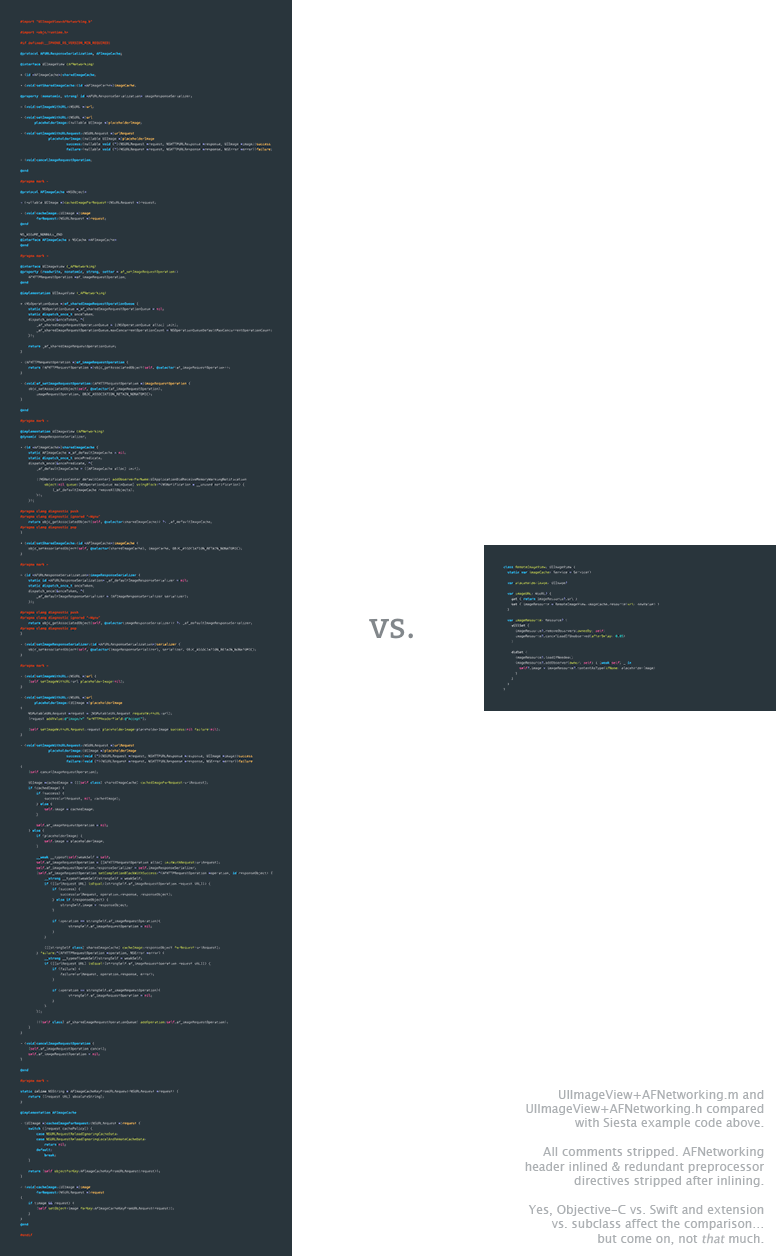
The same functionality. Yes, really.
(Well, OK, they’re not _exactly_ identical. The Siesta version has more robust caching behavior, and will automatically update an image everywhere it is displayed if it’s refreshed.)
There’s a more featureful version of `RemoteImageView` [already included with Siesta](https://bustoutsolutions.github.io/siesta/api/Classes/RemoteImageView.html) — but the UI freebies aren’t the point. “Less code” isn’t even the point. The point is that Siesta gives you an **elegant abstraction** that **solves problems you actually have**, making your code **simpler and less brittle**.
## Comparison With Other Frameworks
Popular REST / networking frameworks have different primary goals:
- [URLSession](https://developer.apple.com/reference/foundation/urlsession) is Apple’s standard iOS HTTP library (and is all most projects need).
- [Siesta](https://bustoutsolutions.github.io/siesta/) untangles state problems with an observable resource cache.
- [Alamofire](https://github.com/Alamofire/Alamofire) provides a Swifty, modern-feeling wrapper for URLSession.
- [Moya](https://github.com/Moya/Moya) wraps Alamofire to hide HTTP URLs and parameters.
- [RestKit](https://github.com/RestKit/RestKit) couples HTTP with JSON ↔ object model ↔ Core Data mapping.
- [AFNetworking](https://github.com/AFNetworking/AFNetworking) is a modern-feeling Obj-C wrapper for Apple’s network APIs, plus a suite of related utilities.
Which one is right for your project? It depends on your needs and your tastes.
Siesta has robust functionality, but does not attempt to solve everything. In particular, Moya and RestKit address complementary / alternative concerns, while Alamofire and AFNetworking provide more robust low-level HTTP support. Further complicating a comparison, some frameworks are built on top of others. When you use Moya, for example, you’re also signing up for Alamofire. Siesta uses URLSession by default, but can also stack on top of Alamofire if you want to use its SSL trust management features. Combinations abound.
With all that in mind, here is a capabilities comparison¹:
| | Siesta | Alamofire | RestKit | Moya | AFNetworking | URLSession |
|:----------------------------|:------------------:|:--------------:|:-------------:|:---------:|:---------------:|:--------------:|
| HTTP requests | ✓ | ✓ | ✓ | ✓ | ✓ | ✓ |
| Async response callbacks | ✓ | ✓ | ✓ | ✓ | ✓ | ✓ |
| Observable in-memory cache | ✓ | | | | | |
| Prevents redundant requests | ✓ | | | | | |
| Prevents redundant parsing | ✓ | | | | | |
| Parsing for common formats | ✓ | ✓ | | | ✓ | |
| Route-based parsing | ✓ | | ✓ | | | |
| Content-type-based parsing | ✓ | | | | | |
| File upload/download tasks | | ✓ | ~ | | ✓ | ✓ |
| Object model mapping | | | ✓ | | | |
| Core data integration | | | ✓ | | | |
| Hides HTTP | | | | ✓ | | |
| UI helpers | ✓ | | | | ✓ | |
| Primary language | Swift | Swift | Obj-C | Swift | Obj-C | Obj-C |
| Nontrivial lines of code² | 2609 | 3980 | 13220 | 1178 | 3936 | ? |
| Built on top of | any (injectable)| URLSession | AFNetworking | Alamofire | NSURLSession / NSURLConnection| Apple guts
1. Disclaimer: table compiled by Siesta’s non-omniscient author. Corrections / additions? Please [submit a PR](https://github.com/bustoutsolutions/siesta/edit/master/README%2Emd#L280).
2. “Trivial” means lines containing only whitespace, comments, parens, semicolons, and braces.
Despite this capabilities list, Siesta is a relatively lean codebase — smaller than Alamofire, and 5.5x lighter than RestKit.
### What sets Siesta apart?
It’s not just the features. Siesta **solves a different problem** than other REST frameworks.
Other frameworks essentially view HTTP as a form of [RPC](https://en.wikipedia.org/wiki/Remote_procedure_call). New information arrives only in responses that are coupled to requests — the return values of asynchronous functions.
Siesta **puts the the “ST” back in “REST”**, embracing the notion of _state transfer_ as an architectural principle, and decoupling the act of _observing_ state from the act of _transferring_ it.
If that approach sounds appealing, give Siesta a try.
---
## Documentation
- **[User Guide](https://bustoutsolutions.github.io/siesta/guide/)**
- **[API documentation](https://bustoutsolutions.github.io/siesta/api/)**
- **[Specs](https://bustoutsolutions.github.io/siesta/specs/)**
## Examples
This repo includes a [simple example project](https://github.com/bustoutsolutions/siesta/tree/master/Examples/GithubBrowser). To download the example project, install its dependencies, and run it locally:
1. Install CocoaPods ≥ 1.0 if you haven’t already.
2. `pod try Siesta` (Note that there’s no need to download/clone Siesta locally first; this command does that for you.)
## Support
To **ask for help**, please post a question on [Stack Overflow](https://stackoverflow.com/questions/ask?tags=siesta-swift,swift) and tag it with `siesta-swift`. (Be sure to include that tag. It triggers a notification to the Siesta core team.) This is preferable to filing an issue because other people may have the same question as you, and Stack Overflow answers are more discoverable than closed issues.
Things that belong on Stack Overflow:
- “How do I…?”
- “Is there a way to…?”
- “Is Siesta appropriate for…?”
- “I got this error…”
For a **bug, feature request, or cool idea**, please [file a Github issue](https://github.com/bustoutsolutions/siesta/issues/new). Things that belong in Github issues:
- “When I do _x_, I expect _y_ but get _z_”
- “There should be a way to…”
- “Documentation for _x_ is missing / confusing”
Unsure which to choose? If you’re _proposing a change_ to Siesta, use Github issues. If you’re _asking a question_ that doesn’t change the project, and thus will remain valid even after you get an answer, then use Stack Overflow.
### Two big little things
Keep in mind that Siesta is maintained by volunteers. Please be patient if you don’t immediately get an answer to your question; we all have jobs, families, obligations, and lives beyond this project.
Please be excellent to one another and follow our [code of conduct](https://github.com/bustoutsolutions/siesta/blob/master/CODE_OF_CONDUCT.md).