[](https://discord.gg/f6aerfE)
[](#contributors)
[](https://opencollective.com/stride3d)
[](https://github.com/stride3d/stride/blob/master/LICENSE.md)
Welcome to the Stride source code repository!
Stride is an open-source C# game engine for realistic rendering and VR.
The engine is highly modular and aims at giving game makers more flexibility in their development.
Stride comes with an editor that allows you to create and manage the content of your games or applications visually and intuitively.
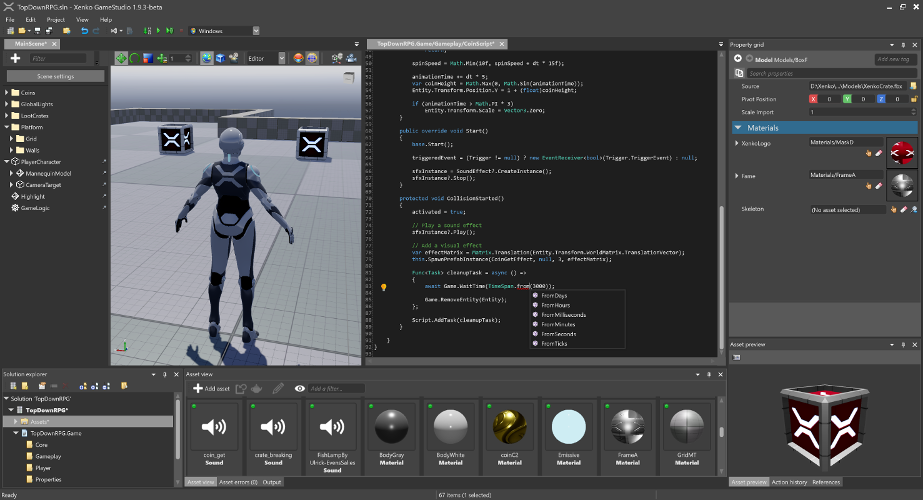
To learn more about Stride, visit [stride3d.net](https://stride3d.net/).
## Earn money by contributing
If you are a developer with solid experience in C#, rendering techniques, or game development, we want to hire you! We have allocated funds from supporters on [OpenCollective](https://opencollective.com/stride3d) and can pay for work on certain projects. [More info about this here](https://doc.stride3d.net/latest/en/contributors/engine/bug-bounties.html).
## License and governance
### .NET Foundation
This project is supported by the [.NET Foundation](https://dotnetfoundation.org).
### License
Stride is covered by the [MIT License](LICENSE.md) unless stated otherwise (i.e. for some files that are copied from other projects). You can find the list of third-party projects [here](THIRD%20PARTY.md). Contributors need to sign the following [Contribution License Agreement](https://github.com/dotnet-foundation/.github/blob/main/CLA/dotnetfoundation.yml).
### Code of conduct
Stride being a [.NET Foundation](https://www.dotnetfoundation.org/) project, it has adopted the code of conduct defined by the Contributor Covenant to clarify expected behavior in our community.
For more information see the [.NET Foundation Code of Conduct](https://dotnetfoundation.org/code-of-conduct).
## Documentation
Find explanations and information about Stride:
* [Stride Manual](https://doc.stride3d.net/latest/manual/index.html)
* [Tutorials](https://doc.stride3d.net/latest/en/tutorials/)
* [API Reference](https://doc.stride3d.net/latest/api/index.html)
* [Release Notes](https://doc.stride3d.net/latest/ReleaseNotes/index.html)
## Community
Ask for help or report issues:
* [Chat with the community on Discord](https://discord.gg/f6aerfE)
* [Discuss topics on GitHub discussions](https://github.com/stride3d/stride/discussions)
* [Report engine issues](https://github.com/stride3d/stride/issues)
* [Donate to support the project](https://opencollective.com/stride3d/)
* [List of Projects made by users](https://github.com/stride3d/stride/wiki/Community-Projects)
* [Awesome Stride - Huge List of Stride Resources](https://github.com/Doprez/Awesome-Stride)
* [Localization](https://doc.stride3d.net/latest/en/contributors/engine/localization.html)
## Building from source
### Prerequisites
1. **Latest** [Git](https://git-scm.com/downloads) **with Large File Support** selected in the setup on the components dialog and for convenience a git UI client like [GitExtensions](https://gitextensions.github.io/).
2. [.NET 8.0 SDK](https://dotnet.microsoft.com/en-us/download/dotnet/8.0)
- Run `dotnet --info` in a console or powershell window to see which versions you have installed
3. [Visual Studio 2022](https://www.visualstudio.com/downloads/) with the following workloads:
- `.NET desktop development` with `.NET Framework 4.7.2 targeting pack` (should be enabled by default)
- `Desktop development with C++` with
- `Windows 10 SDK (10.0.18362.0)` or later version (should be enabled by default)
- `MSVC v143 - VS2022 C++ x64/x86 build tools (Latest)` (should be enabled by default)
- `C++/CLI support for v143 build tools (Latest)` **(not enabled by default)**
- Optional (to target iOS/Android): `.NET Multi-paltform App UI development` and `Android SDK setup` individual component (enabled by default), then in Visual Studio go to `Tools > Android > Android SDK Manager` and install `NDK` (version 20.1+) from `Tools` tab.
- Optional (to build VSIX package): `Visual Studio extension development`
### Build Stride
1. Clone the repo with a git UI or open a command prompt, point it to a directory and clone Stride to it: `git lfs clone https://github.com/stride3d/stride.git`
- **Do NOT use GitHub -> Code -> Download ZIP**, this won't include the ```lfs``` files.
2. Open `\build\Stride.sln` with Visual Studio 2022 and build `Stride.GameStudio` in the 60-Editor solution folder (it should be the default startup project) or run it from VS's toolbar.
- Optionally, open and build `Stride.Android.sln`, `Stride.iOS.sln`, etc.
#### Build Stride without Visual Studio
1. Install [Visual Studio Build Tools](https://aka.ms/vs/17/release/vs_BuildTools.exe) with the same prerequisites listed above
2. Add MSBuild's directory to your system's *PATH* (ex: `C:\Program Files (x86)\Microsoft Visual Studio\2022\BuildTools\MSBuild\Current\Bin`)
3. Clone the repo with a git UI or open a command prompt, point it to a directory and clone Stride to it: `git lfs clone https://github.com/stride3d/stride.git`
4. Navigate to `/Build` with the command prompt, input `msbuild /t:Restore Stride.sln` then `compile.bat`
If building failed:
* Some errors for test projects are normal, GameStudio will start anyway.
* The Visual Studio extension might fail to build if you are missing the [Visual Studio SDK](https://learn.microsoft.com/en-us/visualstudio/extensibility/installing-the-visual-studio-sdk?view=vs-2022), but GameStudio will start anyway.
* If you skipped one of the `Prerequisites` thinking that you already have the latest version, update to the latest anyway just to be sure.
* Visual Studio might have issues properly building if an anterior version is present alongside 2022. If you want to keep those version make sure that they are up to date and that you are building Stride through VS 2022.
* Your system's *PATH* should not contain older versions of MSBuild (ex: `...\Microsoft Visual Studio\2019\BuildTools\MSBuild\Current\Bin` should be removed)
* Some changes might require a system reboot, try that if you haven't yet.
* Make sure that Git, Git LFS and Visual Studio can access the internet.
* Close VS, clear the nuget cache (in your cmd `dotnet nuget locals all --clear`), delete the hidden `.vs` folder inside `\build` and the files inside `bin\packages`, kill any msbuild and other vs processes, build the whole solution then build and run GameStudio.
Do note that test solutions might fail but it should not prevent you from building `Stride.GameStudio`.
### Contribution Guidelines
Please check our [Contributing Guidelines](https://doc.stride3d.net/latest/en/contributors/index.html).
### Build Status
|Branch| **master** |
|:--:|:--:|
|Windows D3D11|
|Windows D3D12|
|Windows Vulkan|
|Windows OpenGL|
|Windows OpenGL ES|
|iOS|
|Android|
|Linux Vulkan|
|Linux OpenGL|
|Tests Windows Simple|
|Tests Windows D3D11|
## Contributors ✨
Thanks goes to these wonderful people ([emoji key](https://allcontributors.org/docs/en/emoji-key)):