# MasterMemory
**Repository Path**: cuizhiqiang_802/MasterMemory
## Basic Information
- **Project Name**: MasterMemory
- **Description**: No description available
- **Primary Language**: Unknown
- **License**: MIT
- **Default Branch**: master
- **Homepage**: None
- **GVP Project**: No
## Statistics
- **Stars**: 0
- **Forks**: 0
- **Created**: 2021-01-14
- **Last Updated**: 2021-01-14
## Categories & Tags
**Categories**: Uncategorized
**Tags**: None
## README
[](https://github.com/Cysharp/MasterMemory/actions) [](https://github.com/Cysharp/MasterMemory/releases)
MasterMemory
===
Embedded Typed Readonly In-Memory Document Database for .NET Core and Unity.
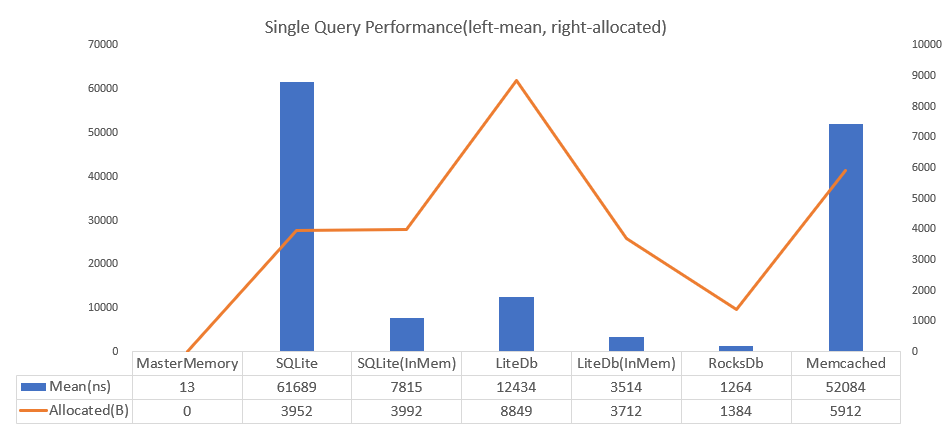
**4700** times faster than SQLite and achieves zero allocation per query. Also the DB size is small. When SQLite is 3560kb then MasterMemory is only 222kb.
## Table of Contents
- [Concept](#concept)
- [Getting Started(.NET Core)](#getting-startednet-core)
- [Getting Started(Unity)](#getting-startedunity)
- [DataTable configuration](#datatable-configuration)
- [MemoryDatabase/RangeView](#memorydatabaserangeview)
- [Extend Table](#extend-table)
- [ImmutableBuilder](#immutablebuilder)
- [Immutable Data](#immutable-data)
- [Validator](#validator)
- [Metadata](#metadata)
- [Inheritance](#inheritance)
- [Code Generator](#code-generator)
- [License](#license)
Concept
---
* **Memory Efficient**, Only use underlying data memory and do aggressively string interning.
* **Performance**, Similar as dictionary lookup.
* **TypeSafe**, 100% Type safe by pre code-generation.
* **Fast load speed**, MasterMemory save data by [MessagePack for C#, a fastest C# serializer](https://github.com/neuecc/MessagePack-CSharp) so load speed is blazing fast.
* **Flexible Search**, Supports multiple key, multiple result, range/closest query.
* **Validator**, You can define custom data validation by C#.
* **Metadata**, To make custom importer/exporter, get the all database metadata.
These features are suitable for master data management(write-once, read-heavy) on embedded application such as role-playing game. MasterMemory has better performance than any other database solutions. [PalDB](https://github.com/linkedin/PalDB) developed by LinkedIn has a similar concept(embeddable write-once key-value store), but the implementation and performance characteristics are completely different.
Getting Started(.NET Core)
---
MasterMemory uses C# to C# code-generator. Runtime library API is the same but how to code-generate has different way between .NET Core and Unity. This sample is for .NET Core(for Unity is in below sections).
Install the core library(Runtime and [Annotations](https://www.nuget.org/packages/MasterMemory.Annotations)).
> PM> Install-Package [MasterMemory](https://www.nuget.org/packages/MasterMemory)
Prepare the example table definition like following.
```csharp
public enum Gender
{
Male, Female, Unknown
}
// table definition marked by MemoryTableAttribute.
// database-table must be serializable by MessagePack-CSsharp
[MemoryTable("person"), MessagePackObject(true)]
public class Person
{
// index definition by attributes.
[PrimaryKey]
public int PersonId { get; set; }
// secondary index can add multiple(discriminated by index-number).
[SecondaryKey(0), NonUnique]
[SecondaryKey(1, keyOrder: 1), NonUnique]
public int Age { get; set; }
[SecondaryKey(2), NonUnique]
[SecondaryKey(1, keyOrder: 0), NonUnique]
public Gender Gender { get; set; }
public string Name { get; set; }
}
```
Edit the `.csproj`, add [MasterMemory.MSBuild.Tasks](https://www.nuget.org/packages/MasterMemory.MSBuild.Tasks) and add configuration like following.
```xml
```
After the build, generated files(`DatabaseBuilder.cs`, `ImmutableBuilder.cs`, `MasterMemoryResolver.cs`, `MemoryDatabase.cs` and `Tables/***Table.cs`) in OutputDirectory.

Finally, you can regsiter and query by these files.
```csharp
// to create database, use DatabaseBuilder and Append method.
var builder = new DatabaseBuilder();
builder.Append(new Person[]
{
new Person { PersonId = 0, Age = 13, Gender = Gender.Male, Name = "Dana Terry" },
new Person { PersonId = 1, Age = 17, Gender = Gender.Male, Name = "Kirk Obrien" },
new Person { PersonId = 2, Age = 31, Gender = Gender.Male, Name = "Wm Banks" },
new Person { PersonId = 3, Age = 44, Gender = Gender.Male, Name = "Karl Benson" },
new Person { PersonId = 4, Age = 23, Gender = Gender.Male, Name = "Jared Holland" },
new Person { PersonId = 5, Age = 27, Gender = Gender.Female, Name = "Jeanne Phelps" },
new Person { PersonId = 6, Age = 25, Gender = Gender.Female, Name = "Willie Rose" },
new Person { PersonId = 7, Age = 11, Gender = Gender.Female, Name = "Shari Gutierrez" },
new Person { PersonId = 8, Age = 63, Gender = Gender.Female, Name = "Lori Wilson" },
new Person { PersonId = 9, Age = 34, Gender = Gender.Female, Name = "Lena Ramsey" },
});
// build database binary(you can also use `WriteToStream` for save to file).
byte[] data = builder.Build();
// -----------------------
// for query phase, create MemoryDatabase.
// (MemoryDatabase is recommended to store in singleton container(static field/DI)).
var db = new MemoryDatabase(data);
// .PersonTable.FindByPersonId is fully typed by code-generation.
Person person = db.PersonTable.FindByPersonId(10);
// Multiple key is also typed(***And * **), Return value is multiple if key is marked with `NonUnique`.
RangeView result = db.PersonTable.FindByGenderAndAge((Gender.Female, 23));
// Get nearest value(choose lower(default) or higher).
RangeView age1 = db.PersonTable.FindClosestByAge(31);
// Get range(min-max inclusive).
RangeView age2 = db.PersonTable.FindRangeByAge(20, 29);
```
All table(marked by `MemoryTableAttribute`) and methods(created by `PrimaryKeyAttribute` or `SecondaryKeyAttribute`) are typed.

You can invoke all indexed query by IntelliSense.
Getting Started(Unity)
---
Check the [releases](https://github.com/Cysharp/MasterMemory/releases) page, download `MasterMemory.Unity.unitypackage`(runtime) and `MasterMemory.Generator.zip`(cli code-generator). MasterMemory also depends on MessagePack-CSharp so you have to download `MessagePack.Unity.2.*.*.unitypackage` and `mpc.zip` from [MessagePack-CSharp/releases page](https://github.com/neuecc/MessagePack-CSharp/releases).
Prepare the example table definition like following.
```csharp
public enum Gender
{
Male, Female, Unknown
}
// table definition marked by MemoryTableAttribute.
// database-table must be serializable by MessagePack-CSsharp
[MemoryTable("person"), MessagePackObject(true)]
public class Person
{
// index definition by attributes.
[PrimaryKey]
public int PersonId { get; set; }
// secondary index can add multiple(discriminated by index-number).
[SecondaryKey(0), NonUnique]
[SecondaryKey(1, keyOrder: 1), NonUnique]
public int Age { get; set; }
[SecondaryKey(2), NonUnique]
[SecondaryKey(1, keyOrder: 0), NonUnique]
public Gender Gender { get; set; }
public string Name { get; set; }
}
```
use the MasterMemory code generator by commandline. Commandline tool support platforms are `win-x64`, `osx-x64` and `linux-x64`.
```
Usage: MasterMemory.Generator [options...]
Options:
-i, -inputDirectory Input file directory(search recursive). (Required)
-o, -outputDirectory Output file directory. (Required)
-n, -usingNamespace Namespace of generated files. (Required)
-p, -prefixClassName Prefix of class names. (Default: )
-c, -addImmutableConstructor Add immutable constructor to MemoryTable class. (Default: False)
-t, -returnNullIfKeyNotFound Return null if key not found on unique find method. (Default: False)
```
```bash
MasterMemory.Generator.exe -i "C:\UnitySample" -o "C:\UnitySample\Generated" -n "UnitySample"
```
Also you need to generated MessagePack-CSharp code generation.
Additional steps, you have to set up to use generated resolver.
```csharp
public static class Initializer
{
[RuntimeInitializeOnLoadMethod(RuntimeInitializeLoadType.BeforeSceneLoad)]
public static void SetupMessagePackResolver()
{
StaticCompositeResolver.Instance.Register(new[]{
MasterMemoryResolver.Instance, // set MasterMemory generated resolver
GeneratedResolver.Instance, // set MessagePack generated resolver
StandardResolver.Instance // set default MessagePack resolver
});
var options = MessagePackSerializerOptions.Standard.WithResolver(StaticCompositeResolver.Instance);
MessagePackSerializer.DefaultOptions = options;
}
}
```
The rest is the same as .NET Core version.
```csharp
// to create database, use DatabaseBuilder and Append method.
var builder = new DatabaseBuilder();
builder.Append(new Person[]
{
new Person { PersonId = 0, Age = 13, Gender = Gender.Male, Name = "Dana Terry" },
new Person { PersonId = 1, Age = 17, Gender = Gender.Male, Name = "Kirk Obrien" },
new Person { PersonId = 2, Age = 31, Gender = Gender.Male, Name = "Wm Banks" },
new Person { PersonId = 3, Age = 44, Gender = Gender.Male, Name = "Karl Benson" },
new Person { PersonId = 4, Age = 23, Gender = Gender.Male, Name = "Jared Holland" },
new Person { PersonId = 5, Age = 27, Gender = Gender.Female, Name = "Jeanne Phelps" },
new Person { PersonId = 6, Age = 25, Gender = Gender.Female, Name = "Willie Rose" },
new Person { PersonId = 7, Age = 11, Gender = Gender.Female, Name = "Shari Gutierrez" },
new Person { PersonId = 8, Age = 63, Gender = Gender.Female, Name = "Lori Wilson" },
new Person { PersonId = 9, Age = 34, Gender = Gender.Female, Name = "Lena Ramsey" },
});
// build database binary(you can also use `WriteToStream` for save to file).
byte[] data = builder.Build();
// -----------------------
// for query phase, create MemoryDatabase.
// (MemoryDatabase is recommended to store in singleton container(static field/DI)).
var db = new MemoryDatabase(data);
// .PersonTable.FindByPersonId is fully typed by code-generation.
Person person = db.PersonTable.FindByPersonId(10);
// Multiple key is also typed(***And * **), Return value is multiple if key is marked with `NonUnique`.
RangeView result = db.PersonTable.FindByGenderAndAge((Gender.Female, 23));
// Get nearest value(choose lower(default) or higher).
RangeView age1 = db.PersonTable.FindClosestByAge(31);
// Get range(min-max inclusive).
RangeView age2 = db.PersonTable.FindRangeByAge(20, 29);
```
All table(marked by `MemoryTableAttribute`) and methods(created by `PrimaryKeyAttribute` or `SecondaryKeyAttribute`) are typed.

You can invoke all indexed query by IntelliSense.
DataTable configuration
---
Element type of datatable must be marked by `[MemoryTable(tableName)]`, datatable is generated from marked type. `string tableName` is saved in database binary, you can rename class name if tableName is same.
`[PrimaryKey(keyOrder = 0)]`, `[SecondaryKey(indexNo, keyOrder)]`, `[NonUnique]` can add to public property, `[PrimaryKey]` must use in MemoryTable, `[SecondaryKey]` is option.
Both `PrimaryKey` and `SecondaryKey` can add to multiple properties, it will be generated `***And***And***...`. `keyOrder` is order of column names, default is zero(sequential in which they appear).
```csharp
[MemoryTable("sample"), MessagePackObject(true)]
public class Sample
{
[PrimaryKey]
public int Foo { get; set; }
[PrimaryKey]
public int Bar { get; set; }
}
db.Sample.FindByFooAndBar((int Foo, int Bar))
// ----
[MemoryTable("sample"), MessagePackObject(true)]
public class Sample
{
[PrimaryKey(keyOrder: 1)]
public int Foo { get; set; }
[PrimaryKey(keyOrder: 0)]
public int Bar { get; set; }
}
db.Sample.FindByBarAndFoo((int Bar, int Foo))
```
Default of `FindBy***` return type is single(if not found, returns `null`). It means key is unique by default. If mark `[NonUnique]` in same AttributeList, return type is `RangeView`(if not found, return empty).
```csharp
[MemoryTable("sample"), MessagePackObject(true)]
public class Sample
{
[PrimaryKey, NonUnique]
public int Foo { get; set; }
[PrimaryKey, NonUnique]
public int Bar { get; set; }
}
RangeView q = db.Sample.FindByFooAndBar((int Foo, int Bar))
```
```csharp
[MemoryTable("sample"), MessagePackObject(true)]
public class Sample
{
[PrimaryKey]
[SecondaryKey(0)]
public int Foo { get; set; }
[SecondaryKey(0)]
[SecondaryKey(1)]
public int Bar { get; set; }
}
db.Sample.FindByFoo(int Foo)
db.Sample.FindByFooAndBar((int Foo, int Bar))
db.Sample.FindByBar(int Bar)
```
`[StringComparisonOption]` allow to configure how compare if key is string. Default is `Ordinal`.
```csharp
[MemoryTable("sample"), MessagePackObject(true)]
public class Sample
{
[PrimaryKey]
[StringComparisonOption(StringComparison.InvariantCultureIgnoreCase)]
public string Foo { get; set; }
}
```
If computation property exists, add `[IgnoreMember]` of MessagePack should mark.
```csharp
[MemoryTable("person"), MessagePackObject(true)]
public class Person
{
[PrimaryKey]
public int Id { get;}
public string FirstName { get; }
public string LastName { get; }
[IgnoreMember]
public string FullName => FirstName + LastName;
}
```
MemoryDatabase/RangeView
---
In default, `MemoryDatabase` do all string data automatically interning(see: [Wikipedia/String interning](https://en.wikipedia.org/wiki/String_interning)). If multiple same string value exists in database(ex: "goblin","goblin", "goblin", "goblin", "goblin"....), standard database creates string value per query or store multiple same values. But MasterMemory stores single string value reference, it can save much memory if data is denormalized.
Use intern or not is selected in constructor. If you want to disable automatically interning, use `internString:false`.
`MemoryDatabase(byte[] databaseBinary, bool internString = true, MessagePack.IFormatterResolver formatterResolver = null)`.
MemoryDatabase has three(or four) query methods.
* `T|RangeView` FindBy***(TKey key)
* bool TryFindBy***(TKey key, out T result)
* `T|RangeView` FindClosestBy***(TKey key, bool selectLower = true)
* `RangeView` FindRangeBy***(TKey min, TKey max, bool ascendant = true)
If index key is unique, generates `FindBy***` and `TryFindBy***` methods and then `FindBy***` throws `KeyNotFoundException` when key is not found.
`By***` is generated by `PrimaryKey` and `SecondaryKey` defines.
And has some utility properties.
* `int` Count
* `RangeView` All
* `RangeView` AllReverse
* `RangeView` SortBy***
* `T[] GetRawDataUnsafe()`
`struct RangeView : IEnumerable` is the view of database elements. It has following property/method.
* `T` [int index]
* `int` Count
* `T` First
* `T` Last
* `RangeView` Reverse
* `IEnumerator` GetEnumerator()
Extend Table
---
Generated table class is defined partial class so create same namespace and class name's partial class on another file, you can add your custom method to generated table.
Table class also defined partial `OnAfterConstruct` method, it called after table has been constructed. You can use it to store custom data to field after all data has been constructed.
```csharp
// create MonsterTable.Partial.cs
public sealed partial class MonsterTable
{
int maxHp;
#pragma warning disable CS0649
readonly int minHp;
#pragma warning restore CS0649
// called after constructed
partial void OnAfterConstruct()
{
maxHp = All.Select(x => x.MaxHp).Max();
// you can use Unsafe.AsRef to set readonly field
Unsafe.AsRef(minHp) = All.Select(x => x.MaxHp).Min();
}
// add custom method other than standard Find method
public IEnumerable GetRangedMonster(int arg1)
{
return All.Where....();
}
}
```
ImmutableBuilder
---
If you want to add/modify data to loaded database, you can use `ToImmutableBuilder` method.
```csharp
// Create ImmutableBuilder from original database.
var builder = db.ToImmutableBuilder();
// Add Or Replace compare with PrimaryKey
builder.Diff(addOrReplaceData);
// Remove by PrimaryKey
builder.RemovePerson(new[] { 1, 10, 100 });
// Replace all data
builder.ReplaceAll(newData);
// Finally create new database
MemoryDatabase newDatabase = builder.Build();
// If you want to save new database, you can convert to MemoryDatabase->DatabaseBuilder
var newBuilder = newDatabase.ToDatabaseBuilder();
var newBinary = newBuilder.Build(); // or use WriteToStream
```
MemoryDatabase's reference can use as snapshot.
```csharp
// 1 game per 1 instance
public class GameRoom
{
MemoryDatabase database;
// The reference is a snapshot of the timing of game begins.
public GameRoom(MemoryDatabase database)
{
this.database = database;
}
}
```
Immutable Data
---
Element data is shared in the application so ideally should be immutable. But C# only has a constructor to create immutable data, it is too difficult to create many data tables.
Code generator has `AddImmutableConstructor`(`-c, -addImmutableConstructor`) option. If enabled it, code generator modify orignal file and add immutable constructor in target type. If you define property as `{get; private set;}` or `{get;}`, it will be immutable type.
```csharp
// For the versioning, MessagePackObject is recommended to use string key.
[MemoryTable("person"), MessagePackObject(true)]
public class Person
{
[PrimaryKey]
public int PersonId { get; }
public int Age { get; }
public Gender Gender { get; }
public string Name { get; }
}
// use AddImmutableConstructor="true" or -c option
MasterMemory.Generator.exe -i "C:\UnitySample" -o "C:\UnitySample\Generated" -n "UnitySample" -c
// after generated...
[MemoryTable("person"), MessagePackObject(true)]
public class Person
{
[PrimaryKey]
public int PersonId { get; }
public int Age { get; }
public Gender Gender { get; }
public string Name { get; }
public Person(int PersonId, int Age, Gender Gender, string Name)
{
this.PersonId = PersonId;
this.Age = Age;
this.Gender = Gender;
this.Name = Name;
}
}
```
Validator
---
You can validate data by `MemoryDatabase.Validate` method. In default, it check unique key(data duplicated) and you can define custom validate logics.
```csharp
// Implements IValidatable to targeted validation
[MemoryTable("quest_master"), MessagePackObject(true)]
public class Quest : IValidatable
{
// If index is Unique, validate duplicate in default.
[PrimaryKey]
public int Id { get; }
public string Name { get; }
public int RewardId { get; }
public int Cost { get; }
void IValidatable.Validate(IValidator validator)
{
// get the external reference table
var items = validator.GetReferenceSet();
// Custom if logics.
if (this.RewardId > 0)
{
// RewardId must exists in Item.ItemId
items.Exists(x => x.RewardId, x => x.ItemId);
}
// Range check, Cost must be 10..20
validator.Validate(x => x.Cost >= 10);
validator.Validate(x => x.Cost <= 20);
// In this region, only called once so enable to validate overall of tables.
if (validator.CallOnce())
{
var quests = validator.GetTableSet();
// Check unique othe than index property.
quests.Where(x => x.RewardId != 0).Unique(x => x.RewardId);
}
}
}
[MemoryTable("item_master"), MessagePackObject(true)]
public class Item
{
[PrimaryKey]
public int ItemId { get; }
}
void Main()
{
var db = new MemoryDatabase(bin);
// Get the validate result.
var validateResult = db.Validate();
if (validateResult.IsValidationFailed)
{
// Output string format.
Console.WriteLine(validateResult.FormatFailedResults());
// Get the raw FaildItem[]. (.Type, .Message, .Data)
// validateResult.FailedResults
}
}
```
Following is list of validation methods.
```csharp
// all void methods are assert function, it stores message to ValidateResult if failed.
interface IValidator
{
ValidatableSet GetTableSet();
ReferenceSet GetReferenceSet();
void Validate(Expression> predicate);
void Validate(Func predicate, string message);
void ValidateAction(Expression> predicate);
void ValidateAction(Func predicate, string message);
void Fail(string message);
bool CallOnce();
}
class ReferenceSet
{
IReadOnlyList TableData { get; }
void Exists(Expression> elementSelector, Expression> referenceElementSelector);
void Exists(Expression> elementSelector, Expression> referenceElementSelector, EqualityComparer equalityComparer);
}
class ValidatableSet
{
IReadOnlyList TableData { get; }
void Unique(Expression> selector);
void Unique(Expression> selector, IEqualityComparer equalityComparer);
void Unique(Func selector, string message);
void Unique(Func selector, IEqualityComparer equalityComparer, string message);
void Sequential(Expression> selector, bool distinct = false);
ValidatableSet Where(Func predicate);
}
```
Metadata
---
You can get the table-info, properties, indexes by metadata api. It helps to make custom importer/exporter application.
```csharp
var metaDb = MemoryDatabase.GetMetaDatabase();
foreach (var table in metaDb.GetTableInfos())
{
// for example, generate CSV header
var sb = new StringBuilder();
foreach (var prop in table.Properties)
{
if (sb.Length != 0) sb.Append(",");
// Name can convert to LowerCamelCase or SnakeCase.
sb.Append(prop.NameSnakeCase);
}
File.WriteAllText(table.TableName + ".csv", sb.ToString(), new UTF8Encoding(false));
}
```
If creates console-app, our [ConsoleAppFramework](https://github.com/Cysharp/ConsoleAppFramework/) can easy to make helper applications.
Here is sample of reading and creating dynamic from csv. `builder.AppendDynamic` and `System.Runtime.Serialization.FormatterServices.GetUninitializedObject` will help it.
```csharp
class Program
{
static void Main(string[] args)
{
var csv = @"monster_id,name,max_hp
1,foo,100
2,bar,200";
var fileName = "monster";
var builder = new DatabaseBuilder();
var meta = MemoryDatabase.GetMetaDatabase();
var table = meta.GetTableInfo(fileName);
var tableData = new List