# LucidDreamer
**Repository Path**: cyanbukkit/luciddreamer
## Basic Information
- **Project Name**: LucidDreamer
- **Description**: No description available
- **Primary Language**: Unknown
- **License**: Not specified
- **Default Branch**: master
- **Homepage**: None
- **GVP Project**: No
## Statistics
- **Stars**: 0
- **Forks**: 0
- **Created**: 2025-10-23
- **Last Updated**: 2026-02-15
## Categories & Tags
**Categories**: Uncategorized
**Tags**: None
## README

# 😴 LucidDreamer: 无域限制的3D高斯溅射场景生成器 😴
[](https://luciddreamer-cvlab.github.io/)
[](https://arxiv.org/abs/2311.13384)
[](https://colab.research.google.com/github/camenduru/LucidDreamer-Gaussian-colab/blob/main/LucidDreamer_Gaussian_colab.ipynb)
[](https://huggingface.co/spaces/ironjr/LucidDreamer-mini)
[](https://github.com/luciddreamer-cvlab/LucidDreamer)
[](https://twitter.com/_ironjr_)
[](https://github.com/luciddreamer-cvlab/LucidDreamer/blob/master/LICENSE)
https://github.com/luciddreamer-cvlab/LucidDreamer/assets/12259041/35004aaa-dffc-4133-b15a-05224e68b91e
> #### [LucidDreamer: 无域限制的3D高斯溅射场景生成](https://arxiv.org/abs/2311.13384)
> ##### \*[Jaeyoung Chung](https://robot0321.github.io/), \*[Suyoung Lee](https://esw0116.github.io/), [Hyeongjin Nam](https://hygenie1228.github.io/), [Jaerin Lee](http://jaerinlee.com/), [Kyoung Mu Lee](https://cv.snu.ac.kr/index.php/~kmlee/)
###### \*表示同等贡献

---
## ⚠️ 二次开发与使用声明
**重要声明**:本项目基于LucidDreamer进行本地化改造和优化,**仅用于AI电影相关业务的制作与创作**,不会进行任何形式的商业销售。我们尊重原作者的知识产权,并严格遵守CC BY-NC-SA 4.0许可协议。
- ✅ 允许使用:个人学习、研究、AI电影制作
- ❌ 禁止行为:商业销售、直接盈利、违反原许可协议
请在使用时注明原作者信息和本项目来源。
---
## 🤖 安装指南
### Ubuntu系统
#### 前置要求
- CUDA>=11.4(更高版本亦可)
- Python==3.9(因open3d兼容性,不可使用3.10)
#### 安装脚本
```bash
conda create -n lucid python=3.9
conda activate lucid
pip install peft diffusers scipy numpy imageio[ffmpeg] opencv-python Pillow open3d torch==2.0.1 torchvision==0.15.2 gradio omegaconf
# ZoeDepth
pip install timm==0.6.7
# 高斯溅射
pip install plyfile==0.8.1
cd submodules/depth-diff-gaussian-rasterization-min
# sudo apt-get install libglm-dev # 编译可能需要
python setup.py install
cd ../simple-knn
python setup.py install
cd ../..
```
### Windows系统(实验性,已在Windows 11 + VS2022测试)
#### 检查清单
- 确保已安装的 [**CUDA**](https://developer.nvidia.com/cuda-11-8-0-download-archive)、[**cudatoolkit**](https://anaconda.org/nvidia/cudatoolkit) 与 [**pytorch**](https://pytorch.org/get-started/previous-versions/) 版本匹配。我们已在CUDA==11.8下测试。
- 确保从 [Visual Studio build tools](https://visualstudio.microsoft.com/downloads/) 下载并安装C++ (>=14)。
#### 安装脚本
```bash
conda create -n lucid python=3.9
conda activate lucid
conda install pytorch=2.0.1 torchvision=0.15.2 torchaudio=2.0.2 pytorch-cuda=11.8 -c pytorch -c nvidia
pip install peft diffusers scipy numpy imageio[ffmpeg] opencv-python Pillow open3d gradio omegaconf
# ZoeDepth
pip install timm==0.6.7
# 高斯溅射
pip install plyfile==0.8.1
# whl文件有问题,需手动安装模块
cd submodules\depth-diff-gaussian-rasterization-min\third_party
git clone https://github.com/g-truc/glm.git
cd ..\
python setup.py install
cd ..\simple-knn
python setup.py install
cd ..\..
```
### 🇨🇳 中国用户特别安装指南
#### 网络环境配置
由于网络限制,中国用户需要配置镜像源和代理:
```bash
# 配置pip镜像源(清华大学)
pip config set global.index-url https://pypi.tuna.tsinghua.edu.cn/simple
# 配置conda镜像源
conda config --add channels https://mirrors.tuna.tsinghua.edu.cn/anaconda/pkgs/free/
conda config --add channels https://mirrors.tuna.tsinghua.edu.cn/anaconda/pkgs/main/
conda config --set show_channel_urls yes
```
#### 模型下载配置
**重要提示**:由于HuggingFace在国内访问受限,需要手动配置镜像源并下载模型:
##### 1. 环境准备
1. **安装huggingface-cli工具**:
```bash
pip install huggingface_hub
```
2. **设置镜像环境变量**:
```bash
# Windows PowerShell
$env:HF_ENDPOINT="https://hf-mirror.com"
# 永久设置(推荐)
setx HF_ENDPOINT "https://hf-mirror.com"
```
##### 2. 需要下载的模型
**主模型(必需)**:
```bash
# 创建模型目录
mkdir models
# 下载Stable Diffusion Inpainting(主模型,不要用fp16分支)
huggingface-cli download runwayml/stable-diffusion-inpainting --local-dir "./models/stable-diffusion-inpainting" --local-dir-use-symlinks False
```
**可选模型**:
```bash
# ControlNet Inpaint(用于高级功能)
huggingface-cli download lllyasviel/control_v11p_sd15_inpaint --local-dir "./models/control_v11p_sd15_inpaint" --local-dir-use-symlinks False
# Stable Diffusion v1.5(用于模型切换)
huggingface-cli download runwayml/stable-diffusion-v1-5 --local-dir "./models/stable-diffusion-v1-5" --local-dir-use-symlinks False
```
##### 3. 完整下载脚本
创建 `download_all_models.bat`:
```batch
@echo off
echo ========================================
echo 下载 LucidDreamer 所需模型
echo ========================================
set HF_ENDPOINT=https://hf-mirror.com
:: 创建模型目录
if not exist "models" mkdir models
echo.
echo [1/3] 下载 Stable Diffusion Inpainting...
huggingface-cli download runwayml/stable-diffusion-inpainting --local-dir "./models/stable-diffusion-inpainting" --local-dir-use-symlinks False
echo.
echo [2/3] 下载 ControlNet Inpaint...
huggingface-cli download lllyasviel/control_v11p_sd15_inpaint --local-dir "./models/control_v11p_sd15_inpaint" --local-dir-use-symlinks False
echo.
echo [3/3] 下载 Stable Diffusion v1.5(可选)...
huggingface-cli download runwayml/stable-diffusion-v1-5 --local-dir "./models/stable-diffusion-v1-5" --local-dir-use-symlinks False
echo.
echo ========================================
echo ✅ 所有模型下载完成!
echo ========================================
pause
```
##### 4. 修改代码使用本地模型
创建 `fix_model_paths.py`:
```python
import re
# 读取 luciddreamer.py
with open('luciddreamer.py', 'r', encoding='utf-8') as f:
content = f.read()
# 替换模型路径并删除 revision='fp16'
replacements = [
# 第 73 行
(
r"'runwayml/stable-diffusion-inpainting',\s*revision='fp16',",
"'./models/stable-diffusion-inpainting',"
),
# 第 95 行
(
r"'stablediffusion/SD1-5',\s*revision='fp16',",
"'./models/stable-diffusion-v1-5',"
),
# 第 102 行
(
r"'lllyasviel/control_v11p_sd15_inpaint'",
"'./models/control_v11p_sd15_inpaint'"
),
# 第 107 行
(
r"f'stablediffusion/{model_name}',\s*revision='fp16',",
"f'./models/{model_name}',"
),
]
for pattern, replacement in replacements:
content = re.sub(pattern, replacement, content)
# 保存
with open('luciddreamer.py', 'w', encoding='utf-8') as f:
f.write(content)
print("✅ 模型路径已修改为本地路径")
```
##### 5. 执行步骤
```bash
# 1. 进入项目目录
cd "G:\Ai Agent\LucidDreamer-main"
# 2. 激活环境
conda activate lucid
# 3. 确保安装了 huggingface-cli
pip install huggingface_hub[cli]
# 4. 下载模型
download_all_models.bat
# 5. 修改代码路径
python fix_model_paths.py
# 6. 运行
python app.py
```
##### 6. 如果下载失败
**方法1:使用代理**
```bash
set HTTP_PROXY=http://127.0.0.1:7890
set HTTPS_PROXY=http://127.0.0.1:7890
set HF_ENDPOINT=
```
**方法2:分块下载**
```python
# download_by_parts.py
from huggingface_hub import hf_hub_download
import os
os.environ['HF_ENDPOINT'] = 'https://hf-mirror.com'
repo_id = "runwayml/stable-diffusion-inpainting"
files = [
"model_index.json",
"unet/config.json",
"unet/diffusion_pytorch_model.safetensors",
"vae/config.json",
"vae/diffusion_pytorch_model.safetensors",
"text_encoder/config.json",
"text_encoder/pytorch_model.bin",
"tokenizer/tokenizer_config.json",
"tokenizer/vocab.json",
"scheduler/scheduler_config.json",
]
for file in files:
print(f"下载: {file}")
hf_hub_download(
repo_id=repo_id,
filename=file,
local_dir="./models/stable-diffusion-inpainting",
local_dir_use_symlinks=False
)
```
##### 7. 验证模型是否下载完整
```bash
# 检查目录结构
dir /s models\stable-diffusion-inpainting
```
应该包含:
- `model_index.json`
- `unet/` 目录
- `vae/` 目录
- `text_encoder/` 目录
- `tokenizer/` 目录
- `scheduler/` 目录
#### 无FP16支持的替代方案
如果你的GPU不支持FP16(半精度浮点数),请按以下步骤操作:
1. **修改配置文件**:
编辑 `configs/default.yaml`,将 `fp16: true` 改为 `fp16: false`
2. **使用CPU模式**(如果GPU内存不足):
```bash
# 在运行命令中添加 --device cpu 参数
python luciddreamer.py --device cpu
```
3. **降低批处理大小**:
在配置文件中减小 `batch_size` 值(建议设置为1-2)
#### 常见问题解决
**问题1:CUDA out of memory**
```bash
# 解决方案:降低分辨率或减少批处理大小
export PYTORCH_CUDA_ALLOC_CONF=max_split_size_mb:128
```
**问题2:模型下载失败**
```bash
# 使用国内镜像手动下载
wget https://hf-mirror.com/runwayml/stable-diffusion-inpainting/resolve/main/config.json -P ./models/stable-diffusion-inpainting/
```
**问题3:依赖安装失败**
```bash
# 单独安装关键依赖
pip install torch==2.0.1+cu118 torchvision==0.15.2+cu118 torchaudio==2.0.2+cu118 -f https://download.pytorch.org/whl/torch_stable.html
```
## ⚡ 使用方法
### 运行LucidDreamer
```bash
# 1. 激活conda环境
conda activate lucid
# 2. 运行生成
python luciddreamer.py --prompt "一个美丽公园的照片" --save_path ./output
```
### 参数说明
- `--prompt`: 描述想要生成场景的中文或英文文本提示。**这是必需参数。**
- `--negative_prompt`: 描述不希望在场景中出现的元素。
- `--seed`: 随机种子,用于生成可重复的结果。默认为-1(随机)。
- `--save_path`: 输出文件保存路径。默认为`./outputs`。
- `--elevation`: 输入图像的仰角。默认为-10。
- `--height`, `--width`: 输入图像的高度和宽度。默认为512。
- `--scene_traj_type`: 场景轨迹类型。选项有`double_spiral`(默认)或`front_back`。
- `--camera_traj_type`: 相机轨迹类型。选项有`double_spiral`(默认)或`front_back`。
- `--batch_size`: 批处理大小。默认为1。
- `--num_frames`: 生成的帧数。默认为120。
- `--fps`: 输出视频的帧率。默认为30。
- `--guidance_scale`: 扩散模型的引导比例。默认为7.5。
- `--num_inference_steps`: 推理步数。默认为50。
- `--half_precision`: 使用半精度(fp16)进行更快的推理。默认为True。
- `--device`: 推理设备。选项有`cuda`(默认)或`cpu`。
- `--image_path`: 用于图像到3D生成的输入图像路径。
- `--mesh`: 除了高斯溅射外还导出网格。默认为False。
- `--video`: 除了高斯溅射外还生成视频。默认为False。
### 使用示例
```bash
# 基本用法
python luciddreamer.py --prompt "一个美丽的公园"
# 自定义设置
python luciddreamer.py --prompt "山上的中世纪城堡" --seed 42 --num_frames 200 --fps 60
# 图像到3D生成
python luciddreamer.py --prompt "中世纪城堡" --image_path ./input_image.jpg
# 导出网格和视频
python luciddreamer.py --prompt "现代房屋" --mesh --video
```
### 🇨🇳 中文用户提示词建议
为了获得更好的生成效果,建议使用以下中文提示词模板:
```bash
# 风景类
python luciddreamer.py --prompt "春日樱花盛开的日式庭院,小桥流水,花瓣飘落"
# 建筑类
python luciddreamer.py --prompt "未来科技城市,霓虹灯光,飞行汽车,赛博朋克风格"
# 自然类
python luciddreamer.py --prompt "秋日森林小径,金黄色落叶,温暖的阳光透过树梢"
# 添加负面提示词避免不需要的元素
python luciddreamer.py --prompt "古典欧式花园" --negative_prompt "模糊,低质量,扭曲,变形"
```
### Guideline for the prompting / Troubleshoot
#### General guides
1. If your image is indoors with specific scene (and possible character in it), you can **just put the most simplest representation of the scene first**, like a cozy livingroom for christmas, or a dark garage, etc. Please avoid prompts like 1girl because it will generate many humans for each inpainting task.
2. If you want to start from already hard-engineered image from e.g., StableDiffusion model, or a photo taken from other sources, you can try **using [WD14 tagger](https://github.com/toriato/stable-diffusion-webui-wd14-tagger) ([huggingface demo](https://huggingface.co/spaces/deepghs/wd14_tagging_online)) to extract the danbooru tags from an image**. Please ensure you remove some comma separated tags if you don't want them to appear multiple times. This include human-related objects, e.g., 1girl, white shirt, boots, smiling face, red eyes, etc. Make sure to specify the objects you want to have multiples of them.
#### Q. I generate unwanted objects everywhere, e.g., photo frames.
1. Manipulate negative prompts to set harder constraints for the frame object. You may try adding tags like twitter thumbnail, profile image, instagram image, watermark, text to the negative prompt. In fact, negative prompts are the best thing to try if you want some things not to be appeared in the resulting image.
2. Try using other custom checkpoint models, which employs different pipeline methods: LaMa inpainting -> ControlNet-inpaint guided image inpainting.
### Visualize `.ply` files
There are multiple available viewers / editors for Gaussian splatting `.ply` files.
1. [@playcanvas](https://github.com/playcanvas)'s [Super-Splat](https://github.com/playcanvas/super-splat) project ([Live demo](https://playcanvas.com/super-splat)). This is the viewer we have used for our debugging along with MeshLab.

2. [@antimatter15](https://github.com/antimatter15)'s [WebGL viewer](https://github.com/antimatter15/splat) for Gaussian splatting ([Live demo](https://antimatter15.com/splat/)).
3. [@splinetool](https://github.com/splinetool)'s [web-based viewer](https://spline.design/) for Gaussian splatting. This is the version we have used in our project page's demo.
## 📝 使用技巧和指南
### 提示词工程(中文优化)
- **具体描述**:不要只说"房子",试试"带有大窗户和红屋顶的现代两层楼房"。
- **包含风格描述词**:添加"照片级真实感"、"卡通风格"、"油画风格"等术语。
- **提及光照条件**:包括"金色时光"、"柔和光照"、"戏剧性阴影"等。
- **添加氛围描述**:描述情绪或氛围,如"宁静"、"神秘"、"充满活力"。
#### 中文提示词模板推荐
```bash
# 风景类模板
"[季节]的[地点],[主要元素],[天气条件],[氛围描述],[风格]"
# 示例:"春天的江南水乡,小桥流水,薄雾缭绕,宁静致远,中国山水画风格"
# 建筑类模板
"[年代]的[建筑类型],[材质颜色],[周边环境],[时间光线],[细节描述]"
# 示例:"中世纪石制城堡,灰色外墙,护城河环绕,黄昏时分的暖光,高耸的塔楼"
# 科幻类模板
"[未来时间]的[场景],[科技元素],[色彩光线],[氛围感觉],[渲染风格]"
# 示例:"2150年的未来都市,飞行汽车和全息广告,蓝紫色调霓虹灯,赛博朋克氛围,电影级渲染"
```
### 性能优化
- **GPU内存**:如果遇到内存不足错误,尝试减小`batch_size`或`num_frames`。
- **生成速度**:使用`half_precision=True`(默认)可显著加快生成速度。
- **质量提升**:增加`num_inference_steps`可获得更高质量,但会降低速度。
### 故障排除
- **内存不足**:减少批处理大小或帧数。
- **生成缓慢**:启用半精度并确保CUDA正确安装。
- **质量不佳**:尝试不同的提示词或增加推理步数。
#### 中国用户常见问题
**Q: 模型下载失败怎么办?**
A: 使用镜像源下载:
```bash
# 设置镜像环境变量
export HF_ENDPOINT=https://hf-mirror.com
# 或者手动下载到本地
huggingface-cli download runwayml/stable-diffusion-inpainting --local-dir "./models/stable-diffusion-inpainting"
```
**Q: CUDA版本不兼容?**
A: 确保所有PyTorch相关包都使用相同的CUDA版本:
```bash
# 检查CUDA版本
nvidia-smi
# 安装对应版本
pip install torch==2.0.1+cu118 torchvision==0.15.2+cu118 torchaudio==2.0.2+cu118 -f https://download.pytorch.org/whl/torch_stable.html
```
**Q: 生成效果不理想?**
A: 尝试以下中文优化提示词:
```bash
# 增强真实感
python luciddreamer.py --prompt "古代中式园林,亭台楼阁,假山水池,细节丰富,照片级真实感,8K超高清" --num_inference_steps 100
# 避免失真
python luciddreamer.py --prompt "现代玻璃幕墙建筑,蓝天白云倒影,专业摄影,高清画质" --negative_prompt "扭曲,变形,模糊,低质量"
```
## 📅 更新日志
- **2024.01.26**: LucidDreamer初始版本发布。
- **2024.01.30**: 优化中文用户支持,添加镜像源配置指南。
- **2024.02.01**: 增强无FP16支持的处理方案。
- ✅ 2023年12月12日:我们为基于CUDA的子模块预编译了wheel文件,并放置在`submodules/wheels`中。Windows安装指南已相应修订!
- ✅ 2023年12月11日:我们更新了Windows安装指南。感谢[@Maoku](https://twitter.com/Maoku)的杰出贡献!
- ✅ 2023年12月8日:[HuggingFace Space演示](https://huggingface.co/spaces/ironjr/LucidDreamer-mini)已发布。我们衷心感谢HF团队的支持!
- ✅ 2023年12月7日:感谢[@camenduru](https://github.com/camenduru),[Colab](https://colab.research.google.com/github/camenduru/LucidDreamer-Gaussian-colab/blob/main/LucidDreamer_Gaussian_colab.ipynb)实现现已可用!
- ✅ 2023年12月6日:代码发布!
- ✅ 2023年11月22日:我们在[arXiv](https://arxiv.org/abs/2311.13384)上发布了论文LucidDreamer。
## 🌏 引用
如果您觉得我们的项目有用,请引用我们!
```latex
@article{chung2023luciddreamer,
title={LucidDreamer: Domain-free Generation of 3D Gaussian Splatting Scenes},
author={Chung, Jaeyoung and Lee, Suyoung and Nam, Hyeongjin and Lee, Jaerin and Lee, Kyoung Mu},
journal={arXiv preprint arXiv:2311.13384},
year={2023}
}
```
## 🤗 致谢
我们深深感谢[ZoeDepth](https://github.com/isl-org/ZoeDepth)、[Stability AI]()和[Runway](https://huggingface.co/runwayml/stable-diffusion-v1-5)提供的模型。
## 📧 联系方式
如有任何问题,请发送邮件至`robot0321@snu.ac.kr`、`esw0116@snu.ac.kr`、`jarin.lee@gmail.com`。
## 📄 许可证
本项目采用[CC BY-NC-SA 4.0许可证](https://github.com/luciddreamer-cvlab/LucidDreamer/blob/master/LICENSE) - 详情请参见[LICENSE](https://github.com/luciddreamer-cvlab/LucidDreamer/blob/master/LICENSE)文件。
### 许可证说明(中文)
**CC BY-NC-SA 4.0** 许可证允许:
- **BY(署名)**:必须给出适当的署名,提供指向许可证的链接,并指明是否进行了修改。
- **NC(非商业性)**:不得将本作品用于商业目的。
- **SA(相同方式共享)**:如果您修改、转换或基于本作品进行创作,必须按照与原始作品相同的许可证分发您的贡献。
### 二次开发声明
本项目基于LucidDreamer进行本地化改造:
- **仅限AI电影制作用途**:本项目仅用于人工智能电影相关业务的制作与创作。
- **禁止商业销售**:不会进行任何形式的商业销售或直接盈利活动。
- **尊重原作者权益**:完整保留原作者信息和版权声明。
- **遵守许可证条款**:严格遵守CC BY-NC-SA 4.0许可证的所有条款。
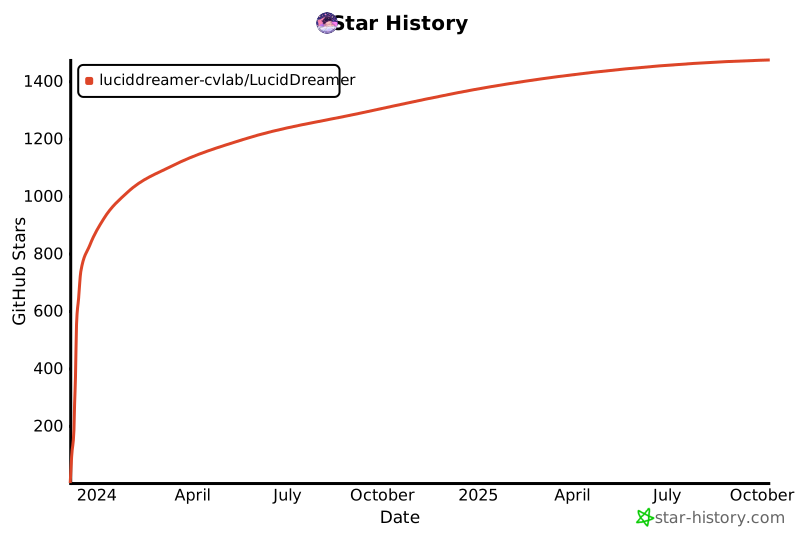
## ⭐ Star History