# guardian-cli
**Repository Path**: data_factory/guardian-cli
## Basic Information
- **Project Name**: guardian-cli
- **Description**: No description available
- **Primary Language**: Unknown
- **License**: Not specified
- **Default Branch**: main
- **Homepage**: None
- **GVP Project**: No
## Statistics
- **Stars**: 0
- **Forks**: 0
- **Created**: 2026-01-28
- **Last Updated**: 2026-03-12
## Categories & Tags
**Categories**: Uncategorized
**Tags**: None
## README

# 🔐 Guardian
### AI-Powered Penetration Testing Automation Platform
[](https://opensource.org/licenses/MIT)
[](https://www.python.org/downloads/)
[](https://github.com/psf/black)
**Guardian** is an enterprise-grade AI-powered penetration testing automation framework that combines multiple AI providers (OpenAI GPT-4, Claude, Google Gemini, OpenRouter) with battle-tested security tools to deliver intelligent, adaptive security assessments with comprehensive evidence capture.
[Features](#-features) • [Installation](#-installation) • [Quick Start](#-quick-start) • [Documentation](#-documentation) • [Contributing](#-contributing)
---
## ⚠️ Legal Disclaimer
**Guardian is designed exclusively for authorized security testing and educational purposes.**
- ✅ **Legal Use**: Authorized penetration testing, security research, educational environments
- ❌ **Illegal Use**: Unauthorized access, malicious activities, any form of cyber attack
**You are fully responsible for ensuring you have explicit written permission before testing any system.** Unauthorized access to computer systems is illegal under laws including the Computer Fraud and Abuse Act (CFAA), GDPR, and equivalent international legislation.
**By using Guardian, you agree to use it only on systems you own or have explicit authorization to test.**
---
## ✨ Features
### 🤖 Multi-Provider AI Intelligence
- **4 AI Providers Supported**: OpenAI (GPT-4o), Anthropic (Claude), Google (Gemini), OpenRouter
- **Flexible Provider Selection**: Switch between providers via config or command-line
- **Multi-Agent Architecture**: Specialized AI agents (Planner, Tool Selector, Analyst, Reporter) collaborate for comprehensive security assessments
- **Strategic Decision Making**: AI analyzes findings and determines optimal next steps
- **Adaptive Testing**: AI adjusts tactics based on discovered vulnerabilities and system responses
- **False Positive Filtering**: Intelligent analysis reduces noise and focuses on real vulnerabilities
### 🛠️ Extensive Tool Arsenal
**19 Integrated Security Tools:**
- **Network**: Nmap (comprehensive scanning), Masscan (ultra-fast scanning)
- **Web Reconnaissance**: httpx (HTTP probing), WhatWeb (tech fingerprinting), Wafw00f (WAF detection)
- **Subdomain Discovery**: Subfinder (passive enumeration), Amass (active/passive mapping), DNSRecon (DNS analysis)
- **Vulnerability Scanning**: Nuclei (template-based), Nikto (web vulnerabilities), SQLMap (SQL injection), WPScan (WordPress)
- **SSL/TLS Testing**: TestSSL (cipher analysis), SSLyze (advanced configuration)
- **Content Discovery**: Gobuster (directory brute forcing), FFuf (advanced web fuzzing), Arjun (parameter discovery)
- **Security Analysis**: XSStrike (XSS detection), GitLeaks (secret scanning), CMSeeK (CMS detection)
### 📊 Enhanced Evidence Capture
- **Execution Traceability**: Every finding linked to its source tool execution
- **Complete Command History**: Full tool output preserved with each finding
- **Raw Evidence Storage**: 2000-character snippets of actual tool output
- **Session Reconstruction**: Ability to review exact commands and outputs from any scan
### 🔄 Smart Workflow System
- **Parameter Priority**: Workflow parameters override config defaults
- **Self-Contained Workflows**: Each workflow defines its own tool parameters
- **Fuzzy Matching**: Intelligent workflow file discovery and loading
- **Multiple Report Formats**: Markdown, HTML, and JSON with evidence inclusion
### 🔒 Security & Compliance
- **Scope Validation**: Automatic blacklisting of private networks and unauthorized targets
- **Audit Logging**: Complete transparency with detailed logs of all AI decisions and actions
- **Human-in-the-Loop**: Configurable confirmation prompts for sensitive operations
- **Safe Mode**: Prevents destructive actions by default
### 📋 Professional Reporting
- **Multiple Formats**: Markdown, HTML, and JSON reports
- **Executive Summaries**: Non-technical overviews for stakeholders
- **Technical Deep-Dives**: Detailed findings with evidence and remediation steps
- **Evidence Sections**: Raw tool output embedded in reports
- **AI Decision Traces**: Full transparency into AI reasoning process
### ⚡ Performance & Efficiency
- **Asynchronous Execution**: Parallel tool execution for faster assessments
- **Workflow Automation**: Predefined workflows (Recon, Web, Network, Autonomous)
- **Customizable**: Create custom tools and workflows via simple YAML/Python
---
## 📋 Prerequisites
### Required
- **Python 3.11 or higher** ([Download](https://www.python.org/downloads/))
- **AI Provider API Key** (Choose one):
- OpenAI API Key ([Get it here](https://platform.openai.com/api-keys))
- Anthropic API Key ([Get it here](https://console.anthropic.com/))
- Google AI Studio API Key ([Get it here](https://makersuite.google.com/app/apikey))
- OpenRouter API Key ([Get it here](https://openrouter.ai/keys))
- **Git** (for cloning repository)
### Optional Tools (for full functionality)
Guardian can intelligently use these tools if installed:
| Tool | Purpose | Installation |
|------|---------|--------------|
| **nmap** | Port scanning | `apt install nmap` / `choco install nmap` |
| **masscan** | Ultra-fast scan | `apt install masscan` / Build from source |
| **httpx** | HTTP probing | `go install github.com/projectdiscovery/httpx/cmd/httpx@latest` |
| **subfinder** | Subdomain enum | `go install github.com/projectdiscovery/subfinder/v2/cmd/subfinder@latest` |
| **amass** | Network mapping | `go install github.com/owasp-amass/amass/v4/...@master` |
| **nuclei** | Vuln scanning | `go install github.com/projectdiscovery/nuclei/v3/cmd/nuclei@latest` |
| **whatweb** | Tech fingerprint | `gem install whatweb` / `apt install whatweb` |
| **wafw00f** | WAF detection | `pip install wafw00f` |
| **nikto** | Web vuln scan | `apt install nikto` |
| **sqlmap** | SQL injection | `pip install sqlmap` / `apt install sqlmap` |
| **wpscan** | WordPress scan | `gem install wpscan` |
| **testssl** | SSL/TLS testing | Download from [testssl.sh](https://testssl.sh/) |
| **sslyze** | SSL/TLS analysis | `pip install sslyze` |
| **gobuster** | Directory brute | `go install github.com/OJ/gobuster/v3@latest` |
| **ffuf** | Web fuzzing | `go install github.com/ffuf/ffuf/v2@latest` |
| **arjun** | Parameter discovery | `pip install arjun` |
| **xsstrike** | Advanced XSS | `git clone https://github.com/s0md3v/XSStrike` |
| **gitleaks** | Secret scanning | `go install github.com/zricethezav/gitleaks/v8@latest` |
| **cmseek** | CMS detection | `pip install cmseek` |
| **dnsrecon** | DNS enumeration | `pip install dnsrecon` |
> **Note**: Guardian works without external tools but with limited scanning capabilities. The AI will adapt based on available tools.
---
## 🚀 Installation
### Step 1: Clone Repository
```bash
git clone https://github.com/zakirkun/guardian-cli.git
cd guardian-cli
```
### Step 2: Set Up Python Environment
**Linux/macOS:**
```bash
python3 -m venv venv
source venv/bin/activate
pip install -e .
```
**Windows:**
```powershell
python -m venv venv
.\venv\Scripts\activate
pip install -e .
```
### Step 3: Configure AI Provider
Guardian supports multiple AI providers. Configure your preferred provider in `config/guardian.yaml`:
```yaml
# config/guardian.yaml
ai:
# Choose your provider: openai, claude, gemini, or openrouter
provider: openai
# OpenAI Configuration (recommended)
openai:
model: gpt-4o
api_key: sk-your-api-key-here # Or set OPENAI_API_KEY env var
# Claude Configuration
claude:
model: claude-3-5-sonnet-20241022
api_key: null # Or set ANTHROPIC_API_KEY env var
# Gemini Configuration
gemini:
model: gemini-2.5-pro
api_key: null # Or set GOOGLE_API_KEY env var
# OpenRouter Configuration
openrouter:
model: anthropic/claude-3.5-sonnet
api_key: null # Or set OPENROUTER_API_KEY env var
```
**Or use environment variables:**
```bash
# Linux/macOS
export OPENAI_API_KEY="sk-your-key-here"
export ANTHROPIC_API_KEY="sk-ant-your-key-here"
export GOOGLE_API_KEY="your-gemini-key"
export OPENROUTER_API_KEY="your-router-key"
# Windows PowerShell
$env:OPENAI_API_KEY="sk-your-key-here"
$env:ANTHROPIC_API_KEY="sk-ant-your-key-here"
```
### Step 4: Initialize Configuration
```bash
# Verify installation
python -m cli.main --help
# Check AI provider status
python -m cli.main models
```
---
## 🎯 Quick Start
### Basic Commands
```bash
# List available workflows
python -m cli.main workflow list
# View AI providers and models
python -m cli.main models
# Run with specific provider
python -m cli.main workflow run --name web_pentest --target example.com --provider openai
```
### Example Usage Scenarios
#### 1. Quick Web Application Pen Test
```bash
# Fast security check with evidence capture
python -m cli.main workflow run --name web_pentest --target https://dvwa.csalab.app
```
**Expected Output:**
- ✅ HTTP discovery with httpx
- ✅ Vulnerability scan with nuclei
- ✅ Full evidence linking (commands + outputs)
- ✅ Markdown report with findings
#### 2. Comprehensive Network Assessment
```bash
# Full network penetration test
python -m cli.main workflow run --name network --target 192.168.1.0/24
```
#### 3. Custom Workflow with Parameters
```bash
# Run with workflow-specific parameters
# Parameters in workflow YAML override config defaults
python -m cli.main workflow run --name web_pentest --target example.com
```
**Workflow Parameter Priority:**
1. Workflow YAML parameters (highest priority)
2. Config file parameters
3. Tool defaults (lowest priority)
#### 4. Generate Report from Session
```bash
# Create HTML report with evidence
python -m cli.main report --session 20260203_175905 --format html
```
#### 5. Switch AI Providers
```bash
# Use OpenAI GPT-4
python -m cli.main workflow run --name web_pentest --target example.com --provider openai
# Use Claude
python -m cli.main workflow run --name web_pentest --target example.com --provider claude
# Use Gemini
python -m cli.main workflow run --name web_pentest --target example.com --provider gemini
```
> **Windows Users**: Use `python -m cli.main` instead of `guardian`
---
## 🔧 Configuration
### Complete Configuration Reference
Edit `config/guardian.yaml` to customize Guardian's behavior:
```yaml
# AI Configuration
ai:
provider: openai # openai, claude, gemini, openrouter
openai:
model: gpt-4o
api_key: sk-your-key # Or use OPENAI_API_KEY env var
claude:
model: claude-3-5-sonnet-20241022
api_key: null
gemini:
model: gemini-2.5-pro
api_key: null
temperature: 0.2
max_tokens: 8000
# Penetration Testing Settings
pentest:
safe_mode: true # Prevent destructive actions
require_confirmation: true # Confirm before each step
max_parallel_tools: 3 # Concurrent tool execution
max_depth: 3 # Maximum scan depth
tool_timeout: 300 # Tool timeout in seconds
# Output Configuration
output:
format: markdown # markdown, html, json
save_path: ./reports
include_reasoning: true
verbosity: normal # quiet, normal, verbose, debug
# Scope Validation
scope:
blacklist: # Never scan these
- 127.0.0.0/8
- 10.0.0.0/8
- 172.16.0.0/12
- 192.168.0.0/16
require_scope_file: false
max_targets: 100
# Tool Configuration (defaults)
tools:
httpx:
threads: 50
timeout: 10
tech_detect: true
nuclei:
severity: ["critical", "high", "medium"]
templates_path: ~/nuclei-templates
nmap:
default_args: "-sV -sC"
timing: T4
```
### Workflow Parameters
Create custom workflows in `workflows/` directory:
```yaml
# workflows/custom_web.yaml
name: custom_web_assessment
description: Custom web security testing
steps:
- name: http_discovery
type: tool
tool: httpx
parameters:
threads: 100 # Override config default (50)
timeout: 15 # Override config default (10)
tech_detect: true
- name: vulnerability_scan
type: tool
tool: nuclei
parameters:
severity: ["critical", "high"] # Override config
templates_path: ".shared/nuclei/templates/"
- name: generate_report
type: report
# Format will use config default (markdown)
```
**Parameter Priority:**
- Workflow parameters **override** config parameters
- Config parameters **override** tool defaults
- Self-contained, reusable workflows
---
## 📖 Documentation
### User Guides
- **[Quick Start Guide](QUICKSTART.md)** - Get up and running in 5 minutes
- **[Command Reference](docs/)** - Detailed documentation for all commands
- **[Configuration Guide](config/guardian.yaml)** - Complete configuration reference
- **[Workflow Guide](docs/WORKFLOW_GUIDE.md)** - Creating custom workflows
### Developer Guides
- **[Creating Custom Tools](docs/TOOLS_DEVELOPMENT_GUIDE.md)** - Build your own tool integrations
- **[Workflow Development](docs/WORKFLOW_GUIDE.md)** - Create custom testing workflows
- **[Available Tools](tools/README.md)** - Overview of integrated tools
### Architecture Overview
```
Guardian Architecture:
┌─────────────────────────────────────────┐
│ AI Provider Layer │
│ (OpenAI, Claude, Gemini, OpenRouter) │
└─────────────────────────────────────────┘
│
┌─────────────────────────────────────────┐
│ Multi-Agent System │
│ Planner → Tool Agent → Analyst → │
│ Reporter │
└─────────────────────────────────────────┘
│
┌─────────────────────────────────────────┐
│ Workflow Engine │
│ - Parameter Priority │
│ - Evidence Capture │
│ - Session Management │
└─────────────────────────────────────────┘
│
┌─────────────────────────────────────────┐
│ Tool Integration Layer │
│ (19 Security Tools) │
└─────────────────────────────────────────┘
```
---
## 🏗️ Project Structure
```
guardian-cli/
├── ai/ # AI integration
│ └── providers/ # Multi-provider support
│ ├── base_provider.py
│ ├── openai_provider.py
│ ├── claude_provider.py
│ ├── gemini_provider.py
│ └── openrouter_provider.py
├── cli/ # Command-line interface
│ └── commands/ # CLI commands (init, scan, recon, etc.)
├── core/ # Core agent system
│ ├── agent.py # Base agent
│ ├── planner.py # Planner agent
│ ├── tool_agent.py # Tool selection agent
│ ├── analyst_agent.py # Analysis agent
│ ├── reporter_agent.py # Reporting agent
│ ├── memory.py # State management
│ └── workflow.py # Workflow orchestration
├── tools/ # Pentesting tool wrappers
│ ├── nmap.py # Nmap integration
│ ├── masscan.py # Masscan integration
│ ├── httpx.py # httpx integration
│ ├── subfinder.py # Subfinder integration
│ ├── amass.py # Amass integration
│ ├── nuclei.py # Nuclei integration
│ ├── sqlmap.py # SQLMap integration
│ ├── wpscan.py # WPScan integration
│ ├── whatweb.py # WhatWeb integration
│ ├── wafw00f.py # Wafw00f integration
│ ├── nikto.py # Nikto integration
│ ├── testssl.py # TestSSL integration
│ ├── sslyze.py # SSLyze integration
│ ├── gobuster.py # Gobuster integration
│ ├── ffuf.py # FFuf integration
│ └── ... # 15 tools total
├── workflows/ # Workflow definitions (YAML)
├── utils/ # Utilities (logging, validation)
├── config/ # Configuration files
├── docs/ # Documentation
└── reports/ # Generated reports
```
---
## 🆕 Latest Updates
### Version 2.0.0 - Major Release
#### ✨ Multi-Provider AI Support
- **4 AI Providers**: OpenAI, Claude, Gemini, OpenRouter
- **Easy Switching**: Configure via `config/guardian.yaml` or CLI flags
- **Provider Abstraction**: Unified interface for all providers
#### 📊 Evidence Capture System
- **Execution Linking**: Every finding linked to its source tool execution
- **Raw Evidence**: Full command output preserved (2000-char snippets)
- **Traceability**: Reconstruct exact workflow execution from session files
#### 🔄 Smart Workflow Parameters
- **Priority System**: Workflow params > Config > Defaults
- **Self-Contained**: Workflows define their own parameters
- **No Conflicts**: Multiple workflows can use different settings for same tools
#### 🐛 Bug Fixes
- Fixed workflow fuzzy matching logic
- Corrected report format handling
- Improved YAML parsing with better error messages
---
## 🤝 Contributing
We welcome contributions! Here's how:
### Setting Up Development Environment
```bash
# Fork and clone
git clone https://github.com/zakirkun/guardian-cli.git
cd guardian-cli
# Install dev dependencies
pip install -e ".[dev]"
# Run tests
pytest tests/
# Format code
black .
```
### Contribution Areas
- 🤖 **AI Provider Integrations** - Add more AI models
- 🛠️ **New Tool Integrations** - Add more security tools
- 🔄 **Custom Workflows** - Share your workflow templates
- 🐛 **Bug Fixes** - Report and fix issues
- 📚 **Documentation** - Improve guides and examples
- 🧪 **Testing** - Expand test coverage
See [CONTRIBUTING.md](CONTRIBUTING.md) for detailed guidelines.
---
## 📊 Roadmap
- [x] Multi-provider AI support (OpenAI, Claude, Gemini, OpenRouter)
- [x] Complete evidence capture with execution linking
- [x] Workflow parameter priority system
- [ ] Web Dashboard for visualization
- [ ] PostgreSQL backend for multi-session tracking
- [ ] MITRE ATT&CK mapping for findings
- [ ] Plugin system for custom modules
- [ ] Integration with CI/CD pipelines
- [ ] Additional AI models (Llama, Mistral)
- [ ] Real-time collaboration features
---
## 🐛 Troubleshooting
### Common Issues
**Import Errors**
```bash
# Reinstall dependencies
pip install -e . --force-reinstall
```
**AI Provider Errors**
```bash
# Verify API key is set
python -m cli.main models
# Check provider configuration
cat config/guardian.yaml | grep -A 5 "ai:"
```
**Tool Not Found**
```bash
# Check tool availability
which nmap
which httpx
# Install missing tools (see Prerequisites)
```
**Workflow Not Loading**
```bash
# Check workflow file exists
ls workflows/web_pentest.yaml
# Verify YAML syntax
python -c "import yaml; yaml.safe_load(open('workflows/web_pentest.yaml'))"
```
**Windows Command Not Found**
```powershell
# Use full command
python -m cli.main --help
```
For more help, [open an issue](https://github.com/zakirkun/guardian-cli/issues).
---
## 📄 License
This project is licensed under the MIT License - see the [LICENSE](LICENSE) file for details.
---
## 🙏 Acknowledgments
- **OpenAI** - GPT-4 capabilities
- **Anthropic** - Claude AI
- **Google** - Gemini AI
- **LangChain** - AI orchestration framework
- **ProjectDiscovery** - Open-source security tools (httpx, subfinder, nuclei)
- **Nmap** - Network exploration and security auditing
- **The Security Community** - Tool developers and researchers
---
## 📞 Support & Contact
- **GitHub Issues**: [Report bugs or request features](https://github.com/zakirkun/guardian-cli/issues)
- **Discussions**: [Join community discussions](https://github.com/zakirkun/guardian-cli/discussions)
- **Documentation**: [Read the docs](docs/)
- **Security**: Report vulnerabilities privately to security@example.com
---
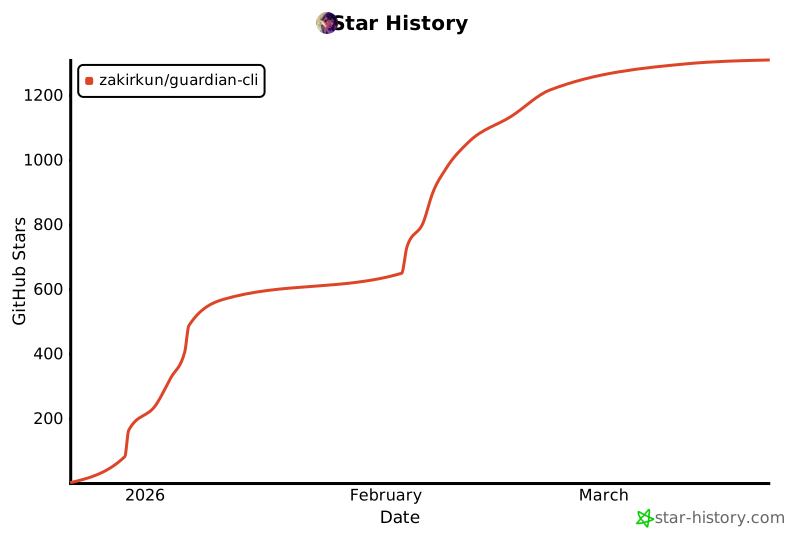
## 🌟 Star History
 ---
---
---
---
**Guardian** - Intelligent, Ethical, Automated Penetration Testing
Made with ❤️ by the Security Community
[⬆ Back to Top](#-guardian)