# openvg
**Repository Path**: dockership/openvg
## Basic Information
- **Project Name**: openvg
- **Description**: No description available
- **Primary Language**: Unknown
- **License**: Not specified
- **Default Branch**: master
- **Homepage**: None
- **GVP Project**: No
## Statistics
- **Stars**: 0
- **Forks**: 0
- **Created**: 2025-05-22
- **Last Updated**: 2025-05-22
## Categories & Tags
**Categories**: Uncategorized
**Tags**: None
## README
# Testbed for exploring OpenVG on the Raspberry Pi.
 ## First program
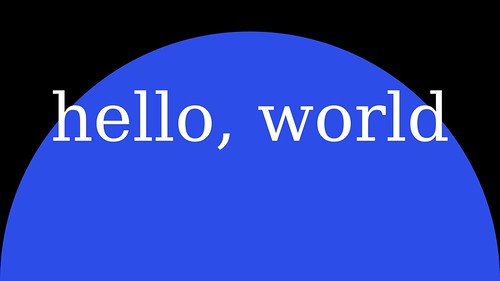
Here is the graphics equivalent of "hello, world"
// first OpenVG program
// Anthony Starks (ajstarks@gmail.com)
#include
#include
#include
#include "VG/openvg.h"
#include "VG/vgu.h"
#include "fontinfo.h"
#include "shapes.h"
int main() {
int width, height;
char s[3];
init(&width, &height); // Graphics initialization
Start(width, height); // Start the picture
Background(0, 0, 0); // Black background
Fill(44, 77, 232, 1); // Big blue marble
Circle(width / 2, 0, width); // The "world"
Fill(255, 255, 255, 1); // White text
TextMid(width / 2, height / 2, "hello, world", SerifTypeface, width / 10); // Greetings
End(); // End the picture
fgets(s, 2, stdin); // look at the pic, end with [RETURN]
finish(); // Graphics cleanup
exit(0);
}
## First program
Here is the graphics equivalent of "hello, world"
// first OpenVG program
// Anthony Starks (ajstarks@gmail.com)
#include
#include
#include
#include "VG/openvg.h"
#include "VG/vgu.h"
#include "fontinfo.h"
#include "shapes.h"
int main() {
int width, height;
char s[3];
init(&width, &height); // Graphics initialization
Start(width, height); // Start the picture
Background(0, 0, 0); // Black background
Fill(44, 77, 232, 1); // Big blue marble
Circle(width / 2, 0, width); // The "world"
Fill(255, 255, 255, 1); // White text
TextMid(width / 2, height / 2, "hello, world", SerifTypeface, width / 10); // Greetings
End(); // End the picture
fgets(s, 2, stdin); // look at the pic, end with [RETURN]
finish(); // Graphics cleanup
exit(0);
}
 ## API
 Coordinates are VGfloat values, with the origin at the lower left, with x increasing to the right, and y increasing up.
OpenVG specifies colors as a VGfloat array containing red, green, blue, alpha values ranging from 0.0 to 1.0, but typically colors are specified as RGBA (0-255 for RGB, A from 0.0 to 1.0)
### Window (canvas) functions
void WindowClear()
WindowClear clears the window to previously set background colour
void AreaClear(unsigned int x, unsigned int y, unsigned int w, unsigned int h)
AreaClear clears a given rectangle in window coordinates
void WindowOpacity(unsigned int a)
WindowOpacity sets the window opacity
void WindowPosition(int x, int y)
WindowPosition moves the window to given position
### Setup and shutdown
void init(int *w, int *h)
Initialize the graphics: width and height of the canvas are returned. This should begin every program.
void initWindowSize(int x, int y, unsigned int w, unsigned int h)
Initialize with specific dimensions
void finish()
Shutdown the graphics. This should end every program.
void Start(int width, int height)
Begin the picture, clear the screen with a default white, set the stroke and fill to black.
void End()
End the picture, rendering to the screen.
void SaveEnd(char *filename)
End the picture, rendering to the screen, save the raster to the named file as 4-byte RGBA words, with a stride of
width*4 bytes. The program raw2png converts the "raw" raster to png.
void saveterm(), restoreterm(), rawterm()
Terminal settings, save current settings, restore settings, put the terminal in raw mode.
### Attributes
void setfill(float color[4])
Set the fill color
void Background(unsigned int r, unsigned int g, unsigned int b)
Fill the screen with the background color defined from RGB values.
void BackgroundRGB(unsigned int r, unsigned int g, unsigned int b, VGfloat a)
clears the screen to a background color with alpha
void StrokeWidth(float width)
Set the stroke width.
void RGBA(unsigned int r, unsigned int g, unsigned int b, VGfloat a, VGfloat color[4])
fill a color vector from RGBA values.
void RGB(unsigned int r, unsigned int g, unsigned int b, VGfloat color[4])
fill a color vector from RGB values.
void Stroke(unsigned int r, unsigned int g, unsigned int b, VGfloat a)
Set the Stroke color using RGBA values.
void Fill(unsigned int r, unsigned int g, unsigned int b, VGfloat a)
Set the Fill color using RGBA values.
void FillLinearGradient(VGfloat x1, VGfloat y1, VGfloat x2, VGfloat y2, VGfloat *stops, int n)
Set the fill to a linear gradient bounded by (x1, y1) and (x2, y2). using offsets and colors specified in n number of stops
void FillRadialGradient(VGfloat cx, VGfloat cy, VGfloat fx VGfloat fy, VGfloat r, VGfloat *stops, int n)
Set the fill to a radial gradient centered at (cx, cy) with radius r, and focal point at (fx, ry), using offsets and colors specified in n number of stops
### Shapes
void Line(VGfloat x1, VGfloat y1, VGfloat x2, VGfloat y2)
Draw a line between (x1, y1) and (x2, y2).
void Rect(VGfloat x, VGfloat y, VGfloat w, VGfloat h)
Draw a rectangle with its origin (lower left) at (x,y), and size is (width,height).
void RectOutline(VGfloat x, VGfloat y, VGfloat w, VGfloat h)
Outlined version
void Roundrect(VGfloat x, VGfloat y, VGfloat w, VGfloat h, VGfloat rw, VGfloat rh)
Draw a rounded rectangle with its origin (lower left) at (x,y), and size is (width,height).
The width and height of the corners are specified with (rw,rh).
void RoundrectOutline(VGfloat x, VGfloat y, VGfloat w, VGfloat h, VGfloat rw, VGfloat rh)
Outlined version
void Polygon(VGfloat *x, VGfloat *y, VGint n)
Draw a polygon using the coordinates in arrays pointed to by x and y. The number of coordinates is n.
void Polyline(VGfloat *x, VGfloat *y, VGint n)
Draw a polyline using the coordinates in arrays pointed to by x and y. The number of coordinates is n.
void Circle(VGfloat x, VGfloat y, VGfloat d)
Draw a circle centered at (x,y) with diameter d.
void CircleOutline(VGfloat x, VGfloat y, VGfloat r)
Outlined version
void Ellipse(VGfloat x, VGfloat y, VGfloat w, VGfloat h)
Draw an ellipse centered at (x,y) with radii (w, h).
void EllipseOutline(VGfloat x, VGfloat y, VGfloat w, VGfloat h)
Outlined version
void Qbezier(VGfloat sx, VGfloat sy, VGfloat cx, VGfloat cy, VGfloat ex, VGfloat ey)
Draw a quadratic bezier curve beginning at (sx, sy), using control points at (cx, cy), ending at (ex, ey).
void QbezierOutline(VGfloat sx, VGfloat sy, VGfloat cx, VGfloat cy, VGfloat ex, VGfloat ey)
Outlined version
void Cbezier(VGfloat sx, VGfloat sy, VGfloat cx, VGfloat cy, VGfloat px, VGfloat py, VGfloat ex, VGfloat ey)
Draw a cubic bezier curve beginning at (sx, sy), using control points at (cx, cy) and (px, py), ending at (ex, ey).
void CbezierOutline(VGfloat sx, VGfloat sy, VGfloat cx, VGfloat cy, VGfloat px, VGfloat py, VGfloat ex, VGfloat ey)
Outlined version
void Arc(VGfloat x, VGfloat y, VGfloat w, VGfloat h, VGfloat sa, VGfloat aext)
Draw an elliptical arc centered at (x, y), with width and height at (w, h). Start angle (degrees) is sa, angle extent is aext.
void ArcOutline(VGfloat x, VGfloat y, VGfloat w, VGfloat h, VGfloat sa, VGfloat aext)
Outlined version
### Text and Images
void Text(VGfloat x, VGfloat y, char* s, Fontinfo f, int pointsize)
Draw a the text srtring (s) at location (x,y), using pointsize.
void TextMid(VGfloat x, VGfloat y, char* s, Fontinfo f, int pointsize)
Draw a the text srtring (s) at centered at location (x,y), using pointsize.
void TextEnd(VGfloat x, VGfloat y, char* s, Fontinfo f, int pointsize)
Draw a the text srtring (s) at with its lend aligned to location (x,y), using pointsize
VGfloat TextWidth(char *s, Fontinfo f, int pointsize)
Return the width of text
VGfloat TextHeight(Fontinfo f, int pointsize)
Return a font's height
TextDepth(Fontinfo f, int pointsize)
Return a font's distance beyond the baseline.
void Image(VGfloat x, VGfloat y, int w, int h, char * filename)
place a JPEG image with dimensions (w,h) at (x,y).
### Transformations
void Translate(VGfloat x, VGfloat y)
Translate the coordinate system to (x,y).
void Rotate(VGfloat r)
Rotate the coordinate system around angle r (degrees).
void Scale(VGfloat x, VGfloat y)
Scale by x,y.
void Shear(VGfloat x, VGfloat y)
Shear by the angles x,y.
## Clipping
void ClipRect(VGint x, VGint y, VGint w, VGint h)
Limit drawing the drawing area to the specified rectangle, end with ClipEnd()
void ClipEnd()
Ends clipping area
## Using fonts
Also included is the font2openvg program, which turns font information into C source that
you can embed in your program. The Makefile makes font code from files found in /usr/share/fonts/truetype/ttf-dejavu/.
If you want to use other fonts, adjust the Makefile accordingly, or generate the font code on your own once the font2openvg program is built.
font2openvg takes three arguments: the TrueType font file, the output file to be included and the prefix for identifiers.
For example to use the DejaVu Sans font:
./font2openvg /usr/share/fonts/truetype/ttf-dejavu/DejaVuSans.ttf DejaVuSans.inc DejaVuSans
and include the generated code in your program:
#include "DejaVuSans.inc"
Fontinfo DejaFont
The loadfont function creates OpenVG paths from the font data:
loadfont(DejaVuSans_glyphPoints,
DejaVuSans_glyphPointIndices,
DejaVuSans_glyphInstructions,
DejaVuSans_glyphInstructionIndices,
DejaVuSans_glyphInstructionCounts,
DejaVuSans_glyphAdvances,
DejaVuSans_characterMap,
DejaVuSans_glyphCount);
The unloadfont function releases the path information:
unloadfont(DejaFont.Glyphs, DejaFont.Count);
Note that the location of the font files may differ. (The current location for Jessie is /usr/share/fonts/truetype/ttf-dejavu)
Use the FONTLIB makefile variable to adjust this location.
# Build and run
Note that you will need at least 64 Mbytes of GPU RAM:. You will also need the DejaVu fonts, and the jpeg and freetype libraries.
The indent tool is also useful for code formatting. Install them via:
pi@raspberrypi ~ $ sudo apt-get install libjpeg8-dev indent libfreetype6-dev ttf-dejavu-core
Next, build the library and test:
pi@raspberrypi ~ $ git clone git://github.com/ajstarks/openvg
pi@raspberrypi ~ $ cd openvg
pi@raspberrypi ~/openvg $ make
g++ -I/usr/include/freetype2 fontutil/font2openvg.cpp -o font2openvg -lfreetype
./font2openvg /usr/share/fonts/truetype/ttf-dejavu/DejaVuSans.ttf DejaVuSans.inc DejaVuSans
224 glyphs written
./font2openvg /usr/share/fonts/truetype/ttf-dejavu/DejaVuSansMono.ttf DejaVuSansMono.inc DejaVuSansMono
224 glyphs written
./font2openvg /usr/share/fonts/truetype/ttf-dejavu/DejaVuSerif.ttf DejaVuSerif.inc DejaVuSerif
224 glyphs written
gcc -O2 -Wall -I/opt/vc/include -I/opt/vc/include/interface/vmcs_host/linux -I/opt/vc/include/interface/vcos/pthreads -c libshapes.c
gcc -O2 -Wall -I/opt/vc/include -I/opt/vc/include/interface/vmcs_host/linux -I/opt/vc/include/interface/vcos/pthreads -c oglinit.c
pi@raspberrypi ~/openvg/client $ cd client
pi@raspberrypi ~/openvg/client $ make test
cc -Wall -I/opt/vc/include -I/opt/vc/include/interface/vcos/pthreads -o shapedemo shapedemo.c ../libshapes.o ../oglinit.o -L/opt/vc/lib -lGLESv2 -ljpeg
./shapedemo demo 5
The program "shapedemo" exercises a high-level API built on OpenVG found in libshapes.c.
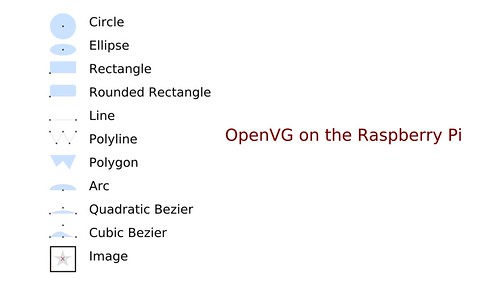
./shapedemo # show a reference card
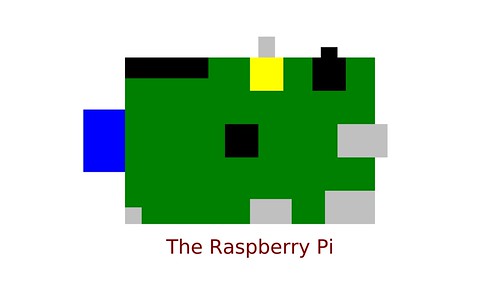
./shapedemo raspi # show a self-portrait
./shapedemo image # show four test images
./shapedemo astro # the sun and the earth, to scale
./shapedemo text # show blocks of text in serif, sans, and mono fonts
./shapedemo rand 10 # show 10 random shapes
./shapedemo rotate 10 a # rotated and faded "a"
./shapedemo test "hello, world" # show a test pattern, with "hello, world" at mid-display in sans, serif, and mono.
./shapedemo fontsize # show a range of font sizes (per )
./shapedemo demo 10 # run through the demo, pausing 10 seconds between each one; contemplate the awesome.
To install the shapes library as a system-wide shared library
pi@raspberrypi ~/openvg $ make library
pi@raspberrypi ~/openvg $ sudo make install
The openvg shapes library can now be used in C code by including shapes.h and fontinfo.h and linking with libshapes.so:
#include
#include
pi@raspberrypi ~ $ gcc -I/opt/vc/include -I/opt/vc/include/interface/vmcs_host/linux -I/opt/vc/include/interface/vcos/pthreads anysource.c -o anysource -lshapes
pi@raspberrypi ~ $ ./anysource
Coordinates are VGfloat values, with the origin at the lower left, with x increasing to the right, and y increasing up.
OpenVG specifies colors as a VGfloat array containing red, green, blue, alpha values ranging from 0.0 to 1.0, but typically colors are specified as RGBA (0-255 for RGB, A from 0.0 to 1.0)
### Window (canvas) functions
void WindowClear()
WindowClear clears the window to previously set background colour
void AreaClear(unsigned int x, unsigned int y, unsigned int w, unsigned int h)
AreaClear clears a given rectangle in window coordinates
void WindowOpacity(unsigned int a)
WindowOpacity sets the window opacity
void WindowPosition(int x, int y)
WindowPosition moves the window to given position
### Setup and shutdown
void init(int *w, int *h)
Initialize the graphics: width and height of the canvas are returned. This should begin every program.
void initWindowSize(int x, int y, unsigned int w, unsigned int h)
Initialize with specific dimensions
void finish()
Shutdown the graphics. This should end every program.
void Start(int width, int height)
Begin the picture, clear the screen with a default white, set the stroke and fill to black.
void End()
End the picture, rendering to the screen.
void SaveEnd(char *filename)
End the picture, rendering to the screen, save the raster to the named file as 4-byte RGBA words, with a stride of
width*4 bytes. The program raw2png converts the "raw" raster to png.
void saveterm(), restoreterm(), rawterm()
Terminal settings, save current settings, restore settings, put the terminal in raw mode.
### Attributes
void setfill(float color[4])
Set the fill color
void Background(unsigned int r, unsigned int g, unsigned int b)
Fill the screen with the background color defined from RGB values.
void BackgroundRGB(unsigned int r, unsigned int g, unsigned int b, VGfloat a)
clears the screen to a background color with alpha
void StrokeWidth(float width)
Set the stroke width.
void RGBA(unsigned int r, unsigned int g, unsigned int b, VGfloat a, VGfloat color[4])
fill a color vector from RGBA values.
void RGB(unsigned int r, unsigned int g, unsigned int b, VGfloat color[4])
fill a color vector from RGB values.
void Stroke(unsigned int r, unsigned int g, unsigned int b, VGfloat a)
Set the Stroke color using RGBA values.
void Fill(unsigned int r, unsigned int g, unsigned int b, VGfloat a)
Set the Fill color using RGBA values.
void FillLinearGradient(VGfloat x1, VGfloat y1, VGfloat x2, VGfloat y2, VGfloat *stops, int n)
Set the fill to a linear gradient bounded by (x1, y1) and (x2, y2). using offsets and colors specified in n number of stops
void FillRadialGradient(VGfloat cx, VGfloat cy, VGfloat fx VGfloat fy, VGfloat r, VGfloat *stops, int n)
Set the fill to a radial gradient centered at (cx, cy) with radius r, and focal point at (fx, ry), using offsets and colors specified in n number of stops
### Shapes
void Line(VGfloat x1, VGfloat y1, VGfloat x2, VGfloat y2)
Draw a line between (x1, y1) and (x2, y2).
void Rect(VGfloat x, VGfloat y, VGfloat w, VGfloat h)
Draw a rectangle with its origin (lower left) at (x,y), and size is (width,height).
void RectOutline(VGfloat x, VGfloat y, VGfloat w, VGfloat h)
Outlined version
void Roundrect(VGfloat x, VGfloat y, VGfloat w, VGfloat h, VGfloat rw, VGfloat rh)
Draw a rounded rectangle with its origin (lower left) at (x,y), and size is (width,height).
The width and height of the corners are specified with (rw,rh).
void RoundrectOutline(VGfloat x, VGfloat y, VGfloat w, VGfloat h, VGfloat rw, VGfloat rh)
Outlined version
void Polygon(VGfloat *x, VGfloat *y, VGint n)
Draw a polygon using the coordinates in arrays pointed to by x and y. The number of coordinates is n.
void Polyline(VGfloat *x, VGfloat *y, VGint n)
Draw a polyline using the coordinates in arrays pointed to by x and y. The number of coordinates is n.
void Circle(VGfloat x, VGfloat y, VGfloat d)
Draw a circle centered at (x,y) with diameter d.
void CircleOutline(VGfloat x, VGfloat y, VGfloat r)
Outlined version
void Ellipse(VGfloat x, VGfloat y, VGfloat w, VGfloat h)
Draw an ellipse centered at (x,y) with radii (w, h).
void EllipseOutline(VGfloat x, VGfloat y, VGfloat w, VGfloat h)
Outlined version
void Qbezier(VGfloat sx, VGfloat sy, VGfloat cx, VGfloat cy, VGfloat ex, VGfloat ey)
Draw a quadratic bezier curve beginning at (sx, sy), using control points at (cx, cy), ending at (ex, ey).
void QbezierOutline(VGfloat sx, VGfloat sy, VGfloat cx, VGfloat cy, VGfloat ex, VGfloat ey)
Outlined version
void Cbezier(VGfloat sx, VGfloat sy, VGfloat cx, VGfloat cy, VGfloat px, VGfloat py, VGfloat ex, VGfloat ey)
Draw a cubic bezier curve beginning at (sx, sy), using control points at (cx, cy) and (px, py), ending at (ex, ey).
void CbezierOutline(VGfloat sx, VGfloat sy, VGfloat cx, VGfloat cy, VGfloat px, VGfloat py, VGfloat ex, VGfloat ey)
Outlined version
void Arc(VGfloat x, VGfloat y, VGfloat w, VGfloat h, VGfloat sa, VGfloat aext)
Draw an elliptical arc centered at (x, y), with width and height at (w, h). Start angle (degrees) is sa, angle extent is aext.
void ArcOutline(VGfloat x, VGfloat y, VGfloat w, VGfloat h, VGfloat sa, VGfloat aext)
Outlined version
### Text and Images
void Text(VGfloat x, VGfloat y, char* s, Fontinfo f, int pointsize)
Draw a the text srtring (s) at location (x,y), using pointsize.
void TextMid(VGfloat x, VGfloat y, char* s, Fontinfo f, int pointsize)
Draw a the text srtring (s) at centered at location (x,y), using pointsize.
void TextEnd(VGfloat x, VGfloat y, char* s, Fontinfo f, int pointsize)
Draw a the text srtring (s) at with its lend aligned to location (x,y), using pointsize
VGfloat TextWidth(char *s, Fontinfo f, int pointsize)
Return the width of text
VGfloat TextHeight(Fontinfo f, int pointsize)
Return a font's height
TextDepth(Fontinfo f, int pointsize)
Return a font's distance beyond the baseline.
void Image(VGfloat x, VGfloat y, int w, int h, char * filename)
place a JPEG image with dimensions (w,h) at (x,y).
### Transformations
void Translate(VGfloat x, VGfloat y)
Translate the coordinate system to (x,y).
void Rotate(VGfloat r)
Rotate the coordinate system around angle r (degrees).
void Scale(VGfloat x, VGfloat y)
Scale by x,y.
void Shear(VGfloat x, VGfloat y)
Shear by the angles x,y.
## Clipping
void ClipRect(VGint x, VGint y, VGint w, VGint h)
Limit drawing the drawing area to the specified rectangle, end with ClipEnd()
void ClipEnd()
Ends clipping area
## Using fonts
Also included is the font2openvg program, which turns font information into C source that
you can embed in your program. The Makefile makes font code from files found in /usr/share/fonts/truetype/ttf-dejavu/.
If you want to use other fonts, adjust the Makefile accordingly, or generate the font code on your own once the font2openvg program is built.
font2openvg takes three arguments: the TrueType font file, the output file to be included and the prefix for identifiers.
For example to use the DejaVu Sans font:
./font2openvg /usr/share/fonts/truetype/ttf-dejavu/DejaVuSans.ttf DejaVuSans.inc DejaVuSans
and include the generated code in your program:
#include "DejaVuSans.inc"
Fontinfo DejaFont
The loadfont function creates OpenVG paths from the font data:
loadfont(DejaVuSans_glyphPoints,
DejaVuSans_glyphPointIndices,
DejaVuSans_glyphInstructions,
DejaVuSans_glyphInstructionIndices,
DejaVuSans_glyphInstructionCounts,
DejaVuSans_glyphAdvances,
DejaVuSans_characterMap,
DejaVuSans_glyphCount);
The unloadfont function releases the path information:
unloadfont(DejaFont.Glyphs, DejaFont.Count);
Note that the location of the font files may differ. (The current location for Jessie is /usr/share/fonts/truetype/ttf-dejavu)
Use the FONTLIB makefile variable to adjust this location.
# Build and run
Note that you will need at least 64 Mbytes of GPU RAM:. You will also need the DejaVu fonts, and the jpeg and freetype libraries.
The indent tool is also useful for code formatting. Install them via:
pi@raspberrypi ~ $ sudo apt-get install libjpeg8-dev indent libfreetype6-dev ttf-dejavu-core
Next, build the library and test:
pi@raspberrypi ~ $ git clone git://github.com/ajstarks/openvg
pi@raspberrypi ~ $ cd openvg
pi@raspberrypi ~/openvg $ make
g++ -I/usr/include/freetype2 fontutil/font2openvg.cpp -o font2openvg -lfreetype
./font2openvg /usr/share/fonts/truetype/ttf-dejavu/DejaVuSans.ttf DejaVuSans.inc DejaVuSans
224 glyphs written
./font2openvg /usr/share/fonts/truetype/ttf-dejavu/DejaVuSansMono.ttf DejaVuSansMono.inc DejaVuSansMono
224 glyphs written
./font2openvg /usr/share/fonts/truetype/ttf-dejavu/DejaVuSerif.ttf DejaVuSerif.inc DejaVuSerif
224 glyphs written
gcc -O2 -Wall -I/opt/vc/include -I/opt/vc/include/interface/vmcs_host/linux -I/opt/vc/include/interface/vcos/pthreads -c libshapes.c
gcc -O2 -Wall -I/opt/vc/include -I/opt/vc/include/interface/vmcs_host/linux -I/opt/vc/include/interface/vcos/pthreads -c oglinit.c
pi@raspberrypi ~/openvg/client $ cd client
pi@raspberrypi ~/openvg/client $ make test
cc -Wall -I/opt/vc/include -I/opt/vc/include/interface/vcos/pthreads -o shapedemo shapedemo.c ../libshapes.o ../oglinit.o -L/opt/vc/lib -lGLESv2 -ljpeg
./shapedemo demo 5
The program "shapedemo" exercises a high-level API built on OpenVG found in libshapes.c.
./shapedemo # show a reference card
./shapedemo raspi # show a self-portrait
./shapedemo image # show four test images
./shapedemo astro # the sun and the earth, to scale
./shapedemo text # show blocks of text in serif, sans, and mono fonts
./shapedemo rand 10 # show 10 random shapes
./shapedemo rotate 10 a # rotated and faded "a"
./shapedemo test "hello, world" # show a test pattern, with "hello, world" at mid-display in sans, serif, and mono.
./shapedemo fontsize # show a range of font sizes (per )
./shapedemo demo 10 # run through the demo, pausing 10 seconds between each one; contemplate the awesome.
To install the shapes library as a system-wide shared library
pi@raspberrypi ~/openvg $ make library
pi@raspberrypi ~/openvg $ sudo make install
The openvg shapes library can now be used in C code by including shapes.h and fontinfo.h and linking with libshapes.so:
#include
#include
pi@raspberrypi ~ $ gcc -I/opt/vc/include -I/opt/vc/include/interface/vmcs_host/linux -I/opt/vc/include/interface/vcos/pthreads anysource.c -o anysource -lshapes
pi@raspberrypi ~ $ ./anysource
 ## Go wrapper
A Go programming language wrapper for the library is found in openvg.go. Sample clients are in the directory go-client. The API closely follows the C API; here is the "hello, world" program in Go:
The Go API
package main
import (
"bufio"
"github.com/ajstarks/openvg"
"os"
)
func main() {
width, height := openvg.Init() // OpenGL, etc initialization
w2 := openvg.VGfloat(width / 2)
h2 := openvg.VGfloat(height / 2)
w := openvg.VGfloat(width)
openvg.Start(width, height) // Start the picture
openvg.BackgroundColor("black") // Black background
openvg.FillRGB(44, 77, 232, 1) // Big blue marble
openvg.Circle(w2, 0, w) // The "world"
openvg.FillColor("white") // White text
openvg.TextMid(w2, h2, "hello, world", "serif", width/10) // Greetings
openvg.End() // End the picture
bufio.NewReader(os.Stdin).ReadBytes('\n') // Pause until [RETURN]
openvg.Finish() // Graphics cleanup
}
To build the wrapper: (make sure GOPATH is set)
pi@raspberrypi ~/openvg $ go install .
pi@raspberrypi ~/openvg $ cd go-client/hellovg
pi@raspberrypi ~/openvg/go-client/hellovg $ go build .
pi@raspberrypi ~/openvg/go-client/hellovg $ ./hellovg
## Go wrapper
A Go programming language wrapper for the library is found in openvg.go. Sample clients are in the directory go-client. The API closely follows the C API; here is the "hello, world" program in Go:
The Go API
package main
import (
"bufio"
"github.com/ajstarks/openvg"
"os"
)
func main() {
width, height := openvg.Init() // OpenGL, etc initialization
w2 := openvg.VGfloat(width / 2)
h2 := openvg.VGfloat(height / 2)
w := openvg.VGfloat(width)
openvg.Start(width, height) // Start the picture
openvg.BackgroundColor("black") // Black background
openvg.FillRGB(44, 77, 232, 1) // Big blue marble
openvg.Circle(w2, 0, w) // The "world"
openvg.FillColor("white") // White text
openvg.TextMid(w2, h2, "hello, world", "serif", width/10) // Greetings
openvg.End() // End the picture
bufio.NewReader(os.Stdin).ReadBytes('\n') // Pause until [RETURN]
openvg.Finish() // Graphics cleanup
}
To build the wrapper: (make sure GOPATH is set)
pi@raspberrypi ~/openvg $ go install .
pi@raspberrypi ~/openvg $ cd go-client/hellovg
pi@raspberrypi ~/openvg/go-client/hellovg $ go build .
pi@raspberrypi ~/openvg/go-client/hellovg $ ./hellovg