# Deep_White_Balance
**Repository Path**: dominic23331/Deep_White_Balance
## Basic Information
- **Project Name**: Deep_White_Balance
- **Description**: No description available
- **Primary Language**: Unknown
- **License**: Not specified
- **Default Branch**: master
- **Homepage**: None
- **GVP Project**: No
## Statistics
- **Stars**: 0
- **Forks**: 0
- **Created**: 2025-09-01
- **Last Updated**: 2025-09-01
## Categories & Tags
**Categories**: Uncategorized
**Tags**: None
## README
# Deep White-Balance Editing, CVPR 2020 (Oral)
*[Mahmoud Afifi](https://sites.google.com/view/mafifi)*1,2 and *[Michael S. Brown](http://www.cse.yorku.ca/~mbrown/)*1
1Samsung AI Center (SAIC) - Toronto
2York University
[Oral presentation](https://youtu.be/b2u705wZOvU)

Reference code for the paper [Deep White-Balance Editing.](http://openaccess.thecvf.com/content_CVPR_2020/papers/Afifi_Deep_White-Balance_Editing_CVPR_2020_paper.pdf) Mahmoud Afifi and Michael S. Brown, CVPR 2020. If you use this code or our dataset, please cite our paper:
```
@inproceedings{afifi2020deepWB,
title={Deep White-Balance Editing},
author={Afifi, Mahmoud and Brown, Michael S},
booktitle={Proceedings of the IEEE Conference on Computer Vision and Pattern Recognition},
year={2020}
}
```

## Training data
1. Download the [Rendered WB dataset](http://cvil.eecs.yorku.ca/projects/public_html/sRGB_WB_correction/dataset.html).
2. Copy both input images and ground-truth images in a single directory. Each pair of input/ground truth images should be in the following format: input image: `name_WB_picStyle.png` and the corresponding ground truth image: `name_G_AS.png`. This is the same filename style used in the [Rendered WB dataset](http://cvil.eecs.yorku.ca/projects/public_html/sRGB_WB_correction/dataset.html). As an example, please refer to `dataset` directory.
## Code
We provide source code for Matlab and PyTorch platforms. *There is no guarantee that the trained models produce exactly the same results.*
### 1. Matlab (recommended)
#### Prerequisite
1. Matlab 2019b or higher
2. Deep Learning Toolbox
#### Get Started
Run `install_.m`
##### Demos:
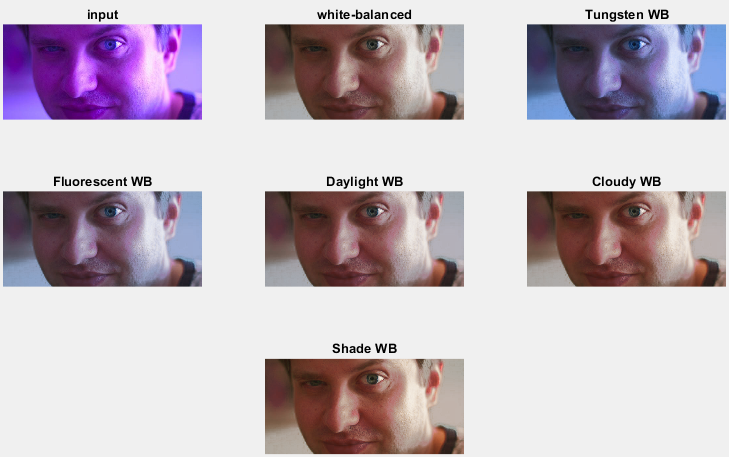
1. Run `demo_single_image.m` or `demo_images.m` to process a single image or image directory, respectively. The available tasks are AWB, all, and editing. If you run the demo_single_image.m, it should save the result in `../result_images` and output the following figure:
2. Run `demo_GUI.m` for a gui demo.

##### Training Code:
Run `training.m` to start training. You should adjust training image directories from the `datasetDir` variable before running the code. You can change the training settings in `training.m` before training.
For example, you can use `epochs` and `miniBatch` variables to change the number of training epochs and mini-batch size, respectively. If you set `fold = 0` and `trainingImgsNum = 0`, the training will use all training data without fold cross-validation. If you would like to limit the number of training images to be `n` images, set `trainingImgsNum` to `n`. If you would like to do 3-fold cross-validation, use `fold = testing_fold`. Then the code will train on the remaining folds and leave the selected fold for testing.
Other useful options include: `patchsPerImg` to select the number of random patches per image and `patchSize` to set the size of training patches. To control the learning rate drop rate and factor, please check the `get_training_options.m` function located in the `utilities` directory. You can use the `loadpath` variable to continue training from a training checkpoint `.mat` file. To start training from scratch, use `loadpath=[];`.
Once training started, a `.cvs` file will be created in the `reports_and_checkpoints` directory. You can use this file to visualize training progress. If you run Matlab with a graphical interface and you want to visualize some of input/output patches during training, set a breakpoint [here](./Matlab/arch/maeLossLayer.m#L30) and write the following code in the command window:
```close all; i = 1; figure; subplot(2,3,1);imshow(extractdata(Y(:,:,1:3,i))); subplot(2,3,2);imshow(extractdata(Y(:,:,4:6,i))); subplot(2,3,3);imshow(extractdata(Y(:,:,7:9,i))); subplot(2,3,4); imshow(gather(T(:,:,1:3,i))); subplot(2,3,5); imshow(gather(T(:,:,4:6,i))); subplot(2,3,6); imshow(gather(T(:,:,7:9,i)));```
You can change the value of `i` in the above code to see different images in the current training batch. The figure will show you produced patches (first row) and the corresponding ground truth patches (second row). For non-graphical interface, you can edit your custom code [here](./Matlab/arch/maeLossLayer.m#L30) to save example patches periodically. Hint: you may need to use a [persistent variable](https://www.mathworks.com/help/matlab/ref/persistent.html) to control the process. Alternative solutions include using [custom trianing loop](https://www.mathworks.com/help/deeplearning/ug/define-custom-training-loops-loss-functions-and-networks.html).
### 2. PyTorch
#### Prerequisite
1. Python 3.6
2. pytorch (tested with 1.2.0 and 1.5.0)
3. torchvision (tested with 0.4.0 and 0.6.0)
4. cudatoolkit
5. tensorboard (optional)
6. numpy
7. Pillow
8. future
9. tqdm
10. matplotlib
11. scipy
12. scikit-learn
##### The code may work with library versions other than the specified.
#### Get Started
##### Demos:
1. Run `demo_single_image.py` to process a single image.
Example of applying AWB + different WB settings: `python demo_single_image.py --input_image ../example_images/00.jpg --output_image ../result_images --show`. This example should save the output image in `../result_images` and output the following figure:

2. Run `demo_images.py` to process image directory. Example: `python demo_images.py --input_dir ../example_images/ --output_dir ../result_images --task AWB`. The available tasks are AWB, all, and editing. You can also specify the task in the `demo_single_image.py` demo.
##### Training Code:
Run `training.py` to start training. You should adjust training image directories before running the code.
Example: `CUDA_VISIBLE_DEVICE=0 python train.py --training_dir ../dataset/ --fold 0 --epochs 500 --learning-rate-drop-period 50 --num_training_images 0`. In this example, `fold = 0` and `num_training_images = 0` mean that the training will use all training data without fold cross-validation. If you would like to limit the number of training images to be `n` images, set `num_training_images` to `n`. If you would like to do 3-fold cross-validation, use `fold = testing_fold`. Then the code will train on the remaining folds and leave the selected fold for testing.
Other useful options include: `--patches-per-image` to select the number of random patches per image, `--learning-rate-drop-period` and `--learning-rate-drop-factor` to control the learning rate drop period and factor, respectively, and `--patch-size` to set the size of training patches. You can continue training from a training checkpoint `.pth` file using `--load` option.
If you have TensorBoard installed on your machine, run `tensorboard --logdir ./runs` after start training to check training progress and visualize samples of input/output patches.
### Results


This software is provided for research purposes only and CAN NOT be used for commercial purposes.
Maintainer: Mahmoud Afifi (m.3afifi@gmail.com)
## Related Research Projects
- [When Color Constancy Goes Wrong](https://github.com/mahmoudnafifi/WB_sRGB): The first work to directly address the problem of incorrectly white-balanced images; requires a small memory overhead and it is fast (CVPR 2019).
- [White-Balance Augmenter](https://github.com/mahmoudnafifi/WB_color_augmenter): An augmentation technique based on camera WB errors (ICCV 2019).
- [Interactive White Balancing](https://github.com/mahmoudnafifi/Interactive_WB_correction):A simple method to link the nonlinear white-balance correction to the user's selected colors to allow interactive white-balance manipulation (CIC 2020).
- [Exposure Correction](https://github.com/mahmoudnafifi/Exposure_Correction): A single coarse-to-fine deep learning model with adversarial training to correct both over- and under-exposed photographs (CVPR 2021).