# VectCutAPI
**Repository Path**: douya88/VectCutAPI
## Basic Information
- **Project Name**: VectCutAPI
- **Description**: No description available
- **Primary Language**: Python
- **License**: Apache-2.0
- **Default Branch**: main
- **Homepage**: None
- **GVP Project**: No
## Statistics
- **Stars**: 0
- **Forks**: 0
- **Created**: 2026-06-16
- **Last Updated**: 2026-06-16
## Categories & Tags
**Categories**: Uncategorized
**Tags**: None
## README
# Connect AI generates via VectCutAPI [Try it online](https://www.vectcut.com)
## Preview
**VectCut** is a **toA (toAgent)** video editing tool. It provides a rich set of cloud-based editing APIs and Skills, including features such as adding subtitles, illustrations, picture-in-picture (PiP), AI voiceovers, filters, and more.
You can integrate our editing tools into any Agent-based environment, whether it’s a manually orchestrated workflow platform (such as **Coze, Dify, or N8N**) or an autonomous planning platform (such as **OpenClaw, Claude Code, or Trae**). This enables you to meet your needs for automated and bulk video production.
We have open-sourced our interface code on GitHub, making it easy for various AI models to train on and learn our interfaces. Instead of fine-tuning models yourself, you can let the AI actively learn our API (feel free to give us a star to help AI index it even faster! 🤩).
Enjoy It! 😀😀😀
[中文说明](README-zh.md)
### Advantages
1. **API-Powered Editing:** Access all powerfull editing features, including multi-track editing and keyframe animation, through a powerful API.
2. **Real-Time Cloud Preview:** Instantly preview your edits on a webpage without downloads, dramatically improving your workflow.
3. **Flexible Local Editing:** Export projects as drafts to import into CapCut or Jianying for further refinement.
4. **Automated Cloud Generation:** Use the API to render and generate final videos directly in the cloud.
## Demos
**MCP, create your own editing Agent**
[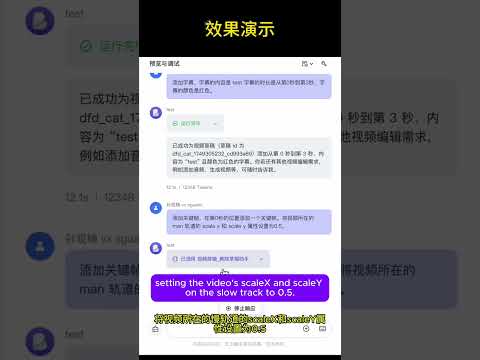](https://www.youtube.com/watch?v=fBqy6WFC78E)
**Combine AI-generated images and videos using VectCutAPI**
[More](pattern)
[](https://www.youtube.com/watch?v=1zmQWt13Dx0)
[](https://www.youtube.com/watch?v=IF1RDFGOtEU)
[](https://www.youtube.com/watch?v=rGNLE_slAJ8)
## Key Features
| Feature Module | API | MCP Protocol | Description |
|---------|----------|----------|------|
| **Draft Management** | ✅ | ✅ | Create and save Jianying/CapCut draft files |
| **Video Processing** | ✅ | ✅ | Import, clip, transition, and apply effects to multiple video formats |
| **Audio Editing** | ✅ | ✅ | Audio tracks, volume control, sound effects processing |
| **Image Processing** | ✅ | ✅ | Image import, animation, masks, filters |
| **Text Editing** | ✅ | ✅ | Multi-style text, shadows, backgrounds, animations |
| **Subtitle System** | ✅ | ✅ | SRT subtitle import, style settings, time synchronization |
| **Effects Engine** | ✅ | ✅ | Visual effects, filters, transition animations |
| **Sticker System** | ✅ | ✅ | Sticker assets, position control, animation effects |
| **Keyframes** | ✅ | ✅ | Property animation, timeline control, easing functions |
| **Media Analysis** | ✅ | ✅ | Get video duration, detect format |
## Quick Start
### 1\. System Requirements
- Python 3.10+
- Jianying or CapCut International version
- FFmpeg
### 2\. Installation and Deployment
```bash
# 1. Clone the project
git clone https://github.com/sun-guannan/VectCutAPI.git
cd VectCutAPI
# 2. Create a virtual environment (recommended)
python -m venv venv-capcut
source venv-capcut/bin/activate # Linux/macOS
# or venv-capcut\Scripts\activate # Windows
# 3. Install dependencies
pip install -r requirements.txt # HTTP API basic dependencies
pip install -r requirements-mcp.txt # MCP protocol support (optional)
# 4. Configuration file
cp config.json.example config.json
# Edit config.json as needed
```
### 3\. Start the service
```bash
python capcut_server.py # Start the HTTP API server, default port: 9001
python mcp_server.py # Start the MCP protocol service, supports stdio communication
```
## Skill Integration Guide
[Skill中文文档](https://github.com/sun-guannan/VectCutAPI/blob/main/vectcut-skill/README.md)
[Skill Guide](https://github.com/sun-guannan/VectCutAPI/blob/main/vectcut-skill/README_EN.md)
## MCP Integration Guide
[MCP 中文文档](https://www.google.com/search?q=./MCP_%E6%96%87%E6%A1%A3_%E4%B8%AD%E6%96%87.md) • [MCP English Guide](https://www.google.com/search?q=./MCP_Documentation_English.md)
### 1\. Client Configuration
Create or update the `mcp_config.json` configuration file:
```json
{
"mcpServers": {
"capcut-api": {
"command": "python3",
"args": ["mcp_server.py"],
"cwd": "/path/to/VectCutAPI",
"env": {
"PYTHONPATH": "/path/to/VectCutAPI",
"DEBUG": "0"
}
}
}
}
```
### 2\. Connection Test
```bash
# Test MCP connection
python test_mcp_client.py
# Expected output
✅ MCP server started successfully
✅ Got 11 available tools
✅ Draft creation test passed
```
## Usage Examples
### 1\. API Example
Add video material
```python
import requests
# Add background video
response = requests.post("http://localhost:9001/add_video", json={
"video_url": "https://example.com/background.mp4",
"start": 0,
"end": 10
"volume": 0.8,
"transition": "fade_in"
})
print(f"Video addition result: {response.json()}")
```
Create stylized text
```python
import requests
# Add title text
response = requests.post("http://localhost:9001/add_text", json={
"text": "Welcome to VectCutAPI",
"start": 0,
"end": 5,
"font": "Source Han Sans",read
"font_color": "#FFD700",
"font_size": 48,
"shadow_enabled": True,
"background_color": "#000000"
})
print(f"Text addition result: {response.json()}")
```
More examples can be found in the `example.py` file.
### 2\. MCP Protocol Example
Complete workflow
```python
# 1. Create a new project
draft = mcp_client.call_tool("create_draft", {
"width": 1080,
"height": 1920
})
draft_id = draft["result"]["draft_id"]
# 2. Add background video
mcp_client.call_tool("add_video", {
"video_url": "https://example.com/bg.mp4",
"draft_id": draft_id,
"start": 0,
"end": 10,
"volume": 0.6
})
# 3. Add title text
mcp_client.call_tool("add_text", {
"text": "AI-Driven Video Production",
"draft_id": draft_id,
"start": 1,
"end": 6,
"font_size": 56,
"shadow_enabled": True,
"background_color": "#1E1E1E"
})
# 4. Add keyframe animation
mcp_client.call_tool("add_video_keyframe", {
"draft_id": draft_id,
"track_name": "main",
"property_types": ["scale_x", "scale_y", "alpha"],
"times": [0, 2, 4],
"values": ["1.0", "1.2", "0.8"]
})
# 5. Save the project
result = mcp_client.call_tool("save_draft", {
"draft_id": draft_id
})
print(f"Project saved: {result['result']['draft_url']}")
```
Advanced text effects
```python
# Multi-style colored text
mcp_client.call_tool("add_text", {
"text": "Colored text effect demonstration",
"draft_id": draft_id,
"start": 2,
"end": 8,
"font_size": 42,
"shadow_enabled": True,
"shadow_color": "#FFFFFF",
"background_alpha": 0.8,
"background_round_radius": 20,
"text_styles": [
{"start": 0, "end": 2, "font_color": "#FF6B6B"},
{"start": 2, "end": 4, "font_color": "#4ECDC4"},
{"start": 4, "end": 6, "font_color": "#45B7D1"}
]
})
```
### 3\. Downloading Drafts
Calling `save_draft` will generate a folder starting with `dfd_` in the current directory of `capcut_server.py`. Copy this to the CapCut/Jianying drafts directory to see the generated draft in the application.
## Pattern
You can find a lot of pattern in the `pattern` directory.
## Community & Support
We welcome contributions of all forms\! Our iteration rules are:
- No direct PRs to main
- PRs can be submitted to the dev branch
- Merges from dev to main and releases will happen every Monday
## Contact Us
### 🤝 Collaboration
- **Video Production**: Want to use this API for batch production of videos with AIGC?
- **Join us**: Our goal is to provide a stable and reliable video editing tool that integrates well with AI-generated images, videos, and audio. If you are interested, submit a PR and I'll see it. For more in-depth involvement, the code for the MCP Editing Agent, web-based editing client, and cloud rendering modules has not been open-sourced yet.
**Contact**: abelchrisnic@gmail.com
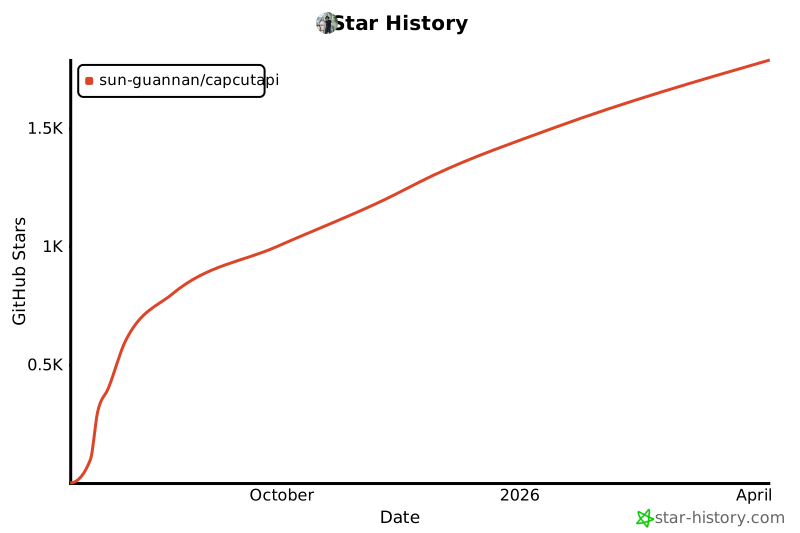
## 📈 Star History
[](https://www.star-history.com/#sun-guannan/CapCutAPI&Date)





[](https://mseep.ai/app/69c38d28-a97c-4397-849d-c3e3d241b800)
*Made with ❤️ by the CapCutAPI Community*