# FXGL
**Repository Path**: dragonknightofbreeze/FXGL
## Basic Information
- **Project Name**: FXGL
- **Description**: Java / JavaFX / Kotlin Game Library (Engine)
- **Primary Language**: Unknown
- **License**: MIT
- **Default Branch**: master
- **Homepage**: None
- **GVP Project**: No
## Statistics
- **Stars**: 0
- **Forks**: 0
- **Created**: 2021-01-06
- **Last Updated**: 2024-06-01
## Categories & Tags
**Categories**: Uncategorized
**Tags**: None
## README
## About
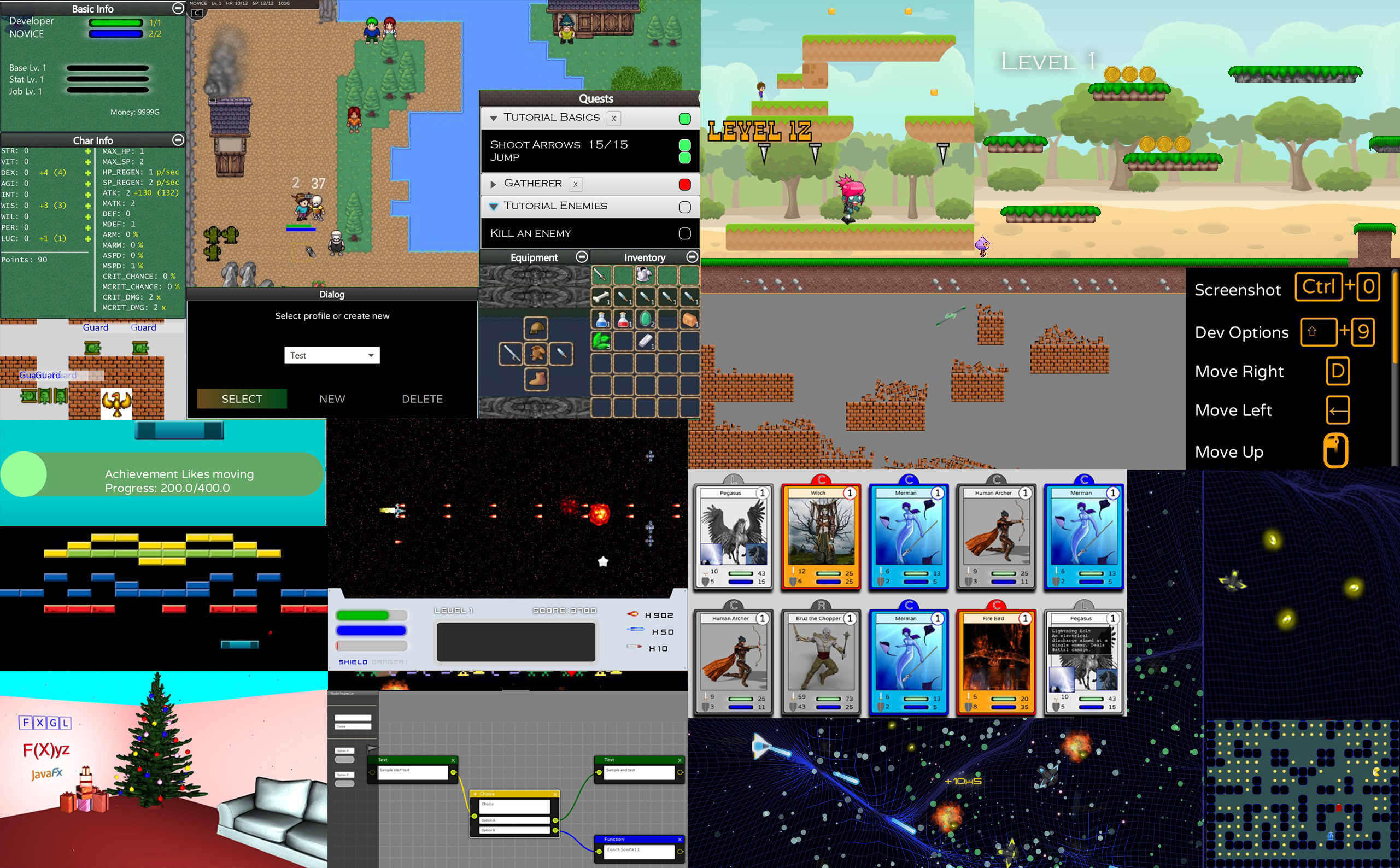
 JavaFX Game Development Framework
[]()
[](https://travis-ci.org/AlmasB/FXGL)
[](https://codecov.io/gh/AlmasB/FXGL)
### Why FXGL?
* No installation or setup required
* "Out of the box": Java 8-12, Win/Mac/Linux/Android 5.0+([Sample](https://github.com/AlmasB/FXGL-MobileApp))/iOS([alpha](https://github.com/AlmasB/FXGL-MobileApp))/Web([Sample](https://github.com/AlmasB/FXGL-WebApp))
* Simple and clean API, higher level than other engines
* Superset of JavaFX: no need to learn new UI API
* Real-world game development techniques: Entity-Component, Event System, Scripting, and [many more](https://github.com/AlmasB/FXGL/wiki/Core-Features)
* Games are easily packaged into a single executable .jar or native images
### Good for:
* Any 2D genre (side-scroller / platformer / arcade / RPG)
* Complex UI controls
* Hobby / academic / commercial projects
* Teaching / learning / improving game development skills
* Fast prototyping of game ideas
### Minimal Example
```java
public class BasicGameApp extends GameApplication {
@Override
protected void initSettings(GameSettings settings) {
settings.setWidth(800);
settings.setHeight(600);
settings.setTitle("Basic Game App");
}
public static void main(String[] args) {
launch(args);
}
}
```
## Getting Started
- Version for Java 8-10: `0.5.4` (not updated)
- Version for Java 11: `11.5` (frequent updates)
FXGL 11 supports Java 11+ and has a more scalable architecture,
but currently supports only a subset of features from `0.5.4`.
Want a quick dive into code? See [basic examples](https://github.com/AlmasB/FXGL/tree/master/fxgl-samples/src/main/java/basics).
Otherwise, you have the following options:
* [Java 11 modules](https://github.com/AlmasB/FXGL/wiki/FXGL-11-%28Java-11-modules%29)
* [Wiki & Written tutorials](https://github.com/AlmasB/FXGL/wiki)
* [YouTube tutorials](https://www.youtube.com/playlist?list=PL4h6ypqTi3RTiTuAQFKE6xwflnPKyFuPp)
* [Sample code demos](fxgl-samples)
* [FXGL games](https://github.com/AlmasB/FXGLGames) (src)
* [Game demos](https://github.com/AlmasB/FXGLGames/tree/master/binaries) (.jar)
### Maven
* [Maven](https://github.com/AlmasB/FXGL-Maven) project if you use Java
* [Maven](https://github.com/AlmasB/FXGL-MavenKt) project if you use Kotlin
Already have `pom.xml`? Then add: (use `0.5.4` for Java 8-10). **Note:** make sure to set `11` for `maven-compiler-plugin`.
```
com.github.almasb
fxgl
11.5
```
### Gradle
* [Gradle](https://github.com/AlmasB/FXGL-Gradle) project if you use Java 8-10
* [Gradle](https://github.com/AlmasB/FXGL11-Gradle) project if you use Java 11+
* [Gradle](https://github.com/AlmasB/FXGL-GradleKt) project if you use Kotlin
Already have `build.gradle`? Then add: (use `0.5.4` for Java 8-10). **Note:** in case you have errors, please see templates for Gradle above.
```
repositories {
jcenter()
}
dependencies {
compile 'com.github.almasb:fxgl:11.5'
}
```
### Uber jar
Download the latest uber jar from [Releases](https://github.com/AlmasB/FXGL/releases)
## Community
* University of Brighton, UK
* University of Nottingham, UK
* kidOYO, USA
* Walton High School, USA
* Zealand Institute of Business and Technology, Denmark
* Federal Institute of Education, Science and Technology of Rio Grande do Sul, Brazil
If your institution wants to use / is using FXGL, drop me an email to discuss how FXGL can aid your course.
### Contribution & Support
If you want to build FXGL from sources or want to contribute,
please see the [Contribution Guide](CONTRIBUTING.md) (including non-code).
FXGL is fully modular, so new contributors do not need to understand the entire codebase, only the module to which the contribution is made.
You can support the FXGL development / show interest by simply starring the repo.
### Contact
* Ask questions on [StackOverflow](https://stackoverflow.com/search?q=fxgl) with tags `javafx` and `fxgl`
* Tweet with [#fxgl](https://twitter.com/search?src=typd&q=%23fxgl)
* [Chat](https://gitter.im/AlmasB/FXGL) with the friendly FXGL community
* 
JavaFX Game Development Framework
[]()
[](https://travis-ci.org/AlmasB/FXGL)
[](https://codecov.io/gh/AlmasB/FXGL)
### Why FXGL?
* No installation or setup required
* "Out of the box": Java 8-12, Win/Mac/Linux/Android 5.0+([Sample](https://github.com/AlmasB/FXGL-MobileApp))/iOS([alpha](https://github.com/AlmasB/FXGL-MobileApp))/Web([Sample](https://github.com/AlmasB/FXGL-WebApp))
* Simple and clean API, higher level than other engines
* Superset of JavaFX: no need to learn new UI API
* Real-world game development techniques: Entity-Component, Event System, Scripting, and [many more](https://github.com/AlmasB/FXGL/wiki/Core-Features)
* Games are easily packaged into a single executable .jar or native images
### Good for:
* Any 2D genre (side-scroller / platformer / arcade / RPG)
* Complex UI controls
* Hobby / academic / commercial projects
* Teaching / learning / improving game development skills
* Fast prototyping of game ideas
### Minimal Example
```java
public class BasicGameApp extends GameApplication {
@Override
protected void initSettings(GameSettings settings) {
settings.setWidth(800);
settings.setHeight(600);
settings.setTitle("Basic Game App");
}
public static void main(String[] args) {
launch(args);
}
}
```
## Getting Started
- Version for Java 8-10: `0.5.4` (not updated)
- Version for Java 11: `11.5` (frequent updates)
FXGL 11 supports Java 11+ and has a more scalable architecture,
but currently supports only a subset of features from `0.5.4`.
Want a quick dive into code? See [basic examples](https://github.com/AlmasB/FXGL/tree/master/fxgl-samples/src/main/java/basics).
Otherwise, you have the following options:
* [Java 11 modules](https://github.com/AlmasB/FXGL/wiki/FXGL-11-%28Java-11-modules%29)
* [Wiki & Written tutorials](https://github.com/AlmasB/FXGL/wiki)
* [YouTube tutorials](https://www.youtube.com/playlist?list=PL4h6ypqTi3RTiTuAQFKE6xwflnPKyFuPp)
* [Sample code demos](fxgl-samples)
* [FXGL games](https://github.com/AlmasB/FXGLGames) (src)
* [Game demos](https://github.com/AlmasB/FXGLGames/tree/master/binaries) (.jar)
### Maven
* [Maven](https://github.com/AlmasB/FXGL-Maven) project if you use Java
* [Maven](https://github.com/AlmasB/FXGL-MavenKt) project if you use Kotlin
Already have `pom.xml`? Then add: (use `0.5.4` for Java 8-10). **Note:** make sure to set `11` for `maven-compiler-plugin`.
```
com.github.almasb
fxgl
11.5
```
### Gradle
* [Gradle](https://github.com/AlmasB/FXGL-Gradle) project if you use Java 8-10
* [Gradle](https://github.com/AlmasB/FXGL11-Gradle) project if you use Java 11+
* [Gradle](https://github.com/AlmasB/FXGL-GradleKt) project if you use Kotlin
Already have `build.gradle`? Then add: (use `0.5.4` for Java 8-10). **Note:** in case you have errors, please see templates for Gradle above.
```
repositories {
jcenter()
}
dependencies {
compile 'com.github.almasb:fxgl:11.5'
}
```
### Uber jar
Download the latest uber jar from [Releases](https://github.com/AlmasB/FXGL/releases)
## Community
* University of Brighton, UK
* University of Nottingham, UK
* kidOYO, USA
* Walton High School, USA
* Zealand Institute of Business and Technology, Denmark
* Federal Institute of Education, Science and Technology of Rio Grande do Sul, Brazil
If your institution wants to use / is using FXGL, drop me an email to discuss how FXGL can aid your course.
### Contribution & Support
If you want to build FXGL from sources or want to contribute,
please see the [Contribution Guide](CONTRIBUTING.md) (including non-code).
FXGL is fully modular, so new contributors do not need to understand the entire codebase, only the module to which the contribution is made.
You can support the FXGL development / show interest by simply starring the repo.
### Contact
* Ask questions on [StackOverflow](https://stackoverflow.com/search?q=fxgl) with tags `javafx` and `fxgl`
* Tweet with [#fxgl](https://twitter.com/search?src=typd&q=%23fxgl)
* [Chat](https://gitter.im/AlmasB/FXGL) with the friendly FXGL community
* 