
Documentation • Example • Change Log





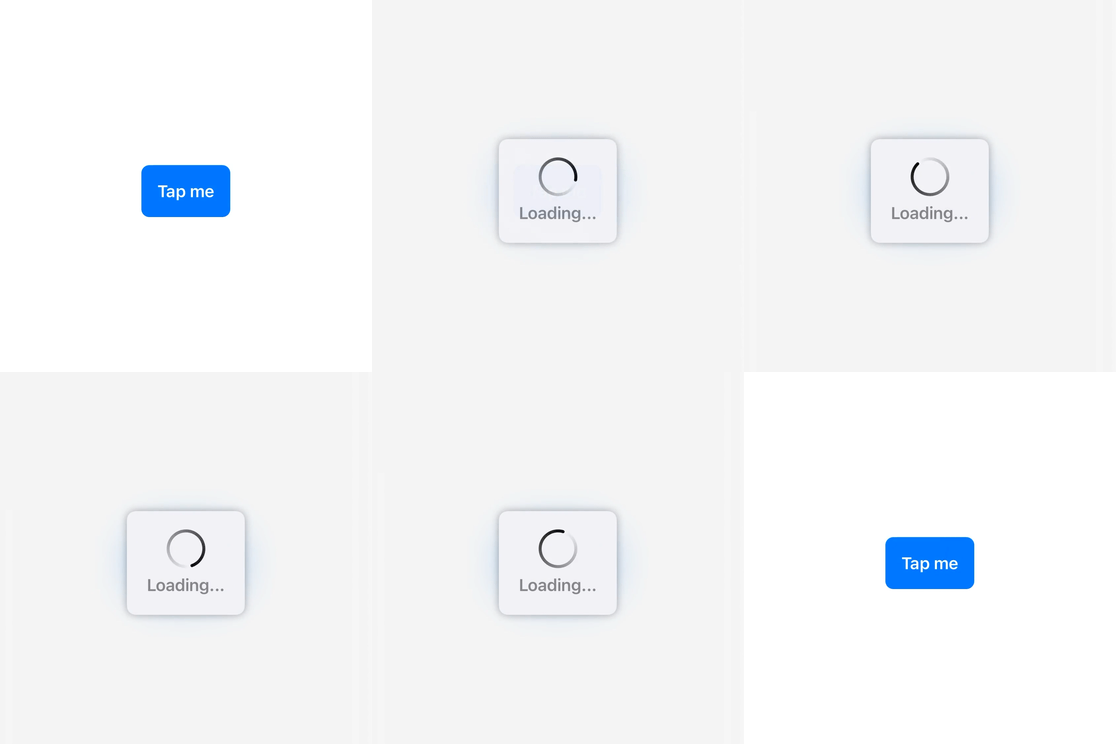 ``` swift
struct ContentView: View {
@State private var presentingToast: Bool = false
var body: some View {
Button {
presentingToast = true
} label: {
Text("Tap me")
.bold()
.foregroundColor(.white)
.padding()
.background(Color.accentColor)
.cornerRadius(8.0)
}
.toast(isPresented: $presentingToast, dismissAfter: 2.0) {
print("Toast dismissed")
} content: {
ToastView("Loading...")
.toastViewStyle(IndefiniteProgressToastViewStyle())
}
}
}
```
You can also present custom alerts or any SwiftUI views of your choice.
``` swift
struct ContentView: View {
@State private var presentingToast: Bool = false
var body: some View {
Button {
presentingToast = true
} label: {
Text("Tap me")
.bold()
.foregroundColor(.white)
.padding()
.background(Color.accentColor)
.cornerRadius(8.0)
}
.toast(isPresented: $presentingToast, dismissAfter: 2.0) {
print("Toast dismissed")
} content: {
ToastView("Loading...")
.toastViewStyle(IndefiniteProgressToastViewStyle())
}
}
}
```
You can also present custom alerts or any SwiftUI views of your choice.
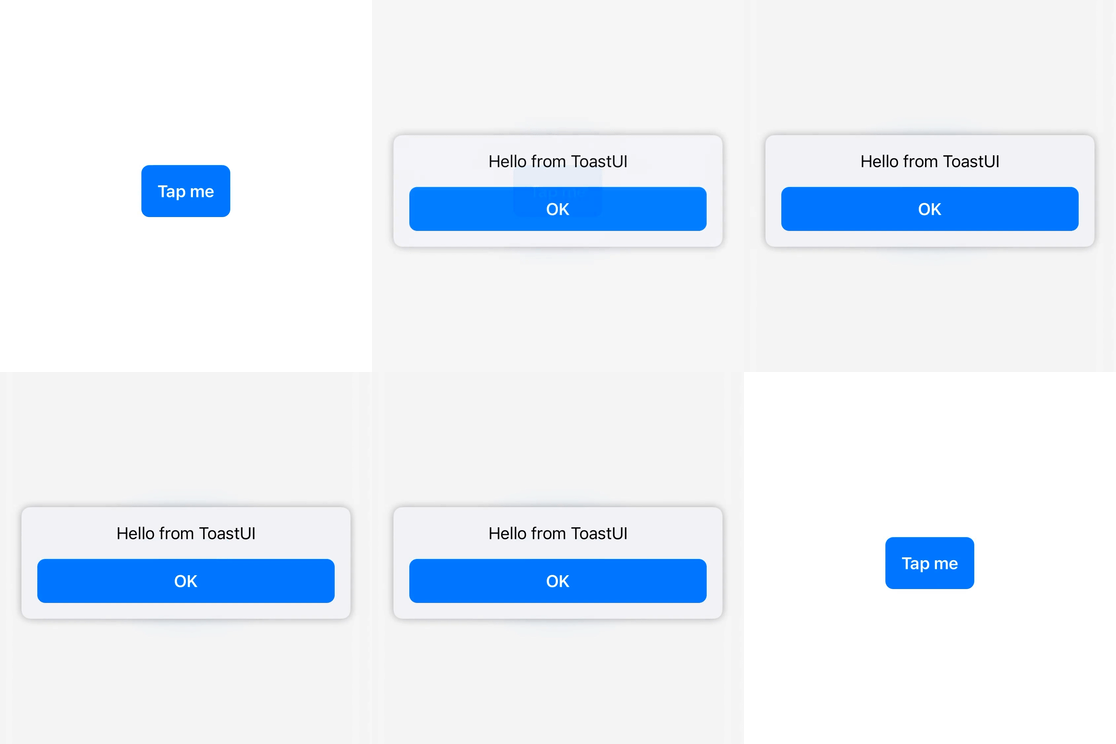 ``` swift
struct ContentView: View {
@State private var presentingToast: Bool = false
var body: some View {
Button {
presentingToast = true
} label: {
Text("Tap me")
.bold()
.foregroundColor(.white)
.padding()
.background(Color.accentColor)
.cornerRadius(8.0)
}
.toast(isPresented: $presentingToast) {
ToastView {
VStack {
Text("Hello from ToastUI")
.padding(.bottom)
.multilineTextAlignment(.center)
Button {
presentingToast = false
} label: {
Text("OK")
.bold()
.foregroundColor(.white)
.padding(.horizontal)
.padding(.vertical, 12.0)
.background(Color.accentColor)
.cornerRadius(8.0)
}
}
}
}
}
}
```
Have a look at the [ `ToastUISample` ](ToastUISample) project for more examples and also check out the [Documentation](#documentation) below.
## Requirements
* iOS 14.0+ | tvOS 14.0+ | macOS 11.0+
* Xcode 12.0+ | Swift 5.3+
## Installation
#### Swift Package Manager
`ToastUI` is available through [Swift Package Manager](https://swift.org/package-manager/).
For app integration, add `ToastUI` to an existing Xcode project as a package dependency:
1. From the **File** menu, select **Swift Packages > Add Package Dependency...**
2. Enter https://github.com/quanshousio/ToastUI into the package repository URL text field.
3. Xcode should choose updates package up to the next version option by default.
For package integration, add the following line to the `dependencies` parameter in your `Package.swift` .
``` swift
dependencies: [
.package(url: "https://github.com/quanshousio/ToastUI.git", from: "2.0.0")
]
```
#### CocoaPods
`ToastUI` is available through [CocoaPods](https://cocoapods.org). To install it, add the following line to your `Podfile` :
``` ruby
pod 'ToastUI'
```
## Documentation
For more detailed documentation, please see **[here](https://quanshousio.github.io/ToastUI/)**.
#### Presenting
`ToastUI` supports presenting any SwiftUI views from anywhere. You just need to add `toast()` view modifier and provide your views, much like using `alert()` or `sheet()` .
``` swift
.toast(isPresented: $presentingToast) {
// your SwiftUI views here
}
```
There are two types of `toast()` view modifier. For more usage information, check out the [examples](ToastUISample).
* `toast(isPresented:dismissAfter:onDismiss:content:)` – presents a toast when the given boolean binding is true.
* `toast(item:dismissAfter:onDismiss:content:)` – presents a toast using the given item as a data source for the toast's content.
#### ToastView
`ToastUI` comes with `ToastView` , which visually represented as a rounded rectangle shape that contains your provided views and has a default thin blurred background.
``` swift
.toast(isPresented: $presentingToast) {
ToastView("Hello from ToastUI")
}
```
Layout of `ToastView` is demonstrated in this figure below.
``` swift
+-----------------------------+
| |
|
``` swift
struct ContentView: View {
@State private var presentingToast: Bool = false
var body: some View {
Button {
presentingToast = true
} label: {
Text("Tap me")
.bold()
.foregroundColor(.white)
.padding()
.background(Color.accentColor)
.cornerRadius(8.0)
}
.toast(isPresented: $presentingToast) {
ToastView {
VStack {
Text("Hello from ToastUI")
.padding(.bottom)
.multilineTextAlignment(.center)
Button {
presentingToast = false
} label: {
Text("OK")
.bold()
.foregroundColor(.white)
.padding(.horizontal)
.padding(.vertical, 12.0)
.background(Color.accentColor)
.cornerRadius(8.0)
}
}
}
}
}
}
```
Have a look at the [ `ToastUISample` ](ToastUISample) project for more examples and also check out the [Documentation](#documentation) below.
## Requirements
* iOS 14.0+ | tvOS 14.0+ | macOS 11.0+
* Xcode 12.0+ | Swift 5.3+
## Installation
#### Swift Package Manager
`ToastUI` is available through [Swift Package Manager](https://swift.org/package-manager/).
For app integration, add `ToastUI` to an existing Xcode project as a package dependency:
1. From the **File** menu, select **Swift Packages > Add Package Dependency...**
2. Enter https://github.com/quanshousio/ToastUI into the package repository URL text field.
3. Xcode should choose updates package up to the next version option by default.
For package integration, add the following line to the `dependencies` parameter in your `Package.swift` .
``` swift
dependencies: [
.package(url: "https://github.com/quanshousio/ToastUI.git", from: "2.0.0")
]
```
#### CocoaPods
`ToastUI` is available through [CocoaPods](https://cocoapods.org). To install it, add the following line to your `Podfile` :
``` ruby
pod 'ToastUI'
```
## Documentation
For more detailed documentation, please see **[here](https://quanshousio.github.io/ToastUI/)**.
#### Presenting
`ToastUI` supports presenting any SwiftUI views from anywhere. You just need to add `toast()` view modifier and provide your views, much like using `alert()` or `sheet()` .
``` swift
.toast(isPresented: $presentingToast) {
// your SwiftUI views here
}
```
There are two types of `toast()` view modifier. For more usage information, check out the [examples](ToastUISample).
* `toast(isPresented:dismissAfter:onDismiss:content:)` – presents a toast when the given boolean binding is true.
* `toast(item:dismissAfter:onDismiss:content:)` – presents a toast using the given item as a data source for the toast's content.
#### ToastView
`ToastUI` comes with `ToastView` , which visually represented as a rounded rectangle shape that contains your provided views and has a default thin blurred background.
``` swift
.toast(isPresented: $presentingToast) {
ToastView("Hello from ToastUI")
}
```
Layout of `ToastView` is demonstrated in this figure below.
``` swift
+-----------------------------+
| |
|