# x-ui
**Repository Path**: dsguang/x-ui
## Basic Information
- **Project Name**: x-ui
- **Description**: Lightweight Xray panel with multi-protocol and multi-user on the same port,supports English language and Telegram bot. Easy to use and easy to manage.
- **Primary Language**: Unknown
- **License**: GPL-3.0
- **Default Branch**: main
- **Homepage**: None
- **GVP Project**: No
## Statistics
- **Stars**: 0
- **Forks**: 0
- **Created**: 2026-03-03
- **Last Updated**: 2026-03-15
## Categories & Tags
**Categories**: Uncategorized
**Tags**: None
## README
# X-UI
简体中文|[ENGLISH](./README_EN.md)
> 免责声明:该项目仅供个人学习、交流,请遵守当地法律法规,勿用于非法用途;请勿用于生产环境
支持单端口多用户、多协议的 xray 面板,究极缝合怪
通过免费的Telegram bot方便快捷地进行监控、管理你的代理服务
⚡`xtls-rprx-vision`与`reality`快速入手请看[这里](https://github.com/FranzKafkaYu/x-ui/wiki/%E8%8A%82%E7%82%B9%E9%85%8D%E7%BD%AE)
欢迎大家使用并反馈意见或提交Pr,帮助项目更好的改善
如果您觉得本项目对您有所帮助,不妨给个star:star2:支持我
或者你恰巧有购买服务器的需求,可以通过文末的赞助部分支持我~
# 文档目录
- [功能介绍](#功能介绍)
- [一键安装](#一键安装)
- [效果预览](#效果预览)
- [快捷方式](#快捷方式)
- [变更记录](#变更记录)
# 功能介绍
- 系统状态监控
- 支持单端口多用户、多协议,网页可视化操作
- 支持的协议:vmess、vless、trojan、shadowsocks、shadowsocks 2022、dokodemo-door、socks、http
- 支持配置更多传输配置:http、tcp、ws、grpc、kcp、quic
- 流量统计,限制流量,限制到期时间,一键重置与设备监控
- 可自定义 xray 配置模板
- 支持 https 访问面板(自备域名 + ssl 证书)
- 支持一键SSL证书申请且自动续签
- Telegram bot通知、控制功能
- 更多高级配置项,详见面板
:bulb:具体**使用、配置细节以及问题排查**请点击这里:point_right:[WIKI](https://github.com/FranzKafkaYu/x-ui/wiki):point_left:
Specific **Usages、Configurations and Debug** please refer to [WIKI](https://github.com/FranzKafkaYu/x-ui/wiki)
# 一键安装
在安装前请确保你的系统支持`bash`环境,且系统网络正常
⚡从原版升级也可使用该命令,数据不会丢失⚡
```
bash <(curl -Ls https://raw.githubusercontent.com/FranzKafkaYu/x-ui/master/install.sh)
```
For English Users,please use the following command to install English supported version:
```
bash <(curl -Ls https://raw.githubusercontent.com/FranzKafkaYu/x-ui/master/install_en.sh)
```
如需安装指定的版本,可以在上述命令中指定版本号,如指定版本为`0.3.4.4`,安装命令如下:
```
bash <(curl -Ls https://raw.githubusercontent.com/FranzKafkaYu/x-ui/master/install.sh) 0.3.4.4
```
# 效果预览
`面板使用`:
点击查看效果预览


`Bot使用`:
点击查看效果预览

`流量提醒`:
点击查看效果预览

`SSH提醒`:
点击查看效果预览

`限额提醒`:
点击查看效果预览

`到期提醒`:
点击查看效果预览

`登录提醒`:
点击查看效果预览


`用户速览`:
点击查看效果预览

`用户查询`:
点击查看效果预览

# 快捷方式
安装成功后,通过键入`x-ui`进入控制选项菜单,目前菜单内容:
```
x-ui 面板管理脚本
0. 退出脚本
————————————————
1. 安装 x-ui
2. 更新 x-ui
3. 卸载 x-ui
————————————————
4. 重置用户名密码
5. 重置面板设置
6. 设置面板端口
7. 查看当前面板设置
————————————————
8. 启动 x-ui
9. 停止 x-ui
10. 重启 x-ui
11. 查看 x-ui 状态
12. 查看 x-ui 日志
————————————————
13. 设置 x-ui 开机自启
14. 取消 x-ui 开机自启
————————————————
15. 一键安装 bbr (最新内核)
16. 一键申请SSL证书(acme申请)
面板状态: 已运行
是否开机自启: 是
xray 状态: 运行
请输入选择 [0-16]:
```
# 配置要求
## 内存
- 128MB minimal/256MB+ recommend
## OS
- CentOS 7+
- Ubuntu 16+
- Debian 8+
# 变更记录
- 2023.07.18:随机生成Reality dest与serverNames,去除微软域名;细化sniffing配置
- 2023.06.10:开启TLS时自动复用面板证书与域名;增加证书热重载设定;优化设备限制功能
- 2023.04.09:支持Reality;支持新的telegram bot控制指令
- 2023.03.05:支持用户到期时间限制;随机用户名、密码与端口生成
- 2023.02.09:支持单端口内用户流量限制与统计;支持VLESS utls配置与分享链接导出
- 2022.12.07:添加设备并发限制;细化tls配置,支持minVersion、maxVersion与cipherSuites选择
- 2022.11.14:添加xtls-rprx-vision流控选项;定时自动更新geo与清除日志
- 2022.10.23:实现全英文支持;增加批量导出分享链接功能;优化页面细节与Telegram通知
- 2022.08.11:实现Vmess/Vless/Trojan单端口多用户;增加CPU使用超限提醒
- 2022.07.28:增加acme standalone模式申请证书;增加x-ui自动保活机制;优化编译选项以适配更多系统
- 2022.07.24:增加自动生成面板根路径,节点流量自动重置功能,设备IP接入变化通知功能
- 2022.07.21:增加节点IP接入变化提醒,Web面板增加停止/重启xray功能,优化部分翻译
- 2022.07.11:增加节点到期提醒、流量预警策略,增加Telegram bot节点复制、获取分享链接等
- 2022.07.03:重构Telegram bot功能,指令控制不再需要键盘输入;增加Trojan底层传输配置
- 2022.06.19:增加Shadowsocs2022新的Cipher,增加节点搜索、一键清除流量功能
- 2022.05.14:增加Telegram bot Command控制功能,支持关闭/开启/删除节点等
- 2022.04.25:增加SSH登录提醒、面板登录提醒
- 2022.04.23:增加更多Telegram bot提醒功能
- 2022.04.16:增加面板设置Telegram bot功能
- 2022.04.12:优化Telegram Bot通知提醒
- 2022.04.06:优化安装/更新流程,增加证书签发功能,添加Telegram bot机器人推送功能
# Telegram
[订阅频道](https://t.me/CoderfanBaby)
[讨论群组](https://t.me/franzkafayu)
# 致谢
- [vaxilu/x-ui](https://github.com/vaxilu/x-ui)
- [XTLS/Xray-core](https://github.com/XTLS/Xray-core)
- [telegram-bot-api](https://github.com/go-telegram-bot-api/telegram-bot-api)
# 广告赞助
如果你觉得本项目对你有用,而且你也恰巧有这方面的需求,你也可以选择通过我的购买链接赞助我
- [搬瓦工GIA高端线路](https://bandwagonhost.com/aff.php?aff=65703),仅推荐购买GIA套餐
- [Cloudcone性价比主机提供商](https://app.cloudcone.com/?ref=7536)
- [Spartan三网4837性价比主机](https://billing.spartanhost.net/aff.php?aff=1875)
- USDT TRC20:`TYZ5MAq5YvtCMsjQDq1TJZnMWmjMVGLk2T`

如果你希望购买一些现成的代理服务,可选择下述代理服务
- [搬瓦工关联机场](https://justmysocks.net/members/aff.php?aff=18177)
- [高端奶昔机场](https://nxboom.com/signupbyemail.aspx?MemberCode=2fd79885e45549049c66698f1eea154620230921234746)
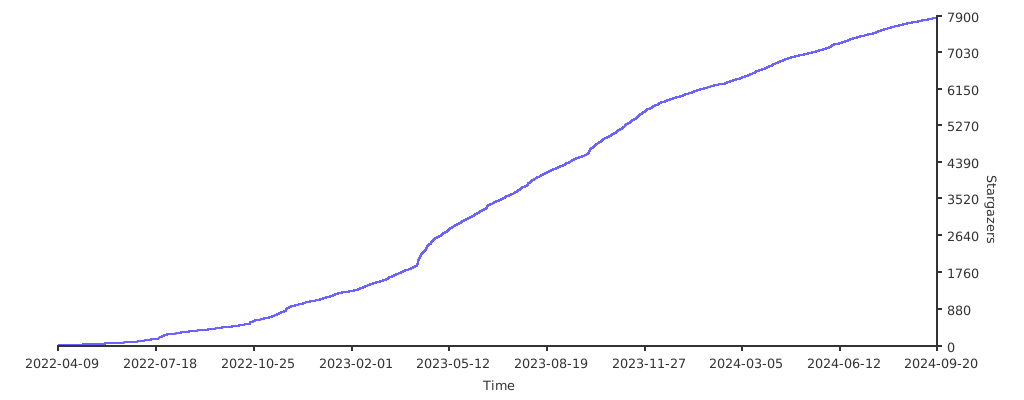
## Stargazers over time
[](https://starchart.cc/FranzKafkaYu/x-ui)