# JSSample
**Repository Path**: ekber/JSSample
## Basic Information
- **Project Name**: JSSample
- **Description**: No description available
- **Primary Language**: Unknown
- **License**: Apache-2.0
- **Default Branch**: master
- **Homepage**: None
- **GVP Project**: No
## Statistics
- **Stars**: 0
- **Forks**: 0
- **Created**: 2018-03-15
- **Last Updated**: 2020-12-18
## Categories & Tags
**Categories**: Uncategorized
**Tags**: None
## README
# JSSample
自定义progressbar 简书讲解1 http://www.jianshu.com/p/c2370b2f2d26
progressbar 自定义progressbar 进度条 圆形progressbar
---
世界因为有了互相帮助,变得美好!
程序的世界因为有了分享,一切都变得更容易!
一直以来,各种开源项目给了我们工作极大的便利,作为一个懂得感恩的人,我也想分享一些东西,可能网上类似的分享已经有很多了,但还是准备写一些东西,希望做些微贡献。
本人独自负责上线应用[赛百姿App](http://app.saibaizi.com)近一年,其中也积累了一些个人觉得值得分享的东西,准备按计划写个系列。有需要的可以下载app查看,可针对各位想要了解的地方作针对性讲解分享。
详细自定义View流程,其他自定义view以此类推,后面还会讲一个炫酷的自定义view
---
[AppSimple](http://pan.baidu.com/share/link?shareid=1296757564&uk=3961162285)
##### 先看效果以及怎

```
==xml配置==
==代码配置==
new SProgress(MainActivity.this)
.setProgress(0)
.setColor(colors[a][b], colors[b][a], 0xffff0000)
.setTextSize(12)
.animatorToProgress(99);
```
#### 第一步:确定所需属性,在attrs.xml中定义相应属性。
- 根据需求需要以下属性
```
//进度开始颜色
//进度结束颜色
//背景色
//文字颜色
//文字大小
//最小进度
//起始进度
```
#### 第二步:获取属性 初始化相关参数
- 获取属性
```
private void obtainData(AttributeSet attrs) {
TypedArray a = getContext().obtainStyledAttributes(attrs, R.styleable.SProgress);
progressColor = a.getColor(R.styleable.SProgress_progressColor, progressColor);
progressendcolor = a.getColor(R.styleable.SProgress_progressendcolor, progressendcolor);
backColor = a.getColor(R.styleable.SProgress_backColor, backColor);
textColor = a.getColor(R.styleable.SProgress_textColor, textColor);
textsize = a.getDimension(R.styleable.SProgress_textsize, textsize);
minProgress = a.getFloat(R.styleable.SProgress_minProgress, 0);
progress = a.getFloat(R.styleable.SProgress_startprogress, 0);
a.recycle();
}
```
- 初始化、
```
private void init() {
//背景画笔
bgpaint = new Paint();
bgpaint.setColor(backColor);
bgpaint.setAntiAlias(true);
//进度画笔
proPaint = new Paint();
proPaint.setColor(progressColor);
//设置为渐变进度效果
LinearGradient linearGradient = new LinearGradient(0, 0, width, height, progressColor, progressendcolor, Shader.TileMode.CLAMP);
proPaint.setShader(linearGradient);
proPaint.setAntiAlias(true);
//文字画笔
textPaint = new Paint();
textPaint.setColor(textColor);
textPaint.setAntiAlias(true);
textPaint.setTextSize(textsize);
//其他一些初始化
textbaseline = getFontstart(textPaint);
rectbg =new RectF();
rectprogress =new RectF();
}
```
第三步:View的测量
- EXACTLY模式下设置测量的值
- 其他情况给定预设最小值
```
protected void onMeasure(int widthMeasureSpec, int heightMeasureSpec) {
int widthMode = MeasureSpec.getMode(widthMeasureSpec);
int heightMode = MeasureSpec.getMode(heightMeasureSpec);
int widthSize = MeasureSpec.getSize(widthMeasureSpec);
int heightSize = MeasureSpec.getSize(heightMeasureSpec);
//有准确值就设置,没有给定最小值
if (widthMode == MeasureSpec.EXACTLY) {
width = widthSize;
} else {
width = Math.min(width, widthSize);
}
if (heightMode == MeasureSpec.EXACTLY) {
height = heightSize;
} else {
height = Math.min(heightSize, height);
}
//记录下padding值,以支持内padding
padding.set(getPaddingLeft(),getPaddingTop(),getPaddingRight(),getPaddingBottom());
setMeasuredDimension(width, height);
}
```
#### 第四部:draw
- 先画背景,计算背景矩形的位置drawRoundRect
```
//除去上下左右的内padding中间为显示进度区域
rectbg.set(padding.left, padding.top, (float) width - padding.right, (float) height - padding.bottom);
//为了让进度条为椭圆型,设置roundrect 边弧度为高度的一半
canvas.drawRoundRect(rectbg, (height - padding.top-padding.bottom) / 2, (height - padding.top-padding.bottom) / 2, bgpaint);
```
- 画上层进度 由动画控制变量progress,调用invalidate()重绘以达到动画效果 一下两种不同方式供参考
- clipPath实现
```
if(path==null) {
path = new Path();
path.addRoundRect(rectbg,(height - padding.top-padding.bottom) / 2, (height - padding.top-padding.bottom) / 2,Path.Direction.CW);
}
int save = canvas.save();
canvas.clipPath(path);
rectprogress.set(padding.left, padding.top, padding.left + ((width - padding.left-padding.right) * (progress < minProgress ? minProgress : progress) / 100), height - padding.bottom);
canvas.drawRoundRect(rectprogress, (float) ((height - padding.top-padding.bottom) / 2), (float) ((height - padding.top-padding.bottom) / 2), proPaint);
canvas.restoreToCount(save);
```
- setXfermode实现
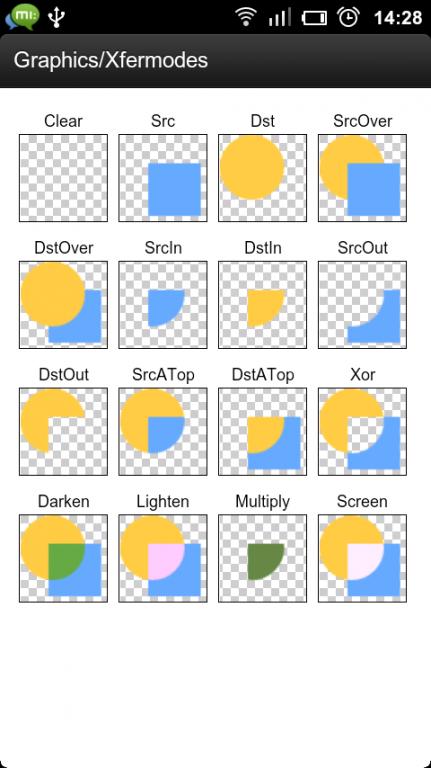
- 进度要相交于背景矩形内setXfermode 中的PorterDuff.Mode.SRC_ATOP 是我们想要的相交效果
- 
```
Canvas c=newCanvas(BmpDST);
//清空bitmap
c.drawColor(Color.BLACK,PorterDuff.Mode.CLEAR);
//画上矩形
c.drawRoundRect(rectprogress,(float) ((height - padding.top-padding.bottom) / 2), (float) ((height - padding.top-padding.bottom) / 2),proPaint);
//模式合成
int layerId=canvas.saveLayer(0,0nwidthheightnnull,Canvas.ALL_SAVE_FLAG);
canvas.drawBitmap(BmpDST,0,0,proaint);
proPaint.setXfermode(new PorterDuffXfermode(PorterDuff.Mode.SRC_ATOP));
rectprogress.set(padding.left, padding.top, padding.left + ((width - padding.left-padding.right) * (progress < minProgress ? minProgress : progress) / 100), height - padding.bottom);
canvas.drawRoundRect(rectprogress, (float) ((height - padding.top-padding.bottom) / 2), (float) ((height - padding.top-padding.bottom) / 2), proPaint);
proPaint.setXfermode(null);
canvas.restoreToCount(layerId);
```
- 画文字
- 我们的文字要的效果是"当前进度12.5%",在strings.xml中定义字符串样式
```
当前进度%.1f%%
```
- 根据当前进度画文本
```
float length = textPaint.measureText(getText(progress));
canvas.drawText(getText(progress), width / 2 - length / 2, height / 2 - textbaseline, textPaint);
//获取格式化文本方法
private String getText(float progress) {
String progresstext = String.format(getResources().getString(R.string.sprogress_string), progress);
return progresstext;
}
//由于文字的的y是指baseline
//文字y为控件height/2+文字中间到baseline的距离
public float getFontstart(Paint paint) {
Paint.FontMetrics fm = paint.getFontMetrics();
return (fm.descent + fm.ascent) / 2 - fm.leading;
}
```
- 1.基准点是baseline
2.ascent:是baseline之上至字符最高处的距离
3.descent:是baseline之下至字符最低处的距离
4.leading:是上一行字符的descent到下一行的ascent之间的距离,也就是相邻行间的空白距离
5.top:是指的是最高字符到baseline的值,即ascent的最大值
6.bottom:是指最低字符到baseline的值,即descent的最大值

第五步:动画动起来
- 用valueanimator来执行动画
- 通过改变变量progress、的值重绘以达到动画效果目的
- 要求最后结果带小数,的所以中间的数字转换为int,最后执行完显示float
```
private void startAnimator(float pors) {
ValueAnimator animator = ValueAnimator.ofFloat((progress < minProgress ? minProgress : progress), pors < minProgress ? minProgress : pors);
int i = (int) (pors - progress) * maxDuring / 100;
animator.setDuration(i < minDuring ? minDuring : i);
animator.setInterpolator(new AccelerateDecelerateInterpolator());
animator.addUpdateListener(new ValueAnimator.AnimatorUpdateListener() {
@Override
public void onAnimationUpdate(ValueAnimator animation) {
//结束时显示原值带小数,中间变换显示不带小数
if (animation.getAnimatedFraction() == 1)
progress = (float) animation.getAnimatedValue();
else
progress = (int) ((float)animation.getAnimatedValue());
invalidate();
}
});
animator.start();
}
```
第六步:适配代码中也能使用
- 我喜欢各种属性都以这种格式设置,以方便链式调用
```
public SProgress setTextSize(float size) {
textsize = dp2px(size);
return this;
}
```