# vue-to-react
**Repository Path**: ekber/vue-to-react
## Basic Information
- **Project Name**: vue-to-react
- **Description**: No description available
- **Primary Language**: Unknown
- **License**: MIT
- **Default Branch**: master
- **Homepage**: None
- **GVP Project**: No
## Statistics
- **Stars**: 0
- **Forks**: 0
- **Created**: 2018-07-18
- **Last Updated**: 2020-12-18
## Categories & Tags
**Categories**: Uncategorized
**Tags**: None
## README
  [](http://standardjs.com)
## vue-to-react
🛠️ 👉 Try to transform Vue component(support [JSX](https://github.com/vuejs/babel-plugin-transform-vue-jsx) and [SFC](https://vuejs.org/v2/guide/single-file-components.html)) to React component.
> Since v0.0.8 support SFC
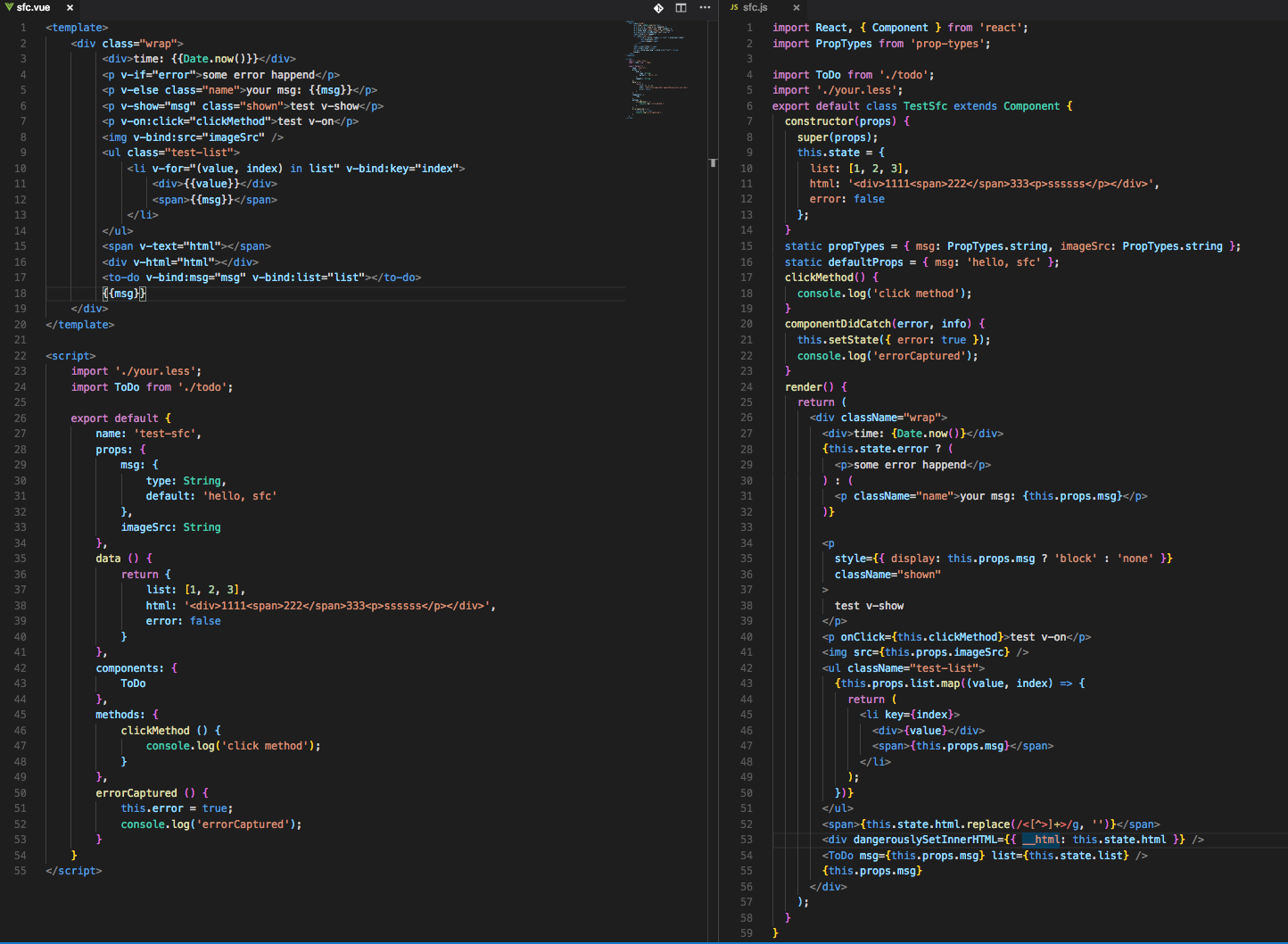
## Preview screenshots
**Transform JSX Component:**

**Transform SFC Component:**
### Install
Prerequisites: [Node.js](https://nodejs.org/en/) (>=8.0) and [NPM](https://www.npmjs.com/) (>=5.0)
```js
$ npm install vue-to-react -g
```
### Usage
```sh
Usage: vtr [options]
Options:
-V, --version output the version number
-i, --input the input path for vue component
-o, --output the output path for react component, which default value is process.cwd()
-n, --name the output file name, which default value is "react.js"
-h, --help output usage information
```
Examples:
```sh
$ vtr -i my/vue/component
```
The above code will transform `my/vue/component.js` to `${process.cwd()}/react.js`.
```sh
$ vtr -i my/vue/component -o my/vue -n test
```
The above code will transform `my/vue/component.js` to `my/vue/test.js`.
Here is a [demo](https://github.com/dwqs/vue-to-react/tree/master/demo).
## Attention
The following list you should be pay attention when you are using vue-to-react to transform a vue component to react component:
* Not support [class object syntax binding](https://vuejs.org/v2/guide/class-and-style.html#Object-Syntax) and [class array syntax binding](https://vuejs.org/v2/guide/class-and-style.html#Array-Syntax)
```js
// Not support
// support
computed: {
classes () {
// ...
return your-classes;
}
}
// ...
// react component
// ...
render () {
const classes = your-classes;
return (
)
}
```
* Not support [style object syntax binding](https://vuejs.org/v2/guide/class-and-style.html#Object-Syntax-1) and [style array syntax binding](https://vuejs.org/v2/guide/class-and-style.html#Array-Syntax-1)
```js
// Not support
// support
computed: {
style () {
return {
activeColor: 'red',
fontSize: 30
}
}
}
// ...
// react component
// ...
render () {
const style = {
activeColor: 'red',
fontSize: 30
};
return (
)
}
```
* Not support `watch` prop of vue component
* Not support `components` prop of vue component if you are transforming a JSX component. See [component tip](https://github.com/vuejs/babel-plugin-transform-vue-jsx#component-tip). But support `components` prop when you are transforming SFC.
* Only supports partial built-in Vue directives(SFC): `v-if`, `v-else`, `v-show`, `v-for`, `v-bind`, `v-on`, `v-text` and `v-html`.
* Not support v-bind shorthand and v-on shorthand(SFC):
```js
// Not support
// Support
```
* Not support custom directives and filter expression(SFC).
* Only supports partial lift-cycle methods of vue component. Lift-cycle relations mapping as follows:
```js
// Life-cycle methods relations mapping
const cycle = {
'created': 'componentWillMount',
'mounted': 'componentDidMount',
'updated': 'componentDidUpdate',
'beforeDestroy': 'componentWillUnmount',
'errorCaptured': 'componentDidCatch',
'render': 'render'
};
```
* Each computed prop should be a function:
```js
// ...
computed: {
// support
test () {
return your-computed-value;
},
// not support
test2: {
get () {},
set () {}
}
}
// ...
```
* Computed prop of vue component will be put into the render method of react component:
```js
// vue component
// ...
computed: {
// support
test () {
this.title = 'messages'; // Don't do this, it won't be handle and you will receive a warning.
return this.title + this.msg;
}
}
// ...
// react component
// ...
render () {
const test = this.state.title + this.state.msg;
}
// ...
```
## Development
1. Fork it
2. Create your feature branch (git checkout -b my-new-feature)
3. Commit your changes (git commit -am 'Add some feature')
4. Push to the branch (git push origin my-new-feature)
5. Create new Pull Request
## LICENSE
This repo is released under the [MIT](http://opensource.org/licenses/MIT).