# go-captcha
**Repository Path**: endung/go-captcha
## Basic Information
- **Project Name**: go-captcha
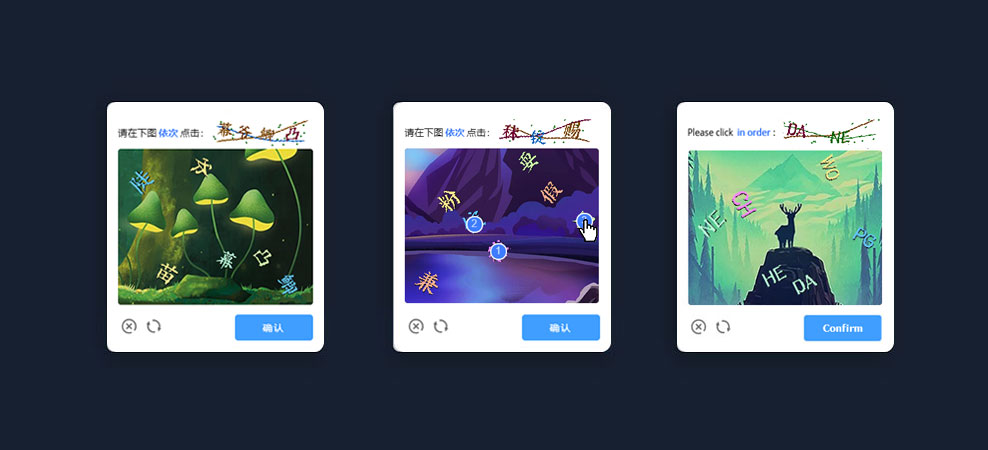
- **Description**: go-captcha, 一个简洁易用、交互友好、高安全性的点选行为验证码 Go 库 ,采用 “验证码展示-采集用户行为-验证行为数据” 为流程,用户无需键盘手动输入,极大优化传统验证码用户体验不佳的问题,支持PC端及移动端。Github地址 https://github.com/wenlng/go-captcha
- **Primary Language**: Go
- **License**: MIT
- **Default Branch**: master
- **Homepage**: https://github.com/wenlng/go-captcha
- **GVP Project**: No
## Statistics
- **Stars**: 0
- **Forks**: 4
- **Created**: 2022-01-10
- **Last Updated**: 2022-01-10
## Categories & Tags
**Categories**: Uncategorized
**Tags**: None
## README
# go-captcha - 行为式验证码
[](https://github.com/wenlng/go-captcha/releases)
[](https://goreportcard.com/report/github.com/wenlng/go-captcha)
[](https://godoc.org/github.com/wenlng/go-captcha)
[](https://github.com/wenlng/go-captcha/blob/master/LICENSE)
> [English](README.md) | 中文
go-captcha, 一个简洁易用、交互友好、高安全性的"行为式验证码" Go库 ,采用 “验证码展示-采集用户行为-验证行为数据” 为流程,用户无需键盘手动输入,极大优化传统验证码用户体验不佳的问题,支持PC端及移动端,支持前端Vue、React...等项目。
- Github:[https://github.com/wenlng/go-captcha](https://github.com/wenlng/go-captcha)
- Go实例代码:[https://github.com/wenlng/go-captcha-example](https://github.com/wenlng/go-captcha-example)
- Vue实例代码:[https://github.com/wenlng/go-captcha-vue](https://github.com/wenlng/go-captcha-vue)
- React实例代码:[https://github.com/wenlng/go-captcha-react](https://github.com/wenlng/go-captcha-react)
- 在线演示:[http://47.104.180.148:8081/go_captcha_demo](http://47.104.180.148:8081/go_captcha_demo)
- 作者网站: [http://witkeycode.com](http://witkeycode.com)
## 中国Go模块代理
- GoProxy https://github.com/goproxy/goproxy.cn
- AliProxy: https://mirrors.aliyun.com/goproxy/
- OfficialProxy: https://goproxy.io/
- ChinaProxy:https://goproxy.cn
- Other:https://gocenter.io
### 设置Go模块的代理
- Window
```shell script
$ set GO111MODULE=on
$ set GOPROXY=https://goproxy.io,direct
### The Golang 1.13+ can be executed directly
$ go env -w GO111MODULE=on
$ go env -w GOPROXY=https://goproxy.io,direct
```
- Linux or Mac
```shell script
$ export GO111MODULE=on
$ export GOPROXY=https://goproxy.io,direct
### or
$ echo "export GO111MODULE=on" >> ~/.profile
$ echo "export GOPROXY=https://goproxy.cn,direct" >> ~/.profile
$ source ~/.profile
```
### 依赖golang官方标准库
```
$ go get -u github.com/golang/freetype
$ go get -u golang.org/x/crypto
$ go get -u golang.org/x/image
```
### 安装模块
```
$ go get -u github.com/wenlng/go-captcha/captcha
```
### 引入模块
```go
package main
import "github.com/wenlng/go-captcha/captcha"
func main(){
// ....
}
```
## 快速使用
```go
package main
import (
"fmt"
"os"
"github.com/wenlng/go-captcha/captcha"
)
func main(){
// Captcha Single Instances
capt := captcha.GetCaptcha()
// 生成验证码
dots, b64, tb64, key, err := capt.Generate()
if err != nil {
panic(err)
return
}
// 主图base64
fmt.Println(len(b64))
// 缩略图base64
fmt.Println(len(tb64))
// 唯一key
fmt.Println(key)
// 文本位置验证数据
fmt.Println(dots)
}
```
## 验证码实例
- 创建实例或者获取单例模式的实例
```go
package main
import (
"fmt"
"github.com/wenlng/go-captcha/captcha"
)
func main(){
// 创建验证码实例
// capt := captcha.NewCaptcha()
// 单例模式的验证码实例
capt := captcha.GetCaptcha()
// ====================================================
fmt.Println(capt)
}
```
## 验证码配置
v1.2.3版本后大图默认尺寸为:300×240px,小图默认尺寸为:150×40px。
#### 文本相关配置
默认情况下内置了定制的字体。如果设置了其他中文的文字,则可能需要设置字体文件。
```go
package main
import (
"fmt"
"github.com/wenlng/go-captcha/captcha"
)
func main(){
capt := captcha.GetCaptcha()
// ====================================================
// Method: SetRangChars (chars []string) error;
// Desc: 设置验证码文本随机种子
// ====================================================
// 字符
//chars := "abcdefghijklmnopqrstuvwxyz0123456789ABCDEFGHIJKLMNOPQRSTUVWXYZ"
//_ = capt.SetRangChars(strings.Split(chars, ""))
// 双字母
//chars := []string{"HE","CA","WO","NE","HT","IE","PG","GI","CH","CO","DA"}
//_ = capt.SetRangChars(chars)
// 汉字
chars := []string{"你","好","呀","这","是","点","击","验","证","码","哟"}
_ = capt.SetRangChars(chars)
// ====================================================
fmt.Println(capt)
}
```
#### 设置字体文件
你可以拷贝实例中 "__example/resources" 的图片资源和字体文件到你的项目中使用。
```go
package main
import (
"fmt"
"os"
"github.com/wenlng/go-captcha/captcha"
)
func main(){
capt := captcha.GetCaptcha()
path, _ := os.Getwd()
// ====================================================
// Method: SetFont(fonts []string);
// Desc: 设置验证码字体
// ====================================================
capt.SetFont([]string{
path + "/__example/resources/fonts/fzshengsksjw_cu.ttf",
})
}
```
#### 大图相关配置
```go
package main
import (
"fmt"
"os"
"golang.org/x/image/font"
"github.com/wenlng/go-captcha/captcha"
)
func main(){
capt := captcha.GetCaptcha()
path, _ := os.Getwd()
// ====================================================
// Method: SetBackground(color []string);
// Desc: 设置验证码背景图
// ====================================================
capt.SetBackground([]string{
path + "/__example/resources/images/1.jpg",
path + "/__example/resources/images/2.jpg",
})
// ====================================================
// Method: SetImageSize(size Size);
// Desc: 设置验证码主图的尺寸
// ====================================================
capt.SetImageSize(captcha.Size{300, 300})
// ====================================================
// Method: SetImageQuality(val int);
// Desc: 设置验证码主图清晰度,压缩级别范围1-5,QualityCompressNone无压缩,默认为最底压缩级别
// ====================================================
capt.SetImageQuality(captcha.QualityCompressNone)
// ====================================================
// Method: SetFontHinting(val font.Hinting);
// Desc: 设置字体Hinting值 (HintingNone,HintingVertical,HintingFull)
// ====================================================
capt.SetFontHinting(font.HintingFull)
// ====================================================
// Method: SetTextRangLen(val captcha.RangeVal);
// Desc: 设置验证码文本显示的总数随机范围
// ====================================================
capt.SetTextRangLen(captcha.RangeVal{6, 7})
// ====================================================
// Method: SetRangFontSize(val captcha.RangeVal);
// Desc: 设置验证码文本的随机大小
// ====================================================
capt.SetRangFontSize(captcha.RangeVal{32, 42})
// ====================================================
// Method: SetTextRangFontColors(colors []string);
// Desc: 设置验证码文本的随机十六进制颜色
// ====================================================
capt.SetTextRangFontColors([]string{
"#1d3f84",
"#3a6a1e",
})
// ====================================================
// Method: SetImageFontAlpha(val float64);
// Desc:设置验证码字体的透明度
// ====================================================
capt.SetImageFontAlpha(0.5)
// ====================================================
// Method: SetTextShadow(val bool);
// Desc:设置字体阴影
// ====================================================
capt.SetTextShadow(true)
// ====================================================
// Method: SetTextShadowColor(val string);
// Desc:设置字体阴影颜色
// ====================================================
capt.SetTextShadowColor("#101010")
// ====================================================
// Method: SetTextShadowPoint(val captcha.Point);
// Desc:设置字体阴影偏移位置
// ====================================================
capt.SetTextShadowPoint(captcha.Point{1, 1})
// ====================================================
// Method: SetTextRangAnglePos(pos []captcha.RangeVal);
// Desc:设置验证码文本的旋转角度
// ====================================================
capt.SetTextRangAnglePos([]captcha.RangeVal{
{1, 15},
{15, 30},
{30, 45},
{315, 330},
{330, 345},
{345, 359},
})
// ====================================================
// Method: SetImageFontDistort(val int);
// Desc:设置验证码字体的扭曲程度
// ====================================================
capt.SetImageFontDistort(captcha.DistortLevel2)
}
```
#### 小图相关配置
```go
package main
import (
"fmt"
"os"
"github.com/wenlng/go-captcha/captcha"
)
func main(){
capt := captcha.GetCaptcha()
path, _ := os.Getwd()
// ====================================================
// Method: SetThumbSize(size Size);
// Desc: 设置缩略图的尺寸
// ====================================================
capt.SetThumbSize(captcha.Size{150, 40})
// ====================================================
// Method: SetRangCheckTextLen(val captcha.RangeVal);
// Desc:设置缩略图校验文本的随机长度范围
// ====================================================
capt.SetRangCheckTextLen(captcha.RangeVal{2, 4})
// ====================================================
// Method: SetRangCheckFontSize(val captcha.RangeVal);
// Desc:设置缩略图校验文本的随机大小
// ====================================================
capt.SetRangCheckFontSize(captcha.RangeVal{24, 30})
// ====================================================
// Method: SetThumbTextRangFontColors(colors []string);
// Desc: 设置缩略图文本的随机十六进制颜色
// ====================================================
capt.SetThumbTextRangFontColors([]string{
"#1d3f84",
"#3a6a1e",
})
// ====================================================
// Method: SetThumbBgColors(colors []string);
// Desc: 设置缩略图的背景随机十六进制颜色
// ====================================================
capt.SetThumbBgColors([]string{
"#1d3f84",
"#3a6a1e",
})
// ====================================================
// Method: SetThumbBackground(colors []string);
// Desc:设置缩略图的随机图像背景
// ====================================================
capt.SetThumbBackground([]string{
path + "/__example/resources/images/r1.jpg",
path + "/__example/resources/images/r2.jpg",
})
// ====================================================
// Method: SetThumbBgDistort(val int);
// Desc:设置缩略图背景的扭曲程度
// ====================================================
capt.SetThumbBgDistort(captcha.DistortLevel2)
// ====================================================
// Method: SetThumbFontDistort(val int);
// Desc:设置缩略图字体的扭曲程度
// ====================================================
capt.SetThumbFontDistort(captcha.DistortLevel2)
// ====================================================
// Method: SetThumbBgCirclesNum(val int);
// Desc:设置缩略图背景的圈点数
// ====================================================
capt.SetThumbBgCirclesNum(20)
// ====================================================
// Method: SetThumbBgSlimLineNum(val int);
// Desc:设置缩略图背景的线条数
// ====================================================
capt.SetThumbBgSlimLineNum(3)
}
```
#### 其它
```go
package main
import (
"fmt"
"os"
"github.com/wenlng/go-captcha/captcha"
)
func main(){
capt := captcha.GetCaptcha()
path, _ := os.Getwd()
// ====================================================
// Method: ClearAssetCacheWithPath(paths []string) bool;
// Desc: 根据路径消除对应的资源缓存
// ====================================================
capt.ClearAssetCacheWithPaths([]string{
path + "/__example/resources/images/1.jpg",
path + "/__example/resources/images/2.jpg",
})
// ====================================================
// Method: captcha.CheckPointDist(sx, sy, dx, dy, width, height int64) bool;
// Desc: 校验点的位置
// ====================================================
captcha.CheckPointDist(0, 30, 0, 30, 30, 30)
// ====================================================
// Method: captcha.CheckPointDistWithPadding(sx, sy, dx, dy, width, height, padding int64) bool;
// Desc: 校验点的位置
// ====================================================
captcha.CheckPointDistWithPadding(0, 30, 0, 30, 30, 30, 5)
}
```
### 生成验证码数据
```go
package main
import (
"fmt"
"os"
"github.com/wenlng/go-captcha/captcha"
)
func main(){
capt := captcha.GetCaptcha()
// generate ...
// ====================================================
// dots: 文本字符的位置信息
// - {"0":{"Index":0,"Dx":198,"Dy":77,"Size":41,"Width":54,"Height":41,"Text":"SH","Angle":6,"Color":"#885500"} ...}
// imageBase64: Verify the clicked image
// thumbImageBase64: Thumb displayed
// key: Only Key
// ====================================================
dots, imageBase64, thumbImageBase64, key, err := capt.Generate()
if err != nil {
panic(err)
return
}
fmt.Println(len(imageBase64))
fmt.Println(len(thumbImageBase64))
fmt.Println(key)
fmt.Println(dots)
}
```
### 在 __example 中的前端在数据请求或提交验证数据时的格式:
```
// Example: 获取验证码数据
API = http://....../captcha/captcha-data
Respose Data = {
"code": 0,
"image_base64": "...",
"thumb_base64": "...",
"captcha_key": "xxxxxx",
}
// Example: 提交校验数据
API = http://....../captcha/check-data
Request Data = {
dots: "x1,y1,x2,y2,...."
key: "xxxxxx"
}
```
> 请作者喝咖啡:[http://witkeycode.com/sponsor](http://witkeycode.com/sponsor)
## LICENSE
MIT