# arcgis-pro-sdk **Repository Path**: esri_hub/arcgis-pro-sdk ## Basic Information - **Project Name**: arcgis-pro-sdk - **Description**: No description available - **Primary Language**: Unknown - **License**: Apache-2.0 - **Default Branch**: master - **Homepage**: None - **GVP Project**: No ## Statistics - **Stars**: 0 - **Forks**: 0 - **Created**: 2021-03-30 - **Last Updated**: 2022-03-08 ## Categories & Tags **Categories**: Uncategorized **Tags**: None ## README ## ArcGIS Pro 2.9 SDK for .NET Extend ArcGIS Pro with ArcGIS Pro SDK for .NET. ArcGIS Pro SDK for .NET is based on the add-in and configurations extensibility pattern. Leverage modern .NET features and patterns such as Task Asynchronous Programming (TAP), LINQ, WPF Binding, and MVVM to write integrated 2D/3D add-ins using Pro’s new APIs. View it live ### Table of Contents #### Developing with ArcGIS Pro * [Requirements](#requirements) * [What's New for Developers at 2.9](#whats-new-for-developers-at-29) * [Installing ArcGIS Pro SDK for .NET](#installing-arcgis-pro-sdk-for-net) * [Getting started](#getting-started) * [Pro SDK Videos](https://www.youtube.com/channel/UCSGXXfYjfpg9DI8eEUmW1ag) * [ProSnippets](#prosnippets) * [ArcGIS Pro API](#arcgis-pro-api) * [Release notes](#release-notes) * [Resources](#resources) * [ProGuide: ArcGIS Pro Extensions NuGet](../../wiki/ProGuide-ArcGIS-Pro-Extensions-NuGet) * [ProConcepts: Migrating to ArcGIS Pro](../../wiki/ProConcepts-Migrating-to-ArcGIS-Pro) * [ProConcepts: Distributing Add-Ins Online](../../wiki/ProConcepts-Distributing-Add-Ins-Online) #### Framework * [ProSnippets: Framework](../../wiki/ProSnippets-Framework) * [ProConcepts: Framework](../../wiki/ProConcepts-Framework) * [ProConcepts: Asynchronous Programming in ArcGIS Pro](../../wiki/ProConcepts-Asynchronous-Programming-in-ArcGIS-Pro) * [ProConcepts: Advanced topics](../../wiki/ProConcepts-Advanced-Topics) * [ProGuide: Command line switches for ArcGISPro.exe](../../wiki/ProGuide-Command-line-switches-for-ArcGISPro.exe) * [ProGuide: Reusing ArcGIS Pro Commands](../../wiki/ProGuide-Reusing-Pro-Commands) * [ProGuide: Licensing](../../wiki/ProGuide-License-Your-Add-in) * [ProGuide: Digital signatures](../../wiki/ProGuide-Digitally-signed-add-ins-and-configurations) * [ProGuide: Command Search](../../wiki/ProGuide-Command-Search)     **Add-ins** * [Pro Guide: Installation](../../wiki/ProGuide-Installation-and-Upgrade) * [Pro Guide: Your first add-in](../../wiki/ProGuide-Build-Your-First-Add-in) * [ProConcept: Localization](../../wiki/ProConcept-Localization) * [ProGuide: Content and image resources](../../wiki/ProGuide-content-and-image-resources) * [ProGuide: Embedding Toolboxes](../../wiki/ProGuide-content-and-image-resources#embedding-toolboxes) * [ProGuide: Diagnosing ArcGIS Pro Add-ins](../../wiki/ProGuide-Diagnosing-ArcGIS-Pro-Add-ins) * [ProGuide: Regression Testing](../../wiki/ProGuide-Regression-Testing)     **Configurations** * [ProConcepts: Configurations](../../wiki/ProConcepts-Configurations) * [ProGuide: Configurations](../../wiki/ProGuide-Configurations)     **Customization** * [ProGuide: Ribbon, tabs, and groups](../../wiki/ProGuide-Ribbon-Tabs-and-Groups) * [ProGuide: Buttons](../../wiki/ProGuide-Buttons) * [ProGuide: Label controls](../../wiki/ProGuide-Label-Controls) * [ProGuide: Check boxes](../../wiki/ProGuide-Checkboxes) * [ProGuide: Edit boxes](../../wiki/ProGuide-Edit-Boxes) * [ProGuide: Combo boxes](../../wiki/ProGuide-Combo-boxes) * [ProGuide: Context Menus](../../wiki/ProGuide-Context-Menus) * [ProGuide: Palettes and Split buttons](../../wiki/ProGuide-Palettes-and-Split-Buttons) * [ProGuide: Galleries](../../wiki/ProGuide-Galleries) * [ProGuide: Dockpanes](../../wiki/ProGuide-Dockpanes) * [ProGuide: Code your own states and conditions](../../wiki/ProGuide-Code-Your-Own-States-and-Conditions)     **Styling** * [ProGuide: Style Guide](../../wiki/proguide-style-guide) * [ProGuide: Applying custom styles](../../wiki/ProGuide-Applying-Custom-Styles) * [Esri Brushes](http://ArcGIS.github.io/arcgis-pro-sdk/content/brushescolors/brushes.html) * [Esri Colors](http://ArcGIS.github.io/arcgis-pro-sdk/content/brushescolors/colors.html) ------------------------- ### Content * [ProSnippets: Content](../../wiki/ProSnippets-content) * [ProSnippets: Browse Filters](../../wiki/ProSnippets-OpenItemDialogBrowseFilter) * [ProConcepts: Project Content and Items](../../wiki/ProConcepts-Content-and-Items) * [ProConcepts: Custom Items](../../wiki/ProConcepts-Custom-Items) * [ProGuide: Custom Items](../../wiki/ProGuide-Custom-Items) * [ProGuide: Custom Browse Dialog Filters](../../wiki/ProGuide-Custom-Browse-Dialog-Filters) * [ArcGIS Pro TypeID Reference](../../wiki/ArcGIS-Pro-TypeID-Reference) -------------------------- ### CoreHost * [ProSnippets: CoreHost](../../wiki/ProSnippets-CoreHost) * [ProConcepts: CoreHost](../../wiki/proconcepts-CoreHost) -------------------------- ### DataReviewer * [ProConcepts: DataReviewer](../../wiki/proconcepts-DataReviewer) -------------------------- ### Editing * [ProSnippets: Editing](../../wiki/ProSnippets-Editing) * [ProConcepts: Editing](../../wiki/ProConcepts-Editing) * [ProConcepts: COGO](../../wiki/ProConcepts-cogo) * [ProConcepts: Annotation Editing](../../wiki/ProConcepts-Editing-Annotation) * [ProConcepts: Dimension Editing](../../wiki/ProConcepts-Editing-Dimensions) * [ProGuide: Editing Tool](../../wiki/ProGuide-Editing-Tool) * [ProGuide: Construction Tools with Options](../../wiki/ProGuide-Construction-Tools-with-Options) * [ProGuide: Annotation Construction Tools](../../wiki/ProGuide-Annotation-Construction-Tools) * [ProGuide: Annotation Editing Tools](../../wiki/ProGuide-Annotation-Editing-Tools) * [ProGuide: Templates](../../wiki/ProGuide-Templates) -------------------------- ### Geodatabase * [ProSnippets: Geodatabase](../../wiki/ProSnippets-Geodatabase) * [ProConcepts: Geodatabase](../../wiki/ProConcepts-Geodatabase) * [ProConcepts: DDL](../../wiki/ProConcepts-DDL)     **Plugin Datasources** * [ProConcepts: Plugin Datasources](../../wiki/ProConcepts-Plugin-Datasources) * [ProGuide: Plugin Datasources](../../wiki/ProGuide-Plugin-Datasources)     **Topology** * [ProSnippets: Topology](../../wiki/ProSnippets-Topology) * [ProConcepts: Topology](../../wiki/ProConcepts-Topology)     **Object Model Diagram** * [Object Model Diagram](http://ArcGIS.github.io/arcgis-pro-sdk/content/OMDs/Geodatabase-Object-Model-Diagram.pdf) -------------------------- ### Geometry * [ProSnippets: Geometry](../../wiki/ProSnippets-Geometry) * [ProSnippets: Geometry Engine](../../wiki/ProSnippets-GeometryEngine) * [ProConcepts: Geometry](../../wiki/ProConcepts-Geometry) * [ProConcepts: Multipatches](../../wiki/ProConcepts-Multipatches) * [ProGuide: Building Multipatches](../../wiki/ProGuide-Building-Multipatches)     **Relational Operations** * [ProGuide: RelationalOperations](../../wiki/ProGuide-Relational-Operations) * [ProSnippets: Custom Relational Operations](../../wiki/ProGuide-Custom-Relational-Operations) -------------------------- ### Geoprocessing * [ProSnippets: Geoprocessing](../../wiki/ProSnippets-Geoprocessing) * [ProConcepts: Geoprocessing](../../wiki/ProConcepts-Geoprocessing) * [ProGuide: Embedding Toolboxes](../../wiki/ProGuide-content-and-image-resources#embedding-toolboxes) -------------------------- ### Layouts * [ProSnippets: Layouts](../../wiki/ProSnippets-Layouts) * [ProConcepts: Layouts](../../wiki/ProConcepts-Layouts)     **Reports** * [ProSnippets: Reports](../../wiki/ProSnippets-Reports) * [ProConcepts: Reports](../../wiki/ProConcepts-Reports) -------------------------- ### Map Authoring * [ProSnippets: Map Authoring](../../wiki/ProSnippets-MapAuthoring) * [ProSnippets: Annotation](../../wiki/ProSnippets-Annotation) * [ProSnippets: Labeling](../../wiki/ProSnippets-Labeling) * [ProSnippets: Renderers](../../wiki/ProSnippets-Renderer) * [ProSnippets: Symbology](../../wiki/ProSnippets-Symbology) * [ProSnippets: Text Symbols](../../ProSnippets-TextSymbols) * [ProConcepts: Map Authoring](../../wiki/ProConcepts-Map-Authoring) * [ProConcepts: Annotation](../../wiki/ProConcepts-Annotation) * [ProConcepts: Dimensions](../../wiki/ProConcepts-Dimensions) * [ProGuide: Custom Dictionary Style](../../wiki/ProGuide-Custom-Dictionary-Style) * [ProGuide: Geocoding](../../wiki/ProGuide-Geocoding)     **Graphics** * [ProSnippets: Graphics Layers](../../wiki/ProSnippets-GraphicsLayers) * [ProConcepts: Graphics Layers](../../wiki/ProConcepts-GraphicsLayers)     **Scene** * [ProSnippets: Scene Layers](../../wiki/ProSnippets-SceneLayers) * [ProConcepts: Scene Layers](../../wiki/ProConcepts-Scene-Layers)     **Stream** * [ProSnippets: Stream Layers](../../wiki/ProSnippets-StreamLayers) * [ProConcepts: Stream Layers](../../wiki/ProConcepts-Stream-Layers)     **Voxel** * [ProSnippets: Voxel Layers](../../wiki/ProSnippets-VoxelLayers) * [ProConcepts: Voxel Layers](../../wiki/ProConcepts-Voxel-Layers) -------------------------- ### Map Exploration * [ProSnippets: Map Exploration](../../wiki/ProSnippets-MapExploration) * [ProSnippets: Custom Pane with Contents](../../wiki/ProSnippets-CustomPaneWithContents) * [ProConcept: Map Exploration](../../wiki/ProConcepts-Map-Exploration) * [ProGuide: Map Pane Impersonation](../../wiki/ProGuide-Map-Pane-Impersonation) * [ProGuide: TableControl](../../wiki/ProGuide-TableControl)     **Map Tools**
* [ProGuide: Feature Selection](../../wiki/ProGuide-Feature-Selection) * [ProGuide: Identify](../../wiki/ProGuide-Identify) * [ProGuide: MapView Interaction](../../wiki/ProGuide-MapView-Interaction) * [ProGuide: Embeddable Controls](../../wiki/ProGuide-Using-Embeddable-Controls) * [ProGuide: Custom Popups](../../wiki/ProGuide-Custom-Popups) * [ProGuide: Dynamic Popup Menu](../../wiki/ProGuide-Dynamic-Popup-Menu) -------------------------- ### Parcel Fabric * [ProSnippets: Parcel Fabric](../../wiki/ProSnippets-ParcelFabric) * [ProConcepts: Parcel Fabric](../../wiki/ProConcepts-Parcel-Fabric) -------------------------- ### Raster * [ProSnippets: Raster](../../wiki/ProSnippets-Raster) * [ProConcept: Raster](../../wiki/ProConcepts-Raster) -------------------------- ### Sharing * [ProSnippets: Sharing](../../wiki/ProSnippets-sharing) * [ProConcepts: Portal](../../wiki/ProConcepts-Portal) -------------------------- ### Tasks * [ProSnippets: Tasks](../../wiki/ProSnippets-Tasks) * [ProConcepts: Tasks](../../wiki/ProConcepts-Tasks) -------------------------- ### Utility Network * [ProSnippets: Utility Network](../../wiki/ProSnippets-UtilityNetwork) * [ProConcepts: Utility Network](../../wiki/ProConcepts-Utility-Network) * [Object Model Diagram](http://Esri.github.io/arcgis-pro-sdk/content/OMDs/Utility-Network-Object-Model-Diagram.pdf) -------------------------- ### Workflow Manager * [ProSnippets: Workflow Manager](../../wiki/ProSnippets-WorkflowManager) * [ProConcept: Workflow Manager](../../wiki/ProConcepts-Workflow-Manager) -------------------------- ## Resources * [API Reference online](http://pro.arcgis.com/en/pro-app/sdk/api-reference) * ArcGIS Pro SDK for .NET (pro.arcgis.com) * [arcgis-pro-sdk-community-samples](http://github.com/Esri/arcgis-pro-sdk-community-samples) * [ArcGISPro Registry Keys](http://github.com/Esri/arcgis-pro-sdk/wiki/ArcGIS-Pro-Registry-Keys) * [ArcGIS Pro DAML ID Reference](http://github.com/Esri/arcgis-pro-sdk/wiki/ArcGIS-Pro-DAML-ID-Reference) * [ArcGIS Pro Icon Reference](http://github.com/Esri/arcgis-pro-sdk/wiki/DAML-ID-Reference-Icons) * [ArcGIS Pro TypeID Reference](http://github.com/Esri/arcgis-pro-sdk/wiki/ArcGIS-Pro-TypeID-Reference) * [FAQ](http://github.com/Esri/arcgis-pro-sdk/wiki/FAQ) * [ArcGIS Pro SDK icons](https://github.com/Esri/arcgis-pro-sdk/releases/tag/2.9.0.32739) ## Overview of the ArcGIS Pro SDK ### Requirements #### ArcGIS Pro * ArcGIS Pro 2.9 #### Supported platforms * Windows 11 (Home, Pro, Enterprise) * Windows 10 (Home, Pro, Enterprise) (64 bit) * Windows 8.1 (Pro, and Enterprise) (64 bit) #### Supported .NET framework * Microsoft .NET Framework 4.8 Developer Pack **Note:** ArcGIS Pro 2.9 is the last release with .NET Framework 4.8. ArcGIS Pro **3.0** will introduce support for .NET 6.0, Microsoft's latest edition of .NET. Support for .NET 6.0 will replace support for .NET Framework 4.8. With **3.0**, .NET Framework 4.8 will no longer be supported. This will be **a breaking change**. #### Supported IDEs * Visual Studio 2019 (Professional, Enterprise, and Community Editions) * Visual Studio 2017 (Professional, Enterprise, and Community Editions) **Note:** ArcGIS Pro 2.9 SDK is the last release with support for Visual Studio 2017 and 2019. The ArcGIS Pro **3.0** SDK will introduce support for Visual Studio 2022, Microsoft's latest edition of its IDE. Support for Visual Studio 2022 will replace support for Visual Studio 2017 and 2019. With **3.0**, Visual Studio 2017 and 2019 will no longer be supported. #### Third party assemblies _**Newtonsoft Json**_ * At 2.9 ArcGIS Pro is using version 12.0.1 of the Newtonsoft Json NuGet. If you require Newtonsoft NuGet in your add-ins it is recommended to use the same version. _**CefSharp**_ * At 2.9 ArcGIS is using version 92.0.260 of CefSharp. Pro includes the CefSharp.dll, CefSharp.Core.dll and CefSharp.Wpf.dll in the "C:\Program Files\ArcGIS\Pro\bin\cef" installation location. * ChromiumWebBrowser has been been deprecated at 2.9. If you are currently using ChromiumWebBrowser control, please switch to using WebViewBrowser instead. [WebViewBrowser control](https://github.com/esri/arcgis-pro-sdk/wiki/ProConcepts-Framework#webviewbrowser-control) _**WebView2**_ * Starting at ArcGIS Pro 2.9, addin developers can use the new WebViewBrowser control based on Microsoft Edge WebView2. Consult the WebView2 manifest in the Pro bin\WebView folder for the current WebView2 fixed version runtime in use by ArcGIS Pro. Note: [ArcGIS Pro system requirements](http://pro.arcgis.com/en/pro-app/get-started/arcgis-pro-system-requirements.htm) ### ArcGIS Pro API The ArcGIS Pro APIs are managed .NET assemblies which are installed with each ArcGIS Pro installation. Intermediary assemblies containing .NET metadata or PIAs (Primary Interop Assemblies) are not required. Add any of the ArcGIS Pro managed assemblies that comprise its API as references directly in your Visual Studio add-in projects ![pro-references.png](https://ArcGIS.github.io/arcgis-pro-sdk/images/Home/pro-references.png "ArcGIS Pro API References") A complete list of the ArcGIS Pro assemblies in the public API is provided below. Consult the online [API Reference](https://pro.arcgis.com/en/pro-app/latest/sdk/api-reference) for specific details of each assembly: #### Core Core assemblies are located in the {ArcGIS Pro Installation folder}\bin. Assembly | Description ------------------------| ------------- ArcGIS.Core.dll | Provides CIM, Geodatabase, Geometry and Utility Network APIs. ArcGIS.CoreHost.dll | Provides Host.Initialize to initialize ArcGIS.Core.dll for stand-alone use. ArcGIS.Desktop.Framework.dll | Provides the application framework to include add-in contracts, DAML support, and base classes. This assembly must be referenced by every add-in. ESRI.ArcGIS.ItemIndex.dll | Provides functionality to create and work with Custom items. #### Extensions Major subsystems within ArcGIS Pro are organized into units called extensions. Extension assemblies are located in the {ArcGIS Pro Installation folder}\bin\Extensions folder in their own individual subfolder. Extension subfolder names are logically named for the unit of functionality they represent, for example, Mapping, Editing, Layout, and so on. Assembly | Description ------------------------| ------------- ArcGIS.Desktop.Catalog.dll | Provides access to project content items (map items, layout items, style items, folder items, and so on). ArcGIS.Desktop.Core.dll | Provides functionality to create and manage projects, access to events associated with the current project, and the ability to execute geoprocessing tools. ArcGIS.Desktop.DataReviewer.dll | Provides functionality to establish and manage Reviewer results, sessions, and batch jobs in a project. ArcGIS.Desktop.Editing.dll | Provides access to the editing environment and core editing functionality required for custom edit tool implementations. ArcGIS.Desktop.Extensions.dll | Provides extension methods for other ArcGIS Pro classes. Provides a base class for custom map tools. ArcGIS.Desktop.Geoprocessing.dll | Provides access to geoprocessing history items stored in the project. (Note: Adds a reference to ArcGIS.Desktop.Core.dll to execute geoprocessing tools.) ArcGIS.Desktop.Layouts.dll | Provides functionality for manipulating elements on a layout and exporting to a variety of image formats. ArcGIS.Desktop.Mapping.dll | Provides types to create maps and layers, label features, perform query operations, and visualize them in 2D or 3D. Provides a raster API to create raster layers and customize raster rendering, and an API to manage styles, style items, and symbols. ArcGIS.Desktop.TaskAssistant.dll | Provides the Tasks framework, allowing developers to access, open, close, or export task items. ArcGIS.Desktop.Workflow.dll | Provides functionality to create, configure, and execute Workflow Manager jobs and queries. Provides functionality to retrieve configuration information from the Workflow Manager database. #### Extensions with no public API There are extension assemblies in {ArcGIS Pro Installation folder}\bin\Extensions subfolders) that do not have a public API. They are currently for Esri internal use only. * ArcGIS.Desktop.Analyst3D.dll * ArcGIS.Desktop.Aviation.dll * ArcGIS.Desktop.BusinessAnalyst.dll * ArcGIS.Desktop.CAD.dll * ArcGIS.Desktop.Charts.dll * ArcGIS.Desktop.DataEngineering.dll * ArcGIS.Desktop.DataSourcesRaster.dll * ArcGIS.Desktop.Defense.dll * ArcGIS.Desktop.DefenseMapping.dll * ArcGIS.Desktop.Editing.PushPull.dll * ArcGIS.Desktop.FullMotionVideo.dll * ArcGIS.Desktop.GAWizard.dll * ArcGIS.Desktop.GeoProcessing.BDC.dll * ArcGIS.Desktop.GeoProcessing.SAModels.dll * ArcGIS.Desktop.Geostatistics.dll * ArcGIS.Desktop.Indoors.dll * ArcGIS.Desktop.Intelligence.dll * ArcGIS.Desktop.Intelligence.Common.dll * ArcGIS.Desktop.KnowledgeGraph.dll * ArcGIS.Desktop.LocationReferencing.dll * ArcGIS.Desktop.Maritime.dll * ArcGIS.Desktop.Metadata.dll * ArcGIS.Desktop.NetworkAnalysis.Facility.dll * ArcGIS.Desktop.NetworkAnalysis.NetworkDiagrams.dll * ArcGIS.Desktop.NetworkAnalysis.Transportation.dll * ArcGIS.Desktop.Search.dll * ArcGIS.Desktop.Sharing.dll * ArcGIS.Desktop.TerritoryDesign.dll * ArcGIS.Desktop.Workflow.Client.dll Note: Static string resource properties and image resources included within the public API assemblies are for Esri internal use only. They are not intended for use in third-party add-ins. #### ArcGIS Pro Extensions Nuget The ArcGIS Pro Extensions NuGet contains all the Pro API assemblies needed to compile your Add-ins and Configurations and offers an alternate way to reference the ArcGIS Pro assemblies in your add-in and configuration over traditional file based references. The ArcGIS Pro Extensions NuGet will only work with: * Visual Studio 2017 update 8 or higher (Professional, Enterprise, and Community Editions) * NuGet Package Management format setting in Visual Studio must be PackageReference. * As of Pro 2.5, .Net Target Framework must be set to 4.8. This is important if you are adding the Nuget to a pre 2.5 add-in project. [ProGuide: ArcGIS Pro Extensions NuGet](https://github.com/Esri/arcgis-pro-sdk/wiki/ProGuide-ArcGIS-Pro-Extensions-NuGet) ## What's New for Developers at 2.9 #### 1. API Enhancements At 2.9 you can take advantage of API enhancements for: ##### Visual Studio Templates * The Layout Tool item template creates a layout tool for adding/editing graphics in layout and map views and elements in layout. * The Table Construction Tool item template creates a table construction tool for creating rows in standalone tables. ##### Content: * Catalog pane enhancements for accessing GDB, file, and CAD data. * API access to application options. ##### Editing: * Table templates, template commands, table editing, and sketch symbology customization. ##### Geodatabase * DDL support for annotation layers and mobile geodatabases. ##### Map Authoring: * Add tables to group layers and layer documents (.lyrx), and save map to web map format. ##### Map Exploration: * Table Control enhancements like “Go to” row, open + customize table pane/view. ##### Utility Network: * Support for retrieving and executing named trace configurations stored as part of a utility network. * Traverse multiple levels of utility network associations in a single call (crucial for some utility network data models such as telecommunications). For a detailed list of changes to the ArcGIS Pro API refer to the [What's new for developers at 2.9 ](https://pro.arcgis.com/en/pro-app/latest/sdk/api-reference/#topic15120.html) topic in the [ArcGIS Pro API Reference Guide](https://pro.arcgis.com/en/pro-app/latest/sdk/api-reference/#topic1.html). #### 2. .NET 6.0 and .NET Framework 4.8 * ArcGIS Pro 2.9 is the last release with .NET Framework 4.8. ArcGIS Pro **3.0** will introduce support for .NET 6.0, Microsoft's latest edition of .NET. Support for .NET 6.0 will replace support for .NET Framework 4.8. With **3.0**, .NET Framework 4.8 will no longer be supported. This will be **a breaking change**. #### 3. Visual Studio 2017, 2019, and 2022 * ArcGIS Pro 2.9 SDK is the last release with support for Visual Studio 2017 and 2019. ArcGIS Pro **3.0** SDK will introduce support for Visual Studio 2022, Microsoft's latest edition of its IDE. Support for Visual Studio 2022 will replace support for Visual Studio 2017 and 2019. With **3.0**, Visual Studio 2017 and 2019 will no longer be supported. #### 4. ArcGIS Pro 2.5 and .NET Framework 4.8 As with the release of ArcGIS Pro 2.5, the minimum .NET target was switched to 4.8, and is no longer 4.6.1. What does this mean for you and your add-ins? * Existing add-ins, already deployed, will work at 2.9 with no change to their forward compatibility. * Existing add-ins which are recompiled at 2.9 (e.g. because a code change was made) will also require the minimum target framework set to 4.8 or they will not compile. Note: As always, if an existing add-in is changed for any reason, the desktopVersion attribute in its Config.daml file should be changed to reflect the version of Pro it was last compiled against, in this case, now 2.9. To migrate add-ins previously developed with 4.6.1 to 4.8, please consult technical support article [How To: Convert a version 2.0 to 2.4 ArcGIS Pro SDK add-in solution to Pro 2.5 and later versions](https://support.esri.com/en/Technical-Article/000022645) for more information #### 5. Target platform has changed from AnyCPU to x64 * When recompiling add-ins made with previous versions, it is recommended that you change the Platform Target in Visual Studio from "Any CPU" to "x64". * Also starting at 2.8, when opening a user control .xaml using the Visual Studio Designer, it could result in the error "Could not load file or assembly 'ArcGIS.Desktop.Framework".
Please refer to the [ArcGIS Pro FAQ](https://github.com/Esri/arcgis-pro-sdk/wiki/FAQ#when-opening-a-user-control-xaml-using-the-visual-studio-designer-why-do-i-get-the-error-could-not-load-file-or-assembly-arcgisdesktopframework) for more information. #### 6. SDK Resources There are many ProConcepts, ProGuide, ProSnippets, and samples to help you get up and running with the new SDK features. Updates to the SDK Resources include, but are not limited to: * [ProConcepts: Framework](https://github.com/Esri/arcgis-pro-sdk/wiki/ProConcepts-Framework) * [ProConcepts: COGO](https://github.com/Esri/arcgis-pro-sdk/wiki/ProConcepts-cogo) * [ProConcepts: Project Content and items](https://github.com/Esri/arcgis-pro-sdk/wiki/ProConcepts-Content-and-Items) * [ProConcepts: Editing](https://github.com/Esri/arcgis-pro-sdk/wiki/ProConcepts-Editing) * [ProConcepts: Layouts](https://github.com/Esri/arcgis-pro-sdk/wiki/ProConcepts-Layouts) * [ProConcepts: Parcel Fabric](https://github.com/Esri/arcgis-pro-sdk/wiki/ProConcepts-Parcel-Fabric) * [ProConcepts: Map Authoring](https://github.com/Esri/arcgis-pro-sdk/wiki/ProConcepts-Map-Authoring) * [ProConcepts: Reports](https://github.com/Esri/arcgis-pro-sdk/wiki/ProConcepts-Reports) * [ProConcepts: Geometry](https://github.com/Esri/arcgis-pro-sdk/wiki/ProConcepts-Geometry) * [ProGuide: Regression Testing](https://github.com/Esri/arcgis-pro-sdk/wiki/ProGuide-Regression-Testing) * The [Pro Community Samples](https://github.com/Esri/arcgis-pro-sdk-community-samples) and [Snippets](https://github.com/Esri/arcgis-pro-sdk/wiki/ProSnippets) have new samples and snippets. ## Release notes ### Installing ArcGIS Pro SDK for .NET ArcGIS Pro SDK for .NET can be downloaded and installed from within Visual Studio. Read the [ProGuide: Installation and Upgrade](http://github.com/Esri/arcgis-pro-sdk/wiki/ProGuide-Installation-and-Upgrade) for detailed installation instructions. ### ArcGIS Pro SDK for .NET components The following table summarizes the functionality of each .vsix file included in the SDK download: | Name|File|Functionality| | ------------- | ------------- |------------- | | ArcGIS Pro SDK for .NET | proapp-sdk-templates.vsix | A collection of project and item templates to create ArcGIS Pro add-ins| | ArcGIS Pro SDK for .NET (Utilities) | proapp-sdk-utilities.vsix | A collection of utilities to help create ArcGIS Pro add-ins| #### ArcGIS Pro SDK for .NET templates Package: proapp-sdk-templates.vsix ArcGIS Pro SDK for .NET provides the following project and item templates:
C# VB Name
ArcGIS Pro Module Add-in Project template
ArcGIS Pro Managed Configurations Project template
N/A ArcGIS Pro Plugin Project template
N/A ArcGIS Pro CoreHost Application Project template
ArcGIS Pro Backstage Tab
ArcGIS Pro Button
ArcGIS Pro Button Palette
ArcGIS Pro Combo Box
ArcGIS Pro Construction Tool
ArcGIS Pro Custom Control
N/A ArcGIS Pro Custom Item
N/A ArcGIS Pro Custom Project Item
ArcGIS Pro Dockpane
ArcGIS Pro Dockpane with Burger Button
ArcGIS Pro Drop Handler
ArcGIS Pro Embeddable Control
ArcGIS Pro Gallery
ArcGIS Pro Inline-Gallery
N/A ArcGIS Pro Layout Tool
ArcGIS Pro Map Pane Impersonation
ArcGIS Pro Map Tool
ArcGIS Pro Menu
ArcGIS Pro Pane
ArcGIS Pro Property Sheet
ArcGIS Pro ProWindow
ArcGIS Pro Split Button
N/A ArcGIS Pro Table Construction Tool
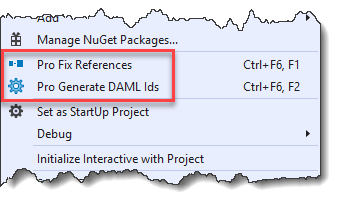
In general, there is a one-to-one correspondence between a framework UI element extensibility point (e.g. button, tool, menu, dockpane, etc) and an item template. Use the relevant item template to add the corresponding extensibility point to your Add-in. Note: For the following item templates a further description may be useful: ##### Drop Handler The ArcGIS Pro Framework supports drag and drop via two virtual functions: [OnDragOver](https://pro.arcgis.com/en/pro-app/latest/sdk/api-reference/#topic10438.html) and [OnDrop](https://pro.arcgis.com/en/pro-app/latest/sdk/api-reference/#topic10439.html). Use the Drop Handler template to add basic implementations of these methods to your add-in to help get you started with drag and drop support for your custom panes and dockpanes. [Excel Drop Handler sample](https://github.com/Esri/arcgis-pro-sdk-community-samples/tree/master/Content/ExcelDropHandler) ##### Embeddable Control Use the Embeddable Control template to add a pop-up or similar UI to your custom map tools. When a map tool is activated, its associated embeddable control (if it has one) is displayed on-top-of the active map view. When the map tool is de-activated, the embeddable control is hidden. [ProGuide: Using Embeddable Controls](https://github.com/Esri/arcgis-pro-sdk/wiki/ProGuide-Using-Embeddable-Controls) [Basic Map Tool sample](https://github.com/Esri/arcgis-pro-sdk-community-samples/tree/master/Map-Exploration/BasicMapTool) [Map Tool with OverlayControl Sample](https://github.com/Esri/arcgis-pro-sdk-community-samples/tree/master/Map-Exploration/MapToolWithOverlayControl) ##### Map Pane Impersonation If you want your custom pane to "use" the map TOC content control (and not a custom content control) then you must "impersonate" the map pane. Run this template to generate the necessary code to implement a custom pane with map pane impersonation. [ProGuide: Map Pane Impersonation](https://github.com/Esri/arcgis-pro-sdk/wiki/ProGuide-Map-Pane-Impersonation) [ImpersonateMapPane Sample](https://github.com/Esri/arcgis-pro-sdk-community-samples/tree/master/Map-Exploration/ImpersonateMapPane) #### ArcGIS Pro SDK for .NET utilities Package: proapp-sdk-utilities.vsix ArcGIS Pro SDK for .NET (Utilities) provides the following utilities that extend the Visual Studio environment: ![pro-fix-references](https://ArcGIS.github.io/arcgis-pro-sdk/images/Home/proapp-sdk-utilities.png "ArcGIS Pro SDK(Utilities)") Name | Description ---------------------------- | -------------------------------------- Pro Fix References utility | Fixes broken references in an ArcGIS Pro add-in, core host, configuration, or plug-in projects. Broken references can be caused when you share add-ins with other colleagues or download add-ins where the ArcGIS Pro assembly references point to a different location from where you installed them. Pro Fix References can be run on individual projects or all projects within a solution. Pro Generate DAML Ids utility| Converts all of the ArcGIS Pro Desktop Application Markup Language (DAML) string IDs into static string properties organized by DAML element types (for example, Button, Dockpane, Tool, Condition, and so on). This allows you to use the IntelliSense feature of Visual Studio within your source code file to add IDs, rather than having to manually type DAML string IDs). ### Getting started See [ProGuide: Build your first add-in](https://github.com/Esri/arcgis-pro-sdk/wiki/ProGuide-Build-Your-First-Add-in) for step-by-step instructions on creating a basic button that appears on the ArcGIS Pro ribbon. ### ProSnippets ProSnippets are ready-made snippets of code you can quickly insert into your ArcGIS Pro add-in. [List of available ProSnippets](https://github.com/Esri/arcgis-pro-sdk/wiki/ProSnippets). ### Deprecation Information * ArcGIS Pro 2.9 is the last release with .NET Framework 4.8. ArcGIS Pro **3.0** will introduce support for .NET 6.0, Microsoft's latest edition of .NET. Support for .NET 6.0 will replace support for .NET Framework 4.8. With **3.0**, .NET Framework 4.8 will no longer be supported. This will be **a breaking change**. * ArcGIS Pro 2.9 SDK is the last release with support for Visual Studio 2017 and 2019. The ArcGIS Pro **3.0** SDK will introduce support for Visual Studio 2022, Microsoft's latest edition of its IDE. Support for Visual Studio 2022 will replace support for Visual Studio 2017 and 2019. With **3.0**, Visual Studio 2017 and 2019 will no longer be supported.. * ChromiumWebBrowser has been been deprecated at 2.9. If you are currently using ChromiumWebBrowser control, please switch to using WebViewBrowser instead. [WebViewBrowser control](https://github.com/esri/arcgis-pro-sdk/wiki/ProConcepts-Framework#webviewbrowser-control) ## Previous versions * [ArcGIS Pro 2.8 SDK for .NET](https://github.com/Esri/arcgis-pro-sdk/releases/tag/2.8.0.29751) * [ArcGIS Pro 2.7 SDK for .NET](https://github.com/Esri/arcgis-pro-sdk/releases/tag/2.7.0.26828) * [ArcGIS Pro 2.6 SDK for .NET](https://github.com/Esri/arcgis-pro-sdk/releases/tag/2.6.0.24783) * [ArcGIS Pro 2.5 SDK for .NET](https://github.com/Esri/arcgis-pro-sdk/releases/tag/2.5.0.22081) * [ArcGIS Pro 2.4 SDK for .NET](https://github.com/Esri/arcgis-pro-sdk/releases/tag/2.4.0.19948) * [ArcGIS Pro 2.3 SDK for .NET](https://github.com/Esri/arcgis-pro-sdk/releases/tag/2.3.0.15769) * [ArcGIS Pro 2.2 SDK for .NET](https://github.com/Esri/arcgis-pro-sdk/releases/tag/2.2.0.12813) * [ArcGIS Pro 2.1 SDK for .NET](https://github.com/Esri/arcgis-pro-sdk/releases/tag/2.1.0.10257) * [ArcGIS Pro 2.0 SDK for .NET](https://github.com/Esri/arcgis-pro-sdk/releases/tag/2.0.0.8933) * [ArcGIS Pro 1.4 SDK for .NET](https://github.com/Esri/arcgis-pro-sdk/releases/tag/1.4.0.7198) * [ArcGIS Pro 1.3 SDK for .NET](https://github.com/Esri/arcgis-pro-sdk/releases/tag/1.3.0.5861) * [ArcGIS Pro 1.2 SDK for .NET](https://github.com/Esri/arcgis-pro-sdk/releases/tag/1.2.0.5023) * [ArcGIS Pro 1.1 SDK for .NET](https://github.com/Esri/arcgis-pro-sdk/releases/tag/1.1.0.3318) ## Contributing Esri welcomes contributions from anyone and everyone. For more information, see our [guidelines for contributing](https://github.com/esri/contributing). ## Issues Find a bug or want to request a new feature? Let us know by submitting an issue. ## Licensing Copyright 2021 Esri Licensed under the Apache License, Version 2.0 (the "License"); you may not use this file except in compliance with the License. You may obtain a copy of the License at: http://www.apache.org/licenses/LICENSE-2.0. Unless required by applicable law or agreed to in writing, software distributed under the License is distributed on an "AS IS" BASIS, WITHOUT WARRANTIES OR CONDITIONS OF ANY KIND, either express or implied. See the License for the specific language governing permissions and limitations under the License. A copy of the license is available in the repository's [license.txt](./License.txt) file.
pre-req ArcGIS Pro 2.9 SDK for Microsoft .NET Framework

                                                    [Home](https://github.com/Esri/arcgis-pro-sdk/wiki) | API Reference | [Requirements](#requirements) | [Download](#installing-arcgis-pro-sdk-for-net) | Samples