# video_player_web_hls
**Repository Path**: fanbook/video_player_web_hls
## Basic Information
- **Project Name**: video_player_web_hls
- **Description**: 修改视频ObjectFit属性为cover
- **Primary Language**: Unknown
- **License**: BSD-3-Clause
- **Default Branch**: master
- **Homepage**: None
- **GVP Project**: No
## Statistics
- **Stars**: 0
- **Forks**: 0
- **Created**: 2021-11-16
- **Last Updated**: 2024-08-27
## Categories & Tags
**Categories**: Uncategorized
**Tags**: None
## README
# video_player_web_hls
Supports hls on chrome and other browsers.
## Usage
```yaml
...
dependencies:
...
video_player_web_hls: ^0.1.1
video_player: ^0.10.10
...
```
Add
```javascript
```
in index.html above
```javascript
```
## dart:io
The Web platform does **not** suppport `dart:io`, so attempts to create a `VideoPlayerController.file` will throw an `UnimplementedError`.
## Autoplay
Playing videos without prior interaction with the site might be prohibited
by the browser and lead to runtime errors. See also: https://goo.gl/xX8pDD.
## Supported Formats
**Different web browsers support different sets of video codecs.**
### Video codecs?
Check MDN's [**Web video codec guide**](https://developer.mozilla.org/en-US/docs/Web/Media/Formats/Video_codecs) to learn more about the pros and cons of each video codec.
### What codecs are supported?
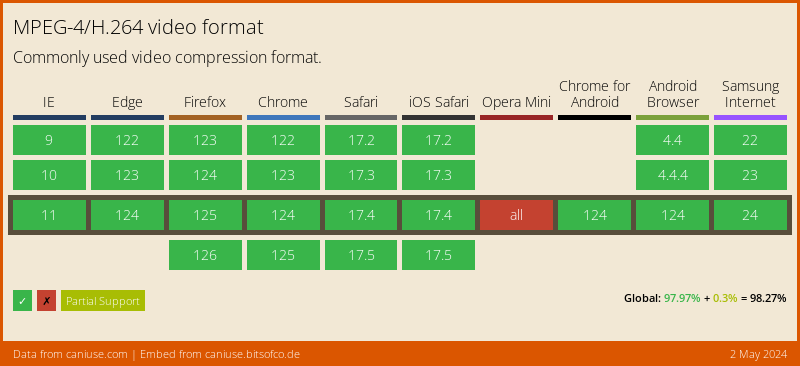
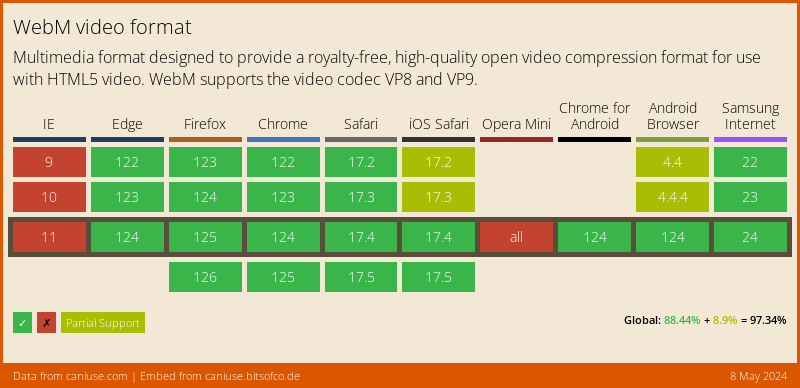
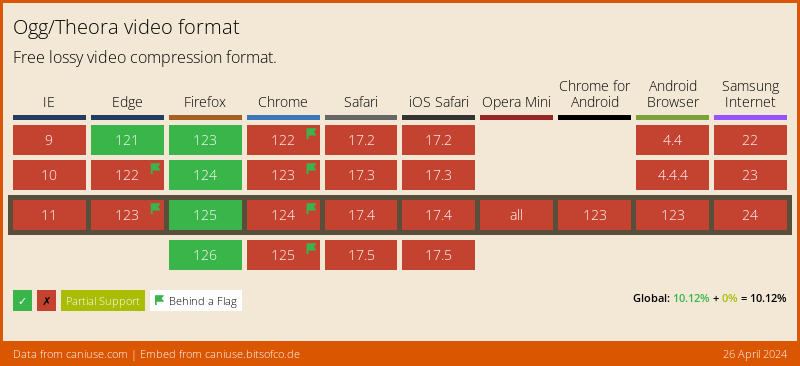
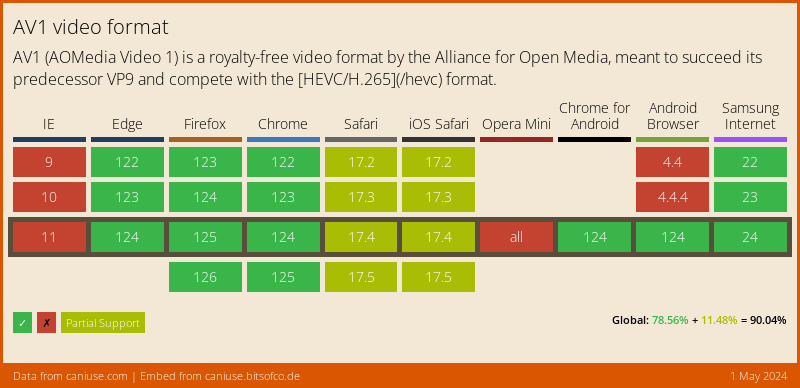
Visit [**caniuse.com: 'video format'**](https://caniuse.com/#search=video%20format) for a breakdown of which browsers support what codecs. You can customize charts there for the users of your particular website(s).
Here's an abridged version of the data from caniuse, for a Global audience:
#### MPEG-4/H.264
[](https://caniuse.com/#feat=mpeg4)
#### WebM
[](https://caniuse.com/#feat=webm)
#### Ogg/Theora
[](https://caniuse.com/#feat=ogv)
#### AV1
[](https://caniuse.com/#feat=av1)
#### HEVC/H.265
[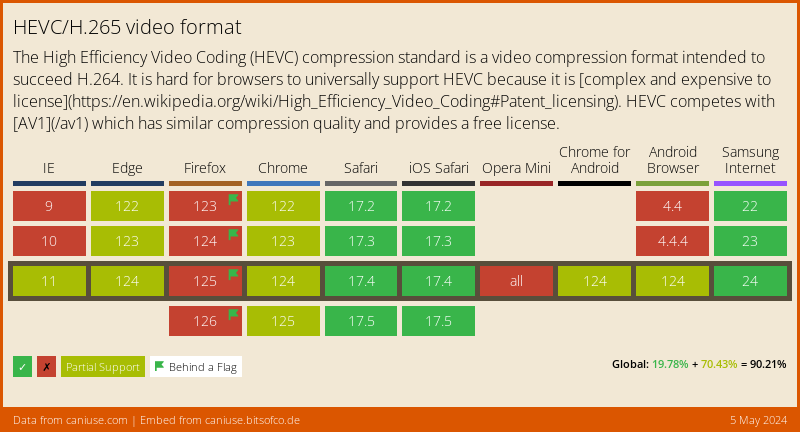](https://caniuse.com/#feat=hevc)
[1]: ../video_player
## Example
```dart
import 'package:video_player/video_player.dart';
import 'package:flutter/material.dart';
void main() => runApp(VideoApp());
class VideoApp extends StatefulWidget {
@override
_VideoAppState createState() => _VideoAppState();
}
class _VideoAppState extends State {
VideoPlayerController _controller;
@override
void initState() {
super.initState();
_controller = VideoPlayerController.network(
'https://test-streams.mux.dev/x36xhzz/x36xhzz.m3u8')
..initialize().then((_) {
// Ensure the first frame is shown after the video is initialized, even before the play button has been pressed.
setState(() {});
});
}
@override
Widget build(BuildContext context) {
return MaterialApp(
title: 'Video Demo',
home: Scaffold(
body: Center(
child: _controller.value.initialized
? AspectRatio(
aspectRatio: _controller.value.aspectRatio,
child: VideoPlayer(_controller),
)
: Container(),
),
floatingActionButton: FloatingActionButton(
onPressed: () {
setState(() {
_controller.value.isPlaying
? _controller.pause()
: _controller.play();
});
},
child: Icon(
_controller.value.isPlaying ? Icons.pause : Icons.play_arrow,
),
),
),
);
}
@override
void dispose() {
super.dispose();
_controller.dispose();
}
}
```