# pix3D
**Repository Path**: fl9621/pix3D
## Basic Information
- **Project Name**: pix3D
- **Description**: No description available
- **Primary Language**: Python
- **License**: Not specified
- **Default Branch**: master
- **Homepage**: None
- **GVP Project**: No
## Statistics
- **Stars**: 0
- **Forks**: 0
- **Created**: 2020-05-20
- **Last Updated**: 2024-12-01
## Categories & Tags
**Categories**: Uncategorized
**Tags**: None
## README
# Pix3D: Dataset and Methods for Single-Image 3D Shape Modeling
[Xingyuan Sun](http://people.csail.mit.edu/xingyuan/)\*, [Jiajun Wu](https://jiajunwu.com)\*, [Xiuming Zhang](http://people.csail.mit.edu/xiuming/), Zhoutong Zhang, Chengkai Zhang, [Tianfan Xue](http://people.csail.mit.edu/tfxue/), [Joshua B. Tenenbaum](http://web.mit.edu/cocosci/josh.html), [William T. Freeman](https://billf.mit.edu).
[Paper](http://pix3d.csail.mit.edu/papers/pix3d_cvpr.pdf) / [Project Page](http://pix3d.csail.mit.edu)
## Prerequisites
Evaluation
- [`GCC`](https://gcc.gnu.org) 4.8.5
- [`CUDA`](https://developer.nvidia.com/cuda-toolkit) 8.0
- [`Python`](https://www.python.org) 3.6.4
- [`TensorFlow`](https://github.com/tensorflow/tensorflow) 1.1.0
- [`numpy`](http://www.numpy.org) 1.14.0
- [`skimage`](http://scikit-image.org) 0.13.1
- [`numba`](https://numba.pydata.org) 0.36.2
- [`scipy`](https://www.scipy.org) 1.0.0
- [`tqdm`](https://github.com/noamraph//tqdm) 4.19.4
Rendering Demo
- [`blender`](https://www.blender.org) 2.78
## Installation
Our current release has been tested on Ubuntu 16.04.4 LTS.
#### Cloning the repository and downloading Pix3D (3.6GB)
```sh
git clone git@github.com:xingyuansun/pix3d.git
cd pix3d
./download_dataset.sh
```
The Pix3D dataset is licensed under a Creative Commons Attribution 4.0 International License.
## Dataset
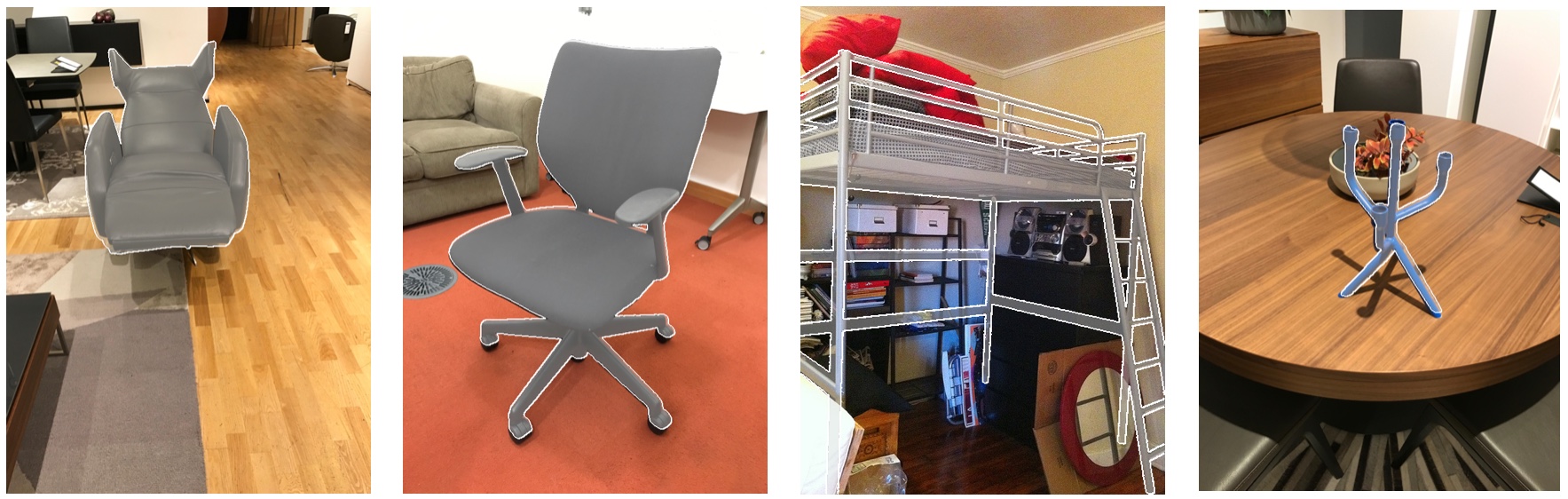
For each instance in Pix3D, we provide the following information (stored in `pix3d.json`):
- `img`: path to the image
- `category`: category of the object in the image
- `img_size`: size of the image, in the format of [`width`, `height`]
- `2d_keypoints`: array of size `N` x `M` x 2, where `N` is the number of annotators and `M` is the number of 2D keypoints, indicating the positions of 2D keypoints on the image (origin: top left corner; `+x`: rightward; `+y`: downward); [-1.0, -1.0] if an annotator marked this keypoint hard to label (e.g., invisible)
- `mask`: path to the object mask
- `img_source`: source of the image: "ikea" / "internet" / "self-taken"
- `model`: 3D model of the object (`+x`: leftward, `+y`: upward, `+z`: inward, in canonical view)
- `model_raw`: raw 3D model of the object (for raw, scanned 3D models, only available in the full Pix3D dataset)
- `model_source`: source of the 3D model: "ikea" / "self-scanned"
- `3d_keypoints`: path to saved 3D keypoints (a text file)
- `voxel`: voxelized 3D model (`+x`: leftward, `+y`: outward, `+z`: upward, in canonical view)
- `rot_mat`: rotation matrix of the object (used in rendering)
- `trans_mat`: translation matrix of the object (used in rendering)
- `focal_length`: estimated focal length (in mm, and the width of the sensor is fixed to 32mm; used in rendering)
- `cam_position`: estimated camera position assuming the object is at the origin, and the camera is looking at the object center. The coordinates are defined in 3d model's reference frame, not voxel's. The camera's up vector is `+y`. (used in the evaluation)
- `inplane_rotation`: estimated inplane camera rotation assuming the object is at the origin, and the camera is looking at the object. (positive value: clockwise rotation, unit: radian; used in the evaluation).
- `truncated`: whether the object is truncated: "true" or "false"
- `occluded`: whether the object is occluded: "true" or "false"
- `slightly_occluded`: whether the object is slightly occluded: "true" or "false" (an object will not be both `occluded` and `slightly_occluded`)
- `bbox`: bounding box of the object, in the format of [`width_from`, `height_from`, `width_to`, `height_to`]
You can load `pix3d.json` into Python with
```python
import json
json.load(open('pix3d.json'))
```
## Rendering Demo
Usage:
```sh
blender --background --python demo.py -- --anno_idx --output_path
```
Rendering of the `i`-th (starting from 0) annotation in `pix3d.json` will be saved to path `p`. Note that your Blender should be bundled with Python, which is usually the default. For rendering, a camera with a sensor width of 32mm and a focal length of `focal_length` is placed at the origin. We apply `rot_mat` and `trans_mat` to the object.
For example, by executing
```sh
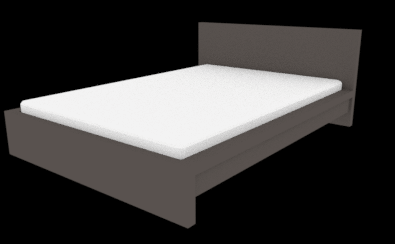
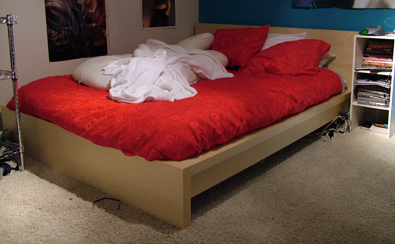
blender --background --python demo.py -- --anno_idx 0 --output_path ./demo.png
```
you get the rendering on the left (the associated image is shown on the right).
## Evaluation
#### Compiling the evaluation code
First, modify the first 4 lines of `eval/Makefile` according to your environment. Then, in the `eval` folder, execute
```sh
make
```
#### Usage
**Note**: Calculations of CD and EMD need to be run on a GPU.
- To select which GPU to run on, use the environment variable `CUDA_VISIBLE_DEVICES`
- **Warning**: Make sure to check the returned scores. Zero scores indicate that there isn't enough GPU memory. You will need to re-compute the scores with a smaller batch size.
You can evaluate your predictions on Pix3D with `eval/eval.py`. The file takes two file lists and calculates IoU, EMD, and CD between each pair of voxels or point clouds. The following options are available:
- `list1_path`: path to the 1st file list
- `list2_path`: path to the 2nd file list
- `output_path`: path to the output -- a csv file containing the scores
- `list1_mode`, `list2_mode`: type of inputs expected for files from each list: "voxels" for voxel inputs (for CD and EMD calculations, point clouds are sampled from the isosurface); "points" for point cloud inputs. Default: "voxels"
- `list1_max_value`, `list2_max_value`: voxel inputs from each list will be divided by the corresponding value. Default: 1.0
- `list1_var_name`, `list2_var_name`: variable name in `.mat` file (only for voxels). Default: "voxel"
- `no_resample1`, `no_resample2`: do not perform bounding box finding and resampling for voxels in each list
- `pts_size`: number of points to use for CD and EMD calculations. Default: 1024
- `threshold`: threshold for calculating bounding box (IoU) or isosurface (CD & EMD). Default: 0.1
- `batch_size_emd`: batch size for EMD computations. Default: 100
- `calc_iou`: set to true to calculate IoU (N/A for point cloud inputs)
- `calc_cd`: set to true to calculate CD
- `calc_emd`: set to true to calculate EMD
- `iou_l`, `iou_r`: lower and upper bounds of IoU threshold search range. Default: 0.01, 0.5
- `iou_s`: step size of IoU threshold search range. Default: 0.01
- `iou_rsl`: resolution of downsampled voxels (for IoU). Default: 32
#### Evaluation details
As different voxelization methods may result in objects of different scales in the voxel grid, for a fair comparison, we preprocess all voxels and point clouds before calculating IoU, CD and EMD.
For IoU, we first find the bounding box of the object with a threshold of 0.1, pad the bounding box into a cube, and then use trilinear interpolation to resample to the desired resolution (32 x 32 x 32). Some algorithms reconstruct shapes at a resolution of 128 x 128 x 128. In this case, we first, apply a 4x max-pooling before trilinear interpolation; without the max pooling, the sampling grid can be too sparse and some thin structure can be left out. After the resampling of both the output voxel and the ground truth voxel, we search for an optimal threshold that maximizes the average IoU score over all objects, from 0.01 to 0.50 with a step size of 0.01.
For CD and EMD, we first sample a point cloud from the voxelized reconstructions. For each shape, we compute its isosurface with a threshold of 0.1, and then sample 1,024 points from the surface. All point clouds are then translated and scaled such that the bounding box of the point cloud is centered at the origin with its longest side being 1. We then compute CD and EMD for each pair of point clouds.
#### Demo
`eval/list` shows an evaluation example on the 2,894 untruncated, unoccluded chair images from Pix3D. Slightly occluded images have also been excluded.
- `eval/list/input.txt`: file list of input images (path to uncropped images; you may crop them before testing)
- `eval/list/gt.txt`: file list of ground truth voxels
- `eval/list/baseline_output.txt`: file list of predictions
Download the baseline output (829MB) by executing
```sh
./download_baseline_output.sh
```
Then, you can evaluate the output by executing the following command in the `eval` folder:
```sh
CUDA_VISIBLE_DEVICES=0 python eval.py --list1_path ./list/baseline_output.txt --list1_max_value 255 --list2_path ./list/gt.txt --calc_cd --calc_emd --calc_iou --threshold 0.1 --output_path results.csv
```
Your results should be around 0.287 for IoU, 0.119 for CD, and 0.120 for EMD, corresponding to the last row of Table 3 in the paper. The numbers might be slightly different from those reported in the paper because
- There is randomness in sampling points from voxels;
- We use an approximation algorithm for calculating EMD;
- We updated the voxelization algorithm for the final release.
#### Acknowledgements
Code for calculating CD and EMD comes from [PSGN](https://github.com/fanhqme/PointSetGeneration).
## Notice
For rendering masks, we used `rot_mat`, `trans_mat`, and `focal_length`, which are defined in camera coordinates and applied to objects. However, for viewer-centered algorithms whose predictions need to be rotated back to the canonical view for evaluations against ground truth shapes, those values are not very helpful. As most algorithms assume that the camera is looking at the object's center, the raw input images are usually cropped or transformed before sending into their pipeline. This will result in a rotation matrix that is slightly different from the one provided. We provide `cam_position` and `inplane_rotation` to mitigate this. Those values are defined in object coordinates and will reproduce an image that is equivalent to the original image under a homography transformation. We use these values to rotate back viewer-centered predictions to evaluate their performance. These values are also used in evaluating viewpoint estimation algorithms for a similar reason.
## Reference
```
@inproceedings{pix3d,
title={Pix3D: Dataset and Methods for Single-Image 3D Shape Modeling},
author={Sun, Xingyuan and Wu, Jiajun and Zhang, Xiuming and Zhang, Zhoutong and Zhang, Chengkai and Xue, Tianfan and Tenenbaum, Joshua B and Freeman, William T},
booktitle={IEEE Conference on Computer Vision and Pattern Recognition (CVPR)},
year={2018}
}
```
For any questions, please contact Xingyuan Sun (xingyuansun.cs@gmail.com) and Jiajun Wu (jiajunwu@mit.edu).