# react-native-community-art
**Repository Path**: fujm/react-native-community-art
## Basic Information
- **Project Name**: react-native-community-art
- **Description**: No description available
- **Primary Language**: Unknown
- **License**: MIT
- **Default Branch**: master
- **Homepage**: None
- **GVP Project**: No
## Statistics
- **Stars**: 0
- **Forks**: 0
- **Created**: 2022-04-08
- **Last Updated**: 2022-04-08
## Categories & Tags
**Categories**: Uncategorized
**Tags**: None
## README
# `@react-native-community/art`
[![CircleCI][circle-ci-badge]][circle-ci]
![MIT License][license-badge]
[![PRs Welcome][pr-welcome-badge]][make-a-pr]
![Supports Android and iOS][support-badge]
[![Lean Core Badge][lean-core-badge]][lean-core-issue]
> _NOTE: ART was extracted from core `react-native` as a part of "[Lean Core](https://github.com/facebook/react-native/issues/23313)" effort._
React Native module that allows you to draw vector graphics
# Getting started
## Installing module
```sh
yarn add @react-native-community/art
```
or
```sh
npm install @react-native-community/art --save
```
## Linking module
### Mostly automatic linking
For `react-native >= 0.60` ReactNativeART should be autolinked and no additional action is required.
For `react-native < 0.60` you need to link ReactNative ART:
```js
react-native link @react-native-community/art
```
### Manual linking
Manually linking the library for iOS
#### `Open project.xcodeproj in Xcode`
Drag `RNCSlider.xcodeproj` to your project on Xcode (usually under the Libraries group on Xcode):
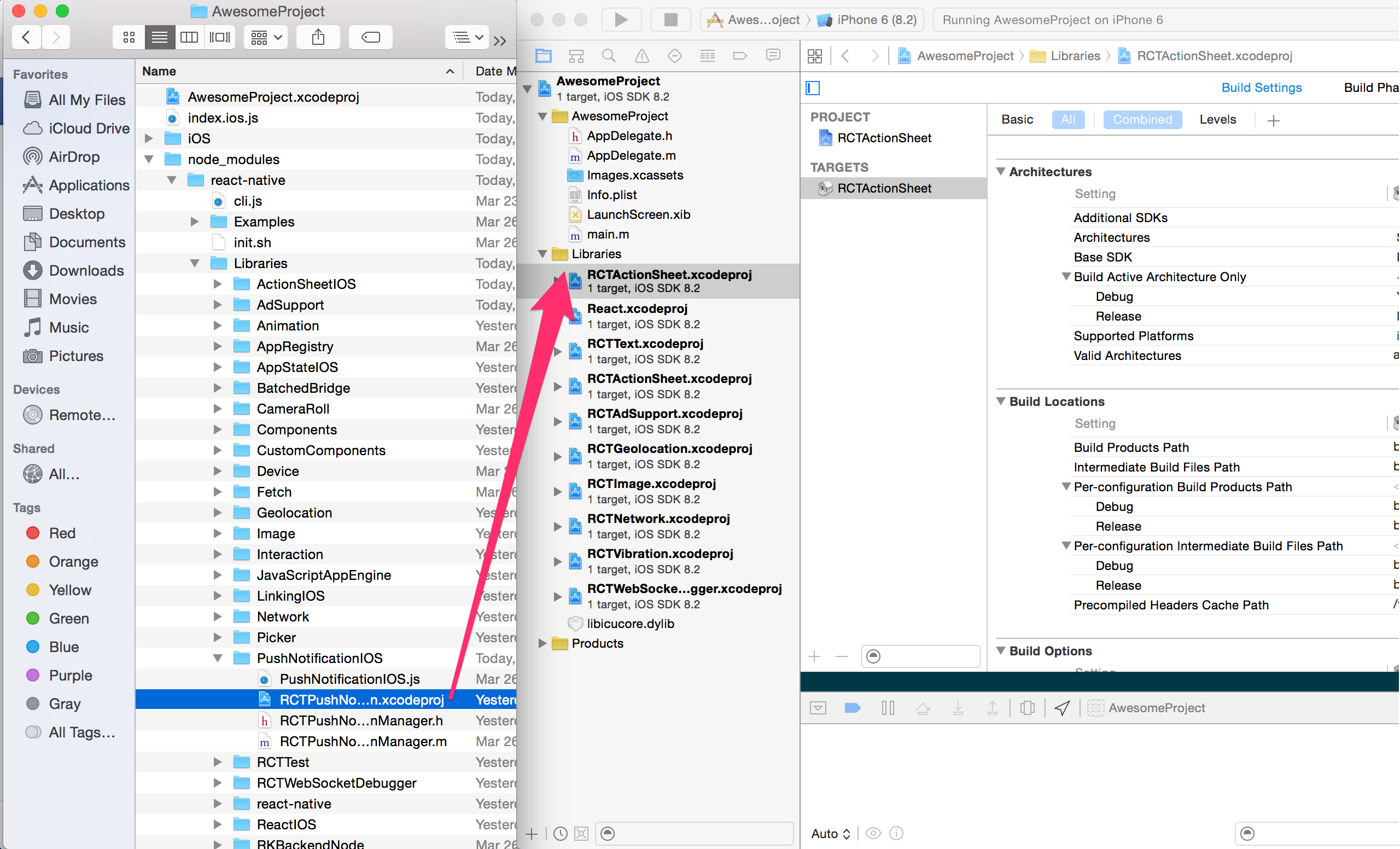
#### Link `libART.a` binary with libraries
Click on your main project file (the one that represents the `.xcodeproj`) select `Build Phases` and drag the static library from the `Products` folder inside the Library you are importing to `Link Binary With Libraries` (or use the `+` sign and choose library from the list):

Manually linking the library for Android
#### `android/settings.gradle`
```groovy
include ':react-native-art'
project(':react-native-art').projectDir = new File(rootProject.projectDir, '../node_modules/@react-native-community/art/android')
```
#### `android/app/build.gradle`
```groovy
dependencies {
...
implementation project(':react-native-art')
}
```
#### `android/app/src/main/.../MainApplication.java`
On top, where imports are:
```java
import com.reactnativecommunity.art.ARTPackage;
```
Add the `ARTPackage` class to your list of exported packages.
```java
@Override
protected List getPackages() {
return Arrays.asList(
new MainReactPackage(),
new ARTPackage()
);
}
```
# Migrating from the core `react-native` module
To migrate to this module you need to follow all the installation instructions above and change your imports from:
```js
import {ART} from 'react-native';
const {Surface, Shape} = ART;
```
to:
```js
import {Surface, Shape} from '@react-native-community/art';
```
# Documentation
You can find API reference [here](https://github.com/react-native-community/art/tree/master/docs/api.md).
## License
The library is released under the MIT licence. For more information see `LICENSE`.
[support-badge]:https://img.shields.io/badge/platforms-android%20|%20ios-lightgrey.svg?style=flat-square
[make-a-pr]:http://makeapullrequest.com
[pr-welcome-badge]:https://img.shields.io/badge/PRs-welcome-brightgreen.svg?style=flat-square
[license-badge]:https://img.shields.io/npm/l/@react-native-community/slider.svg?style=flat-square
[circle-ci]:https://circleci.com/gh/react-native-community/art
[circle-ci-badge]: https://img.shields.io/circleci/project/github/react-native-community/art/master.svg?style=flat-square
[lean-core-badge]: https://img.shields.io/badge/Lean%20Core-Extracted-brightgreen.svg?style=flat-square
[lean-core-issue]: https://github.com/facebook/react-native/issues/23313