# WindowTabs
**Repository Path**: ginkdu/WindowTabs
## Basic Information
- **Project Name**: WindowTabs
- **Description**: Forked From:https://github.com/leafOfTree/WindowTabs,修复频闪问题,增加简中语言。
- **Primary Language**: Unknown
- **License**: MIT
- **Default Branch**: master
- **Homepage**: None
- **GVP Project**: No
## Statistics
- **Stars**: 5
- **Forks**: 0
- **Created**: 2026-05-09
- **Last Updated**: 2026-08-15
## Categories & Tags
**Categories**: Uncategorized
**Tags**: WindowTabs
## README
 # WindowTabs
[English](README.md)
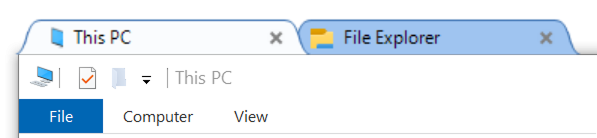
一款为桌面带来浏览器式标签页窗口管理功能的实用工具。
# WindowTabs
[English](README.md)
一款为桌面带来浏览器式标签页窗口管理功能的实用工具。
## 历史
该项目最初由 Maurice Flanagan 于 2009 年开发,提供免费版和付费版。
原作者因无时间维护而将其开源。详见原始仓库:[mauricef/WindowTabs](https://github.com/mauricef/WindowTabs)。
本仓库 fork 自 [payaneco 的仓库](https://github.com/payaneco/WindowTabs),而后者 fork 自 [redgis 的仓库](https://github.com/redgis/WindowTabs)。目前可在 Win7、Win10 和 Win11 上成功编译运行。
## 下载

你可以从 [releases](https://github.com/leafOfTree/WindowTabs/releases) 页面下载预编译文件,也可以按以下步骤自行编译 `exe` 文件。
## 使用方法
- 运行 `WindowTabs.exe`,程序将在后台运行。
- 配置哪些窗口启用分组和标签页,以及其他设置。
- 右键点击右下角的通知图标。
- 右键点击标签页标题。
## 贡献
欢迎任何形式的帮助。随时可以创建 issue 或 pull request。如果你想修复问题,可以选择 [任意未关闭的 issue](https://github.com/leafOfTree/WindowTabs/issues?q=is%3Aissue%20state%3Aopen)。
## 编译
已在 Win10 上使用 Visual Studio 2022 测试通过。
- 克隆
```
git clone https://gitee.com/ginkdu/WindowTabs.git
```
- 安装依赖
- [Visual Studio 2022 社区版](https://visualstudio.microsoft.com/)
安装时需要选择 `.NET 桌面开发` 工作负载。
- [WiX Toolset build tools V3.14.1](https://wixtoolset.org/docs/wix3/)
- [WiX Toolset Visual Studio 2022 扩展](https://marketplace.visualstudio.com/items?itemName=WixToolset.WixToolsetVisualStudio2022Extension)
> 安装扩展前需要先关闭 Visual Studio。
- 编译发布版
启动 Visual Studio,通过 "文件 > 打开 > 项目/解决方案" 打开 `WindowTabs.sln`。
选择 `Release` 配置并点击 `启动`,你将在 `WindowTabs\WtProgram\bin\Release\WindowTabs.exe` 得到发布版本。
- 调试版
选择 `Debug` 配置,将编译到 `WindowTabs\WtProgram\bin\Debug\WindowTabs.exe`。
### 小技巧
- 在 Visual Studio 编辑器中,点击左侧灰色列可以在当前行添加断点。然后启动 `调试` 即可查看运行时详情。
- 你也可以在代码中使用 `System.Diagnostics.Debug.WriteLine("Hello, world");` 打印日志进行调试。
## 项目结构
- 入口点:`Program.fs` this.run
- 托盘图标(通知图标):`NotifyIconPlugin.fs` this.icon
- 设置窗口:`DesktopManagerForm.fs`。其标签页位于 `ManagerViewService/Views/`
- 树形控件:`treeviewadv/`。可能来自 https://sourceforge.net/projects/treeviewadv/
- 任务栏分组:`SuperBarPlugin.fs`
- GUI 框架:WinForms
## 更新日志
### 2026
- 在标签页右键菜单添加"打开文件所在路径"项
- **标签条闪屏修复**:通过优化渲染和内存使用修复标签条闪屏问题
- 移除 `TabStrip.fs` 和 `SuperBarPlugin.fs` 中阻塞 UI 线程的频繁 `GC.Collect()` 调用
- 优化 `Win32.fs` 中的 `update()` 方法,避免不必要的 Bitmap 创建
- 修复 `showNoActivate()` 仅在窗口不可见时才显示窗口
- 更新 `TabStripSprite.fs` 使用 `PixelFormat.Format32bppArgb` 正确处理透明通道
- **Tab 闪烁修复**:修复标签页闪烁问题,添加去抖和 5 秒自动清除超时
- 新增 `flashTimers` Cell 跟踪每个 Tab 的 Flash 超时定时器
- 重写 `flashTab` 方法,添加去抖逻辑跳过重复的 `setTabBgColor` 调用
- 增强 `HSHELL_REDRAW` 处理,清除当前窗口和组内其他 Tab 的闪烁状态
- 在 `removeWindow` 和 `destroy` 中清理 Flash 定时器
- 在 TabStrip 新增 `isTabFlashing` 方法用于去抖检查
- **VS2022 + .NET 4.8 兼容性修复**:升级项目以支持 Visual Studio 2022
- `WtProgram.fsproj`:TargetFramework v4.0→v4.8,FSharp.Core 引用路径 net40→net45
- `Win32.csproj`、`Settings.csproj`:TargetFramework v2.0→v4.8
- `App.config`:SKU 版本 v4.0→v4.8,添加 FSharp.Core bindingRedirect
- `WtInject.vcxproj`:PlatformToolset v143(VS2022)
### 2025
- 添加选项:在"行为"中切换 `shift+滚轮` 是否切换标签页
- 添加文字颜色选项(外观设置)
- 添加预设主题颜色按钮:深色模式和蓝色变体(外观设置)
- 修复标签页右对齐时与最小化按钮重叠的问题
- 支持鼠标悬停激活标签页
- 添加保存自动隐藏和标签对齐默认值的选项
### 2024
- 改进 UI - 布局、颜色和字体
- 支持从任务栏按钮右键菜单关闭所有标签页
- 修复没有打开窗口时 WindowTabs 的 alt+tab 崩溃问题
- 支持 Visual Studio 2022
- 移除任务窗口预览以修复任务切换错误
- 使用最后一个文件名作为标签页名称
- 图标和任务切换窗口边框的 UI 改进
- 添加禁用 `ctrl+1`... 快捷键的选项
- 在标签页右键菜单添加"新窗口"项
- 支持 exe 文件同目录下的设置文件
### 2023
- 识别基于 ApplicationFrameWindow 的应用,如照片和邮件
- 修复切换"淡出..."选项时的空异常
- 调整设置字体和显示
- 修复文件资源管理器的额外空白标签页
- 更新 Win10 的包
- 修复桌面"程序"标题丢失问题
## 许可证
[MIT 许可证](LICENSE)
## 参考
- [mauricef/WindowTabs](https://github.com/mauricef/WindowTabs) - 原始仓库
- [redgis/WindowTabs](https://github.com/redgis/WindowTabs)
- [payaneco/WindowTabs](https://github.com/payaneco/WindowTabs)
- [leafoftree/WindowTabs](https://github.com/leafOfTree/WindowTabs)