# SwanLab **Repository Path**: git.jason_zhang/swanlab ## Basic Information - **Project Name**: SwanLab - **Description**: ⚡️SwanLab - 一个开源的、现代设计的AI训练记录、观测与协作工具。支持云/自托管使用。集成了PyTorch / Transformers / LLaMA Factory / Swift / Ultralytics / veRL 等 30+ 主流AI训练框架。 - **Primary Language**: Unknown - **License**: Apache-2.0 - **Default Branch**: main - **Homepage**: None - **GVP Project**: No ## Statistics - **Stars**: 0 - **Forks**: 22 - **Created**: 2025-06-13 - **Last Updated**: 2025-06-13 ## Categories & Tags **Categories**: Uncategorized **Tags**: None ## README
SwanLab

SwanLab

An open-source, modern-designed deep learning training tracking and visualization tool Supports both cloud/offline usage, integrates with 30+ mainstream frameworks, and easily integrates with your experimental code. 🔥SwanLab Online · 📃 Documentation · Report Issues · Feedback · Changelog [![][release-shield]][release-link] [![][dockerhub-shield]][dockerhub-link] [![][github-stars-shield]][github-stars-link] [![][github-issues-shield]][github-issues-shield-link] [![][github-contributors-shield]][github-contributors-link] [![][license-shield]][license-shield-link] [![][tracking-swanlab-shield]][tracking-swanlab-shield-link] [![][last-commit-shield]][last-commit-shield-link] [![][pypi-version-shield]][pypi-version-shield-link] [![][wechat-shield]][wechat-shield-link] [![][pypi-downloads-shield]][pypi-downloads-shield-link] [![][colab-shield]][colab-shield-link] ![](readme_files/swanlab-overview.png) [中文](README.md) / English / [日本語](README_JP.md) / [Русский](README_RU.md) 👋 Join our [WeChat Group](https://docs.swanlab.cn/en/guide_cloud/community/online-support.html)
## Table of Contents - [🌟 Recent Updates](#-recent-updates) - [👋🏻 What is SwanLab](#-what-is-swanlab) - [📃 Online Demo](#-online-demo) - [🏁 Quick Start](#-quick-start) - [💻 Self-Hosting](#-self-hosting) - [🚗 Framework Integration](#-framework-integration) - [🔌 Plugins](#-plugins) - [🎮 Hardware Monitoring](#-hardware-monitoring) - [🆚 Comparison with Familiar Tools](#-comparison-with-familiar-tools) - [👥 Community](#-community) - [📃 License](#-license)
## 🌟 Recent Updates - 2025.06.11: 📊 Added support for **swanlab.echarts.table** data type, supporting pure text chart display; added support for **stretch interaction** for groups, allowing more charts to be displayed at the same time; added **maximum/minimum value** options for table views; - 2025.06.08: ♻️ Added support for storing complete experiment log files locally and uploading them to the cloud/private deployment via **swanlab sync**; Hardware monitoring now supports **Hygon DCU**; - 2025.06.01: 🏸 Added support for **chart free dragging**; added support for **ECharts custom chart**; added support for **PaddleNLP** framework; hardware monitoring supports **MetaX GPU**; - 2025.05.25: Logging now supports capturing the **standard error stream**, allowing better recording of output from frameworks like PyTorch Lightning; hardware monitoring now includes support for **Moore Threads**; added a security feature for logging runtime commands, where API Keys will be automatically hidden. - 2025.05.14: Added support for **experiment tags**; added support for **Log Scale** for line charts; added support for **group dragging**; significantly optimized the experience of uploading a large number of metrics. - 2025.05.09: Added support for line chart creation; enhanced the chart configuration feature with data source selection, enabling a single chart to display different metrics; introduced the ability to generate GitHub badges for training projects. - 2025.04.23: Added support for editing line charts, allowing free configuration of X and Y axis data ranges and title styles; chart search now supports regular expressions; added hardware detection and monitoring for Kunlun Core XPU. - 2025.04.11: Added support for **local selection** for line charts; supports the step range of the current graph. - 2025.04.08: Added support for the **swanlab.Molecule** data type, enabling recording and visualization of biochemical molecular data; also supports saving the state of sorting, filtering, and column order changes in table views.
Full Changelog - 2025.04.07: We completed joint integration with [EvalScope](https://github.com/ModelScope/EvalScope). Now you can use **SwanLab** in EvalScope to **evaluate LLM performance**. - 2025.03.30: Added support for the **swanlab.Settings** method, enabling more precise control over experiment behavior; added support for **Cambricon MLU** hardware monitoring; integrated [Slack notifications](https://docs.swanlab.cn/plugin/notification-slack.html) and [Discord notifications](https://docs.swanlab.cn/plugin/notification-discord.html). - 2025.03.21: 🎉🤗 HuggingFace Transformers has officially integrated SwanLab (version >=4.50.0), [#36433](https://github.com/huggingface/transformers/pull/36433); Added **Object3D chart** support, now you can track and visualize 3D point clouds, [docs](https://docs.swanlab.cn/en/api/py-object3d.html); Hardware monitoring supports the recording of GPU memory (MB), disk utilization, and network sent and received. - 2025.03.12: 🎉🎉 The **Privatized Deployment Edition** of SwanLab is now available!! [🔗 Deployment Documentation](https://docs.swanlab.cn/en/guide_cloud/self_host/docker-deploy.html); SwanLab now supports plugin extensions, such as [Email Notification](https://docs.swanlab.cn/en/plugin/notification-email.html) and [Lark Notification](https://docs.swanlab.cn/en/plugin/notification-lark.html). - 2025.03.09: Added **experiment sidebar width** support; added **external Git code** button; added **sync_mlflow** feature, supporting synchronization with mlflow framework. - 2025.03.06: We completed integration with [DiffSynth Studio](https://github.com/modelscope/diffsynth-studio). Now you can use SwanLab in DiffSynth Studio to **track and visualize Diffusion model text-to-image/video experiments**. [Usage Guide](https://docs.swanlab.cn/en/guide_cloud/integration/integration-diffsynth-studio.html) - 2025.03.04: Added **MLFlow** feature, supporting conversion of MLFlow experiments to SwanLab experiments. [Usage Guide](https://docs.swanlab.cn/en/guide_cloud/integration/integration-mlflow.html) - 2025.03.01: Added **move experiment** feature, now you can move experiments to different projects in different organizations. - 2025.02.24: We completed integration with [EasyR1](https://github.com/hiyouga/EasyR1). Now you can use SwanLab in EasyR1 to **track and visualize large model fine-tuning experiments**. [Usage Guide](https://github.com/hiyouga/EasyR1?tab=readme-ov-file#merge-checkpoint-in-hugging-face-format). - 2025.02.18: We completed integration with [Swift](https://github.com/modelscope/ms-swift). Now you can use SwanLab in Swift's CLI/WebUI to **track and visualize large model fine-tuning experiments**. [Usage Guide](https://docs.swanlab.cn/en/guide_cloud/integration/integration-swift.html). - 2025.02.16: Added **chart moving group** and **create group** features. - 2025.02.09: We completed integration with [veRL](https://github.com/volcengine/verl). Now you can use SwanLab in veRL to **track and visualize large model reinforcement learning experiments**. [Usage Guide](https://docs.swanlab.cn/en/guide_cloud/integration/integration-verl.html). - 2025.02.05: `swanlab.log` supports nested dictionaries [#812](https://github.com/SwanHubX/SwanLab/pull/812), adapting Jax framework features; supports `name` and `notes` parameters. - 2025.01.22: Added `sync_tensorboardX` and `sync_tensorboard_torch` features, supporting synchronization of experiment tracking with these two TensorBoard frameworks. - 2025.01.17: Added `sync_wandb` feature, [docs](https://docs.swanlab.cn/en/guide_cloud/integration/integration-wandb.html), supporting synchronization with Weights & Biases experiment tracking; significantly improved log rendering performance. - 2025.01.11: The cloud version enhanced project table performance with drag-and-drop, sorting, and filtering support. - 2025.01.01: Added **persistent smoothing** for line charts and drag-to-resize functionality for line charts, improving chart browsing experience. - 2024.12.22: We completed integration with [LLaMA Factory](https://github.com/hiyouga/LLaMA-Factory). Now you can use SwanLab in LLaMA Factory to **track and visualize large model fine-tuning experiments**. [Usage Guide](https://github.com/hiyouga/LLaMA-Factory?tab=readme-ov-file#use-swanlab-logger). - 2024.12.15: **Hardware Monitoring (0.4.0)** is now available, supporting system-level information recording and monitoring for CPU, NPU (Ascend), and GPU (Nvidia). - 2024.12.06: Added integration with [LightGBM](https://docs.swanlab.cn/en/guide_cloud/integration/integration-lightgbm.html) and [XGBoost](https://docs.swanlab.cn/en/guide_cloud/integration/integration-xgboost.html); increased the limit for single-line log length. - 2024.11.26: Environment tab - Hardware section now supports identifying **Huawei Ascend NPU** and **Kunpeng CPU**; cloud provider section now supports identifying **QingCloud Jishi Computing**.

## 👋🏻 What is SwanLab SwanLab is an open-source, lightweight AI model training tracking and visualization tool, providing a platform for tracking, recording, comparing, and collaborating on experiments. SwanLab is designed for AI researchers, offering a friendly Python API and a beautiful UI interface, and providing features such as **training visualization, automatic logging, hyperparameter recording, experiment comparison, and multi-user collaboration**. With SwanLab, researchers can identify training issues through intuitive visual charts, compare multiple experiments to find research inspiration, and break down team communication barriers through **online web sharing** and **multi-user collaborative training** within organizations, improving organizational training efficiency. https://github.com/user-attachments/assets/7965fec4-c8b0-4956-803d-dbf177b44f54 Here is a list of its core features: **1. 📊 Experiment Metrics and Hyperparameter Tracking**: Minimal code integration into your machine learning pipeline to track and record key training metrics. - ☁️ Supports **cloud** usage (similar to Weights & Biases), allowing you to check training progress anytime, anywhere. [How to view experiments on mobile](https://docs.swanlab.cn/en/guide_cloud/general/app.html). ![swanlab-architecture](readme_files/swanlab-architecture.png) - 🌸 **Visualizing the Training Process**: By visualizing experiment tracking data through the UI interface, trainers can intuitively observe the results at each step of the experiment, analyze metric trends, and determine which changes led to improved model performance—ultimately enhancing the overall efficiency of model iteration. ![swanlab-table](readme_files/swanlab-table.png) - Supports **hyperparameter recording** and table display. - **Supported metadata types**: Scalar metrics, images, audio, text, 3D point clouds, biological chemical molecules, Echarts custom chart... ![swanlab-table](readme_files/molecule.gif) - **Supported chart types**: Line charts, media charts (images, audio, text, 3D point clouds, biological chemical molecules), Bar charts, Scatter charts, Box plots, Heat maps, Pie charts, Radar charts... ![swanlab-echarts](readme_files/echarts.png) - **Automatic background logging**: Logging, hardware environment, Git repository, Python environment, Python library list, project runtime directory. **2. ⚡️ Comprehensive Framework Integration**: PyTorch, 🤗HuggingFace Transformers, PyTorch Lightning, 🦙LLaMA Factory, MMDetection, Ultralytics, PaddleDetection, LightGBM, XGBoost, Keras, Tensorboard, Weights&Biases, OpenAI, Swift, XTuner, Stable Baseline3, Hydra, and more, totaling **30+** frameworks. ![](readme_files/integrations.png) **3. 💻 Hardware Monitoring**: Supports real-time recording and monitoring of system-level hardware metrics for CPU, NPU (Ascend), GPU (Nvidia), MLU (Cambricon), and memory. **4. 📦 Experiment Management**: Through a centralized dashboard designed for training scenarios, quickly overview and manage multiple projects and experiments. **5. 🆚 Result Comparison**: Compare hyperparameters and results of different experiments through online tables and comparison charts to uncover iteration insights. **6. 👥 Online Collaboration**: Collaborate with your team on training, supporting real-time synchronization of experiments under a single project. You can view team training records online and provide feedback and suggestions based on results. **7. ✉️ Share Results**: Copy and send persistent URLs to share each experiment, easily send to partners, or embed in online notes. **8. 💻 Self-Hosting Support**: Supports offline usage, and the self-hosted community edition also allows viewing dashboards and managing experiments. **9. 🔌 Plugin Extensions**: Supports extending SwanLab's usage scenarios through plugins, such as [Lark Notifications](https://docs.swanlab.cn/plugin/notification-lark.html), [Slack Notifications](https://docs.swanlab.cn/plugin/notification-slack.html), [CSV Logger](https://docs.swanlab.cn/plugin/writer-csv.html), etc. > \[!IMPORTANT] > > **Star the project** to receive all release notifications from GitHub without delay~ ⭐️ ![star-us](readme_files/star-us.png)
## 📃 Online Demo Check out SwanLab's online demos: | [ResNet50 Cat-Dog Classification][demo-cats-dogs] | [Yolov8-COCO128 Object Detection][demo-yolo] | | :--------: | :--------: | | [![][demo-cats-dogs-image]][demo-cats-dogs] | [![][demo-yolo-image]][demo-yolo] | | Track a simple ResNet50 model training on a cat-dog dataset for image classification. | Use Yolov8 on the COCO128 dataset for object detection, tracking training hyperparameters and metrics. | | [Qwen2 Instruction Fine-Tuning][demo-qwen2-sft] | [LSTM Google Stock Prediction][demo-google-stock] | | :--------: | :--------: | | [![][demo-qwen2-sft-image]][demo-qwen2-sft] | [![][demo-google-stock-image]][demo-google-stock] | | Track Qwen2 large language model instruction fine-tuning for simple instruction following. | Use a simple LSTM model on Google stock price dataset to predict future stock prices. | | [ResNeXt101 Audio Classification][demo-audio-classification] | [Qwen2-VL COCO Dataset Fine-Tuning][demo-qwen2-vl] | | :--------: | :--------: | | [![][demo-audio-classification-image]][demo-audio-classification] | [![][demo-qwen2-vl-image]][demo-qwen2-vl] | | Progressive experimental process from ResNet to ResNeXt on audio classification tasks. | Fine-tune Qwen2-VL multimodal large model on COCO2014 dataset using Lora. | | [EasyR1 multimodal LLM RL Training][demo-easyr1-rl] | [Qwen2.5-0.5B GRPO Training][demo-qwen2-grpo] | | :--------: | :--------: | | [![][demo-easyr1-rl-image]][demo-easyr1-rl] | [![][demo-qwen2-grpo-image]][demo-qwen2-grpo] | | Use EasyR1 framework for multimodal LLM RL training | Fine-tune Qwen2.5-0.5B model on GSM8k dataset using GRPO. | [More Examples](https://docs.swanlab.cn/en/examples/mnist.html)
## 🏁 Quick Start ### 1. Installation ```bash pip install swanlab ```
Install from Source If you want to experience the latest features, you can install from the source code. ```bash # Method 1 git clone https://github.com/SwanHubX/SwanLab.git pip install -e . # Method 2 pip install git+https://github.com/SwanHubX/SwanLab.git ```
Dashboard Extension Installation [Dashboard Extension Documentation](https://docs.swanlab.cn/en/guide_cloud/self_host/offline-board.html) ```bash pip install 'swanlab[dashboard]' ```
### 2. Login and Get API Key 1. Register for free at [SwanLab](https://swanlab.cn). 2. Log in, and copy your API Key from User Settings > [API Key](https://swanlab.cn/settings). 3. Open the terminal and enter: ```bash swanlab login ``` When prompted, enter your API Key, press Enter, and complete the login. ### 3. Integrate SwanLab with Your Code ```python import swanlab # Initialize a new SwanLab experiment swanlab.init( project="my-first-ml", config={'learning-rate': 0.003}, ) # Log metrics for i in range(10): swanlab.log({"loss": i, "acc": i}) ``` Done! Head over to [SwanLab](https://swanlab.cn) to view your first SwanLab experiment.
## 💻 Self-Hosted The self-hosted community edition supports offline viewing of the SwanLab dashboard. ![swanlab-docker](./readme_files/swanlab-docker.png) ### 1. Deploy the Self-Hosted Version Using Docker For detailed instructions, refer to: [Documentation](https://docs.swanlab.cn/en/guide_cloud/self_host/docker-deploy.html) ```bash git clone https://github.com/SwanHubX/self-hosted.git cd self-hosted/docker ``` Quick installation for China: ```bash ./install.sh ``` Pull and install the image from DockerHub: ```bash ./install-dockerhub.sh ``` ### 2. Specify Experiments to the Self-Hosted Service Log in to the self-hosted service: ```bash swanlab login --host http://localhost:8000 ``` After logging in, you can record experiments to the self-hosted service.
## 🚗 Framework Integration Use your favorite frameworks with SwanLab! Below is a list of frameworks we have integrated. Feel free to submit an [Issue](https://github.com/swanhubx/swanlab/issues) to request integration for your desired framework. **Basic Frameworks** - [PyTorch](https://docs.swanlab.cn/en/guide_cloud/integration/integration-pytorch.html) - [MindSpore](https://docs.swanlab.cn/en/guide_cloud/integration/integration-ascend.html) - [Keras](https://docs.swanlab.cn/en/guide_cloud/integration/integration-keras.html) **Specialized/Fine-Tuning Frameworks** - [PyTorch Lightning](https://docs.swanlab.cn/en/guide_cloud/integration/integration-pytorch-lightning.html) - [HuggingFace Transformers](https://docs.swanlab.cn/en/guide_cloud/integration/integration-huggingface-transformers.html) - [LLaMA Factory](https://docs.swanlab.cn/en/guide_cloud/integration/integration-llama-factory.html) - [Modelscope Swift](https://docs.swanlab.cn/en/guide_cloud/integration/integration-swift.html) - [DiffSynth Studio](https://docs.swanlab.cn/en/guide_cloud/integration/integration-diffsynth-studio.html) - [Sentence Transformers](https://docs.swanlab.cn/en/guide_cloud/integration/integration-sentence-transformers.html) - [PaddleNLP](https://docs.swanlab.cn/guide_cloud/integration/integration-paddlenlp.html) - [OpenMind](https://modelers.cn/docs/zh/openmind-library/1.0.0/basic_tutorial/finetune/finetune_pt.html#%E8%AE%AD%E7%BB%83%E7%9B%91%E6%8E%A7) - [Torchtune](https://docs.swanlab.cn/en/guide_cloud/integration/integration-pytorch-torchtune.html) - [XTuner](https://docs.swanlab.cn/en/guide_cloud/integration/integration-xtuner.html) - [MMEngine](https://docs.swanlab.cn/en/guide_cloud/integration/integration-mmengine.html) - [FastAI](https://docs.swanlab.cn/en/guide_cloud/integration/integration-fastai.html) - [LightGBM](https://docs.swanlab.cn/en/guide_cloud/integration/integration-lightgbm.html) - [XGBoost](https://docs.swanlab.cn/en/guide_cloud/integration/integration-xgboost.html) **Evaluation Frameworks** - [EvalScope](https://docs.swanlab.cn/en/guide_cloud/integration/integration-evalscope.html) **Computer Vision** - [Ultralytics](https://docs.swanlab.cn/en/guide_cloud/integration/integration-ultralytics.html) - [MMDetection](https://docs.swanlab.cn/en/guide_cloud/integration/integration-mmdetection.html) - [MMSegmentation](https://docs.swanlab.cn/en/guide_cloud/integration/integration-mmsegmentation.html) - [PaddleDetection](https://docs.swanlab.cn/en/guide_cloud/integration/integration-paddledetection.html) - [PaddleYOLO](https://docs.swanlab.cn/en/guide_cloud/integration/integration-paddleyolo.html) **Reinforcement Learning** - [Stable Baseline3](https://docs.swanlab.cn/en/guide_cloud/integration/integration-sb3.html) - [veRL](https://docs.swanlab.cn/en/guide_cloud/integration/integration-verl.html) - [HuggingFace trl](https://docs.swanlab.cn/en/guide_cloud/integration/integration-huggingface-trl.html) - [EasyR1](https://docs.swanlab.cn/en/guide_cloud/integration/integration-easyr1.html) **Other Frameworks:** - [Tensorboard](https://docs.swanlab.cn/en/guide_cloud/integration/integration-tensorboard.html) - [Weights&Biases](https://docs.swanlab.cn/en/guide_cloud/integration/integration-wandb.html) - [MLFlow](https://docs.swanlab.cn/en/guide_cloud/integration/integration-mlflow.html) - [HuggingFace Accelerate](https://docs.swanlab.cn/en/guide_cloud/integration/integration-huggingface-accelerate.html) - [Unsloth](https://docs.swanlab.cn/en/guide_cloud/integration/integration-unsloth.html) - [Hydra](https://docs.swanlab.cn/en/guide_cloud/integration/integration-hydra.html) - [Omegaconf](https://docs.swanlab.cn/en/guide_cloud/integration/integration-omegaconf.html) - [OpenAI](https://docs.swanlab.cn/en/guide_cloud/integration/integration-openai.html) - [ZhipuAI](https://docs.swanlab.cn/en/guide_cloud/integration/integration-zhipuai.html) [More Integrations](https://docs.swanlab.cn/en/guide_cloud/integration/integration-pytorch-lightning.html)
## 🔌 Plugins Enhance your experiment management experience by extending SwanLab's functionality through plugins! - [Customize Your Plugin](https://docs.swanlab.cn/en/plugin/custom-plugin.html) - [Email Notification](https://docs.swanlab.cn/en/plugin/notification-email.html) - [Lark Notification](https://docs.swanlab.cn/en/plugin/notification-lark.html) - [DingTalk Notification](https://docs.swanlab.cn/en/plugin/notification-dingtalk.html) - [WXWork Notification](https://docs.swanlab.cn/en/plugin/notification-wxwork.html) - [Discord Notification](https://docs.swanlab.cn/en/plugin/notification-discord.html) - [Slack Notification](https://docs.swanlab.cn/en/plugin/notification-slack.html) - [CSV Logger](https://docs.swanlab.cn/en/plugin/writer-csv.html)
## 🎮 Hardware Monitoring SwanLab records the **hardware information** and **resource usage** during AI training. Below is a table of supported hardware: | Hardware | Information Recording | Resource Monitoring | Script | | --- | --- | --- | --- | | Nvidia GPU | ✅ | ✅ | [nvidia.py](https://github.com/SwanHubX/SwanLab/blob/main/swanlab/data/run/metadata/hardware/gpu/nvidia.py) | | Ascend NPU | ✅ | ✅ | [ascend.py](https://github.com/SwanHubX/SwanLab/blob/main/swanlab/data/run/metadata/hardware/npu/ascend.py) | | Apple SOC | ✅ | ✅ | [apple.py](https://github.com/SwanHubX/SwanLab/blob/main/swanlab/data/run/metadata/hardware/soc/apple.py) | | Combricon MLU | ✅ | ✅ | [cambricon.py](https://github.com/SwanHubX/SwanLab/blob/main/swanlab/data/run/metadata/hardware/mlu/cambricon.py) | | Kunlunxin XPU | ✅ | ✅ | [kunlunxin.py](https://github.com/SwanHubX/SwanLab/blob/main/swanlab/data/run/metadata/hardware/xpu/kunlunxin.py) | | MooreThreads GPU | ✅ | ✅ | [moorethreads.py](https://github.com/SwanHubX/SwanLab/blob/main/swanlab/data/run/metadata/hardware/gpu/moorethreads.py) | | MetaX GPU | ✅ | ✅ | [metax.py](https://github.com/SwanHubX/SwanLab/blob/main/swanlab/data/run/metadata/hardware/gpu/metax.py) | | Hygon DCU | ✅ | ✅ | [hygon.py](https://github.com/SwanHubX/SwanLab/blob/main/swanlab/data/run/metadata/hardware/dcu/hygon.py) | | CPU | ✅ | ✅ | [cpu.py](https://github.com/SwanHubX/SwanLab/blob/main/swanlab/data/run/metadata/hardware/cpu.py) | | Memory | ✅ | ✅ | [memory.py](https://github.com/SwanHubX/SwanLab/blob/main/swanlab/data/run/metadata/hardware/memory.py) | | Disk | ✅ | ✅ | [disk.py](https://github.com/SwanHubX/SwanLab/blob/main/swanlab/data/run/metadata/hardware/disk.py) | | Network | ✅ | ✅ | [network.py](https://github.com/SwanHubX/SwanLab/blob/main/swanlab/data/run/metadata/hardware/network.py) | If you wish to document other hardware, feel free to submit an Issue or PR!
## 🆚 Comparison with Familiar Tools ### Tensorboard vs SwanLab - **☁️ Online Support**: SwanLab allows convenient cloud-based synchronization and storage of training experiments, enabling remote viewing of training progress, managing historical projects, sharing experiment links, sending real-time notifications, and multi-device experiment viewing. Tensorboard, on the other hand, is an offline experiment tracking tool. - **👥 Multi-User Collaboration**: SwanLab facilitates multi-user, cross-team machine learning collaboration by easily managing team training projects, sharing experiment links, and enabling cross-space discussions. Tensorboard is primarily designed for individual use, making multi-user collaboration and experiment sharing difficult. - **💻 Persistent, Centralized Dashboard**: Regardless of where you train your models—on a local computer, a lab cluster, or a public cloud GPU instance—your results are recorded in the same centralized dashboard. TensorBoard requires time-consuming copying and management of TFEvent files from different machines. - **💪 More Powerful Tables**: SwanLab tables allow you to view, search, and filter results from different experiments, making it easy to review thousands of model versions and identify the best-performing models for different tasks. TensorBoard is not suitable for large-scale projects. ### Weights and Biases vs SwanLab - Weights and Biases is a closed-source MLOps platform that requires an internet connection. - SwanLab not only supports online usage but also offers an open-source, free, self-hosted version.
## 👥 Community ### Repositories • [SwanLab-Docs](https://github.com/swanhubx/swanlab-docs): The official documentation repository. • [SwanLab-Dashboard](https://github.com/swanhubx/swanlab-dashboard): The offline dashboard repository, which contains the web code for the lightweight offline dashboard opened by `swanlab watch`. • [self-hosted](https://github.com/swanhubx/self-hosted): The repository for private deployment scripts. ### Community and Support - [GitHub Issues](https://github.com/SwanHubX/SwanLab/issues): Errors and issues encountered while using SwanLab. - [Email Support](zeyi.lin@swanhub.co): Feedback and questions about using SwanLab. - WeChat Group: Discuss SwanLab usage and share the latest AI technologies. ### SwanLab README Badge If you enjoy using SwanLab in your work, please add the SwanLab badge to your README: [![][tracking-swanlab-shield]][tracking-swanlab-shield-link]、[![][visualize-swanlab-shield]][visualize-swanlab-shield-link] ``` [![](https://raw.githubusercontent.com/SwanHubX/assets/main/badge2.svg)](your experiment url) [![](https://raw.githubusercontent.com/SwanHubX/assets/main/badge1.svg)](your experiment url) ``` More design materials: [assets](https://github.com/SwanHubX/assets) ### Citing SwanLab in Papers If you find SwanLab helpful in your research journey, please consider citing it in the following format: ```bibtex @software{Zeyilin_SwanLab_2023, author = {Zeyi Lin, Shaohong Chen, Kang Li, Qiushan Jiang, Zirui Cai, Kaifang Ji and {The SwanLab team}}, doi = {10.5281/zenodo.11100550}, license = {Apache-2.0}, title = {{SwanLab}}, url = {https://github.com/swanhubx/swanlab}, year = {2023} } ``` ### Contributing to SwanLab Considering contributing to SwanLab? First, take a moment to read the [Contribution Guide](CONTRIBUTING.md). We also greatly appreciate support through social media, events, and conference sharing. Thank you!
**Contributors**
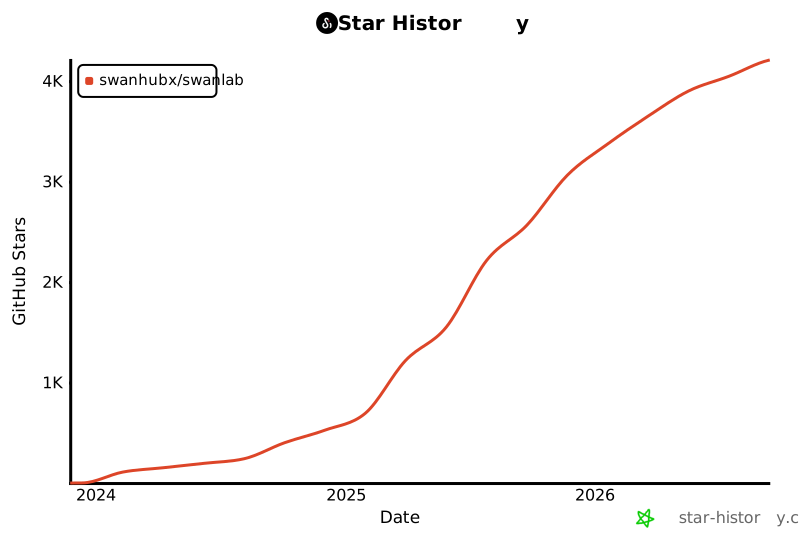
## 📃 License This repository is licensed under the [Apache 2.0 License](https://github.com/SwanHubX/SwanLab/blob/main/LICENSE). ## Star History [![Star History Chart](https://api.star-history.com/svg?repos=swanhubx/swanlab&type=Date)](https://star-history.com/#swanhubx/swanlab&Date) [release-shield]: https://img.shields.io/github/v/release/swanhubx/swanlab?color=369eff&labelColor=black&logo=github&style=flat-square [release-link]: https://github.com/swanhubx/swanlab/releases [license-shield]: https://img.shields.io/badge/license-apache%202.0-white?labelColor=black&style=flat-square [license-shield-link]: https://github.com/SwanHubX/SwanLab/blob/main/LICENSE [last-commit-shield]: https://img.shields.io/github/last-commit/swanhubx/swanlab?color=c4f042&labelColor=black&style=flat-square [last-commit-shield-link]: https://github.com/swanhubx/swanlab/commits/main [pypi-version-shield]: https://img.shields.io/pypi/v/swanlab?color=orange&labelColor=black&style=flat-square [pypi-version-shield-link]: https://pypi.org/project/swanlab/ [pypi-downloads-shield]: https://static.pepy.tech/badge/swanlab?labelColor=black&style=flat-square [pypi-downloads-shield-link]: https://pepy.tech/project/swanlab [swanlab-cloud-shield]: https://img.shields.io/badge/Product-SwanLab云端版-636a3f?labelColor=black&style=flat-square [swanlab-cloud-shield-link]: https://swanlab.cn/ [wechat-shield]: https://img.shields.io/badge/WeChat-微信-4cb55e?labelColor=black&style=flat-square [wechat-shield-link]: https://docs.swanlab.cn/en/guide_cloud/community/online-support.html [colab-shield]: https://colab.research.google.com/assets/colab-badge.svg [colab-shield-link]: https://colab.research.google.com/drive/1RWsrY_1bS8ECzaHvYtLb_1eBkkdzekR3?usp=sharing [github-stars-shield]: https://img.shields.io/github/stars/swanhubx/swanlab?labelColor&style=flat-square&color=ffcb47 [github-stars-link]: https://github.com/swanhubx/swanlab [github-issues-shield]: https://img.shields.io/github/issues/swanhubx/swanlab?labelColor=black&style=flat-square&color=ff80eb [github-issues-shield-link]: https://github.com/swanhubx/swanlab/issues [github-contributors-shield]: https://img.shields.io/github/contributors/swanhubx/swanlab?color=c4f042&labelColor=black&style=flat-square [github-contributors-link]: https://github.com/swanhubx/swanlab/graphs/contributors [demo-cats-dogs]: https://swanlab.cn/@ZeyiLin/Cats_Dogs_Classification/runs/jzo93k112f15pmx14vtxf/chart [demo-cats-dogs-image]: readme_files/example-catsdogs.png [demo-yolo]: https://swanlab.cn/@ZeyiLin/ultratest/runs/yux7vclmsmmsar9ear7u5/chart [demo-yolo-image]: readme_files/example-yolo.png [demo-qwen2-sft]: https://swanlab.cn/@ZeyiLin/Qwen2-fintune/runs/cfg5f8dzkp6vouxzaxlx6/chart [demo-qwen2-sft-image]: readme_files/example-qwen2.png [demo-google-stock]:https://swanlab.cn/@ZeyiLin/Google-Stock-Prediction/charts [demo-google-stock-image]: readme_files/example-lstm.png [demo-audio-classification]:https://swanlab.cn/@ZeyiLin/PyTorch_Audio_Classification/charts [demo-audio-classification-image]: readme_files/example-audio-classification.png [demo-qwen2-vl]:https://swanlab.cn/@ZeyiLin/Qwen2-VL-finetune/runs/pkgest5xhdn3ukpdy6kv5/chart [demo-qwen2-vl-image]: readme_files/example-qwen2-vl.jpg [demo-easyr1-rl]:https://swanlab.cn/@Kedreamix/easy_r1/runs/wzezd8q36bb6dlza6wtpc/chart [demo-easyr1-rl-image]: readme_files/example-easyr1-rl.png [demo-qwen2-grpo]:https://swanlab.cn/@kmno4/Qwen-R1/runs/t0zr3ak5r7188mjbjgdsc/chart [demo-qwen2-grpo-image]: readme_files/example-qwen2-grpo.png [tracking-swanlab-shield-link]:https://swanlab.cn [tracking-swanlab-shield]: https://raw.githubusercontent.com/SwanHubX/assets/main/badge2.svg [visualize-swanlab-shield-link]:https://swanlab.cn [visualize-swanlab-shield]: https://raw.githubusercontent.com/SwanHubX/assets/main/badge1.svg [dockerhub-shield]: https://img.shields.io/docker/v/swanlab/swanlab-next?color=369eff&label=docker&labelColor=black&logoColor=white&style=flat-square [dockerhub-link]: https://hub.docker.com/r/swanlab/swanlab-next/tags