|
|  |
## 📑 Table of Contents
- [🚀 快速开始](#-%E5%BF%AB%E9%80%9F%E5%BC%80%E5%A7%8B)
- [💻 安装](#-%E5%AE%89%E8%A3%85)
- [🛠️ 从源码安装](#-%E4%BB%8E%E6%BA%90%E7%A0%81%E5%AE%89%E8%A3%85)
- [📦 从PyPi安装](#-%E4%BB%8Epypi%E5%AE%89%E8%A3%85)
- [📝 示例](#-%E7%A4%BA%E4%BE%8B)
- [👋 Hello AgentScope](#-hello-agentscope)
- [🧑🤝🧑 多智能体对话](#-%E5%A4%9A%E6%99%BA%E8%83%BD%E4%BD%93%E5%AF%B9%E8%AF%9D)
- [💡 ReAct 智能体与工具&MCP](#-react-%E6%99%BA%E8%83%BD%E4%BD%93%E4%B8%8E%E5%B7%A5%E5%85%B7mcp)
- [🔠 结构化输出](#-%E7%BB%93%E6%9E%84%E5%8C%96%E8%BE%93%E5%87%BA)
- [✏️ 工作流编排](#-%E5%B7%A5%E4%BD%9C%E6%B5%81%E7%BC%96%E6%8E%92)
- [⚡️ 分布式和并行化](#%EF%B8%8F-%E5%88%86%E5%B8%83%E5%BC%8F%E5%92%8C%E5%B9%B6%E8%A1%8C%E5%8C%96)
- [👀 追踪和监控](#-%E8%BF%BD%E8%B8%AA%E5%92%8C%E7%9B%91%E6%8E%A7)
- [⚖️ 许可证](#-%E8%AE%B8%E5%8F%AF%E8%AF%81)
- [📚 发表](#-%E5%8F%91%E8%A1%A8)
- [✨ 贡献者](#-%E8%B4%A1%E7%8C%AE%E8%80%85)
## 🚀 快速开始
### 💻 安装
> AgentScope 要求 **Python 3.9** 或更高版本。
#### 🛠️ 从源码安装
```bash
# 从 GitHub 拉取源代码
git clone https://github.com/modelscope/agentscope.git
# 以编辑模式安装
cd agentscope
pip install -e .
```
#### 📦 从PyPi安装
```bash
pip install agentscope
```
## 📝 示例
### 👋 Hello AgentScope


使用 AgentScope **显式地**构建一个**用户**和**助手**的对话应用:
```python
from agentscope.agents import DialogAgent, UserAgent
import agentscope
# 加载模型配置
agentscope.init(
model_configs=[
{
"config_name": "my_config",
"model_type": "dashscope_chat",
"model_name": "qwen-max",
}
]
)
# 创建一个对话智能体和一个用户智能体
dialog_agent = DialogAgent(
name="Friday",
model_config_name="my_config",
sys_prompt="你是一个名为Friday的助手"
)
user_agent = UserAgent(name="user")
# 显式构建工作流程/对话
x = None
while x is None or x.content != "exit":
x = dialog_agent(x)
x = user_agent(x)
```
### 🧑🤝🧑 多智能体对话
AgentScope 专为**多智能体**设计,支持灵活的信息流控制和智能体间通信。


```python
from agentscope.agents import DialogAgent
from agentscope.message import Msg
from agentscope.pipelines import sequential_pipeline
from agentscope import msghub
import agentscope
# 加载模型配置
agentscope.init(
model_configs=[
{
"config_name": "my_config",
"model_type": "dashscope_chat",
"model_name": "qwen-max",
}
]
)
# 创建三个智能体
friday = DialogAgent(
name="Friday",
model_config_name="my_config",
sys_prompt="你是一个名为Friday的助手"
)
saturday = DialogAgent(
name="Saturday",
model_config_name="my_config",
sys_prompt="你是一个名为Saturday的助手"
)
sunday = DialogAgent(
name="Sunday",
model_config_name="my_config",
sys_prompt="你是一个名为Sunday的助手"
)
# 通过msghub创建一个聊天室,智能体的消息会广播给所有参与者
with msghub(
participants=[friday, saturday, sunday],
announcement=Msg("user", "从1开始数数,每次只报一个数字,不要说其他内容", "user"), # 一个问候消息
) as hub:
# 按顺序发言
sequential_pipeline([friday, saturday, sunday], x=None)
```
### 💡 ReAct 智能体与工具&MCP

轻松创建一个 ReAct 智能体,并装备工具和 MCP Server!
```python
from agentscope.agents import ReActAgentV2, UserAgent
from agentscope.service import ServiceToolkit, execute_python_code
import agentscope
agentscope.init(
model_configs={
"config_name": "my_config",
"model_type": "dashscope_chat",
"model_name": "qwen-max",
}
)
# 添加内置工具
toolkit = ServiceToolkit()
toolkit.add(execute_python_code)
# 连接到高德 MCP Server
toolkit.add_mcp_servers(
{
"mcpServers": {
"amap-amap-sse": {
"url": "https://mcp.amap.com/sse?key={YOUR_GAODE_API_KEY}"
}
}
}
)
# 创建一个 ReAct 智能体
agent = ReActAgentV2(
name="Friday",
model_config_name="my_config",
service_toolkit=toolkit,
sys_prompt="你是一个名为Friday的AI助手。"
)
user_agent = UserAgent(name="user")
# 显式构建工作流程/对话
x = None
while x is None or x.content != "exit":
x = agent(x)
x = user_agent(x)
```
### 🔠 结构化输出

使用 Pydantic 的 `BaseModel` 轻松指定&切换结构化输出。
```python
from agentscope.agents import ReActAgentV2
from agentscope.service import ServiceToolkit
from agentscope.message import Msg
from pydantic import BaseModel, Field
from typing import Literal
import agentscope
agentscope.init(
model_configs={
"config_name": "my_config",
"model_type": "dashscope_chat",
"model_name": "qwen-max",
}
)
# 创建一个推理-行动智能体
agent = ReActAgentV2(
name="Friday",
model_config_name="my_config",
service_toolkit=ServiceToolkit(),
max_iters=20
)
class CvModel(BaseModel):
name: str = Field(max_length=50, description="姓名")
description: str = Field(max_length=200, description="简短描述")
aget: int = Field(gt=0, le=120, description="年龄")
class ChoiceModel(BaseModel):
choice: Literal["apple", "banana"]
# 使用`structured_model`字段指定结构化输出
res_msg = agent(
Msg("user", "介绍下爱因斯坦", "user"),
structured_model=CvModel
)
print(res_msg.metadata)
# 切换到不同的结构化输出
res_msg = agent(
Msg("user", "选择一个水果", "user"),
structured_model=ChoiceModel
)
print(res_msg.metadata)
```
### ✏️ 工作流编排

[Routing](https://www.anthropic.com/engineering/building-effective-agents), [parallelization](https://www.anthropic.com/engineering/building-effective-agents), [orchestrator-workers](https://www.anthropic.com/engineering/building-effective-agents), 或 [evaluator-optimizer](https://www.anthropic.com/engineering/building-effective-agents)。使用 AgentScope 轻松构建各种类型的智能体工作流!以 Routing 为例:
```python
from agentscope.agents import ReActAgentV2
from agentscope.service import ServiceToolkit
from agentscope.message import Msg
from pydantic import BaseModel, Field
from typing import Literal, Union
import agentscope
agentscope.init(
model_configs={
"config_name": "my_config",
"model_type": "dashscope_chat",
"model_name": "qwen-max",
}
)
# Routing 智能体
routing_agent = ReActAgentV2(
name="Routing",
model_config_name="my_config",
sys_prompt="你是一个路由智能体。你的目标是将用户查询路由到正确的后续任务",
service_toolkit=ServiceToolkit()
)
# 使用结构化输出来指定路由结果
class RoutingChoice(BaseModel):
your_choice: Literal[
'Content Generation',
'Programming',
'Information Retrieval',
None
] = Field(description="选择正确的后续任务,如果任务太简单或没有合适的任务,选择`None`")
task_description: Union[str, None] = Field(description="任务描述", default=None)
res_msg = routing_agent(
Msg("user", "帮我写一首诗", "user"),
structured_model=RoutingChoice
)
# 执行后续任务
if res_msg.metadata["your_choice"] == "Content Generation":
...
elif res_msg.metadata["your_choice"] == "Programming":
...
elif res_msg.metadata["your_choice"] == "Information Retrieval":
...
else:
...
```
### ⚡️ 分布式和并行化



使用`to_dist`函数在分布式模式下运行智能体!
```python
from agentscope.agents import DialogAgent
from agentscope.message import Msg
import agentscope
# 加载模型配置
agentscope.init(
model_configs=[
{
"config_name": "my_config",
"model_type": "dashscope_chat",
"model_name": "qwen-max",
}
]
)
# 使用`to_dist()`在分布式模式下运行智能体
agent1 = DialogAgent(
name="Saturday",
model_config_name="my_config"
).to_dist()
agent2 = DialogAgent(
name="Sunday",
model_config_name="my_config"
).to_dist()
# 两个智能体将并行运行
agent1(Msg("user", "执行任务1...", "user"))
agent2(Msg("user", "执行任务2...", "user"))
```
### 👀 追踪和监控


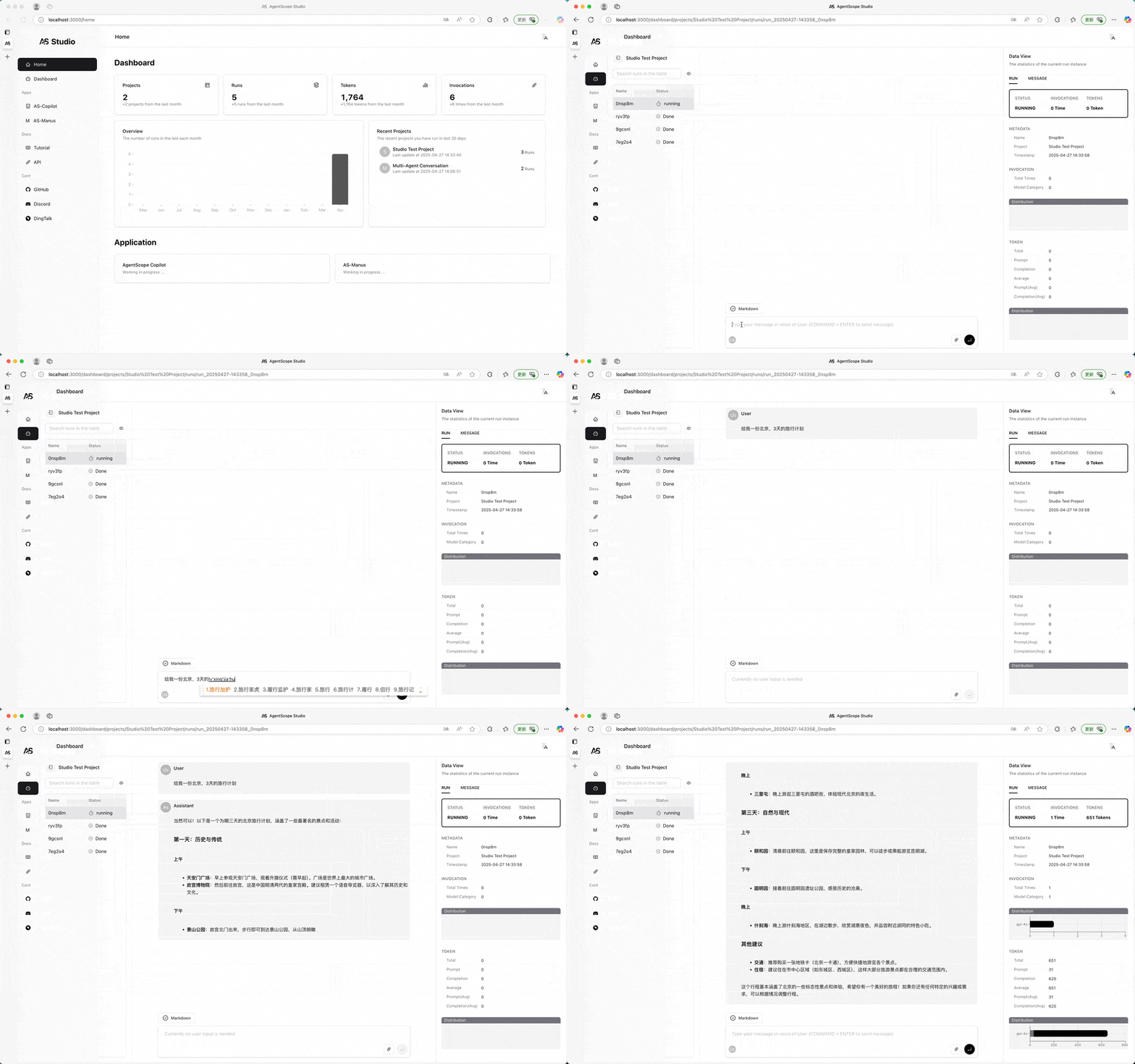
AgentScope 提供了一个本地可视化和监控工具,**AgentScope Studio**。工具调用,模型 API 调用,Token 使用轻松追踪,一目了然。
```bash
# 安装 AgentScope Studio
npm install -g @agentscope/studio
# 运行 AgentScope Studio
as_studio
```
将 Python 应用连接到 AgentScope Studio:
```python
import agentscope
# 将应用程序连接到 AgentScope Studio
agentscope.init(
model_configs = {
"config_name": "my_config",
"model_type": "dashscope_chat",
"model_name": "qwen_max",
},
studio_url="http://localhost:3000", # AgentScope Studio 的 URL
)
# ...
```
|
## 📑 Table of Contents
- [🚀 快速开始](#-%E5%BF%AB%E9%80%9F%E5%BC%80%E5%A7%8B)
- [💻 安装](#-%E5%AE%89%E8%A3%85)
- [🛠️ 从源码安装](#-%E4%BB%8E%E6%BA%90%E7%A0%81%E5%AE%89%E8%A3%85)
- [📦 从PyPi安装](#-%E4%BB%8Epypi%E5%AE%89%E8%A3%85)
- [📝 示例](#-%E7%A4%BA%E4%BE%8B)
- [👋 Hello AgentScope](#-hello-agentscope)
- [🧑🤝🧑 多智能体对话](#-%E5%A4%9A%E6%99%BA%E8%83%BD%E4%BD%93%E5%AF%B9%E8%AF%9D)
- [💡 ReAct 智能体与工具&MCP](#-react-%E6%99%BA%E8%83%BD%E4%BD%93%E4%B8%8E%E5%B7%A5%E5%85%B7mcp)
- [🔠 结构化输出](#-%E7%BB%93%E6%9E%84%E5%8C%96%E8%BE%93%E5%87%BA)
- [✏️ 工作流编排](#-%E5%B7%A5%E4%BD%9C%E6%B5%81%E7%BC%96%E6%8E%92)
- [⚡️ 分布式和并行化](#%EF%B8%8F-%E5%88%86%E5%B8%83%E5%BC%8F%E5%92%8C%E5%B9%B6%E8%A1%8C%E5%8C%96)
- [👀 追踪和监控](#-%E8%BF%BD%E8%B8%AA%E5%92%8C%E7%9B%91%E6%8E%A7)
- [⚖️ 许可证](#-%E8%AE%B8%E5%8F%AF%E8%AF%81)
- [📚 发表](#-%E5%8F%91%E8%A1%A8)
- [✨ 贡献者](#-%E8%B4%A1%E7%8C%AE%E8%80%85)
## 🚀 快速开始
### 💻 安装
> AgentScope 要求 **Python 3.9** 或更高版本。
#### 🛠️ 从源码安装
```bash
# 从 GitHub 拉取源代码
git clone https://github.com/modelscope/agentscope.git
# 以编辑模式安装
cd agentscope
pip install -e .
```
#### 📦 从PyPi安装
```bash
pip install agentscope
```
## 📝 示例
### 👋 Hello AgentScope


使用 AgentScope **显式地**构建一个**用户**和**助手**的对话应用:
```python
from agentscope.agents import DialogAgent, UserAgent
import agentscope
# 加载模型配置
agentscope.init(
model_configs=[
{
"config_name": "my_config",
"model_type": "dashscope_chat",
"model_name": "qwen-max",
}
]
)
# 创建一个对话智能体和一个用户智能体
dialog_agent = DialogAgent(
name="Friday",
model_config_name="my_config",
sys_prompt="你是一个名为Friday的助手"
)
user_agent = UserAgent(name="user")
# 显式构建工作流程/对话
x = None
while x is None or x.content != "exit":
x = dialog_agent(x)
x = user_agent(x)
```
### 🧑🤝🧑 多智能体对话
AgentScope 专为**多智能体**设计,支持灵活的信息流控制和智能体间通信。


```python
from agentscope.agents import DialogAgent
from agentscope.message import Msg
from agentscope.pipelines import sequential_pipeline
from agentscope import msghub
import agentscope
# 加载模型配置
agentscope.init(
model_configs=[
{
"config_name": "my_config",
"model_type": "dashscope_chat",
"model_name": "qwen-max",
}
]
)
# 创建三个智能体
friday = DialogAgent(
name="Friday",
model_config_name="my_config",
sys_prompt="你是一个名为Friday的助手"
)
saturday = DialogAgent(
name="Saturday",
model_config_name="my_config",
sys_prompt="你是一个名为Saturday的助手"
)
sunday = DialogAgent(
name="Sunday",
model_config_name="my_config",
sys_prompt="你是一个名为Sunday的助手"
)
# 通过msghub创建一个聊天室,智能体的消息会广播给所有参与者
with msghub(
participants=[friday, saturday, sunday],
announcement=Msg("user", "从1开始数数,每次只报一个数字,不要说其他内容", "user"), # 一个问候消息
) as hub:
# 按顺序发言
sequential_pipeline([friday, saturday, sunday], x=None)
```
### 💡 ReAct 智能体与工具&MCP

轻松创建一个 ReAct 智能体,并装备工具和 MCP Server!
```python
from agentscope.agents import ReActAgentV2, UserAgent
from agentscope.service import ServiceToolkit, execute_python_code
import agentscope
agentscope.init(
model_configs={
"config_name": "my_config",
"model_type": "dashscope_chat",
"model_name": "qwen-max",
}
)
# 添加内置工具
toolkit = ServiceToolkit()
toolkit.add(execute_python_code)
# 连接到高德 MCP Server
toolkit.add_mcp_servers(
{
"mcpServers": {
"amap-amap-sse": {
"url": "https://mcp.amap.com/sse?key={YOUR_GAODE_API_KEY}"
}
}
}
)
# 创建一个 ReAct 智能体
agent = ReActAgentV2(
name="Friday",
model_config_name="my_config",
service_toolkit=toolkit,
sys_prompt="你是一个名为Friday的AI助手。"
)
user_agent = UserAgent(name="user")
# 显式构建工作流程/对话
x = None
while x is None or x.content != "exit":
x = agent(x)
x = user_agent(x)
```
### 🔠 结构化输出

使用 Pydantic 的 `BaseModel` 轻松指定&切换结构化输出。
```python
from agentscope.agents import ReActAgentV2
from agentscope.service import ServiceToolkit
from agentscope.message import Msg
from pydantic import BaseModel, Field
from typing import Literal
import agentscope
agentscope.init(
model_configs={
"config_name": "my_config",
"model_type": "dashscope_chat",
"model_name": "qwen-max",
}
)
# 创建一个推理-行动智能体
agent = ReActAgentV2(
name="Friday",
model_config_name="my_config",
service_toolkit=ServiceToolkit(),
max_iters=20
)
class CvModel(BaseModel):
name: str = Field(max_length=50, description="姓名")
description: str = Field(max_length=200, description="简短描述")
aget: int = Field(gt=0, le=120, description="年龄")
class ChoiceModel(BaseModel):
choice: Literal["apple", "banana"]
# 使用`structured_model`字段指定结构化输出
res_msg = agent(
Msg("user", "介绍下爱因斯坦", "user"),
structured_model=CvModel
)
print(res_msg.metadata)
# 切换到不同的结构化输出
res_msg = agent(
Msg("user", "选择一个水果", "user"),
structured_model=ChoiceModel
)
print(res_msg.metadata)
```
### ✏️ 工作流编排

[Routing](https://www.anthropic.com/engineering/building-effective-agents), [parallelization](https://www.anthropic.com/engineering/building-effective-agents), [orchestrator-workers](https://www.anthropic.com/engineering/building-effective-agents), 或 [evaluator-optimizer](https://www.anthropic.com/engineering/building-effective-agents)。使用 AgentScope 轻松构建各种类型的智能体工作流!以 Routing 为例:
```python
from agentscope.agents import ReActAgentV2
from agentscope.service import ServiceToolkit
from agentscope.message import Msg
from pydantic import BaseModel, Field
from typing import Literal, Union
import agentscope
agentscope.init(
model_configs={
"config_name": "my_config",
"model_type": "dashscope_chat",
"model_name": "qwen-max",
}
)
# Routing 智能体
routing_agent = ReActAgentV2(
name="Routing",
model_config_name="my_config",
sys_prompt="你是一个路由智能体。你的目标是将用户查询路由到正确的后续任务",
service_toolkit=ServiceToolkit()
)
# 使用结构化输出来指定路由结果
class RoutingChoice(BaseModel):
your_choice: Literal[
'Content Generation',
'Programming',
'Information Retrieval',
None
] = Field(description="选择正确的后续任务,如果任务太简单或没有合适的任务,选择`None`")
task_description: Union[str, None] = Field(description="任务描述", default=None)
res_msg = routing_agent(
Msg("user", "帮我写一首诗", "user"),
structured_model=RoutingChoice
)
# 执行后续任务
if res_msg.metadata["your_choice"] == "Content Generation":
...
elif res_msg.metadata["your_choice"] == "Programming":
...
elif res_msg.metadata["your_choice"] == "Information Retrieval":
...
else:
...
```
### ⚡️ 分布式和并行化



使用`to_dist`函数在分布式模式下运行智能体!
```python
from agentscope.agents import DialogAgent
from agentscope.message import Msg
import agentscope
# 加载模型配置
agentscope.init(
model_configs=[
{
"config_name": "my_config",
"model_type": "dashscope_chat",
"model_name": "qwen-max",
}
]
)
# 使用`to_dist()`在分布式模式下运行智能体
agent1 = DialogAgent(
name="Saturday",
model_config_name="my_config"
).to_dist()
agent2 = DialogAgent(
name="Sunday",
model_config_name="my_config"
).to_dist()
# 两个智能体将并行运行
agent1(Msg("user", "执行任务1...", "user"))
agent2(Msg("user", "执行任务2...", "user"))
```
### 👀 追踪和监控


AgentScope 提供了一个本地可视化和监控工具,**AgentScope Studio**。工具调用,模型 API 调用,Token 使用轻松追踪,一目了然。
```bash
# 安装 AgentScope Studio
npm install -g @agentscope/studio
# 运行 AgentScope Studio
as_studio
```
将 Python 应用连接到 AgentScope Studio:
```python
import agentscope
# 将应用程序连接到 AgentScope Studio
agentscope.init(
model_configs = {
"config_name": "my_config",
"model_type": "dashscope_chat",
"model_name": "qwen_max",
},
studio_url="http://localhost:3000", # AgentScope Studio 的 URL
)
# ...
```