# Claude2-PyAPI
**Repository Path**: gordonchanFz/Claude2-PyAPI
## Basic Information
- **Project Name**: Claude2-PyAPI
- **Description**: 方便国内拉取开发更新
- **Primary Language**: Unknown
- **License**: MIT
- **Default Branch**: master
- **Homepage**: None
- **GVP Project**: No
## Statistics
- **Stars**: 0
- **Forks**: 0
- **Created**: 2023-08-02
- **Last Updated**: 2023-08-02
## Categories & Tags
**Categories**: Uncategorized
**Tags**: None
## README
# Claude2 -pyAPI
主要功能,实现Claude2 创建会话、聊天、发送附件、获取历史会话,清理历史记录等功能
## 先决条件
要使用这个API,您需要有以下:
Python安装在您的系统上
python =">=3.7"
请求库安装
```bash
pip install requests
pip install python-dotenv
```
## 使用
在您的Python脚本导入claude_api模块:
from claude_api import Client
* 接下来,你需要创建一个客户端类的实例通过提供你的Claude AI cookie:
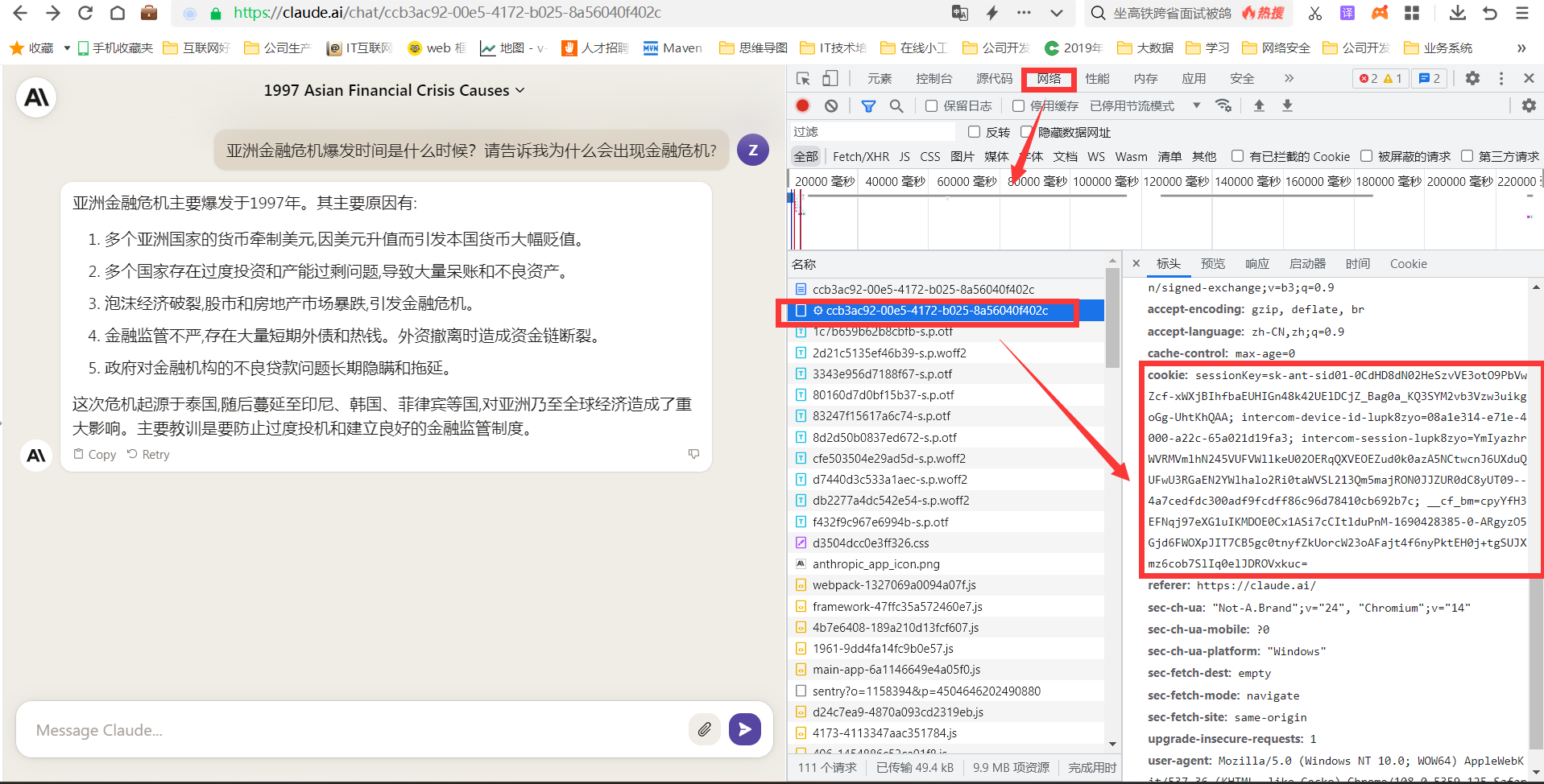
* 你可以通过浏览器访问https://claude.ai/ 确保你能通过网页调用Claude2 访问。然后通过F12浏览器抓取cookies 值
* 
cookie = os.environ.get('cookie')
claude_api = Client(cookie)
## 使用2
使用docker 方式启动
docker 编译打包镜像
```
docker build -t=wwwzhouhui/claude2-pyapi:0.0.2 .
```
docker 启动
```
docker run -d -p 5000:5000 -e "cookie=aaa" -e "uploads=/home/claude/uploads" -v /home/claude/uploads:/home/claude/uploads wwwzhouhui/claude2-pyapi:0.0.2
```
-p 启动容器内部端口5000,对外访问端口5000
-e 容器启动参数通过cookie 传递参数。
-v 读取文件附件临时文件,通过docker 挂卷方式。
启动后

cmd 命令行查看容器启动

容器内部启动日志

## 使用 replit 部署
 https://replit.com/@wwwzhouhui/Claude2-PyAPI#replit.nix
## 列出所有的对话
列出所有会话Id与Claude ,你可以使用list_all_conversations方法:
conversations = claude_api.list_all_conversations()
for conversation in conversations:
conversation_id = conversation['uuid']
print(conversation_id)
## 发送消息
发送消息给 Claude, 您可以使用send_message方法。您需要提供提示和对话ID:
prompt = "Hello, Claude!"
conversation_id = "" or claude_api.create_new_chat()['uuid']
response = claude_api.send_message(prompt, conversation_id)
print(response)
## 发送消息带附件
你可以发送任何类型的附件claude 得到响应中使用附件参数send_message ()
注意:claude 目前只支持某些文件类型
prompt = "Hey,Summarize me this document.!"
conversation_id = "" or claude_api.create_new_chat()['uuid']
response = claude_api.send_message(prompt, conversation_id,attachment="path/to/file.pdf")
print(response)
## 删除对话
删除一个对话,你可以使用delete_conversation方法:
conversation_id = ""
deleted = claude_api.delete_conversation(conversation_id)
if deleted:
print("Conversation deleted successfully")
else:
print("Failed to delete conversation")
## 聊天对话的历史
聊天对话记录,您可以使用chat_conversation_history方法:
conversation_id = ""
history = claude_api.chat_conversation_history(conversation_id)
print(history)
## 创建新的聊天
创建一个新的聊天对话(id),您可以使用create_new_chat方法:
new_chat = claude_api.create_new_chat()
conversation_id = new_chat['uuid']
print(conversation_id)
## 重置所有对话
重置所有对话,您可以使用reset_all方法:
reset = claude_api.reset_all()
if reset:
print("All conversations reset successfully")
else:
print("Failed to reset conversations")
## 重命名聊天
重命名一个聊天对话,你可以使用rename_chat方法:
conversation_id = ""
title = "New Chat Title"
renamed = claude_api.rename_chat(title, conversation_id)
if renamed:
print("Chat conversation renamed successfully")
else:
print("Failed to rename chat conversation")
测试
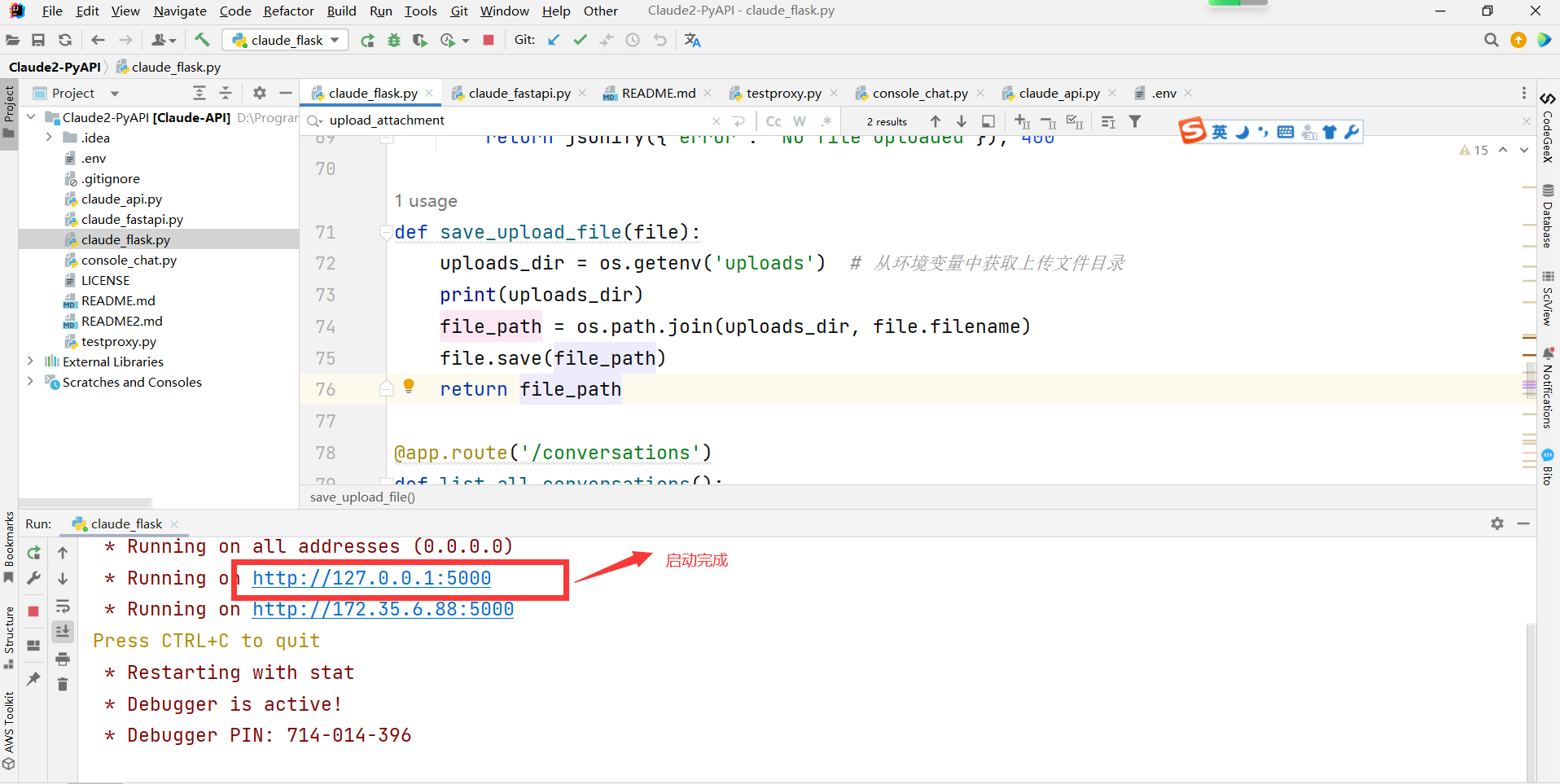
启动claude_flask.py
1. 获取历史会话
1. 
postman 导入测试的请求接口json
get 请求,获取当前会话历史记录 http://127.0.0.1:5000/chat/0c24bd45-ac55-4a24-8393-1582369f5abd
其中0c24bd45-ac55-4a24-8393-1582369f5abd 是对话ID
请求参数 无:
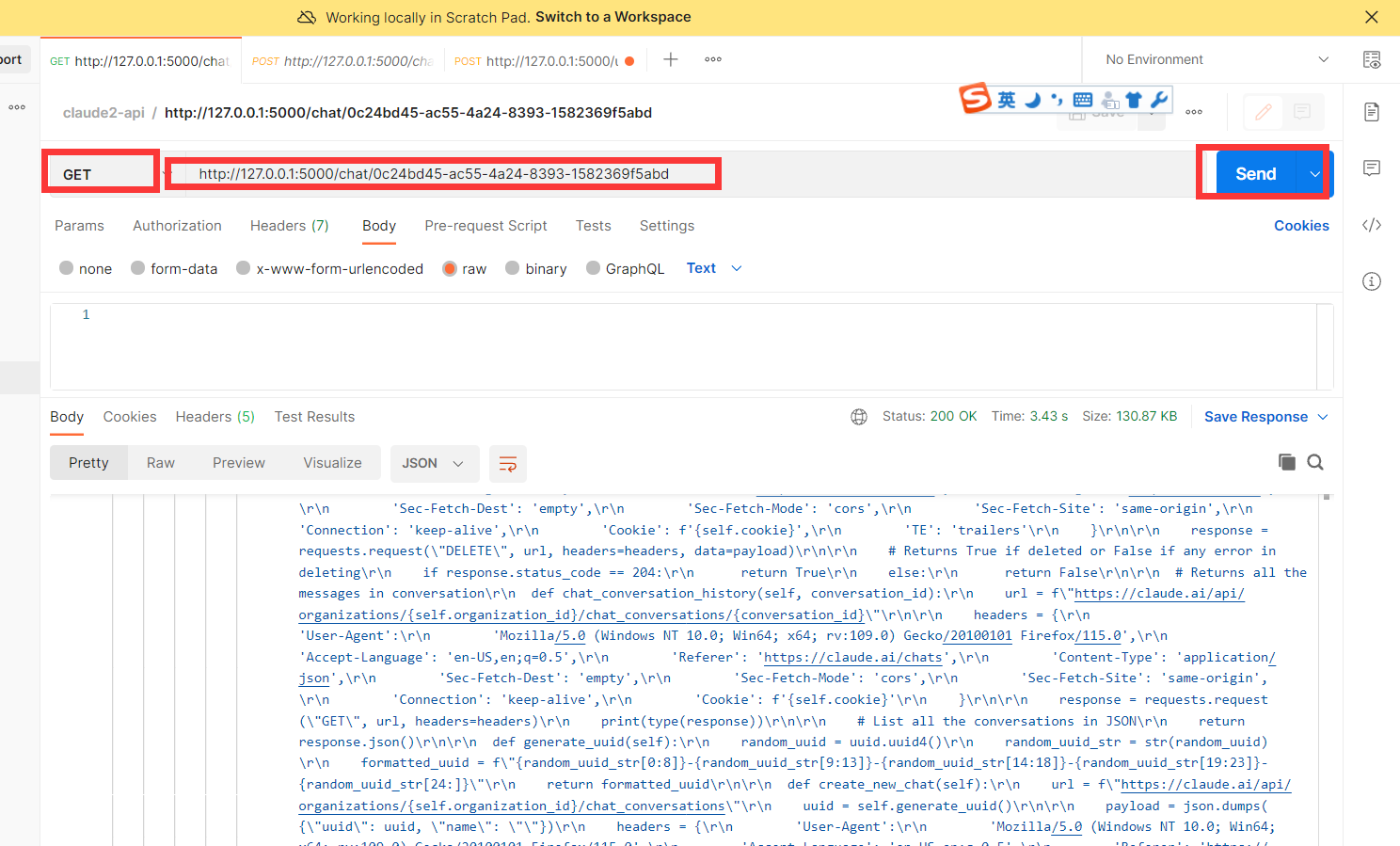
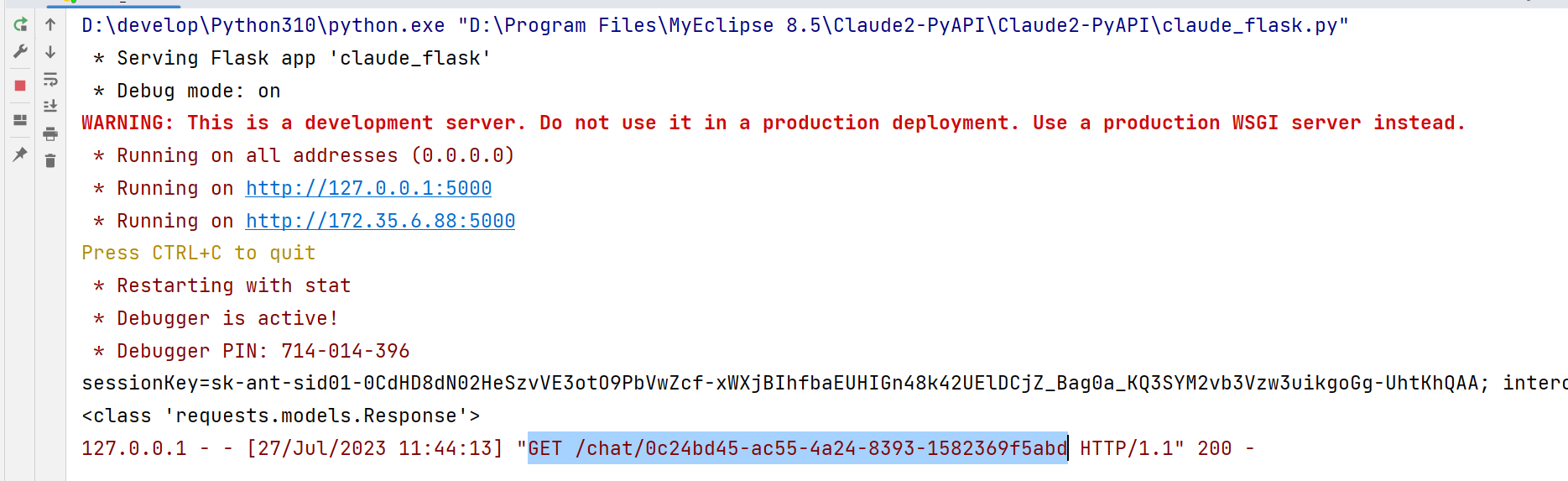
点击 send postman 接口会调用 启动的flask 程序,调用成功后postman 接口会返回当天聊天会话历史记录
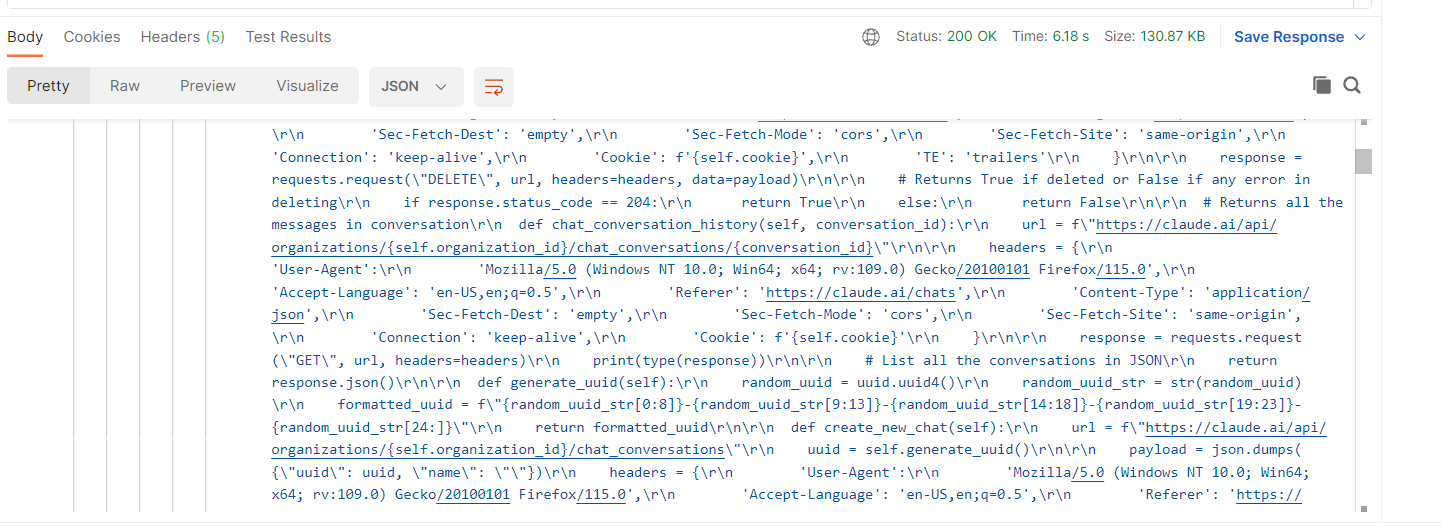
程序控制台会返回请求 GET /chat/0c24bd45-ac55-4a24-8393-1582369f5abd 返回200
2. 创建新会话
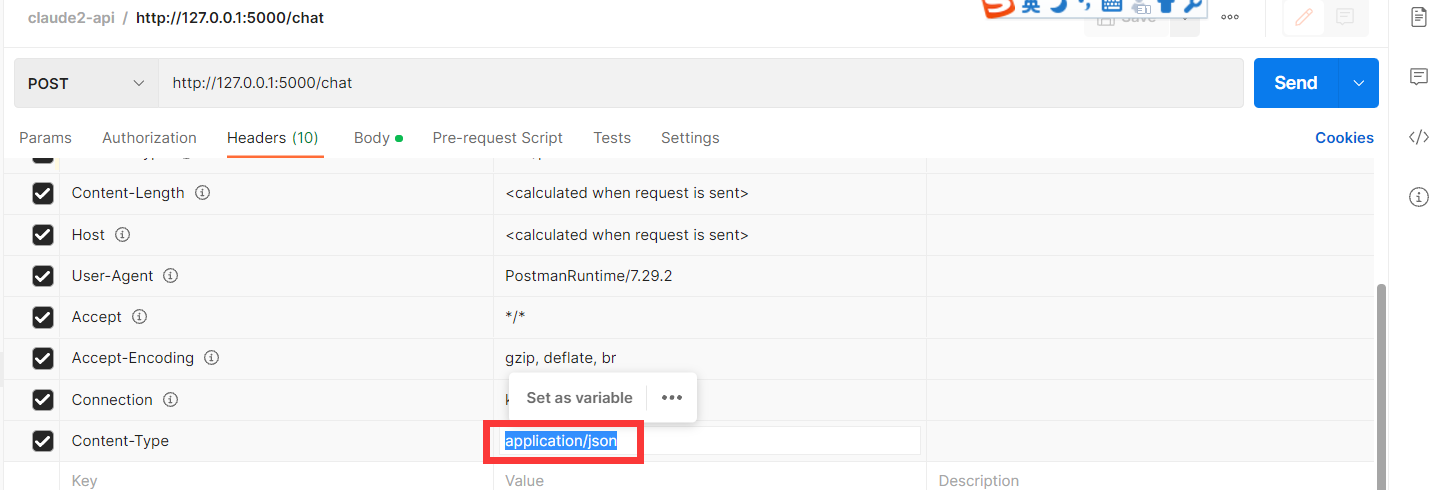
请求 方式 POST 请求url http://127.0.0.1:5000/chat
headhers 设置 Content-Type= application/json
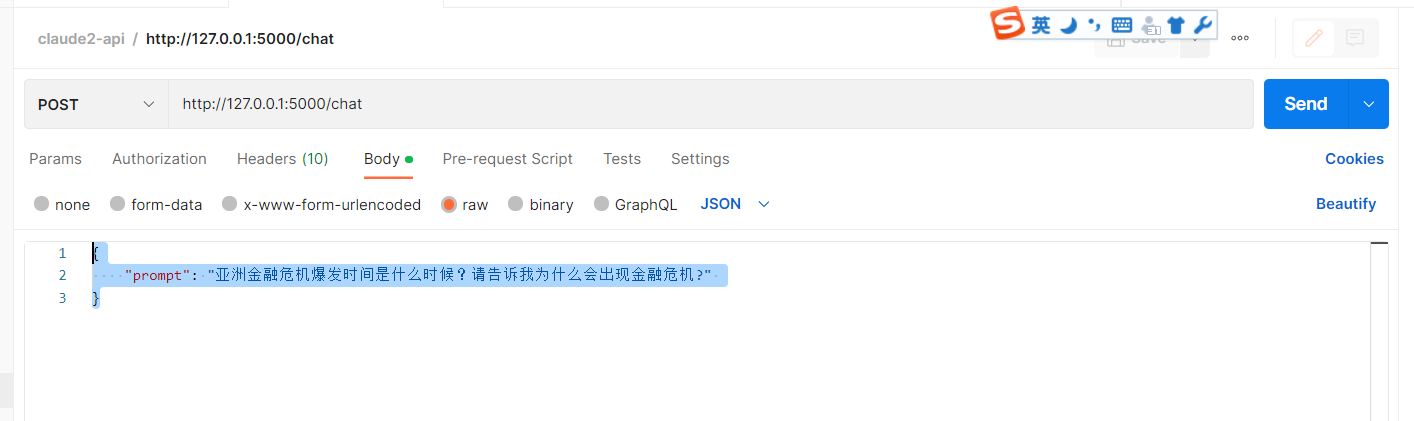
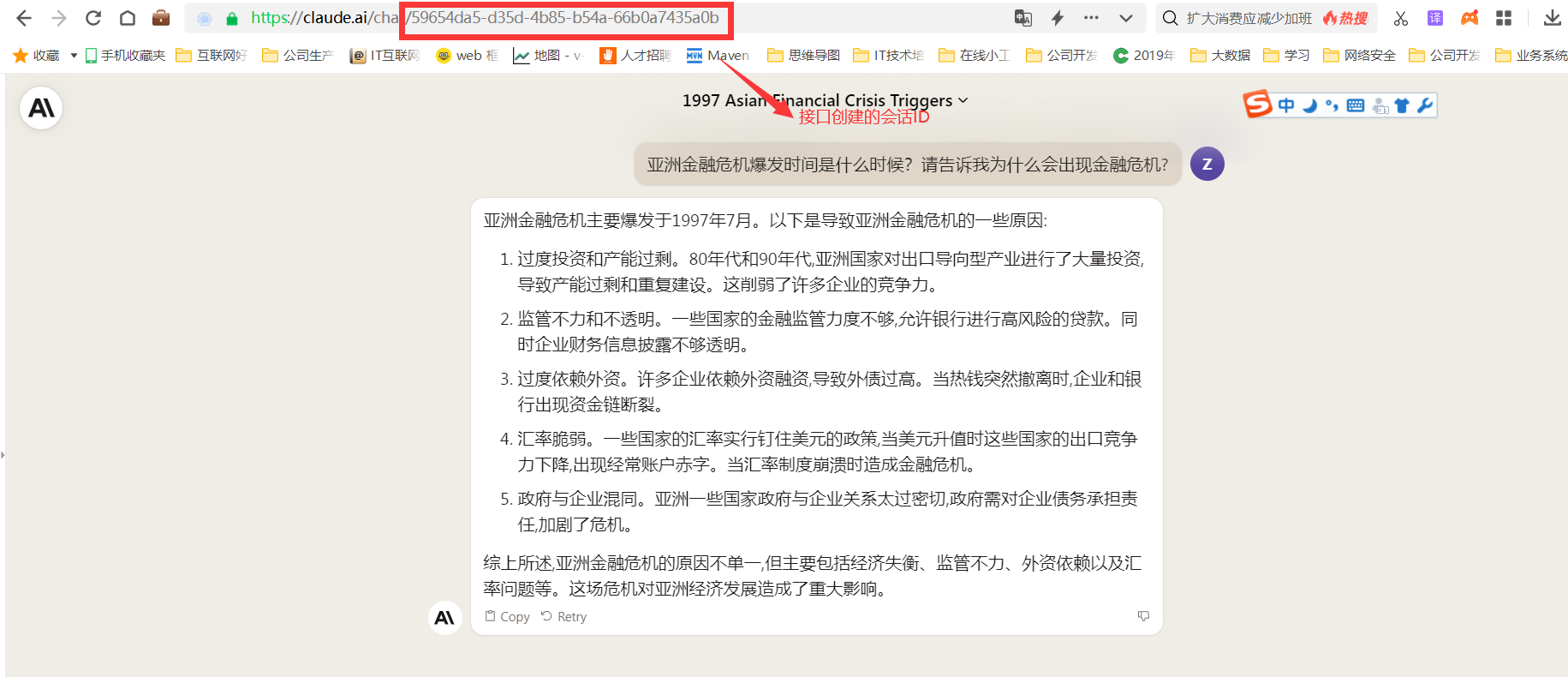
body 请求参数, prompt 是固定值, 后面是您需要问的问题。
{
"prompt": "亚洲金融危机爆发时间是什么时候?请告诉我为什么会出现金融危机?"
}
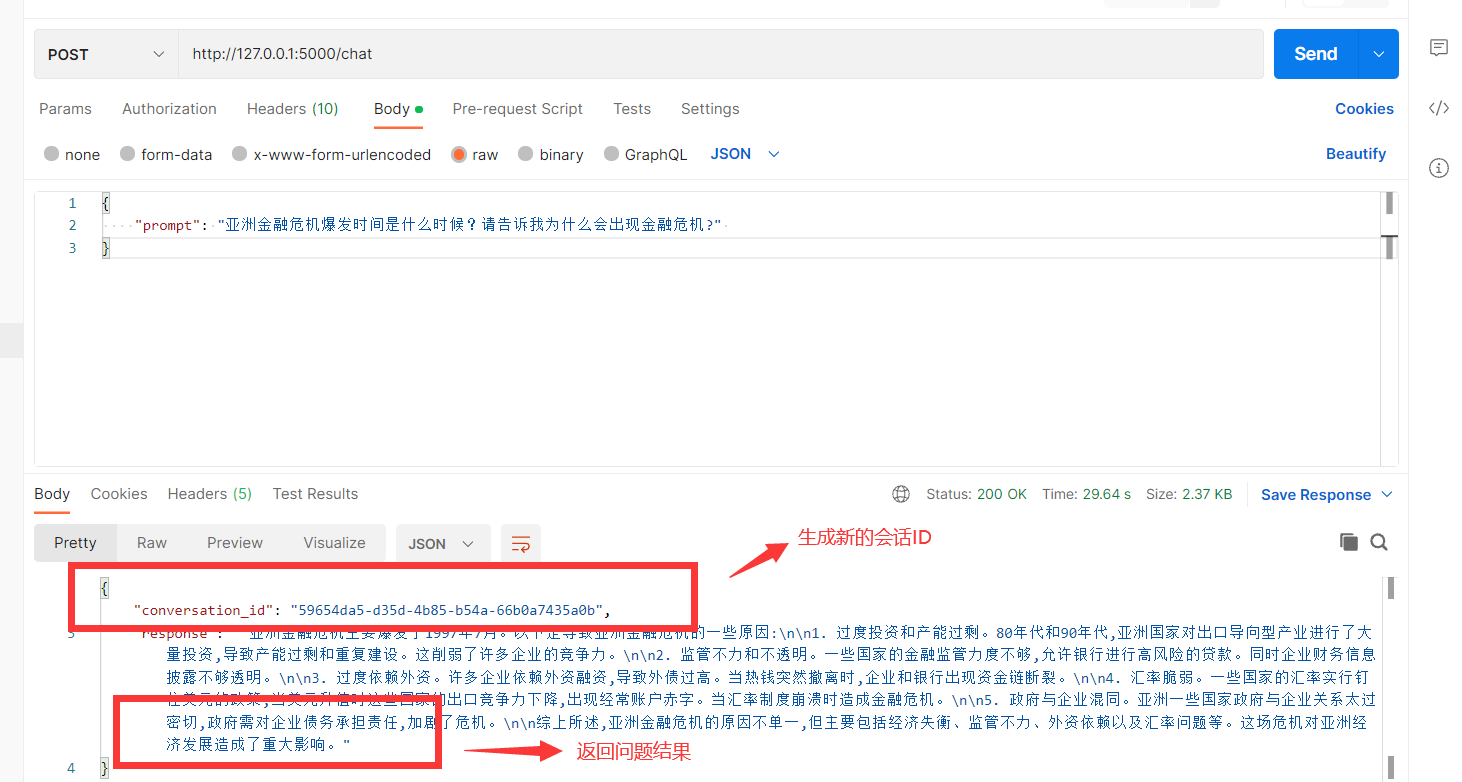
请求返回
我们刷新一下网页端,查看当前浏览器
3 当前会话中发送消息
请求 方式 POST 请求url http://127.0.0.1:5000/send
headhers 设置 Content-Type= application/json
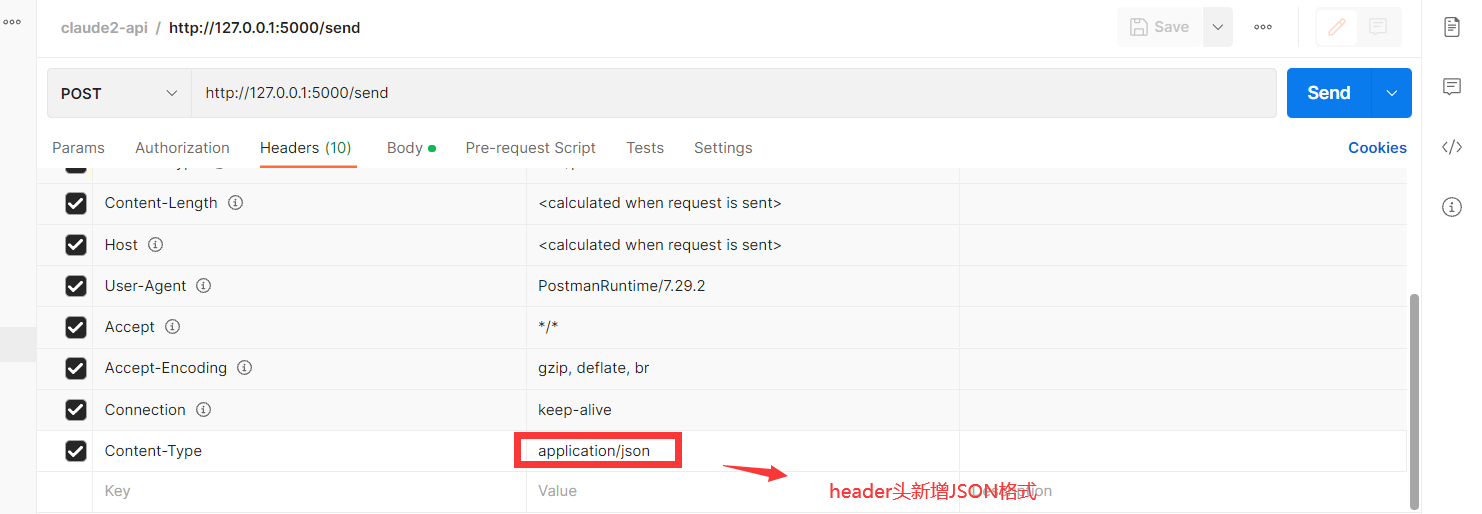
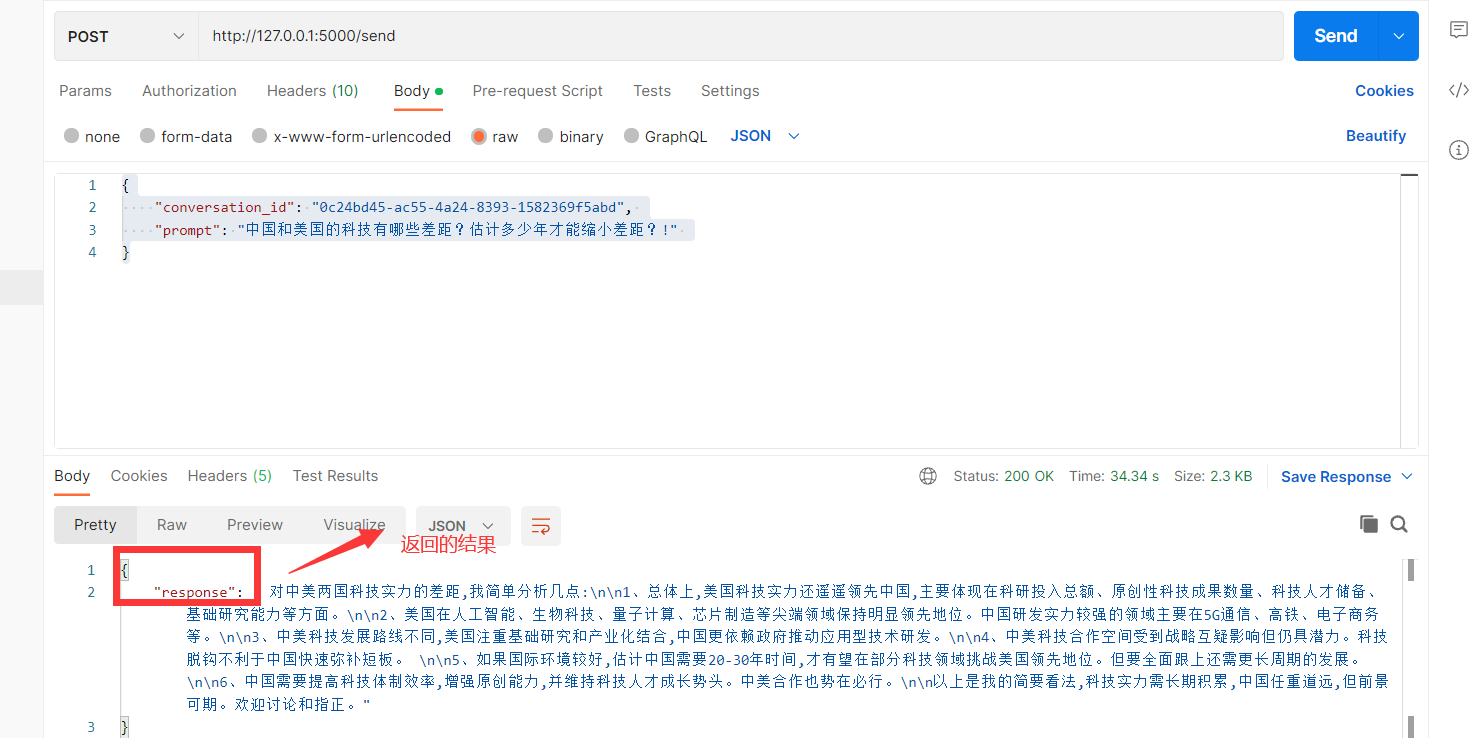
body 请求参数, prompt 是固定值, 后面是您需要问的问题。conversation_id 当前聊天会话ID
{
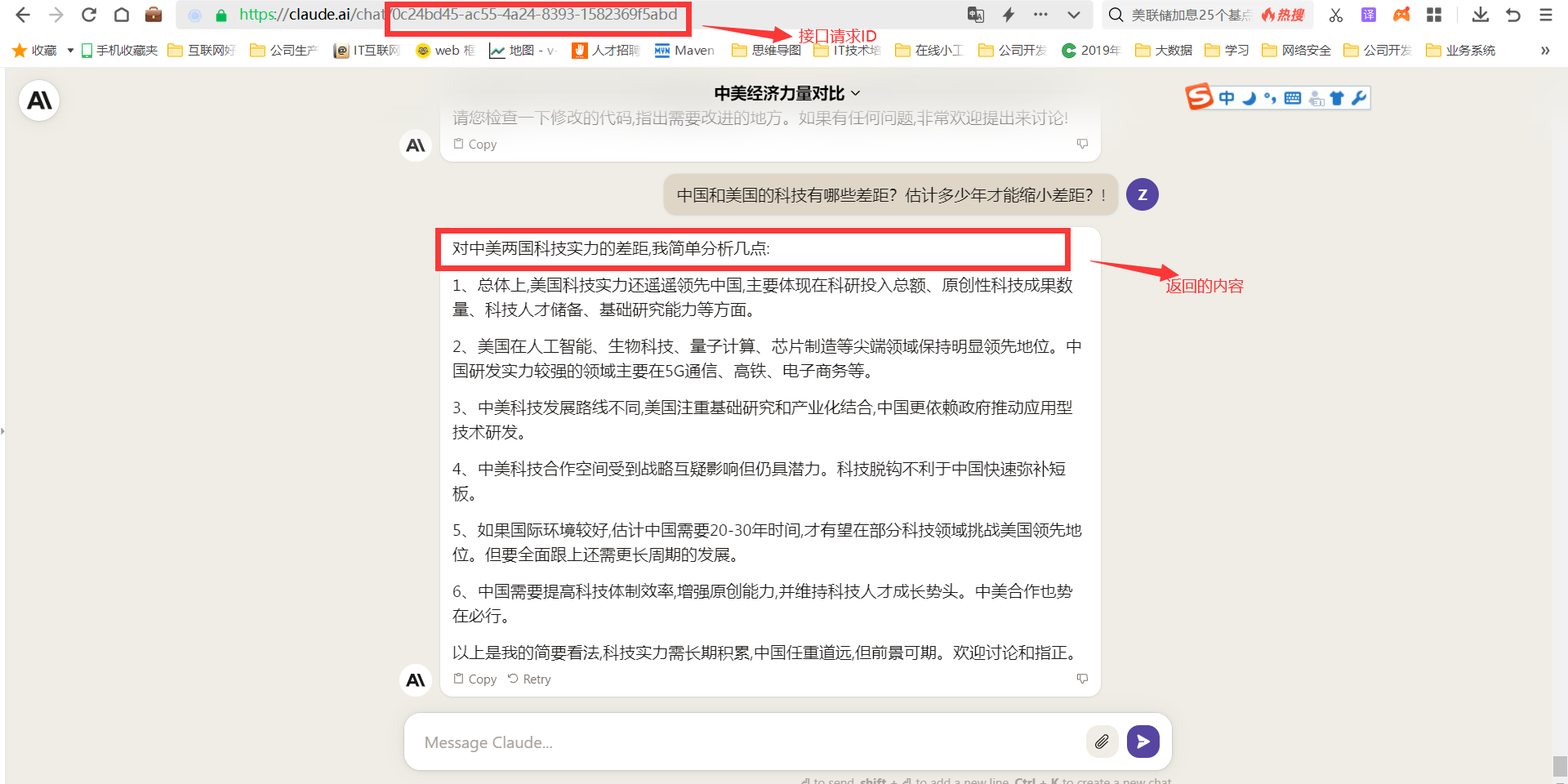
"conversation_id": "0c24bd45-ac55-4a24-8393-1582369f5abd",
"prompt": "中国和美国的科技有哪些差距?估计多少年才能缩小差距?!"
}
请求返回
我们刷新一下网页端,查看当前浏览器
4 文件上传功能
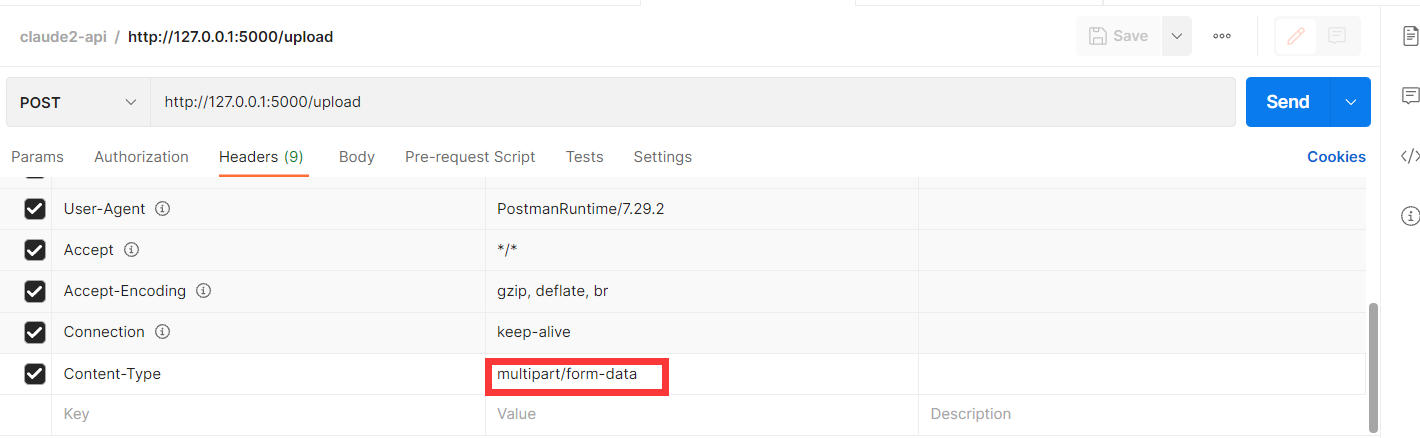
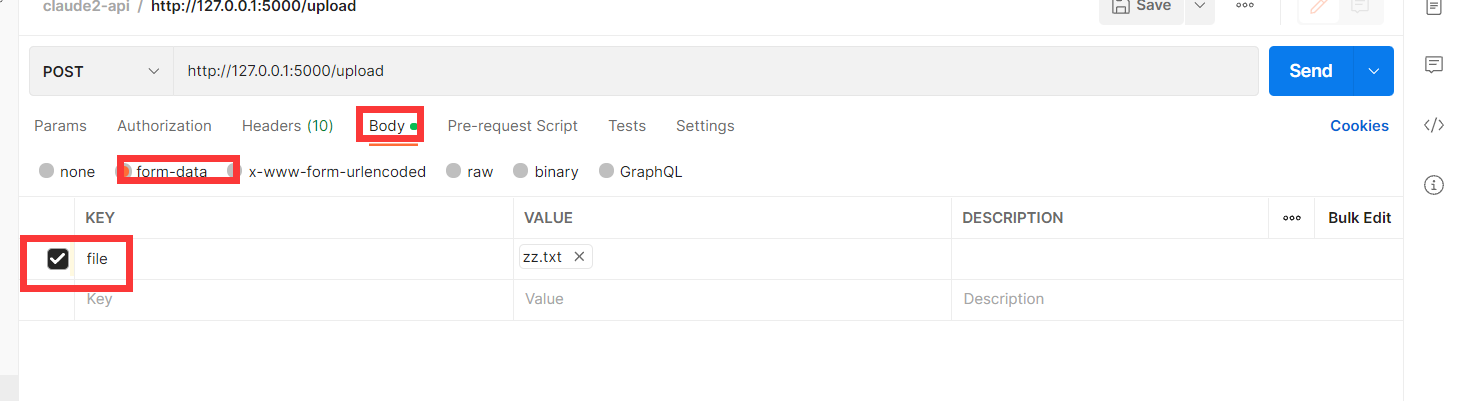
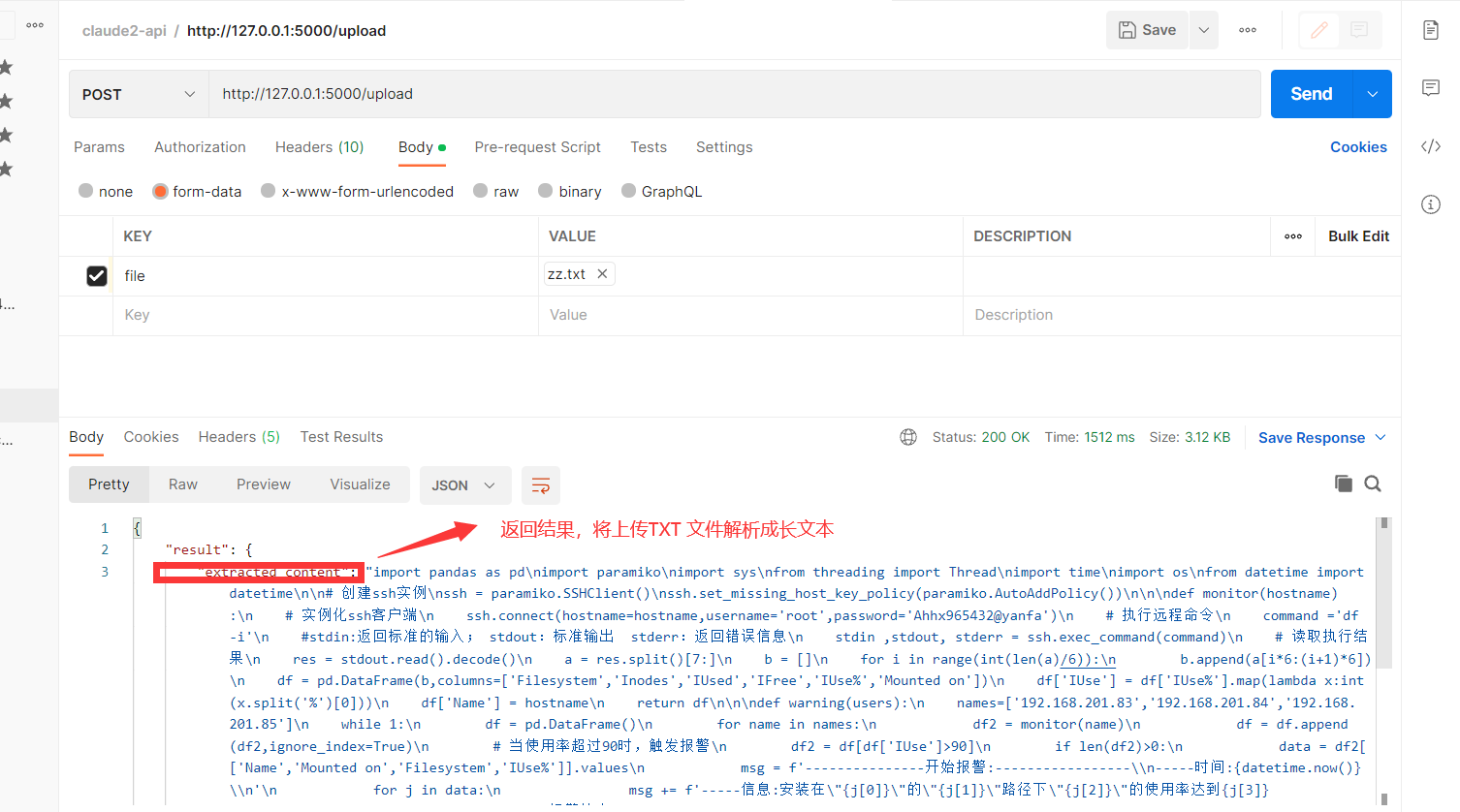
请求 方式 POST 请求url http://127.0.0.1:5000/upload
headhers 设置 Content-Type= multipart/form-data
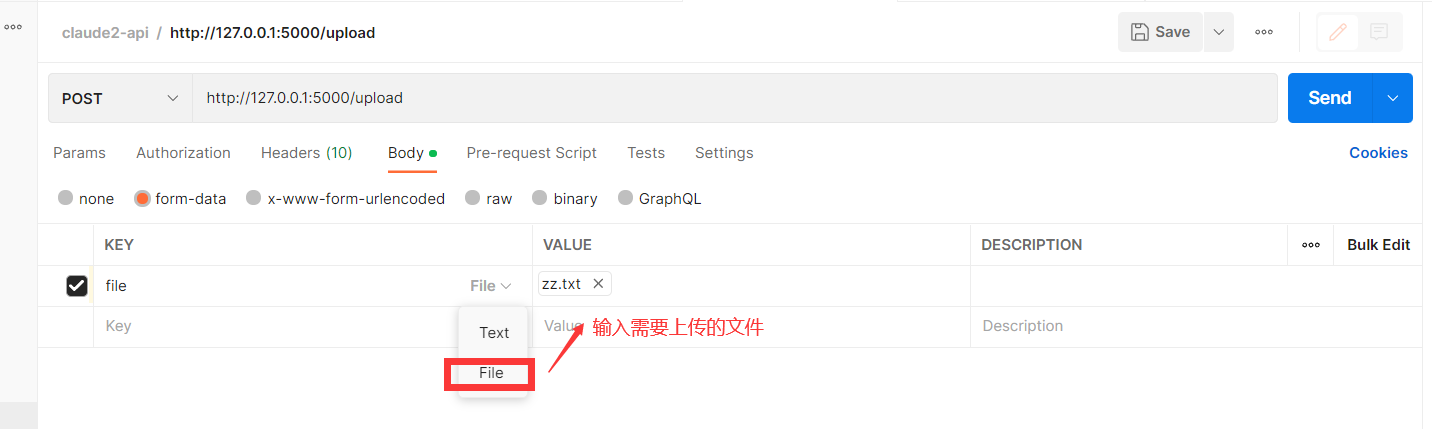
body 请求参数 使用form-data, form 表单1 参数file 类型选择 file
请求返回
5 发送消息并附带附件
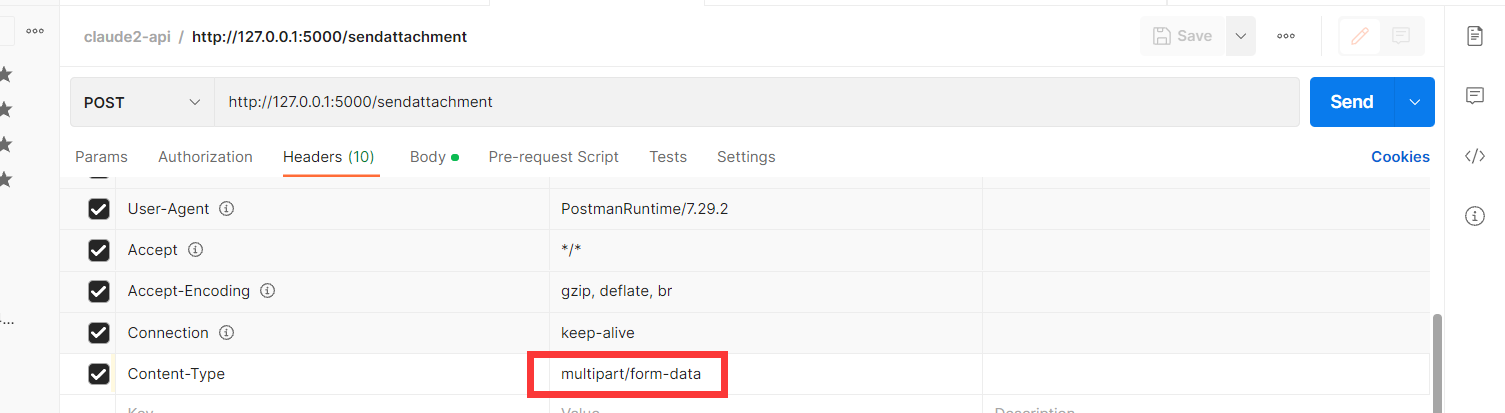
请求 方式 POST 请求url http://127.0.0.1:5000/sendattachment
headhers 设置 Content-Type= multipart/form-data
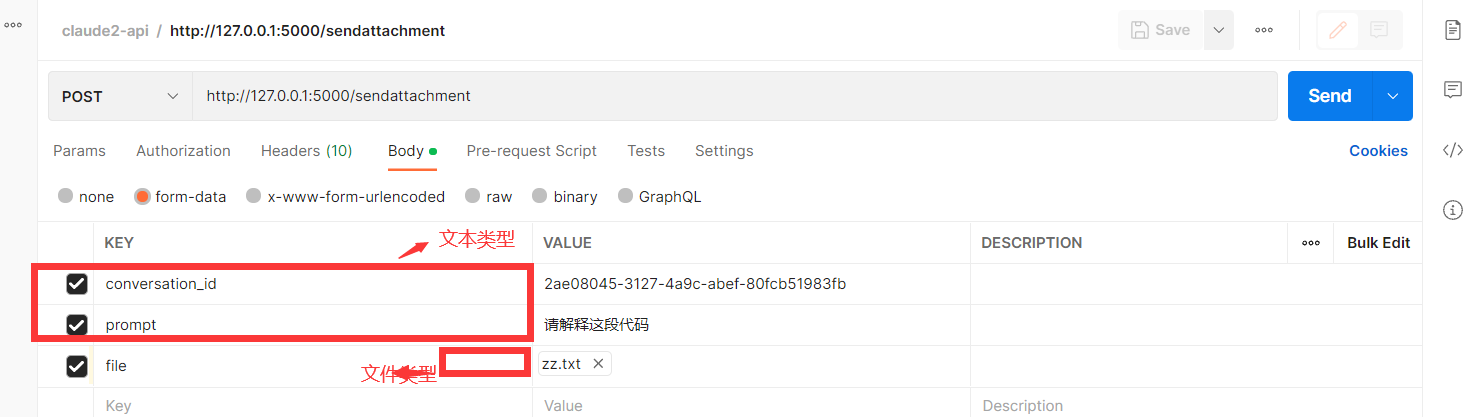
body 请求参数 使用form-data, form 表单三个参数 ,conversation_id,prompt,file 其中 前面2个 文件类型txt,最后一个文件类型选择file
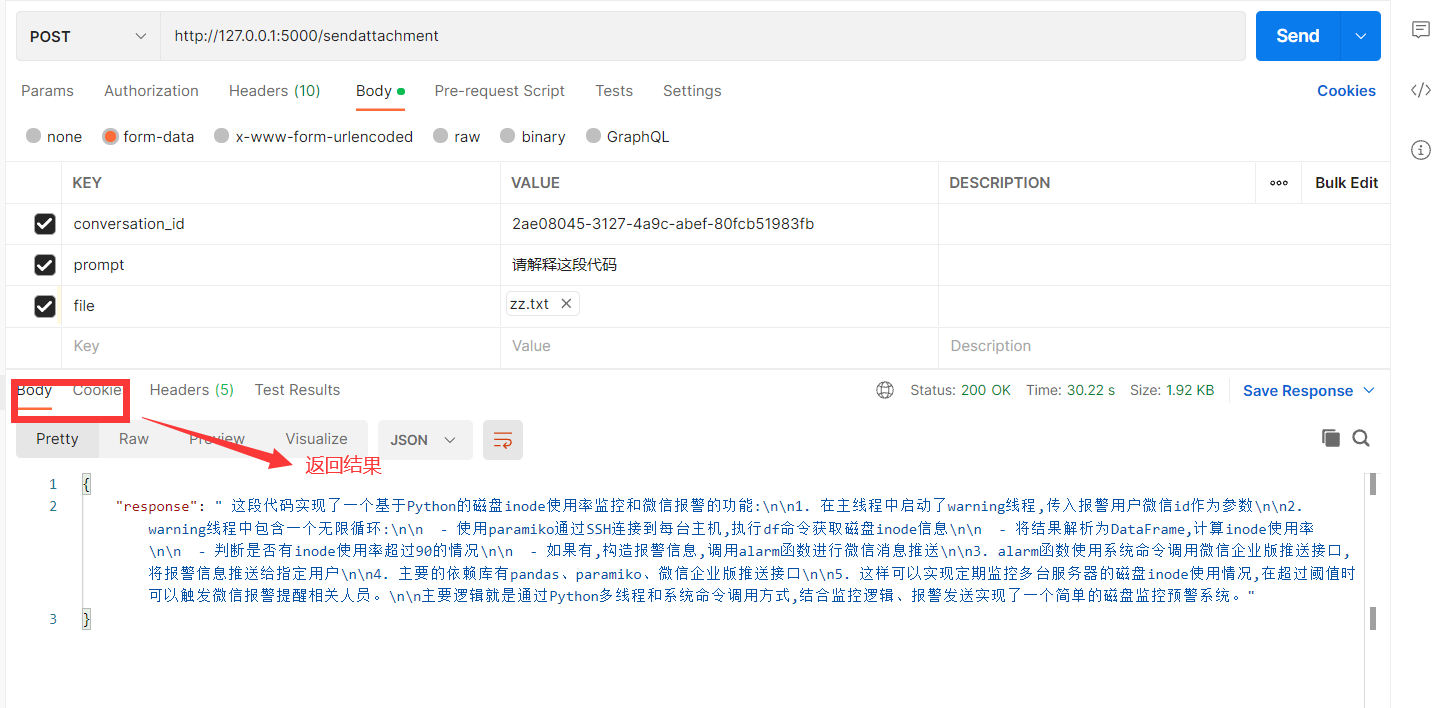
请求返回
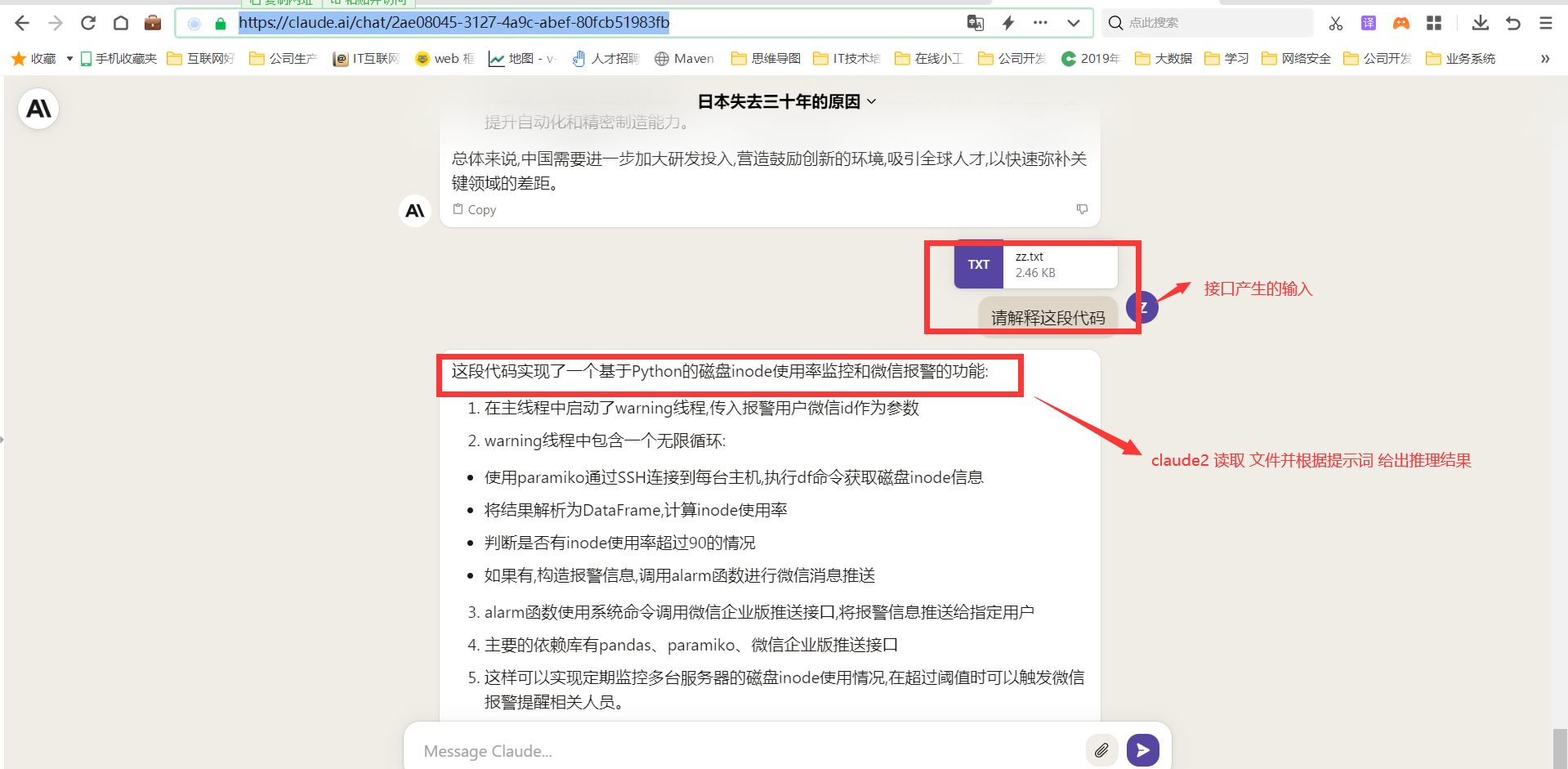
刷新网页查看页面结果。
视频信息:https://foul-maxilla-075.notion.site/claude2-a81a9488e7e943f588f4fe80a0a2fce0
### 版本:
- version 0.0.1: 基础功能包括创建会话、聊天、获取历史会话,清理历史记录等功能
- version 0.0.2: 修改文件读取功能,增加了文件上传功能和发送消息并附带附件功能;增加了项目演示视频信息。
- version 0.0.3:增加docker容器运行,运行cookie传参数使用,避免程序写死;增加replit 部署
### 视频演示地址:
哔哩哔哩:https://www.bilibili.com/video/BV1Cz4y1x7BV/
YouTube:https://www.youtube.com/watch?v=e-ssvXw9Di8&t=49s
西瓜视频:https://www.ixigua.com/7260833345888584249?is_new_connect=0&is_new_user=0
## 🎉 致谢
感谢 @KoushikNavuluri 对本项目的支持。
## 问题反馈
如有问题,请在GitHub Issue中提交,在提交问题之前,请先查阅以往的issue是否能解决你的问题。
https://replit.com/@wwwzhouhui/Claude2-PyAPI#replit.nix
## 列出所有的对话
列出所有会话Id与Claude ,你可以使用list_all_conversations方法:
conversations = claude_api.list_all_conversations()
for conversation in conversations:
conversation_id = conversation['uuid']
print(conversation_id)
## 发送消息
发送消息给 Claude, 您可以使用send_message方法。您需要提供提示和对话ID:
prompt = "Hello, Claude!"
conversation_id = "" or claude_api.create_new_chat()['uuid']
response = claude_api.send_message(prompt, conversation_id)
print(response)
## 发送消息带附件
你可以发送任何类型的附件claude 得到响应中使用附件参数send_message ()
注意:claude 目前只支持某些文件类型
prompt = "Hey,Summarize me this document.!"
conversation_id = "" or claude_api.create_new_chat()['uuid']
response = claude_api.send_message(prompt, conversation_id,attachment="path/to/file.pdf")
print(response)
## 删除对话
删除一个对话,你可以使用delete_conversation方法:
conversation_id = ""
deleted = claude_api.delete_conversation(conversation_id)
if deleted:
print("Conversation deleted successfully")
else:
print("Failed to delete conversation")
## 聊天对话的历史
聊天对话记录,您可以使用chat_conversation_history方法:
conversation_id = ""
history = claude_api.chat_conversation_history(conversation_id)
print(history)
## 创建新的聊天
创建一个新的聊天对话(id),您可以使用create_new_chat方法:
new_chat = claude_api.create_new_chat()
conversation_id = new_chat['uuid']
print(conversation_id)
## 重置所有对话
重置所有对话,您可以使用reset_all方法:
reset = claude_api.reset_all()
if reset:
print("All conversations reset successfully")
else:
print("Failed to reset conversations")
## 重命名聊天
重命名一个聊天对话,你可以使用rename_chat方法:
conversation_id = ""
title = "New Chat Title"
renamed = claude_api.rename_chat(title, conversation_id)
if renamed:
print("Chat conversation renamed successfully")
else:
print("Failed to rename chat conversation")
测试
启动claude_flask.py
1. 获取历史会话
1. 
postman 导入测试的请求接口json
get 请求,获取当前会话历史记录 http://127.0.0.1:5000/chat/0c24bd45-ac55-4a24-8393-1582369f5abd
其中0c24bd45-ac55-4a24-8393-1582369f5abd 是对话ID
请求参数 无:

点击 send postman 接口会调用 启动的flask 程序,调用成功后postman 接口会返回当天聊天会话历史记录

程序控制台会返回请求 GET /chat/0c24bd45-ac55-4a24-8393-1582369f5abd 返回200

2. 创建新会话
请求 方式 POST 请求url http://127.0.0.1:5000/chat
headhers 设置 Content-Type= application/json

body 请求参数, prompt 是固定值, 后面是您需要问的问题。
{
"prompt": "亚洲金融危机爆发时间是什么时候?请告诉我为什么会出现金融危机?"
}

请求返回

我们刷新一下网页端,查看当前浏览器

3 当前会话中发送消息
请求 方式 POST 请求url http://127.0.0.1:5000/send
headhers 设置 Content-Type= application/json

body 请求参数, prompt 是固定值, 后面是您需要问的问题。conversation_id 当前聊天会话ID
{
"conversation_id": "0c24bd45-ac55-4a24-8393-1582369f5abd",
"prompt": "中国和美国的科技有哪些差距?估计多少年才能缩小差距?!"
}
请求返回

我们刷新一下网页端,查看当前浏览器

4 文件上传功能
请求 方式 POST 请求url http://127.0.0.1:5000/upload
headhers 设置 Content-Type= multipart/form-data

body 请求参数 使用form-data, form 表单1 参数file 类型选择 file


请求返回

5 发送消息并附带附件
请求 方式 POST 请求url http://127.0.0.1:5000/sendattachment
headhers 设置 Content-Type= multipart/form-data

body 请求参数 使用form-data, form 表单三个参数 ,conversation_id,prompt,file 其中 前面2个 文件类型txt,最后一个文件类型选择file

请求返回

刷新网页查看页面结果。

视频信息:https://foul-maxilla-075.notion.site/claude2-a81a9488e7e943f588f4fe80a0a2fce0
### 版本:
- version 0.0.1: 基础功能包括创建会话、聊天、获取历史会话,清理历史记录等功能
- version 0.0.2: 修改文件读取功能,增加了文件上传功能和发送消息并附带附件功能;增加了项目演示视频信息。
- version 0.0.3:增加docker容器运行,运行cookie传参数使用,避免程序写死;增加replit 部署
### 视频演示地址:
哔哩哔哩:https://www.bilibili.com/video/BV1Cz4y1x7BV/
YouTube:https://www.youtube.com/watch?v=e-ssvXw9Di8&t=49s
西瓜视频:https://www.ixigua.com/7260833345888584249?is_new_connect=0&is_new_user=0
## 🎉 致谢
感谢 @KoushikNavuluri 对本项目的支持。
## 问题反馈
如有问题,请在GitHub Issue中提交,在提交问题之前,请先查阅以往的issue是否能解决你的问题。