 This [MagicMirror](https://github.com/MichMich/MagicMirror) modules, shows the processor temperature, system load, available RAM, uptime and free disk space.
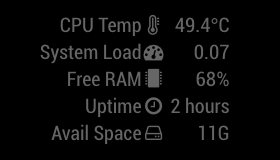
Tested with:
- Raspberry Pi
## Dependencies
- An installation of [MagicMirror2](https://github.com/MichMich/MagicMirror)
- npm
- [async](https://www.npmjs.com/package/async)
## Installation
Navigate into your MagicMirror's `modules` folder:
```
cd ~/MagicMirror/modules
```
Clone this repository:
```
git clone https://github.com/BenRoe/MMM-SystemStats
```
Navigate to the new `MMM-SystemStats` folder and install the node dependencies.
```
cd MMM-SystemStats/ && npm install
```
Configure the module in your `config.js` file.
## Update the module
Navigate into the `MMM-SystemStats` folder with `cd ~/MagicMirror/modules/MMM-SystemStats` and get the latest code from Github with `git pull`.
If you haven't changed the modules, this should work without any problems. Type `git status` to see your changes, if there are any, you can reset them with `git reset --hard`. After that, git pull should be possible.
## Using the module
To use this module, add it to the modules array in the `config/config.js` file:
```javascript
modules: [
{
module: 'MMM-SystemStats',
position: 'top_center', // This can be any of the regions.
// classes: 'small dimmed', // Add your own styling. OPTIONAL.
// header: 'System Stats', // Set the header text OPTIONAL
config: {
updateInterval: 10000, // every 10 seconds
align: 'right', // align labels
//header: 'System Stats', // This is optional
units: 'metric', // default, metric, imperial
view: 'textAndIcon',
},
},
]
```
## Configuration options
The following properties can be configured:
| Option | Description |
|---|---|
updateInterval |
How often does the content needs to be fetched? (Milliseconds)
Possible values: 1000 - 86400000
Default value: 10000 (10 seconds)
|
animationSpeed |
Speed of the update animation. (Milliseconds)
Possible values: 0 - 5000
Default value: 0 (animation off)
|
language |
language id for text can be different from MM.
Default value: config.language
|
units |
What units to use.
Possible values: config.units = Specified by config.js, default = Kelvin, metric = Celsius, imperial = Fahrenheit
Default value: config.units
|
align |
Align the labels.
Possible values: left or right
Default value: right
|
label |
Show text labels with icons, only text, or only icons.
Possible values: textAndIcon, text or icon
Default value: textAndIcon
|
useSyslog |
log event to MMM-syslog?
Default value: false
|
thresholdCPUTemp |
upper-threshold for CPU Temp. If CPU Temp is more than this value, log to MMM-syslog if useSyslog=true. (celcius)
Default value: 70
|
baseURLSyslog |
URL base of MMM-syslog module
Default value: http://127.0.0.1:8080/syslog
|