# flutter_photo_manager
**Repository Path**: hongpeifeng/flutter_photo_manager
## Basic Information
- **Project Name**: flutter_photo_manager
- **Description**: flutter_photo_manager good project
- **Primary Language**: Unknown
- **License**: Apache-2.0
- **Default Branch**: main
- **Homepage**: None
- **GVP Project**: No
## Statistics
- **Stars**: 0
- **Forks**: 0
- **Created**: 2022-09-23
- **Last Updated**: 2022-10-26
## Categories & Tags
**Categories**: Uncategorized
**Tags**: None
## README
# photo_manager
English | [中文说明](#) (🚧 WIP)
[][pub package]
[](https://pub.dev/packages/photo_manager)
[](https://github.com/Solido/awesome-flutter)
[][repo]
[][repo]
 A Flutter plugin that provides assets abstraction management APIs without UI integration,
you can get assets (image/video/audio) on Android, iOS and macOS.
## Projects using this plugin
| name | pub | github |
|:---------------------|:-------------------------------------------------------------------------------------------------------------------|:------------------------------------------------------------------------------------------------------------------------------------------------------------------------|
| wechat_assets_picker | [](https://pub.dev/packages/wechat_assets_picker) | [](https://github.com/fluttercandies/flutter_wechat_assets_picker) |
| wechat_camera_picker | [](https://pub.dev/packages/wechat_camera_picker) | [](https://github.com/fluttercandies/flutter_wechat_camera_picker) |
## Articles about this plugin
- [Hard to manage media with Flutter? Try photo_manager, the all-in-one solution](https://medium.flutter.cn/hard-to-manage-media-with-flutter-try-photo-manager-the-all-in-one-solution-5188599e4cf)
## Migration guide
For versions upgrade across major versions,
see the [migration guide](MIGRATION_GUIDE.md) for detailed info.
## Table of Contents
- [photo_manager](#photo_manager)
- [Projects using this plugin](#projects-using-this-plugin)
- [Articles about this plugin](#articles-about-this-plugin)
- [Migration guide](#migration-guide)
- [Table of Contents](#table-of-contents)
- [Common issues](#common-issues)
- [Prepare for use](#prepare-for-use)
- [Add the plugin reference to pubspec.yaml](#add-the-plugin-reference-to-pubspecyaml)
- [Import in your projects](#import-in-your-projects)
- [Configure native platforms](#configure-native-platforms)
- [Android config preparation](#android-config-preparation)
- [Kotlin, Gradle, AGP](#kotlin-gradle-agp)
- [Android 10+ (Q, 29)](#android-10-q-29)
- [Glide](#glide)
- [iOS config preparation](#ios-config-preparation)
- [Usage](#usage)
- [Request for permission](#request-for-permission)
- [Limited entities access on iOS](#limited-entities-access-on-ios)
- [Get albums/folders (`AssetPathEntity`)](#get-albumsfolders-assetpathentity)
- [Get assets (`AssetEntity`)](#get-assets-assetentity)
- [From `AssetPathEntity`](#from-assetpathentity)
- [From ID](#from-id)
- [From raw data](#from-raw-data)
- [From iCloud](#from-icloud)
- [Display assets](#display-assets)
- [Obtain "Live Photos"](#obtain-live-photos)
- [Filtering only "Live Photos"](#filtering-only-live-photos)
- [Obtain the video from "Live Photos"](#obtain-the-video-from-live-photos)
- [Limitations](#limitations)
- [Android 10 media location permission](#android-10-media-location-permission)
- [Usage of the original data](#usage-of-the-original-data)
- [Long retrieving duration with file on iOS](#long-retrieving-duration-with-file-on-ios)
- [Entities change notify](#entities-change-notify)
- [Cache mechanism](#cache-mechanism)
- [Cache on Android](#cache-on-android)
- [Cache on iOS](#cache-on-ios)
- [Clear caches](#clear-caches)
- [Native extra configs](#native-extra-configs)
- [Android extra configs](#android-extra-configs)
- [Glide issues](#glide-issues)
- [Android 13 (Api 33) extra configs](#android-13-api-33-extra-configs)
- [iOS extra configs](#ios-extra-configs)
- [Localized system albums name](#localized-system-albums-name)
- [Experimental features](#experimental-features)
- [Preload thumbnails](#preload-thumbnails)
- [Delete entities](#delete-entities)
- [Copy an entity](#copy-an-entity)
- [Features for Android only](#features-for-android-only)
- [Move an entity to another album](#move-an-entity-to-another-album)
- [Remove all non-exist entities](#remove-all-non-exist-entities)
- [Features for iOS only](#features-for-ios-only)
- [Create a folder](#create-a-folder)
- [Create an album](#create-an-album)
- [Remove the entity entry from the album](#remove-the-entity-entry-from-the-album)
- [Delete a path entity](#delete-a-path-entity)
## Common issues
Please search common issues in [GitHub issues][]
for build errors, runtime exceptions, etc.
## Prepare for use
### Add the plugin reference to pubspec.yaml
Two ways to add the plugin to your pubspec:
- **(Recommend)** Run `flutter pub add photo_manager`.
- Add the plugin reference in your `pubspec.yaml`'s `dependencies` section:
```yaml
dependencies:
photo_manager: $latest_version
```
The latest stable version is:
[][pub package]
### Import in your projects
```dart
import 'package:photo_manager/photo_manager.dart';
```
### Configure native platforms
Minimum platform versions:
**Android 16, iOS 9.0, macOS 10.15**.
- Android: [Android config preparation](#android-config-preparation).
- iOS: [iOS config preparation](#ios-config-preparation).
- macOS: Pretty much the same with iOS.
#### Android config preparation
##### Kotlin, Gradle, AGP
Starting from 1.2.7, We ship this plugin with
**Kotlin `1.5.21`** and **Android Gradle Plugin `4.1.0`**.
If your projects use a lower version of Kotlin/Gradle/AGP,
please upgrade them to a newer version.
More specifically:
- Upgrade your Gradle version (`gradle-wrapper.properties`)
to `7.5.1` or the latest version.
- Upgrade your Kotlin version (`ext.kotlin_version`)
to `1.5.30` or the latest version.
- Upgrade your AGP version (`com.android.tools.build:gradle`)
to `7.2.2` or the latest version.
##### Android 10+ (Q, 29)
_If you're not compiling or targeting with 29, you can skip this section._
On Android 10, **Scoped Storage** was introduced,
which causes the origin resource file not directly
inaccessible through it file path.
If your `compileSdkVersion` is `29`, you can consider adding
`android:requestLegacyExternalStorage="true"` to your
`AndroidManifest.xml` in order to obtain resources:
```xml
```
Noted that this is not a requirement, the plugin can still work with caching files.
But you'll need to control caches on your own, the best practice is to clear file caches
each time when you start your app by calling `PhotoManager.clearFileCache()`.
##### Glide
The plugin use [Glide][] to create thumbnail bytes for Android.
If you found some warning logs with Glide appearing,
it means the main project needs an implementation of `AppGlideModule`.
See [Generated API][] for the implementation.
#### iOS config preparation
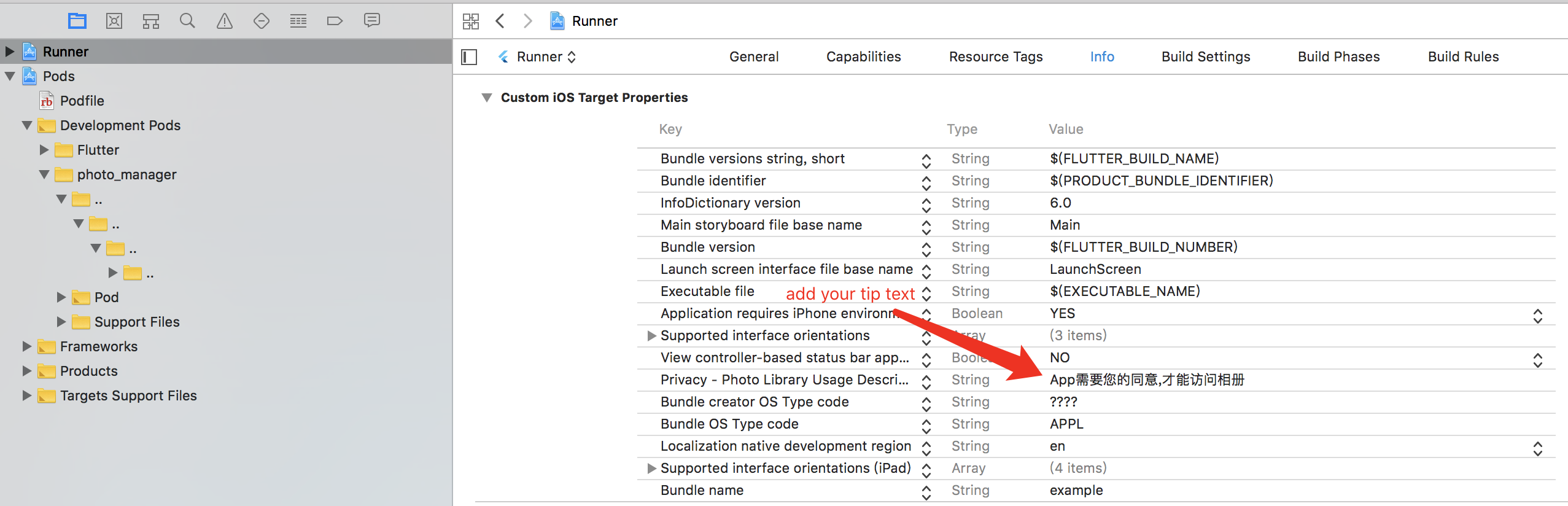
Define the `NSPhotoLibraryUsageDescription`
key-value in the `ios/Runner/Info.plist`:
```xml
NSPhotoLibraryUsageDescription
In order to access your photo library
```
If you want to grant only write-access to the photo library on iOS 11 and above,
define the `NSPhotoLibraryAddUsageDescription`
key-value in the `ios/Runner/Info.plist`.
It's pretty much the same as the `NSPhotoLibraryUsageDescription`.
## Usage
### Request for permission
Most of the APIs can only use with granted permission.
```dart
final PermissionState _ps = await PhotoManager.requestPermissionExtend();
if (_ps.isAuth) {
// Granted.
} else {
// Limited(iOS) or Rejected, use `==` for more precise judgements.
// You can call `PhotoManager.openSetting()` to open settings for further steps.
}
```
But if you're pretty sure your callers will be only called
after the permission is granted, you can ignore permission checks:
```dart
PhotoManager.setIgnorePermissionCheck(true);
```
#### Limited entities access on iOS
With iOS 14 released, Apple brought a "Limited Photos Library" to iOS.
So use the `PhotoManager.requestPermissionExtend()` to request permissions.
The method will return `PermissionState`.
See [PHAuthorizationStatus][] for more detail.
To reselect accessible entites for the app,
use `PhotoManager.presentLimited()` to call the modal of
accessible entities' management.
This method only available for iOS 14+ and when the permission state
is limited (`PermissionState.limited`),
other platform won't make a valid call.
### Get albums/folders (`AssetPathEntity`)
Albums or folders are abstracted as the [`AssetPathEntity`][] class.
It represents a bucket in the `MediaStore` on Android,
and the `PHAssetCollection` object on iOS/macOS.
To get all of them:
```dart
final List paths = await PhotoManager.getAssetPathList();
```
See [`getAssetPathList`][] for more detail.
### Get assets (`AssetEntity`)
Assets (images/videos/audios) are abstracted as the [`AssetEntity`][] class.
It represents a series of fields with `MediaStore` on Android,
and the `PHAsset` object on iOS/macOS.
#### From `AssetPathEntity`
You can use [the pagination method][`getAssetListPaged`]:
```dart
final List entities = await path.getAssetListPaged(page: 0, size: 80);
```
Or use [the range method][`getAssetListRange`]:
```dart
final List entities = await path.getAssetListRange(start: 0, end: 80);
```
#### From ID
The ID concept represents:
- The ID field of the `MediaStore` on Android.
- The `localIdentifier` field of the `PHAsset` on iOS.
You can store the ID if you want to implement features
that's related to persistent selections.
Use [`AssetEntity.fromId`][] to retrieve the entity
once you persist an ID.
```dart
final AssetEntity? asset = await AssetEntity.fromId(id);
```
Be aware that the created asset might have
limited access or got deleted in anytime,
so the result might be null.
#### From raw data
You can create your own entity from raw data,
such as downloaded images, recorded videos, etc.
The created entity will show as a corresponding resource
on your device's gallery app.
```dart
final Uint8List rawData = yourRawData;
// Save an image to an entity from `Uint8List`.
final AssetEntity? entity = await PhotoManager.editor.saveImage(
rawData,
title: 'write_your_own_title.jpg', // Affects EXIF reading.
);
// Save an existed image to an entity from it's path.
final AssetEntity? imageEntityWithPath = await PhotoManager.editor.saveImageWithPath(
path, // Use the absolute path of your source file, it's more like a copy method.
title: 'same_as_above.jpg',
);
// Save a video entity from `File`.
final File videoFile = File('path/to/your/video.mp4');
final AssetEntity? videoEntity = await PhotoManager.editor.saveVideo(
videoFile, // You can check whether the file is exist for better test coverage.
title: 'write_your_own_title.mp4',
);
```
Be aware that the created asset might have
limited access or got deleted in anytime,
so the result might be null.
#### From iCloud
Resources might be saved only on iCloud to save disk space.
When retrieving file from iCloud, the speed is depend on the network condition,
which might be very slow that makes users feel anxious.
To provide a responsive user interface, you can use `PMProgressHandler`
to retrieve the progress when load a file.
The preferred implementation would be the [`LocallyAvailableBuilder`][]
in the `wechat_asset_picker` package, which provides a progress indicator
when the file is downloading.
#### Display assets
The plugin provided the `AssetEntityImage` widget and
the `AssetEntityImageProvider` to display assets:
```dart
final Widget image = AssetEntityImage(
yourAssetEntity,
isOriginal: false, // Defaults to `true`.
thumbnailSize: const ThumbnailSize.square(200), // Preferred value.
thumbnailFormat: ThumbnailFormat.jpeg, // Defaults to `jpeg`.
);
final Widget imageFromProvider = Image(
image: AssetEntityImageProvider(
yourAssetEntity,
isOriginal: false,
thumbnailSize: const ThumbnailSize.square(200),
thumbnailFormat: ThumbnailFormat.jpeg,
),
);
```
#### Obtain "Live Photos"
This plugin supports obtain live photos and filtering them:
##### Filtering only "Live Photos"
This is supported when filtering only image.
```dart
final List paths = await PhotoManager.getAssetPathList(
type: RequestType.image,
filterOption: FilterOptionGroup(onlyLivePhotos: true),
);
```
##### Obtain the video from "Live Photos"
```dart
final AssetEntity entity = livePhotoEntity;
final String? mediaUrl = await entity.getMediaUrl();
final File? imageFile = await entity.file;
final File? videoFile = await entity.fileWithSubtype;
final File? originImageFile = await entity.originFile;
final File? originVideoFile = await entity.originFileWithSubtype;
```
#### Limitations
##### Android 10 media location permission
Due to the privacy policy issues on Android 10,
it is necessary to grant the location permission
to obtain the original data with the location info
and the EXIF metadata.
If you want to use the location permission,
add the `ACCESS_MEDIA_LOCATION` permission to your manifest.
##### Usage of the original data
The `originFile` and `originBytes` getter
will return the original data of an entity.
However, there are some cases that the original data is invalid in Flutter.
Here are some common cases:
- HEIC files are not fully supported across platforms. We suggest you to
upload the JPEG file (99% quality compressed thumbnail) in order to keep
a consistent behavior between multiple platforms.
See [flutter/flutter#20522][] for more detail.
- Videos will only be obtained in the original format,
not the exported/composited format, which might cause
some behavior difference when playing videos.
##### Long retrieving duration with file on iOS
There are several I/O methods in this library targeting `AssetEntity`,
typically they are:
- All methods named with `file`.
- `AssetEntity.originBytes`.
File retrieving and caches are limited by the sandbox mechanism on iOS.
An existing `PHAsset` doesn't mean the file located on the device.
In generally, a `PHAsset` will have three status:
- `isLocallyAvailable` equals `true`, **also cached**: Available for obtain.
- `isLocallyAvailable` equals `true`, **but not cached**: When you call I/O methods,
the resource will first cached into the sandbox, then available for obtain.
- `isLocallyAvailable` equals `false`: Typically this means the asset exists,
but it's saved only on iCloud, or some videos that not exported yet.
In this case, the best practise is to use the `PMProgressHandler`
to provide a responsive user interface.
### Entities change notify
Plugin will post entities change events from native,
but they will include different contents.
See [the `logs` folder](log) for more recorded logs.
To register a callback for these events, use
[`PhotoManager.addChangeCallback`] to add a callback,
and use [`PhotoManager.removeChangeCallback`] to remove the callback,
just like `addListener` and `removeListener` methods.
After you added/removed callbacks, you can call
[`PhotoManager.startChangeNotify`] method to enable to notify,
and [`PhotoManager.stopChangeNotify`] method to stop notify.
```dart
import 'package:flutter/services.dart';
void changeNotify(MethodCall call) {
// Your custom callback.
}
/// Register your callback.
PhotoManager.addChangeCallback(changeNotify);
/// Enable change notify.
PhotoManager.startChangeNotify();
/// Remove your callback.
PhotoManager.removeChangeCallback(changeNotify);
/// Disable change notify.
PhotoManager.stopChangeNotify();
```
## Cache mechanism
### Cache on Android
Because Android 10 restricts the ability to access the resource path directly,
some large image caches will be generated during I/O processes.
More specifically, when the `file`, `originFile` and any other I/O getters are called,
the plugin will save a file in the cache folder for further use.
Fortunately, in Android 11, the resource path can be obtained directly again,
but for Android 10, you can only use `requestLegacyExternalStorage` as a workaround.
See [Android 10+ (Q, 29)](#android-10-q-29)
for how to add the attribute.
### Cache on iOS
iOS does not directly provide APIs to access the original files of the album.
So a cached file will be generated locally
into the container of the current application
when you called `file`, `originFile` and any other I/O getters.
If occupied disk spaces are sensitive in your use case,
you can delete it after your usage has done (iOS only).
```dart
import 'dart:io';
Future useEntity(AssetEntity entity) async {
File? file;
try {
file = await entity.file;
handleFile(file!); // Custom method to handle the obtained file.
} finally {
if (Platform.isIOS) {
file?.deleteSync(); // Delete it once the process has done.
}
}
}
```
### Clear caches
You can use the `PhotoManager.clearFileCache()` method
to clear all caches that generated by the plugin.
Here are caches generation on different platforms,
types and resolutions.
| Platform | Thumbnail | File / Origin File |
|----------|-----------|--------------------|
| Android | Yes | No |
| iOS | No | Yes |
## Native extra configs
### Android extra configs
#### Glide issues
If your found any conflicting issues against Glide,
then you'll need to edit the `android/build.gradle` file:
```gradle
rootProject.allprojects {
subprojects {
project.configurations.all {
resolutionStrategy.eachDependency { details ->
if (details.requested.group == 'com.github.bumptech.glide'
&& details.requested.name.contains('glide')) {
details.useVersion '4.11.0'
}
}
}
}
}
```
See [ProGuard for Glide](https://github.com/bumptech/glide#proguard)
if you want to know more about using ProGuard and Glide together.
#### Android 13 (Api 33) extra configs
When targeting Android 13 (API level 33), the following extra configs needs to be added to the manifest:
```xml
```
### iOS extra configs
#### Localized system albums name
By default, iOS will retrieve system album names only in English
no matter what language has been set to devices.
To change the default language, see the following steps:
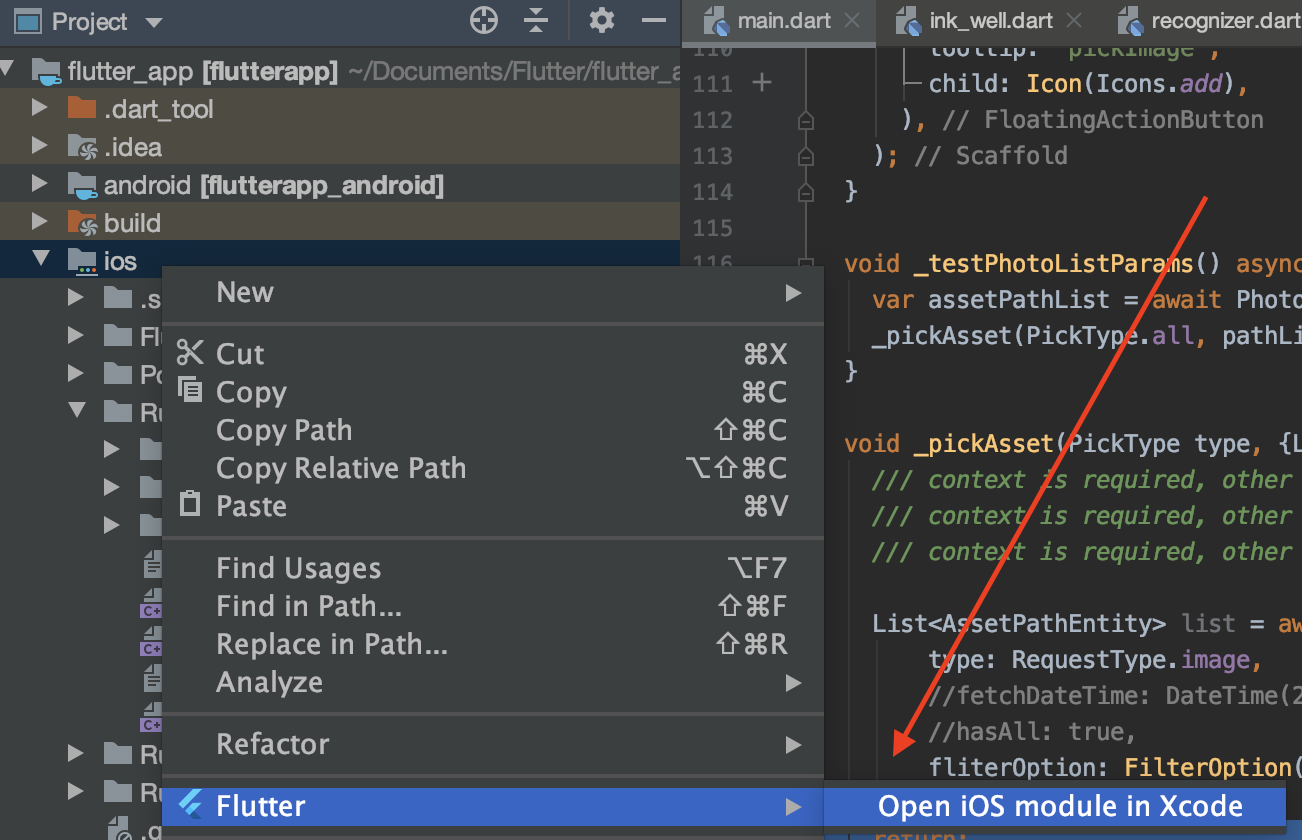
- Open your iOS project (Runner.xcworkspace) using Xcode.
- Select the project "Runner" and in the localizations table, click on the + icon.
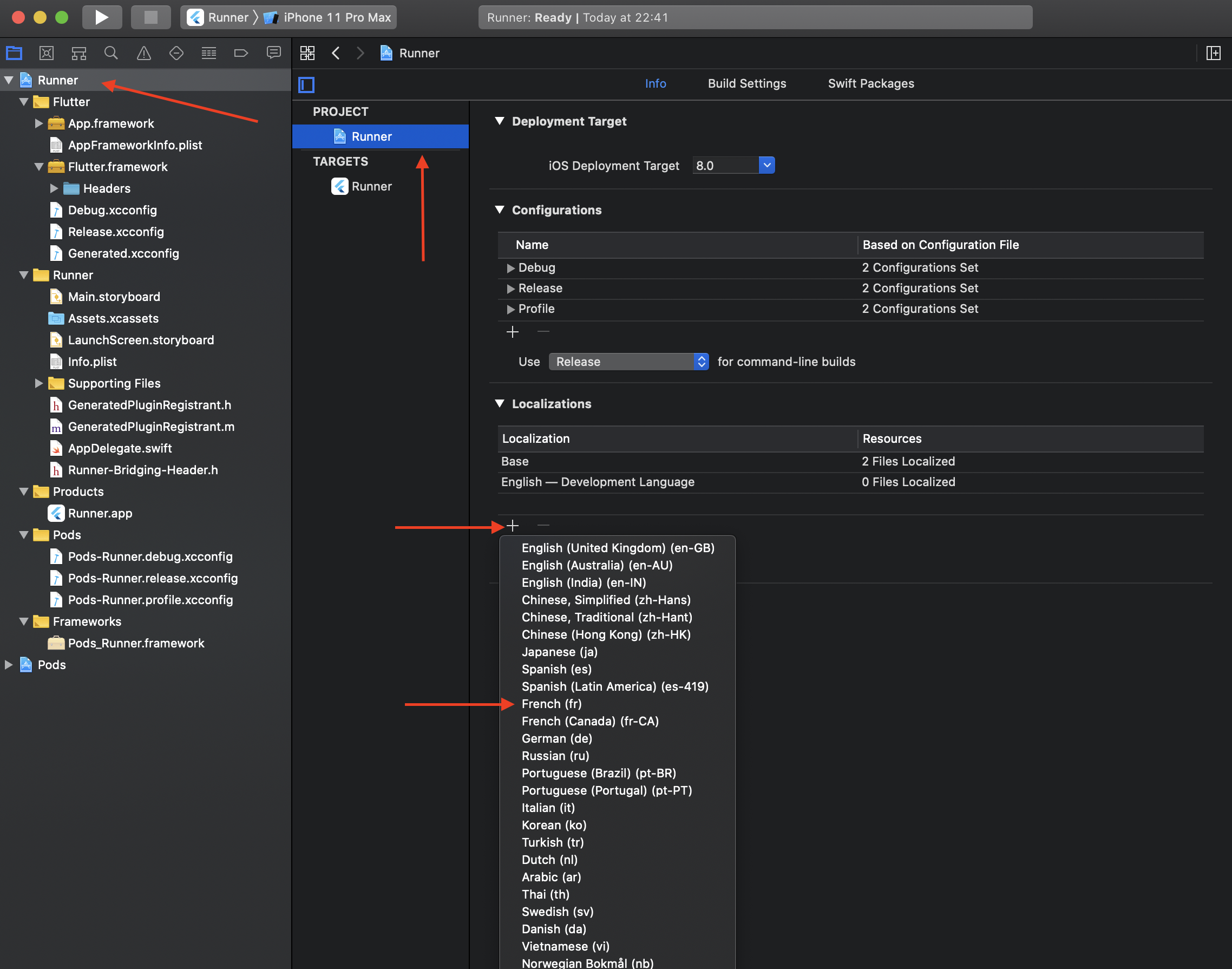
- Select the adequate language(s) you want to retrieve localized strings.
- Validate the popup screen without any modification.
- Rebuild your flutter project.
Now system albums label should display accordingly.
### Experimental features
**Warning**: Features here aren't guaranteed to be fully usable
since they involved with data modification.
They can be modified/removed in any time,
without following a proper version semantic.
Some APIs will make irreversible modification/deletion to data.
**Please be careful and implement your own test mechanism when using them**.
#### Preload thumbnails
You can preload thumbnails for entities with specified thumbnail options
using [`PhotoCachingManager.requestCacheAssets`][]
or `PhotoCachingManager.requestCacheAssetsWithIds`.
```dart
PhotoCachingManager().requestCacheAssets(assets: assets, option: option);
```
And you can stop in anytime by calling
`PhotoCachingManager().cancelCacheRequest()`.
Usually, when we're previewing assets, thumbnails will be use.
But sometimes we want to preload assets to make them display faster.
The `PhotoCachingManager` uses the [PHCachingImageManager][] on iOS,
and Glide's file cache on Android.
#### Delete entities
**This method will delete the asset completely from your device.
Use it with extra cautious.**
```dart
// Deleted IDs will returned, if it fails, the result will be an empty list.
final List result = await PhotoManager.editor.deleteWithIds(
[entity.id],
);
```
After the deletion, you can call the `refreshPathProperties` method
to refresh the corresponding `AssetPathEntity` in order to get latest fields.
#### Copy an entity
You can use `copyAssetToPath` method to "Copy" an entity
from its current position to the targeting `AssetPathEntity`:
```dart
// Make sure your path entity is accessible.
final AssetPathEntity anotherPathEntity = anotherAccessiblePath;
final AssetEntity entity = yourEntity;
final AssetEntity? newEntity = await PhotoManager.editor.copyAssetToPath(
asset: entity,
pathEntity: anotherPathEntity,
); // The result could be null when the path is not accessible.
```
The "Copy" means differently here on Android and iOS:
- For Android, it inserts a copy of the source entity:
- On platforms <=28, the method will copy most of the origin info.
- On platforms >=29, some fields cannot be modified during the insertion,
e.g. [MediaColumns.RELATIVE_PATH][].
- For iOS, it makes a shortcut thing rather than create a new physical entity.
- Some albums are smart albums, their content is automatically managed
by the system and cannot insert entities manually.
(For Android 30+, this feature is blocked by system limitations currently.)
#### Features for Android only
##### Move an entity to another album
```dart
// Make sure your path entity is accessible.
final AssetPathEntity pathEntity = accessiblePath;
final AssetEntity entity = yourEntity;
await PhotoManager.editor.android.moveAssetToAnother(
entity: entity,
target: pathEntity,
);
```
(For Android 30+, this feature is blocked by system limitations currently.)
##### Remove all non-exist entities
This will remove all items (records) that's not existed locally.
A record in Android `MediaStore` could have the corresponding file deleted.
Those abnormal behaviors usually caused by operations from
file manager, helper tools or adb tool.
This operation is resource-consuming,
Please use the `await` keyword to call the cleaning process
before you call another one.
```dart
await PhotoManager.editor.android.removeAllNoExistsAsset();
```
Some operating systems will prompt confirmation dialogs
for each entities' deletion, we have no way to avoid them.
Make sure your customers accept repeatedly confirmations.
#### Features for iOS only
##### Create a folder
```dart
PhotoManager.editor.iOS.createFolder(
name,
parent: parent, // Null, the root path or accessible folders.
);
```
##### Create an album
```dart
PhotoManager.editor.iOS.createAlbum(
name,
parent: parent, // Null, the root path or accessible folders.
);
```
##### Remove the entity entry from the album
Remove the entry of the asset from the specific album.
The asset won't be deleted from the device, only removed from the album.
```dart
// Make sure your path entity is accessible.
final AssetPathEntity pathEntity = accessiblePath;
final AssetEntity entity = yourEntity;
final List entities = [yourEntity, anotherEntity];
// Remove single asset from the album.
// It'll call the list method as the implementation.
await PhotoManager.editor.iOS.removeInAlbum(
yourEntity,
accessiblePath,
);
// Remove assets from the album in batches.
await PhotoManager.editor.iOS.removeAssetsInAlbum(
entities,
accessiblePath,
);
```
##### Delete a path entity
Smart albums can't be deleted.
```dart
PhotoManager.editor.iOS.deletePath();
```
[pub package]: https://pub.dev/packages/photo_manager
[repo]: https://github.com/fluttercandies/flutter_photo_manager
[GitHub issues]: https://github.com/fluttercandies/flutter_photo_manager/issues
[Glide]: https://bumptech.github.io/glide/
[Generated API]: https://bumptech.github.io/glide/doc/generatedapi.html
[`ACCESS_MEDIA_LOCATION`]: https://developer.android.com/training/data-storage/shared/media#media-location-permission
[MediaColumns.RELATIVE_PATH]: https://developer.android.com/reference/android/provider/MediaStore.MediaColumns#RELATIVE_PATH
[PHAuthorizationStatus]: https://developer.apple.com/documentation/photokit/phauthorizationstatus?language=objc
[PHCachingImageManager]: https://developer.apple.com/documentation/photokit/phcachingimagemanager?language=objc
[`AssetPathEntity`]: https://pub.dev/documentation/photo_manager/latest/photo_manager/AssetPathEntity-class.html
[`AssetEntity`]: https://pub.dev/documentation/photo_manager/latest/photo_manager/AssetEntity-class.html
[`getAssetPathList`]: https://pub.dev/documentation/photo_manager/latest/photo_manager/PhotoManager/getAssetPathList.html
[`getAssetListPaged`]: https://pub.dev/documentation/photo_manager/latest/photo_manager/AssetPathEntity/getAssetListPaged.html
[`getAssetListRange`]: https://pub.dev/documentation/photo_manager/latest/photo_manager/AssetPathEntity/getAssetListRange.html
[`AssetEntity.fromId`]: https://pub.dev/documentation/photo_manager/latest/photo_manager/AssetEntity/fromId.html
[`PhotoCachingManager.requestCacheAssets`]: https://pub.dev/documentation/photo_manager/latest/photo_manager/PhotoCachingManager/requestCacheAssets.html
[`LocallyAvailableBuilder`]: https://github.com/fluttercandies/flutter_wechat_assets_picker/blob/2055adfa74370339d10e6f09adef72f2130d2380/lib/src/widget/builder/locally_available_builder.dart
[flutter/flutter#20522]: https://github.com/flutter/flutter/issues/20522
A Flutter plugin that provides assets abstraction management APIs without UI integration,
you can get assets (image/video/audio) on Android, iOS and macOS.
## Projects using this plugin
| name | pub | github |
|:---------------------|:-------------------------------------------------------------------------------------------------------------------|:------------------------------------------------------------------------------------------------------------------------------------------------------------------------|
| wechat_assets_picker | [](https://pub.dev/packages/wechat_assets_picker) | [](https://github.com/fluttercandies/flutter_wechat_assets_picker) |
| wechat_camera_picker | [](https://pub.dev/packages/wechat_camera_picker) | [](https://github.com/fluttercandies/flutter_wechat_camera_picker) |
## Articles about this plugin
- [Hard to manage media with Flutter? Try photo_manager, the all-in-one solution](https://medium.flutter.cn/hard-to-manage-media-with-flutter-try-photo-manager-the-all-in-one-solution-5188599e4cf)
## Migration guide
For versions upgrade across major versions,
see the [migration guide](MIGRATION_GUIDE.md) for detailed info.
## Table of Contents
- [photo_manager](#photo_manager)
- [Projects using this plugin](#projects-using-this-plugin)
- [Articles about this plugin](#articles-about-this-plugin)
- [Migration guide](#migration-guide)
- [Table of Contents](#table-of-contents)
- [Common issues](#common-issues)
- [Prepare for use](#prepare-for-use)
- [Add the plugin reference to pubspec.yaml](#add-the-plugin-reference-to-pubspecyaml)
- [Import in your projects](#import-in-your-projects)
- [Configure native platforms](#configure-native-platforms)
- [Android config preparation](#android-config-preparation)
- [Kotlin, Gradle, AGP](#kotlin-gradle-agp)
- [Android 10+ (Q, 29)](#android-10-q-29)
- [Glide](#glide)
- [iOS config preparation](#ios-config-preparation)
- [Usage](#usage)
- [Request for permission](#request-for-permission)
- [Limited entities access on iOS](#limited-entities-access-on-ios)
- [Get albums/folders (`AssetPathEntity`)](#get-albumsfolders-assetpathentity)
- [Get assets (`AssetEntity`)](#get-assets-assetentity)
- [From `AssetPathEntity`](#from-assetpathentity)
- [From ID](#from-id)
- [From raw data](#from-raw-data)
- [From iCloud](#from-icloud)
- [Display assets](#display-assets)
- [Obtain "Live Photos"](#obtain-live-photos)
- [Filtering only "Live Photos"](#filtering-only-live-photos)
- [Obtain the video from "Live Photos"](#obtain-the-video-from-live-photos)
- [Limitations](#limitations)
- [Android 10 media location permission](#android-10-media-location-permission)
- [Usage of the original data](#usage-of-the-original-data)
- [Long retrieving duration with file on iOS](#long-retrieving-duration-with-file-on-ios)
- [Entities change notify](#entities-change-notify)
- [Cache mechanism](#cache-mechanism)
- [Cache on Android](#cache-on-android)
- [Cache on iOS](#cache-on-ios)
- [Clear caches](#clear-caches)
- [Native extra configs](#native-extra-configs)
- [Android extra configs](#android-extra-configs)
- [Glide issues](#glide-issues)
- [Android 13 (Api 33) extra configs](#android-13-api-33-extra-configs)
- [iOS extra configs](#ios-extra-configs)
- [Localized system albums name](#localized-system-albums-name)
- [Experimental features](#experimental-features)
- [Preload thumbnails](#preload-thumbnails)
- [Delete entities](#delete-entities)
- [Copy an entity](#copy-an-entity)
- [Features for Android only](#features-for-android-only)
- [Move an entity to another album](#move-an-entity-to-another-album)
- [Remove all non-exist entities](#remove-all-non-exist-entities)
- [Features for iOS only](#features-for-ios-only)
- [Create a folder](#create-a-folder)
- [Create an album](#create-an-album)
- [Remove the entity entry from the album](#remove-the-entity-entry-from-the-album)
- [Delete a path entity](#delete-a-path-entity)
## Common issues
Please search common issues in [GitHub issues][]
for build errors, runtime exceptions, etc.
## Prepare for use
### Add the plugin reference to pubspec.yaml
Two ways to add the plugin to your pubspec:
- **(Recommend)** Run `flutter pub add photo_manager`.
- Add the plugin reference in your `pubspec.yaml`'s `dependencies` section:
```yaml
dependencies:
photo_manager: $latest_version
```
The latest stable version is:
[][pub package]
### Import in your projects
```dart
import 'package:photo_manager/photo_manager.dart';
```
### Configure native platforms
Minimum platform versions:
**Android 16, iOS 9.0, macOS 10.15**.
- Android: [Android config preparation](#android-config-preparation).
- iOS: [iOS config preparation](#ios-config-preparation).
- macOS: Pretty much the same with iOS.
#### Android config preparation
##### Kotlin, Gradle, AGP
Starting from 1.2.7, We ship this plugin with
**Kotlin `1.5.21`** and **Android Gradle Plugin `4.1.0`**.
If your projects use a lower version of Kotlin/Gradle/AGP,
please upgrade them to a newer version.
More specifically:
- Upgrade your Gradle version (`gradle-wrapper.properties`)
to `7.5.1` or the latest version.
- Upgrade your Kotlin version (`ext.kotlin_version`)
to `1.5.30` or the latest version.
- Upgrade your AGP version (`com.android.tools.build:gradle`)
to `7.2.2` or the latest version.
##### Android 10+ (Q, 29)
_If you're not compiling or targeting with 29, you can skip this section._
On Android 10, **Scoped Storage** was introduced,
which causes the origin resource file not directly
inaccessible through it file path.
If your `compileSdkVersion` is `29`, you can consider adding
`android:requestLegacyExternalStorage="true"` to your
`AndroidManifest.xml` in order to obtain resources:
```xml
```
Noted that this is not a requirement, the plugin can still work with caching files.
But you'll need to control caches on your own, the best practice is to clear file caches
each time when you start your app by calling `PhotoManager.clearFileCache()`.
##### Glide
The plugin use [Glide][] to create thumbnail bytes for Android.
If you found some warning logs with Glide appearing,
it means the main project needs an implementation of `AppGlideModule`.
See [Generated API][] for the implementation.
#### iOS config preparation
Define the `NSPhotoLibraryUsageDescription`
key-value in the `ios/Runner/Info.plist`:
```xml
NSPhotoLibraryUsageDescription
In order to access your photo library
```
If you want to grant only write-access to the photo library on iOS 11 and above,
define the `NSPhotoLibraryAddUsageDescription`
key-value in the `ios/Runner/Info.plist`.
It's pretty much the same as the `NSPhotoLibraryUsageDescription`.

## Usage
### Request for permission
Most of the APIs can only use with granted permission.
```dart
final PermissionState _ps = await PhotoManager.requestPermissionExtend();
if (_ps.isAuth) {
// Granted.
} else {
// Limited(iOS) or Rejected, use `==` for more precise judgements.
// You can call `PhotoManager.openSetting()` to open settings for further steps.
}
```
But if you're pretty sure your callers will be only called
after the permission is granted, you can ignore permission checks:
```dart
PhotoManager.setIgnorePermissionCheck(true);
```
#### Limited entities access on iOS
With iOS 14 released, Apple brought a "Limited Photos Library" to iOS.
So use the `PhotoManager.requestPermissionExtend()` to request permissions.
The method will return `PermissionState`.
See [PHAuthorizationStatus][] for more detail.
To reselect accessible entites for the app,
use `PhotoManager.presentLimited()` to call the modal of
accessible entities' management.
This method only available for iOS 14+ and when the permission state
is limited (`PermissionState.limited`),
other platform won't make a valid call.
### Get albums/folders (`AssetPathEntity`)
Albums or folders are abstracted as the [`AssetPathEntity`][] class.
It represents a bucket in the `MediaStore` on Android,
and the `PHAssetCollection` object on iOS/macOS.
To get all of them:
```dart
final List paths = await PhotoManager.getAssetPathList();
```
See [`getAssetPathList`][] for more detail.
### Get assets (`AssetEntity`)
Assets (images/videos/audios) are abstracted as the [`AssetEntity`][] class.
It represents a series of fields with `MediaStore` on Android,
and the `PHAsset` object on iOS/macOS.
#### From `AssetPathEntity`
You can use [the pagination method][`getAssetListPaged`]:
```dart
final List entities = await path.getAssetListPaged(page: 0, size: 80);
```
Or use [the range method][`getAssetListRange`]:
```dart
final List entities = await path.getAssetListRange(start: 0, end: 80);
```
#### From ID
The ID concept represents:
- The ID field of the `MediaStore` on Android.
- The `localIdentifier` field of the `PHAsset` on iOS.
You can store the ID if you want to implement features
that's related to persistent selections.
Use [`AssetEntity.fromId`][] to retrieve the entity
once you persist an ID.
```dart
final AssetEntity? asset = await AssetEntity.fromId(id);
```
Be aware that the created asset might have
limited access or got deleted in anytime,
so the result might be null.
#### From raw data
You can create your own entity from raw data,
such as downloaded images, recorded videos, etc.
The created entity will show as a corresponding resource
on your device's gallery app.
```dart
final Uint8List rawData = yourRawData;
// Save an image to an entity from `Uint8List`.
final AssetEntity? entity = await PhotoManager.editor.saveImage(
rawData,
title: 'write_your_own_title.jpg', // Affects EXIF reading.
);
// Save an existed image to an entity from it's path.
final AssetEntity? imageEntityWithPath = await PhotoManager.editor.saveImageWithPath(
path, // Use the absolute path of your source file, it's more like a copy method.
title: 'same_as_above.jpg',
);
// Save a video entity from `File`.
final File videoFile = File('path/to/your/video.mp4');
final AssetEntity? videoEntity = await PhotoManager.editor.saveVideo(
videoFile, // You can check whether the file is exist for better test coverage.
title: 'write_your_own_title.mp4',
);
```
Be aware that the created asset might have
limited access or got deleted in anytime,
so the result might be null.
#### From iCloud
Resources might be saved only on iCloud to save disk space.
When retrieving file from iCloud, the speed is depend on the network condition,
which might be very slow that makes users feel anxious.
To provide a responsive user interface, you can use `PMProgressHandler`
to retrieve the progress when load a file.
The preferred implementation would be the [`LocallyAvailableBuilder`][]
in the `wechat_asset_picker` package, which provides a progress indicator
when the file is downloading.
#### Display assets
The plugin provided the `AssetEntityImage` widget and
the `AssetEntityImageProvider` to display assets:
```dart
final Widget image = AssetEntityImage(
yourAssetEntity,
isOriginal: false, // Defaults to `true`.
thumbnailSize: const ThumbnailSize.square(200), // Preferred value.
thumbnailFormat: ThumbnailFormat.jpeg, // Defaults to `jpeg`.
);
final Widget imageFromProvider = Image(
image: AssetEntityImageProvider(
yourAssetEntity,
isOriginal: false,
thumbnailSize: const ThumbnailSize.square(200),
thumbnailFormat: ThumbnailFormat.jpeg,
),
);
```
#### Obtain "Live Photos"
This plugin supports obtain live photos and filtering them:
##### Filtering only "Live Photos"
This is supported when filtering only image.
```dart
final List paths = await PhotoManager.getAssetPathList(
type: RequestType.image,
filterOption: FilterOptionGroup(onlyLivePhotos: true),
);
```
##### Obtain the video from "Live Photos"
```dart
final AssetEntity entity = livePhotoEntity;
final String? mediaUrl = await entity.getMediaUrl();
final File? imageFile = await entity.file;
final File? videoFile = await entity.fileWithSubtype;
final File? originImageFile = await entity.originFile;
final File? originVideoFile = await entity.originFileWithSubtype;
```
#### Limitations
##### Android 10 media location permission
Due to the privacy policy issues on Android 10,
it is necessary to grant the location permission
to obtain the original data with the location info
and the EXIF metadata.
If you want to use the location permission,
add the `ACCESS_MEDIA_LOCATION` permission to your manifest.
##### Usage of the original data
The `originFile` and `originBytes` getter
will return the original data of an entity.
However, there are some cases that the original data is invalid in Flutter.
Here are some common cases:
- HEIC files are not fully supported across platforms. We suggest you to
upload the JPEG file (99% quality compressed thumbnail) in order to keep
a consistent behavior between multiple platforms.
See [flutter/flutter#20522][] for more detail.
- Videos will only be obtained in the original format,
not the exported/composited format, which might cause
some behavior difference when playing videos.
##### Long retrieving duration with file on iOS
There are several I/O methods in this library targeting `AssetEntity`,
typically they are:
- All methods named with `file`.
- `AssetEntity.originBytes`.
File retrieving and caches are limited by the sandbox mechanism on iOS.
An existing `PHAsset` doesn't mean the file located on the device.
In generally, a `PHAsset` will have three status:
- `isLocallyAvailable` equals `true`, **also cached**: Available for obtain.
- `isLocallyAvailable` equals `true`, **but not cached**: When you call I/O methods,
the resource will first cached into the sandbox, then available for obtain.
- `isLocallyAvailable` equals `false`: Typically this means the asset exists,
but it's saved only on iCloud, or some videos that not exported yet.
In this case, the best practise is to use the `PMProgressHandler`
to provide a responsive user interface.
### Entities change notify
Plugin will post entities change events from native,
but they will include different contents.
See [the `logs` folder](log) for more recorded logs.
To register a callback for these events, use
[`PhotoManager.addChangeCallback`] to add a callback,
and use [`PhotoManager.removeChangeCallback`] to remove the callback,
just like `addListener` and `removeListener` methods.
After you added/removed callbacks, you can call
[`PhotoManager.startChangeNotify`] method to enable to notify,
and [`PhotoManager.stopChangeNotify`] method to stop notify.
```dart
import 'package:flutter/services.dart';
void changeNotify(MethodCall call) {
// Your custom callback.
}
/// Register your callback.
PhotoManager.addChangeCallback(changeNotify);
/// Enable change notify.
PhotoManager.startChangeNotify();
/// Remove your callback.
PhotoManager.removeChangeCallback(changeNotify);
/// Disable change notify.
PhotoManager.stopChangeNotify();
```
## Cache mechanism
### Cache on Android
Because Android 10 restricts the ability to access the resource path directly,
some large image caches will be generated during I/O processes.
More specifically, when the `file`, `originFile` and any other I/O getters are called,
the plugin will save a file in the cache folder for further use.
Fortunately, in Android 11, the resource path can be obtained directly again,
but for Android 10, you can only use `requestLegacyExternalStorage` as a workaround.
See [Android 10+ (Q, 29)](#android-10-q-29)
for how to add the attribute.
### Cache on iOS
iOS does not directly provide APIs to access the original files of the album.
So a cached file will be generated locally
into the container of the current application
when you called `file`, `originFile` and any other I/O getters.
If occupied disk spaces are sensitive in your use case,
you can delete it after your usage has done (iOS only).
```dart
import 'dart:io';
Future useEntity(AssetEntity entity) async {
File? file;
try {
file = await entity.file;
handleFile(file!); // Custom method to handle the obtained file.
} finally {
if (Platform.isIOS) {
file?.deleteSync(); // Delete it once the process has done.
}
}
}
```
### Clear caches
You can use the `PhotoManager.clearFileCache()` method
to clear all caches that generated by the plugin.
Here are caches generation on different platforms,
types and resolutions.
| Platform | Thumbnail | File / Origin File |
|----------|-----------|--------------------|
| Android | Yes | No |
| iOS | No | Yes |
## Native extra configs
### Android extra configs
#### Glide issues
If your found any conflicting issues against Glide,
then you'll need to edit the `android/build.gradle` file:
```gradle
rootProject.allprojects {
subprojects {
project.configurations.all {
resolutionStrategy.eachDependency { details ->
if (details.requested.group == 'com.github.bumptech.glide'
&& details.requested.name.contains('glide')) {
details.useVersion '4.11.0'
}
}
}
}
}
```
See [ProGuard for Glide](https://github.com/bumptech/glide#proguard)
if you want to know more about using ProGuard and Glide together.
#### Android 13 (Api 33) extra configs
When targeting Android 13 (API level 33), the following extra configs needs to be added to the manifest:
```xml
```
### iOS extra configs
#### Localized system albums name
By default, iOS will retrieve system album names only in English
no matter what language has been set to devices.
To change the default language, see the following steps:
- Open your iOS project (Runner.xcworkspace) using Xcode.

- Select the project "Runner" and in the localizations table, click on the + icon.

- Select the adequate language(s) you want to retrieve localized strings.
- Validate the popup screen without any modification.
- Rebuild your flutter project.
Now system albums label should display accordingly.
### Experimental features
**Warning**: Features here aren't guaranteed to be fully usable
since they involved with data modification.
They can be modified/removed in any time,
without following a proper version semantic.
Some APIs will make irreversible modification/deletion to data.
**Please be careful and implement your own test mechanism when using them**.
#### Preload thumbnails
You can preload thumbnails for entities with specified thumbnail options
using [`PhotoCachingManager.requestCacheAssets`][]
or `PhotoCachingManager.requestCacheAssetsWithIds`.
```dart
PhotoCachingManager().requestCacheAssets(assets: assets, option: option);
```
And you can stop in anytime by calling
`PhotoCachingManager().cancelCacheRequest()`.
Usually, when we're previewing assets, thumbnails will be use.
But sometimes we want to preload assets to make them display faster.
The `PhotoCachingManager` uses the [PHCachingImageManager][] on iOS,
and Glide's file cache on Android.
#### Delete entities
**This method will delete the asset completely from your device.
Use it with extra cautious.**
```dart
// Deleted IDs will returned, if it fails, the result will be an empty list.
final List result = await PhotoManager.editor.deleteWithIds(
[entity.id],
);
```
After the deletion, you can call the `refreshPathProperties` method
to refresh the corresponding `AssetPathEntity` in order to get latest fields.
#### Copy an entity
You can use `copyAssetToPath` method to "Copy" an entity
from its current position to the targeting `AssetPathEntity`:
```dart
// Make sure your path entity is accessible.
final AssetPathEntity anotherPathEntity = anotherAccessiblePath;
final AssetEntity entity = yourEntity;
final AssetEntity? newEntity = await PhotoManager.editor.copyAssetToPath(
asset: entity,
pathEntity: anotherPathEntity,
); // The result could be null when the path is not accessible.
```
The "Copy" means differently here on Android and iOS:
- For Android, it inserts a copy of the source entity:
- On platforms <=28, the method will copy most of the origin info.
- On platforms >=29, some fields cannot be modified during the insertion,
e.g. [MediaColumns.RELATIVE_PATH][].
- For iOS, it makes a shortcut thing rather than create a new physical entity.
- Some albums are smart albums, their content is automatically managed
by the system and cannot insert entities manually.
(For Android 30+, this feature is blocked by system limitations currently.)
#### Features for Android only
##### Move an entity to another album
```dart
// Make sure your path entity is accessible.
final AssetPathEntity pathEntity = accessiblePath;
final AssetEntity entity = yourEntity;
await PhotoManager.editor.android.moveAssetToAnother(
entity: entity,
target: pathEntity,
);
```
(For Android 30+, this feature is blocked by system limitations currently.)
##### Remove all non-exist entities
This will remove all items (records) that's not existed locally.
A record in Android `MediaStore` could have the corresponding file deleted.
Those abnormal behaviors usually caused by operations from
file manager, helper tools or adb tool.
This operation is resource-consuming,
Please use the `await` keyword to call the cleaning process
before you call another one.
```dart
await PhotoManager.editor.android.removeAllNoExistsAsset();
```
Some operating systems will prompt confirmation dialogs
for each entities' deletion, we have no way to avoid them.
Make sure your customers accept repeatedly confirmations.
#### Features for iOS only
##### Create a folder
```dart
PhotoManager.editor.iOS.createFolder(
name,
parent: parent, // Null, the root path or accessible folders.
);
```
##### Create an album
```dart
PhotoManager.editor.iOS.createAlbum(
name,
parent: parent, // Null, the root path or accessible folders.
);
```
##### Remove the entity entry from the album
Remove the entry of the asset from the specific album.
The asset won't be deleted from the device, only removed from the album.
```dart
// Make sure your path entity is accessible.
final AssetPathEntity pathEntity = accessiblePath;
final AssetEntity entity = yourEntity;
final List entities = [yourEntity, anotherEntity];
// Remove single asset from the album.
// It'll call the list method as the implementation.
await PhotoManager.editor.iOS.removeInAlbum(
yourEntity,
accessiblePath,
);
// Remove assets from the album in batches.
await PhotoManager.editor.iOS.removeAssetsInAlbum(
entities,
accessiblePath,
);
```
##### Delete a path entity
Smart albums can't be deleted.
```dart
PhotoManager.editor.iOS.deletePath();
```
[pub package]: https://pub.dev/packages/photo_manager
[repo]: https://github.com/fluttercandies/flutter_photo_manager
[GitHub issues]: https://github.com/fluttercandies/flutter_photo_manager/issues
[Glide]: https://bumptech.github.io/glide/
[Generated API]: https://bumptech.github.io/glide/doc/generatedapi.html
[`ACCESS_MEDIA_LOCATION`]: https://developer.android.com/training/data-storage/shared/media#media-location-permission
[MediaColumns.RELATIVE_PATH]: https://developer.android.com/reference/android/provider/MediaStore.MediaColumns#RELATIVE_PATH
[PHAuthorizationStatus]: https://developer.apple.com/documentation/photokit/phauthorizationstatus?language=objc
[PHCachingImageManager]: https://developer.apple.com/documentation/photokit/phcachingimagemanager?language=objc
[`AssetPathEntity`]: https://pub.dev/documentation/photo_manager/latest/photo_manager/AssetPathEntity-class.html
[`AssetEntity`]: https://pub.dev/documentation/photo_manager/latest/photo_manager/AssetEntity-class.html
[`getAssetPathList`]: https://pub.dev/documentation/photo_manager/latest/photo_manager/PhotoManager/getAssetPathList.html
[`getAssetListPaged`]: https://pub.dev/documentation/photo_manager/latest/photo_manager/AssetPathEntity/getAssetListPaged.html
[`getAssetListRange`]: https://pub.dev/documentation/photo_manager/latest/photo_manager/AssetPathEntity/getAssetListRange.html
[`AssetEntity.fromId`]: https://pub.dev/documentation/photo_manager/latest/photo_manager/AssetEntity/fromId.html
[`PhotoCachingManager.requestCacheAssets`]: https://pub.dev/documentation/photo_manager/latest/photo_manager/PhotoCachingManager/requestCacheAssets.html
[`LocallyAvailableBuilder`]: https://github.com/fluttercandies/flutter_wechat_assets_picker/blob/2055adfa74370339d10e6f09adef72f2130d2380/lib/src/widget/builder/locally_available_builder.dart
[flutter/flutter#20522]: https://github.com/flutter/flutter/issues/20522