# tui.editor
**Repository Path**: hongyelan/tui.editor
## Basic Information
- **Project Name**: tui.editor
- **Description**: 从GitHub导入的master版本tui.editor仓库
- **Primary Language**: Unknown
- **License**: MIT
- **Default Branch**: 1.4.11
- **Homepage**: None
- **GVP Project**: No
## Statistics
- **Stars**: 0
- **Forks**: 0
- **Created**: 2025-08-18
- **Last Updated**: 2025-08-19
## Categories & Tags
**Categories**: Uncategorized
**Tags**: None
## README
# 
> GFM Markdown WYSIWYG Editor - Productive and Extensible
[](https://github.com/nhn/tui.editor/releases/latest) [](https://www.npmjs.com/package/tui-editor) [](https://github.com/nhn/tui.editor/blob/master/LICENSE) [](https://github.com/nhn/tui.editor/issues?q=is%3Aissue+is%3Aopen+label%3A%22help+wanted%22) [](https://github.com/nhn)
 ## 🚩 Table of Contents
* [Collect Statistics on the Use of Open Source](#collect-statistics-on-the-use-of-open-source)
* [Documents](#-documents)
* [Standard and Extensible](#-standard-and-extensible)
* [Features](#-features)
* [Examples](#-examples)
* [Install](#-install)
* [Wrappers](#-wrappers)
* [Usage](#-usage)
* [Browser Support](#-browser-support)
* [Pull Request Steps](#-pull-request-steps)
* [Contributing](#-contributing)
* [TOAST UI Family](#-toast-ui-family)
* [Used By](#-used-by)
* [License](#-license)
## Collect Statistics on the Use of Open Source
TOAST UI Editor applies Google Analytics (GA) to collect statistics on the use of open source, in order to identify how widely TOAST UI Editor is used throughout the world. It also serves as important index to determine the future course of projects. location.hostname (e.g. > “ui.toast.com") is to be collected and the sole purpose is nothing but to measure statistics on the usage. To disable GA, use the following `usageStatistics` options when creating editor.
``` javascript
const options = {
// ...
usageStatistics: false
}
const instance = new Editor(options);
```
Or, include [`tui-code-snippet`](https://github.com/nhn/tui.code-snippet)(**v1.5.0** or **later**) and then immediately write the options as follows:
``` javascript
tui.usageStatistics = false;
```
## 📙 Documents
* [Getting Started](https://github.com/nhn/tui.editor/blob/master/docs/getting-started.md)
* [Getting Started with Bower](https://github.com/nhn/tui.editor/blob/master/docs/getting-started-with-bower.md)
* [Writing Your Own Extension](https://github.com/nhn/tui.editor/blob/master/docs/writing-your-own-extension.md)
* [APIs](https://nhn.github.io/tui.editor/api/latest/)
##
## 🚩 Table of Contents
* [Collect Statistics on the Use of Open Source](#collect-statistics-on-the-use-of-open-source)
* [Documents](#-documents)
* [Standard and Extensible](#-standard-and-extensible)
* [Features](#-features)
* [Examples](#-examples)
* [Install](#-install)
* [Wrappers](#-wrappers)
* [Usage](#-usage)
* [Browser Support](#-browser-support)
* [Pull Request Steps](#-pull-request-steps)
* [Contributing](#-contributing)
* [TOAST UI Family](#-toast-ui-family)
* [Used By](#-used-by)
* [License](#-license)
## Collect Statistics on the Use of Open Source
TOAST UI Editor applies Google Analytics (GA) to collect statistics on the use of open source, in order to identify how widely TOAST UI Editor is used throughout the world. It also serves as important index to determine the future course of projects. location.hostname (e.g. > “ui.toast.com") is to be collected and the sole purpose is nothing but to measure statistics on the usage. To disable GA, use the following `usageStatistics` options when creating editor.
``` javascript
const options = {
// ...
usageStatistics: false
}
const instance = new Editor(options);
```
Or, include [`tui-code-snippet`](https://github.com/nhn/tui.code-snippet)(**v1.5.0** or **later**) and then immediately write the options as follows:
``` javascript
tui.usageStatistics = false;
```
## 📙 Documents
* [Getting Started](https://github.com/nhn/tui.editor/blob/master/docs/getting-started.md)
* [Getting Started with Bower](https://github.com/nhn/tui.editor/blob/master/docs/getting-started-with-bower.md)
* [Writing Your Own Extension](https://github.com/nhn/tui.editor/blob/master/docs/writing-your-own-extension.md)
* [APIs](https://nhn.github.io/tui.editor/api/latest/)
##  Standard and Extensible
### CommonMark + GFM Specifications
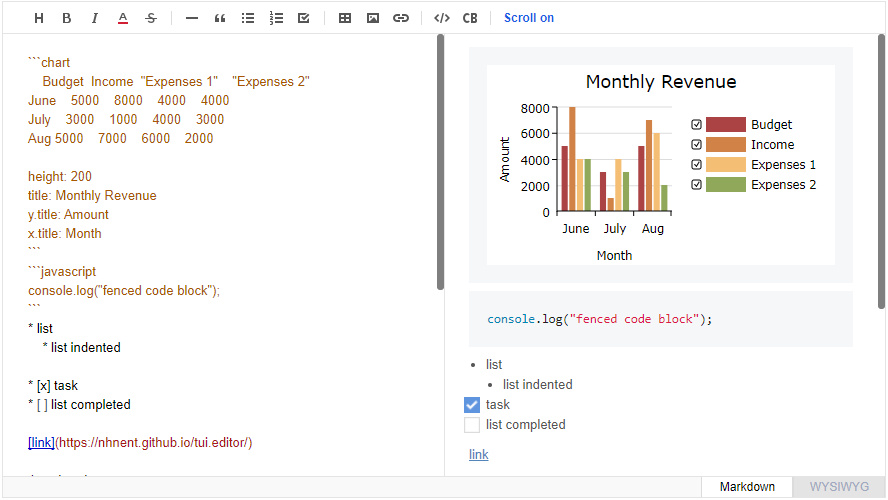
Today *CommonMark* is the de-facto *Markdown* standard. *GFM (GitHub Flavored Markdown)* is another popular specification based on *CommonMark* - maintained by *GitHub*, which is the *Markdown* mostly used. TOAST UI Editor follows both [*CommonMark*](http://commonmark.org/) and [*GFM*](https://github.github.com/gfm/) specifications. Write documents with ease using productive tools provided by TOAST UI Editor and you can easily open the produced document wherever the specifications are supported.
### Powerful Extensions
*CommonMark* and *GFM* are great, but we often need more abstraction. The TOAST UI Editor comes with powerful **Extensions** in compliance with the *Markdown* syntax. You also get the flexibility to develop your own extensions using simple APIs.
Here are some of the extensions you can start with:
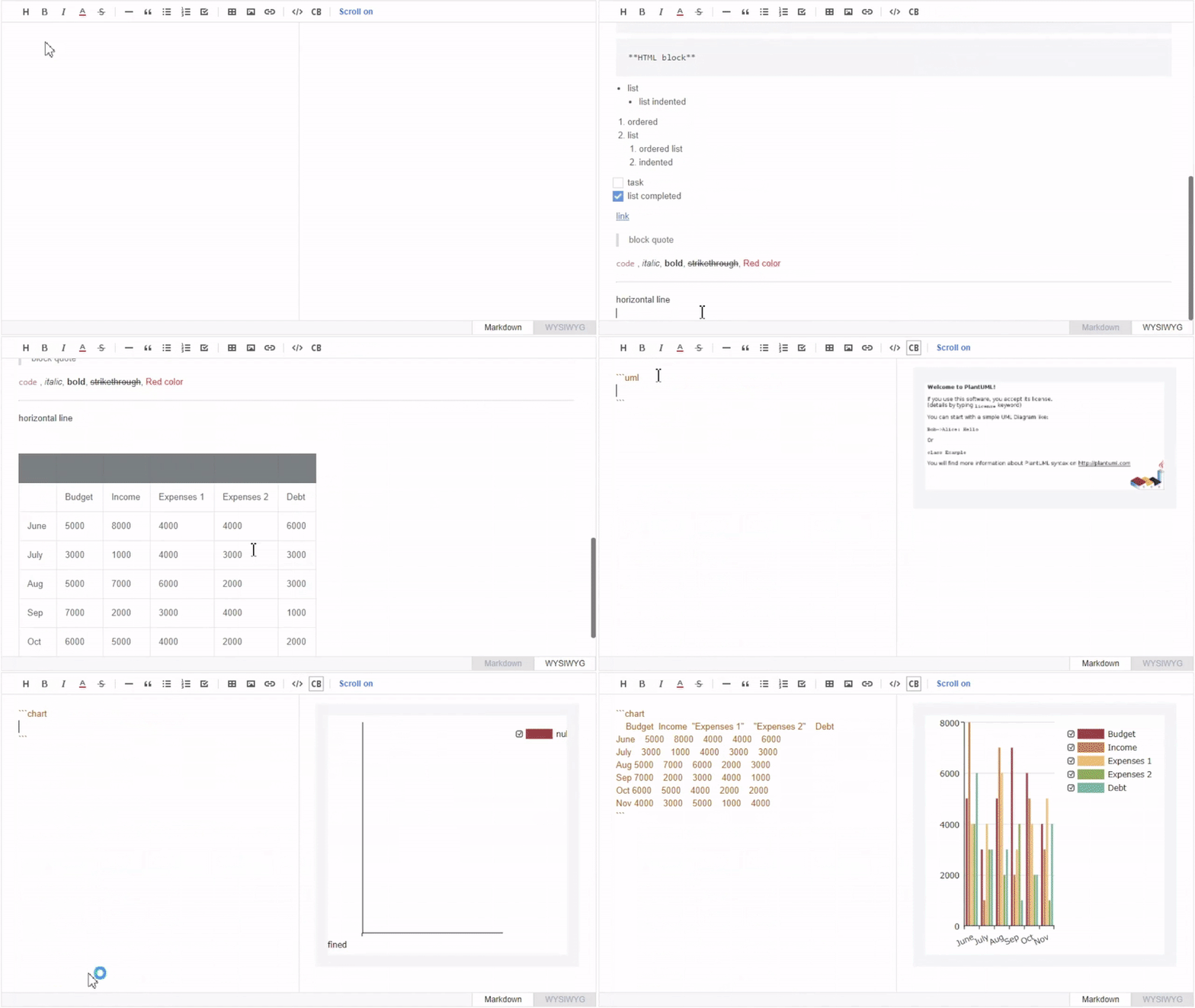
* **Color Picker**: [ColorPicker](https://github.com/nhn/tui.color-picker) provides an easy way to color text with a GUI tool box.
* **Chart Code Block**: A code block marked as a 'chart' will render [charts](https://github.com/nhn/tui.chart).
* **UML Code Block**: A code block marked as an 'uml' will render [UML diagrams](http://plantuml.com/screenshot).
* **Table Merge**: You can merge columns and rows in tables.
To learn more about **Extensions** check the [Using Extension](https://github.com/nhn/tui.editor/blob/master/docs/using-extensions.md).
## 🎨 Features
TOAST UI Editor provides **Markdown mode** and **WYSIWYG mode**.
Depending on the type of use you want like production of *Markdown* or maybe to just edit the *Markdown*. The TOAST UI Editor can be helpful for both the usage. It offers **Markdown mode** and **WYSIWYG mode**, which can be switched any point in time.
### Productive Markdown Mode
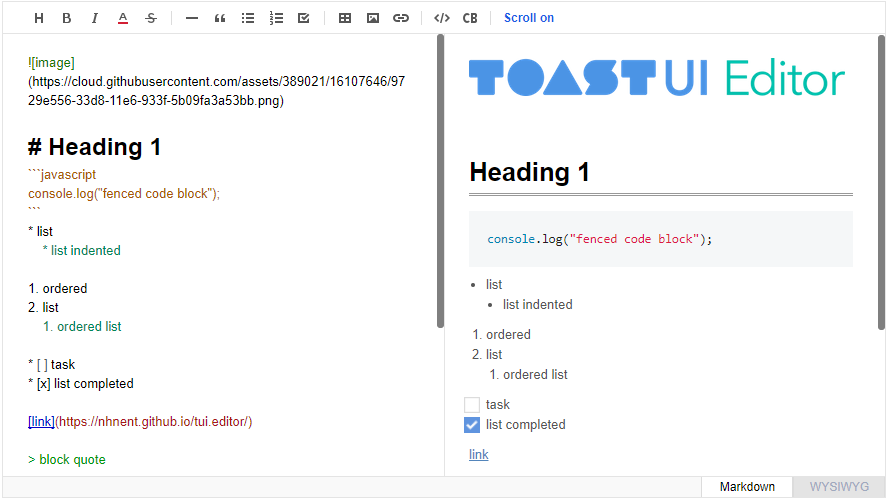
* **Live Preview**: Edit Markdown while keeping an eye on the rendered HTML. Your edits will be applied immediately.
* **Scrolling Sync**: Synchronous scrolling between Markdown and Preview. You don't need to scroll through each one separately.
* **Auto Indent**: The cursor will always be where you want it to be.
* **Syntax Highlight**: You can check broken Markdown syntax immediately.
### Easy WYSIWYG Mode
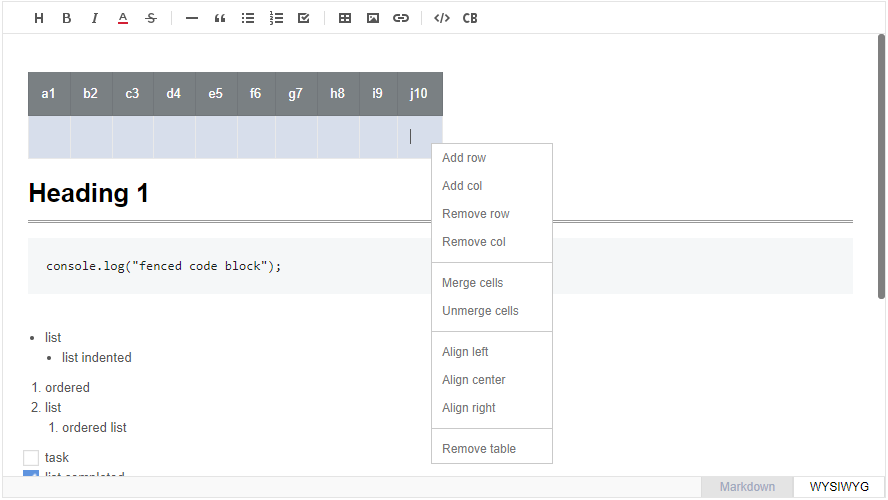
* **Copy and Paste**: Paste anything from browser, screenshot, excel, powerpoint, etc.
* **Codeblock Editor**: Highlight 170+ languages with full size code editor.
* **Table**: Hate the Markdown table? You can do everything with a mouse.
### And More
* **i18n**: English, Dutch, Korean, Japanese, Chinese, Spanish, German, Russian, French, Ukrainian, Turkish, Finnish, Czech, Arabic, Polish, Galician, Swedish, Italian + language you extend.
* **Viewer**: Renders Markdown content with extensions
## 🐾 Examples
* [Editor Basic](https://nhn.github.io/tui.editor/latest/tutorial-example01-editor-basic)
* [Viewer Basic](https://nhn.github.io/tui.editor/latest/tutorial-example02-viewer-basic)
* [UML Extensionn](https://nhn.github.io/tui.editor/latest/tutorial-example08-uml)
* [Chart Extension](https://nhn.github.io/tui.editor/latest/tutorial-example09-chart)
* [Writing Extension](https://nhn.github.io/tui.editor/latest/tutorial-example10-make-new-extension)
* [All Extensions](https://nhn.github.io/tui.editor/latest/tutorial-example03-editor-extensions)
## 💾 Install
TOAST UI products can be used by using the package manager or downloading the source directly. However, we highly recommend using the package manager.
### Via Package Manager
TOAST UI products are registered in two package managers, [npm](https://www.npmjs.com/) and [bower](https://bower.io/).
You can conveniently install it using the commands provided by the package manager. When using npm, be sure to use it in the environment [Node.js](https://nodejs.org/en/) is installed.
#### npm
``` sh
$ npm install --save tui-editor # Latest version
$ npm install --save tui-editor@ # Specific version
```
### Via Contents Delivery Network (CDN)
TOAST UI products are available over the CDN powered by [TOAST Cloud](https://www.toast.com).
You can use the CDN as below.
```html
```
If you want to use a specific version, use the tag name instead of `latest` in the url's path.
The CDN directory has the following structure.
```
tui-editor/
├─ latest/
│ ├─ tui-editor-Editor.js
│ ├─ tui-editor-Editor.min.js
│ └─ ...
├─ v1.1.0/
│ ├─ ...
```
### Download Source Files
* [Download bundle files](https://github.com/nhn/tui.editor/tree/production/dist)
* [Download all sources for each version](https://github.com/nhn/tui.editor/releases)
## 🛍️ Wrappers
* [toast-ui.vue-editor](https://github.com/nhn/toast-ui.vue-editor): **Vue** wrapper component is powered by [NHN](https://github.com/nhn).
* [toast-ui.react-editor](https://github.com/nhn/toast-ui.react-editor): **React** wrapper component is powered by [NHN](https://github.com/nhn).
* [ember-tui-editor](https://github.com/evocount/ember-tui-editor): **Ember** wrapper component by [@evocount](https://github.com/evocount). Thanks for their effort.
## 🔨 Usage
The code below shows an example of using ES6 in node environment. If you are using *bower* please see [Getting Started with Bower](https://github.com/nhn/tui.editor/blob/master/docs/getting-started-with-bower.md).
### Create Editor
#### HTML
Add the container element where TOAST UI Editor will be created.
```html
```
#### JavaScript
TOAST UI Editor can be used by creating an instance with the constructor function. To get the constructor function, you should import the module using one of the following ways depending on your environment.
``` javascript
const Editor = require('tui-editor'); /* CommonJS */
```
``` javascript
import Editor from 'tui-editor'; /* ES6 */
```
Then import styles of TOAST UI Editor and dependencies.
``` javascript
import 'tui-editor/dist/tui-editor.css'; // editor's ui
import 'tui-editor/dist/tui-editor-contents.css'; // editor's content
import 'codemirror/lib/codemirror.css'; // codemirror
import 'highlight.js/styles/github.css'; // code block highlight
```
Finally you can create an instance with options and call various API after creating an instance.
``` javascript
import 'codemirror/lib/codemirror.css';
import 'tui-editor/dist/tui-editor.css';
import 'tui-editor/dist/tui-editor-contents.css';
import 'highlight.js/styles/github.css';
import Editor from 'tui-editor';
const instance = new Editor({
el: document.querySelector('#editorSection'),
initialEditType: 'markdown',
previewStyle: 'vertical',
height: '300px'
});
instance.getHtml();
```
If you use jQuery plugin, you can use it as follows.
``` javascript
$('#editorSection').tuiEditor({
initialEditType: 'markdown',
previewStyle: 'vertical',
height: '300px'
});
```
#### Default Options
* `height`: Height in string or auto ex) `300px` | `auto`
* `initialValue`: Initial value. Set Markdown string
* `initialEditType`: Initial type to show `markdown` | `wysiwyg`
* `previewType`: Preview style of Markdown mode `tab` | `vertical`
* `usageStatistics`: Let us know the *hostname*. We want to learn from you how you are using the Editor. You are free to disable it. `true` | `false`
Find out more options [here](https://nhn.github.io/tui.editor/latest/ToastUIEditor)
### Create Viewer
TOAST UI Editor provides the **Viewer** in case you want to show *Markdown* content without loading the Editor. The Viewer is much **lighter** than the Editor.
``` javascript
import 'tui-editor/dist/tui-editor-contents.css';
import 'highlight.js/styles/github.css';
import Viewer from 'tui-editor/dist/tui-editor-Viewer';
const instance = new Viewer({
el: document.querySelector('#viewerSection'),
height: '500px',
initialValue: '# content to be rendered'
});
instance.getHtml();
```
Be careful not to load both the Editor and the Viewer at the same time because the Editor already contains the Viewer function, you can initialize editor [`Editor.factory()`](https://nhn.github.io/tui.editor/latest/ToastUIEditor#factory) and set the `viewer` option to value `true` in order to make the editor a viewer. You can also call [`getHtml()`](https://nhn.github.io/tui.editor/latest/ToastUIEditor#getHtml) to render the HTML.
``` javascript
import Editor from 'tui-editor';
const instance = Editor.factory({
el: document.querySelector('#viewerSection'),
viewer: true,
height: '500px',
initialValue: '# content to be rendered'
});
```
TOAST UI Editor follows *CommonMark* and *GFM*. So any *Markdown* renderer including [markdown-it](https://github.com/markdown-it/markdown-it) can handle the content made using TOAST UI Editor. You can also use any of these renderer in place of TOAST UI Editor **Viewer**.
## 🌏 Browser Support
|
Standard and Extensible

### CommonMark + GFM Specifications
Today *CommonMark* is the de-facto *Markdown* standard. *GFM (GitHub Flavored Markdown)* is another popular specification based on *CommonMark* - maintained by *GitHub*, which is the *Markdown* mostly used. TOAST UI Editor follows both [*CommonMark*](http://commonmark.org/) and [*GFM*](https://github.github.com/gfm/) specifications. Write documents with ease using productive tools provided by TOAST UI Editor and you can easily open the produced document wherever the specifications are supported.
### Powerful Extensions
*CommonMark* and *GFM* are great, but we often need more abstraction. The TOAST UI Editor comes with powerful **Extensions** in compliance with the *Markdown* syntax. You also get the flexibility to develop your own extensions using simple APIs.
Here are some of the extensions you can start with:
* **Color Picker**: [ColorPicker](https://github.com/nhn/tui.color-picker) provides an easy way to color text with a GUI tool box.
* **Chart Code Block**: A code block marked as a 'chart' will render [charts](https://github.com/nhn/tui.chart).
* **UML Code Block**: A code block marked as an 'uml' will render [UML diagrams](http://plantuml.com/screenshot).
* **Table Merge**: You can merge columns and rows in tables.
To learn more about **Extensions** check the [Using Extension](https://github.com/nhn/tui.editor/blob/master/docs/using-extensions.md).
## 🎨 Features
TOAST UI Editor provides **Markdown mode** and **WYSIWYG mode**.
Depending on the type of use you want like production of *Markdown* or maybe to just edit the *Markdown*. The TOAST UI Editor can be helpful for both the usage. It offers **Markdown mode** and **WYSIWYG mode**, which can be switched any point in time.
### Productive Markdown Mode

* **Live Preview**: Edit Markdown while keeping an eye on the rendered HTML. Your edits will be applied immediately.
* **Scrolling Sync**: Synchronous scrolling between Markdown and Preview. You don't need to scroll through each one separately.
* **Auto Indent**: The cursor will always be where you want it to be.
* **Syntax Highlight**: You can check broken Markdown syntax immediately.
### Easy WYSIWYG Mode

* **Copy and Paste**: Paste anything from browser, screenshot, excel, powerpoint, etc.
* **Codeblock Editor**: Highlight 170+ languages with full size code editor.
* **Table**: Hate the Markdown table? You can do everything with a mouse.
### And More
* **i18n**: English, Dutch, Korean, Japanese, Chinese, Spanish, German, Russian, French, Ukrainian, Turkish, Finnish, Czech, Arabic, Polish, Galician, Swedish, Italian + language you extend.
* **Viewer**: Renders Markdown content with extensions
## 🐾 Examples
* [Editor Basic](https://nhn.github.io/tui.editor/latest/tutorial-example01-editor-basic)
* [Viewer Basic](https://nhn.github.io/tui.editor/latest/tutorial-example02-viewer-basic)
* [UML Extensionn](https://nhn.github.io/tui.editor/latest/tutorial-example08-uml)
* [Chart Extension](https://nhn.github.io/tui.editor/latest/tutorial-example09-chart)
* [Writing Extension](https://nhn.github.io/tui.editor/latest/tutorial-example10-make-new-extension)
* [All Extensions](https://nhn.github.io/tui.editor/latest/tutorial-example03-editor-extensions)
## 💾 Install
TOAST UI products can be used by using the package manager or downloading the source directly. However, we highly recommend using the package manager.
### Via Package Manager
TOAST UI products are registered in two package managers, [npm](https://www.npmjs.com/) and [bower](https://bower.io/).
You can conveniently install it using the commands provided by the package manager. When using npm, be sure to use it in the environment [Node.js](https://nodejs.org/en/) is installed.
#### npm
``` sh
$ npm install --save tui-editor # Latest version
$ npm install --save tui-editor@ # Specific version
```
### Via Contents Delivery Network (CDN)
TOAST UI products are available over the CDN powered by [TOAST Cloud](https://www.toast.com).
You can use the CDN as below.
```html
```
If you want to use a specific version, use the tag name instead of `latest` in the url's path.
The CDN directory has the following structure.
```
tui-editor/
├─ latest/
│ ├─ tui-editor-Editor.js
│ ├─ tui-editor-Editor.min.js
│ └─ ...
├─ v1.1.0/
│ ├─ ...
```
### Download Source Files
* [Download bundle files](https://github.com/nhn/tui.editor/tree/production/dist)
* [Download all sources for each version](https://github.com/nhn/tui.editor/releases)
## 🛍️ Wrappers
* [toast-ui.vue-editor](https://github.com/nhn/toast-ui.vue-editor): **Vue** wrapper component is powered by [NHN](https://github.com/nhn).
* [toast-ui.react-editor](https://github.com/nhn/toast-ui.react-editor): **React** wrapper component is powered by [NHN](https://github.com/nhn).
* [ember-tui-editor](https://github.com/evocount/ember-tui-editor): **Ember** wrapper component by [@evocount](https://github.com/evocount). Thanks for their effort.
## 🔨 Usage
The code below shows an example of using ES6 in node environment. If you are using *bower* please see [Getting Started with Bower](https://github.com/nhn/tui.editor/blob/master/docs/getting-started-with-bower.md).
### Create Editor
#### HTML
Add the container element where TOAST UI Editor will be created.
```html
```
#### JavaScript
TOAST UI Editor can be used by creating an instance with the constructor function. To get the constructor function, you should import the module using one of the following ways depending on your environment.
``` javascript
const Editor = require('tui-editor'); /* CommonJS */
```
``` javascript
import Editor from 'tui-editor'; /* ES6 */
```
Then import styles of TOAST UI Editor and dependencies.
``` javascript
import 'tui-editor/dist/tui-editor.css'; // editor's ui
import 'tui-editor/dist/tui-editor-contents.css'; // editor's content
import 'codemirror/lib/codemirror.css'; // codemirror
import 'highlight.js/styles/github.css'; // code block highlight
```
Finally you can create an instance with options and call various API after creating an instance.
``` javascript
import 'codemirror/lib/codemirror.css';
import 'tui-editor/dist/tui-editor.css';
import 'tui-editor/dist/tui-editor-contents.css';
import 'highlight.js/styles/github.css';
import Editor from 'tui-editor';
const instance = new Editor({
el: document.querySelector('#editorSection'),
initialEditType: 'markdown',
previewStyle: 'vertical',
height: '300px'
});
instance.getHtml();
```
If you use jQuery plugin, you can use it as follows.
``` javascript
$('#editorSection').tuiEditor({
initialEditType: 'markdown',
previewStyle: 'vertical',
height: '300px'
});
```
#### Default Options
* `height`: Height in string or auto ex) `300px` | `auto`
* `initialValue`: Initial value. Set Markdown string
* `initialEditType`: Initial type to show `markdown` | `wysiwyg`
* `previewType`: Preview style of Markdown mode `tab` | `vertical`
* `usageStatistics`: Let us know the *hostname*. We want to learn from you how you are using the Editor. You are free to disable it. `true` | `false`
Find out more options [here](https://nhn.github.io/tui.editor/latest/ToastUIEditor)
### Create Viewer
TOAST UI Editor provides the **Viewer** in case you want to show *Markdown* content without loading the Editor. The Viewer is much **lighter** than the Editor.
``` javascript
import 'tui-editor/dist/tui-editor-contents.css';
import 'highlight.js/styles/github.css';
import Viewer from 'tui-editor/dist/tui-editor-Viewer';
const instance = new Viewer({
el: document.querySelector('#viewerSection'),
height: '500px',
initialValue: '# content to be rendered'
});
instance.getHtml();
```
Be careful not to load both the Editor and the Viewer at the same time because the Editor already contains the Viewer function, you can initialize editor [`Editor.factory()`](https://nhn.github.io/tui.editor/latest/ToastUIEditor#factory) and set the `viewer` option to value `true` in order to make the editor a viewer. You can also call [`getHtml()`](https://nhn.github.io/tui.editor/latest/ToastUIEditor#getHtml) to render the HTML.
``` javascript
import Editor from 'tui-editor';
const instance = Editor.factory({
el: document.querySelector('#viewerSection'),
viewer: true,
height: '500px',
initialValue: '# content to be rendered'
});
```
TOAST UI Editor follows *CommonMark* and *GFM*. So any *Markdown* renderer including [markdown-it](https://github.com/markdown-it/markdown-it) can handle the content made using TOAST UI Editor. You can also use any of these renderer in place of TOAST UI Editor **Viewer**.
## 🌏 Browser Support
|  Chrome |
  Internet Explorer |
  Edge |
  Safari |
  Firefox |
| :---------: | :---------: | :---------: | :---------: | :---------: |
| Yes | 10+ | Yes | Yes | Yes |
## 🔧 Pull Request Steps
All TOAST UI products are open source. A Pull Request (PR) can be made upon fixing an issue or developing additional features to be implemented.
### Install
To install, first fork the master branch to your own personal repository. Then, clone the forked repository to your local machine, and install the following node module. Prior to development, first, make sure that the modules are properly installed.
``` sh
$ git clone https://github.com/{your-personal-repo}/tui.editor.git
$ cd tui.editor
$ npm install
$ npm run test
```
### Develop
You can see your code is reflected as soon as you saving the codes by running a server. Don't miss adding test cases and then make green rights.
#### Run webpack-dev-server
``` sh
$ npm run serve
```
#### Run karma
``` sh
$ npm run test
```
### Pull Request
Before creating a PR, test and check for any errors. If there are no errors, then commit and push.
For more information, please refer to the Contributing section.
## 💬 Contributing
* [Code of Conduct](https://github.com/nhn/tui.editor/blob/master/CODE_OF_CONDUCT.md)
* [Contributing Guideline](https://github.com/nhn/tui.editor/blob/master/CONTRIBUTING.md)
* [Commit Convention](https://github.com/nhn/tui.editor/blob/master/docs/COMMIT_MESSAGE_CONVENTION.md)
## 🍞 TOAST UI Family
* [TOAST UI Calendar](https://github.com/nhn/tui.calendar)
* [TOAST UI Chart](https://github.com/nhn/tui.chart)
* [TOAST UI Grid](https://github.com/nhn/tui.grid)
* [TOAST UI Image Editor](https://github.com/nhn/tui.image-editor)
* [TOAST UI Components](https://github.com/nhn?q=tui)
## 🚀 Used By
* [TOAST Dooray! - Collaboration Service (Project, Messenger, Mail, Calendar, Drive, Wiki, Contacts)](https://dooray.com)
* [UNOTES - Visual Studio Code Extension](https://marketplace.visualstudio.com/items?itemName=ryanmcalister.Unotes)
## 📜 License
This software is licensed under the [MIT](https://github.com/nhn/tui.editor/blob/master/LICENSE) © [NHN](https://github.com/nhn).
Firefox |
| :---------: | :---------: | :---------: | :---------: | :---------: |
| Yes | 10+ | Yes | Yes | Yes |
## 🔧 Pull Request Steps
All TOAST UI products are open source. A Pull Request (PR) can be made upon fixing an issue or developing additional features to be implemented.
### Install
To install, first fork the master branch to your own personal repository. Then, clone the forked repository to your local machine, and install the following node module. Prior to development, first, make sure that the modules are properly installed.
``` sh
$ git clone https://github.com/{your-personal-repo}/tui.editor.git
$ cd tui.editor
$ npm install
$ npm run test
```
### Develop
You can see your code is reflected as soon as you saving the codes by running a server. Don't miss adding test cases and then make green rights.
#### Run webpack-dev-server
``` sh
$ npm run serve
```
#### Run karma
``` sh
$ npm run test
```
### Pull Request
Before creating a PR, test and check for any errors. If there are no errors, then commit and push.
For more information, please refer to the Contributing section.
## 💬 Contributing
* [Code of Conduct](https://github.com/nhn/tui.editor/blob/master/CODE_OF_CONDUCT.md)
* [Contributing Guideline](https://github.com/nhn/tui.editor/blob/master/CONTRIBUTING.md)
* [Commit Convention](https://github.com/nhn/tui.editor/blob/master/docs/COMMIT_MESSAGE_CONVENTION.md)
## 🍞 TOAST UI Family
* [TOAST UI Calendar](https://github.com/nhn/tui.calendar)
* [TOAST UI Chart](https://github.com/nhn/tui.chart)
* [TOAST UI Grid](https://github.com/nhn/tui.grid)
* [TOAST UI Image Editor](https://github.com/nhn/tui.image-editor)
* [TOAST UI Components](https://github.com/nhn?q=tui)
## 🚀 Used By
* [TOAST Dooray! - Collaboration Service (Project, Messenger, Mail, Calendar, Drive, Wiki, Contacts)](https://dooray.com)
* [UNOTES - Visual Studio Code Extension](https://marketplace.visualstudio.com/items?itemName=ryanmcalister.Unotes)
## 📜 License
This software is licensed under the [MIT](https://github.com/nhn/tui.editor/blob/master/LICENSE) © [NHN](https://github.com/nhn).