# NExT-Chat
**Repository Path**: huansinho/NExT-Chat
## Basic Information
- **Project Name**: NExT-Chat
- **Description**: No description available
- **Primary Language**: Unknown
- **License**: Apache-2.0
- **Default Branch**: main
- **Homepage**: None
- **GVP Project**: No
## Statistics
- **Stars**: 0
- **Forks**: 0
- **Created**: 2025-04-24
- **Last Updated**: 2025-04-24
## Categories & Tags
**Categories**: Uncategorized
**Tags**: None
## README
# NExT-Chat
NExT-Chat: An LMM for Chat, Detection and Segmentation
[Ao Zhang](https://waxnkw.github.io/), [Yuan Yao](https://yaoyuanthu.github.io/), [Wei Ji](https://jiwei0523.github.io/), [Zhiyuan Liu](https://nlp.csai.tsinghua.edu.cn/~lzy/), and [Tat-Seng Chua](https://www.chuatatseng.com/)
**National University of Singapore, Tsinghua University**
Project page with demo: [NExT-Chat](https://next-chatv.github.io/)
-----------------


 [](https://www.youtube.com/watch?v=q0EdZgv6uQg)
## What's New: 🎉
- [x] 2023.2.5 Add deepspeed training
- [x] 2023.12.12 Initial code released
## Table of Contents
- [Introduction](#introduction)
- [Installation](#installation)
- [Model Zoo](#model-zoo)
- [Data Preparation](#data-preparation)
- [Demo](#demo)
- [Evaluation](#evaluation)
- [Training](#training)
- [Examples](#examples)
- [Acknowledgement](#acknowledgement)
## Introduction
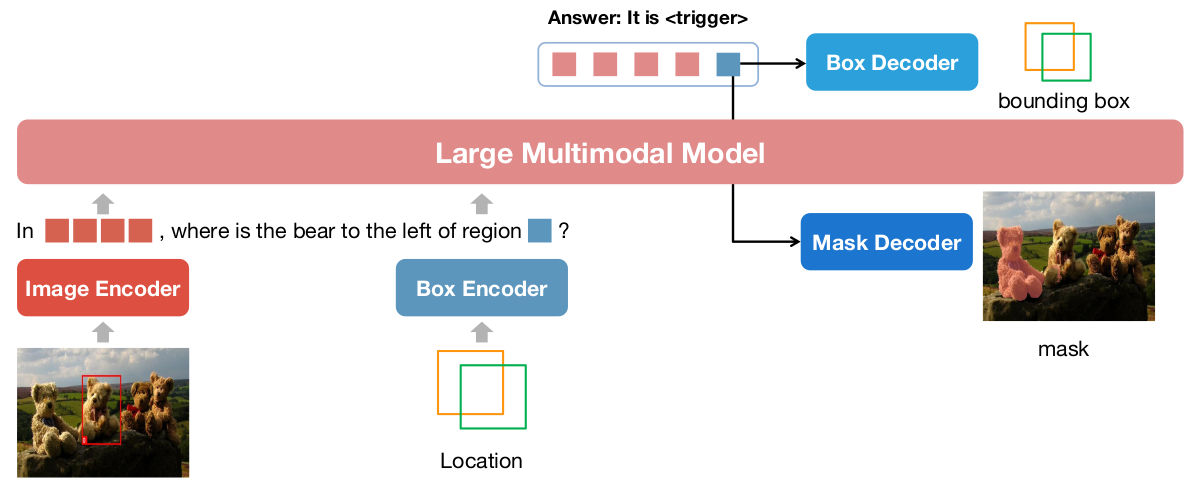
An LMM for chat with detection and segmentation results.
The framework is shown:
[](https://next-chatv.github.io)
## Installation
Please clone the repo:
```shell
git clone https://github.com/NExT-ChatV/NExT-Chat.git
cd NExT-Chat
```
Then install requirements:
```shell
pip install -r requirements.txt
```
## Model Zoo
Currently, we totally have 3 models:
|Version| ckpt | LM Size | ViT Res. | GPU Mem. |Comment|
|----------|----------|----------|---------|----------|----------|
|v1| [nextchat-7b-336](https://huggingface.co/AoZhang/nextchat-7b-336) | 7B | 336x336 | ~32G |recommended|
|v0| [nextchat-7b-224](https://www.modelscope.cn/models/ZhangAo6/nextchat/files) | 7B | 224x224 | ~24G |not recommended|
|v0| [nextchat-13b-224](https://www.modelscope.cn/models/ZhangAo6/nextchat/files) | 7B | 224x224 | ~35G |not recommended|
We recommend to use the `nextchat-7b-336-v1`, which can achieve better performance.
Moreover, we also update the training templates for `nextchat-7b-336-v1` to make it easier to use.
You can refer to [templates](config/_base_/dataset/template/) for details in eliciting concrete abilities.
Some examples:
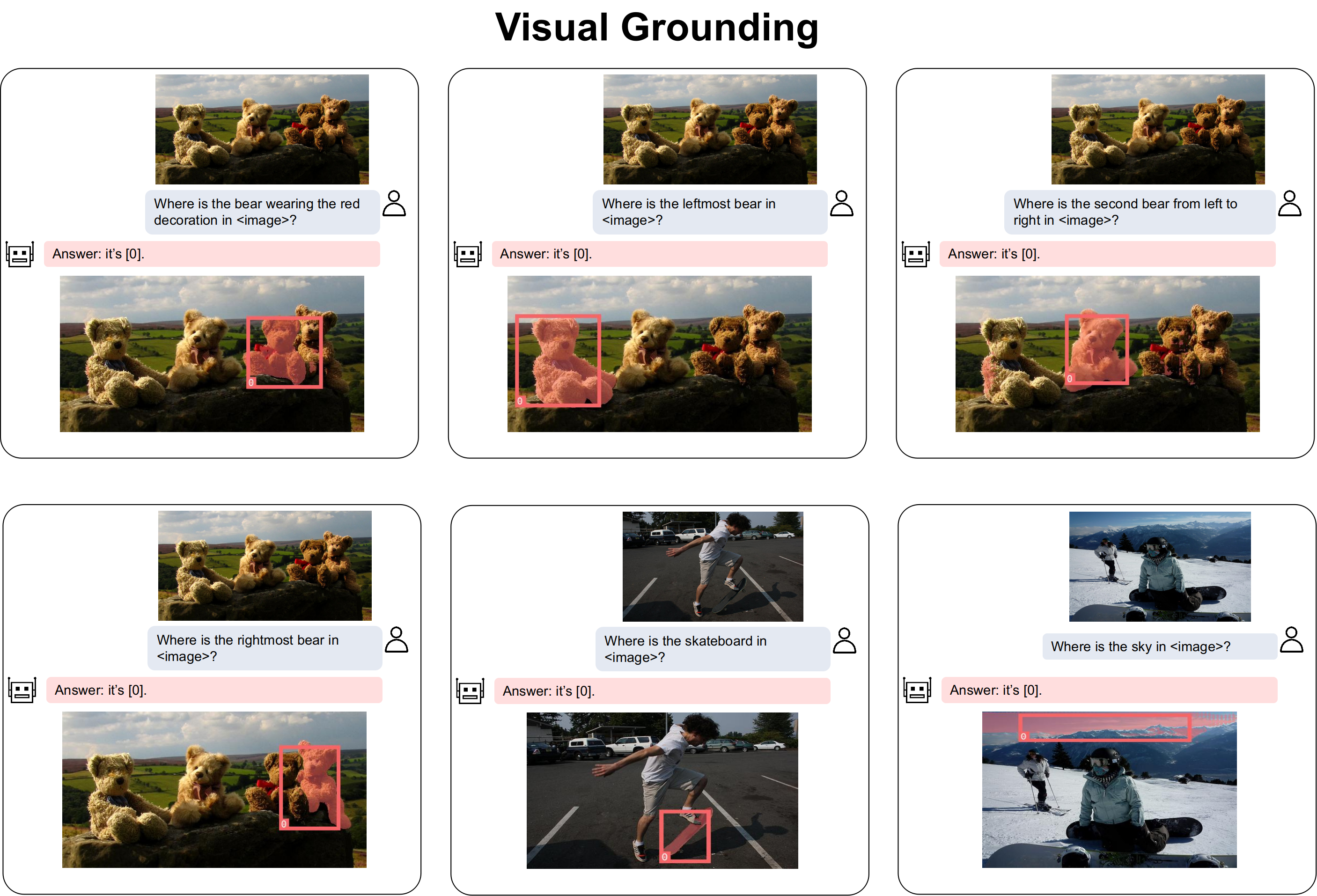
1. Localize a object:
|Version| Template |
|----------|----------|
|v0|Where is XXX in the ?|
|v1|Where is XXX in the image?|
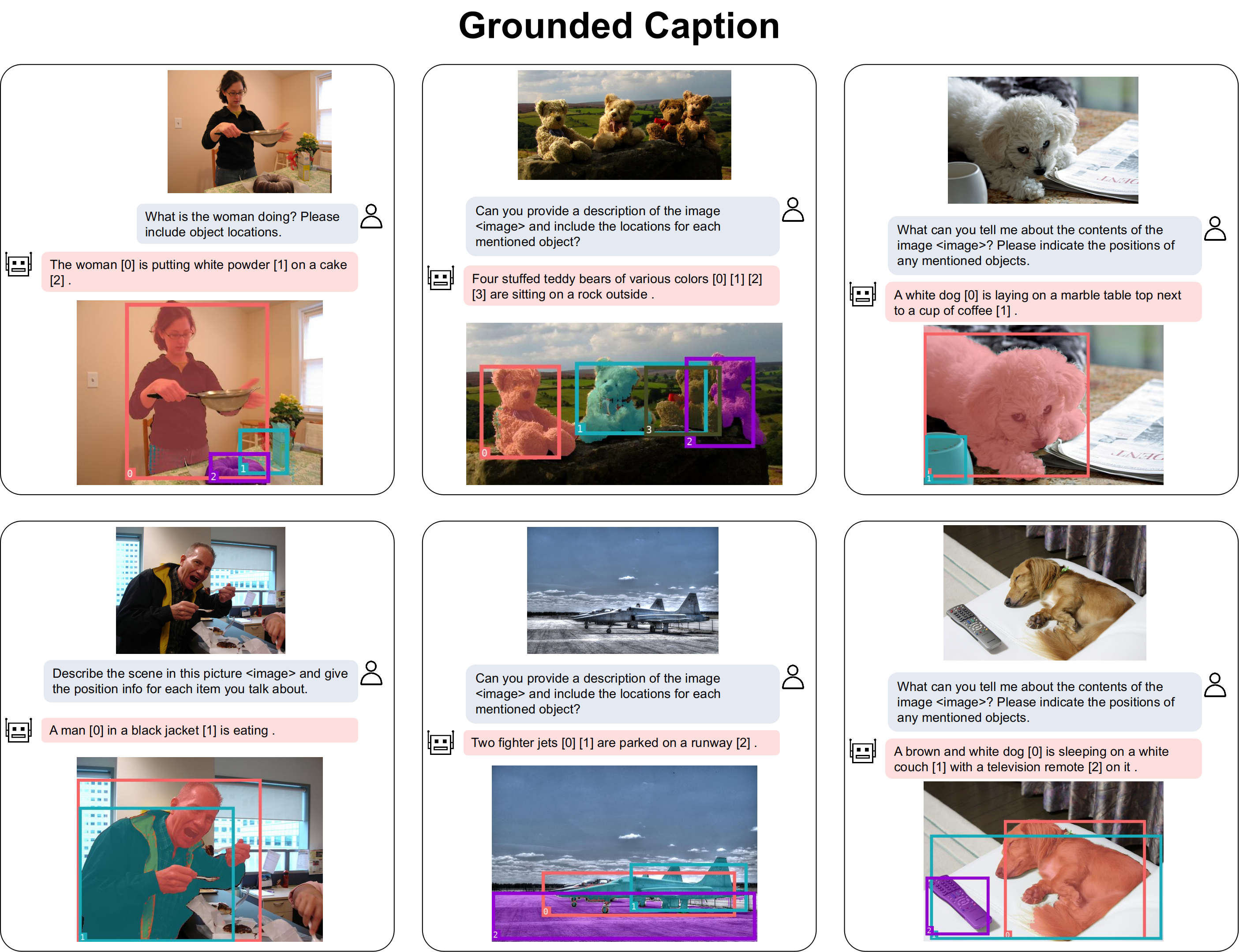
2. Grounded Caption:
|Version| Template |
|----------|---------|
|v0|Can you provide a description of the image and include the locations for each mentioned object?|
|v1|Can you describe the image and include object locations?|
3. VQA+Localization
|Version| Template |
|----------|----------|
|v0| Please include object locations and explain.|
|v1| Please mention related object locations.|
## Data Preparation
Please refer to [DATA.md](DATA.md).
## Demo
Please first download the model weights from [huggingface](https://huggingface.co/AoZhang/nextchat-7b-336/tree/main) or our [link](https://thunlp.oss-cn-qingdao.aliyuncs.com/nextchat-7b-336.tar.gz).
We also use OpenAI CLIP [ViT model](https://huggingface.co/openai/clip-vit-large-patch14-336/tree/main) as the visual encoder. Please make sure that you can connect to huggingface or you can download it to your local directory.
Then, download the [SAM](https://dl.fbaipublicfiles.com/segment_anything/sam_vit_h_4b8939.pth) and modify `sam_path` in [config/_base_/model/nextchat.py](https://github.com/NExT-ChatV/NExT-Chat/blob/6e92d9b13b08e978190a00793b5e7b06d70ac236/config/_base_/model/nextchat.py#L9) to your sam path.
**Web Demo**
Please run:
```shell
CUDA_VISIBLE_DEVICES="0" python mllm/demo/web_demo.py --model_path path/to/model_weights --vit_path path/to/openai-clip-vit-large-patch14-336
```
If you can connect to huggingface, just run:
```shell
CUDA_VISIBLE_DEVICES="0" python mllm/demo/web_demo.py --model_path AoZhang/nextchat-7b-336 --vit_path openai/clip-vit-large-patch14-336
```
**Bash Demo**
```shell
CUDA_VISIBLE_DEVICES="0" python mllm/demo/bash_demo.py path/to/model_weights path/to/openai-clip-vit-large-patch14-336
```
If you can connect to huggingface, just run:
```shell
CUDA_VISIBLE_DEVICES="0" python mllm/demo/bash_demo.py AoZhang/nextchat-7b-336 openai/clip-vit-large-patch14-336
```
You can also initialize the model by yourself:
```python
from mllm.demo.demo_util import NextChatInference
model = NextChatInference(model_weight_path, vit_path, 576)
```
You will get into the IPython mode. Then use the model like:
```python
input = {"text": "What is the possible relationship between the two people? Please include object locations.", "image": "./COCO_val2014_000000222628.jpg"}
response, boxes, masks, ret_img = model(input)
```
## Easy Run
We have our old models (v0 versions) in the modelscope.
Please first install `pip install modelscope`.
Then run:
```python
from modelscope import pipeline
pipe = pipeline('my-nextchat-task', 'ZhangAo6/nextchat', model_size="7b") # 7b model takes around 21G GPU mem, 13b takes around 35G GPU mem
response, ret_image = pipe({"text": "xxxx?", "image": "xxx.jpg"})
# response: the text answer
# ret_image: image annotated with boxes and masks
```
## Evaluation
The final result have not been updated to the arxiv.
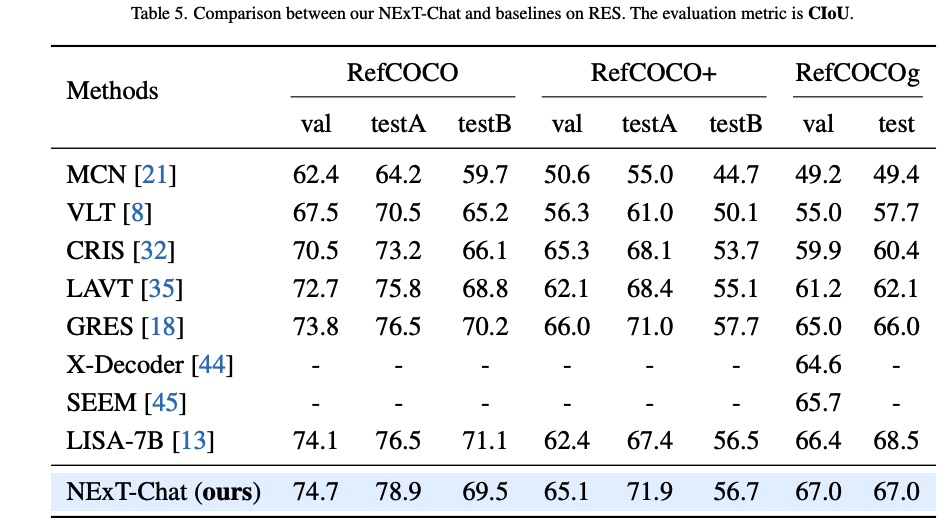
We show the results here:
### Referring Expression Segmentation (RES)
[](https://www.youtube.com/watch?v=q0EdZgv6uQg)
## What's New: 🎉
- [x] 2023.2.5 Add deepspeed training
- [x] 2023.12.12 Initial code released
## Table of Contents
- [Introduction](#introduction)
- [Installation](#installation)
- [Model Zoo](#model-zoo)
- [Data Preparation](#data-preparation)
- [Demo](#demo)
- [Evaluation](#evaluation)
- [Training](#training)
- [Examples](#examples)
- [Acknowledgement](#acknowledgement)
## Introduction
An LMM for chat with detection and segmentation results.
The framework is shown:
[](https://next-chatv.github.io)
## Installation
Please clone the repo:
```shell
git clone https://github.com/NExT-ChatV/NExT-Chat.git
cd NExT-Chat
```
Then install requirements:
```shell
pip install -r requirements.txt
```
## Model Zoo
Currently, we totally have 3 models:
|Version| ckpt | LM Size | ViT Res. | GPU Mem. |Comment|
|----------|----------|----------|---------|----------|----------|
|v1| [nextchat-7b-336](https://huggingface.co/AoZhang/nextchat-7b-336) | 7B | 336x336 | ~32G |recommended|
|v0| [nextchat-7b-224](https://www.modelscope.cn/models/ZhangAo6/nextchat/files) | 7B | 224x224 | ~24G |not recommended|
|v0| [nextchat-13b-224](https://www.modelscope.cn/models/ZhangAo6/nextchat/files) | 7B | 224x224 | ~35G |not recommended|
We recommend to use the `nextchat-7b-336-v1`, which can achieve better performance.
Moreover, we also update the training templates for `nextchat-7b-336-v1` to make it easier to use.
You can refer to [templates](config/_base_/dataset/template/) for details in eliciting concrete abilities.
Some examples:
1. Localize a object:
|Version| Template |
|----------|----------|
|v0|Where is XXX in the ?|
|v1|Where is XXX in the image?|
2. Grounded Caption:
|Version| Template |
|----------|---------|
|v0|Can you provide a description of the image and include the locations for each mentioned object?|
|v1|Can you describe the image and include object locations?|
3. VQA+Localization
|Version| Template |
|----------|----------|
|v0| Please include object locations and explain.|
|v1| Please mention related object locations.|
## Data Preparation
Please refer to [DATA.md](DATA.md).
## Demo
Please first download the model weights from [huggingface](https://huggingface.co/AoZhang/nextchat-7b-336/tree/main) or our [link](https://thunlp.oss-cn-qingdao.aliyuncs.com/nextchat-7b-336.tar.gz).
We also use OpenAI CLIP [ViT model](https://huggingface.co/openai/clip-vit-large-patch14-336/tree/main) as the visual encoder. Please make sure that you can connect to huggingface or you can download it to your local directory.
Then, download the [SAM](https://dl.fbaipublicfiles.com/segment_anything/sam_vit_h_4b8939.pth) and modify `sam_path` in [config/_base_/model/nextchat.py](https://github.com/NExT-ChatV/NExT-Chat/blob/6e92d9b13b08e978190a00793b5e7b06d70ac236/config/_base_/model/nextchat.py#L9) to your sam path.
**Web Demo**
Please run:
```shell
CUDA_VISIBLE_DEVICES="0" python mllm/demo/web_demo.py --model_path path/to/model_weights --vit_path path/to/openai-clip-vit-large-patch14-336
```
If you can connect to huggingface, just run:
```shell
CUDA_VISIBLE_DEVICES="0" python mllm/demo/web_demo.py --model_path AoZhang/nextchat-7b-336 --vit_path openai/clip-vit-large-patch14-336
```
**Bash Demo**
```shell
CUDA_VISIBLE_DEVICES="0" python mllm/demo/bash_demo.py path/to/model_weights path/to/openai-clip-vit-large-patch14-336
```
If you can connect to huggingface, just run:
```shell
CUDA_VISIBLE_DEVICES="0" python mllm/demo/bash_demo.py AoZhang/nextchat-7b-336 openai/clip-vit-large-patch14-336
```
You can also initialize the model by yourself:
```python
from mllm.demo.demo_util import NextChatInference
model = NextChatInference(model_weight_path, vit_path, 576)
```
You will get into the IPython mode. Then use the model like:
```python
input = {"text": "What is the possible relationship between the two people? Please include object locations.", "image": "./COCO_val2014_000000222628.jpg"}
response, boxes, masks, ret_img = model(input)
```
## Easy Run
We have our old models (v0 versions) in the modelscope.
Please first install `pip install modelscope`.
Then run:
```python
from modelscope import pipeline
pipe = pipeline('my-nextchat-task', 'ZhangAo6/nextchat', model_size="7b") # 7b model takes around 21G GPU mem, 13b takes around 35G GPU mem
response, ret_image = pipe({"text": "xxxx?", "image": "xxx.jpg"})
# response: the text answer
# ret_image: image annotated with boxes and masks
```
## Evaluation
The final result have not been updated to the arxiv.
We show the results here:
### Referring Expression Segmentation (RES)
Please config the `vision_tower` in the [config/_base_/model/nextchat.py]([config/_base_/model/nextchat.py]) to the path of OpenAI CLIP, if you can not connect to huggingface.
Make sure to download the [SAM](https://dl.fbaipublicfiles.com/segment_anything/sam_vit_h_4b8939.pth) and modify `sam_path` in [config/_base_/model/nextchat.py](https://github.com/NExT-ChatV/NExT-Chat/blob/6e92d9b13b08e978190a00793b5e7b06d70ac236/config/_base_/model/nextchat.py#L9) to your sam path.
```shell
bash eval_res.sh /path/to/checkpoint
```
### Referring Expression Comprehension (REC)
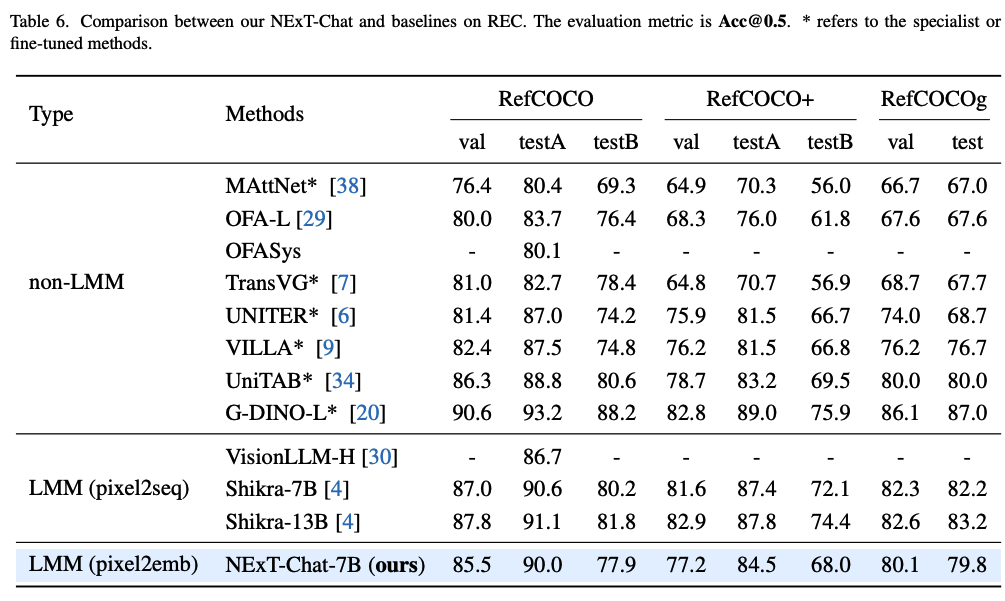
Although it seems to be better by modeling the localization as a regression task (also validated by toy experiments),
we find that pixel2emb now is **hard to beat top-tier pixel2seq models** on REC (like Shikra) in the pre-training setting.
We guess the key factors might be to find a balance between the localization loss and LM loss, which will significantly affect the REC performance.
We are still working on this interesting finding and tune the model.
If you have some insights, welcome to discuss.
Please config the `vision_tower` in the [config/_base_/model/nextchat.py]([config/_base_/model/nextchat.py]) to the path of OpenAI CLIP, if you can not connect to huggingface.
Make sure to download the [SAM](https://dl.fbaipublicfiles.com/segment_anything/sam_vit_h_4b8939.pth) and modify `sam_path` in [config/_base_/model/nextchat.py](https://github.com/NExT-ChatV/NExT-Chat/blob/6e92d9b13b08e978190a00793b5e7b06d70ac236/config/_base_/model/nextchat.py#L9) to your sam path.
```shell
bash eval_rec.sh /path/to/checkpoint
```
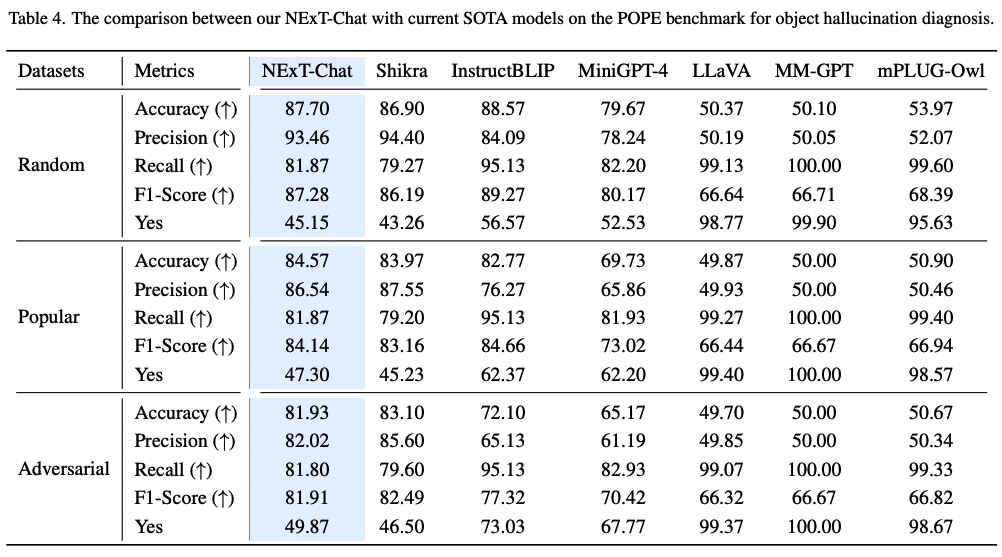
### Pope (Image-level Hallucination)
Please config the `vision_tower` in the [config/_base_/model/nextchat.py]([config/_base_/model/nextchat.py]) to the path of OpenAI CLIP, if you can not connect to huggingface.
Make sure to download the [SAM](https://dl.fbaipublicfiles.com/segment_anything/sam_vit_h_4b8939.pth) and modify `sam_path` in [config/_base_/model/nextchat.py](https://github.com/NExT-ChatV/NExT-Chat/blob/6e92d9b13b08e978190a00793b5e7b06d70ac236/config/_base_/model/nextchat.py#L9) to your sam path.
```shell
bash eval_pope.sh /path/to/checkpoint
```
### RefCOCOg-google (Region Caption)
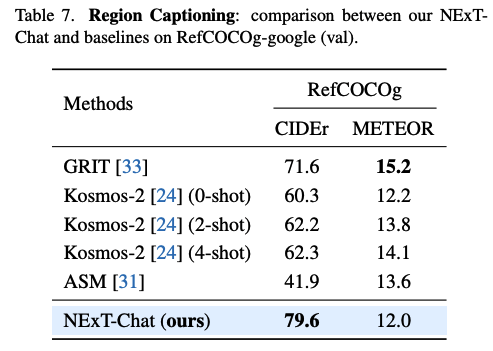
Please config the `vision_tower` in the [config/_base_/model/nextchat.py]([config/_base_/model/nextchat.py]) to the path of OpenAI CLIP, if you can not connect to huggingface.
Make sure to download the [SAM](https://dl.fbaipublicfiles.com/segment_anything/sam_vit_h_4b8939.pth) and modify `sam_path` in [config/_base_/model/nextchat.py](https://github.com/NExT-ChatV/NExT-Chat/blob/6e92d9b13b08e978190a00793b5e7b06d70ac236/config/_base_/model/nextchat.py#L9) to your sam path.
```shell
bash eval_reg_cap.sh /path/to/checkpoint
```
## Training
Please config the `vision_tower` in the [config/_base_/model/nextchat.py]([config/_base_/model/nextchat.py]) to the path of OpenAI CLIP, if you can not connect to huggingface.
Make sure to download the [SAM](https://dl.fbaipublicfiles.com/segment_anything/sam_vit_h_4b8939.pth) and modify `sam_path` in [config/_base_/model/nextchat.py](https://github.com/NExT-ChatV/NExT-Chat/blob/6e92d9b13b08e978190a00793b5e7b06d70ac236/config/_base_/model/nextchat.py#L9) to your sam path.
Our training consists of 3 stages:
1. VL+Detection Pre-training
```shell
bash run_stage1.sh
```
If you want to use deepspeed, please modify the config in **run_stage1.sh** from `config/nextchat_stage1.py` to `config/nextchat_stage1_deepspeed.py`.
2. VL+Detection Instruction Following
```shell
bash run_stage2.sh output/stage1/checkpoint-65000 # or other path to your stage1 model, we use 65000 for stage2
```
If you want to use deepspeed, please modify the config in **run_stage2.sh** from `config/nextchat_stage2.py` to `config/nextchat_stage2_deepspeed.py`.
3. VL+Detection+Segmentation
```shell
bash run_stage3.sh output/stage2/checkpoint-4950 # or other path to your stage2 model
```
If you want to use deepspeed, please modify the config in **run_stage3.sh** from `config/nextchat_stage3.py` to `config/nextchat_stage3_deepspeed.py`.
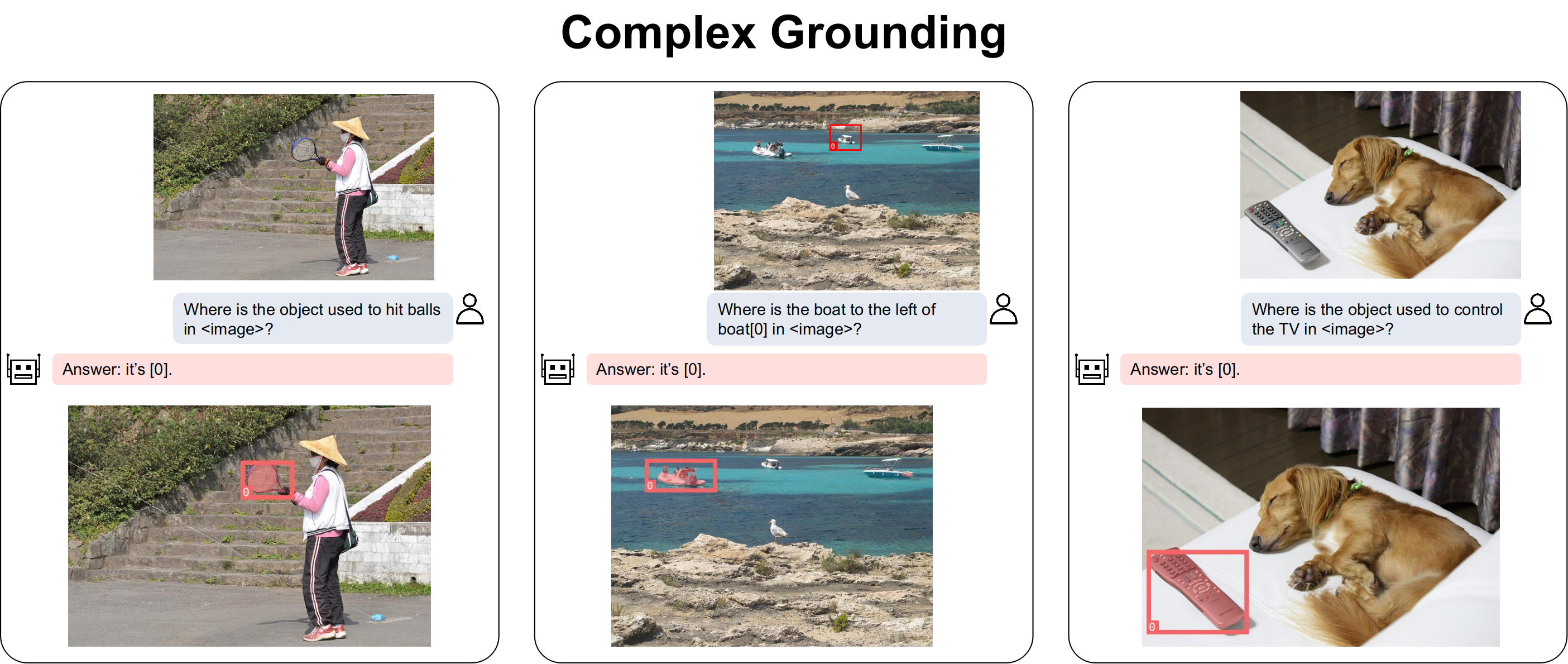
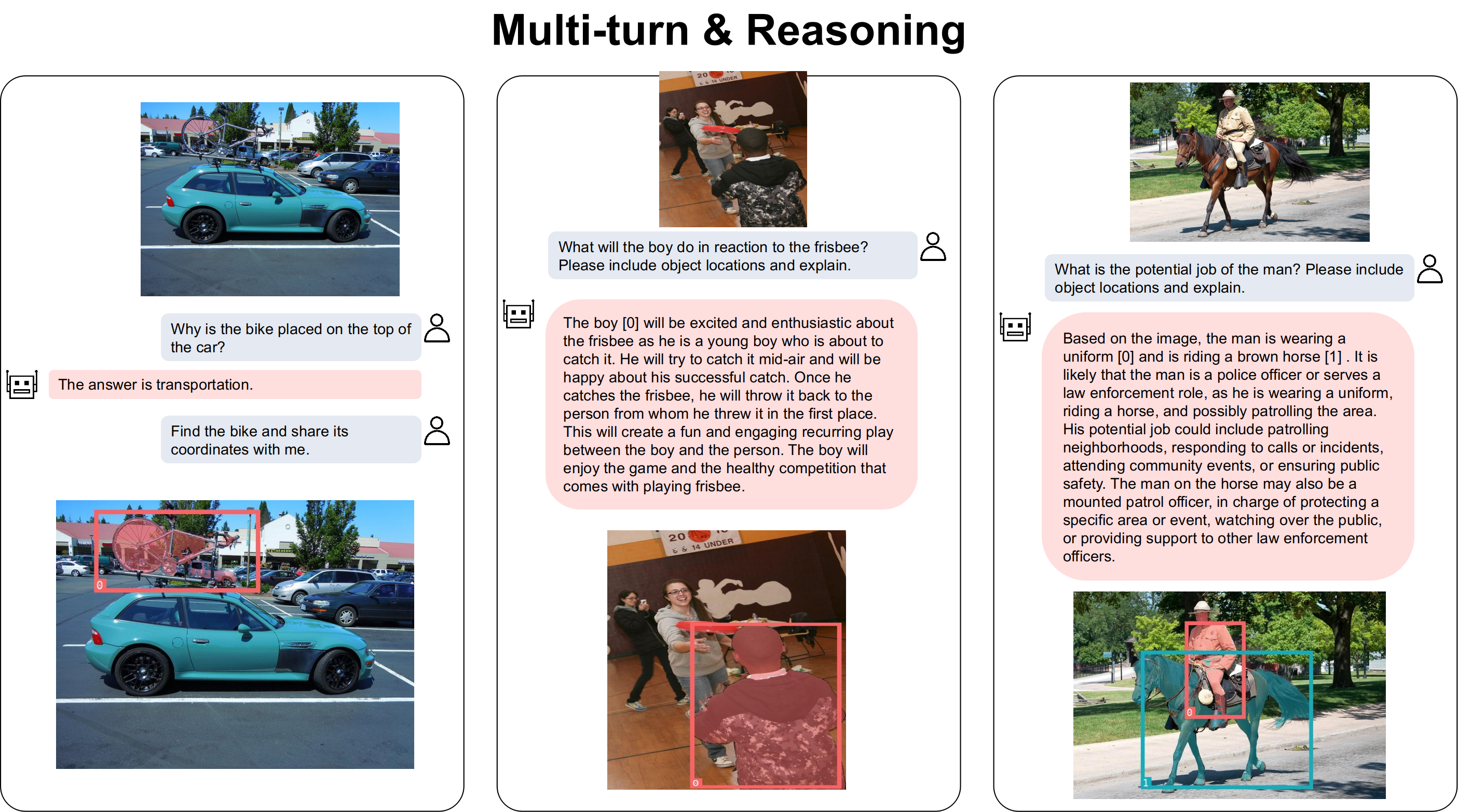
## Examples
Examples generated by our nextchat-13b-v0 models:
## Acknowledgement
Thanks to [Shikra](https://github.com/shikras/shikra), [LLaVA](https://github.com/haotian-liu/LLaVA), [CogVLM](https://github.com/THUDM/CogVLM) for their excellent codes.
Our bibtex:
```bibtex
@misc{zhang2023nextchat,
title={NExT-Chat: An LMM for Chat, Detection and Segmentation},
author={Ao Zhang and Yuan Yao and Wei Ji and Zhiyuan Liu and Tat-Seng Chua},
year={2023},
eprint={2311.04498},
archivePrefix={arXiv},
primaryClass={cs.CV}
}
```