# project-migration-tools
**Repository Path**: i513536373/project-migration-tools
## Basic Information
- **Project Name**: project-migration-tools
- **Description**: No description available
- **Primary Language**: Unknown
- **License**: Unlicense
- **Default Branch**: master
- **Homepage**: None
- **GVP Project**: No
## Statistics
- **Stars**: 0
- **Forks**: 0
- **Created**: 2024-02-03
- **Last Updated**: 2024-02-03
## Categories & Tags
**Categories**: Uncategorized
**Tags**: None
## README
## Getting started with IAR EWPtool Utility
### What is EWPtool?
The _IAR Embedded Workbench IDE_ allows adding source files from a single folder at a time, which is fine for a few folders. Although, this process can become time-consuming in cases where there are many folders involved.
__EWPtool__ can speed up the process of populating an IAR **E**mbedded **W**orkbench **P**roject file (`*.ewp`) by traversing an existing source code tree.
### What does EWPtool do?
From the IDE, the IAR EWPtool Utility acts as an external tool that extends its functionality. When invoked, it asks for where the project's source tree can be found. Then EWPtool automates the task of populating the project with the selected source code tree. The bigger the selected source tree is, the more evident its yielded benefit becomes.
The __EWPtool__ modifies the following entries in the `.ewp` project:
* Populates the project's tree layout, reflecting the selected source code tree layout in the filesystem.
* Fills the preprocessor search paths entries, for the active _build configuration_.
* Updates moved/renamed entries from the project tree layout.
* Removes stale entries from the project tree layout.
### What does EWPtool not do?
Rest assured that:
* __EWPtool__ does __not__ modify your _source files_.
* __EWPtool__ does __not__ convert existing _project files_ created by 3rd party IDEs.
>:bulb: About that, some target architectures of the _IAR Embedded Workbench_ might offer _built-in project converter tools_ able to deal with projects from 3rd party IDEs. The IAR EWPtool Utility is __not__ a requirement for when using those tools. In those cases, you can safely disregard this tutorial. Instead, please visit the _Migration Guides_ section in the official [Project Migration tools][url-iar-migration] page for more information specific to those tools.
## Installing
__EWPtool__ can be used on top of any reasonably recent version of the IAR Embedded Workbench IDE. Installing the tool simply means deploying its files on top of an existing instance of the IDE. Follow the steps below:
1. Close all the instances of the IDE.
2. Download the archive (`EWPtool-.zip`) available from the latest [Release notes][url-repo-tool-release-rn].
3. Extract the zip archive contents inside the `//common` folder.
4. Launch the IDE.
>__Note__ When multiple instances of the IDE are installed on independent locations, repeat __step 3__ for each desired instance.
## Upgrading
For upgrading from previous __EWPtool__ versions, replace the old files in the `common` folder and re-launch the IDE.
## How to use it?
The project layout in the _IAR Embedded Workbench_ is logical. This means that, whenever desired, source files could be added and grouped in a completely different way than the way they are actually arranged in the filesystem.
The __EWPtool__ populates a project by reflecting the selected source tree layout, so the logical layout will initially match the layout from the filesystem.
### Adding source folders to a project
This section describes the steps for when populating an IAR Embedded Workbench project from scratch with a pre-existing source code tree.
>:warning: __EWPtool__ does not create any sort of backup of the affected `.ewp` file. It is recommended to have a backup copy or a _version control system_ in place before proceeding for rolling back in case there are any undesired changes.
* Create a __New Empty Project__ by choosing __Project__ → __Create New Project__ → __Empty Project__ → __OK__.
* A __Save As__ dialog will show up. Save the `.ewp` in the project's top level folder.
* Choose __Tools__ → __Select source folder…__.
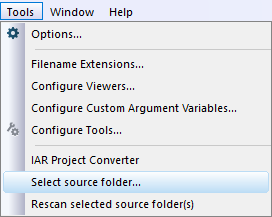
* A dialog window (__Browse For Folder__) will show up pointing initially to the folder where the `.ewp` file is. From there, select the desired source tree folder that will populate the active project. Usually, the project's top directory will be the natural choice. For example:
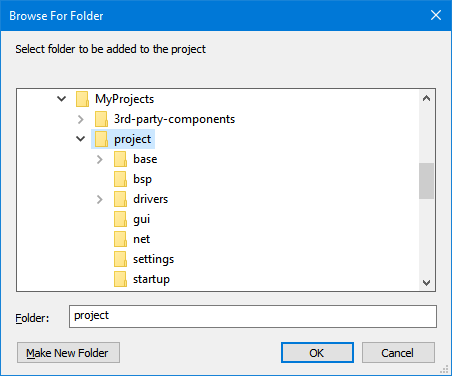
>:bulb: Each time a source folder selection is made, the EWPtool configuration file for the project is updated (`/settings/.cfg`). The selection is saved in the configuration file for later when use the menu command __Tools__ → __Rescan selected source folder(s)__ is invoked.
>:warning: The folder selection is limited to the same drive (`A:`, ..., `Z:`) in which the project file (`*.ewp`) is located.
* The IDE will then tell you that the `/.ewp` project file has been "modified on disk" and will offer to reload the project. This happens because EWPtool scanned the selected source tree, found changes, and updated entries in the project tree layout. Click on the ` Yes ` button to reload the project.

>__Note__ EWPtool can only act upon the contents it finds on the "disk". Always save the project (__File__ → __Save all__) before using the tool.
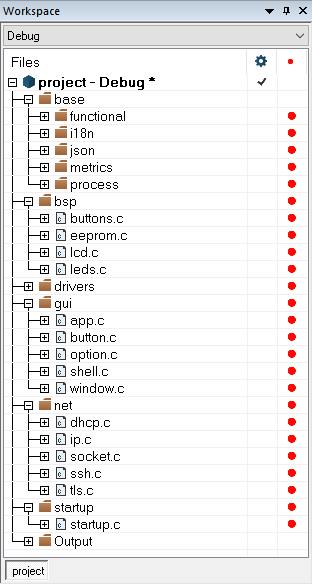
* When the project is reloaded, it should be automatically populated with all the source files detected in the monitored folder(s). The result can be verified by unfolding group nodes in the __Workspace window__'s project tree:
>
And this is what you need to know to start using the __IAR EWPtool Utility__.
Proceed to the [IAR EWPtool wiki][url-repo-wiki] for more information.
## Issues
Found an issue or have a suggestion related to the __EWPtool__?
- Try the [wiki][url-repo-wiki].
- Check for [earlier issues][url-repo-issue-old] in the public issue tracker.
- If nothing helps, create a [new][url-repo-issue-new] issue, describing in detail.
[url-repo-issue]: https://github.com/IARSystems/project-migration-tools/issues
[url-repo-issue-new]: https://github.com/IARSystems/project-migration-tools/issues/new
[url-repo-issue-old]: https://github.com/IARSystems/project-migration-tools/issues?q=is%3Aissue+is%3Aopen%7Cclosed
[url-repo-tool-release-rn]: https://github.com/IARSystems/project-migration-tools/releases/latest
[url-repo-wiki]: https://github.com/IARSystems/project-migration-tools/wiki
[url-iar-migration]: https://iar.com/products/project-migration-tools
[url-iar-doc-proj-dir]: https://wwwfiles.iar.com/arm/webic/doc/EWARM_IDEGuide.ENU.pdf#page=89