# QRCodeReader.swift
**Repository Path**: idoing/QRCodeReader.swift
## Basic Information
- **Project Name**: QRCodeReader.swift
- **Description**: https://github.com/yannickl/QRCodeReader.swift
- **Primary Language**: Swift
- **License**: MIT
- **Default Branch**: master
- **Homepage**: None
- **GVP Project**: No
## Statistics
- **Stars**: 0
- **Forks**: 0
- **Created**: 2022-03-24
- **Last Updated**: 2022-04-07
## Categories & Tags
**Categories**: Uncategorized
**Tags**: None
## README


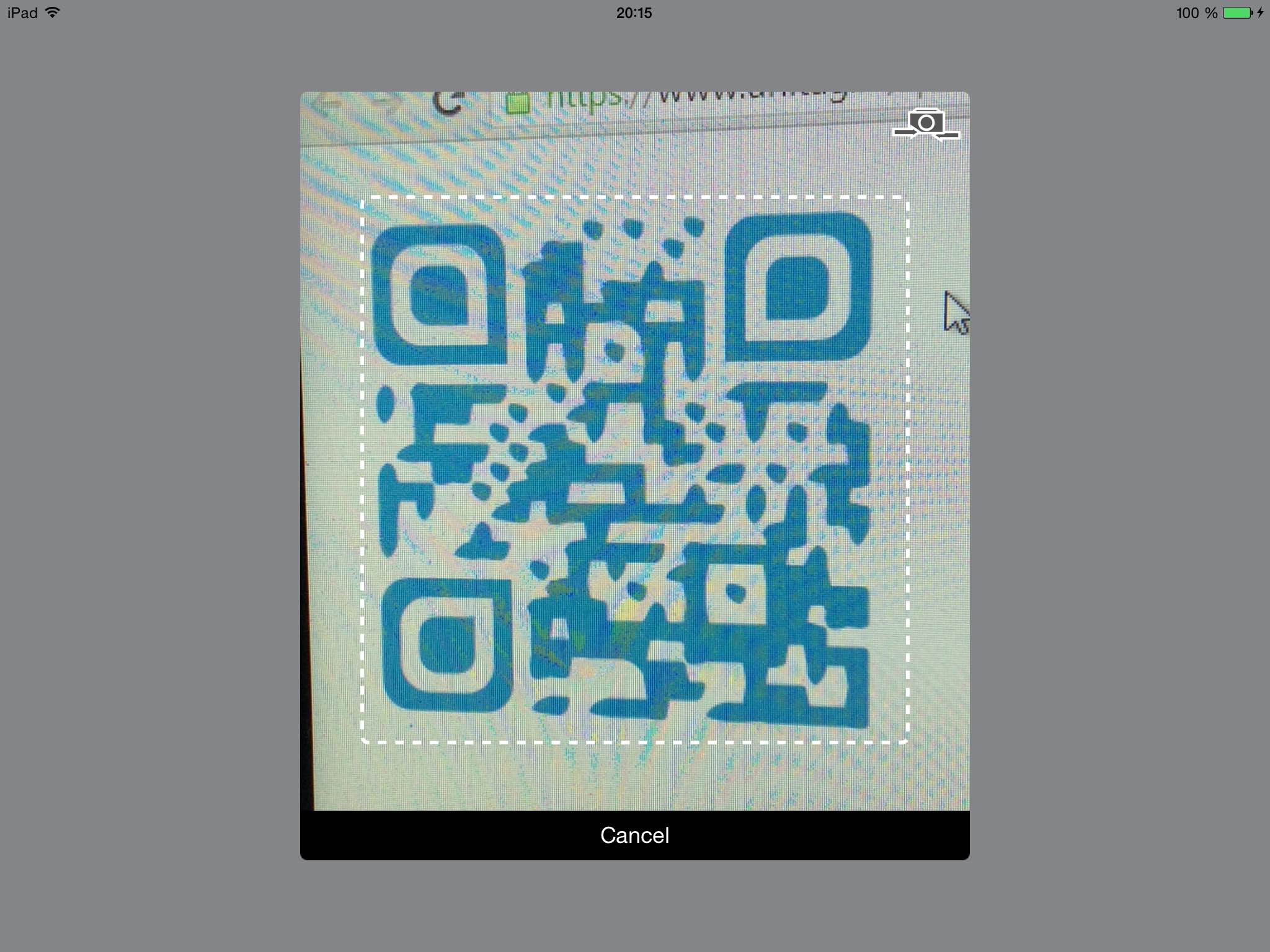
**QRCodeReader.swift** is a simple code reader (initially only QRCode) for iOS in Swift. It is based on the `AVFoundation` framework from Apple in order to replace ZXing or ZBar for iOS 8.0 and over. It can decodes these [format types](https://developer.apple.com/library/ios/documentation/AVFoundation/Reference/AVMetadataMachineReadableCodeObject_Class/index.html#//apple_ref/doc/constant_group/Machine_Readable_Object_Types).
It provides a default view controller to display the camera view with the scan area overlay and it also provides a button to switch between the front and the back cameras.
Requirements • Usage • Installation • Contact • License
## Requirements
- iOS 8.0+
- Xcode 10.0+
- Swift 5.0+
## Usage
In iOS10+, you will need first to reasoning about the camera use. For that you'll need to add the **Privacy - Camera Usage Description** *(NSCameraUsageDescription)* field in your Info.plist:

Then just follow these steps:
- Add delegate `QRCodeReaderViewControllerDelegate`
- Add `import AVFoundation`
- Add `import QRCodeReader`
- The `QRCodeReaderViewControllerDelegate` implementations is:
```swift
// Good practice: create the reader lazily to avoid cpu overload during the
// initialization and each time we need to scan a QRCode
lazy var readerVC: QRCodeReaderViewController = {
let builder = QRCodeReaderViewControllerBuilder {
$0.reader = QRCodeReader(metadataObjectTypes: [.qr], captureDevicePosition: .back)
// Configure the view controller (optional)
$0.showTorchButton = false
$0.showSwitchCameraButton = false
$0.showCancelButton = false
$0.showOverlayView = true
$0.rectOfInterest = CGRect(x: 0.2, y: 0.2, width: 0.6, height: 0.6)
}
return QRCodeReaderViewController(builder: builder)
}()
@IBAction func scanAction(_ sender: AnyObject) {
// Retrieve the QRCode content
// By using the delegate pattern
readerVC.delegate = self
// Or by using the closure pattern
readerVC.completionBlock = { (result: QRCodeReaderResult?) in
print(result)
}
// Presents the readerVC as modal form sheet
readerVC.modalPresentationStyle = .formSheet
present(readerVC, animated: true, completion: nil)
}
// MARK: - QRCodeReaderViewController Delegate Methods
func reader(_ reader: QRCodeReaderViewController, didScanResult result: QRCodeReaderResult) {
reader.stopScanning()
dismiss(animated: true, completion: nil)
}
//This is an optional delegate method, that allows you to be notified when the user switches the cameraName
//By pressing on the switch camera button
func reader(_ reader: QRCodeReaderViewController, didSwitchCamera newCaptureDevice: AVCaptureDeviceInput) {
if let cameraName = newCaptureDevice.device.localizedName {
print("Switching capture to: \(cameraName)")
}
}
func readerDidCancel(_ reader: QRCodeReaderViewController) {
reader.stopScanning()
dismiss(animated: true, completion: nil)
}
```
*Note that you should check whether the device supports the reader library by using the `QRCodeReader.isAvailable()` or the `QRCodeReader.supportsMetadataObjectTypes()` methods.*
#### Interface customization
You can create your own interface to scan your 1D/2D codes by using the `QRCodeReaderDisplayable` protocol and the `readerView` property in the `QRCodeReaderViewControllerBuilder`:
```swift
class YourCustomView: UIView, QRCodeReaderDisplayable {
let cameraView: UIView = UIView()
let cancelButton: UIButton? = UIButton()
let switchCameraButton: UIButton? = SwitchCameraButton()
let toggleTorchButton: UIButton? = ToggleTorchButton()
var overlayView: UIView? = UIView()
func setupComponents(with builder: QRCodeReaderViewControllerBuilder) {
// addSubviews
// setup constraints
// etc.
}
}
lazy var reader: QRCodeReaderViewController = {
let builder = QRCodeReaderViewControllerBuilder {
let readerView = QRCodeReaderContainer(displayable: YourCustomView())
$0.readerView = readerView
}
return QRCodeReaderViewController(builder: builder)
}()
```
### Installation
The recommended approach to use _QRCodeReaderViewController_ in your project is using the [CocoaPods](http://cocoapods.org/) package manager, as it provides flexible dependency management and dead simple installation.
#### CocoaPods
Install CocoaPods if not already available:
```bash
$ [sudo] gem install cocoapods
$ pod setup
```
Go to the directory of your Xcode project, and Create and Edit your Podfile and add _QRCodeReader.swift_ to your corresponding `TargetName`:
```bash
$ cd /path/to/MyProject
$ touch Podfile
$ edit Podfile
source 'https://github.com/CocoaPods/Specs.git'
platform :ios, '8.0'
use_frameworks!
target 'TargetName' do
pod 'QRCodeReader.swift', '~> 10.1.0'
end
```
Install into your project:
```bash
$ pod install
```
Open your project in Xcode from the .xcworkspace file (not the usual project file):
```bash
$ open MyProject.xcworkspace
```
You can now `import QRCodeReader` framework into your files.
#### Carthage
[Carthage](https://github.com/Carthage/Carthage) is a decentralized dependency manager that automates the process of adding frameworks to your Cocoa application.
You can install Carthage with [Homebrew](http://brew.sh/) using the following command:
```bash
$ brew update
$ brew install carthage
```
To integrate `QRCodeReader` into your Xcode project using Carthage, specify it in your `Cartfile` file:
```ogdl
github "yannickl/QRCodeReader.swift" >= 10.1.0
```
#### Swift Package Manager
You can use [The Swift Package Manager](https://swift.org/package-manager) to install `QRCodeReader.swift` by adding the proper description to your `Package.swift` file:
```swift
import PackageDescription
let package = Package(
name: "YOUR_PROJECT_NAME",
targets: [],
dependencies: [
.Package(url: "https://github.com/yannickl/QRCodeReader.swift.git", versions: "10.1.0" ..< Version.max)
]
)
```
Note that the [Swift Package Manager](https://swift.org/package-manager) is still in early design and development, for more information checkout its [GitHub Page](https://github.com/apple/swift-package-manager).
#### Manually
[Download](https://github.com/YannickL/QRCodeReader.swift/archive/master.zip) the project and copy the `QRCodeReader` folder into your project to use it in.
## Contact
Yannick Loriot
- [https://21.co/yannickl/](https://21.co/yannickl/)
- [https://twitter.com/yannickloriot](https://twitter.com/yannickloriot)
## License (MIT)
Copyright (c) 2014-present - Yannick Loriot
Permission is hereby granted, free of charge, to any person obtaining a copy
of this software and associated documentation files (the "Software"), to deal
in the Software without restriction, including without limitation the rights
to use, copy, modify, merge, publish, distribute, sublicense, and/or sell
copies of the Software, and to permit persons to whom the Software is
furnished to do so, subject to the following conditions:
The above copyright notice and this permission notice shall be included in
all copies or substantial portions of the Software.
THE SOFTWARE IS PROVIDED "AS IS", WITHOUT WARRANTY OF ANY KIND, EXPRESS OR
IMPLIED, INCLUDING BUT NOT LIMITED TO THE WARRANTIES OF MERCHANTABILITY,
FITNESS FOR A PARTICULAR PURPOSE AND NONINFRINGEMENT. IN NO EVENT SHALL THE
AUTHORS OR COPYRIGHT HOLDERS BE LIABLE FOR ANY CLAIM, DAMAGES OR OTHER
LIABILITY, WHETHER IN AN ACTION OF CONTRACT, TORT OR OTHERWISE, ARISING FROM,
OUT OF OR IN CONNECTION WITH THE SOFTWARE OR THE USE OR OTHER DEALINGS IN
THE SOFTWARE.