# TOPasscodeViewController
**Repository Path**: idoing/TOPasscodeViewController
## Basic Information
- **Project Name**: TOPasscodeViewController
- **Description**: https://github.com/marinofaggiana/TOPasscodeViewController
- **Primary Language**: Swift
- **License**: MIT
- **Default Branch**: master
- **Homepage**: None
- **GVP Project**: No
## Statistics
- **Stars**: 0
- **Forks**: 0
- **Created**: 2022-04-25
- **Last Updated**: 2022-04-25
## Categories & Tags
**Categories**: Uncategorized
**Tags**: None
## README
# TOPasscodeViewController
> A modal passcode input and validation view controller for iOS.
[](https://github.com/TimOliver/TOPasscodeViewController/actions?query=workflow%3ACI)
[](http://cocoadocs.org/docsets/TOPasscodeViewController)
[](https://raw.githubusercontent.com/TimOliver/TOPasscodeViewController/master/LICENSE)
[](http://cocoadocs.org/docsets/TOPasscodeViewController)
[](https://beerpay.io/TimOliver/TOPasscodeViewController)
[](https://www.paypal.com/cgi-bin/webscr?cmd=_s-xclick&hosted_button_id=M4RKULAVKV7K8)
[](http://twitch.tv/timXD)
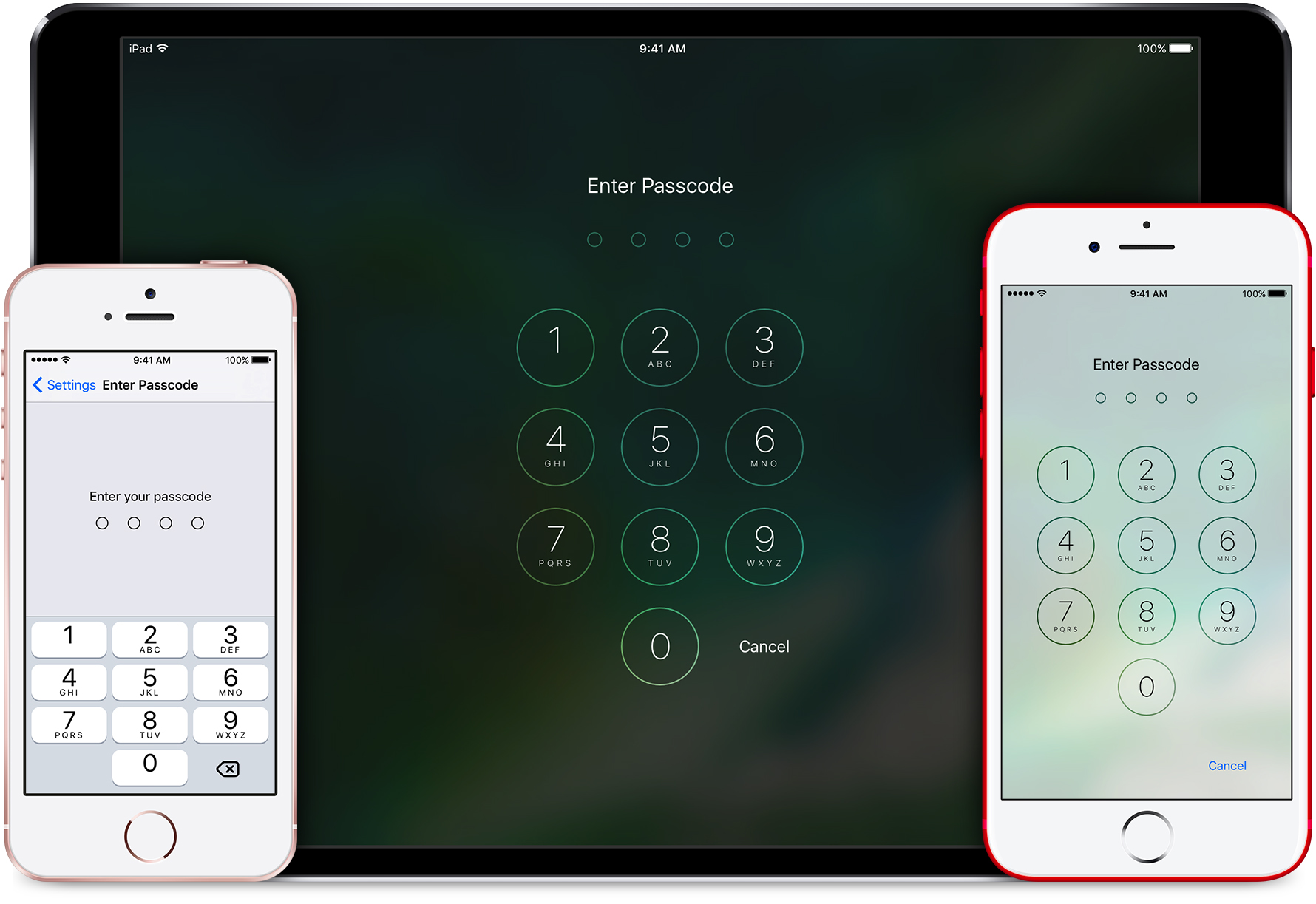
 `TOPasscodeViewController` is an open-source `UIViewController` subclass that will overlay a full-screen passcode UI over an app's content. The user must enter the correct password into it in order to proceed, or hit 'Cancel' to exit the private part of the app.
This sort of UI is useful for certain apps that contain highly sensitive information (such as banking or health) where users may indeed want an extra level of security beyond the standard iOS passcode.
## Features
* Prompts users to enter a passcode in order to proceed.
* May be presented as a translucent overlay, partially showing the normal app content behind it.
* Supports 4 different passcode types, from 4-digit passcodes, up to full alphanumeric passcodes.
* Supports 4 base themes, including translucent/opaque and light/dark.
* Supports Touch ID validation.
* Provides an additional settings view controller for letting users change their passcode.
* Passcode validation is handled by the parent app through a variety of delegate callbacks.
* A custom animation and layout when the device is rotated to landscape mode on iPhone.
* Custom 'opening' and 'dismissal' animations.
## System Requirements
iOS 8.3 or above
## Installation
#### As a CocoaPods Dependency
Add the following to your Podfile:
``` ruby
pod 'TOPasscodeViewController'
```
#### As a Carthage Dependency
Coming soon. :)
#### Manual Installation
Download this project from GitHub, move the subfolder named 'TOPasscodeViewController' over to your project folder, and drag it into your Xcode project.
## Examples
`TOPasscodeViewController` operates around a very strict modal implementation. It cannot be pushed to a `UINavigationController` stack, and must be presented as a full-screen dialog on an existing view controller.
### Basic Implementation
```objc
- (void)showButtonTapped:(id)sender
{
TOPasscodeViewController *passcodeViewController = [[TOPasscodeViewController alloc] initWithStyle:TOPasscodeViewStyleTranslucentDark passcodeType:TOPasscodeTypeFourDigits];
passcodeViewController.delegate = self;
[self presentViewController:passcodeViewController animated:YES completion:nil];
}
- (void)didTapCancelInPasscodeViewController:(TOPasscodeViewController *)passcodeViewController
{
[self dismissViewControllerAnimated:YES completion:nil];
}
- (BOOL)passcodeViewController:(TOPasscodeViewController *)passcodeViewController isCorrectCode:(NSString *)code
{
return [code isEqualToString:@"1234"];
}
```
## Security
`TOPasscodeViewController` does **not** perform any password management on your behalf. Any passcodes the user enters are forwarded to your own code via its delegate, and it's up to you to perform the validation and return the result back to `TOPasscodeViewController`.
This was an intentional decision for security reasons. Instead of every app using `TOPasscodeViewController` implementing the exact same validation and storage code path, you're free to custom tailor the way passcodes are handled in your app as you see fit.
No matter which passcode type, all passcodes in `TOPasscodeViewController` are handled as strings. When storing them in your app, they should be given at least the same level of scrutiny as full passwords. As such, I would strongly recommend you generate a salted hash of any user-defined passcode, and store both the hash and the salt in a protected location, like the iOS secure keychain, or an encrypted Realm file.
Because passcodes are treated as generic strings, if the user has selected a different passcode type (like an arbitrary numerical or alphanumeric one), you should also store that setting alongside the hash as well.
## How it works
`TOPasscodeViewController` is an open-source `UIViewController` subclass that will overlay a full-screen passcode UI over an app's content. The user must enter the correct password into it in order to proceed, or hit 'Cancel' to exit the private part of the app.
This sort of UI is useful for certain apps that contain highly sensitive information (such as banking or health) where users may indeed want an extra level of security beyond the standard iOS passcode.
## Features
* Prompts users to enter a passcode in order to proceed.
* May be presented as a translucent overlay, partially showing the normal app content behind it.
* Supports 4 different passcode types, from 4-digit passcodes, up to full alphanumeric passcodes.
* Supports 4 base themes, including translucent/opaque and light/dark.
* Supports Touch ID validation.
* Provides an additional settings view controller for letting users change their passcode.
* Passcode validation is handled by the parent app through a variety of delegate callbacks.
* A custom animation and layout when the device is rotated to landscape mode on iPhone.
* Custom 'opening' and 'dismissal' animations.
## System Requirements
iOS 8.3 or above
## Installation
#### As a CocoaPods Dependency
Add the following to your Podfile:
``` ruby
pod 'TOPasscodeViewController'
```
#### As a Carthage Dependency
Coming soon. :)
#### Manual Installation
Download this project from GitHub, move the subfolder named 'TOPasscodeViewController' over to your project folder, and drag it into your Xcode project.
## Examples
`TOPasscodeViewController` operates around a very strict modal implementation. It cannot be pushed to a `UINavigationController` stack, and must be presented as a full-screen dialog on an existing view controller.
### Basic Implementation
```objc
- (void)showButtonTapped:(id)sender
{
TOPasscodeViewController *passcodeViewController = [[TOPasscodeViewController alloc] initWithStyle:TOPasscodeViewStyleTranslucentDark passcodeType:TOPasscodeTypeFourDigits];
passcodeViewController.delegate = self;
[self presentViewController:passcodeViewController animated:YES completion:nil];
}
- (void)didTapCancelInPasscodeViewController:(TOPasscodeViewController *)passcodeViewController
{
[self dismissViewControllerAnimated:YES completion:nil];
}
- (BOOL)passcodeViewController:(TOPasscodeViewController *)passcodeViewController isCorrectCode:(NSString *)code
{
return [code isEqualToString:@"1234"];
}
```
## Security
`TOPasscodeViewController` does **not** perform any password management on your behalf. Any passcodes the user enters are forwarded to your own code via its delegate, and it's up to you to perform the validation and return the result back to `TOPasscodeViewController`.
This was an intentional decision for security reasons. Instead of every app using `TOPasscodeViewController` implementing the exact same validation and storage code path, you're free to custom tailor the way passcodes are handled in your app as you see fit.
No matter which passcode type, all passcodes in `TOPasscodeViewController` are handled as strings. When storing them in your app, they should be given at least the same level of scrutiny as full passwords. As such, I would strongly recommend you generate a salted hash of any user-defined passcode, and store both the hash and the salt in a protected location, like the iOS secure keychain, or an encrypted Realm file.
Because passcodes are treated as generic strings, if the user has selected a different passcode type (like an arbitrary numerical or alphanumeric one), you should also store that setting alongside the hash as well.
## How it works
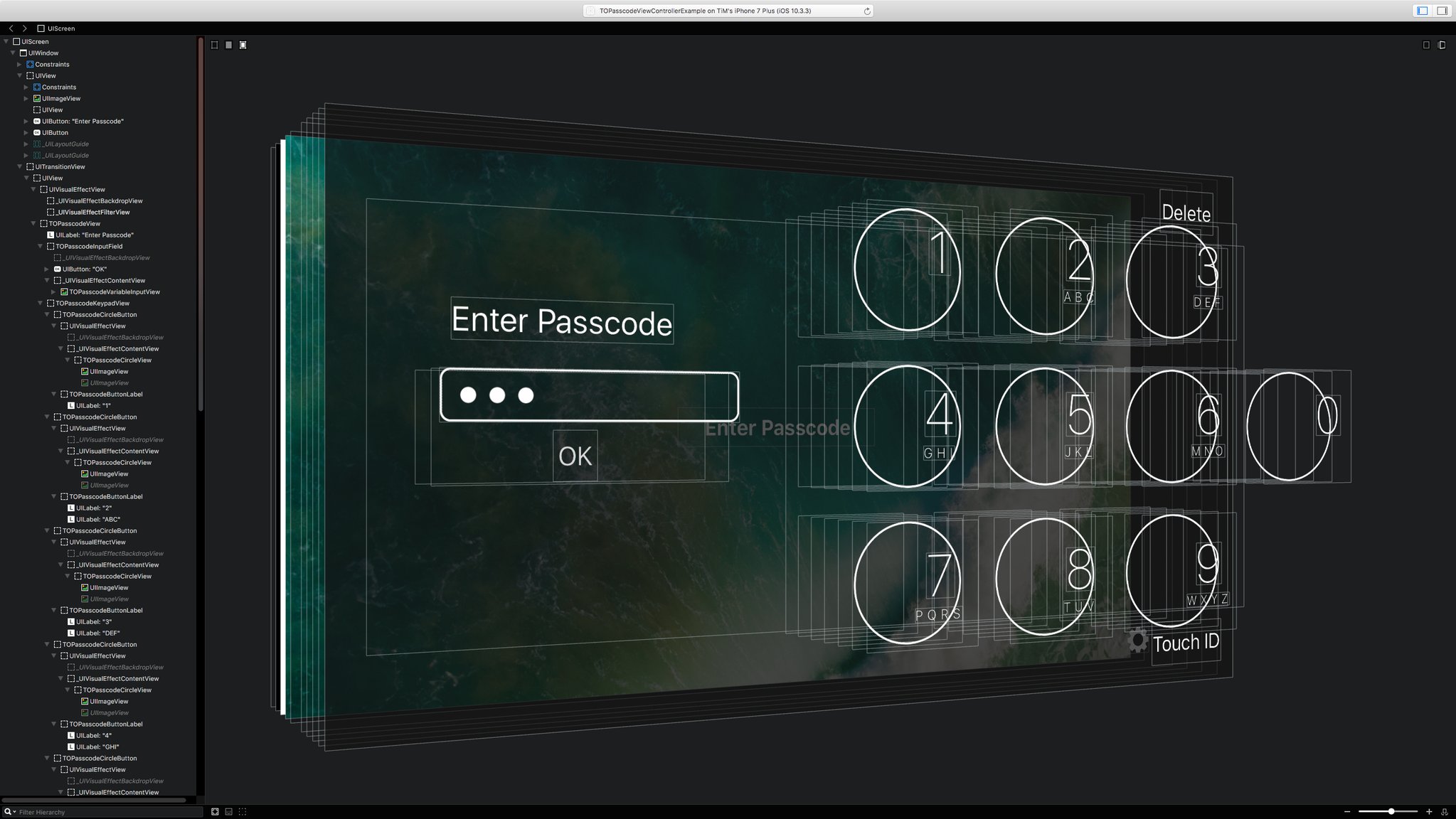
There's nothing too crazy about how this view controller was created. All reusable components are broken out into separate `UIView` classes, and an all-encompassing `TOPasscodeView` class is used to pull as much view logic out of the view controller (one way of solving the Massive View Controller problem.)
Depending on the screen width of the device (or if an iPad is using split screen), a single class manages all of the values for laying out the content with the appropriate font sizes, margins and cIrcle sizes. This was done to ensure maximum granular control over the sizing of elements per device. When transitioning between two of these sizes, all image assets are regenerated to ensure proper pixel scaling.
The view controller heavily uses `UIVisualEffectView` to produce its translucent effect. When dealing with these, I discovered a few interesting tidbits:
- For effect views that blur the content behind them, you can animate setting the `effect` property from `nil` to a `UIBlurEffect` object to produce a very nice gradually blurring transition effect.
- Effect views with a `UIVibrancyEffect` CANNOT EVER have an alpha value less than `1.0`. Trying to animate fading in one of these views will result in an effect that will be broken until the animation has completed. To fix this, I added a `contentAlpha` property to my subclasses that would manually target the alpha values of all subviews, but would leave the visual effect view itself at `1.0`. This created the desired effect where the translucent content would fade in properly.
## Is it App Store-safe?
**UPDATE: No. In it's current form, it's getting rejected from the App Store. [See issue #31.](https://github.com/TimOliver/TOPasscodeViewController/issues/31)**
This is a tricky question. App Review guideline 5.2.5 states that apps can't produce UIs that might be easily confused with system functionality, but this rule is incredibly subjective and will ultimately heavily depend on the app reviewer at the time.
Since the default style and text for this view controller make it very easily confused with the iOS lock screen, I would strongly recommend making these changes before shipping:
- Set your app icon as the `titleView` property of `TOPasscodeViewController` to add more specialised branding to it.
- Change the default tittle text to be more specific. Instead of 'Enter Passcode', put 'Enter MyApp Passcode to continue'.
- Consider using the light style instead of the dark style.
All in all, this might still not be enough. If you do end up getting rejected by Apple for using this library, please file an issue here and we can look at what will need to be changed to let Apple approve it.
## Credits
`TOPasscodeViewController` was originally created by [Tim Oliver](http://twitter.com/TimOliverAU) as a component for [iComics](http://icomics.co), a comic reader app for iOS.
iOS Device mockups used in the screenshot created by [Pixeden](http://pixeden.com).
## License
`TOPasscodeViewController` is licensed under the MIT License, please see the [LICENSE](LICENSE) file. 