# AI-Gist
**Repository Path**: ilovecode2018/AI-Gist
## Basic Information
- **Project Name**: AI-Gist
- **Description**: No description available
- **Primary Language**: Unknown
- **License**: AGPL-3.0
- **Default Branch**: main
- **Homepage**: None
- **GVP Project**: No
## Statistics
- **Stars**: 0
- **Forks**: 0
- **Created**: 2025-09-17
- **Last Updated**: 2025-09-17
## Categories & Tags
**Categories**: Uncategorized
**Tags**: None
## README

# AI Gist
  
✨ AI Gist 是一款隐私优先的 AI 提示词管理工具,致力于让个人收藏的 AI 提示词能够发挥最大价值。支持变量替换、Jinja 模板、AI 生成与调优、历史版本记录、云端备份等核心功能。

[🏠 访问官网](https://getaigist.com) | [🔗 立即下载](https://github.com/yarin-zhang/AI-Gist/releases)
## 📌 特点
AI Gist 提供基础的 AI 提示词管理功能,旨在帮助用户高效地创建、组织和使用 AI 提示词。支持 Jinja 模板。
* **变量填充**:调用模板时动态填入变量,结构清晰灵活,支持 Jinja 模板。
* **多视图管理**:集中管理提示词模板,支持卡片视图、表格视图、分类视图。
* **筛选分类**:快速筛选、查找、组织提示词,支持标签、分类、评分、收藏等功能。
* **多种历史记录**:便于重复调用与持续优化,事后可回溯。

AI Gist 还集成了 AI 模型,支持自动生成和调整提示词,提升管理效率。用之前,改一改。
* **接入多种 AI 模型**:支持接入多种 AI 模型(包括本地模型 Ollama、LM Studio,以及 OpenAI 等多种常见在线模型)。
* **AI 生成**:使用 AI 快捷生成提示词,支持自定义系统提示词。
* **AI 调优**:使用 AI 改写提示词,快速让提示词更具体、更丰富,同样支持自定义。
* **AI 提取变量**:无需手动挖空,使用 AI 自动提取可能的变量。

AI Gist 关注隐私和数据安全,所有数据都存储在本地,并支持云备份功能,方便在不同设备间同步。
* **本地优先**:所有数据存储在本地,默认情况无需联网,确保隐私和安全。
* **掌控数据**:拥有完整的数据控制,支持完整导出和导入,通用格式 CSV 导出。
* **云端备份**:支持 WebDAV、iCloud 备份与恢复,方便在多设备间共享数据。

* **多平台支持**:支持 Windows / macOS / Linux。
* **多语言支持**:支持简体中文、繁体中文、英文、日语。
## ⬇️ 下载
[](https://github.com/yarin-zhang/AI-Gist/releases/latest) [](https://github.com/yarin-zhang/AI-Gist/releases)
| 平台 | 下载链接 | 说明 |
|------|----------|------|
|  | [Windows Setup](https://github.com/yarin-zhang/AI-Gist/releases/latest) | Windows 安装程序 |
|  | [macOS (Apple Silicon)](https://github.com/yarin-zhang/AI-Gist/releases/latest) | 适用于 Apple 芯片 |
|  | [macOS (Intel)](https://github.com/yarin-zhang/AI-Gist/releases/latest) | 适用于 Intel 芯片 |
|  | [Linux AppImage](https://github.com/yarin-zhang/AI-Gist/releases/latest) | 通用 Linux 应用 |
如果 Github 下载较慢,可以尝试通过百度网盘、SourceForge 进行下载。
| 镜像源 | 下载链接 | 说明 |
|------|----------|------|
| [ ](https://pan.baidu.com/s/10apxOpgNciADcKfhuli5sA?pwd=4321) | [百度网盘](https://pan.baidu.com/s/10apxOpgNciADcKfhuli5sA?pwd=4321) | 中国用户推荐 提取码:4321 |
| [](https://sourceforge.net/projects/ai-gist/files/latest/download) | [SourceForge](https://sourceforge.net/projects/ai-gist/files/latest/download) | 国际用户推荐 |
## 🚀 安装说明
- **Windows:** 下载 `.exe` 文件后双击运行安装
- **macOS:** 下载 `.dmg` 文件后打开,将应用拖拽到应用程序文件夹,在终端执行 `xattr -cr /Applications/AI\ Gist.app` 以解除“已损坏”报错后启动。
- **Linux:** 下载 `.AppImage` 文件后添加执行权限:`chmod +x ai-gist-linux.AppImage`
## 📒 使用场景
### 管理提示词
- 点击“新建提示词”
- 输入提示词模板,用 `{{变量名}}` 来插入变量,AI Gist 会自动读取其中的变量。
- 使用时直接选择模板,输入变量值。
- 点击“复制内容”,即可自动记录使用历史。
### AI 生成提示词
- 先在应用中添加 AI 模型(支持纯本地 Ollama、LM Studio 模型,以及常见的 OpenAI、DeepSeek 等在线模型)。
- 在首页点击“AI 生成”按钮,可以通过 AI 模型生成提示词。
### AI 润色提示词
- 先添加 AI 模型
- 在编辑提示词页面对现有提示词进行快速润色,例如“提取变量”、“更具体”等。也可以自定义润色提示词。
## 开发说明
### 安装依赖
```bash
yarn install
```
### 启动开发环境
```bash
yarn dev
```
### 其他常用命令
```bash
# 开发相关
yarn dev # 启动应用并开启热重载
yarn build # 打包应用,输出目录为 "dist"
# 跨平台构建
yarn build:win # 构建 Windows 安装包
yarn build:mac # 构建 macOS 安装包
yarn build:linux # 构建 Linux 安装包
```
### 开发指南
详细的开发指南请参阅 [docs](./docs) 目录:
- [项目架构指南](./docs/project-architecture.md)
- [GitHub Actions 自动构建与发布](./docs/github-actions.md)
## 贡献
本项目主要由个人开发,所有代码完全开源。如果你喜欢这个项目,请点击右上角的 Star ⭐️ 来支持我!这将激励我继续改进和维护这个项目。
如果有问题或建议,欢迎在 GitHub 上提交 Issue 或 Pull Request。
欢迎加入 QQ 群,与开发者和其他用户交流使用心得、反馈问题和获取最新动态。
](https://pan.baidu.com/s/10apxOpgNciADcKfhuli5sA?pwd=4321) | [百度网盘](https://pan.baidu.com/s/10apxOpgNciADcKfhuli5sA?pwd=4321) | 中国用户推荐 提取码:4321 |
| [](https://sourceforge.net/projects/ai-gist/files/latest/download) | [SourceForge](https://sourceforge.net/projects/ai-gist/files/latest/download) | 国际用户推荐 |
## 🚀 安装说明
- **Windows:** 下载 `.exe` 文件后双击运行安装
- **macOS:** 下载 `.dmg` 文件后打开,将应用拖拽到应用程序文件夹,在终端执行 `xattr -cr /Applications/AI\ Gist.app` 以解除“已损坏”报错后启动。
- **Linux:** 下载 `.AppImage` 文件后添加执行权限:`chmod +x ai-gist-linux.AppImage`
## 📒 使用场景
### 管理提示词
- 点击“新建提示词”
- 输入提示词模板,用 `{{变量名}}` 来插入变量,AI Gist 会自动读取其中的变量。
- 使用时直接选择模板,输入变量值。
- 点击“复制内容”,即可自动记录使用历史。
### AI 生成提示词
- 先在应用中添加 AI 模型(支持纯本地 Ollama、LM Studio 模型,以及常见的 OpenAI、DeepSeek 等在线模型)。
- 在首页点击“AI 生成”按钮,可以通过 AI 模型生成提示词。
### AI 润色提示词
- 先添加 AI 模型
- 在编辑提示词页面对现有提示词进行快速润色,例如“提取变量”、“更具体”等。也可以自定义润色提示词。
## 开发说明
### 安装依赖
```bash
yarn install
```
### 启动开发环境
```bash
yarn dev
```
### 其他常用命令
```bash
# 开发相关
yarn dev # 启动应用并开启热重载
yarn build # 打包应用,输出目录为 "dist"
# 跨平台构建
yarn build:win # 构建 Windows 安装包
yarn build:mac # 构建 macOS 安装包
yarn build:linux # 构建 Linux 安装包
```
### 开发指南
详细的开发指南请参阅 [docs](./docs) 目录:
- [项目架构指南](./docs/project-architecture.md)
- [GitHub Actions 自动构建与发布](./docs/github-actions.md)
## 贡献
本项目主要由个人开发,所有代码完全开源。如果你喜欢这个项目,请点击右上角的 Star ⭐️ 来支持我!这将激励我继续改进和维护这个项目。
如果有问题或建议,欢迎在 GitHub 上提交 Issue 或 Pull Request。
欢迎加入 QQ 群,与开发者和其他用户交流使用心得、反馈问题和获取最新动态。

## 应用截图

变量填充

编辑提示词

Jinja 模板

AI 模型管理

添加 AI 配置

AI 快速调整

高级筛选

表格视图

文件夹视图

分类管理

数据备份

明亮模式
## Star History
[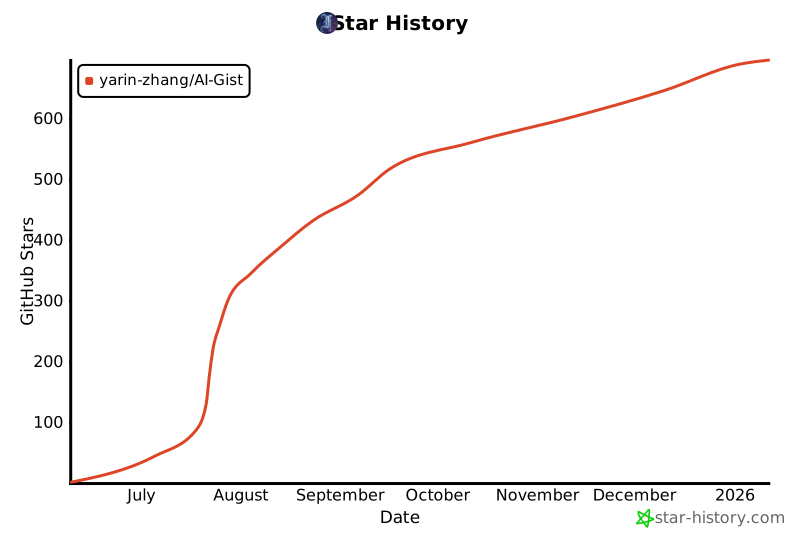](https://www.star-history.com/#yarin-zhang/AI-Gist&Date)
## 许可证
本项目采用 [AGPL 许可证](./LICENSE),请在使用时遵守相关条款。