# voice_note_kit
**Repository Path**: imboy-tripartite-deps/voice_note_kit
## Basic Information
- **Project Name**: voice_note_kit
- **Description**: 镜像 https://github.com/abdallahyassein-dev/voice_note_kit.git
- **Primary Language**: Dart
- **License**: MIT
- **Default Branch**: main
- **Homepage**: None
- **GVP Project**: No
## Statistics
- **Stars**: 0
- **Forks**: 0
- **Created**: 2025-09-29
- **Last Updated**: 2025-09-29
## Categories & Tags
**Categories**: Uncategorized
**Tags**: None
## README
# voice_note_kit
🎙️ **Voice Note Kit** is a Flutter plugin that allows you to record, save, and play voice notes with waveform visualization. It's built for mobile apps needing voice features like audio memos, task recordings, and more.


## 📖 Table of Contents
- [Screenshots](#screenshots)
- [Features](#features)
- [Getting Started](#getting-started)
- [Usage](#usage)
- [Voice Recorder](#voice-recorder)
- [Audio Player](#audio-player)
- [Example](#example)
- [Dependencies Used](#dependencies-used)
- [About the Developer](#about-the-developer)
- [License](#license)
## Screenshots
| 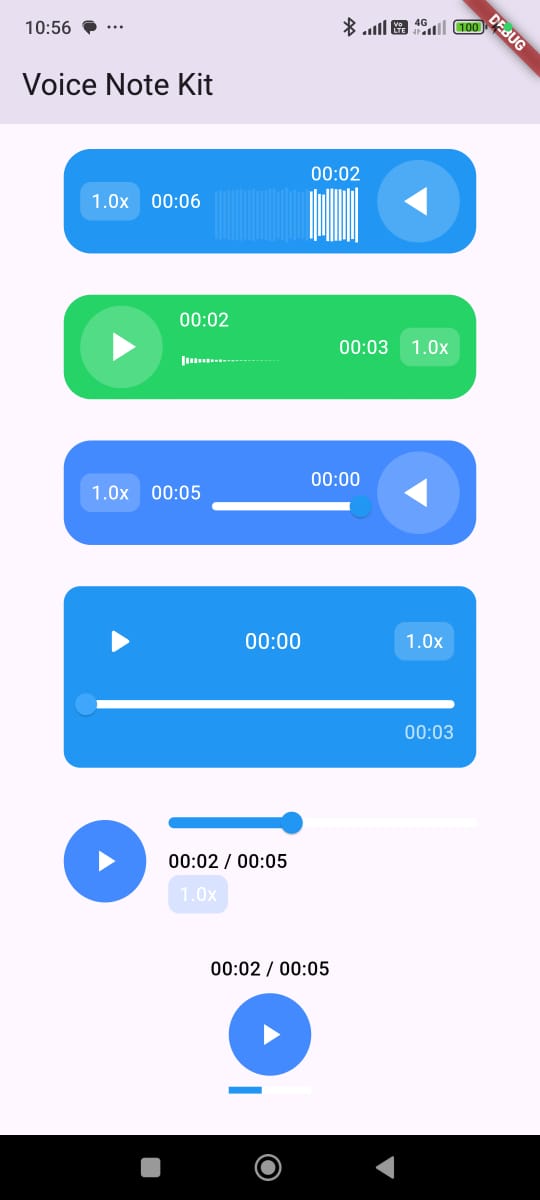 | 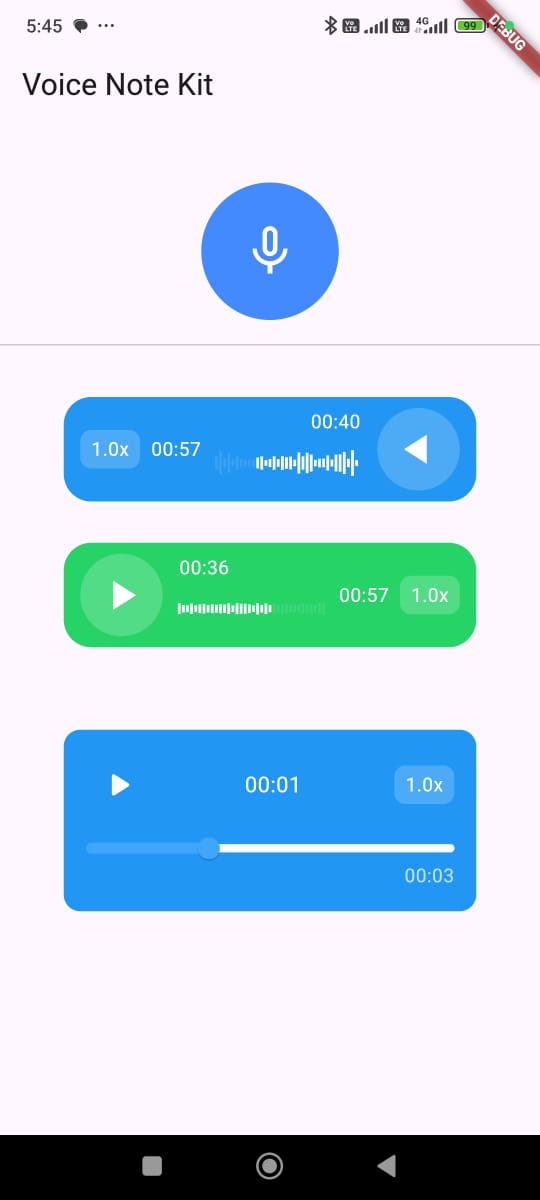 | 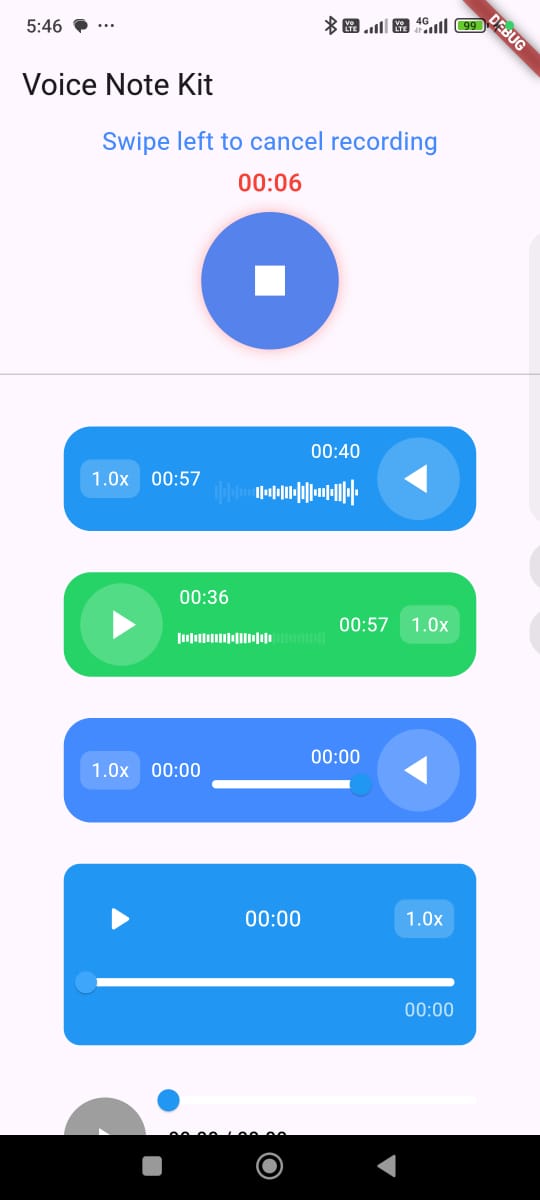 |
|:--:|:--:|:--:|
---
## Features
- 🎤 Record audio: Capture high-quality audio using the device's microphone.
- 💾 Save audio files locally: Store audio files locally on the device for later use.
- 🔊 Play recorded audio: Easily play back the recorded audio with built-in controls.
- 📈 Waveform visualization: Display a dynamic waveform using just_waveform for a visual representation of the audio.
- 🔁 Playback controls: Play, pause, resume, and stop recorded audio seamlessly.
- 🔐 Permissions management: Automatically handles permissions for recording audio and accessing the microphone using permission_handler.
- 🎨 Multiple audio player styles: Choose from various customizable player styles to fit the app’s theme and user interface.
- 🚀 Easy usage: Simple plug-and-play integration with minimal setup required, designed for seamless use in Flutter apps.
- 🏃♂️ Adjustable playback speed: Set the playback speed to multiple values (e.g., 0.5x, 1.0x, 1.5x, 2.0x, etc.) to suit the user’s preference for fast-forwarding or slowing down the audio.
- 🔧 Customizable UI components: Tailor the look and feel of the recorder and player with configurable options for icon sizes, colors, button shapes, and more.
---
## Getting Started
1. **Add dependency:**
In your `pubspec.yaml`:
```yaml
dependencies:
voice_note_kit: ^1.2.0
```
2. `Install Package` In your project:
```
flutter pub get
```
3. `Android Configuration:` In your AndroidManifest.xml:
```xml
```
in /android/app/build.gradle
```
minSdk = 23
// Prefered
compileSdk = 35
```
4. `iOS Configuration:` In your iOS Info.plist, add:
```
NSMicrophoneUsageDescription
This app needs access to the microphone to record audio.
```
In Your Podfile
```
platform :ios, '12.0'
```
```
post_install do |installer|
installer.pods_project.targets.each do |target|
flutter_additional_ios_build_settings(target)
target.build_configurations.each do |config|
config.build_settings['GCC_PREPROCESSOR_DEFINITIONS'] ||= [
'$(inherited)',
'PERMISSION_MICROPHONE=1',
]
end
end
end
```
5. `Macos Configuration:` In your Macos Info.plist, add:
```
NSMicrophoneUsageDescription
This app needs access to the microphone to record audio.
```
In Your Podfile
```
platform :osx, '10.15'
```
Open your macos/Runner/DebugProfile.entitlements and macos/Runner/Release.entitlements files.
```
com.apple.security.device.audio-input
```
## Usage
### Voice Recorder
```dart
VoiceRecorderWidget(
iconSize: 100,
showTimerText: true,
showSwipeLeftToCancel: true,
// Optional: Add custom sounds for recording events
// startSoundAsset: "assets/start_warning.mp3",
// stopSoundAsset: "assets/start_warning.mp3",
// When recording is finished
onRecorded: (file) {
setState(() {
recordedFile = file;
});
ScaffoldMessenger.of(context).showSnackBar(
SnackBar(content: Text('Recording saved: ${file.path}')),
);
},
// For Flutter Web
onRecordedWeb: (url) {
setState(() {
recordedAudioBlobUrl = url;
});
},
// When error occurs during recording
onError: (error) {
ScaffoldMessenger.of(context).showSnackBar(
SnackBar(content: Text('Error: $error')),
);
},
// If recording was cancelled
actionWhenCancel: () {
ScaffoldMessenger.of(context).showSnackBar(
const SnackBar(content: Text('Recording Cancelled')),
);
},
maxRecordDuration: const Duration(seconds: 60),
permissionNotGrantedMessage: 'Microphone permission required',
dragToLeftText: 'Swipe left to cancel recording',
dragToLeftTextStyle: const TextStyle(
color: Colors.blueAccent,
fontSize: 18,
),
cancelDoneText: 'Recording cancelled',
backgroundColor: Colors.blueAccent,
cancelHintColor: Colors.red,
iconColor: Colors.white,
timerFontSize: 18,
),
```
### Audio Player
```dart
AudioPlayerWidget(
autoPlay: false, // Whether to automatically start playback when the widget builds
autoLoad: true, // Whether to preload the audio before the user presses play
audioPath:
"https://commondatastorage.googleapis.com/codeskulptor-demos/riceracer_assets/fx/engine-10.ogg", // The path or URL of the audio file
audioType: AudioType.url, // Specifies if the audio is from a URL, asset, , file , or blobforWeb(for flutter web)
playerStyle: PlayerStyle.style5, // The visual style of the player (you can choose between different predefined styles)
textDirection: TextDirection.rtl, // Text direction for RTL or LTR languages
size: 60, // Size of the play/pause button
progressBarHeight: 5, // Height of the progress bar
backgroundColor: Colors.blue, // Background color of the widget
progressBarColor: Colors.blue, // Color of the progress bar (played portion)
progressBarBackgroundColor: Colors.white, // Background color of the progress bar
iconColor: Colors.white, // Color of the play/pause icon
shapeType: PlayIconShapeType.circular, // Shape of the play/pause button (e.g., circular or square)
showProgressBar: true, // Whether to show the progress bar
showTimer: true, // Whether to display the current time/duration
width: 300, // Width of the whole audio player widget
audioSpeeds: const [0.5, 1.0, 1.5, 2.0, 3.0], // Supported audio playback speeds
onSeek: (value) => print('Seeked to: $value'), // Callback when user seeks to a new position
onError: (message) => print('Error: $message'), // Callback when an error occurs
onPause: () => print("Paused"), // Callback when audio is paused
onPlay: (isPlaying) => print("Playing: $isPlaying"), // Callback when audio starts or resumes playing
onSpeedChange: (speed) => print("Speed: $speed"), // Callback when playback speed is changed
),
```
```dart
// If You Want to User Controller For The Player
late final VoiceNotePlayerController playerController;
@override
void initState() {
playerController = VoiceNotePlayerController();
super.initState();
}
@override
void dispose() {
playerController.dispose();
super.dispose();
}
// Play the audio from the current position
playerController.play();
// Pause the audio playback
playerController.pause();
// Set the playback speed. Accepts a double value (e.g., 1.0 for normal speed, 1.5 for 1.5x speed)
playerController.setSpeed(1.5);
// Seek to a specific position in the audio. The value should be between 0 and 1, where 0 represents the beginning of the audio and 1 represents the end.
playerController.seekTo(0.2); // Seeks to 20% of the audio's total duration
```
## Example
[You Can Find The Full Code Here](https://github.com/abdallahyassein-dev/voice_note_kit/tree/main/example)
## Dependencies Used
This package uses (You do not have to import them):
just_audio:
just_waveform:
record:
path_provider:
permission_handler:
http:
## About the Developer
Hello! 👋 I'm Abdallah Yassein, a Senior Flutter Developer with extensive experience in building high-quality mobile applications. I specialize in using clean architecture and native integrations to create scalable and efficient solutions with Flutter.
In addition to my development work, I am also a content creator and educator. I run a [YouTube channel](https://www.youtube.com/@abdallahyasseindev) where I share in-depth Flutter tutorials in Arabic, helping developers across the Middle East enhance their skills and advance their careers in mobile app development.
I am also excited to offer an in-depth [Flutter course on Udemy](https://www.udemy.com/course/the-complete-flutter-dart-basics-to-advanced-arabic/?referralCode=5AB45AABD60C76696364), designed to guide complete beginners to becoming job-ready Flutter developers. This course covers the fundamentals and best practices to help you build professional-quality Flutter apps.
Feel free to explore my YouTube channel and Udemy course for Flutter development tips, advanced topics, and step-by-step tutorials. Don’t forget to subscribe and enroll to continue your learning journey!
- 📧 Email: abdallahyassein351998@gmail.com
- 💼 [LinkedIn Profile](https://www.linkedin.com/in/abdallah-yassein/)
- 📺 YouTube: [Abdallah Yassein](https://www.youtube.com/@abdallahyasseindev)
---
If you like this package, feel free to ⭐️ the repo and share it!
## Contributors
[Esraa Mohamed](https://www.linkedin.com/in/esraa-mohamed-dawood/)
## License
This project is licensed under the MIT License - see the [LICENSE](https://github.com/abdallahyassein-dev/voice_note_kit/blob/main/LICENSE) file for details.