# WatchShaker
**Repository Path**: insyangming/WatchShaker
## Basic Information
- **Project Name**: WatchShaker
- **Description**: 121221212121
- **Primary Language**: Swift
- **License**: MIT
- **Default Branch**: main
- **Homepage**: None
- **GVP Project**: No
## Statistics
- **Stars**: 0
- **Forks**: 0
- **Created**: 2022-08-11
- **Last Updated**: 2022-08-12
## Categories & Tags
**Categories**: Uncategorized
**Tags**: None
## README
# WatchShaker
> Simple motion detector for ⌚️ (watchOS) shake gesture.
[![Swift Version][swift-image]][swift-url] [](http://cocoadocs.org/docsets/WatchShaker)
WatchShaker is a watchOS helper to get your ⌚️ shake movements
## Requirements
- watchOS 6.0+
- Xcode 11.0+
## Installation
### Swift Package Manager
Once you have your Swift package set up, adding WatchShaker as a dependency is as easy as adding it to the `dependencies` value of your `Package.swift`.
```swift
dependencies: [
.package(url: "https://github.com/ezefranca/WatchShaker.git", .upToNextMajor(from: "1.0.2"))
]
```
### Manually
1. Download and drop [```WatchShaker```](https://github.com/ezefranca/WatchShaker/tree/main/Sources) folder in your project to your watch target.
2. Congratulations!
## Usage example
### Closure Style
```swift
import WatchKit
import Foundation
import WatchShaker
class InterfaceController: WKInterfaceController {
var shaker:WatchShaker = WatchShaker(shakeSensibility: .shakeSensibilityNormal, delay: 0.2)
override func awake(withContext context: Any?) {
super.awake(withContext: context)
}
override func willActivate() {
super.willActivate()
shaker.start()
shaker.startWatchShakerUpdates = { shakeSensibility, error in
guard error == nil else
{
print(error?.localizedDescription)
return
}
print("I'm shook! ⌚️⌚️⌚️")
}
}
override func didDeactivate() {
super.didDeactivate()
shaker.stop()
}
}
```
### Delegate Style
```swift
import WatchKit
import Foundation
class InterfaceController: WKInterfaceController {
override func awake(withContext context: Any?) {
super.awake(withContext: context)
// Configure interface objects here.
}
var shaker:WatchShaker = WatchShaker(shakeSensibility: .shakeSensibilityNormal, delay: 0.2)
override func willActivate() {
super.willActivate()
shaker.delegate = self
shaker.start()
}
override func didDeactivate() {
super.didDeactivate()
shaker.stop()
}
}
extension InterfaceController: WatchShakerDelegate
{
func watchShaker(_ watchShaker: WatchShaker, didShakeWith sensibility: ShakeSensibility) {
print("I'm shook! ⌚️⌚️⌚️")
}
func watchShaker(_ watchShaker: WatchShaker, didFailWith error: Error) {
print(error.localizedDescription)
}
}
```
### Optional Directions
If you interested you can get the `direction` of the shake on the `didShakeWith` method.
```swift
func watchShaker(_ watchShaker: WatchShaker, didShakeWith sensibility: ShakeSensibility,
direction: ShakeDirection) {
print("I'm shook! ⌚️⌚️⌚️ \(direction)")
}
```
`ShakeDirection` is a simple enum who gives you `up`, `down`, `left` or `right` direction. The image bellow is the way used to determine what is each direction.
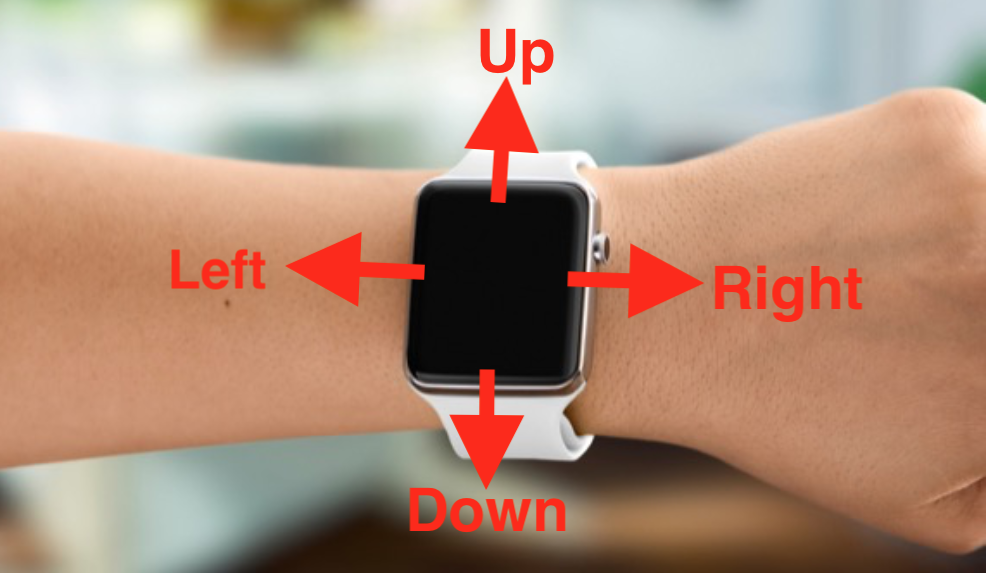
This gentleman bellow for example, is clearly doing a shake with `ShakeDirection.shakeDirectionRight` 😂

## Contribute
We would love for you to contribute to **WatchShaker**, check the ``LICENSE`` file for more info.
## Meta
Ezequiel França – [@ezefranca](https://twitter.com/ezefranca) and all awesome [Contributors](https://github.com/ezefranca/WatchShaker/graphs/contributors)
Distributed under the MIT license. See ``LICENSE`` for more information.
[swift-image]:https://img.shields.io/badge/swift-5.1-orange.svg
[swift-url]: https://swift.org/
[license-image]: https://img.shields.io/badge/License-MIT-blue.svg
[license-url]: LICENSE
[travis-image]: https://img.shields.io/travis/dbader/node-datadog-metrics/master.svg?style=flat-square
[travis-url]: https://travis-ci.org/dbader/node-datadog-metrics
[codebeat-image]: https://codebeat.co/badges/c19b47ea-2f9d-45df-8458-b2d952fe9dad
[codebeat-url]: https://codebeat.co/projects/github-com-vsouza-awesomeios-com