# coc.nvim
**Repository Path**: jackallink/coc.nvim
## Basic Information
- **Project Name**: coc.nvim
- **Description**: Intellisense engine for Vim8 & Neovim, full language server protocol support as VSCode
- **Primary Language**: Unknown
- **License**: MIT
- **Default Branch**: master
- **Homepage**: None
- **GVP Project**: No
## Statistics
- **Stars**: 0
- **Forks**: 0
- **Created**: 2020-08-18
- **Last Updated**: 2020-12-19
## Categories & Tags
**Categories**: Uncategorized
**Tags**: None
## README

Make your Vim/Neovim as smart as VSCode.




---
Coc is an intellisense engine for Vim/Neovim.
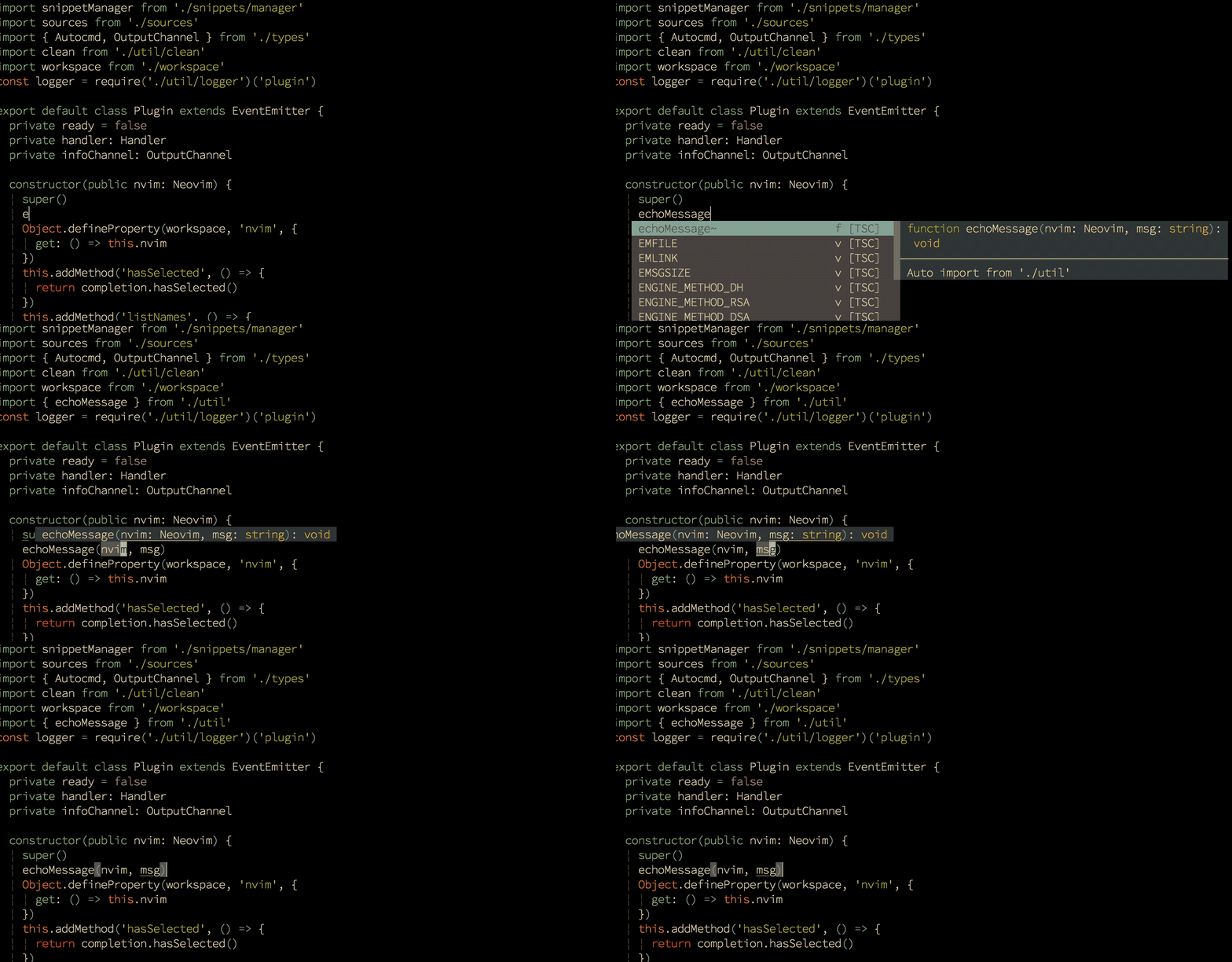 _True snippet and additional text editing support_
Check out [Wiki](https://github.com/neoclide/coc.nvim/wiki), or
[doc/coc.txt](doc/coc.txt) for the Vim interface.
## Quick Start
Install [nodejs](https://nodejs.org/en/download/) when necessary:
```sh
curl -sL install-node.now.sh/lts | bash
```
For [vim-plug](https://github.com/junegunn/vim-plug) users:
```vim
" Use release branch (Recommend)
Plug 'neoclide/coc.nvim', {'branch': 'release'}
" Or build from source code by use yarn: https://yarnpkg.com
Plug 'neoclide/coc.nvim', {'do': 'yarn install --frozen-lockfile'}
```
in your `.vimrc` or `init.vim`, then restart Vim and run `:PlugInstall`.
Checkout [Install
coc.nvim](https://github.com/neoclide/coc.nvim/wiki/Install-coc.nvim) Wiki for
more info.
**Note**: The first time building from source code may be slow.
## Example vim configuration
Configuration is required to make coc.nvim easier to work with, since it
doesn't change your key-mappings or Vim options. This is done as much as
possible to avoid conflict with your other plugins.
**❗️Important**: Some Vim plugins could change key mappings. Please use
`:verbose imap ` to make sure that your keymap has taken effect.
```vim
" TextEdit might fail if hidden is not set.
set hidden
" Some servers have issues with backup files, see #649.
set nobackup
set nowritebackup
" Give more space for displaying messages.
set cmdheight=2
" Having longer updatetime (default is 4000 ms = 4 s) leads to noticeable
" delays and poor user experience.
set updatetime=300
" Don't pass messages to |ins-completion-menu|.
set shortmess+=c
" Always show the signcolumn, otherwise it would shift the text each time
" diagnostics appear/become resolved.
set signcolumn=yes
" Use tab for trigger completion with characters ahead and navigate.
" NOTE: Use command ':verbose imap ' to make sure tab is not mapped by
" other plugin before putting this into your config.
inoremap
\ pumvisible() ? "\" :
\ check_back_space() ? "\" :
\ coc#refresh()
inoremap pumvisible() ? "\" : "\"
function! s:check_back_space() abort
let col = col('.') - 1
return !col || getline('.')[col - 1] =~# '\s'
endfunction
" Use to trigger completion.
inoremap coc#refresh()
" Use to confirm completion, `u` means break undo chain at current
" position. Coc only does snippet and additional edit on confirm.
if has('patch8.1.1068')
" Use `complete_info` if your (Neo)Vim version supports it.
inoremap complete_info()["selected"] != "-1" ? "\" : "\u\"
else
imap pumvisible() ? "\" : "\u\"
endif
" Use `[g` and `]g` to navigate diagnostics
nmap [g (coc-diagnostic-prev)
nmap ]g (coc-diagnostic-next)
" GoTo code navigation.
nmap gd (coc-definition)
nmap gy (coc-type-definition)
nmap gi (coc-implementation)
nmap gr (coc-references)
" Use K to show documentation in preview window.
nnoremap K :call show_documentation()
function! s:show_documentation()
if (index(['vim','help'], &filetype) >= 0)
execute 'h '.expand('')
else
call CocAction('doHover')
endif
endfunction
" Highlight the symbol and its references when holding the cursor.
autocmd CursorHold * silent call CocActionAsync('highlight')
" Symbol renaming.
nmap rn (coc-rename)
" Formatting selected code.
xmap f (coc-format-selected)
nmap f (coc-format-selected)
augroup mygroup
autocmd!
" Setup formatexpr specified filetype(s).
autocmd FileType typescript,json setl formatexpr=CocAction('formatSelected')
" Update signature help on jump placeholder.
autocmd User CocJumpPlaceholder call CocActionAsync('showSignatureHelp')
augroup end
" Applying codeAction to the selected region.
" Example: `aap` for current paragraph
xmap a (coc-codeaction-selected)
nmap a (coc-codeaction-selected)
" Remap keys for applying codeAction to the current line.
nmap ac (coc-codeaction)
" Apply AutoFix to problem on the current line.
nmap qf (coc-fix-current)
" Introduce function text object
" NOTE: Requires 'textDocument.documentSymbol' support from the language server.
xmap if (coc-funcobj-i)
xmap af (coc-funcobj-a)
omap if (coc-funcobj-i)
omap af (coc-funcobj-a)
" Use for selections ranges.
" NOTE: Requires 'textDocument/selectionRange' support from the language server.
" coc-tsserver, coc-python are the examples of servers that support it.
nmap (coc-range-select)
xmap (coc-range-select)
" Add `:Format` command to format current buffer.
command! -nargs=0 Format :call CocAction('format')
" Add `:Fold` command to fold current buffer.
command! -nargs=? Fold :call CocAction('fold', )
" Add `:OR` command for organize imports of the current buffer.
command! -nargs=0 OR :call CocAction('runCommand', 'editor.action.organizeImport')
" Add (Neo)Vim's native statusline support.
" NOTE: Please see `:h coc-status` for integrations with external plugins that
" provide custom statusline: lightline.vim, vim-airline.
set statusline^=%{coc#status()}%{get(b:,'coc_current_function','')}
" Mappings using CoCList:
" Show all diagnostics.
nnoremap a :CocList diagnostics
" Manage extensions.
nnoremap e :CocList extensions
" Show commands.
nnoremap c :CocList commands
" Find symbol of current document.
nnoremap o :CocList outline
" Search workspace symbols.
nnoremap s :CocList -I symbols
" Do default action for next item.
nnoremap j :CocNext
" Do default action for previous item.
nnoremap k :CocPrev
" Resume latest coc list.
nnoremap p :CocListResume
```
## Articles
- [coc.nvim 插件体系介绍](https://zhuanlan.zhihu.com/p/65524706)
- [CocList 入坑指南](https://zhuanlan.zhihu.com/p/71846145)
- [Create coc.nvim extension to improve Vim
experience](https://medium.com/@chemzqm/create-coc-nvim-extension-to-improve-vim-experience-4461df269173)
## Trouble shooting
Try these steps when you have problem with coc.nvim.
- Make sure your Vim version >= 8.0 by command `:version`.
- If service failed to start, use command `:CocInfo` or `:checkhealth` on Neovim.
- Checkout the log of coc.nvim by command `:CocOpenLog`.
- When you have issues with the language server, it's recommended to [checkout
the output](https://github.com/neoclide/coc.nvim/wiki/Debug-language-server#using-output-channel).
## Feedback
- If you think Coc is useful, consider giving it a star.
- If you have a question, [ask on gitter](https://gitter.im/neoclide/coc.nvim)
- 中文用户请到 [中文 gitter](https://gitter.im/neoclide/coc-cn) 讨论
- If something is not working, [create an
issue](https://github.com/neoclide/coc.nvim/issues/new).
_True snippet and additional text editing support_
Check out [Wiki](https://github.com/neoclide/coc.nvim/wiki), or
[doc/coc.txt](doc/coc.txt) for the Vim interface.
## Quick Start
Install [nodejs](https://nodejs.org/en/download/) when necessary:
```sh
curl -sL install-node.now.sh/lts | bash
```
For [vim-plug](https://github.com/junegunn/vim-plug) users:
```vim
" Use release branch (Recommend)
Plug 'neoclide/coc.nvim', {'branch': 'release'}
" Or build from source code by use yarn: https://yarnpkg.com
Plug 'neoclide/coc.nvim', {'do': 'yarn install --frozen-lockfile'}
```
in your `.vimrc` or `init.vim`, then restart Vim and run `:PlugInstall`.
Checkout [Install
coc.nvim](https://github.com/neoclide/coc.nvim/wiki/Install-coc.nvim) Wiki for
more info.
**Note**: The first time building from source code may be slow.
## Example vim configuration
Configuration is required to make coc.nvim easier to work with, since it
doesn't change your key-mappings or Vim options. This is done as much as
possible to avoid conflict with your other plugins.
**❗️Important**: Some Vim plugins could change key mappings. Please use
`:verbose imap ` to make sure that your keymap has taken effect.
```vim
" TextEdit might fail if hidden is not set.
set hidden
" Some servers have issues with backup files, see #649.
set nobackup
set nowritebackup
" Give more space for displaying messages.
set cmdheight=2
" Having longer updatetime (default is 4000 ms = 4 s) leads to noticeable
" delays and poor user experience.
set updatetime=300
" Don't pass messages to |ins-completion-menu|.
set shortmess+=c
" Always show the signcolumn, otherwise it would shift the text each time
" diagnostics appear/become resolved.
set signcolumn=yes
" Use tab for trigger completion with characters ahead and navigate.
" NOTE: Use command ':verbose imap ' to make sure tab is not mapped by
" other plugin before putting this into your config.
inoremap
\ pumvisible() ? "\" :
\ check_back_space() ? "\" :
\ coc#refresh()
inoremap pumvisible() ? "\" : "\"
function! s:check_back_space() abort
let col = col('.') - 1
return !col || getline('.')[col - 1] =~# '\s'
endfunction
" Use to trigger completion.
inoremap coc#refresh()
" Use to confirm completion, `u` means break undo chain at current
" position. Coc only does snippet and additional edit on confirm.
if has('patch8.1.1068')
" Use `complete_info` if your (Neo)Vim version supports it.
inoremap complete_info()["selected"] != "-1" ? "\" : "\u\"
else
imap pumvisible() ? "\" : "\u\"
endif
" Use `[g` and `]g` to navigate diagnostics
nmap [g (coc-diagnostic-prev)
nmap ]g (coc-diagnostic-next)
" GoTo code navigation.
nmap gd (coc-definition)
nmap gy (coc-type-definition)
nmap gi (coc-implementation)
nmap gr (coc-references)
" Use K to show documentation in preview window.
nnoremap K :call show_documentation()
function! s:show_documentation()
if (index(['vim','help'], &filetype) >= 0)
execute 'h '.expand('')
else
call CocAction('doHover')
endif
endfunction
" Highlight the symbol and its references when holding the cursor.
autocmd CursorHold * silent call CocActionAsync('highlight')
" Symbol renaming.
nmap rn (coc-rename)
" Formatting selected code.
xmap f (coc-format-selected)
nmap f (coc-format-selected)
augroup mygroup
autocmd!
" Setup formatexpr specified filetype(s).
autocmd FileType typescript,json setl formatexpr=CocAction('formatSelected')
" Update signature help on jump placeholder.
autocmd User CocJumpPlaceholder call CocActionAsync('showSignatureHelp')
augroup end
" Applying codeAction to the selected region.
" Example: `aap` for current paragraph
xmap a (coc-codeaction-selected)
nmap a (coc-codeaction-selected)
" Remap keys for applying codeAction to the current line.
nmap ac (coc-codeaction)
" Apply AutoFix to problem on the current line.
nmap qf (coc-fix-current)
" Introduce function text object
" NOTE: Requires 'textDocument.documentSymbol' support from the language server.
xmap if (coc-funcobj-i)
xmap af (coc-funcobj-a)
omap if (coc-funcobj-i)
omap af (coc-funcobj-a)
" Use for selections ranges.
" NOTE: Requires 'textDocument/selectionRange' support from the language server.
" coc-tsserver, coc-python are the examples of servers that support it.
nmap (coc-range-select)
xmap (coc-range-select)
" Add `:Format` command to format current buffer.
command! -nargs=0 Format :call CocAction('format')
" Add `:Fold` command to fold current buffer.
command! -nargs=? Fold :call CocAction('fold', )
" Add `:OR` command for organize imports of the current buffer.
command! -nargs=0 OR :call CocAction('runCommand', 'editor.action.organizeImport')
" Add (Neo)Vim's native statusline support.
" NOTE: Please see `:h coc-status` for integrations with external plugins that
" provide custom statusline: lightline.vim, vim-airline.
set statusline^=%{coc#status()}%{get(b:,'coc_current_function','')}
" Mappings using CoCList:
" Show all diagnostics.
nnoremap a :CocList diagnostics
" Manage extensions.
nnoremap e :CocList extensions
" Show commands.
nnoremap c :CocList commands
" Find symbol of current document.
nnoremap o :CocList outline
" Search workspace symbols.
nnoremap s :CocList -I symbols
" Do default action for next item.
nnoremap j :CocNext
" Do default action for previous item.
nnoremap k :CocPrev
" Resume latest coc list.
nnoremap p :CocListResume
```
## Articles
- [coc.nvim 插件体系介绍](https://zhuanlan.zhihu.com/p/65524706)
- [CocList 入坑指南](https://zhuanlan.zhihu.com/p/71846145)
- [Create coc.nvim extension to improve Vim
experience](https://medium.com/@chemzqm/create-coc-nvim-extension-to-improve-vim-experience-4461df269173)
## Trouble shooting
Try these steps when you have problem with coc.nvim.
- Make sure your Vim version >= 8.0 by command `:version`.
- If service failed to start, use command `:CocInfo` or `:checkhealth` on Neovim.
- Checkout the log of coc.nvim by command `:CocOpenLog`.
- When you have issues with the language server, it's recommended to [checkout
the output](https://github.com/neoclide/coc.nvim/wiki/Debug-language-server#using-output-channel).
## Feedback
- If you think Coc is useful, consider giving it a star.
- If you have a question, [ask on gitter](https://gitter.im/neoclide/coc.nvim)
- 中文用户请到 [中文 gitter](https://gitter.im/neoclide/coc-cn) 讨论
- If something is not working, [create an
issue](https://github.com/neoclide/coc.nvim/issues/new).
 ## License
MIT
## License
MIT