# OpenWrt **Repository Path**: jackwl/OpenWrt ## Basic Information - **Project Name**: OpenWrt - **Description**: No description available - **Primary Language**: Unknown - **License**: MIT - **Default Branch**: main - **Homepage**: None - **GVP Project**: No ## Statistics - **Stars**: 0 - **Forks**: 0 - **Created**: 2023-11-01 - **Last Updated**: 2023-11-01 ## Categories & Tags **Categories**: Uncategorized **Tags**: None ## README

OpenWrt — 多设备固件云编译

[![](https://img.shields.io/badge/-目录:-696969.svg)](#readme) [![](https://img.shields.io/badge/-项目说明-FFFFFF.svg)](#项目说明-) [![](https://img.shields.io/badge/-固件特色-FFFFFF.svg)](#固件特色-) [![](https://img.shields.io/badge/-固件下载-FFFFFF.svg)](#固件下载-) [![](https://img.shields.io/badge/-近期更新-FFFFFF.svg)](#近期更新-) [![](https://img.shields.io/badge/-插件预览-FFFFFF.svg)](#插件预览-) [![](https://img.shields.io/badge/-定制固件-FFFFFF.svg)](#定制固件-) [![](https://img.shields.io/badge/-特别提示-FFFFFF.svg)](#特别提示-) [![](https://img.shields.io/badge/-鸣谢-FFFFFF.svg)](#鸣谢-)
## 项目说明 [![](https://img.shields.io/badge/-项目基本介绍-FFFFFF.svg)](#项目说明-) - 固件来源:[![Lean](https://img.shields.io/badge/Lede-Lean-ff69b4.svg?style=flat&logo=appveyor)](https://github.com/coolsnowwolf/lede) [![P3TERX](https://img.shields.io/badge/OpenWrt-P3TERX-blueviolet.svg?style=flat&logo=appveyor)](https://github.com/P3TERX/Actions-OpenWrt) [![Flippy](https://img.shields.io/badge/Package-Flippy-orange.svg?style=flat&logo=appveyor)](https://github.com/unifreq/openwrt_packit) [![Haiibo](https://img.shields.io/badge/Build-Haiibo-32C955.svg?style=flat&logo=appveyor)](https://github.com/haiibo/OpenWrt) - 项目使用 Github Actions 拉取 [Lean](https://github.com/coolsnowwolf/lede) 的 Openwrt 源码仓库进行云编译 - 固件默认管理地址:`192.168.1.1` 默认用户:`root` 默认密码:`password` - 提供适配于 ARMv8 电视盒子、Rockchip 平台、树莓派以及 X86 平台设备的 OpenWrt 固件 - ARMv8 盒子固件分为 [Mini版](https://github.com/haiibo/OpenWrt/releases/tag/ARMv8_MINI) 和 [Plus版](https://github.com/haiibo/OpenWrt/releases/tag/ARMv8_PLUS),Mini 精简版以科学上网为主,Plus 多功能版插件多适合折腾 - ARMv8 系列固件包含 [F大](https://github.com/unifreq/openwrt_packit) 发布的所有已适配的盒子固件,并提供 Docker 镜像固件[➦使用方法](https://hub.docker.com/r/summary/openwrt-aarch64) - 固件集成的所有 ipk 插件全部打包在 Packages 文件中,可以在 [Releases](https://github.com/haiibo/OpenWrt/releases) 内进行下载 - 项目编译的固件插件为最新版本,最新版插件可能有 BUG,如果之前使用稳定则无需追新 - 第一次使用请采用全新安装,避免出现升级失败以及其他一些可能的 BUG ## 固件特色 [![](https://img.shields.io/badge/-本项目固件特色-FFFFFF.svg)](#固件特色-) 1. 固件每天定时自动编译,以确保获得最新体验 2. 集成部分常用有线、无线、3G / 4G 网卡驱动 3. 集成中文版 netdata 实时监控插件,小白也能轻松看懂系统概况 4. 集成 iStore 应用商店,可根据自己需求自由安装所需插件 5. 集成 Docker 服务,可在 OpenWrt 内自由部署 Docker 应用 6. 集成应用过滤插件,支持游戏、视频、聊天、下载等 APP 过滤 7. 集成在线用户插件,可查看所有在线用户 IP 地址与实时速率等 8. ARMv8 系列固件内置晶晨宝盒,支持在线更新固件及内核等 ## 固件下载 [![](https://img.shields.io/badge/-编译状态及下载链接-FFFFFF.svg)](#固件下载-) 点击下表中 [![](https://img.shields.io/badge/下载-链接-blueviolet.svg?style=flat&logo=hack-the-box)](https://github.com/haiibo/OpenWrt/releases) 即可跳转到该设备固件下载页面 | 平台+设备名称 | 固件编译状态 | 配置文件 | 固件下载 | | :-------------: | :-------------: | :-------------: | :-------------: | | [![](https://img.shields.io/badge/OpenWrt-X86_64位-32C955.svg?logo=openwrt)](https://github.com/haiibo/OpenWrt/blob/main/.github/workflows/X86_64-OpenWrt.yml) | [![](https://github.com/haiibo/OpenWrt/actions/workflows/X86_64-OpenWrt.yml/badge.svg)](https://github.com/haiibo/OpenWrt/actions/workflows/X86_64-OpenWrt.yml) | [![](https://img.shields.io/badge/编译-配置-orange.svg?logo=apache-spark)](https://github.com/haiibo/OpenWrt/blob/main/configs/x86_64.config) | [![](https://img.shields.io/badge/下载-链接-blueviolet.svg?logo=hack-the-box)](https://github.com/haiibo/OpenWrt/releases/tag/X86_64) | | [![](https://img.shields.io/badge/OpenWrt-ARMv8_Mini-32C955.svg?logo=openwrt)](https://github.com/haiibo/OpenWrt/blob/main/.github/workflows/ARMv8-Mini-OpenWrt.yml) | [![](https://github.com/haiibo/OpenWrt/actions/workflows/ARMv8-Mini-OpenWrt.yml/badge.svg)](https://github.com/haiibo/OpenWrt/actions/workflows/ARMv8-Mini-OpenWrt.yml) | [![](https://img.shields.io/badge/编译-配置-orange.svg?logo=apache-spark)](https://github.com/haiibo/OpenWrt/blob/main/configs/armv8-mini.config) | [![](https://img.shields.io/badge/下载-链接-blueviolet.svg?logo=hack-the-box)](https://github.com/haiibo/OpenWrt/releases/tag/ARMv8_MINI) | | [![](https://img.shields.io/badge/OpenWrt-ARMv8_Plus-32C955.svg?logo=openwrt)](https://github.com/haiibo/OpenWrt/blob/main/.github/workflows/ARMv8-Plus-OpenWrt.yml) | [![](https://github.com/haiibo/OpenWrt/actions/workflows/ARMv8-Plus-OpenWrt.yml/badge.svg)](https://github.com/haiibo/OpenWrt/actions/workflows/ARMv8-Plus-OpenWrt.yml) | [![](https://img.shields.io/badge/编译-配置-orange.svg?logo=apache-spark)](https://github.com/haiibo/OpenWrt/blob/main/configs/armv8-plus.config) | [![](https://img.shields.io/badge/下载-链接-blueviolet.svg?logo=hack-the-box)](https://github.com/haiibo/OpenWrt/releases/tag/ARMv8_PLUS) | | [![](https://img.shields.io/badge/OpenWrt-Rockchip_平台-32C955.svg?logo=openwrt)](https://github.com/haiibo/OpenWrt/blob/main/.github/workflows/Rockchip-OpenWrt.yml) | [![](https://github.com/haiibo/OpenWrt/actions/workflows/Rockchip-OpenWrt.yml/badge.svg)](https://github.com/haiibo/OpenWrt/actions/workflows/Rockchip-OpenWrt.yml) | [![](https://img.shields.io/badge/编译-配置-orange.svg?logo=apache-spark)](https://github.com/haiibo/OpenWrt/blob/main/configs/rockchip.config) | [![](https://img.shields.io/badge/下载-链接-blueviolet.svg?logo=hack-the-box)](https://github.com/haiibo/OpenWrt/releases/tag/Rockchip) | | [![](https://img.shields.io/badge/OpenWrt-树莓派_4B-32C955.svg?logo=openwrt)](https://github.com/haiibo/OpenWrt/blob/main/.github/workflows/RaspberryPi4-OpenWrt.yml) | [![](https://github.com/haiibo/OpenWrt/actions/workflows/RaspberryPi4-OpenWrt.yml/badge.svg)](https://github.com/haiibo/OpenWrt/actions/workflows/RaspberryPi4-OpenWrt.yml) | [![](https://img.shields.io/badge/编译-配置-orange.svg?logo=apache-spark)](https://github.com/haiibo/OpenWrt/blob/main/configs/rpi4.config) | [![](https://img.shields.io/badge/下载-链接-blueviolet.svg?logo=hack-the-box)](https://github.com/haiibo/OpenWrt/releases/tag/RaspberryPi4) | | [![](https://img.shields.io/badge/OpenWrt-树莓派_3B/3B+-32C955.svg?logo=openwrt)](https://github.com/haiibo/OpenWrt/blob/main/.github/workflows/RaspberryPi3-OpenWrt.yml) | [![](https://github.com/haiibo/OpenWrt/actions/workflows/RaspberryPi3-OpenWrt.yml/badge.svg)](https://github.com/haiibo/OpenWrt/actions/workflows/RaspberryPi3-OpenWrt.yml) | [![](https://img.shields.io/badge/编译-配置-orange.svg?logo=apache-spark)](https://github.com/haiibo/OpenWrt/blob/main/configs/rpi3.config) | [![](https://img.shields.io/badge/下载-链接-blueviolet.svg?logo=hack-the-box)](https://github.com/haiibo/OpenWrt/releases/tag/RaspberryPi3) | ## 近期更新 [![](https://img.shields.io/badge/-近期固件更新-FFFFFF.svg)](#近期更新-) 🤣努力修复中…… ## 插件预览 [![](https://img.shields.io/badge/-固件插件及功能预览-FFFFFF.svg)](#插件预览-)












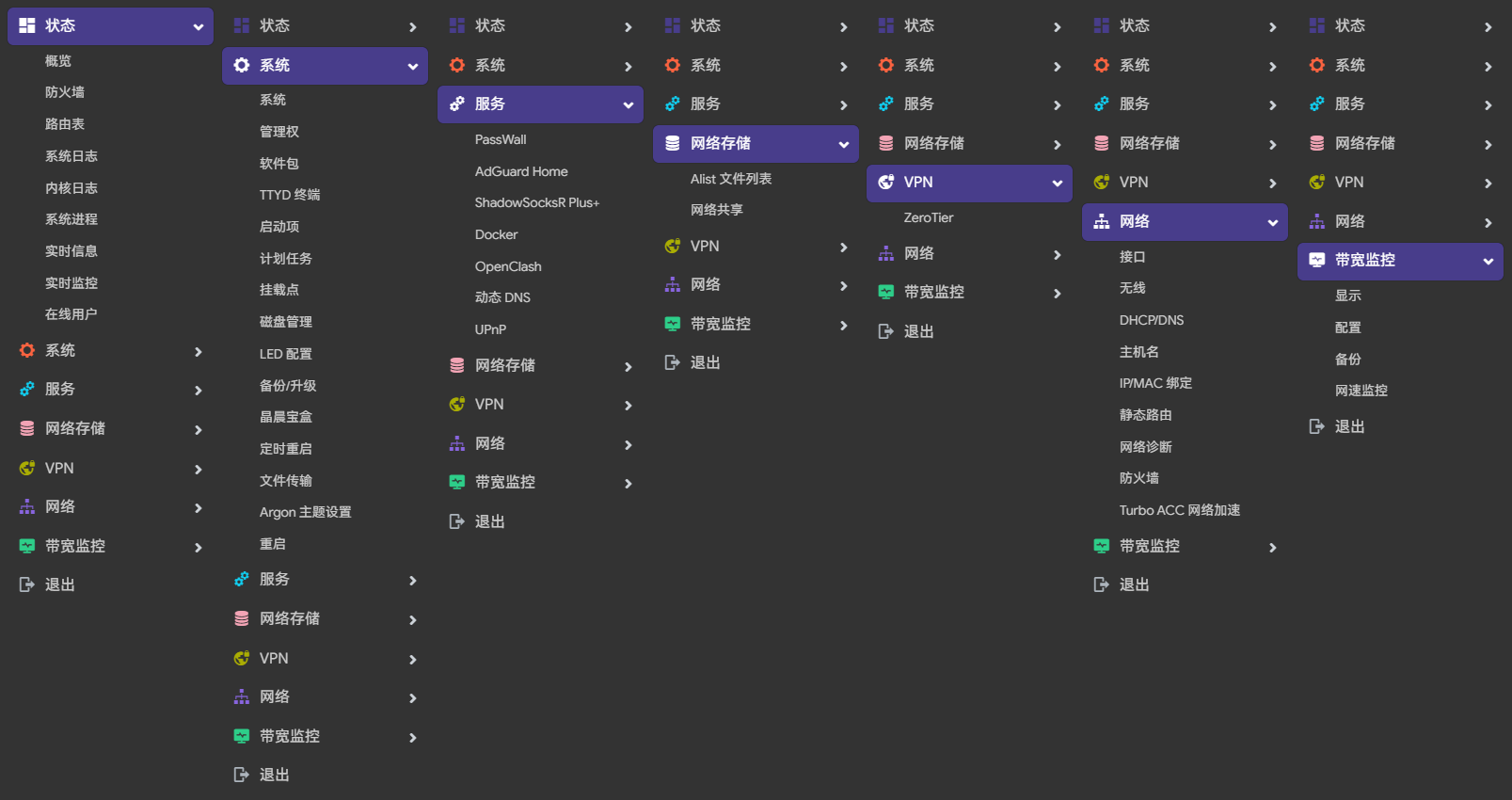
 ARMv8 盒子 Mini 精简版本插件预览
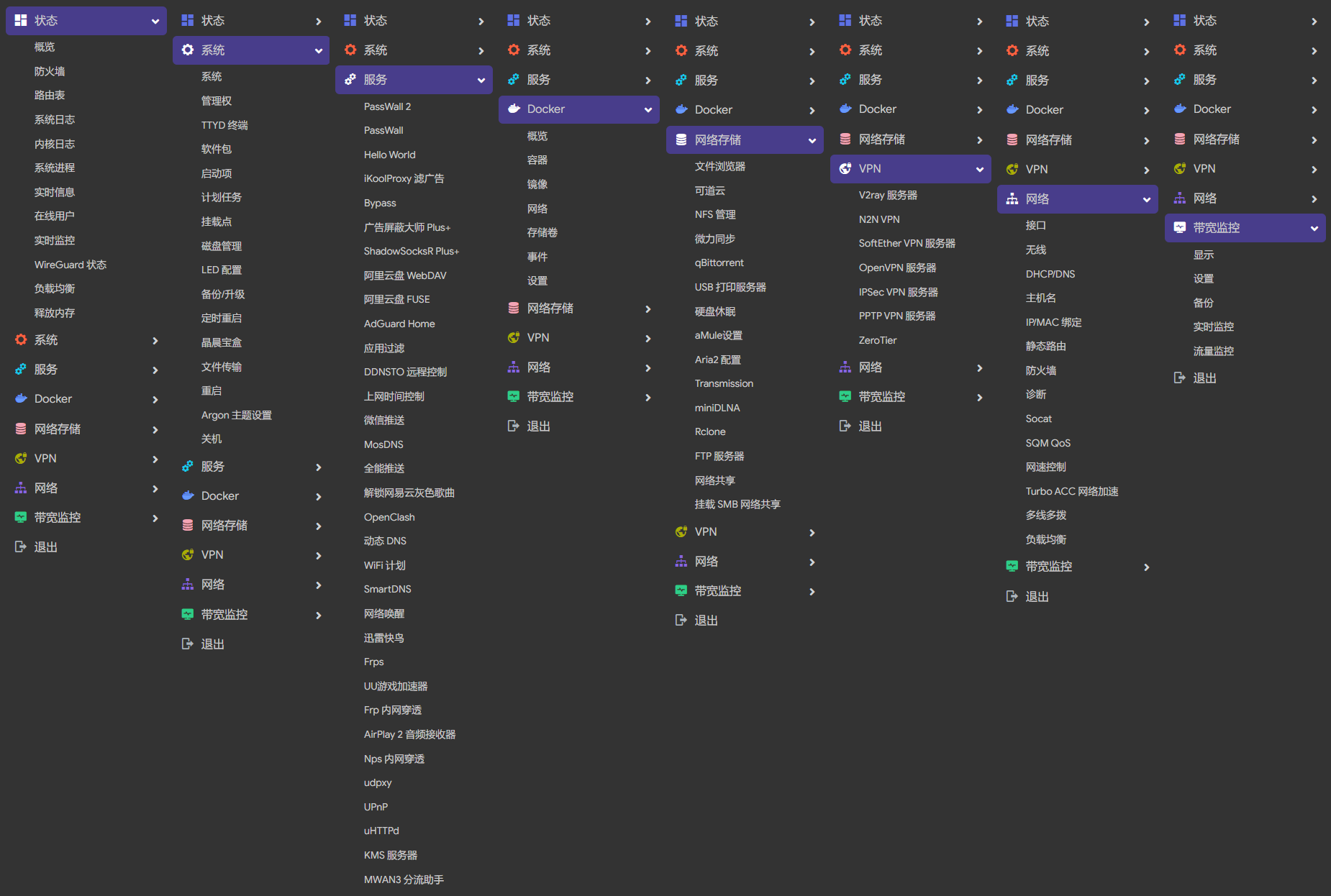
 ARMv8 盒子 Plus 多功能版插件预览
 X86、R2S、R4S 等软路由插件预览
├── 状态  ├── 概况
 ├── 防火墙
 ├── 路由表
 ├── 系统日志
 ├── 内核日志
 ├── 系统进程
 ├── 实时信息
 ├── 实时监控
 ├── 在线用户
 ├── WireGuard 状态
 ├── 负载均衡
 └── 释放内存
├── 系统  ├── 系统
 ├── 管理权
 ├── TTYD 终端
 ├── 软件包
 ├── 启动项
 ├── 计划任务
 ├── 挂载点
 ├── 磁盘管理
 ├── LED 配置
 ├── 备份/升级
 ├── 定时重启
 ├── 文件传输
 ├── Argon 主题设置
 ├── 重启
 └── 关机
├── 服务  ├── PassWall
 ├── PassWall2
 ├── Hello World
 ├── iKoolProxy 滤广告
 ├── 广告屏蔽大师 Plus+
 ├── AdGuard Home
 ├── ShadowSocksR Plus+
 ├── 应用过滤
 ├── 微信推送
 ├── 上网时间控制
 ├── 全能推送
 ├── MosDNS
 ├── OpenClash
 ├── 解锁网易云灰色歌曲
 ├── 动态 DNS
 ├── SmartDNS
 ├── 迅雷快鸟
 ├── 网络唤醒
 ├── UU游戏加速器
 ├── Frp 内网穿透
 ├── Frps
 ├── AirPlay 2 音频接收
 ├── UPnP
 ├── KMS 服务器
 ├── uHTTPd
 ├── udpxy
 ├── Nps 内网穿透
 └── MWAN3 分流助手
├── Docker  ├── 概览
 ├── 容器
 ├── 镜像
 ├── 网络
 ├── 存储卷
 ├── 事件
 └── 设置
├── 网络存储  ├── 文件浏览器
 ├── 可道云
 ├── NFS 管理
 ├── 微力同步
 ├── Alist 文件列表
 ├── qBittorrent
 ├── USB 打印服务器
 ├── 硬盘休眠
 ├── 挂载 SMB 网络共享
 ├── 网络共享
 ├── FTP 服务器
 ├── Rclone
 ├── Aria2 配置
 ├── miniDLNA
 └── Transmission
├── VPN  ├── V2ray 服务器
 ├── N2N v2 VPN
 ├── SoftEther VPN 服务器
 ├── OpenVPN 服务器
 ├── PPTP VPN 服务器
 ├── IPSec VPN 服务器
 └── ZeroTier
├── 网络  ├── 接口
 ├── DHCP/DNS
 ├── 主机名
 ├── IP/MAC 绑定
 ├── 静态路由
 ├── 防火墙
 ├── 诊断
 ├── Socat
 ├── SQM QoS
 ├── 网速控制
 ├── 多线多拨
 ├── 负载均衡
 └── Turbo ACC 网络加速
├── 带宽监控  ├── 显示
 ├── 配置
 ├── 备份
 ├── 网速监控
 └── 实时流量监测
 └── 退出
## 定制固件 [![](https://img.shields.io/badge/-项目基本编译教程-FFFFFF.svg)](#定制固件-) 1. 首先要登录 Gihub 账号,然后 Fork 此项目到你自己的 Github 仓库 2. 修改 `configs` 目录对应文件添加或删除插件,或者上传自己的 `xx.config` 配置文件 3. 插件对应名称及功能请参考恩山网友帖子:[Applications 添加插件应用说明](https://www.right.com.cn/forum/thread-3682029-1-1.html) 4. 如需修改默认 IP、添加或删除插件包以及一些其他设置请在 `diy-script.sh` 文件内修改 5. 添加或修改 `xx.yml` 文件,最后点击 `Actions` 运行要编译的 `workflow` 即可开始编译 6. 编译大概需要3-5小时,编译完成后在仓库主页 [Releases](https://github.com/haiibo/OpenWrt/releases) 对应 Tag 标签内下载固件
 如果你觉得修改 config 文件麻烦,那么你可以点击此处尝试本地提取 1. 首先装好 Linux 系统,推荐 Debian 11 或 Ubuntu LTS 2. 安装编译依赖环境 ```bash sudo apt update -y sudo apt full-upgrade -y sudo apt install -y ack antlr3 asciidoc autoconf automake autopoint binutils bison build-essential \ bzip2 ccache cmake cpio curl device-tree-compiler fastjar flex gawk gettext gcc-multilib g++-multilib \ git gperf haveged help2man intltool libc6-dev-i386 libelf-dev libglib2.0-dev libgmp3-dev libltdl-dev \ libmpc-dev libmpfr-dev libncurses5-dev libncursesw5-dev libreadline-dev libssl-dev libtool lrzsz \ mkisofs msmtp nano ninja-build p7zip p7zip-full patch pkgconf python2.7 python3 python3-pyelftools \ libpython3-dev qemu-utils rsync scons squashfs-tools subversion swig texinfo uglifyjs upx-ucl unzip \ vim wget xmlto xxd zlib1g-dev ``` 3. 下载源代码,更新 feeds 并安装到本地 ```bash git clone https://github.com/coolsnowwolf/lede cd lede ./scripts/feeds update -a ./scripts/feeds install -a ``` 4. 复制 diy-script.sh 文件内所有内容到命令行,添加自定义插件和自定义设置 5. 命令行输入 `make menuconfig` 选择配置,选好配置后导出差异部分到 seed.config 文件 ```bash make defconfig ./scripts/diffconfig.sh > seed.config ``` 7. 命令行输入 `cat seed.config` 查看这个文件,也可以用文本编辑器打开 8. 复制 seed.config 文件内所有内容到 configs 目录对应文件中覆盖就可以了 **如果看不懂编译界面可以参考 YouTube 视频:[软路由固件 OpenWrt 编译界面设置](https://www.youtube.com/watch?v=jEE_J6-4E3Y&list=WL&index=7)**
## 特别提示 [![](https://img.shields.io/badge/-个人免责声明-FFFFFF.svg)](#特别提示-) - **因精力有限不提供任何技术支持和教程等相关问题解答,不保证完全无 BUG!** - **本人不对任何人因使用本固件所遭受的任何理论或实际的损失承担责任!** - **本固件禁止用于任何商业用途,请务必严格遵守国家互联网使用相关法律规定!** - **请务必遵从 “不涉及政治,不涉及宗教,不涉及黄赌毒” 三不原则!** ## 鸣谢 [![](https://img.shields.io/badge/-跪谢各大佬-FFFFFF.svg)](#鸣谢-) | [ImmortalWrt](https://github.com/immortalwrt) | [coolsnowwolf](https://github.com/coolsnowwolf) | [P3TERX](https://github.com/P3TERX) | [Flippy](https://github.com/unifreq) | | :-------------: | :-------------: | :-------------: | :-------------: | | | | | | | [Ophub](https://github.com/ophub) | [SuLingGG](https://github.com/SuLingGG) | [QiuSimons](https://github.com/QiuSimons) | [IvanSolis1989](https://github.com/IvanSolis1989) | | | | | |