# claude-howto
**Repository Path**: jerrycell/claude-howto
## Basic Information
- **Project Name**: claude-howto
- **Description**: No description available
- **Primary Language**: Unknown
- **License**: MIT
- **Default Branch**: main
- **Homepage**: None
- **GVP Project**: No
## Statistics
- **Stars**: 0
- **Forks**: 0
- **Created**: 2026-03-30
- **Last Updated**: 2026-04-08
## Categories & Tags
**Categories**: Uncategorized
**Tags**: None
## README
[](https://github.com/luongnv89/claude-howto/stargazers)
[](https://github.com/luongnv89/claude-howto/network/members)
[](LICENSE)
[](CHANGELOG.md)
[](https://code.claude.com)
🌐 **Language / Ngôn ngữ / 语言:** [English](README.md) | [Tiếng Việt](vi/README.md) | [中文](zh/README.md)
# Master Claude Code in a Weekend
Go from typing `claude` to orchestrating agents, hooks, skills, and MCP servers — with visual tutorials, copy-paste templates, and a guided learning path.
**[Get Started in 15 Minutes](#get-started-in-15-minutes)** | **[Find Your Level](#not-sure-where-to-start)** | **[Browse the Feature Catalog](CATALOG.md)**
---
## Table of Contents
- [The Problem](#the-problem)
- [How Claude How To Fixes This](#how-claude-how-to-fixes-this)
- [How It Works](#how-it-works)
- [Not Sure Where to Start?](#not-sure-where-to-start)
- [Get Started in 15 Minutes](#get-started-in-15-minutes)
- [What Can You Build With This?](#what-can-you-build-with-this)
- [FAQ](#faq)
- [Contributing](#contributing)
- [License](#license)
---
## The Problem
You installed Claude Code. You ran a few prompts. Now what?
- **The official docs describe features — but don't show you how to combine them.** You know slash commands exist, but not how to chain them with hooks, memory, and subagents into a workflow that actually saves hours.
- **There's no clear learning path.** Should you learn MCP before hooks? Skills before subagents? You end up skimming everything and mastering nothing.
- **Examples are too basic.** A "hello world" slash command doesn't help you build a production code review pipeline that uses memory, delegates to specialized agents, and runs security scans automatically.
You're leaving 90% of Claude Code's power on the table — and you don't know what you don't know.
---
## How Claude How To Fixes This
This isn't another feature reference. It's a **structured, visual, example-driven guide** that teaches you to use every Claude Code feature with real-world templates you can copy into your project today.
| | Official Docs | This Guide |
|--|---------------|------------|
| **Format** | Reference documentation | Visual tutorials with Mermaid diagrams |
| **Depth** | Feature descriptions | How it works under the hood |
| **Examples** | Basic snippets | Production-ready templates you use immediately |
| **Structure** | Feature-organized | Progressive learning path (beginner to advanced) |
| **Onboarding** | Self-directed | Guided roadmap with time estimates |
| **Self-Assessment** | None | Interactive quizzes to find your gaps and build a personalized path |
### What you get:
- **10 tutorial modules** covering every Claude Code feature — from slash commands to custom agent teams
- **Copy-paste configs** — slash commands, CLAUDE.md templates, hook scripts, MCP configs, subagent definitions, and full plugin bundles
- **Mermaid diagrams** showing how each feature works internally, so you understand *why*, not just *how*
- **A guided learning path** that takes you from beginner to power user in 11-13 hours
- **Built-in self-assessment** — run `/self-assessment` or `/lesson-quiz hooks` directly in Claude Code to identify gaps
**[Start the Learning Path ->](LEARNING-ROADMAP.md)**
---
## How It Works
### 1. Find your level
Take the [self-assessment quiz](LEARNING-ROADMAP.md#-find-your-level) or run `/self-assessment` in Claude Code. Get a personalized roadmap based on what you already know.
### 2. Follow the guided path
Work through 10 modules in order — each builds on the last. Copy templates directly into your project as you learn.
### 3. Combine features into workflows
The real power is in combining features. Learn to wire slash commands + memory + subagents + hooks into automated pipelines that handle code reviews, deployments, and documentation generation.
### 4. Test your understanding
Run `/lesson-quiz [topic]` after each module. The quiz pinpoints what you missed so you can fill gaps fast.
**[Get Started in 15 Minutes](#get-started-in-15-minutes)**
---
## Trusted by 21,800+ Developers
- **21,800+ GitHub stars** from developers who use Claude Code daily
- **2,585+ forks** — teams adapting this guide for their own workflows
- **Actively maintained** — synced with every Claude Code release (latest: v2.3.0, April 2026)
- **Community-driven** — contributions from developers who share their real-world configurations
[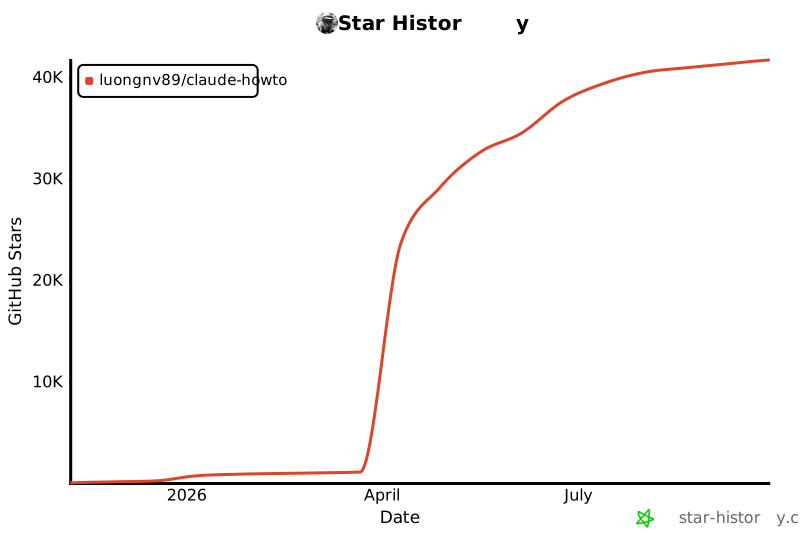](https://star-history.com/#luongnv89/claude-howto&Date)
---
## Not Sure Where to Start?
Take the self-assessment or pick your level:
| Level | You can... | Start here | Time |
|-------|-----------|------------|------|
| **Beginner** | Start Claude Code and chat | [Slash Commands](01-slash-commands/) | ~2.5 hours |
| **Intermediate** | Use CLAUDE.md and custom commands | [Skills](03-skills/) | ~3.5 hours |
| **Advanced** | Configure MCP servers and hooks | [Advanced Features](09-advanced-features/) | ~5 hours |
**Full learning path with all 10 modules:**
| Order | Module | Level | Time |
|-------|--------|-------|------|
| 1 | [Slash Commands](01-slash-commands/) | Beginner | 30 min |
| 2 | [Memory](02-memory/) | Beginner+ | 45 min |
| 3 | [Checkpoints](08-checkpoints/) | Intermediate | 45 min |
| 4 | [CLI Basics](10-cli/) | Beginner+ | 30 min |
| 5 | [Skills](03-skills/) | Intermediate | 1 hour |
| 6 | [Hooks](06-hooks/) | Intermediate | 1 hour |
| 7 | [MCP](05-mcp/) | Intermediate+ | 1 hour |
| 8 | [Subagents](04-subagents/) | Intermediate+ | 1.5 hours |
| 9 | [Advanced Features](09-advanced-features/) | Advanced | 2-3 hours |
| 10 | [Plugins](07-plugins/) | Advanced | 2 hours |
**[Complete Learning Roadmap ->](LEARNING-ROADMAP.md)**
---
## Get Started in 15 Minutes
```bash
# 1. Clone the guide
git clone https://github.com/luongnv89/claude-howto.git
cd claude-howto
# 2. Copy your first slash command
mkdir -p /path/to/your-project/.claude/commands
cp 01-slash-commands/optimize.md /path/to/your-project/.claude/commands/
# 3. Try it — in Claude Code, type:
# /optimize
# 4. Ready for more? Set up project memory:
cp 02-memory/project-CLAUDE.md /path/to/your-project/CLAUDE.md
# 5. Install a skill:
cp -r 03-skills/code-review ~/.claude/skills/
```
Want the full setup? Here's the **1-hour essential setup**:
```bash
# Slash commands (15 min)
cp 01-slash-commands/*.md .claude/commands/
# Project memory (15 min)
cp 02-memory/project-CLAUDE.md ./CLAUDE.md
# Install a skill (15 min)
cp -r 03-skills/code-review ~/.claude/skills/
# Weekend goal: add hooks, subagents, MCP, and plugins
# Follow the learning path for guided setup
```
**[View the Full Installation Reference](#get-started-in-15-minutes)**
---
## What Can You Build With This?
| Use Case | Features You'll Combine |
|----------|------------------------|
| **Automated Code Review** | Slash Commands + Subagents + Memory + MCP |
| **Team Onboarding** | Memory + Slash Commands + Plugins |
| **CI/CD Automation** | CLI Reference + Hooks + Background Tasks |
| **Documentation Generation** | Skills + Subagents + Plugins |
| **Security Audits** | Subagents + Skills + Hooks (read-only mode) |
| **DevOps Pipelines** | Plugins + MCP + Hooks + Background Tasks |
| **Complex Refactoring** | Checkpoints + Planning Mode + Hooks |
---
## FAQ
**Is this free?**
Yes. MIT licensed, free forever. Use it in personal projects, at work, in your team — no restrictions beyond including the license notice.
**Is this maintained?**
Actively. The guide is synced with every Claude Code release. Current version: v2.3.0 (April 2026), compatible with Claude Code 2.1+.
**How is this different from the official docs?**
The official docs are a feature reference. This guide is a tutorial with diagrams, production-ready templates, and a progressive learning path. They complement each other — start here to learn, reference the docs when you need specifics.
**How long does it take to go through everything?**
11-13 hours for the full path. But you'll get immediate value in 15 minutes — just copy a slash command template and try it.
**Can I use this with Claude Sonnet / Haiku / Opus?**
Yes. All templates work with Claude Sonnet 4.6, Claude Opus 4.6, and Claude Haiku 4.5.
**Can I contribute?**
Absolutely. See [CONTRIBUTING.md](CONTRIBUTING.md) for guidelines. We welcome new examples, bug fixes, documentation improvements, and community templates.
**Can I read this offline?**
Yes. Run `uv run scripts/build_epub.py` to generate an EPUB ebook with all content and rendered diagrams.
---
## Start Mastering Claude Code Today
You already have Claude Code installed. The only thing between you and 10x productivity is knowing how to use it. This guide gives you the structured path, the visual explanations, and the copy-paste templates to get there.
MIT licensed. Free forever. Clone it, fork it, make it yours.
**[Start the Learning Path ->](LEARNING-ROADMAP.md)** | **[Browse the Feature Catalog](CATALOG.md)** | **[Get Started in 15 Minutes](#get-started-in-15-minutes)**
---
Quick Navigation — All Features
| Feature | Description | Folder |
|---------|-------------|--------|
| **Feature Catalog** | Complete reference with installation commands | [CATALOG.md](CATALOG.md) |
| **Slash Commands** | User-invoked shortcuts | [01-slash-commands/](01-slash-commands/) |
| **Memory** | Persistent context | [02-memory/](02-memory/) |
| **Skills** | Reusable capabilities | [03-skills/](03-skills/) |
| **Subagents** | Specialized AI assistants | [04-subagents/](04-subagents/) |
| **MCP Protocol** | External tool access | [05-mcp/](05-mcp/) |
| **Hooks** | Event-driven automation | [06-hooks/](06-hooks/) |
| **Plugins** | Bundled features | [07-plugins/](07-plugins/) |
| **Checkpoints** | Session snapshots & rewind | [08-checkpoints/](08-checkpoints/) |
| **Advanced Features** | Planning, thinking, background tasks | [09-advanced-features/](09-advanced-features/) |
| **CLI Reference** | Commands, flags, and options | [10-cli/](10-cli/) |
| **Blog Posts** | Real-world usage examples | [Blog Posts](https://medium.com/@luongnv89) |
Feature Comparison
| Feature | Invocation | Persistence | Best For |
|---------|-----------|------------|----------|
| **Slash Commands** | Manual (`/cmd`) | Session only | Quick shortcuts |
| **Memory** | Auto-loaded | Cross-session | Long-term learning |
| **Skills** | Auto-invoked | Filesystem | Automated workflows |
| **Subagents** | Auto-delegated | Isolated context | Task distribution |
| **MCP Protocol** | Auto-queried | Real-time | Live data access |
| **Hooks** | Event-triggered | Configured | Automation & validation |
| **Plugins** | One command | All features | Complete solutions |
| **Checkpoints** | Manual/Auto | Session-based | Safe experimentation |
| **Planning Mode** | Manual/Auto | Plan phase | Complex implementations |
| **Background Tasks** | Manual | Task duration | Long-running operations |
| **CLI Reference** | Terminal commands | Session/Script | Automation & scripting |
Installation Quick Reference
```bash
# Slash Commands
cp 01-slash-commands/*.md .claude/commands/
# Memory
cp 02-memory/project-CLAUDE.md ./CLAUDE.md
# Skills
cp -r 03-skills/code-review ~/.claude/skills/
# Subagents
cp 04-subagents/*.md .claude/agents/
# MCP
export GITHUB_TOKEN="token"
claude mcp add github -- npx -y @modelcontextprotocol/server-github
# Hooks
mkdir -p ~/.claude/hooks
cp 06-hooks/*.sh ~/.claude/hooks/
chmod +x ~/.claude/hooks/*.sh
# Plugins
/plugin install pr-review
# Checkpoints (auto-enabled, configure in settings)
# See 08-checkpoints/README.md
# Advanced Features (configure in settings)
# See 09-advanced-features/config-examples.json
# CLI Reference (no installation needed)
# See 10-cli/README.md for usage examples
```
01. Slash Commands
**Location**: [01-slash-commands/](01-slash-commands/)
**What**: User-invoked shortcuts stored as Markdown files
**Examples**:
- `optimize.md` - Code optimization analysis
- `pr.md` - Pull request preparation
- `generate-api-docs.md` - API documentation generator
**Installation**:
```bash
cp 01-slash-commands/*.md /path/to/project/.claude/commands/
```
**Usage**:
```
/optimize
/pr
/generate-api-docs
```
**Learn More**: [Discovering Claude Code Slash Commands](https://medium.com/@luongnv89/discovering-claude-code-slash-commands-cdc17f0dfb29)
02. Memory
**Location**: [02-memory/](02-memory/)
**What**: Persistent context across sessions
**Examples**:
- `project-CLAUDE.md` - Team-wide project standards
- `directory-api-CLAUDE.md` - Directory-specific rules
- `personal-CLAUDE.md` - Personal preferences
**Installation**:
```bash
# Project memory
cp 02-memory/project-CLAUDE.md /path/to/project/CLAUDE.md
# Directory memory
cp 02-memory/directory-api-CLAUDE.md /path/to/project/src/api/CLAUDE.md
# Personal memory
cp 02-memory/personal-CLAUDE.md ~/.claude/CLAUDE.md
```
**Usage**: Automatically loaded by Claude
03. Skills
**Location**: [03-skills/](03-skills/)
**What**: Reusable, auto-invoked capabilities with instructions and scripts
**Examples**:
- `code-review/` - Comprehensive code review with scripts
- `brand-voice/` - Brand voice consistency checker
- `doc-generator/` - API documentation generator
**Installation**:
```bash
# Personal skills
cp -r 03-skills/code-review ~/.claude/skills/
# Project skills
cp -r 03-skills/code-review /path/to/project/.claude/skills/
```
**Usage**: Automatically invoked when relevant
04. Subagents
**Location**: [04-subagents/](04-subagents/)
**What**: Specialized AI assistants with isolated contexts and custom prompts
**Examples**:
- `code-reviewer.md` - Comprehensive code quality analysis
- `test-engineer.md` - Test strategy and coverage
- `documentation-writer.md` - Technical documentation
- `secure-reviewer.md` - Security-focused review (read-only)
- `implementation-agent.md` - Full feature implementation
**Installation**:
```bash
cp 04-subagents/*.md /path/to/project/.claude/agents/
```
**Usage**: Automatically delegated by main agent
05. MCP Protocol
**Location**: [05-mcp/](05-mcp/)
**What**: Model Context Protocol for accessing external tools and APIs
**Examples**:
- `github-mcp.json` - GitHub integration
- `database-mcp.json` - Database queries
- `filesystem-mcp.json` - File operations
- `multi-mcp.json` - Multiple MCP servers
**Installation**:
```bash
# Set environment variables
export GITHUB_TOKEN="your_token"
export DATABASE_URL="postgresql://..."
# Add MCP server via CLI
claude mcp add github -- npx -y @modelcontextprotocol/server-github
# Or add to project .mcp.json manually (see 05-mcp/ for examples)
```
**Usage**: MCP tools are automatically available to Claude once configured
06. Hooks
**Location**: [06-hooks/](06-hooks/)
**What**: Event-driven shell commands that execute automatically in response to Claude Code events
**Examples**:
- `format-code.sh` - Auto-format code before writing
- `pre-commit.sh` - Run tests before commits
- `security-scan.sh` - Scan for security issues
- `log-bash.sh` - Log all bash commands
- `validate-prompt.sh` - Validate user prompts
- `notify-team.sh` - Send notifications on events
**Installation**:
```bash
mkdir -p ~/.claude/hooks
cp 06-hooks/*.sh ~/.claude/hooks/
chmod +x ~/.claude/hooks/*.sh
```
Configure hooks in `~/.claude/settings.json`:
```json
{
"hooks": {
"PreToolUse": [{
"matcher": "Write",
"hooks": ["~/.claude/hooks/format-code.sh"]
}],
"PostToolUse": [{
"matcher": "Write",
"hooks": ["~/.claude/hooks/security-scan.sh"]
}]
}
}
```
**Usage**: Hooks execute automatically on events
**Hook Types** (4 types, 25 events):
- **Tool Hooks**: `PreToolUse`, `PostToolUse`, `PostToolUseFailure`, `PermissionRequest`
- **Session Hooks**: `SessionStart`, `SessionEnd`, `Stop`, `StopFailure`, `SubagentStart`, `SubagentStop`
- **Task Hooks**: `UserPromptSubmit`, `TaskCompleted`, `TaskCreated`, `TeammateIdle`
- **Lifecycle Hooks**: `ConfigChange`, `CwdChanged`, `FileChanged`, `PreCompact`, `PostCompact`, `WorktreeCreate`, `WorktreeRemove`, `Notification`, `InstructionsLoaded`, `Elicitation`, `ElicitationResult`
07. Plugins
**Location**: [07-plugins/](07-plugins/)
**What**: Bundled collections of commands, agents, MCP, and hooks
**Examples**:
- `pr-review/` - Complete PR review workflow
- `devops-automation/` - Deployment and monitoring
- `documentation/` - Documentation generation
**Installation**:
```bash
/plugin install pr-review
/plugin install devops-automation
/plugin install documentation
```
**Usage**: Use bundled slash commands and features
08. Checkpoints and Rewind
**Location**: [08-checkpoints/](08-checkpoints/)
**What**: Save conversation state and rewind to previous points to explore different approaches
**Key Concepts**:
- **Checkpoint**: Snapshot of conversation state
- **Rewind**: Return to previous checkpoint
- **Branch Point**: Explore multiple approaches from same checkpoint
**Usage**:
```
# Checkpoints are created automatically with every user prompt
# To rewind, press Esc twice or use:
/rewind
# Then choose from five options:
# 1. Restore code and conversation
# 2. Restore conversation
# 3. Restore code
# 4. Summarize from here
# 5. Never mind
```
**Use Cases**:
- Try different implementation approaches
- Recover from mistakes
- Safe experimentation
- Compare alternative solutions
- A/B testing different designs
09. Advanced Features
**Location**: [09-advanced-features/](09-advanced-features/)
**What**: Advanced capabilities for complex workflows and automation
**Includes**:
- **Planning Mode** — Create detailed implementation plans before coding
- **Extended Thinking** — Deep reasoning for complex problems (toggle with `Alt+T` / `Option+T`)
- **Background Tasks** — Run long operations without blocking
- **Permission Modes** — `default`, `acceptEdits`, `plan`, `dontAsk`, `bypassPermissions`
- **Headless Mode** — Run Claude Code in CI/CD: `claude -p "Run tests and generate report"`
- **Session Management** — `/resume`, `/rename`, `/fork`, `claude -c`, `claude -r`
- **Configuration** — Customize behavior in `~/.claude/settings.json`
See [config-examples.json](09-advanced-features/config-examples.json) for complete configurations.
10. CLI Reference
**Location**: [10-cli/](10-cli/)
**What**: Complete command-line interface reference for Claude Code
**Quick Examples**:
```bash
# Interactive mode
claude "explain this project"
# Print mode (non-interactive)
claude -p "review this code"
# Process file content
cat error.log | claude -p "explain this error"
# JSON output for scripts
claude -p --output-format json "list functions"
# Resume session
claude -r "feature-auth" "continue implementation"
```
**Use Cases**: CI/CD pipeline integration, script automation, batch processing, multi-session workflows, custom agent configurations
Example Workflows
### Complete Code Review Workflow
```markdown
# Uses: Slash Commands + Subagents + Memory + MCP
User: /review-pr
Claude:
1. Loads project memory (coding standards)
2. Fetches PR via GitHub MCP
3. Delegates to code-reviewer subagent
4. Delegates to test-engineer subagent
5. Synthesizes findings
6. Provides comprehensive review
```
### Automated Documentation
```markdown
# Uses: Skills + Subagents + Memory
User: "Generate API documentation for the auth module"
Claude:
1. Loads project memory (doc standards)
2. Detects doc generation request
3. Auto-invokes doc-generator skill
4. Delegates to api-documenter subagent
5. Creates comprehensive docs with examples
```
### DevOps Deployment
```markdown
# Uses: Plugins + MCP + Hooks
User: /deploy production
Claude:
1. Runs pre-deploy hook (validates environment)
2. Delegates to deployment-specialist subagent
3. Executes deployment via Kubernetes MCP
4. Monitors progress
5. Runs post-deploy hook (health checks)
6. Reports status
```
Directory Structure
```
├── 01-slash-commands/
│ ├── optimize.md
│ ├── pr.md
│ ├── generate-api-docs.md
│ └── README.md
├── 02-memory/
│ ├── project-CLAUDE.md
│ ├── directory-api-CLAUDE.md
│ ├── personal-CLAUDE.md
│ └── README.md
├── 03-skills/
│ ├── code-review/
│ │ ├── SKILL.md
│ │ ├── scripts/
│ │ └── templates/
│ ├── brand-voice/
│ │ ├── SKILL.md
│ │ └── templates/
│ ├── doc-generator/
│ │ ├── SKILL.md
│ │ └── generate-docs.py
│ └── README.md
├── 04-subagents/
│ ├── code-reviewer.md
│ ├── test-engineer.md
│ ├── documentation-writer.md
│ ├── secure-reviewer.md
│ ├── implementation-agent.md
│ └── README.md
├── 05-mcp/
│ ├── github-mcp.json
│ ├── database-mcp.json
│ ├── filesystem-mcp.json
│ ├── multi-mcp.json
│ └── README.md
├── 06-hooks/
│ ├── format-code.sh
│ ├── pre-commit.sh
│ ├── security-scan.sh
│ ├── log-bash.sh
│ ├── validate-prompt.sh
│ ├── notify-team.sh
│ └── README.md
├── 07-plugins/
│ ├── pr-review/
│ ├── devops-automation/
│ ├── documentation/
│ └── README.md
├── 08-checkpoints/
│ ├── checkpoint-examples.md
│ └── README.md
├── 09-advanced-features/
│ ├── config-examples.json
│ ├── planning-mode-examples.md
│ └── README.md
├── 10-cli/
│ └── README.md
└── README.md (this file)
```
Best Practices
### Do's
- Start simple with slash commands
- Add features incrementally
- Use memory for team standards
- Test configurations locally first
- Document custom implementations
- Version control project configurations
- Share plugins with team
### Don'ts
- Don't create redundant features
- Don't hardcode credentials
- Don't skip documentation
- Don't over-complicate simple tasks
- Don't ignore security best practices
- Don't commit sensitive data
Troubleshooting
### Feature Not Loading
1. Check file location and naming
2. Verify YAML frontmatter syntax
3. Check file permissions
4. Review Claude Code version compatibility
### MCP Connection Failed
1. Verify environment variables
2. Check MCP server installation
3. Test credentials
4. Review network connectivity
### Subagent Not Delegating
1. Check tool permissions
2. Verify agent description clarity
3. Review task complexity
4. Test agent independently
Testing
This project includes comprehensive automated testing:
- **Unit Tests**: Python tests using pytest (Python 3.10, 3.11, 3.12)
- **Code Quality**: Linting and formatting with Ruff
- **Security**: Vulnerability scanning with Bandit
- **Type Checking**: Static type analysis with mypy
- **Build Verification**: EPUB generation testing
- **Coverage Tracking**: Codecov integration
```bash
# Install development dependencies
uv pip install -r requirements-dev.txt
# Run all unit tests
pytest scripts/tests/ -v
# Run tests with coverage report
pytest scripts/tests/ -v --cov=scripts --cov-report=html
# Run code quality checks
ruff check scripts/
ruff format --check scripts/
# Run security scan
bandit -c pyproject.toml -r scripts/ --exclude scripts/tests/
# Run type checking
mypy scripts/ --ignore-missing-imports
```
Tests run automatically on every push to `main`/`develop` and every PR to `main`. See [TESTING.md](.github/TESTING.md) for detailed information.
EPUB Generation
Want to read this guide offline? Generate an EPUB ebook:
```bash
uv run scripts/build_epub.py
```
This creates `claude-howto-guide.epub` with all content, including rendered Mermaid diagrams.
See [scripts/README.md](scripts/README.md) for more options.
Contributing
Found an issue or want to contribute an example? We'd love your help!
**Please read [CONTRIBUTING.md](CONTRIBUTING.md) for detailed guidelines on:**
- Types of contributions (examples, docs, features, bugs, feedback)
- How to set up your development environment
- Directory structure and how to add content
- Writing guidelines and best practices
- Commit and PR process
**Our Community Standards:**
- [CODE_OF_CONDUCT.md](CODE_OF_CONDUCT.md) - How we treat each other
- [SECURITY.md](SECURITY.md) - Security policy and vulnerability reporting
### Reporting Security Issues
If you discover a security vulnerability, please report it responsibly:
1. **Use GitHub Private Vulnerability Reporting**: https://github.com/luongnv89/claude-howto/security/advisories
2. **Or read** [.github/SECURITY_REPORTING.md](.github/SECURITY_REPORTING.md) for detailed instructions
3. **Do NOT** open a public issue for security vulnerabilities
Quick start:
1. Fork and clone the repository
2. Create a descriptive branch (`add/feature-name`, `fix/bug`, `docs/improvement`)
3. Make your changes following the guidelines
4. Submit a pull request with a clear description
**Need help?** Open an issue or discussion, and we'll guide you through the process.
Additional Resources
- [Claude Code Documentation](https://code.claude.com/docs/en/overview)
- [MCP Protocol Specification](https://modelcontextprotocol.io)
- [Skills Repository](https://github.com/luongnv89/skills) - Collection of ready-to-use skills
- [Anthropic Cookbook](https://github.com/anthropics/anthropic-cookbook)
- [Boris Cherny's Claude Code Workflow](https://x.com/bcherny/status/2007179832300581177) - The creator of Claude Code shares his systematized workflow: parallel agents, shared CLAUDE.md, Plan mode, slash commands, subagents, and verification hooks for autonomous long-running sessions.
---
## Contributing
We welcome contributions! Please see our [Contributing Guide](CONTRIBUTING.md) for details on how to get started.
---
## License
MIT License - see [LICENSE](LICENSE). Free to use, modify, and distribute. The only requirement is including the license notice.
---
**Last Updated**: April 2026
**Claude Code Version**: 2.1+
**Compatible Models**: Claude Sonnet 4.6, Claude Opus 4.6, Claude Haiku 4.5

