# backtrader_next
**Repository Path**: jiaping/backtrader_next
## Basic Information
- **Project Name**: backtrader_next
- **Description**: backtrader_next镜像
- **Primary Language**: Unknown
- **License**: GPL-3.0
- **Default Branch**: master
- **Homepage**: None
- **GVP Project**: No
## Statistics
- **Stars**: 0
- **Forks**: 0
- **Created**: 2026-03-22
- **Last Updated**: 2026-03-22
## Categories & Tags
**Categories**: Uncategorized
**Tags**: None
## README
# backtrader-next
[](https://pypi.org/project/backtrader_next/)
[](https://pypistats.org/packages/backtrader_next)
[](https://python.org "Go to Python homepage")
[](https://github.com/smalinin/backtrader_next/blob/master/LICENSE)
Live Trading and backtesting platform written in Python.
## Installation
```
pip install backtrader-next
```
## History
Package is based on [backtrader](https://github.com/mementum/backtrader)
Changes:
- Added new Chart plotting using bn-lightweight-charts-python.
- Improved testing performance by using the `PandasData` feed in `runonce=True` mode.
- Added performance statistics in both text format (similar to Backtesting.py) and HTML format (similar to Quantstats).
- Improved support for switching between futures (for testing, etc.).
- Added new indicators implemented with Numba.
- Improved performance — now it runs about 2–3× slower than Backtesting.py in `runonce=True` mode with `PandasData`.
- Detailed results
- Interactive visualizations
## Performance
Performance comparison using the [perf_compare](https://github.com/smalinin/backtrader_next/tree/master/examples/3_perf_compare) benchmark.
- **Backtrader-next** using an optimized **PandasData** feed
- [Backtrader](https://github.com/mementum/backtrader) with **PandasData** feed
- [Backtesting.py](https://github.com/kernc/backtesting.py)
| Framework | Execution Time | Relative Speed |
|---|---|---|
| Backtesting | 2.95 sec | 14.3x faster than Backtrader |
| Backtrader-next | 12.33 sec | 3.4x faster than Backtrader |
| Backtrader | 42.25 sec | Baseline |
## Here a snippet of a Simple Moving Average CrossOver.
```python
import pandas as pd
import backtrader_next as bt
from backtrader_next.feeds import PandasData
class SimpleSizer(bt.Sizer):
params = (
('percents', 99),
)
def _getsizing(self, comminfo, cash, data, isbuy):
value = self.broker.getvalue()
price = data.close[0]+comminfo.p.commission
size = value / price * (self.p.percents / 100)
return int(size)
class SmaCross(bt.Strategy):
params = (
('MA1', 20),
('MA2', 50),
)
def __init__(self):
self.Order = None
self.ma1 = bt.nind.SMA(self.data.close, period=self.p.MA1)
self.ma2 = bt.nind.SMA(self.data.close, period=self.p.MA2)
def notify_order(self, order):
if order.status in [order.Submitted, order.Accepted]: # Order is submitted/accepted
return # Do nothing until the order is completed
# if order.status in [order.Completed]: # Order is completed
# if order.isbuy(): # Buy order
# pass
# elif order.issell(): # Sell order
# pass
elif order.status in [order.Canceled]: # Canceled, Margin, Rejected
print('Order was Canceled', self.data.datetime.datetime(0))
elif order.status in [order.Margin]: # Canceled, Margin, Rejected
print('Order was Margin ', self.data.datetime.datetime(0))
elif order.status in [order.Rejected]: # Canceled, Margin, Rejected
print('Order was Rejected', self.data.datetime.datetime(0))
self.Order = None # Reset order
def next(self):
# Use ONLY Long Positions
if self.crossover(self.ma1, self.ma2):
pos = self.getposition()
if pos:
self.close(size=pos.size)
self.Order = self.buy()
elif self.crossover(self.ma2, self.ma1):
pos = self.getposition()
if pos:
self.close(size=pos.size)
# self.Order = self.sell()
def crossover(self, ma1, ma2):
try:
return ma1[-1] <= ma2[-1] and ma1[0] > ma2[0]
except IndexError:
return False
if __name__ == '__main__':
cerebro = bt.Cerebro()
cerebro.broker.setcash(1_000_000.0)
cerebro.broker.set_shortcash(False)
cerebro.broker.setcommission(commission=0, margin=False)
cerebro.addsizer(SimpleSizer, percents=90)
df = pd.read_csv(f"AAPL_1d.csv.zip", sep=";")
df['Datetime'] = pd.to_datetime(df['Date'].astype(str) , format='%Y-%m-%d')
df.set_index('Datetime', inplace=True)
data = PandasData(dataframe=df, timeframe=bt.TimeFrame.Days, compression=1)
cerebro.adddata(data, name='AAPL')
cerebro.addstrategy(SmaCross, )
print(f'Starting Portfolio Value: {cerebro.broker.getvalue():.2f}\n')
results = cerebro.run()
print(f'\nFinal Portfolio Value: {cerebro.broker.getvalue():.2f}\n')
rc = cerebro.statistics
print(rc)
# old plot required matplotlib
# cerebro.old_plot(style='candle')
cerebro.plot(filename="smacross.html")
cerebro.show_report(filename="smacross_stats.html")
print("end")
```
#### Output log
```
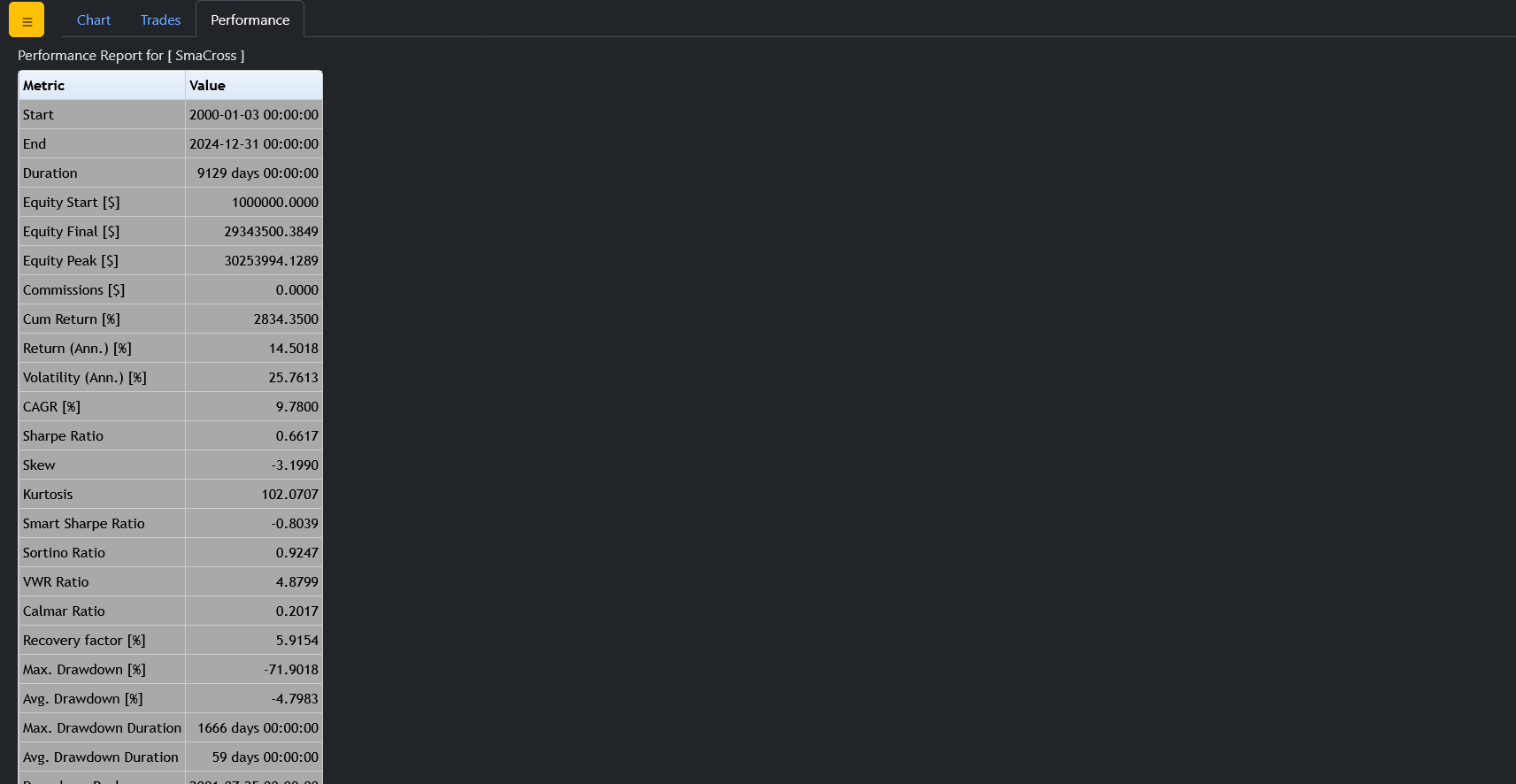
Starting Portfolio Value: 1000000.00
Final Portfolio Value: 29343500.38
Strategy SmaCross
MA1 20
MA2 50
Start 2000-01-03 00:00:00
End 2024-12-31 00:00:00
Duration 9129 days 00:00:00
Equity Start [$] 1000000.0
Equity Final [$] 29343500.384917
Equity Peak [$] 30253994.128875
Commissions [$] 0.0
Cum Return [%] 2834.35
Return (Ann.) [%] 14.5018
Volatility (Ann.) [%] 25.7613
CAGR [%] 9.78
Sharpe Ratio 0.6617
Skew -3.199
Kurtosis 102.0707
Smart Sharpe Ratio -0.8039
Sortino Ratio 0.9247
VWR Ratio 4.8799
Calmar Ratio 0.2017
Recovery factor [%] 5.9154
Max. Drawdown [%] -71.9018
Avg. Drawdown [%] -4.7983
Max. Drawdown Duration 1666 days 00:00:00
Avg. Drawdown Duration 59 days 00:00:00
Drawdown Peak 2001-07-25 00:00:00
# Trades 66
Win Rate [%] 56.0606
Best Trade [%] 104.0816
Worst Trade [%] -63.5437
Avg. Trade [%] 5.5053
Max. Trade Duration 276 days 00:00:00
Avg. Trade Duration 89 days 00:00:00
Profit Factor 1.1704
Expectancy [%] 0.0676
SQN 2.4064
Kelly Criterion [%] 39.2016
dtype: object
end
```
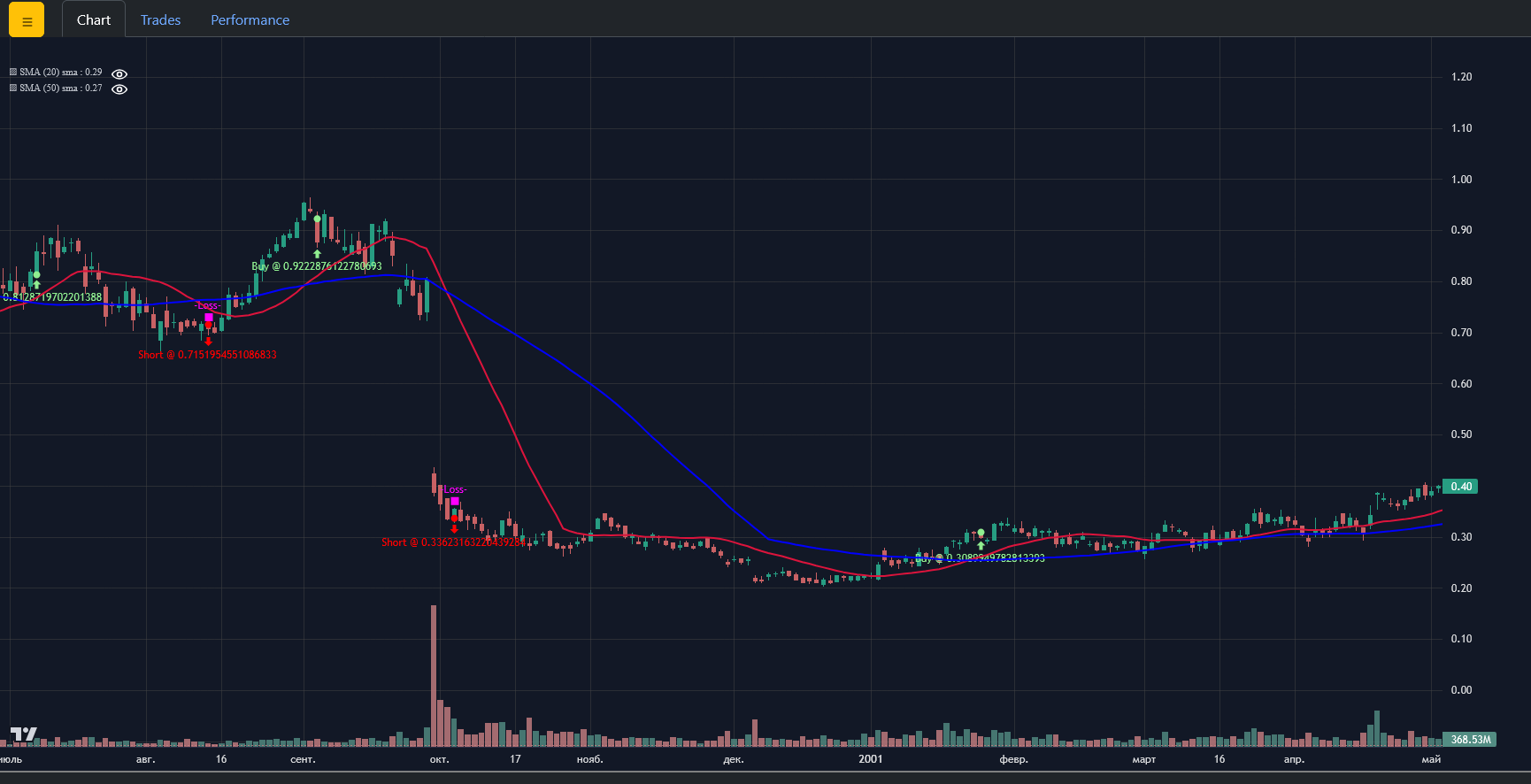
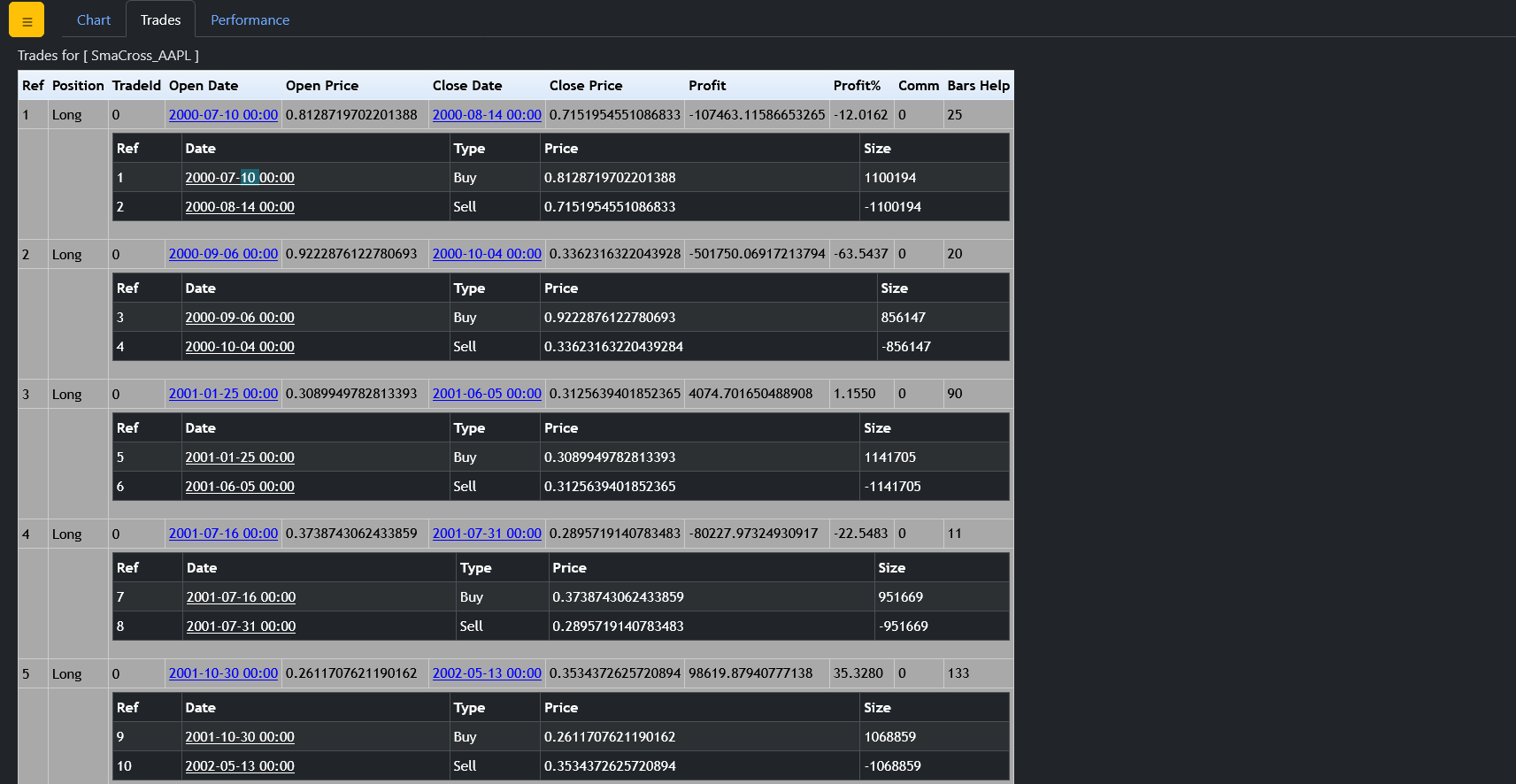
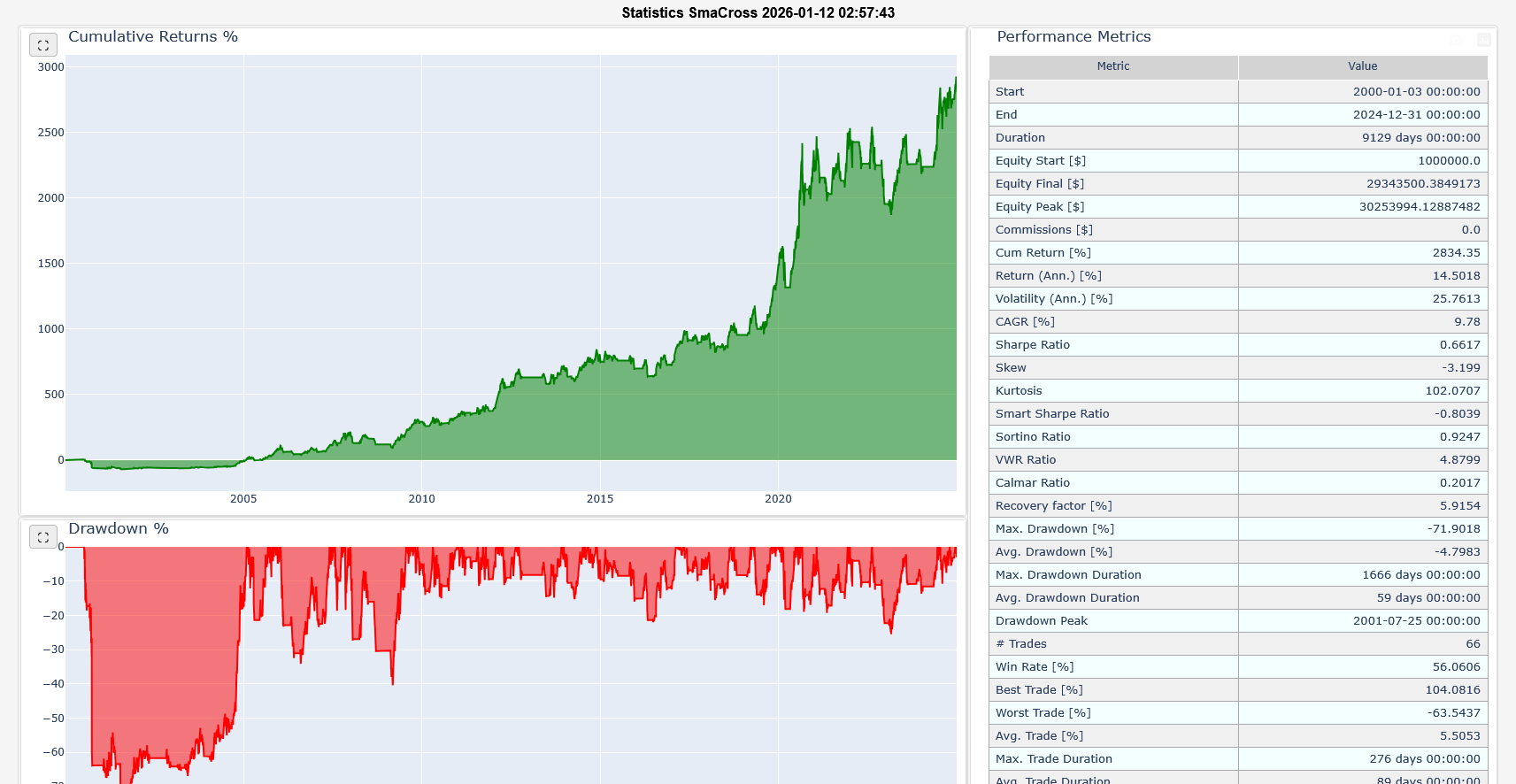
It will create two HTML files and open it in your current browser.
- [smacross.html](https://smalinin.github.io/backtrader_next/1_smacross/smacross.html) - charts and trade stats
- [smacross_stats.html](https://smalinin.github.io/backtrader_next/1_smacross/smacross_stats.html) - quantstats like strategy report
## Features:
Live Trading and backtesting platform written in Python.
- Live Data Feed and Trading with
- Interactive Brokers (needs ``IbPy`` and benefits greatly from an
installed ``pytz``)
- *Visual Chart* (needs a fork of ``comtypes`` until a pull request is
integrated in the release and benefits from ``pytz``)
- *Oanda* (needs ``oandapy``) (REST API Only - v20 did not support
streaming when implemented)
- Data feeds from csv/files, online sources or from *pandas* and *blaze*
- Filters for datas, like breaking a daily bar into chunks to simulate
intraday or working with Renko bricks
- Multiple data feeds and multiple strategies supported
- Multiple timeframes at once
- Integrated Resampling and Replaying
- Step by Step backtesting or at once (except in the evaluation of the Strategy)
- Integrated battery of indicators
- *TA-Lib* indicator support (needs python *ta-lib* / check the docs)
- Easy development of custom indicators
- Analyzers (for example: TimeReturn, Sharpe Ratio, SQN) and ``pyfolio``
integration (**deprecated**)
- Flexible definition of commission schemes
- Integrated broker simulation with *Market*, *Close*, *Limit*, *Stop*,
*StopLimit*, *StopTrail*, *StopTrailLimit*and *OCO* orders, bracket order,
slippage, volume filling strategies and continuous cash adjustmet for
future-like instruments
- Sizers for automated staking
- Cheat-on-Close and Cheat-on-Open modes
- Schedulers
- Trading Calendars
- Plotting (requires matplotlib)
## Documentation
The old blog for backtrader:
- `Blog `_
Read the full old documentation at:
- `Documentation `_
List of built-in Indicators (122)
- `Indicators Reference `_
An example for *IB* Data Feeds/Trading:
- ``IbPy`` doesn't seem to be in PyPi. Do either::
pip install git+https://github.com/blampe/IbPy.git
or (if ``git`` is not available in your system)::
pip install https://github.com/blampe/IbPy/archive/master.zip
For other functionalities like: ``Visual Chart``, ``Oanda``, ``TA-Lib``, check
the dependencies in the documentation.
From source:
- Place the *backtrader_next* directory found in the sources inside your project
Version numbering
=================
X.Y.Z
- X: Major version number. Should stay stable unless something big is changed
like an overhaul to use ``numpy``
- Y: Minor version number. To be changed upon adding a complete new feature or
(god forbids) an incompatible API change.
- Z: Revision version number. To be changed for documentation updates, small
changes, small bug fixes