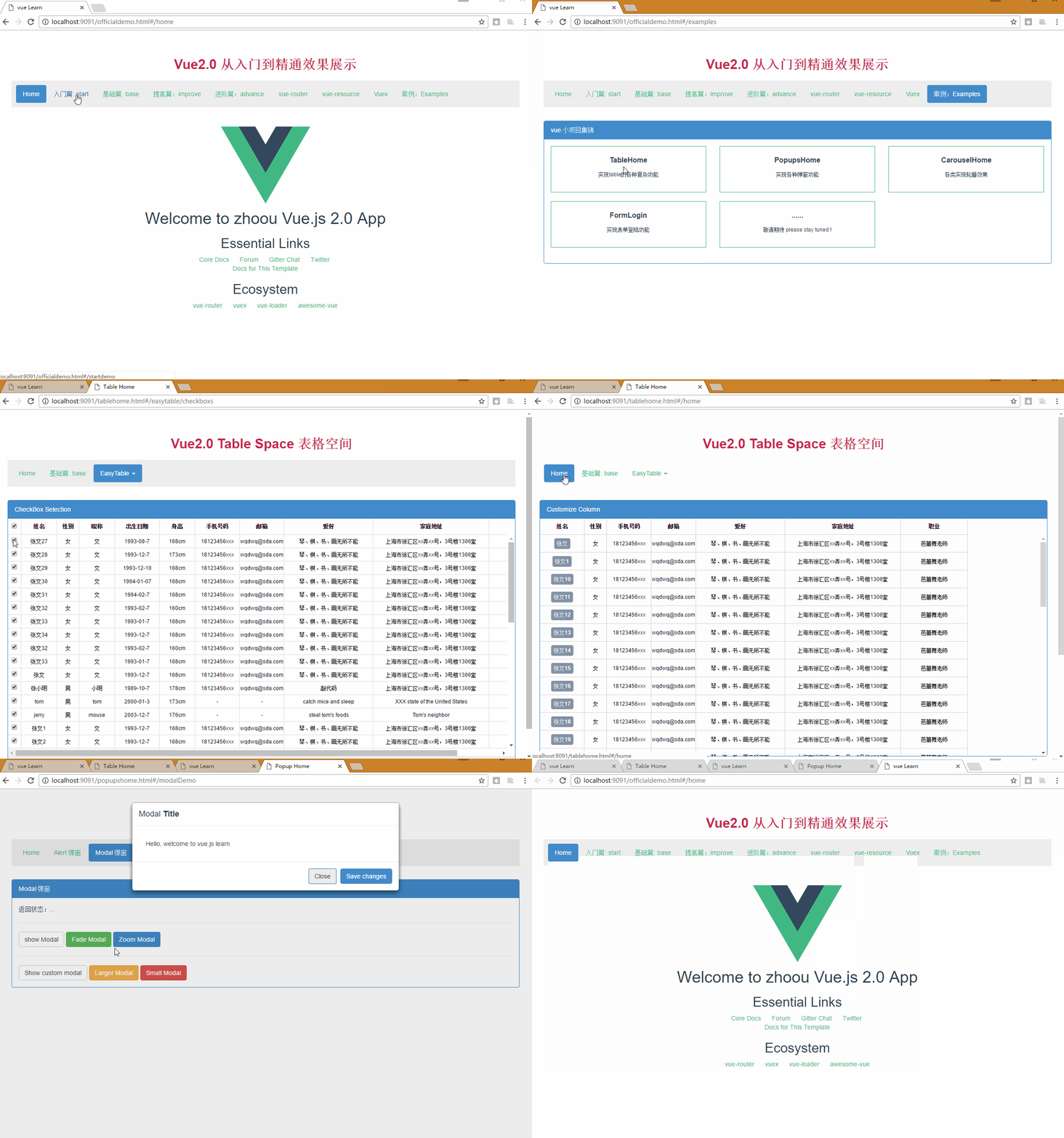
# vue-cli-multipage-bootstrap
**Repository Path**: jiebaobao2/vue-cli-multipage-bootstrap
## Basic Information
- **Project Name**: vue-cli-multipage-bootstrap
- **Description**: vue-cli-multipage-bootstrap demo for learning vue2.0
- **Primary Language**: Unknown
- **License**: Not specified
- **Default Branch**: master
- **Homepage**: None
- **GVP Project**: No
## Statistics
- **Stars**: 0
- **Forks**: 0
- **Created**: 2021-04-16
- **Last Updated**: 2021-04-16
## Categories & Tags
**Categories**: Uncategorized
**Tags**: None
## README
# Vue Learn
> A Vue.js2.0 project with Bootstrap which integrated the vue official online examples to components and some components build by myself to anyone who interested in .
## Components
* [Alert 组件](/src/components/Common/vAlert.vue)
* [Modal 组件](/src/components/Common/vModal.vue)
* [Table 组件](/src/components/Common/vTable.vue)
* [easyTable 组件](/src/components/Common/vEasyTable.vue)
* [Carousel 组件](/src/components/Common/vCarousel.vue)
* [Loading 组件](/src/components/Common/vLoading.vue)
* [Login 组件](/src/components/Common/vLogin.vue)
* [Error 组件](/src/components/Common/vError.vue)
## Dev Environment
`npm install`
`npm run dev`
###The initial access path:
- OfficialDemo: http://localhost:9091/officialdemo.html
- TableHome: http://localhost:9091/tablehome.html
- PopupsHome: http://localhost:9091/popupshome.html
- CarouselHome: http://localhost:9091/carouselhome.html
- FormLogin: http://localhost:9091/formlogin.html
you can click the nav '案例:Examples' and choice 'TableHome' to jump to another project 'tablehome.html'.
## Prod Environment
`npm install`
`npm run build`
Please take the published content to the local server IIS or on another server you like ,
and then the initial access path :(serverIP)/officialdemo.html
## Build Setup
``` bash
# 安装vue-cli
npm install -g vue-cli
# 使用vue-cli初始化项目
vue init webpack my-project
# 进入到目录
cd my-project
# install dependencies
npm install
# serve with hot reload at localhost:8080
npm run dev
# build for production with minification
npm run build
# run unit tests
npm run unit
# run e2e tests
npm run e2e
# run all tests
npm test
```
## 多页面配置
#### webpack.base.conf.js 配置:
var entries = getEntry('./src/module/*/*.js'); // 获得入口js文件

function getEntry(globPath) {
  var entries = {},
    basename, tmp, pathname;

  glob.sync(globPath).forEach(function (entry) {
    basename = path.basename(entry, path.extname(entry));
    tmp = entry.split('/').splice(-3);
    pathname = tmp.splice(1, 1).toString().toLowerCase(); // 正确输出js和html的路径
    entries[pathname] = entry;
  });
  return entries;
}
其中入口entry修改成如下:
entry: Object.assign(entries,{
    vendors : ['jquery', 'bootstrap']
  })
#### webpack.dev.conf.js 配置:
function getEntry(globPath) {
  var entries = {},
    basename, tmp, pathname;

  glob.sync(globPath).forEach(function (entry) {
    basename = path.basename(entry, path.extname(entry));
    tmp = entry.split('/').splice(-3);
    pathname = tmp.splice(1, 1).toString().toLowerCase();
    entries[pathname] = entry;
  });

  return entries;
}

var pages = getEntry('./src/module/**/*.html');

for (var pathname in pages) {
  // 配置生成的html文件,定义路径等
  var conf = {
    filename: pathname + '.html',
    template: pages[pathname], // 模板路径
    inject: true              // js插入位置
  };
  // 需要生成几个html文件,就配置几个HtmlWebpackPlugin对象
  module.exports.plugins.push(new HtmlWebpackPlugin(conf));
}
#### webpack.prod.conf.js 配置:
 function getEntry(globPath) {
  var entries = {},
    basename, tmp, pathname;

  glob.sync(globPath).forEach(function (entry) {
    basename = path.basename(entry, path.extname(entry));
    tmp = entry.split('/').splice(-3);
    pathname = tmp.splice(1, 1).toString().toLowerCase();
    entries[pathname] = entry;
  });
  return entries;
}
var pages = getEntry('./src/module/*/*.html');
for (var pathname in pages) {
  // 配置生成的html文件,定义路径等
  var conf = {
    filename: pathname + '.html',
    template: pages[pathname], // 模板路径
    inject: true,              // js插入位置
    minify: {
      removeComments: true,
      collapseWhitespace: true,
      removeAttributeQuotes: true
      // more options:
      // https://github.com/kangax/html-minifier#options-quick-reference
    },
    // necessary to consistently work with multiple chunks via CommonsChunkPlugin
    chunksSortMode: 'dependency'
  };
  // 需要生成几个html文件,就配置几个HtmlWebpackPlugin对象
  webpackConfig.plugins.push(new HtmlWebpackPlugin(conf));
}
Welcome guidance !!