# gin-yalantinglibs
**Repository Path**: judeli/gin-yalantinglibs
## Basic Information
- **Project Name**: gin-yalantinglibs
- **Description**: No description available
- **Primary Language**: Unknown
- **License**: Apache-2.0
- **Default Branch**: upgrade-v1
- **Homepage**: None
- **GVP Project**: No
## Statistics
- **Stars**: 0
- **Forks**: 0
- **Created**: 2026-09-07
- **Last Updated**: 2026-09-14
## Categories & Tags
**Categories**: Uncategorized
**Tags**: None
## README
yaLanTingLibs
一系列 C++20 库,包含 struct_pack、struct_json、struct_xml、struct_yaml、struct_pb、easylog、coro_rpc、coro_http 和 async_simple



[English](./README.md)
yaLanTingLibs 是一系列现代 C++ 工具库的集合,目前包含 struct_pack、struct_json、struct_xml、struct_yaml、struct_pb、easylog、coro_rpc、coro_io、coro_http 和 async_simple,未来会有更多优秀的库加入 yaLanTingLibs。
yaLanTingLibs 的目标:为开发者提供非常易用且高性能的现代 C++ 库,帮助快速构建高性能应用。
| 操作系统(编译器版本) | 状态 |
|------------------------------------------------|-----------------------------------------------------------------------------------------------------------|
| Ubuntu 22.04 (clang 14.0.0) |  |
| Ubuntu 22.04 (gcc 11.2.0) |  |
| macOS Monterey 12 (AppleClang 14.0.0.14000029) |  |
| Windows Server 2022 (MSVC 19.33.31630.0) |  |
# 快速开始
## 编译器要求
如果你的编译器不支持 C++20,yalantinglibs 将只编译序列化库(struct_pack、struct_json、struct_xml、struct_yaml、easylog 支持 C++17)。
请确保你使用以下编译器:
- g++9 及以上;
- clang++6 及以上;
- msvc 14.20 及以上;
否则,yalantinglibs 将编译所有库。
请确保你使用以下编译器:
- g++10 及以上;
- clang++13 及以上;
- msvc 14.29 及以上;
你也可以使用 cmake 选项 `-DENABLE_CPP_20=ON` 或 `-DENABLE_CPP_20=OFF` 来控制是否启用 C++20。
## 安装与编译
### 通过 Homebrew
1. 安装 [homebrew](https://brew.sh/)
2. 运行 `brew install yalantinglibs`
3. 如果你使用 cmake,添加以下代码:
```cmake
find_package(yalantinglibs CONFIG REQUIRED)
target_link_libraries(main PRIVATE yalantinglibs::yalantinglibs)
```
### 通过 Vcpkg
1. 安装 [vcpkg](https://github.com/microsoft/vcpkg)
2. 运行 `./vcpkg install yalantinglibs`
3. 如果你使用 cmake,添加以下代码:
```cmake
find_package(yalantinglibs CONFIG REQUIRED)
target_link_libraries(main PRIVATE yalantinglibs::yalantinglibs)
```
### 通过 CMake FetchContent
你也可以通过 cmake FetchContent 导入 ylt:
```cmake
cmake_minimum_required(VERSION 3.15)
project(ylt_test)
include(FetchContent)
FetchContent_Declare(
yalantinglibs
GIT_REPOSITORY https://github.com/alibaba/yalantinglibs.git
GIT_TAG main
GIT_SHALLOW 1 # optional ( --depth=1 )
)
FetchContent_MakeAvailable(yalantinglibs)
add_executable(main main.cpp)
target_link_libraries(main yalantinglibs::yalantinglibs)
target_compile_features(main PRIVATE cxx_std_20)
```
### 通过 CMake add_subdirectory
1. 下载 ylt 源码并放到你的项目中
2. 将 ylt 作为子目录添加到你的项目:
```cmake
cmake_minimum_required(VERSION 3.15)
project(ylt_test)
add_subdirectory(yalantinglibs) # 你可以将路径修改为你项目中的真实相对路径
add_executable(main main.cpp)
target_link_libraries(main yalantinglibs::yalantinglibs)
target_compile_features(main PRIVATE cxx_std_20)
```
### 手动安装与导入
Yalantinglibs 是头文件库(header-only),你只需将 `./include/ylt` 目录复制到你的项目中即可。但我们建议你使用 cmake 进行安装。
1. 克隆仓库
```shell
git clone https://github.com/alibaba/yalantinglibs.git
cd yalantinglibs
mkdir build
cd build
```
2. 构建与测试
- 我们建议你先编译示例并测试代码:
```shell
cmake ..
cmake --build . --config debug # 如果你有足够的内存并行编译,可以加上 -j 选项
ctest . # 运行测试
```
你可以在 `./build/output/` 中看到测试/示例/基准测试的可执行文件。
- 或者你可以跳过示例/测试/基准测试的构建:
```shell
# 你可以使用这些选项跳过单元测试 & 基准测试 & 示例的构建:
cmake .. -DBUILD_EXAMPLES=OFF -DBUILD_BENCHMARK=OFF -DBUILD_UNIT_TESTS=OFF -DGENERATE_BENCHMARK_DATA=OFF
```
3. 安装
```shell
cmake --install . # --prefix ./user_defined_install_path
```
4. 开始开发
- 从示例开始:
安装 ylt 后,复制并打开 `src/*/examples` 目录,然后:
```shell
mkdir build
cd build
cmake ..
cmake --build .
```
- 将 ylt 导入到你的项目(cmake):
```cmake
find_package(yalantinglibs CONFIG REQUIRED)
target_link_libraries(main PRIVATE yalantinglibs::yalantinglibs)
```
- 如果你不想使用 cmake,也可以手动将 ylt 导入到你的项目中:
1. 将 `include/` 目录添加到包含路径中(如果你已将 ylt 安装到默认包含路径中,可跳过此步骤)。
2. 将 `include/ylt/thirdparty` 添加到包含路径中(如果你已通过 cmake 安装 ylt,可跳过此步骤)。
3. 将 `include/ylt/standalone` 添加到包含路径中(如果你已通过 cmake 安装 ylt,可跳过此步骤)。
4. 通过选项 `-std=c++20`(g++/clang++)或 `/std:c++20`(msvc)启用 `c++20` 标准。
5. 使用 g++ 时添加链接选项 `-pthread`、`-ldl`,使用 g++10 时添加选项 `-fcoroutines`。
#### 更多细节:
更多细节请参见 [CMakeLists.txt](https://github.com/alibaba/yalantinglibs/blob/main/CMakeLists.txt) 和 [cmake 目录](https://github.com/alibaba/yalantinglibs/tree/main/cmake)。
# 库介绍
## coro_rpc
基于 C++20 协程、极易使用、高性能的 rpc 框架,pipeline 模式下单线程 QPS 超过 40 万。coro_rpc 是头文件库。
你可以在 5 分钟内完成一个 rpc 服务器和 rpc 客户端!
[English Introduction](https://alibaba.github.io/yalantinglibs/en/coro_rpc/coro_rpc_introduction.html)
[English API] (TODO)
coro_rpc 在 purecpp 会议上的[演讲(中文)](https://alibaba.github.io/yalantinglibs/coro_rpc_introduction_purecpp_talk.pdf)。
coro_rpc 在 purecpp 会议上的[视频(中文)](https://live.csdn.net/room/csdnlive1/bKFbKP7T),视频录像从 04:55:08 开始。
### 快速示例
1. 像定义本地普通函数一样定义一个 rpc 函数。
```cpp
// rpc_service.hpp
inline std::string_view echo(std::string_view str) { return str; }
```
2. 注册 rpc 函数并启动服务器
```cpp
#include "rpc_service.hpp"
#include
int main() {
coro_rpc_server server(/*thread_num =*/10, /*port =*/9000);
server.register_handler(); // 注册函数 echo
server.start(); // 启动服务器并阻塞
}
```
3. rpc 客户端调用 rpc 服务
```cpp
#include "rpc_service.hpp"
#include
Lazy test_client() {
coro_rpc_client client;
co_await client.connect("localhost", /*port =*/"9000"); // 连接到服务器
auto r = co_await client.call("hello coro_rpc"); // 调用远程函数 echo
std::cout << r.result.value() << "\n"; //将打印 "hello coro_rpc"
}
int main() {
syncAwait(test_client());
}
```
更多示例请看 [这里](https://github.com/alibaba/yalantinglibs/tree/main/src/coro_rpc/examples)。
## struct_pack
基于编译期反射、极易使用、高性能的序列化库,struct_pack 是头文件库,目前已被 coro_rpc 使用。
只需一行代码即可完成序列化和反序列化,比 protobuf 快 2-20 倍。
### 快速示例
```cpp
struct person {
int64_t id;
std::string name;
int age;
double salary;
};
person person1{.id = 1, .name = "hello struct pack", .age = 20, .salary = 1024.42};
// 一行代码序列化
std::vector buffer = struct_pack::serialize(person1);
// 一行代码反序列化
auto person2 = deserialize(buffer);
```
struct_pack 非常快。
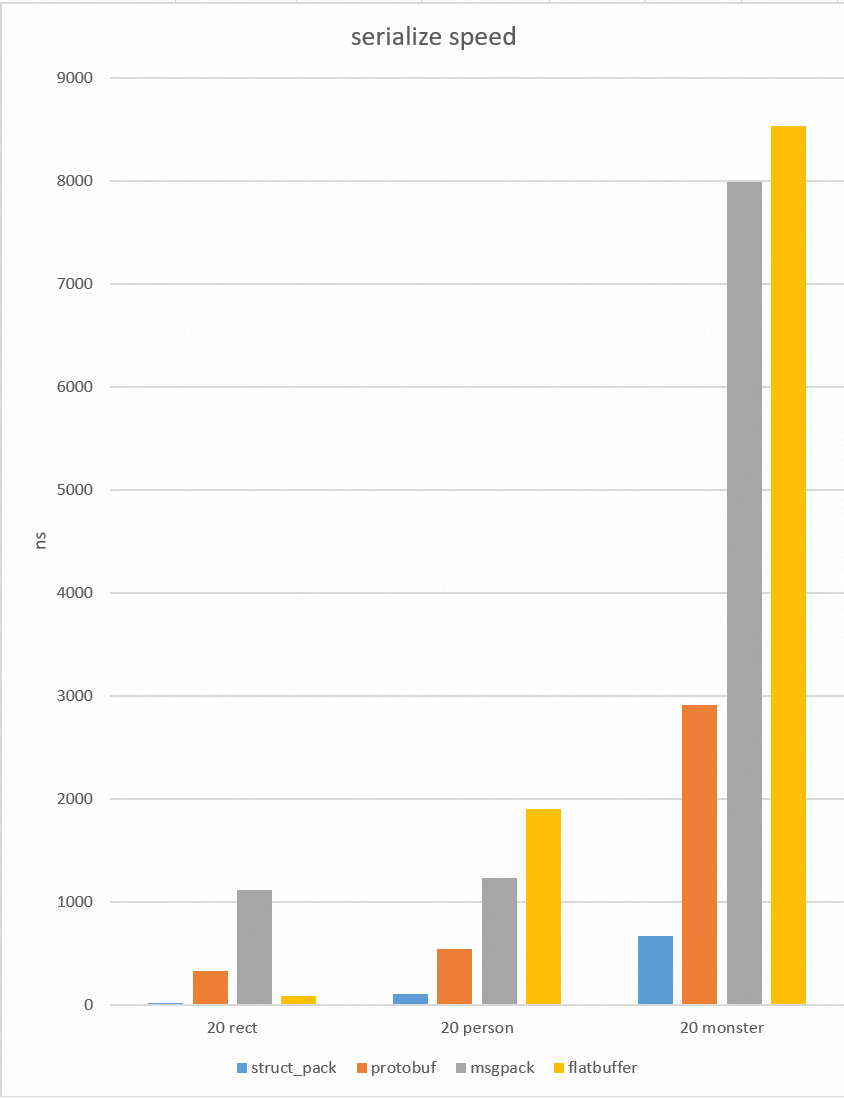
[English Introduction](https://alibaba.github.io/yalantinglibs/en/struct_pack/struct_pack_intro.html)
[English API] (TODO)
struct_pack 在 CppCon2022 上的[演讲幻灯片(《A Faster Serialization Library Based on Compile-time Reflection and C++ 20》)](https://alibaba.github.io/yalantinglibs/resource/A%20Faster%20Serialization%20Library%20Based%20on%20Compile-time%20Reflection%20and%20C++%2020.pdf)
struct_pack 在 cppcon2022 上的[演讲视频](https://www.youtube.com/watch?v=myhB8ZlwOlE)
struct_pack 在 purecpp 会议上的[演讲幻灯片(中文)](https://alibaba.github.io/yalantinglibs/resource/CppSummit_struct_pack.pdf)
struct_pack 在 purecpp 会议上的[视频(中文)](https://live.csdn.net/room/csdnlive1/bKFbKP7T),视频录像从 01:32:20 开始。
查看更多示例 [这里](https://alibaba.github.io/yalantinglibs/en/struct_pack/struct_pack_intro.html#serialization)。
## struct_json
基于反射的 json 库,可以非常方便地实现 struct 与 json 的互转。
### 快速示例
```cpp
#include "ylt/struct_json/json_reader.h"
#include "ylt/struct_json/json_writer.h"
struct person {
std::string name;
int age;
};
// 静态反射在 C++20 下生效。在 C++17 下需要手动添加宏
// YLT_REFL(person, name, age);
int main() {
person p{.name = "tom", .age = 20};
std::string str;
struct_json::to_json(p, str); // {"name":"tom","age":20}
person p1;
struct_json::from_json(p1, str);
}
```
## struct_xml
基于反射的 xml 库,可以非常方便地实现 struct 与 xml 的互转。
### 快速示例
```cpp
#include "ylt/struct_xml/xml_reader.h"
#include "ylt/struct_xml/xml_writer.h"
struct person {
std::string name;
int age;
};
// 静态反射在 C++20 下生效。在 C++17 下需要手动添加宏
// YLT_REFL(person, name, age);
void basic_usage() {
std::string xml = R"(
tom
20
)";
person p;
bool r = struct_xml::from_xml(p, xml.data());
assert(r);
assert(p.name == "tom" && p.age == 20);
std::string str;
r = struct_xml::to_xml_pretty(p, str);
assert(r);
std::cout << str;
}
```
## struct_yaml
基于反射的 yaml 库,可以非常方便地实现 struct 与 yaml 的互转。
### 快速示例
```cpp
#include "ylt/struct_yaml/yaml_reader.h"
#include "ylt/struct_yaml/yaml_writer.h"
struct person {
std::string name;
int age;
};
// 静态反射在 C++20 下生效。在 C++17 下需要手动添加宏
// YLT_REFL(person, name, age);
void basic_usage() {
// 将结构体序列化到字符串
person p = {"admin", 20};
std::string ss;
struct_yaml::to_yaml(ss, p);
std::cout << ss << std::endl;
std::string yaml = R"(
name : tom
age : 30
)";
// 从字符串反序列化结构体
struct_yaml::from_yaml(p, yaml);
}
```
## coro_http
coro_http 是一个 C++20 协程 http(https) 库,包含服务器和客户端,功能有:get/post、websocket、multipart 文件上传、chunked 和 ranges 下载等。[更多示例](https://github.com/alibaba/yalantinglibs/blob/main/src/coro_http/examples/example.cpp)
### get/post
```cpp
#include "ylt/coro_http/coro_http_server.hpp"
#include "ylt/coro_http/coro_http_client.hpp"
using namespace coro_http;
async_simple::coro::Lazy basic_usage() {
coro_http_server server(1, 9001);
server.set_http_handler(
"/get", [](coro_http_request &req, coro_http_response &resp) {
resp.set_status_and_content(status_type::ok, "ok");
});
server.set_http_handler(
"/coro",
[](coro_http_request &req,
coro_http_response &resp) -> async_simple::coro::Lazy {
resp.set_status_and_content(status_type::ok, "ok");
co_return;
});
server.aync_start(); // aync_start() 不阻塞,sync_start() 会阻塞。
std::this_thread::sleep_for(300ms); // 等待服务器启动
coro_http_client client{};
auto result = co_await client.async_get("http://127.0.0.1:9001/get");
assert(result.status == 200);
assert(result.resp_body == "ok");
for (auto [key, val] : result.resp_headers) {
std::cout << key << ": " << val << "\n";
}
}
async_simple::coro::Lazy get_post(coro_http_client &client) {
std::string uri = "http://www.example.com";
auto result = co_await client.async_get(uri);
std::cout << result.status << "\n";
result = co_await client.async_post(uri, "hello", req_content_type::string);
std::cout << result.status << "\n";
}
int main() {
coro_http_client client{};
async_simple::coro::syncAwait(get_post(client));
}
```
### websocket
```cpp
async_simple::coro::Lazy websocket(coro_http_client &client) {
// 连接到你的 websocket 服务器。
bool r = co_await client.async_connect("ws://example.com/ws");
if (!r) {
co_return;
}
co_await client.write_websocket("hello websocket");
auto data = co_await client.read_websocket();
CHECK(data.resp_body == "hello websocket");
co_await client.write_websocket("test again");
data = co_await client.read_websocket();
CHECK(data.resp_body == "test again");
co_await client.write_websocket("ws close");
data = co_await client.read_websocket();
CHECK(data.net_err == asio::error::eof);
CHECK(data.resp_body == "ws close");
}
```
### 上传/下载
```cpp
async_simple::coro::Lazy upload_files(coro_http_client &client) {
std::string uri = "http://example.com";
client.add_str_part("hello", "world");
client.add_str_part("key", "value");
client.add_file_part("test", "test.jpg");
auto result = co_await client.async_upload(uri);
std::cout << result.status << "\n";
result = co_await client.async_upload(uri, "test", "test.jpg");
}
async_simple::coro::Lazy download_files(coro_http_client &client) {
// chunked 下载
auto result = co_await client.async_download("http://example.com/test.jpg",
"myfile.jpg");
std::cout << result.status << "\n";
// ranges 下载
result = co_await client.async_download("http://example.com/test.txt",
"myfile.txt", "1-10,11-16");
std::cout << result.status << "\n";
}
```
## async_simple
一个 C++20 协程库,提供简单、轻量、易用的组件来编写异步代码。
参见 [async_simple](https://github.com/alibaba/async_simple)
# 详细信息
## CMAKE 选项
## 配置选项
这些选项可能对你的项目有用。取值可以是 `ON` 或 `OFF`。如果你通过 cmake fetchContent 或 find_package 导入 ylt,可以在你的项目中启用它们。
|选项|默认值|描述|
|----------|------------|------|
|YLT_ENABLE_SSL|自动|为 rpc/http 启用可选的 ssl 支持,如果你安装了 openssl,默认启用|
|YLT_ENABLE_NTLS|自动|为 SSL 启用可选的 ntls 支持,需要手动启用|
|YLT_ENABLE_PMR|OFF|启用 pmr 优化|
|YLT_ENABLE_IO_URING|OFF|在 linux 上启用 io_uring|
|YLT_ENABLE_FILE_IO_URING|OFF|在 linux 上启用 file io_uring 作为后端|
|YLT_ENABLE_STRUCT_PACK_UNPORTABLE_TYPE|OFF|为 struct_pack 启用不可移植类型(如 wstring、int128_t)|
|YLT_ENABLE_STRUCT_PACK_OPTIMIZE|OFF|通过激进的模板展开优化 struct_pack(会消耗更多编译时间)|
## 安装选项
默认情况下,yalantinglibs 会将第三方库和 standalone 子库独立安装到你的安装路径中。
如果你不想安装第三方库(需要手动安装),可以关闭 cmake 选项 `-DINSTALL_THIRDPARTY=OFF`。
如果你想依赖方式安装第三方库(将第三方库和 standalone 子库安装到 `ylt/thirdparty` 和 `ylt/standalone` 中),可以关闭 cmake 选项 `-DINSTALL_INDEPENDENT_THIRDPARTY=OFF` 和 `-DINSTALL_INDEPENDENT_STANDALONE=OFF`。
|选项|默认值|
|----------|------------|
|INSTALL_THIRDPARTY|ON|
|INSTALL_STANDALONE|ON|
|INSTALL_INDEPENDENT_THIRDPARTY|ON|
|INSTALL_INDEPENDENT_STANDALONE|ON|
这些选项仅在安装时生效。
## 开发选项
这些 CMake 选项用于 yalantinglibs 自身的开发/安装。它们不会影响你的项目,因为 ylt 是头文件库。
|选项|默认值|
|----------|------------|
|BUILD_EXAMPLES|ON|
|BUILD_BENCHMARK|ON|
|BUILD_UNIT_TESTS|ON|
|BUILD_*(BUILD_CORO_RPC、BUILD_STRUCT_PACK 等)|ON|
|COVERAGE_TEST|OFF|
|GENERATE_BENCHMARK_DATA|ON|
|CORO_RPC_USE_OTHER_RPC|ON|
## 第三方依赖列表
以下是我们使用的第三方库(虽然 async_simple 是 ylt 的一部分,但它是先开源的,所以我们将其作为独立的第三方库导入)。
### coro_io/coro_rpc/coro_http
这些依赖默认会被安装,你可以通过 cmake 选项控制。
- [asio](https://think-async.com/Asio)
- [async_simple](https://github.com/alibaba/async_simple)
- [openssl](https://www.openssl.org/)(可选)
### easylog
无依赖。
### struct_pack、struct_json、struct_xml、struct_yaml
无依赖。
### struct_pb
无依赖。
## Standalone 子库
coro_http 由独立的子库 [cinatra](https://github.com/qicosmos/cinatra) 实现。
struct_json、struct_xml、struct_yaml 由独立的子库 [iguana](https://github.com/qicosmos/iguana) 实现。
## 基准测试
### coro_rpc
选项:
```bash
./benchmark_client # [threads = 硬件线程数] [client_pre_thread = 20] [pipeline_size = 1] [host = 127.0.0.1] [port = 9000] [test_data_path = ./test_data/echo_test] [test_seconds = 30] [warm_up_seconds = 5]
```
## 跨语言支持
### 如何将 coro_http 与 python 一起使用
参见 `yalantinglibs/src/coro_http/examples/py_example`
#### 构建并运行 py_example
- 将选项 `ENABLE_pybind11`(位于 `yalantinglibs/src/coro_http/examples/CMakeLists.txt`)设置为 `ON`,然后构建 `py_example`。
- 进入 `yalantinglibs/src/coro_http/examples/py_example`
- 运行 python3 test.py
### 如何将 coro_rpc 与 golang 一起使用
参见 `yalantinglibs/src/coro_rpc/examples/basic_example/go_example`
#### 构建并运行 go_example
- 将选项 `ENABLE_go`(位于 `yalantinglibs/src/coro_rpc/examples/base_examples/CMakeLists.txt`)设置为 `ON`,然后构建 `coro_rpc`。
- 进入 `yalantinglibs/src/coro_rpc/examples/base_examples/go_example`
- 运行 go build test_rpc.go
- 运行 ./test_rpc
## 如何生成文档
参见 [Build Website](https://github.com/alibaba/yalantinglibs/blob/main/website/README.md)
## 如何贡献
1. 按照 issue 模板创建一个 issue。
2. 在本地为你的改动运行测试和 `git-clang-format HEAD^`。
3. 创建一个 PR,填写 PR 模板。
4. 从贡献者中选择一位或多位 reviewer:(例如 qicosmos、poor-circle、PikachuHyA)。
5. 获得批准并合并。
# 讨论群
钉钉群号:645010455
## 许可证
yaLanTingLibs 基于 Apache License (Version 2.0) 分发
本产品包含其他开源许可证下的各类第三方组件。
更多信息请参见 [NOTICE 文件](https://github.com/alibaba/yalantinglibs/blob/main/NOTICE)。