# ESP3D
**Repository Path**: jun-tian/ESP3D
## Basic Information
- **Project Name**: ESP3D
- **Description**: No description available
- **Primary Language**: Unknown
- **License**: GPL-3.0
- **Default Branch**: 2.1.x
- **Homepage**: None
- **GVP Project**: No
## Statistics
- **Stars**: 0
- **Forks**: 1
- **Created**: 2022-03-21
- **Last Updated**: 2024-06-01
## Categories & Tags
**Categories**: Uncategorized
**Tags**: ESP32库
## README
 Firmware for ESP8266/ESP8285 and ESP32 used with 3D printer
[
Firmware for ESP8266/ESP8285 and ESP32 used with 3D printer
[ ](https://liberapay.com/ESP3D)
[Latest stable release  ](https://github.com/luc-github/ESP3D/releases/latest/) [](https://github.com/luc-github/ESP3D/actions/workflows/build-ci-2.0.yml) [](https://github.com/luc-github/ESP3D-WEBUI/tree/2.1)
please use Arduino ide 1.8.9+ with [](https://github.com/espressif/arduino-esp32/releases/tag/1.0.4) or [](https://github.com/esp8266/Arduino/releases/tag/2.5.2)
[Latest development version  ](https://github.com/luc-github/ESP3D/tree/3.0) [](https://github.com/luc-github/ESP3D/actions/workflows/build-ci.yml) [](https://github.com/luc-github/ESP3D-WEBUI/tree/3.0)
please use Arduino ide 1.8.9+ with [](https://github.com/espressif/arduino-esp32) or [](https://github.com/esp8266/Arduino/)
[All releases](https://github.com/luc-github/ESP3D/releases)
This firmware allows not only to have a cheap bridge between Wifi and serial, but also to have a web UI to configure wifi, to monitor 3D printer and even control it, and to make things easy,
UI is fully customizable without reflashing FW.
Firmware should work with any 3D printer firmware (repetier/marlin/smoothieware using GCODE) if serial connection has a correct setup.
I currently use it with my personnal flavor of [repetier for Due based boards](https://github.com/luc-github/Repetier-Firmware-0.92).
The web interface files are present in data directory but UI has it's own repository [ESP3D-WEBUI](https://github.com/luc-github/ESP3D-WEBUI).
* Be aware ESP3D-WEBUI is for firmware 0.9.99 minimum - previous released version use tpl files which are no more used.
* Note for ESP8266 1MB flash : FW is now too big will all features you need to chose strip the FW and select only some features, also WebUI is now also too big for full multilanguage support to fit the 128K SPIFFS so please use pack with limited language (en +another) https://github.com/luc-github/ESP3D-WEBUI/tree/2.1/languages
## Sponsors
[
](https://liberapay.com/ESP3D)
[Latest stable release  ](https://github.com/luc-github/ESP3D/releases/latest/) [](https://github.com/luc-github/ESP3D/actions/workflows/build-ci-2.0.yml) [](https://github.com/luc-github/ESP3D-WEBUI/tree/2.1)
please use Arduino ide 1.8.9+ with [](https://github.com/espressif/arduino-esp32/releases/tag/1.0.4) or [](https://github.com/esp8266/Arduino/releases/tag/2.5.2)
[Latest development version  ](https://github.com/luc-github/ESP3D/tree/3.0) [](https://github.com/luc-github/ESP3D/actions/workflows/build-ci.yml) [](https://github.com/luc-github/ESP3D-WEBUI/tree/3.0)
please use Arduino ide 1.8.9+ with [](https://github.com/espressif/arduino-esp32) or [](https://github.com/esp8266/Arduino/)
[All releases](https://github.com/luc-github/ESP3D/releases)
This firmware allows not only to have a cheap bridge between Wifi and serial, but also to have a web UI to configure wifi, to monitor 3D printer and even control it, and to make things easy,
UI is fully customizable without reflashing FW.
Firmware should work with any 3D printer firmware (repetier/marlin/smoothieware using GCODE) if serial connection has a correct setup.
I currently use it with my personnal flavor of [repetier for Due based boards](https://github.com/luc-github/Repetier-Firmware-0.92).
The web interface files are present in data directory but UI has it's own repository [ESP3D-WEBUI](https://github.com/luc-github/ESP3D-WEBUI).
* Be aware ESP3D-WEBUI is for firmware 0.9.99 minimum - previous released version use tpl files which are no more used.
* Note for ESP8266 1MB flash : FW is now too big will all features you need to chose strip the FW and select only some features, also WebUI is now also too big for full multilanguage support to fit the 128K SPIFFS so please use pack with limited language (en +another) https://github.com/luc-github/ESP3D-WEBUI/tree/2.1/languages
## Sponsors
[ ](https://www.fysetc.com/)
[
](https://www.fysetc.com/)
[ ](https://github.com//bdring)
[
](https://github.com//bdring)
[ ](http://www.spark-concepts.com/)
## Supporters
[
](http://www.spark-concepts.com/)
## Supporters
[ ](http://www.panucatt.com/)
## Become a sponsor or a supporter
* A sponsor is a recurent donator
](http://www.panucatt.com/)
## Become a sponsor or a supporter
* A sponsor is a recurent donator  The sponsors are automaticaly displayed by github, if your tier is `10 US$/month` or more, to thank you for your support, your logo / avatar will be also added to the readme page with eventually with a link to your site.
* A supporter is per time donator [
The sponsors are automaticaly displayed by github, if your tier is `10 US$/month` or more, to thank you for your support, your logo / avatar will be also added to the readme page with eventually with a link to your site.
* A supporter is per time donator [ ](https://www.paypal.com/cgi-bin/webscr?cmd=_s-xclick&hosted_button_id=Y8FFE7NA4LJWQ)
If your donation is over `120 US$` per year, to thank you for your support, your logo / avatar will be added to the readme page with eventually with a link to your site.
Every support is welcome, giving support/ developing new features need time and devices, donations contribute a lot to make things happen, thank you.
## Features
* Serial/Wifi bridge using configurable port 8888
* Use GPIO2 to ground to reset all settings in hard way - 2-6 sec after boot / not before!! Set GPIO2 to ground before boot change boot mode and go to special boot that do not reach FW. Currently boot take 10 sec - giving 8 seconds to connect GPIO2 to GND and do a hard recovery for settings
* Complete configuration by web browser (Station or Access point) or by Serial/telnet commands
* Authentication (optional) for better security
* Update firmware by web browser
* Captive portal in Access point mode which redirect all unknow call to main page
* mDNS which allows to key the name defined in web browser and connect only with bonjour installed on computer
* SSDP, this feature is a discovery protocol, supported on Windows out of the box
* Fail safe mode (Access point)is enabled if cannot connect to defined station at boot.
* Embedded FS uploader and updater.
* OLED screen support
* Notifications using Line / Pushover / email
* The web ui add even more feature : https://github.com/luc-github/ESP3D-WEBUI/blob/2.1/README.md#features
## Default Configuration
Default Settings:
* Access Point: ESP3D
* PW:12345678
* Authentification: WPA
* IP: 192.168.0.1
* Baud rate: 115200
* Web port:80
* Data port: 8888
if Authentication is enabled :
* User: admin
* Password: admin
* User:user
* Password: user
## Direct commands:
Check wiki : https://github.com/luc-github/ESP3D/wiki/Direct-ESP3D-commands
## Installation
Feedback on 2.0 was : ESP3D being a library is not really useful and make setup more complex, so now we are back to simple application.
1. If you haven't already set up Arduino IDE for ESPs then do so for [ESP8266](https://github.com/esp8266/Arduino) or [ESP32 core version](https://github.com/espressif/arduino-esp32).
2. Download the [latest release](https://github.com/luc-github/ESP3D/releases/) and manually copy the libraries present in the `ESP3D-x.y.z/libraries` directory into your `Arduino/libraries` directory. (*no need if using platformIO*). *These versions are verified to work with ESP3D, any others (newer version) may cause untested behavior.*
- Use webserver support (recommended as stable), asyncwebserver support is no longer stable on ESP3D
- * arduinoWebSockets from @Links2004
Generic ones:
Specific for ESP32
* ESP32SSDP
If you want OLED support:
* oled-ssd1306 from @squix78
If you want DHT11/22 support:
* DHT_sensor_library_for_ESPx from @beegee-tokyo
3. Compile project esp3d.ino according target: ESP8266 board or ESP32 board, please review config.h to enable disable a feature, by default athentication is disabled and most others are enabled.
* for ESP8266 set CPU freq to 160MHz for better (https://github.com/luc-github/ESP3D/wiki/Install-Instructions)
4. Upload the data content on ESP3D file system
* Using SPIFFS uploader, this plugin and install instructions is available on each ESP core - please refere to it
or
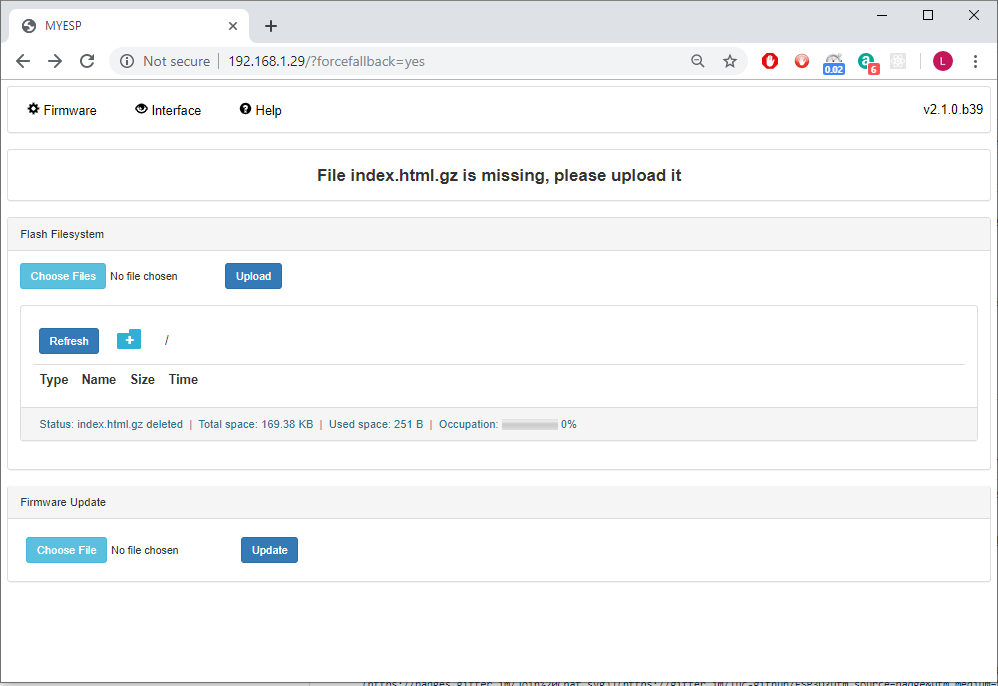
* Using embedded uploader (you may need to format SPIFFS using : [ESP710]FORMAT on ESP8266 first)
if embedded uploader does not show up you can force it ti display using : http://your_IP_address?forcefallback=yes
](https://www.paypal.com/cgi-bin/webscr?cmd=_s-xclick&hosted_button_id=Y8FFE7NA4LJWQ)
If your donation is over `120 US$` per year, to thank you for your support, your logo / avatar will be added to the readme page with eventually with a link to your site.
Every support is welcome, giving support/ developing new features need time and devices, donations contribute a lot to make things happen, thank you.
## Features
* Serial/Wifi bridge using configurable port 8888
* Use GPIO2 to ground to reset all settings in hard way - 2-6 sec after boot / not before!! Set GPIO2 to ground before boot change boot mode and go to special boot that do not reach FW. Currently boot take 10 sec - giving 8 seconds to connect GPIO2 to GND and do a hard recovery for settings
* Complete configuration by web browser (Station or Access point) or by Serial/telnet commands
* Authentication (optional) for better security
* Update firmware by web browser
* Captive portal in Access point mode which redirect all unknow call to main page
* mDNS which allows to key the name defined in web browser and connect only with bonjour installed on computer
* SSDP, this feature is a discovery protocol, supported on Windows out of the box
* Fail safe mode (Access point)is enabled if cannot connect to defined station at boot.
* Embedded FS uploader and updater.
* OLED screen support
* Notifications using Line / Pushover / email
* The web ui add even more feature : https://github.com/luc-github/ESP3D-WEBUI/blob/2.1/README.md#features
## Default Configuration
Default Settings:
* Access Point: ESP3D
* PW:12345678
* Authentification: WPA
* IP: 192.168.0.1
* Baud rate: 115200
* Web port:80
* Data port: 8888
if Authentication is enabled :
* User: admin
* Password: admin
* User:user
* Password: user
## Direct commands:
Check wiki : https://github.com/luc-github/ESP3D/wiki/Direct-ESP3D-commands
## Installation
Feedback on 2.0 was : ESP3D being a library is not really useful and make setup more complex, so now we are back to simple application.
1. If you haven't already set up Arduino IDE for ESPs then do so for [ESP8266](https://github.com/esp8266/Arduino) or [ESP32 core version](https://github.com/espressif/arduino-esp32).
2. Download the [latest release](https://github.com/luc-github/ESP3D/releases/) and manually copy the libraries present in the `ESP3D-x.y.z/libraries` directory into your `Arduino/libraries` directory. (*no need if using platformIO*). *These versions are verified to work with ESP3D, any others (newer version) may cause untested behavior.*
- Use webserver support (recommended as stable), asyncwebserver support is no longer stable on ESP3D
- * arduinoWebSockets from @Links2004
Generic ones:
Specific for ESP32
* ESP32SSDP
If you want OLED support:
* oled-ssd1306 from @squix78
If you want DHT11/22 support:
* DHT_sensor_library_for_ESPx from @beegee-tokyo
3. Compile project esp3d.ino according target: ESP8266 board or ESP32 board, please review config.h to enable disable a feature, by default athentication is disabled and most others are enabled.
* for ESP8266 set CPU freq to 160MHz for better (https://github.com/luc-github/ESP3D/wiki/Install-Instructions)
4. Upload the data content on ESP3D file system
* Using SPIFFS uploader, this plugin and install instructions is available on each ESP core - please refere to it
or
* Using embedded uploader (you may need to format SPIFFS using : [ESP710]FORMAT on ESP8266 first)
if embedded uploader does not show up you can force it ti display using : http://your_IP_address?forcefallback=yes
## Update
* Generate a binary using the export binary menu from Arduino IDE and upload it using ESP-WEBUI or embedded interface
:warning:Do not flash your Printer fw with ESP connected on Serial - it bring troubles, at least on DaVinci, but no issue if you update using web UI
## Contribution/customization
* To style the code before pushing PR please use [astyle --style=otbs *.h *.cpp *.ino](http://astyle.sourceforge.net/)
* The embedded page is created using nodejs then gulp to generate a compressed html page (tool.html.gz), all necessary modules will be installed using the build.bat, you also need bin2c tool (https://sourceforge.net/projects/bin2c/) to generate the h file from the binary, installation and build is done using the build.bat.
* The corresponding UI is located [here](https://github.com/luc-github/ESP3D-WEBUI/tree/2.1)
* An optional UI was development using old repetier UI - check [UI\repetier\testui.htm] (https://raw.githubusercontent.com/wiki/luc-github/ESP3D/UI/repetier/testui.htm) file
## Need more information about supported boards or wiring ?
[Check the wiki](https://github.com/luc-github/ESP3D/wiki)
## :question:Any question ?
Check [Wiki](https://github.com/luc-github/ESP3D/wiki/Install-Instructions) or Join the chat at [](https://discord.gg/Z4ujTwE)
## :exclamation:Any issue/feedback ?
Check [Wiki](https://github.com/luc-github/ESP3D/wiki/Install-Instructions) and [FAQ](https://github.com/luc-github/ESP3D/discussions?discussions_q=category%3AF.A.Q)
If you still have issue: [submit ticket](https://github.com/luc-github/ESP3D/issues)
If it is not an issue join discussion [here](https://github.com/luc-github/ESP3D/discussions)
## ESP3D is used by :
* Opensource version is used by various boards like : https://www.aliexpress.com/wholesale?SearchText=esp3d&opensearch=true&switch_new_app=y
and https://youtu.be/XoWW0aU6DGE?t=76
This is for information only - I am not linked to these products, it is just a search result of a query using ESP3D as keyword. So I am not responsible of any usage of them.
* Custom version (not this repository) is used on azteeg mini wifi : http://www.panucatt.com/azteeg_X5_mini_reprap_3d_printer_controller_p/ax5mini.htm
and Wifi boards for 3D printers : https://www.panucatt.com/ProductDetails.asp?ProductCode=WB8266,
:warning: Do not use this repository for boards using custom firmware, you will lose several features.
* More to come...
## :+1:Thanks
* to @disneysw for bringing this module idea
* to @lkarlslund for suggestion about independent reset using GPIO2
* to Roy Cortes from http://www.panucatt.com for supporting and pushing me implementing great features
* to all contributors, feedbacks owners and donations.
If you use ESP3D on your product, drop me a message so I can link your product page here.