
xmake











A cross-platform build utility based on Lua
A cross-platform build utility based on Lua
 ### 赞助支持
通过成为赞助者来支持该项目。您的logo将显示在此处,并带有指向您网站的链接。🙏 [[成为赞助商](https://xmake.io/#/zh-cn/about/sponsor)]
### 赞助支持
通过成为赞助者来支持该项目。您的logo将显示在此处,并带有指向您网站的链接。🙏 [[成为赞助商](https://xmake.io/#/zh-cn/about/sponsor)]
 ## 简介
XMake是一个基于Lua的轻量级跨平台自动构建工具,支持在各种主流平台上构建项目
xmake的目标是开发者更加关注于项目本身开发,简化项目的描述和构建,并且提供平台无关性,使得一次编写,随处构建
它跟cmake、automake、premake有点类似,但是机制不同,它默认不会去生成IDE相关的工程文件,采用直接编译,并且更加的方便易用
采用lua的工程描述语法更简洁直观,支持在大部分常用平台上进行构建,以及交叉编译
并且xmake提供了创建、配置、编译、打包、安装、卸载、运行等一些actions,使得开发和构建更加的方便和流程化。
不仅如此,它还提供了许多更加高级的特性,例如插件扩展、脚本宏记录、批量打包、自动文档生成等等。。
如果你想要了解更多,请参考:[在线文档](https://xmake.io/#/zh-cn/getting_started), [Github](https://github.com/xmake-io/xmake)以及[Gitee](https://gitee.com/tboox/xmake)
## 安装
#### 使用curl
```bash
bash <(curl -fsSL https://xmake.io/shget.text)
```
#### 使用wget
```bash
bash <(wget https://xmake.io/shget.text -O -)
```
#### 使用powershell
```powershell
Invoke-Expression (Invoke-Webrequest 'https://xmake.io/psget.text' -UseBasicParsing).Content
```
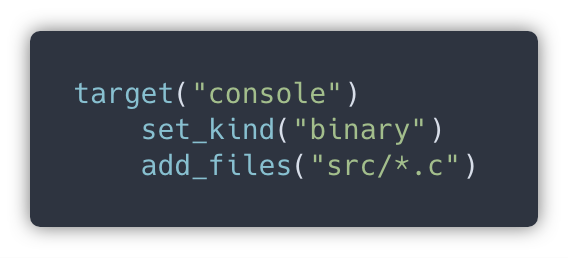
## 简单的工程描述
## 简介
XMake是一个基于Lua的轻量级跨平台自动构建工具,支持在各种主流平台上构建项目
xmake的目标是开发者更加关注于项目本身开发,简化项目的描述和构建,并且提供平台无关性,使得一次编写,随处构建
它跟cmake、automake、premake有点类似,但是机制不同,它默认不会去生成IDE相关的工程文件,采用直接编译,并且更加的方便易用
采用lua的工程描述语法更简洁直观,支持在大部分常用平台上进行构建,以及交叉编译
并且xmake提供了创建、配置、编译、打包、安装、卸载、运行等一些actions,使得开发和构建更加的方便和流程化。
不仅如此,它还提供了许多更加高级的特性,例如插件扩展、脚本宏记录、批量打包、自动文档生成等等。。
如果你想要了解更多,请参考:[在线文档](https://xmake.io/#/zh-cn/getting_started), [Github](https://github.com/xmake-io/xmake)以及[Gitee](https://gitee.com/tboox/xmake)
## 安装
#### 使用curl
```bash
bash <(curl -fsSL https://xmake.io/shget.text)
```
#### 使用wget
```bash
bash <(wget https://xmake.io/shget.text -O -)
```
#### 使用powershell
```powershell
Invoke-Expression (Invoke-Webrequest 'https://xmake.io/psget.text' -UseBasicParsing).Content
```
## 简单的工程描述
 ## 包依赖描述
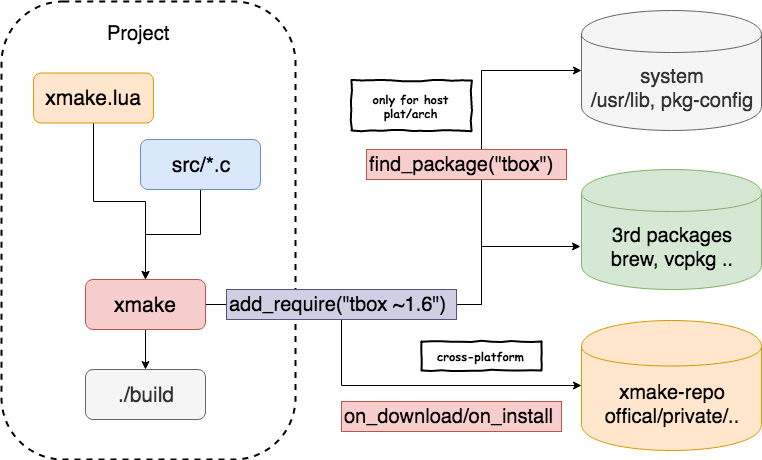
 官方的xmake包管理仓库: [xmake-repo](https://github.com/xmake-io/xmake-repo)
## 构建工程
```bash
$ xmake
```
## 运行目标
```bash
$ xmake run console
```
## 调试程序
```bash
$ xmake run -d console
```
## 配置平台
```bash
$ xmake f -p [windows|linux|macosx|android|iphoneos ..] -a [x86|arm64 ..] -m [debug|release]
$ xmake
```
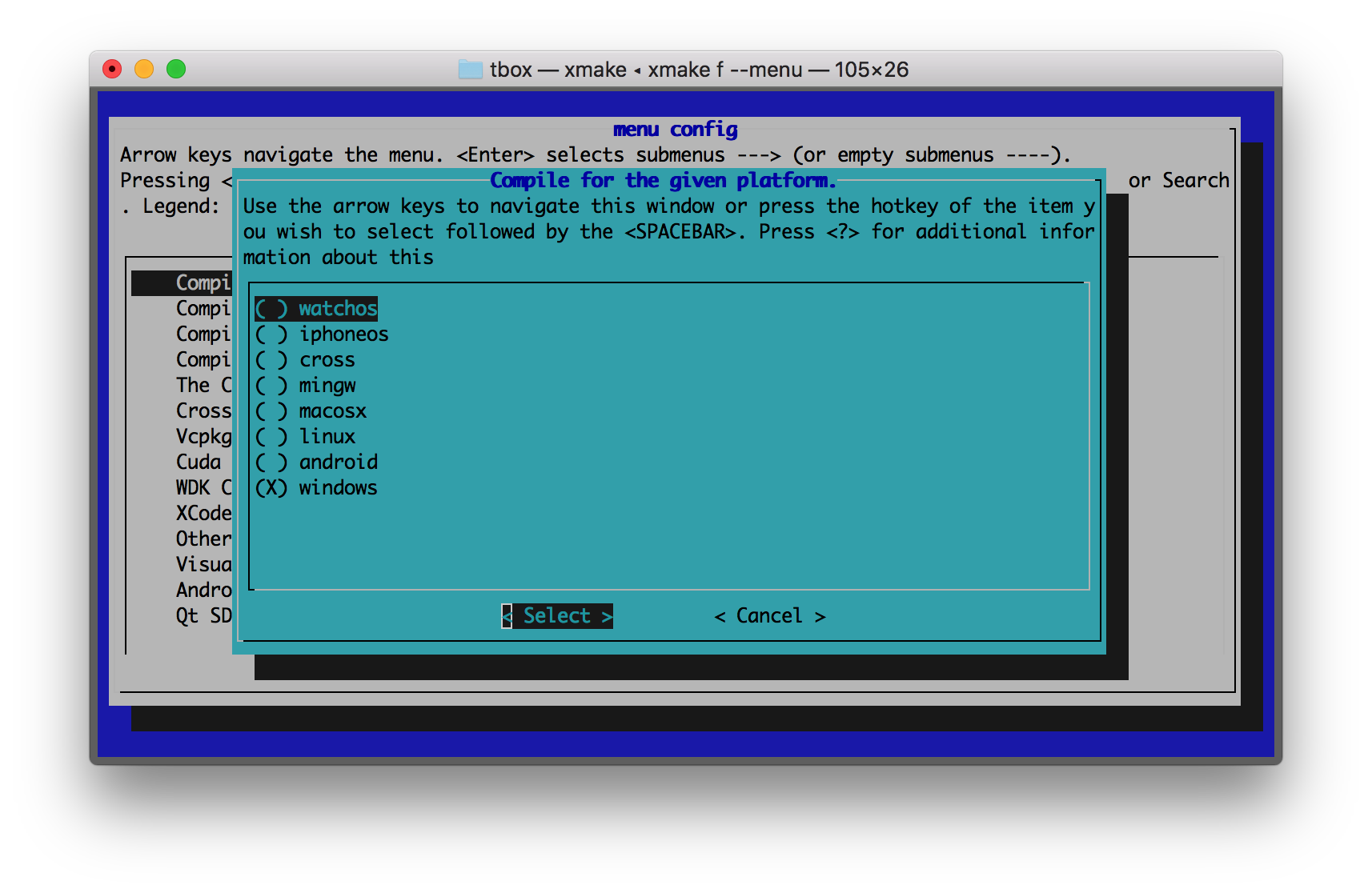
## 图形化菜单配置
```bash
$ xmake f --menu
```
官方的xmake包管理仓库: [xmake-repo](https://github.com/xmake-io/xmake-repo)
## 构建工程
```bash
$ xmake
```
## 运行目标
```bash
$ xmake run console
```
## 调试程序
```bash
$ xmake run -d console
```
## 配置平台
```bash
$ xmake f -p [windows|linux|macosx|android|iphoneos ..] -a [x86|arm64 ..] -m [debug|release]
$ xmake
```
## 图形化菜单配置
```bash
$ xmake f --menu
```
 ## 跟ninja一样快的构建速度
测试工程: [xmake-core](https://github.com/xmake-io/xmake/tree/master/core)
### 多任务并行编译测试
| 构建系统 | Termux (8core/-j12) | 构建系统 | MacOS (8core/-j12) |
|----- | ---- | --- | --- |
|xmake | 24.890s | xmake | 12.264s |
|ninja | 25.682s | ninja | 11.327s |
|cmake(gen+make) | 5.416s+28.473s | cmake(gen+make) | 1.203s+14.030s |
|cmake(gen+ninja) | 4.458s+24.842s | cmake(gen+ninja) | 0.988s+11.644s |
### 单任务编译测试
| 构建系统 | Termux (-j1) | 构建系统 | MacOS (-j1) |
|----- | ---- | --- | --- |
|xmake | 1m57.707s | xmake | 39.937s |
|ninja | 1m52.845s | ninja | 38.995s |
|cmake(gen+make) | 5.416s+2m10.539s | cmake(gen+make) | 1.203s+41.737s |
|cmake(gen+ninja) | 4.458s+1m54.868s | cmake(gen+ninja) | 0.988s+38.022s |
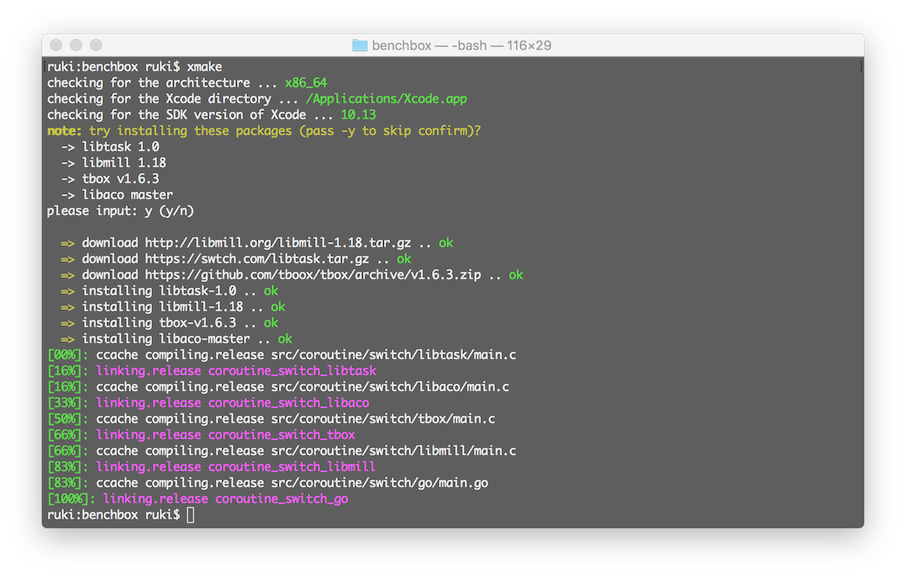
## 包依赖管理
### 下载和编译
## 跟ninja一样快的构建速度
测试工程: [xmake-core](https://github.com/xmake-io/xmake/tree/master/core)
### 多任务并行编译测试
| 构建系统 | Termux (8core/-j12) | 构建系统 | MacOS (8core/-j12) |
|----- | ---- | --- | --- |
|xmake | 24.890s | xmake | 12.264s |
|ninja | 25.682s | ninja | 11.327s |
|cmake(gen+make) | 5.416s+28.473s | cmake(gen+make) | 1.203s+14.030s |
|cmake(gen+ninja) | 4.458s+24.842s | cmake(gen+ninja) | 0.988s+11.644s |
### 单任务编译测试
| 构建系统 | Termux (-j1) | 构建系统 | MacOS (-j1) |
|----- | ---- | --- | --- |
|xmake | 1m57.707s | xmake | 39.937s |
|ninja | 1m52.845s | ninja | 38.995s |
|cmake(gen+make) | 5.416s+2m10.539s | cmake(gen+make) | 1.203s+41.737s |
|cmake(gen+ninja) | 4.458s+1m54.868s | cmake(gen+ninja) | 0.988s+38.022s |
## 包依赖管理
### 下载和编译
 ### 架构和流程
 ## 支持平台
* Windows (x86, x64)
* macOS (i386, x86_64)
* Linux (i386, x86_64, cross-toolchains ..)
* *BSD (i386, x86_64)
* Android (x86, x86_64, armeabi, armeabi-v7a, arm64-v8a)
* iOS (armv7, armv7s, arm64, i386, x86_64)
* WatchOS (armv7k, i386)
* MSYS (i386, x86_64)
* MinGW (i386, x86_64)
* Cygwin (i386, x86_64)
* Cross (cross-toolchains ..)
## 支持工具链
```bash
$ xmake show -l toolchains
xcode Xcode IDE
vs VisualStudio IDE
yasm The Yasm Modular Assembler
clang A C language family frontend for LLVM
go Go Programming Language Compiler
dlang D Programming Language Compiler
gfortran GNU Fortran Programming Language Compiler
zig Zig Programming Language Compiler
sdcc Small Device C Compiler
cuda CUDA Toolkit
ndk Android NDK
rust Rust Programming Language Compiler
llvm A collection of modular and reusable compiler and toolchain technologies
cross Common cross compilation toolchain
nasm NASM Assembler
gcc GNU Compiler Collection
mingw Minimalist GNU for Windows
gnu-rm GNU Arm Embedded Toolchain
envs Environment variables toolchain
fasm Flat Assembler
```
## 支持语言
* C/C++
* Objc/Objc++
* Swift
* Assembly
* Golang
* Rust
* Dlang
* Fortran
* Cuda
* Zig (Experimental)
## 工程类型
* 静态库程序
* 动态库类型
* 控制台程序
* Cuda程序
* Qt应用程序
* WDK驱动程序
* WinSDK应用程序
* MFC应用程序
* iOS/MacOS应用程序
* Framework和Bundle程序(iOS/MacOS)
## 更多例子
Debug和Release模式:
```lua
add_rules("mode.debug", "mode.release")
target("console")
set_kind("binary")
add_files("src/*.c")
if is_mode("debug") then
add_defines("DEBUG")
end
```
自定义脚本:
```lua
target("test")
set_kind("binary")
add_files("src/*.c")
after_build(function (target)
print("hello: %s", target:name())
os.exec("echo %s", target:targetfile())
end)
```
下载和使用在[xmake-repo](https://github.com/xmake-io/xmake-repo)和第三方包仓库的依赖包:
```lua
add_requires("tbox >1.6.1", "libuv master", "vcpkg::ffmpeg", "brew::pcre2/libpcre2-8")
add_requires("conan::OpenSSL/1.0.2n@conan/stable", {alias = "openssl", optional = true, debug = true})
target("test")
set_kind("binary")
add_files("src/*.c")
add_packages("tbox", "libuv", "vcpkg::ffmpeg", "brew::pcre2/libpcre2-8", "openssl")
```
Qt QuickApp应用程序:
```lua
target("test")
add_rules("qt.quickapp")
add_files("src/*.cpp")
add_files("src/qml.qrc")
```
Cuda程序:
```lua
target("test")
set_kind("binary")
add_files("src/*.cu")
add_cugencodes("native")
add_cugencodes("compute_30")
```
WDK/UMDF驱动程序:
```lua
target("echo")
add_rules("wdk.driver", "wdk.env.umdf")
add_files("driver/*.c")
add_files("driver/*.inx")
add_includedirs("exe")
target("app")
add_rules("wdk.binary", "wdk.env.umdf")
add_files("exe/*.cpp")
```
更多WDK驱动程序例子(umdf/kmdf/wdm),见:[WDK工程例子](https://xmake.io/#/zh-cn/guide/project_examples?id=wdk%e9%a9%b1%e5%8a%a8%e7%a8%8b%e5%ba%8f)
iOS/MacOS应用程序:
```lua
target("test")
add_rules("xcode.application")
add_files("src/*.m", "src/**.storyboard", "src/*.xcassets")
add_files("src/Info.plist")
```
Framework和Bundle程序(iOS/MacOS):
```lua
target("test")
add_rules("xcode.framework") -- 或者 xcode.bundle
add_files("src/*.m")
add_files("src/Info.plist")
```
## 插件
#### 生成IDE工程文件插件(makefile, vs2002 - vs2019, ...)
```bash
$ xmake project -k vsxmake -m "debug;release" # 新版vs工程生成插件(推荐)
$ xmake project -k vs -m "debug;release"
$ xmake project -k cmake
$ xmake project -k ninja
$ xmake project -k compile_commands
```
#### 加载自定义lua脚本插件
```bash
$ xmake l ./test.lua
$ xmake l -c "print('hello xmake!')"
$ xmake l lib.detect.find_tool gcc
$ xmake l
> print("hello xmake!")
> {1, 2, 3}
< {
1,
2,
3
}
```
更多内置插件见相关文档:[内置插件文档](https://xmake.io/#/zh-cn/plugin/builtin_plugins)
其他扩展插件,请到插件仓库进行下载安装: [xmake-plugins](https://github.com/xmake-io/xmake-plugins).
## IDE和编辑器插件
* [xmake-vscode](https://github.com/xmake-io/xmake-vscode)
## 支持平台
* Windows (x86, x64)
* macOS (i386, x86_64)
* Linux (i386, x86_64, cross-toolchains ..)
* *BSD (i386, x86_64)
* Android (x86, x86_64, armeabi, armeabi-v7a, arm64-v8a)
* iOS (armv7, armv7s, arm64, i386, x86_64)
* WatchOS (armv7k, i386)
* MSYS (i386, x86_64)
* MinGW (i386, x86_64)
* Cygwin (i386, x86_64)
* Cross (cross-toolchains ..)
## 支持工具链
```bash
$ xmake show -l toolchains
xcode Xcode IDE
vs VisualStudio IDE
yasm The Yasm Modular Assembler
clang A C language family frontend for LLVM
go Go Programming Language Compiler
dlang D Programming Language Compiler
gfortran GNU Fortran Programming Language Compiler
zig Zig Programming Language Compiler
sdcc Small Device C Compiler
cuda CUDA Toolkit
ndk Android NDK
rust Rust Programming Language Compiler
llvm A collection of modular and reusable compiler and toolchain technologies
cross Common cross compilation toolchain
nasm NASM Assembler
gcc GNU Compiler Collection
mingw Minimalist GNU for Windows
gnu-rm GNU Arm Embedded Toolchain
envs Environment variables toolchain
fasm Flat Assembler
```
## 支持语言
* C/C++
* Objc/Objc++
* Swift
* Assembly
* Golang
* Rust
* Dlang
* Fortran
* Cuda
* Zig (Experimental)
## 工程类型
* 静态库程序
* 动态库类型
* 控制台程序
* Cuda程序
* Qt应用程序
* WDK驱动程序
* WinSDK应用程序
* MFC应用程序
* iOS/MacOS应用程序
* Framework和Bundle程序(iOS/MacOS)
## 更多例子
Debug和Release模式:
```lua
add_rules("mode.debug", "mode.release")
target("console")
set_kind("binary")
add_files("src/*.c")
if is_mode("debug") then
add_defines("DEBUG")
end
```
自定义脚本:
```lua
target("test")
set_kind("binary")
add_files("src/*.c")
after_build(function (target)
print("hello: %s", target:name())
os.exec("echo %s", target:targetfile())
end)
```
下载和使用在[xmake-repo](https://github.com/xmake-io/xmake-repo)和第三方包仓库的依赖包:
```lua
add_requires("tbox >1.6.1", "libuv master", "vcpkg::ffmpeg", "brew::pcre2/libpcre2-8")
add_requires("conan::OpenSSL/1.0.2n@conan/stable", {alias = "openssl", optional = true, debug = true})
target("test")
set_kind("binary")
add_files("src/*.c")
add_packages("tbox", "libuv", "vcpkg::ffmpeg", "brew::pcre2/libpcre2-8", "openssl")
```
Qt QuickApp应用程序:
```lua
target("test")
add_rules("qt.quickapp")
add_files("src/*.cpp")
add_files("src/qml.qrc")
```
Cuda程序:
```lua
target("test")
set_kind("binary")
add_files("src/*.cu")
add_cugencodes("native")
add_cugencodes("compute_30")
```
WDK/UMDF驱动程序:
```lua
target("echo")
add_rules("wdk.driver", "wdk.env.umdf")
add_files("driver/*.c")
add_files("driver/*.inx")
add_includedirs("exe")
target("app")
add_rules("wdk.binary", "wdk.env.umdf")
add_files("exe/*.cpp")
```
更多WDK驱动程序例子(umdf/kmdf/wdm),见:[WDK工程例子](https://xmake.io/#/zh-cn/guide/project_examples?id=wdk%e9%a9%b1%e5%8a%a8%e7%a8%8b%e5%ba%8f)
iOS/MacOS应用程序:
```lua
target("test")
add_rules("xcode.application")
add_files("src/*.m", "src/**.storyboard", "src/*.xcassets")
add_files("src/Info.plist")
```
Framework和Bundle程序(iOS/MacOS):
```lua
target("test")
add_rules("xcode.framework") -- 或者 xcode.bundle
add_files("src/*.m")
add_files("src/Info.plist")
```
## 插件
#### 生成IDE工程文件插件(makefile, vs2002 - vs2019, ...)
```bash
$ xmake project -k vsxmake -m "debug;release" # 新版vs工程生成插件(推荐)
$ xmake project -k vs -m "debug;release"
$ xmake project -k cmake
$ xmake project -k ninja
$ xmake project -k compile_commands
```
#### 加载自定义lua脚本插件
```bash
$ xmake l ./test.lua
$ xmake l -c "print('hello xmake!')"
$ xmake l lib.detect.find_tool gcc
$ xmake l
> print("hello xmake!")
> {1, 2, 3}
< {
1,
2,
3
}
```
更多内置插件见相关文档:[内置插件文档](https://xmake.io/#/zh-cn/plugin/builtin_plugins)
其他扩展插件,请到插件仓库进行下载安装: [xmake-plugins](https://github.com/xmake-io/xmake-plugins).
## IDE和编辑器插件
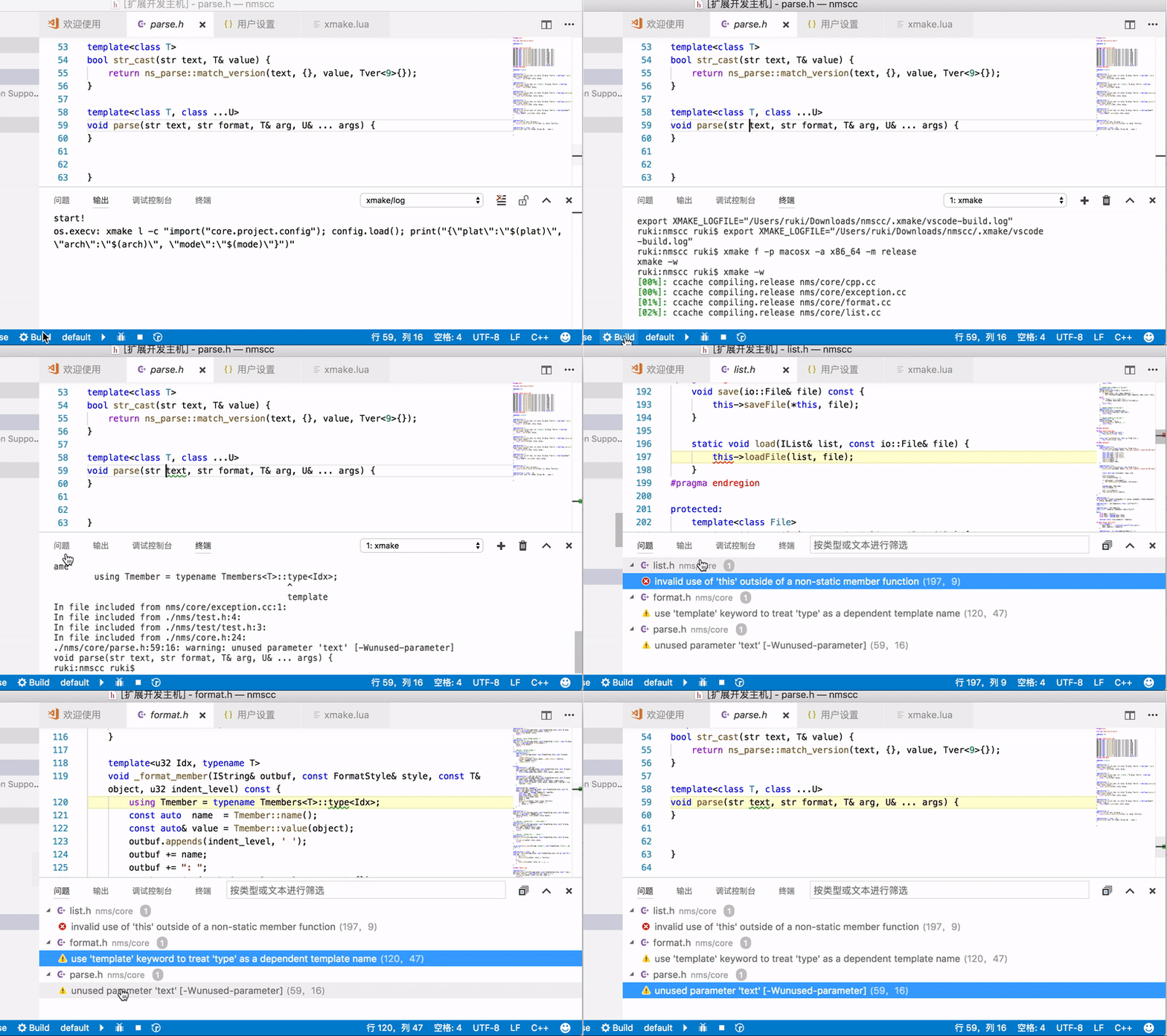
* [xmake-vscode](https://github.com/xmake-io/xmake-vscode)
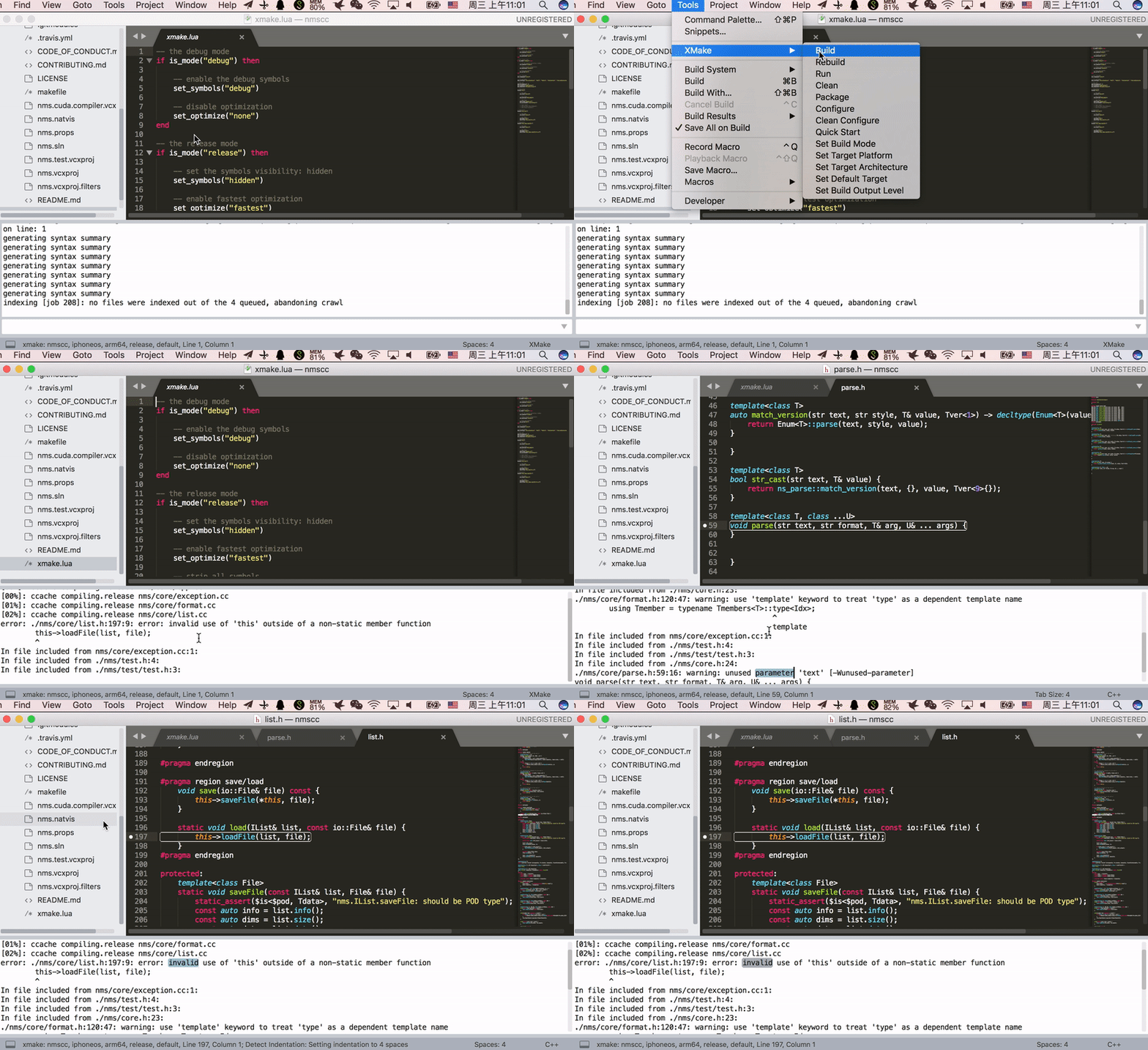
 * [xmake-sublime](https://github.com/xmake-io/xmake-sublime)
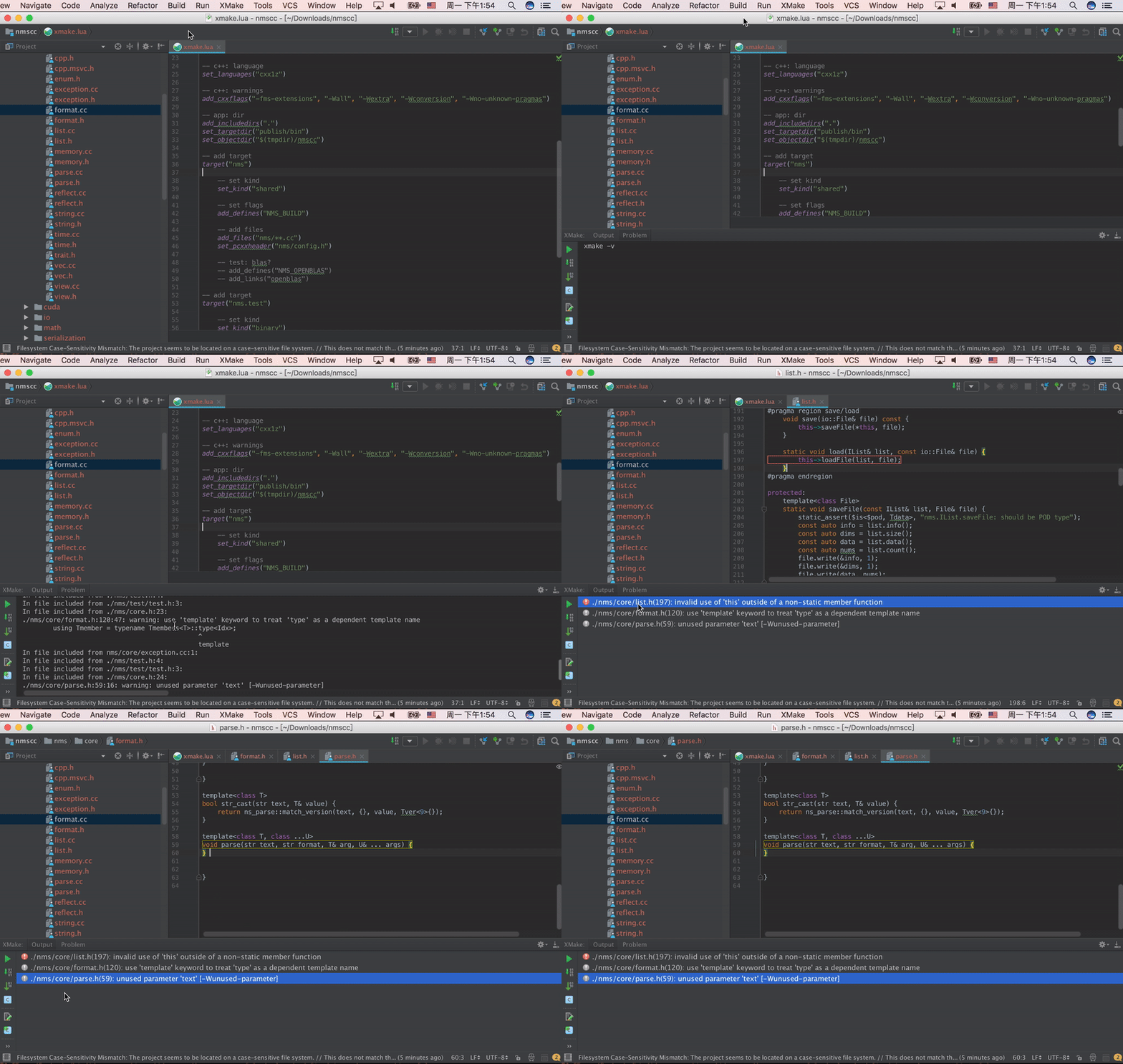
 * [xmake-idea](https://github.com/xmake-io/xmake-idea)
 * [xmake.vim](https://github.com/luzhlon/xmake.vim) (third-party, thanks [@luzhlon](https://github.com/luzhlon))
### XMake Gradle插件 (JNI)
我们也可以在Gradle中使用[xmake-gradle](https://github.com/xmake-io/xmake-gradle)插件来集成编译JNI库
```
plugins {
id 'org.tboox.gradle-xmake-plugin' version '1.0.6'
}
android {
externalNativeBuild {
xmake {
path "jni/xmake.lua"
}
}
}
```
当`gradle-xmake-plugin`插件被应用生效后,`xmakeBuild`任务会自动注入到现有的`assemble`任务中去,自动执行jni库编译和集成。
```console
$ ./gradlew app:assembleDebug
> Task :nativelib:xmakeConfigureForArm64
> Task :nativelib:xmakeBuildForArm64
>> xmake build
[ 50%]: ccache compiling.debug nativelib.cc
[ 75%]: linking.debug libnativelib.so
[100%]: build ok!
>> install artifacts to /Users/ruki/projects/personal/xmake-gradle/nativelib/libs/arm64-v8a
> Task :nativelib:xmakeConfigureForArmv7
> Task :nativelib:xmakeBuildForArmv7
>> xmake build
[ 50%]: ccache compiling.debug nativelib.cc
[ 75%]: linking.debug libnativelib.so
[100%]: build ok!
>> install artifacts to /Users/ruki/projects/personal/xmake-gradle/nativelib/libs/armeabi-v7a
> Task :nativelib:preBuild
> Task :nativelib:assemble
> Task :app:assembleDebug
```
## 项目例子
一些使用xmake的项目:
* [tbox](https://github.com/tboox/tbox)
* [gbox](https://github.com/tboox/gbox)
* [vm86](https://github.com/tboox/vm86)
* [更多](https://github.com/xmake-io/awesome-xmake)
## 演示视频
* [xmake.vim](https://github.com/luzhlon/xmake.vim) (third-party, thanks [@luzhlon](https://github.com/luzhlon))
### XMake Gradle插件 (JNI)
我们也可以在Gradle中使用[xmake-gradle](https://github.com/xmake-io/xmake-gradle)插件来集成编译JNI库
```
plugins {
id 'org.tboox.gradle-xmake-plugin' version '1.0.6'
}
android {
externalNativeBuild {
xmake {
path "jni/xmake.lua"
}
}
}
```
当`gradle-xmake-plugin`插件被应用生效后,`xmakeBuild`任务会自动注入到现有的`assemble`任务中去,自动执行jni库编译和集成。
```console
$ ./gradlew app:assembleDebug
> Task :nativelib:xmakeConfigureForArm64
> Task :nativelib:xmakeBuildForArm64
>> xmake build
[ 50%]: ccache compiling.debug nativelib.cc
[ 75%]: linking.debug libnativelib.so
[100%]: build ok!
>> install artifacts to /Users/ruki/projects/personal/xmake-gradle/nativelib/libs/arm64-v8a
> Task :nativelib:xmakeConfigureForArmv7
> Task :nativelib:xmakeBuildForArmv7
>> xmake build
[ 50%]: ccache compiling.debug nativelib.cc
[ 75%]: linking.debug libnativelib.so
[100%]: build ok!
>> install artifacts to /Users/ruki/projects/personal/xmake-gradle/nativelib/libs/armeabi-v7a
> Task :nativelib:preBuild
> Task :nativelib:assemble
> Task :app:assembleDebug
```
## 项目例子
一些使用xmake的项目:
* [tbox](https://github.com/tboox/tbox)
* [gbox](https://github.com/tboox/gbox)
* [vm86](https://github.com/tboox/vm86)
* [更多](https://github.com/xmake-io/awesome-xmake)
## 演示视频
 ## 联系方式
* 邮箱:[waruqi@gmail.com](mailto:waruqi@gmail.com)
* 主页:[tboox.org](https://tboox.org/cn)
* 社区:[Reddit论坛](https://www.reddit.com/r/tboox/)
* 聊天:[Telegram群组](https://t.me/tbooxorg), [Gitter聊天室](https://gitter.im/tboox/tboox?utm_source=badge&utm_medium=badge&utm_campaign=pr-badge&utm_content=badge)
* 源码:[Github](https://github.com/xmake-io/xmake), [Gitee](https://gitee.com/tboox/xmake)
* QQ群:343118190(技术支持), 662147501
* 微信公众号:tboox-os
## 感谢
感谢所有对xmake有所[贡献](CONTRIBUTING.md)的人:
## 联系方式
* 邮箱:[waruqi@gmail.com](mailto:waruqi@gmail.com)
* 主页:[tboox.org](https://tboox.org/cn)
* 社区:[Reddit论坛](https://www.reddit.com/r/tboox/)
* 聊天:[Telegram群组](https://t.me/tbooxorg), [Gitter聊天室](https://gitter.im/tboox/tboox?utm_source=badge&utm_medium=badge&utm_campaign=pr-badge&utm_content=badge)
* 源码:[Github](https://github.com/xmake-io/xmake), [Gitee](https://gitee.com/tboox/xmake)
* QQ群:343118190(技术支持), 662147501
* 微信公众号:tboox-os
## 感谢
感谢所有对xmake有所[贡献](CONTRIBUTING.md)的人:
 * [TitanSnow](https://github.com/TitanSnow): 提供xmake [logo](https://github.com/TitanSnow/ts-xmake-logo) 和安装脚本
* [uael](https://github.com/uael): 提供语义版本跨平台c库 [sv](https://github.com/uael/sv)
* [OpportunityLiu](https://github.com/OpportunityLiu): 改进cuda构建, tests框架和ci
* [TitanSnow](https://github.com/TitanSnow): 提供xmake [logo](https://github.com/TitanSnow/ts-xmake-logo) 和安装脚本
* [uael](https://github.com/uael): 提供语义版本跨平台c库 [sv](https://github.com/uael/sv)
* [OpportunityLiu](https://github.com/OpportunityLiu): 改进cuda构建, tests框架和ci