# k8s-install
**Repository Path**: kevin186/k8s-install
## Basic Information
- **Project Name**: k8s-install
- **Description**: No description available
- **Primary Language**: Unknown
- **License**: Not specified
- **Default Branch**: master
- **Homepage**: None
- **GVP Project**: No
## Statistics
- **Stars**: 0
- **Forks**: 0
- **Created**: 2025-04-11
- **Last Updated**: 2025-04-11
## Categories & Tags
**Categories**: Uncategorized
**Tags**: None
## README
### **安装案例:**
系统:Centos
可以多台Master,多台Node (注意Master不能低于3台!)
此案例使用三台Master两台Node,用户名root,密码均为123456
```
master 192.168.20.183
master 192.168.20.96
master 192.168.20.171
node 192.168.20.172
node 192.168.20.54
```
#### 安装Master集群
下载项目:
```
git clone https://github.com/zdwork/k8s-install.git
cd k8s-install
```
修改 conf/master-install.conf
内容如下:
```
#!/bin/bash
#User-defined information
export node=3 #Master数量!!
export node_ip="192.168.20.183 192.168.20.96 192.168.20.171" #服务器的ip,以空格分割
export node_name="master-01 master-02 master-03" #主机名 自定义,以空格分割
export node_pass="123456 123456 123456" #每台服务器的root密码,以空格分割
export apiserver_vip="192.168.20.240"#高可用IP 注意此ip要没有被占用
export apiserver_vip_port="4443"
export flaneld_interface="ens33" #你的网卡
export vip_interface="ens33" #你的网卡
export haproxy_name="admin"
export haproxy_pass="123456"
export haproxy_status_port="8000"
```
**安装:**
脚本在master-01上执行
```
./install.sh
```
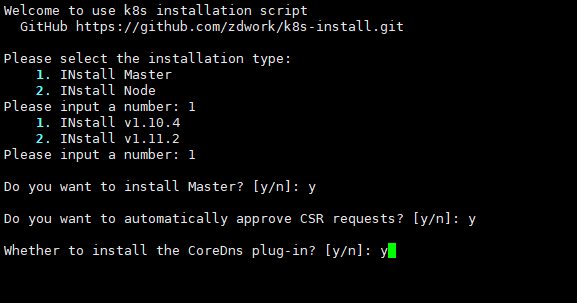
**脚本执行完后会打打印出如下信息:**
```
---------------- etcd --------------------------------
192.168.20.183::master-01
Active: active (running) since 三 2018-11-28 16:03:46 CST; 1h 44min ago
192.168.20.96::master-02
Active: active (running) since 三 2018-11-28 16:03:47 CST; 1h 44min ago
192.168.20.171::master-03
Active: active (running) since 三 2018-11-28 16:04:07 CST; 1h 43min ago
---------------- kube-apiserver -----------------------
192.168.20.183::master-01
Active: active (running) since 三 2018-11-28 16:07:07 CST; 1h 40min ago
192.168.20.96::master-02
Active: active (running) since 三 2018-11-28 16:07:20 CST; 1h 40min ago
192.168.20.171::master-03
Active: active (running) since 三 2018-11-28 16:07:32 CST; 1h 40min ago
---------------- kube-scheduler ------------------------
192.168.20.183::master-01
Active: active (running) since 三 2018-11-28 16:08:26 CST; 1h 39min ago
192.168.20.96::master-02
Active: active (running) since 三 2018-11-28 16:08:26 CST; 1h 39min ago
192.168.20.171::master-03
Active: active (running) since 三 2018-11-28 16:08:26 CST; 1h 39min ago
---------------- kube-controller_manager ----------------
192.168.20.183::master-01
Active: active (running) since 三 2018-11-28 16:07:59 CST; 1h 40min ago
192.168.20.96::master-02
Active: active (running) since 三 2018-11-28 16:09:08 CST; 1h 38min ago
192.168.20.171::master-03
Active: active (running) since 三 2018-11-28 16:08:02 CST; 1h 40min ago
---------------- keepalived ------------------------------
192.168.20.183::master-01
Active: active (running) since 三 2018-11-28 16:06:31 CST; 1h 41min ago
192.168.20.96::master-02
Active: active (running) since 三 2018-11-28 16:06:33 CST; 1h 41min ago
192.168.20.171::master-03
Active: active (running) since 三 2018-11-28 16:06:34 CST; 1h 41min ago
---------------- haproxy ---------------------------------
192.168.20.183::master-01
Active: active (running) since 三 2018-11-28 16:05:03 CST; 1h 43min ago
192.168.20.96::master-02
Active: active (running) since 三 2018-11-28 16:05:20 CST; 1h 42min ago
192.168.20.171::master-03
Active: active (running) since 三 2018-11-28 16:05:34 CST; 1h 42min ago
---------------- flanneld --------------------------------
192.168.20.183::master-01
Active: active (running) since 三 2018-11-28 16:04:39 CST; 1h 43min ago
192.168.20.96::master-02
Active: active (running) since 三 2018-11-28 16:04:41 CST; 1h 43min ago
192.168.20.171::master-03
Active: active (running) since 三 2018-11-28 16:04:43 CST; 1h 43min ago
################ Current cluster state ####################
NAME STATUS MESSAGE ERROR
scheduler Healthy ok
controller-manager Healthy ok
etcd-1 Healthy {"health":"true"}
etcd-2 Healthy {"health":"true"}
etcd-0 Healthy {"health":"true"}
```
#### 安装Node
修改 conf/node-install.conf
内容如下:
```
#!/bin/bash
#User-defined information
export node=2 #Node数量!!
export node_ip="192.168.20.172 192.168.20.54"
export node_name="node-1 node-2"
export node_pass="123456 123456"
export flaneld_interface="ens33"
```
**安装:**
```
./install.sh
```
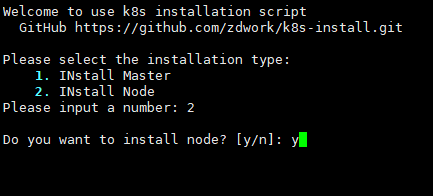
**脚本执行完后会打打印出如下信息:**
```
---------------- flanneld --------------------------------
192.168.20.172::node-1
Active: active (running) since 三 2018-11-28 18:28:34 CST; 26s ago
192.168.20.54::node-2
Active: active (running) since 三 2018-11-28 18:28:37 CST; 25s ago
---------------- docker --------------------------------
192.168.20.172::node-1
Active: active (running) since 三 2018-11-28 18:28:38 CST; 24s ago
192.168.20.54::node-2
Active: active (running) since 三 2018-11-28 18:28:42 CST; 21s ago
---------------- kubelet --------------------------------
192.168.20.172::node-1
Active: active (running) since 三 2018-11-28 18:28:52 CST; 11s ago
192.168.20.54::node-2
Active: active (running) since 三 2018-11-28 18:28:54 CST; 10s ago
---------------- kube-proxy --------------------------------
192.168.20.172::node-1
Active: active (running) since 三 2018-11-28 18:28:59 CST; 5s ago
192.168.20.54::node-2
Active: active (running) since 三 2018-11-28 18:29:00 CST; 5s ago
```
**测试:**
```
[root@localhost k8s-install]# bash
[root@master-01 k8s-install]# source /etc/profile
[root@master-01 k8s-install]# kubectl get nodes
NAME STATUS ROLES AGE VERSION
node-1 Ready 35s v1.10.4
node-2 Ready 34s v1.10.4
[root@master-01 k8s-install]#
```
安装完后最好重启下所有服务器
**以后会持续更新将新增加以下功能:**
- 支持多系统安装
- 多版本可选
- 更多扩展插件
- 使用脚本可自动化管理集群
**因为时间紧迫许多判断条件没有添加以后会陆续完善希望与大家积极提交**
QQ群:895769263