# tree-select
**Repository Path**: kevin402502/tree-select
## Basic Information
- **Project Name**: tree-select
- **Description**: React Tree Select
- **Primary Language**: JavaScript
- **License**: MIT
- **Default Branch**: master
- **Homepage**: None
- **GVP Project**: No
## Statistics
- **Stars**: 0
- **Forks**: 1
- **Created**: 2021-06-17
- **Last Updated**: 2022-08-15
## Categories & Tags
**Categories**: Uncategorized
**Tags**: None
## README
# rc-tree-select
---
React TreeSelect Component
[![NPM version][npm-image]][npm-url]
[![build status][travis-image]][travis-url]
[![Test coverage][coveralls-image]][coveralls-url]
[![gemnasium deps][gemnasium-image]][gemnasium-url]
[![npm download][download-image]][download-url]
[npm-image]: http://img.shields.io/npm/v/rc-tree-select.svg?style=flat-square
[npm-url]: http://npmjs.org/package/rc-tree-select
[travis-image]: https://img.shields.io/travis/react-component/tree-select.svg?style=flat-square
[travis-url]: https://travis-ci.org/react-component/tree-select
[coveralls-image]: https://img.shields.io/coveralls/react-component/tree-select.svg?style=flat-square
[coveralls-url]: https://coveralls.io/r/react-component/tree-select?branch=master
[gemnasium-image]: http://img.shields.io/gemnasium/react-component/tree-select.svg?style=flat-square
[gemnasium-url]: https://gemnasium.com/react-component/tree-select
[node-image]: https://img.shields.io/badge/node.js-%3E=_0.10-green.svg?style=flat-square
[node-url]: http://nodejs.org/download/
[download-image]: https://img.shields.io/npm/dm/rc-tree-select.svg?style=flat-square
[download-url]: https://npmjs.org/package/rc-tree-select
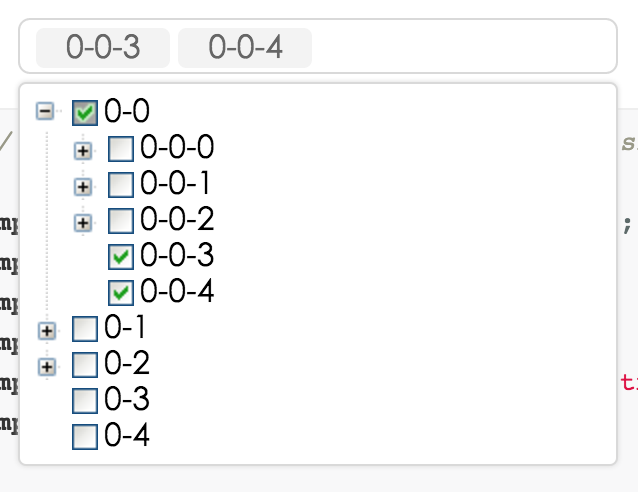
## Screenshots
 ## Development
```
npm install
npm start
```
## Example
http://localhost:8000/examples/
online example: http://react-component.github.io/tree-select/
## install
[](https://npmjs.org/package/rc-tree-select)
## API
### TreeSelect props
| name | description | type | default |
|----------|----------------|----------|--------------|
|className | additional css class of root dom node | String | '' |
|prefixCls | prefix class | String | '' |
|animation | dropdown animation name. only support slide-up now | String | '' |
|transitionName | dropdown css animation name | String | '' |
|choiceTransitionName | css animation name for selected items at multiple mode | String | '' |
|dropdownMatchSelectWidth | whether dropdown's with is same with select | bool | true |
|dropdownClassName | additional className applied to dropdown | String | - |
|dropdownStyle | additional style applied to dropdown | Object | {} |
|dropdownPopupAlign | specify alignment for dropdown (alignConfig of [dom-align](https://github.com/yiminghe/dom-align)) | Object | - |
|onDropdownVisibleChange | control dropdown visible | function | `() => { return true; }` |
|notFoundContent | specify content to show when no result matches. | String | 'Not Found' |
|showSearch | whether show search input in single mode | bool | true |
|allowClear | whether allowClear | bool | false |
|maxTagTextLength | max tag text length to show | number | - |
|multiple | whether multiple select (true when enable treeCheckable) | bool | false |
|disabled | whether disabled select | bool | false |
|inputValue | if enable search, you can set default input's value, if set to null, auto clear input value when finish select/unselect operation | string/null | '' |
|defaultValue | initial selected treeNode(s) | same as value type | - |
|value | current selected treeNode(s). | normal: String/Array. labelInValue: {value:String,label:React.Node}/Array<{value,label}>. treeCheckStrictly(halfChecked default false): {value:String,label:React.Node, halfChecked}/Array<{value,label,halfChecked}>. | - |
|labelInValue| whether to embed label in value, see above value type | Bool | false |
|onChange | called when select treeNode or input value change | function(value, label(null), extra) | - |
|onSelect | called when select treeNode | function(value, node, extra) | - |
|onSearch | called when input changed | function | - |
|showCheckedStrategy | `TreeSelect.SHOW_ALL`: show all checked treeNodes (Include parent treeNode). `TreeSelect.SHOW_PARENT`: show checked treeNodes (Just show parent treeNode). Default just show child. | enum{TreeSelect.SHOW_ALL, TreeSelect.SHOW_PARENT, TreeSelect.SHOW_CHILD } | TreeSelect.SHOW_CHILD |
|treeIcon | show tree icon | bool | false |
|treeLine | show tree line | bool | false |
|treeDefaultExpandAll | default expand all treeNode | bool | false |
|treeDefaultExpandedKeys | default expanded treeNode keys | Array | - |
|treeCheckable | whether tree show checkbox (select callback will not fire) | bool | false |
|treeCheckStrictly | check node precisely, parent and children nodes are not associated| bool | false |
|filterTreeNode | whether filter treeNodes by input value. default filter by treeNode's treeNodeFilterProp prop's value | bool/Function(inputValue:string, treeNode:TreeNode) | Function |
|treeNodeFilterProp | which prop value of treeNode will be used for filter if filterTreeNode return true | String | 'value' |
|treeNodeLabelProp | which prop value of treeNode will render as content of select | String | 'title' |
|treeData | treeNodes data Array, if set it then you need not to construct children TreeNode. (value should be unique across the whole array) | array<{value,label,children, [disabled,selectable]}> | [] |
|treeDataSimpleMode | enable simple mode of treeData.(treeData should be like this: [{id:1, pId:0, value:'1', label:"test1",...},...], `pId` is parent node's id) | bool/object{id:'id', pId:'pId', rootPId:null} | false |
|loadData | load data asynchronously | function(node) | - |
|getPopupContainer | container which popup select menu rendered into | function(trigger:Node):Node | function(){return document.body;} |
### TreeNode props
> note: you'd better to use `treeData` instead of using TreeNode.
| name | description | type | default |
|----------|----------------|----------|--------------|
|disabled | disable treeNode | bool | false |
|key | it's value must be unique across the tree's all TreeNode, you must set it | String | - |
|value | default as treeNodeFilterProp (be unique across the tree's all TreeNode) | String | '' |
|title | tree/subTree's title | String/element | '---' |
|isLeaf | whether it's leaf node | bool | false |
## note
1. Optimization tips(when there are large amounts of data, like more than 5000 nodes)
- Do not Expand all nodes.
- Recommend not exist many `TreeSelect` components in a page at the same time.
- Recommend not use `treeCheckable` mode, or use `treeCheckStrictly`.
2. In `treeCheckable` mode, It has the same effect when click `x`(node in Selection box) or uncheck in the treeNode(in dropdown panel), but the essence is not the same. So, even if both of them trigger `onChange` method, but the parameters (the third parameter) are different. (中文:在`treeCheckable`模式下,已选择节点上的`x`删除操作、和相应 treeNode 节点上 checkbox 的 uncheck 操作,最终效果相同,但本质不一样。前者跟弹出的 tree 组件可以“毫无关系”(例如 dropdown 没展开过,tree 也就没渲染好),而后者是 tree 组件上的节点 uncheck 事件。所以、即便两者都会触发`onChange`方法、但它们的参数(第三个参数)是不同的。)
## Test Case
http://localhost:8000/tests/runner.html?coverage
## Coverage
http://localhost:8000/node_modules/rc-server/node_modules/node-jscover/lib/front-end/jscoverage.html?w=http://localhost:8000/tests/runner.html?coverage
## License
rc-tree-select is released under the MIT license.
## Development
```
npm install
npm start
```
## Example
http://localhost:8000/examples/
online example: http://react-component.github.io/tree-select/
## install
[](https://npmjs.org/package/rc-tree-select)
## API
### TreeSelect props
| name | description | type | default |
|----------|----------------|----------|--------------|
|className | additional css class of root dom node | String | '' |
|prefixCls | prefix class | String | '' |
|animation | dropdown animation name. only support slide-up now | String | '' |
|transitionName | dropdown css animation name | String | '' |
|choiceTransitionName | css animation name for selected items at multiple mode | String | '' |
|dropdownMatchSelectWidth | whether dropdown's with is same with select | bool | true |
|dropdownClassName | additional className applied to dropdown | String | - |
|dropdownStyle | additional style applied to dropdown | Object | {} |
|dropdownPopupAlign | specify alignment for dropdown (alignConfig of [dom-align](https://github.com/yiminghe/dom-align)) | Object | - |
|onDropdownVisibleChange | control dropdown visible | function | `() => { return true; }` |
|notFoundContent | specify content to show when no result matches. | String | 'Not Found' |
|showSearch | whether show search input in single mode | bool | true |
|allowClear | whether allowClear | bool | false |
|maxTagTextLength | max tag text length to show | number | - |
|multiple | whether multiple select (true when enable treeCheckable) | bool | false |
|disabled | whether disabled select | bool | false |
|inputValue | if enable search, you can set default input's value, if set to null, auto clear input value when finish select/unselect operation | string/null | '' |
|defaultValue | initial selected treeNode(s) | same as value type | - |
|value | current selected treeNode(s). | normal: String/Array. labelInValue: {value:String,label:React.Node}/Array<{value,label}>. treeCheckStrictly(halfChecked default false): {value:String,label:React.Node, halfChecked}/Array<{value,label,halfChecked}>. | - |
|labelInValue| whether to embed label in value, see above value type | Bool | false |
|onChange | called when select treeNode or input value change | function(value, label(null), extra) | - |
|onSelect | called when select treeNode | function(value, node, extra) | - |
|onSearch | called when input changed | function | - |
|showCheckedStrategy | `TreeSelect.SHOW_ALL`: show all checked treeNodes (Include parent treeNode). `TreeSelect.SHOW_PARENT`: show checked treeNodes (Just show parent treeNode). Default just show child. | enum{TreeSelect.SHOW_ALL, TreeSelect.SHOW_PARENT, TreeSelect.SHOW_CHILD } | TreeSelect.SHOW_CHILD |
|treeIcon | show tree icon | bool | false |
|treeLine | show tree line | bool | false |
|treeDefaultExpandAll | default expand all treeNode | bool | false |
|treeDefaultExpandedKeys | default expanded treeNode keys | Array | - |
|treeCheckable | whether tree show checkbox (select callback will not fire) | bool | false |
|treeCheckStrictly | check node precisely, parent and children nodes are not associated| bool | false |
|filterTreeNode | whether filter treeNodes by input value. default filter by treeNode's treeNodeFilterProp prop's value | bool/Function(inputValue:string, treeNode:TreeNode) | Function |
|treeNodeFilterProp | which prop value of treeNode will be used for filter if filterTreeNode return true | String | 'value' |
|treeNodeLabelProp | which prop value of treeNode will render as content of select | String | 'title' |
|treeData | treeNodes data Array, if set it then you need not to construct children TreeNode. (value should be unique across the whole array) | array<{value,label,children, [disabled,selectable]}> | [] |
|treeDataSimpleMode | enable simple mode of treeData.(treeData should be like this: [{id:1, pId:0, value:'1', label:"test1",...},...], `pId` is parent node's id) | bool/object{id:'id', pId:'pId', rootPId:null} | false |
|loadData | load data asynchronously | function(node) | - |
|getPopupContainer | container which popup select menu rendered into | function(trigger:Node):Node | function(){return document.body;} |
### TreeNode props
> note: you'd better to use `treeData` instead of using TreeNode.
| name | description | type | default |
|----------|----------------|----------|--------------|
|disabled | disable treeNode | bool | false |
|key | it's value must be unique across the tree's all TreeNode, you must set it | String | - |
|value | default as treeNodeFilterProp (be unique across the tree's all TreeNode) | String | '' |
|title | tree/subTree's title | String/element | '---' |
|isLeaf | whether it's leaf node | bool | false |
## note
1. Optimization tips(when there are large amounts of data, like more than 5000 nodes)
- Do not Expand all nodes.
- Recommend not exist many `TreeSelect` components in a page at the same time.
- Recommend not use `treeCheckable` mode, or use `treeCheckStrictly`.
2. In `treeCheckable` mode, It has the same effect when click `x`(node in Selection box) or uncheck in the treeNode(in dropdown panel), but the essence is not the same. So, even if both of them trigger `onChange` method, but the parameters (the third parameter) are different. (中文:在`treeCheckable`模式下,已选择节点上的`x`删除操作、和相应 treeNode 节点上 checkbox 的 uncheck 操作,最终效果相同,但本质不一样。前者跟弹出的 tree 组件可以“毫无关系”(例如 dropdown 没展开过,tree 也就没渲染好),而后者是 tree 组件上的节点 uncheck 事件。所以、即便两者都会触发`onChange`方法、但它们的参数(第三个参数)是不同的。)
## Test Case
http://localhost:8000/tests/runner.html?coverage
## Coverage
http://localhost:8000/node_modules/rc-server/node_modules/node-jscover/lib/front-end/jscoverage.html?w=http://localhost:8000/tests/runner.html?coverage
## License
rc-tree-select is released under the MIT license.