# react-native-form-component
**Repository Path**: kitchenliang/react-native-form-component
## Basic Information
- **Project Name**: react-native-form-component
- **Description**: No description available
- **Primary Language**: Unknown
- **License**: MIT
- **Default Branch**: master
- **Homepage**: None
- **GVP Project**: No
## Statistics
- **Stars**: 0
- **Forks**: 0
- **Created**: 2024-01-22
- **Last Updated**: 2024-01-24
## Categories & Tags
**Categories**: Uncategorized
**Tags**: None
## README
# react-native-form-component
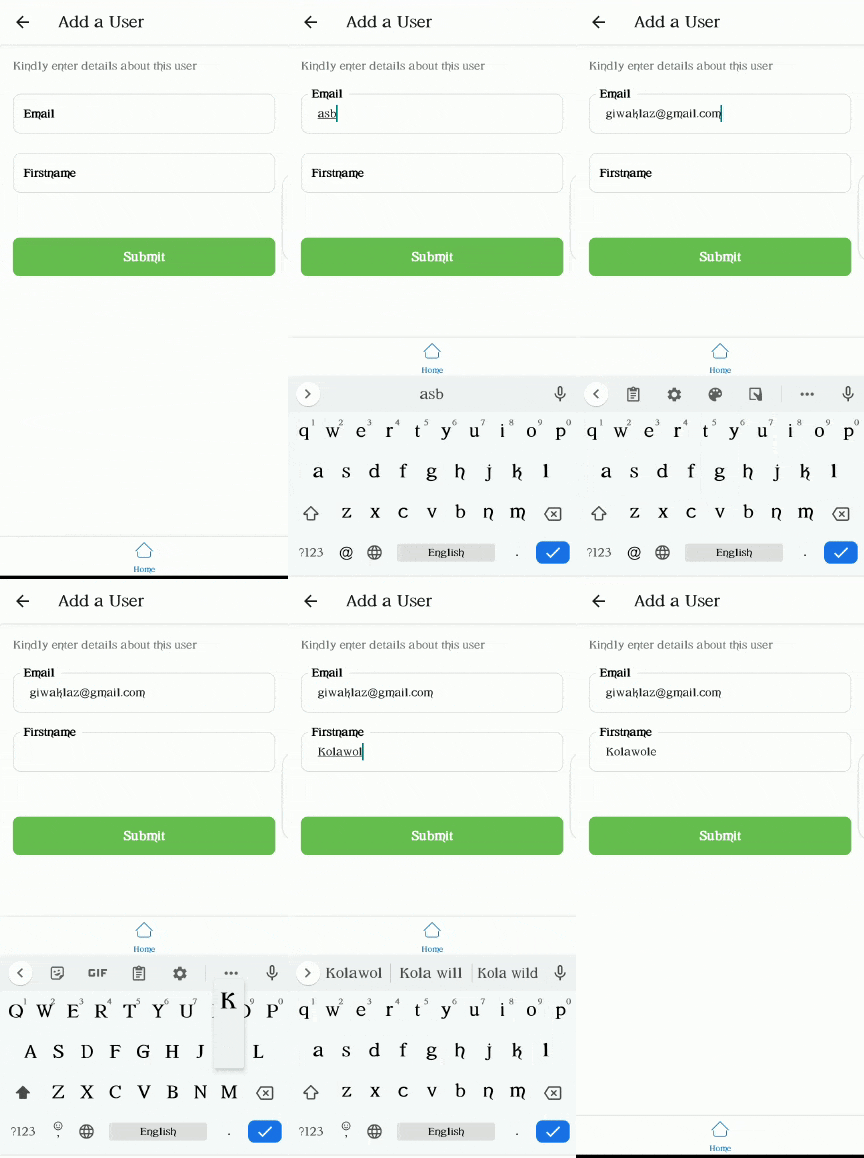
A customizable form component for react-native.
It handles basic validation of inputs, and also alerts you of failed validations.

## Installation
```sh
yarn add react-native-form-component
```
## Functions
| Name | Description |
| ---------- | --------------------------------------------------------------------------------------------------------------------------- |
| submitForm | Does the same thing as `onButtonPress()` in `Form` component. It does validation first, then carries out the defined action |
## Components
- [Form](#form)
- [FormItem](#formitem)
- [Label](#label)
- [Modal](#Modal)
- [Picker](#Picker)
- [PinInput](#PinInput)
### Form
Wrapper component for form items. It is advised to use this component to wrap every other component contained in this library. The `Form` component comes with a button that does validation of `FormItem`s when clicked. The default validation for each `FormItem` is based on the value of its keyboardType prop.
```jsx
import { Form, FormItem } from 'react-native-form-component';
//...
return (
);
```
### Props
| Prop | Function | Type | Default | Platform |
| ---------------------- | ------------------------------------------------------------------------------------------------------ | ------------------ | ------- | -------- |
| keyboardVerticalOffset | Distance between the top of the user screen and the Form component, may be non-zero in some use cases. | number | 50 | iOS |
| buttonText | Text to be displayed by submit button | string | Submit | All |
| buttonStyle | Style of submit button | object \| object[] | - | All |
| buttonTextStyle | Style of submit button text | object \| object[] | - | All |
| onButtonPress | Action to be performed when submit button is pressed | () => void | - | All |
| style | Style Form wrapper | ViewStyle | {} | All |
| hideSubmitButton | To not render the submit button | boolean | false | All |
### FormItem
```jsx
import React, { useRef } from 'react';
import { FormItem } from 'react-native-form-component';
//...
const emailInput = useRef();
return (
//...
setEmail(email)}
asterik
ref={emailInput}
/>
);
```
### Props
Inherits [TextInput Props](https://reactnative.dev/docs/textinput#props)
| Prop | Function | Type | Required |
| ------------------- | ------------------------------------------------------------------------------------------------------------------------------------------------------------------------------------------------------------------------------------------------------------------------------------ | ---------------------------------------- | -------- |
| ref | ref for item | React.Ref | yes |
| value | Value to show for the `FormItem` | string | yes |
| label | Label for FormItem | string | no |
| labelStyle | Style of label | object \| object[] | no |
| textInputStyle | Style of TextInput portion of `FormItem` | object \| object[] | no |
| isRequired | Indicates whethter this item is required or not | boolean | no |
| underneathText | Text just below the `FormItem` | string | no |
| underneathTextStyle | Style of underneathText | object \| object[] | no |
| customValidation | A function used to add custom validation to a `FormItem`. The function returns an object of the shape `{status: boolean, message: string}`. `status` is true when the validation passes and false when it fails. `message` is the underneath text to be shown when validation fails. | () => {status: boolean, message: string} | no |
| asterik | Whether or not to add an asterik to label | boolean | no |
| children | A ReactElement to render on the left part of the TextInput. Usually an icon | ReactElement | no |
| floatingLabel | Whether or not the label should float | boolean | no |
| textArea | Whether or not the input should be a textArea | boolean | no |
| showErrorIcon | Whether or not to show an icon when an error occurs | boolean | no |
| errorBorderColor | Set the color of the border when an error occurs | string | no |
| showIcon | Icon to be rendered when secureTextEntry is true and you want password to be visible | JSX.Element | no |
| hideIcon | Icon to be rendered when secureTextEntry is true and you want password to be hidden | JSX.Element | no |
### Label
```jsx
import { Label } from 'react-native-form-component';
//...
return (
//...
);
```
### Props
| Prop | Type | Required |
| ------------ | ---------------------------------------------------------- | -------- |
| text | string | yes |
| asterik | boolean | no |
| textStyle | [TextStyle](https://reactnative.dev/docs/text#style) | no |
| style | [ViewStyle](https://reactnative.dev/docs/view-style-props) | no |
| asterikStyle | object \| object[] | no |
### Modal
```jsx
import { Modal } from 'react-native-form-component';
return (
I am inside a modal!
);
```
### Props
Inherits [Modal Props](https://reactnative.dev/docs/modal)
| Prop | Type | Required |
| --------------- | --------- | -------- |
| show | boolean | yes |
| backgroundColor | string | no |
| children | ReactNode | no |
### Picker

```jsx
import React, { useState } from 'react';
import { Picker } from 'react-native-form-component';
const [number, setNumber] = useState(1);
return (
setNumber(item.value)}
/>
);
```
### Props
| Prop | Type | Required |
| ------------------ | ---------------------------------------------------------- | -------- |
| items | Array<{label: string; value: string \| number}> | yes |
| onSelection | (item) => void | yes |
| selectedValue | string \| number | yes |
| pickerIcon | ReactNode | no |
| iconWrapperStyle | [ViewStyle](https://reactnative.dev/docs/view-style-props) | no |
| asterik | boolean | no |
| asterikStyle | [TextStyle](https://reactnative.dev/docs/text#style) | no |
| label | string | no |
| labelStyle | [TextStyle](https://reactnative.dev/docs/text#style) | no |
| labelWrapperStyle | [ViewStyle](https://reactnative.dev/docs/view-style-props) | no |
| placeholder | string | no |
| selectedValueStyle | [TextStyle](https://reactnative.dev/docs/text#style) | no |
| buttonStyle | [ViewStyle](https://reactnative.dev/docs/view-style-props) | no |
| itemLabelStyle | [TextStyle](https://reactnative.dev/docs/view-style-props) | no |
| type | "modal" \| "dropdown" | no |
### PinInput
```jsx
import React, { useState } from 'react';
import { PinInput } from 'react-native-form-component';
const [pin, setPin] = useState('');
return setPin(text)} />;
```
### Props
| Prop | Type | Required |
| -------------- | ---------------------- | -------- |
| numOfInput | number | yes |
| onChangeText | (text: string) => void | yes |
| textInputStyle | TextStyle | no |
| style | StyleProp | no |
## Contributing
See the [contributing guide](CONTRIBUTING.md) to learn how to contribute to the repository and the development workflow.
## License
MIT