# MAGIC
**Repository Path**: kylintu/MAGIC
## Basic Information
- **Project Name**: MAGIC
- **Description**: No description available
- **Primary Language**: Unknown
- **License**: GPL-2.0
- **Default Branch**: master
- **Homepage**: None
- **GVP Project**: No
## Statistics
- **Stars**: 0
- **Forks**: 0
- **Created**: 2025-11-14
- **Last Updated**: 2025-11-14
## Categories & Tags
**Categories**: Uncategorized
**Tags**: None
## README
Markov Affinity-based Graph Imputation of Cells (MAGIC)
-------------------------------------------------------
[](https://pypi.org/project/magic-impute/)
[](https://cran.r-project.org/package=Rmagic)
[](https://github.com/KrishnaswamyLab/MAGIC/actions)
[](https://magic.readthedocs.io/)
[](https://www.cell.com/cell/abstract/S0092-8674(18)30724-4)
[](https://twitter.com/KrishnaswamyLab)
[](https://github.com/KrishnaswamyLab/MAGIC/)
Markov Affinity-based Graph Imputation of Cells (MAGIC) is an algorithm for denoising high-dimensional data most commonly applied to single-cell RNA sequencing data. MAGIC learns the manifold data, using the resultant graph to smooth the features and restore the structure of the data.
To see how MAGIC can be applied to single-cell RNA-seq, elucidating the epithelial-to-mesenchymal transition, read our [publication in Cell](https://www.cell.com/cell/abstract/S0092-8674(18)30724-4).
[David van Dijk, et al. **Recovering Gene Interactions from Single-Cell Data Using Data Diffusion**. 2018. *Cell*.](https://www.cell.com/cell/abstract/S0092-8674(18)30724-4)
MAGIC has been implemented in Python, Matlab, and R.
#### To get started immediately, check out our tutorials:
##### Python
* [Epithelial-to-Mesenchymal Transition Tutorial](http://nbviewer.jupyter.org/github/KrishnaswamyLab/MAGIC/blob/master/python/tutorial_notebooks/emt_tutorial.ipynb)
* [Bone Marrow Tutorial](http://nbviewer.jupyter.org/github/KrishnaswamyLab/MAGIC/blob/master/python/tutorial_notebooks/bonemarrow_tutorial.ipynb)
##### R
* [Epithelial-to-Mesenchymal Transition Tutorial](http://htmlpreview.github.io/?https://github.com/KrishnaswamyLab/MAGIC/blob/master/Rmagic/inst/examples/emt_tutorial.html)
* [Bone Marrow Tutorial](http://htmlpreview.github.io/?https://github.com/KrishnaswamyLab/MAGIC/blob/master/Rmagic/inst/examples/bonemarrow_tutorial.html)
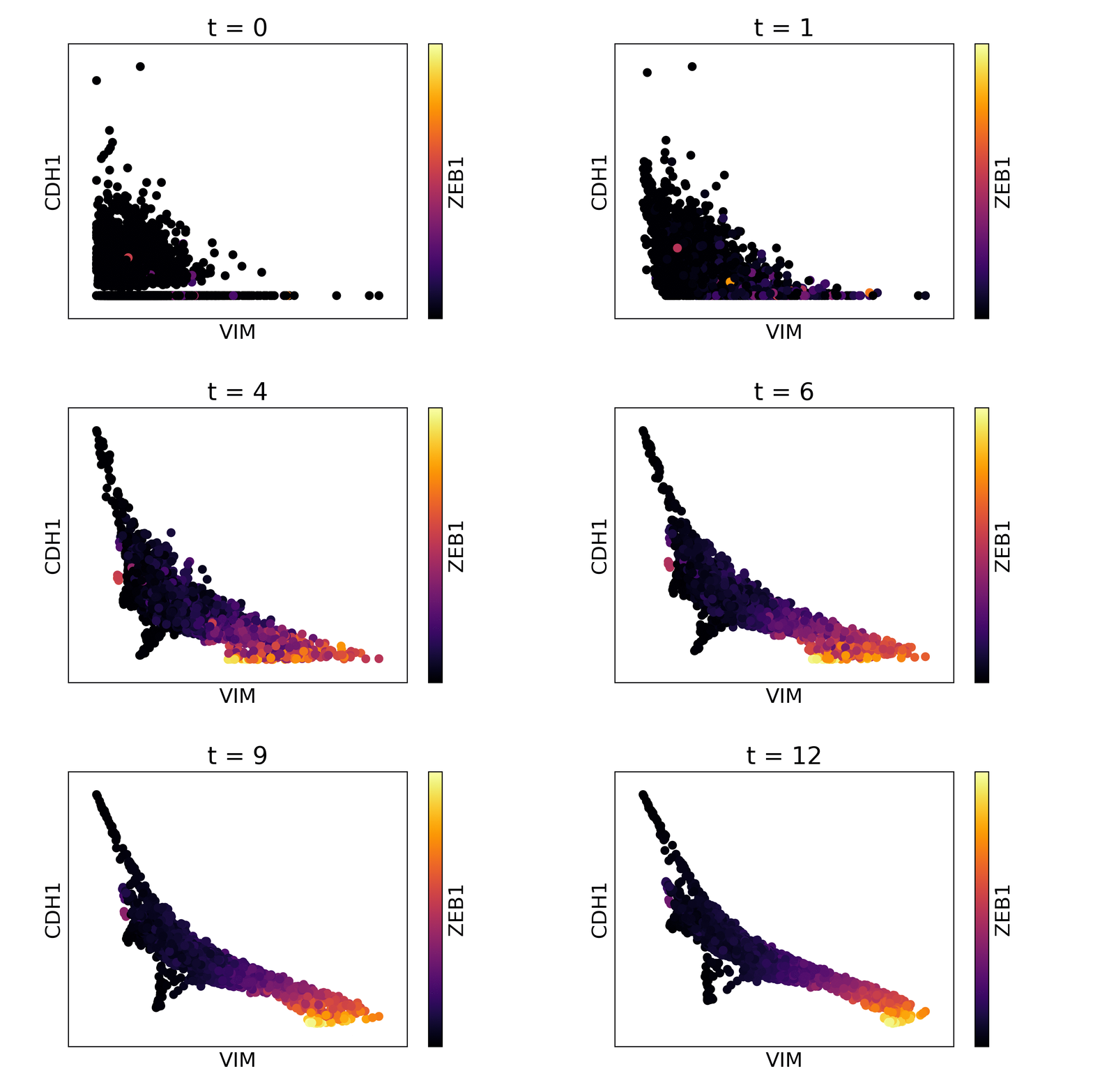
Magic reveals the interaction between Vimentin (VIM), Cadherin-1 (CDH1), and Zinc finger E-box-binding homeobox 1 (ZEB1, encoded by colors).
### Table of Contents
* [Python](#python)
* [Installation](#installation)
* [Installation with pip](#installation-with-pip)
* [Installation from GitHub](#installation-from-github)
* [Usage](#usage)
* [Quick Start](#quick-start)
* [Tutorials](#tutorials)
* [Matlab](#matlab)
* [Instructions for the Matlab version](#instructions-for-the-matlab-version)
* [R](#r)
* [Installation](#installation-1)
* [Installation from CRAN](#installation-from-cran)
* [Installation from GitHub](#installation-from-github-1)
* [Usage](#usage-1)
* [Quick Start](#quick-start-1)
* [Tutorials](#tutorials-1)
* [Help](#help)
## Python
### Installation
#### Installation with pip
To install with `pip`, run the following from a terminal:
pip install --user magic-impute
#### Installation from GitHub
To clone the repository and install manually, run the following from a terminal:
git clone git://github.com/KrishnaswamyLab/MAGIC.git
cd MAGIC/python
python setup.py install --user
### Usage
#### Quick Start
The following code runs MAGIC on test data located in the MAGIC repository.
import magic
import pandas as pd
import matplotlib.pyplot as plt
X = pd.read_csv("MAGIC/data/test_data.csv")
magic_operator = magic.MAGIC()
X_magic = magic_operator.fit_transform(X, genes=['VIM', 'CDH1', 'ZEB1'])
plt.scatter(X_magic['VIM'], X_magic['CDH1'], c=X_magic['ZEB1'], s=1, cmap='inferno')
plt.show()
magic.plot.animate_magic(X, gene_x='VIM', gene_y='CDH1', gene_color='ZEB1', operator=magic_operator)
#### Tutorials
You can read the MAGIC documentation at https://magic.readthedocs.io/. We have included two tutorial notebooks on MAGIC usage and results visualization for single cell RNA-seq data.
EMT data notebook: http://nbviewer.jupyter.org/github/KrishnaswamyLab/MAGIC/blob/master/python/tutorial_notebooks/emt_tutorial.ipynb
Bone Marrow data notebook: http://nbviewer.jupyter.org/github/KrishnaswamyLab/MAGIC/blob/master/python/tutorial_notebooks/bonemarrow_tutorial.ipynb
## Matlab
### Instructions for the Matlab version
1. run_magic.m -- MAGIC imputation function
2. test_magic.m -- Shows how to run MAGIC. Also included is a function for loading 10x format data (load_10x.m)
## R
### Installation
To use MAGIC, you will need to install both the R and Python packages.
If `python` or `pip` are not installed, you will need to install them. We recommend
[Miniconda3](https://conda.io/miniconda.html) to install Python and `pip` together,
or otherwise you can install `pip` from https://pip.pypa.io/en/stable/installing/.
#### Installation from CRAN
In R, run this command to install MAGIC and all dependencies:
install.packages("Rmagic")
In a terminal, run the following command to install the Python
repository.
pip install --user magic-impute
#### Installation from GitHub
To clone the repository and install manually, run the following from a terminal:
git clone git://github.com/KrishnaswamyLab/MAGIC.git
cd MAGIC/python
python setup.py install --user
cd ../Rmagic
R CMD INSTALL .
### Usage
#### Quick Start
After installing the package, MAGIC can be run by loading the library and calling `magic()`:
library(Rmagic)
library(ggplot2)
data(magic_testdata)
MAGIC_data <- magic(magic_testdata, genes=c("VIM", "CDH1", "ZEB1"))
ggplot(MAGIC_data) +
geom_point(aes(x=VIM, y=CDH1, color=ZEB1))
#### Tutorials
You can read the MAGIC tutorial by running `help(Rmagic::magic)`. For a working example, see the Rmarkdown tutorials at and or in `Rmagic/inst/examples`.
## Help
If you have any questions or require assistance using MAGIC, please contact us at .