# Maestro-MPD-Server
**Repository Path**: lcyt/maestro-mpd-server
## Basic Information
- **Project Name**: Maestro-MPD-Server
- **Description**: No description available
- **Primary Language**: Unknown
- **License**: MIT
- **Default Branch**: main
- **Homepage**: None
- **GVP Project**: No
## Statistics
- **Stars**: 0
- **Forks**: 0
- **Created**: 2026-01-07
- **Last Updated**: 2026-01-07
## Categories & Tags
**Categories**: Uncategorized
**Tags**: None
## README
# 🎵 Maestro MPD Server
### The Ultimate Self-Hosted Music Server with an easy to use Web Interface
[](https://github.com/coacharnold1/Maestro-Server)
[](LICENSE)
[](https://www.musicpd.org/)
[](https://www.python.org/)
[](https://github.com/coacharnold1/Maestro-Server)
**Transform your music collection into a powerful streaming server with beautiful web UI, automatic CD ripping, Last.fm integration, and comprehensive system management.**
[Features](#-features) • [Quick Start](#-quick-start) • [📹 Video Tour](#-video-walkthrough) • [Screenshots](#-screenshots) • [Documentation](#-documentation)
---

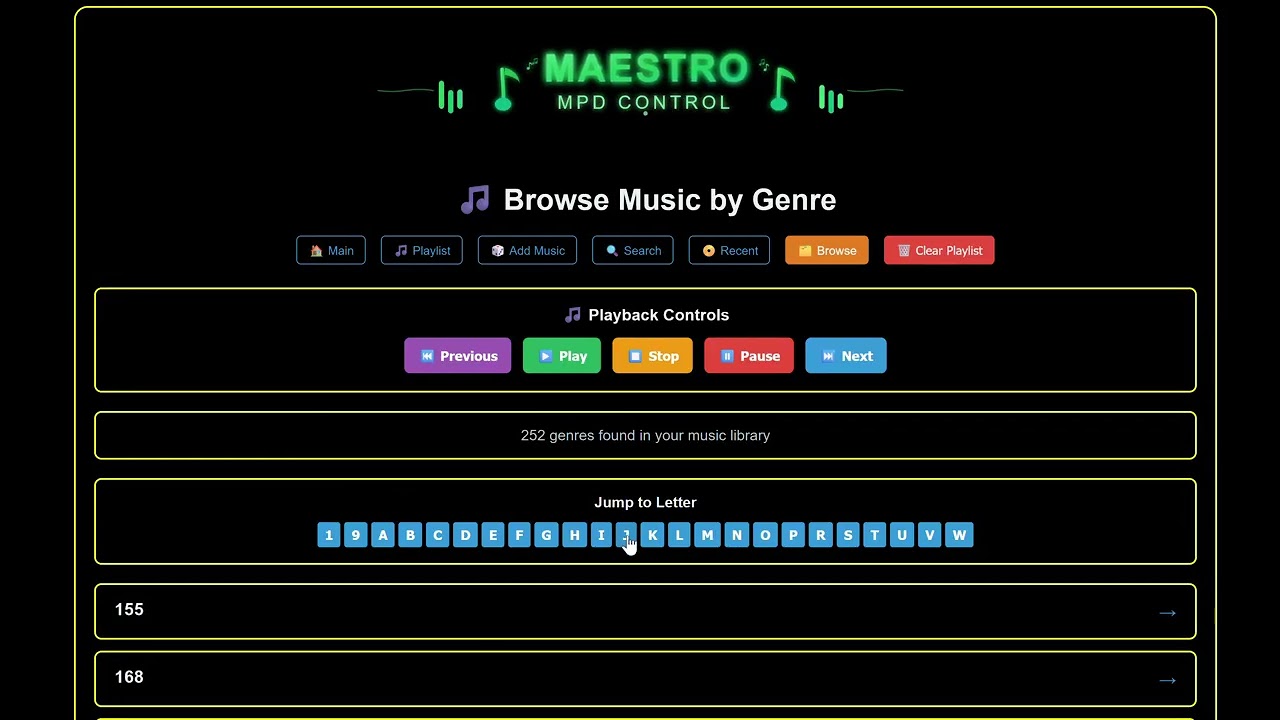
## 📹 Video Walkthrough
[](https://youtu.be/hCz-VLTOxZY)
**[▶️ Watch the Complete Visual Tour on YouTube](https://youtu.be/hCz-VLTOxZY)**
*Silent walkthrough demonstrating the web interface, admin panel, and all major features*
---
## 🎯 Why Maestro?
**Maestro** is not just another MPD web interface - it's a complete music server ecosystem designed for audiophiles, self-hosters, and music enthusiasts who demand:
✨ **Elite-grade features** - CD ripping, multi-disc detection, Last.fm scrobbling
🎨 **Beautiful UI** - 8 gorgeous themes, mobile-responsive, modern design
🔧 **Full system control** - NFS/SMB mounts, audio configuration, OS updates, real-time monitoring
🚀 **Zero-hassle setup** - One-command installation, automatic MPD detection, smart defaults
🎵 **Audiophile-ready** - Bit-perfect playback up to DSD512/384kHz, all formats supported, hardware device selection
📀 **Automatic CD ripping** - Insert disc → automatic rip → organized library
## ✨ Features
### 🎧 Modern Web Interface (Port 5003)
Click to expand full feature list
#### Music Playback & Control
- 🎵 Full MPD control (play, pause, stop, next, previous)
- 🔊 Volume control with visual feedback
- 📊 Real-time playback progress
- 🔀 Shuffle and repeat modes
- 📻 HTTP audio streaming
- ⏱️ Track time display and seek
#### Library Browsing
- 📀 **Album browsing** with album art
- 🎤 **Artist browsing** with smart letter jump navigation (shows when >50 artists)
- 🎼 **Genre filtering** with letter jump navigation
- 🆕 **Recent albums** page (tracks newly added/ripped music)
- 🔍 **Smart search** across artists, albums, and tracks
- 💿 **Multi-disc detection** with proper disc organization
#### Queue Management
- 📝 Current playlist view
- ➕ Add albums/tracks to queue
- 🗑️ Clear playlist
- 🎯 Play from queue position
#### Advanced Features
- 📈 **Playback charts** - track your listening stats
- 🎨 **8 beautiful themes**: Dark, Light, High Contrast, Desert, Terminal, Sunset, Forest, Midnight
- 📱 **Mobile-responsive** design
- 🎵 **Last.fm integration** - scrobbling with on-screen toast notifications
- 🔔 **Smart toasts** - database updates, scrobbles, now playing
### ⚙️ Powerful Admin Interface (Port 5004)
Click to expand admin features
#### System Monitoring
- 📊 **Real-time stats**: CPU, RAM, disk usage, network traffic
- 📈 **Live graphs** updating every 2 seconds
- 💾 **Disk space** monitoring with mount point details
- 🌡️ **System health** at a glance
#### Library Management
- 📂 **NFS/SMB mount management**
- Add network shares through web UI
- Mount/unmount operations
- Mount status monitoring
- 📚 **MPD library structure** view with mount indicators
- 🔄 **Smart library updates** with verification
- 📊 **Optimized file counting** for network shares
#### Audio Configuration
- 🎚️ **Audio device selection** with hardware scanning
- 🎛️ **Bit-perfect playback** configuration
- 🔊 **Buffer size** optimization (2048-16384)
- 🎵 **Resampling quality** settings
- 🎼 **DSD playback** mode configuration
- 🔧 **System audio optimizations** (CPU governor, swappiness)
#### System Administration
- � **Maestro update checker** - see available updates and commits behind
- �📦 **OS package updates** with real-time progress
- 🔄 **Service management** (MPD, Web UI, Admin)
- 🖥️ **System reboot** with countdown
- 📋 **System logs** viewer
- 🔐 **Secure sudo** configuration
#### CD Ripping & Automation
- 📀 **Automatic CD detection** via udev rules
- 🎵 **Automatic ripping** to FLAC with FreeDB metadata
- 📝 **Configurable rip settings** (format, quality, behavior)
- 📊 **Rip status monitoring**
- 🗂️ **Organized output** to /media/music/ripped/
## 🚀 Quick Start
### One-Command Installation & Update
**Install:**
```bash
git clone https://github.com/coacharnold1/Maestro-Server.git
cd Maestro-Server
./install-maestro.sh
```
**Italian users / Utenti italiani:**
```bash
./install-maestro-it.sh # Installer in italiano
```
**Update:**
```bash
cd ~/Maestro-Server
./update-maestro.sh
```
**Installation:** The installer will:
1. ✅ Detect existing MPD or install new
2. ✅ Configure music directories
3. ✅ Set up Web UI (port 5003) and Admin API (port 5004)
4. ✅ Create systemd services
5. ✅ Configure permissions and audio settings
⏱️ **Installation time:** ~5 minutes
### Post-Installation
Access your new music server:
- 🌐 **Web Player**: `http://YOUR_IP:5003`
- ⚙️ **Admin Panel**: `http://YOUR_IP:5004`
- 🎵 **MPD Port**: `YOUR_IP:6600`
## 📸 Screenshots
### Main Player Interface

*Beautiful player interface with album art, queue management, and playback controls*
### Theme Variety

*Choose from 8 beautiful themes to match your style*
### Library Browsing

*Grid view of your album collection with cover art*

*Intuitive browsing with multiple view options*

*Keep track of newly added albums to your library*
### Playback Features

*Manage your current playlist with drag-and-drop*

*Random playback and user-created custom genre stations*

*Powerful search across your entire music library*

*View your Last.fm listening charts and statistics*
### Settings & Configuration

*Comprehensive settings for customization and Last.fm integration*
### Admin Dashboard

*Powerful admin interface with system monitoring and library management*

*System administration panel for updates, service management, and system control*

*Advanced audio configuration - select hardware devices, configure bit-perfect playback, and optimize audio settings*

*Real-time system logs viewer for troubleshooting and monitoring*
### CD Ripping & Automation

*Automatic CD ripping interface with MusicBrainz metadata lookup, album art, and track listing*

*Configure ripping format (FLAC/MP3/WAV/OGG), quality settings, output location, and automatic ripping behavior*
### Mobile Responsive


*Fully responsive design that works beautifully on mobile devices*
## 🎯 Use Cases
**Perfect for:**
- 🏠 **Home music servers** - Central music hub for whole house audio
- 🎧 **Audiophiles** - Bit-perfect playback with DSD support
- 💿 **CD collectors** - Automatic ripping with metadata lookup
- 🖥️ **Raspberry Pi** - Lightweight, efficient music server
- 🌐 **Remote access** - Stream your collection from anywhere
- 📚 **Large libraries** - Handles 100,000+ tracks with ease
- 🎵 **Multi-room** - MPD's network architecture for zone control
## 🛠️ System Requirements
### Minimum Requirements
- **OS**: Ubuntu 20.04+, Debian 11+, or Arch Linux
- **RAM**: 1GB (2GB+ recommended)
- **Storage**: 1GB + your music library
- **Network**: Ethernet or WiFi
- **Audio**: Any ALSA-compatible device (optional for headless)
### Recommended Hardware
- **Raspberry Pi 4** (4GB RAM) - Perfect balance
- **Intel NUC** - More power for large libraries
- **Dedicated Linux server** - Ultimate performance
### Tested Platforms
- ✅ Ubuntu Server 22.04 LTS
- ✅ Debian 12 (Bookworm)
- ✅ Raspberry Pi OS (64-bit)
- ✅ Arch Linux
## 📦 What Gets Installed
```
~/maestro/
├── web/ # Web UI (Port 5003)
│ ├── venv/ # Python virtual environment
│ ├── app.py # Flask web server
│ ├── templates/ # HTML templates
│ └── static/ # CSS, JS, images
├── admin/ # Admin API (Port 5004)
│ ├── venv/ # Python virtual environment
│ ├── admin_api.py # Flask admin server
│ └── templates/ # Admin HTML
├── scripts/ # Automation scripts
│ └── cd-inserted.sh # CD auto-rip handler
└── logs/ # Application logs
/etc/systemd/system/
├── maestro-web.service # Web UI service
└── maestro-admin.service # Admin API service
/etc/udev/rules.d/
└── 99-maestro-cd.rules # CD detection rules
/media/music/ # Music library (configurable)
└── ripped/ # Auto-ripped CDs
```
## 🔧 Configuration
### Quick Configuration
All settings accessible through web interfaces - no config file editing needed!
**Web UI Settings** (`http://YOUR_IP:5003/settings`):
- Choose from 8 themes
- Configure Last.fm integration
- Set scrobbling preferences
**Admin Settings** (`http://YOUR_IP:5004`):
- Add NFS/SMB network shares
- Configure audio hardware
- Optimize playback settings
- Manage system updates
### Advanced Configuration
Click for advanced config options
#### Custom Music Directory
Edit during installation or modify `/etc/mpd.conf`:
```bash
music_directory "/your/custom/path"
```
#### Network Binding
Restrict to localhost only:
```bash
sudo systemctl edit maestro-web
# Add: Environment="FLASK_RUN_HOST=127.0.0.1"
```
#### Custom Ports
```bash
# Web UI (default 5003)
sudo systemctl edit maestro-web
# Add: Environment="FLASK_RUN_PORT=8080"
# Admin API (default 5004)
sudo systemctl edit maestro-admin
# Add: Environment="FLASK_RUN_PORT=8081"
```
## 🌟 Key Features Deep Dive
### 📀 Automatic CD Ripping
Insert a CD and Maestro automatically:
1. Detects disc via udev rule
2. Queries FreeDB for metadata
3. Rips to FLAC (configurable format)
4. Organizes into Artist/Album structure
5. Updates MPD library
6. Shows in "Recent Albums"
**Configure via:** Admin → CD Ripper Settings
### 🎵 Last.fm Integration
Full scrobbling support with visual feedback:
- "Now Playing" updates on track start
- Scrobbles after 50% playback or 4 minutes
- On-screen toast notifications (optional)
- Detailed setup wizard in Settings
### 📊 Letter Jump Navigation
Browse large libraries efficiently:
- Automatically appears for artists/genres with >50 entries
- Click letter to jump instantly
- Visual highlight of current position
- Mobile-optimized buttons
### 💿 Multi-Disc Album Support
Smart handling of box sets and multi-disc albums:
- Automatic disc detection
- Organized disc structure in UI
- Proper track ordering
- Maintains metadata integrity
## 📚 Documentation
- **[FEATURES.md](FEATURES.md)** - Comprehensive feature documentation
- **[ADMIN_INTEGRATION.md](ADMIN_INTEGRATION.md)** - Admin API integration guide
- **[CD_RIPPING_INTEGRATION.md](CD_RIPPING_INTEGRATION.md)** - CD ripper setup guide
- **[Admin README](admin/README.md)** - Admin API endpoints
- **[MPD Documentation](https://www.musicpd.org/doc/)** - Official MPD docs
## 🎬 Getting Started Guide
### 1. Install Maestro
```bash
git clone https://github.com/coacharnold1/Maestro-Server.git
cd Maestro-Server
./install-maestro.sh
```
### 2. Add Your Music
**Option A: Local Files**
```bash
cp -r /path/to/your/music/* /media/music/
sudo systemctl restart mpd
```
**Option B: Network Share**
1. Open `http://YOUR_IP:5004`
2. Go to **Library Management**
3. Click **Add Mount**
4. Enter NFS/SMB details
5. Click **Mount** and **Update MPD Library**
### 3. Configure Audio (Optional)
1. Open `http://YOUR_IP:5004`
2. Go to **Audio Tweaks**
3. Select your audio device
4. Configure bit-perfect playback
5. Save and restart MPD
### 4. Start Listening!
1. Open `http://YOUR_IP:5003`
2. Browse your library
3. Add songs to queue
4. Press play! 🎵
## 🔐 Security
### Sudo Configuration
Maestro configures limited passwordless sudo in `/etc/sudoers.d/maestro` for:
- System updates
- Service management
- Mount operations
- Audio device access
### Network Security
Both services bind to `0.0.0.0` by default for easy access. To restrict:
```bash
# Restrict to localhost
sudo systemctl edit maestro-web
# Add: Environment="FLASK_RUN_HOST=127.0.0.1"
```
**Recommended**: Use nginx/apache reverse proxy with authentication for public exposure.
## 🐛 Troubleshooting
Web UI won't start
```bash
# Check status
sudo systemctl status maestro-web
# View logs
journalctl -u maestro-web -n 50
# Test manually
cd ~/maestro/web
source venv/bin/activate
python3 app.py
```
MPD connection failed
```bash
# Check MPD status
sudo systemctl status mpd
# Test connection
mpc status
# Verify port
sudo netstat -tlnp | grep 6600
```
No audio output
```bash
# List audio devices
aplay -l
# Test playback
speaker-test -c2 -t wav
# Check MPD audio output
sudo vim /etc/mpd.conf
# Ensure audio_output section is correct
```
Network mount failed
```bash
# Test mount manually
sudo mount -t nfs server:/path /media/music/test
# Check connectivity
ping server_ip
# Verify NFS tools
which mount.nfs
```
## 🔄 Updating
### Check for Updates
The **Admin** → **System Admin** page shows:
- Current Maestro version (git commit)
- Latest available version from GitHub
- Number of commits behind
- SSH instructions for manual update
### Run Update Script
Keep Maestro up to date:
```bash
cd ~/Maestro-Server
./update-maestro.sh
```
The updater:
- ✅ Pulls latest code from GitHub
- ✅ Preserves your settings
- ✅ Updates dependencies
- ✅ Restarts services
- ✅ Migrates configuration if needed
## 🔌 Related Projects
### MPD Framebuffer Display
Want to display album art on a physical screen connected to your Maestro server?
**[mpd-framebuffer-display](https://github.com/coacharnold1/mpd-framebuffer-display)** - A companion service that displays real-time album artwork on framebuffer devices (TFT screens, monitors, etc.)
**Features:**
- 🖼️ Real-time album art on framebuffer/TTY displays
- 🔄 Automatic updates on track changes
- 🌐 HTTP API for remote access
- 📺 Perfect for Raspberry Pi with small TFT screens
- 🔌 Integrates seamlessly with Maestro MPD Server
**Quick Install:**
```bash
git clone https://github.com/coacharnold1/mpd-framebuffer-display
cd mpd-framebuffer-display
sudo ./install.sh
```
**Use Cases:**
- Mini music player with album art display
- Kiosk mode music station
- Desktop album art visualizer
- Multi-room audio with visual feedback
---
## 🤝 Contributing
Contributions are welcome! Please:
1. Fork the repository
2. Create a feature branch (`git checkout -b feature/amazing-feature`)
3. Commit your changes (`git commit -m 'Add amazing feature'`)
4. Push to the branch (`git push origin feature/amazing-feature`)
5. Open a Pull Request
## 📜 License
This project is licensed under the MIT License - see the [LICENSE](LICENSE) file for details.
## 🙏 Credits
Built with love and these amazing technologies:
- [Music Player Daemon (MPD)](https://www.musicpd.org/) - The core audio engine
- [Flask](https://flask.palletsprojects.com/) - Web framework
- [python-mpd2](https://github.com/Mic92/python-mpd2) - Python MPD client
- [psutil](https://github.com/giampaolo/psutil) - System monitoring
- [abcde](https://abcde.einval.com/) - CD ripping
- [pylast](https://github.com/pylast/pylast) - Last.fm integration
## 💬 Community & Support
- 🐛 **Bug Reports**: [GitHub Issues](https://github.com/coacharnold1/Maestro-Server/issues)
- 💡 **Feature Requests**: [GitHub Discussions](https://github.com/coacharnold1/Maestro-Server/discussions)
- 📧 **Contact**: [Your Email/Contact]
## ⭐ Show Your Support
If you find Maestro useful, please consider:
- ⭐ Starring the repository
- 🐦 Sharing on social media
- 📝 Writing a blog post about your setup
- 🤝 Contributing code or documentation
---
**Made with ❤️ for the music community**
[⬆ Back to Top](#-maestro-mpd-server)