# clockpicker
**Repository Path**: learnote/clockpicker
## Basic Information
- **Project Name**: clockpicker
- **Description**: A clock-style timepicker for Bootstrap (or jQuery). Sorry but no longer maintained.
- **Primary Language**: JavaScript
- **License**: MIT
- **Default Branch**: gh-pages
- **Homepage**: None
- **GVP Project**: No
## Statistics
- **Stars**: 0
- **Forks**: 0
- **Created**: 2020-09-14
- **Last Updated**: 2020-12-19
## Categories & Tags
**Categories**: Uncategorized
**Tags**: None
## README
# ClockPicker [](http://badge.fury.io/bo/clockpicker) [](https://travis-ci.org/weareoutman/clockpicker) [](https://david-dm.org/weareoutman/clockpicker#info=devDependencies)
A clock-style timepicker for Bootstrap (or jQuery).
[Documentation and examples](http://weareoutman.github.io/clockpicker/).
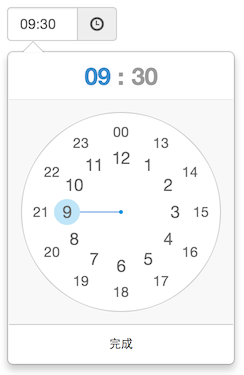

## Browser support
All major browsers are supported, including IE 9+. It should look and behave well enough in IE 8.
## Device support
Both desktop and mobile device are supported. It also works great in touch screen device.
## Dependencies
ClockPicker was designed for Bootstrap in the beginning. So Bootstrap (and jQuery) is the only dependency(s).
Since it only used `.popover` and some of `.btn` styles of Bootstrap, I picked these styles to build a jQuery plugin.
Feel free to use `jquery-*` files instead of `bootstrap-*` , for non-bootstrap project.
## Usage
```html
```
## Options
| Name | Default | Description |
| ---- | ------- | ----------- |
| default | '' | default time, 'now' or '13:14' e.g. |
| placement | 'bottom' | popover placement |
| align | 'left' | popover arrow align |
| donetext | '完成' | done button text |
| autoclose | false | auto close when minute is selected |
| twelvehour | false | enables twelve hour mode with AM & PM buttons |
| vibrate | true | vibrate the device when dragging clock hand |
| fromnow | 0 | set default time to * milliseconds from now (using with default = 'now') |
| init | | callback function triggered after the colorpicker has been initiated |
| beforeShow | | callback function triggered before popup is shown |
| afterShow | | callback function triggered after popup is shown |
| beforeHide | | callback function triggered before popup is hidden Note:will be triggered between a beforeDone and afterDone |
| afterHide | | callback function triggered after popup is hidden Note:will be triggered between a beforeDone and afterDone |
| beforeHourSelect | | callback function triggered before user makes an hour selection |
| afterHourSelect | | callback function triggered after user makes an hour selection |
| beforeDone | | callback function triggered before time is written to input |
| afterDone | | callback function triggered after time is written to input |
## Operations
| operation | Arguments | Description |
| --------- | --------- | ----------- |
| show | | show the clockpicker |
| hide | | hide the clockpicker |
| remove | | remove the clockpicker (and event listeners) |
| toggleView | 'hours' or 'minutes' | toggle to hours or minutes view |
## What's included
```bash
clockpicker/
├── dist/
│ ├── bootstrap-clockpicker.css # full code for bootstrap
│ ├── bootstrap-clockpicker.js
│ ├── bootstrap-clockpicker.min.css # compiled and minified files for bootstrap
│ ├── bootstrap-clockpicker.min.js
│ ├── jquery-clockpicker.css # full code for jquery
│ ├── jquery-clockpicker.js
│ ├── jquery-clockpicker.min.css # compiled and minified files for jquery
│ └── jquery-clockpicker.min.js
└── src/ # source code
├── clockpicker.css
├── clockpicker.js
└── standalone.css # some styles picked from bootstrap
```
## Development
```bash
git clone https://github.com/weareoutman/clockpicker.git
cd clockpicker
npm install -g gulp
npm install
gulp
# gulp test
```
## Todo
- [ ] Auto placement and align.
- [ ] Events.
- [ ] Customize format.
- [ ] Seconds View ?
## Change log
0.0.7
* Enables twelve hour mode with AM & PM buttons.
0.0.6
* Default time can be setted to `now`.
* Registered as a bower package.
0.0.5
* Functional operations.
## License
MIT