# web_function_Automation-Selenium
**Repository Path**: leiyong711/web_function_Automation-Selenium
## Basic Information
- **Project Name**: web_function_Automation-Selenium
- **Description**: Web UI功能自动化测试
- **Primary Language**: HTML
- **License**: Not specified
- **Default Branch**: master
- **Homepage**: None
- **GVP Project**: No
## Statistics
- **Stars**: 0
- **Forks**: 0
- **Created**: 2024-11-08
- **Last Updated**: 2024-11-08
## Categories & Tags
**Categories**: Uncategorized
**Tags**: None
## README
# Web UI功能自动化测试
#### 环境:
* * *
* selenium 2
* Python 2 或 3(自动识别版本并做兼容)
* 谷歌浏览器需安装对应版本驱动
* * *
#### 描述:
* * *
* 该框架内包含测试完毕后自发送邮件功能(需要配置自己的邮箱账号与授权码)
* 图片验证码识别功能(如要使用需去 若快 官网注册账户)
* 测试报告包含测试失败截图
* * *
#### 用到的第三方的库(可能需自己安装):
* * *
1. email -- 4.0.2
2. selenium -- 2.53.6
3. pillow
* * *
## 测试报告图片展示:
### 测试报告默认状态
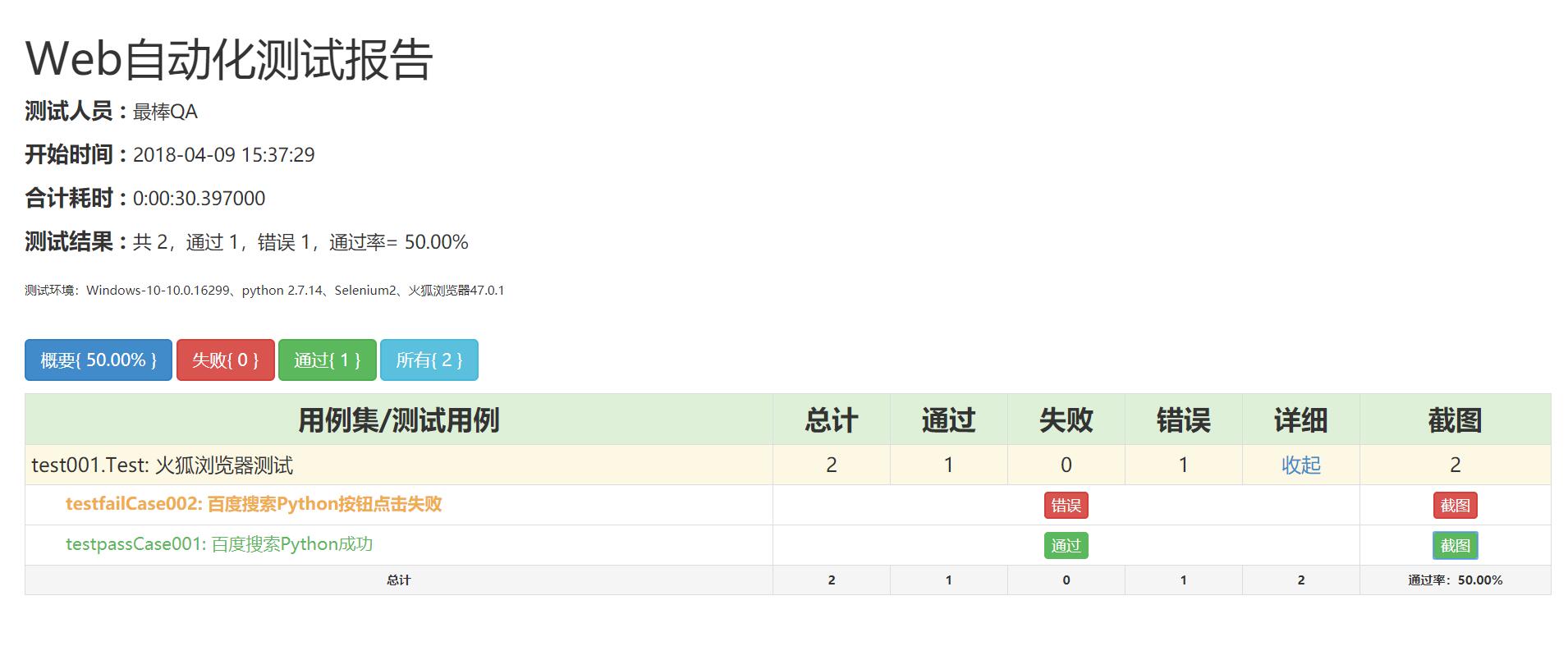
### 测试报告详情全部展开状态
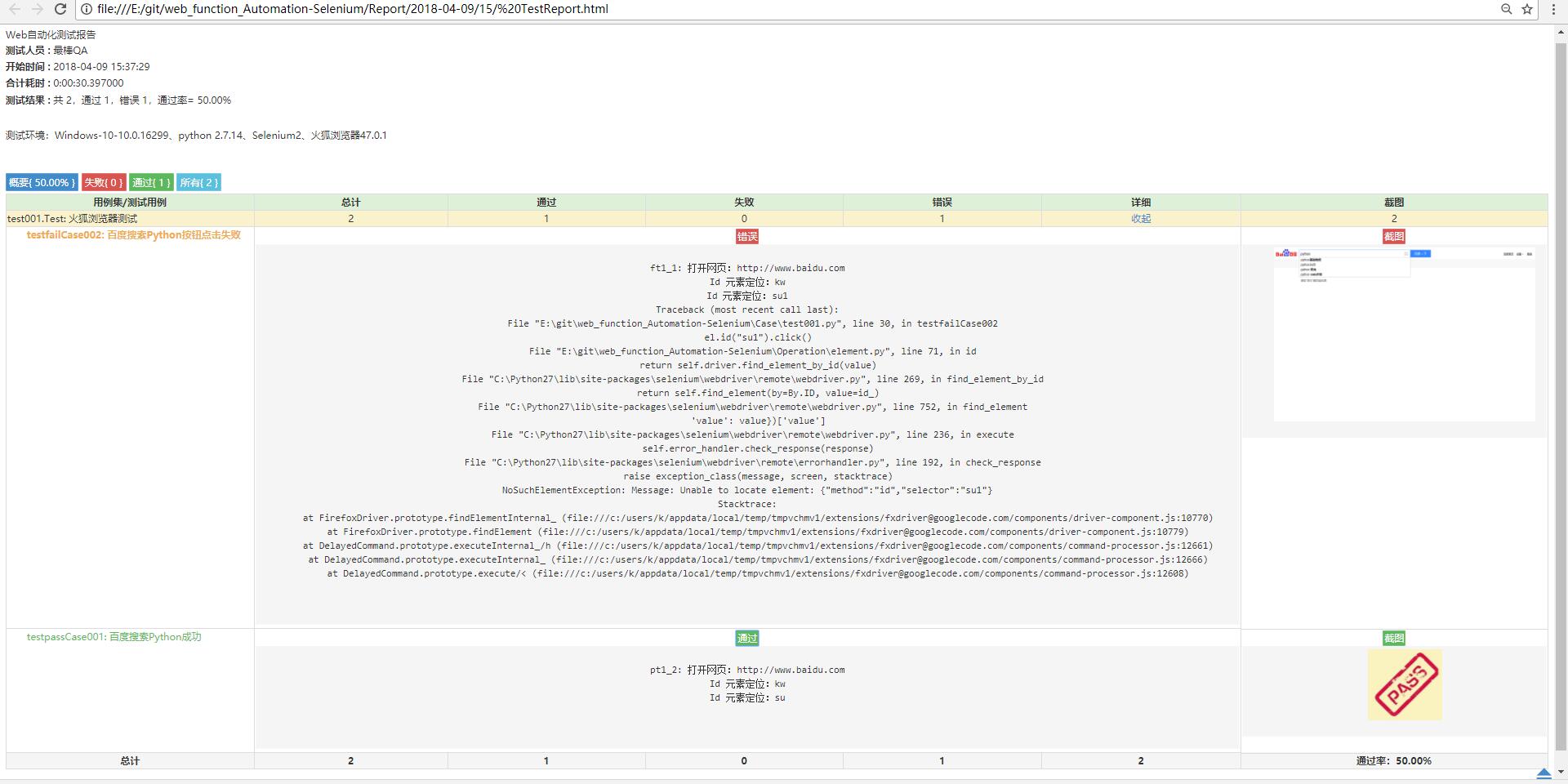
### H5测试报告详情展开状态
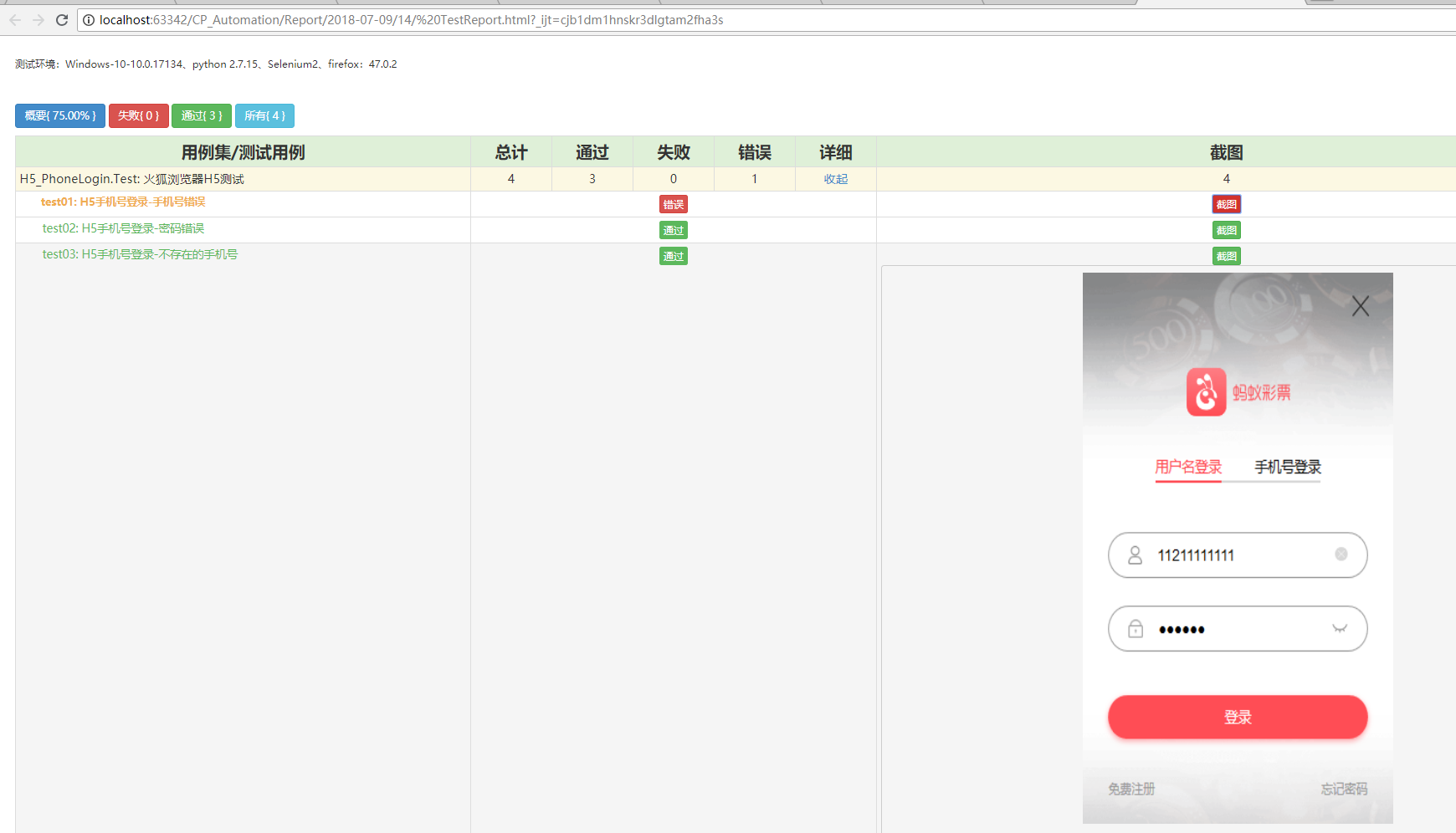
### 用例例程:
class Test(unittest.TestCase):
    """火狐浏览器测试"""

    @classmethod
    def setUpClass(cls):
        cls.driver = el.Driver()

    def testpassCase001(self):
        """百度搜索Python成功"""
        el.openurl("http://www.baidu.com")
        el.id("kw").send_keys("python")
        el.id("su").click()

    def testfailCase002(self):
        """百度搜索Python按钮点击失败"""
        el.openurl("http://www.baidu.com")
        el.id("kw").send_keys("python")
        el.id("su1").click()

    @classmethod
    def tearDownClass(cls):
        cls.driver.quit()
### 封装常用元素定位方法
        # 打开网页
    def openurl(self, url):
        logger.info("打开网页:%s" % url)
        # print("打开网页:%s" % url)
        self.driver.get(url)

    # 关闭浏览器
    def quit(self):
        # print("关闭浏览器")
        logger.info("关闭浏览器")
        self.driver.quit()

    # 浏览器最大化
    def windowMax(self):
        # print("浏览器最大化")
        logger.info("浏览器最大化")
        self.driver.maximize_window()

    # 自定义浏览器大小
    def customWindow(self, wide, hige):
        # print("设置浏览器宽高:%s, %s" % (wide,hige))
        logger.info("设置浏览器宽高:%s, %s" % (wide, hige))
        self.driver.set_window_size(wide, hige)

    # 浏览器前进
    def forward(self):
        # print("浏览器前进")
        logger.info("浏览器前进")
        self.driver.forward()

    # 浏览器后退
    def back(self):
        # print("浏览器后退")
        logger.info("浏览器后退")
        self.driver.back()

    # 删除指定cookie
    def rm_cooke(self, cooke):
        logger.info("删除浏览器 %s Cookie" % cooke)
        self.driver.delete_cookie(cooke)

    # 删除所有cookie
    def rm_all_cooke(self):
        logger.info("删除浏览器所有Cookie")
        self.driver.delete_cookie()


###################################
#           元素定位操作           #
###################################

    # Name 元素定位
    def name(self, value):
        # print("Name 元素定位:%s"% value)
        logger.info("Name 元素定位:%s" % value)
        return self.driver.find_element_by_name(value)

    # class Name 元素定位
    def className(self, value):
        # print("className 元素定位:%s" % value)
        logger.info("className 元素定位:%s" % value)
        return self.driver.find_element_by_class_name(value)

    # Id 元素定位
    def id(self, value):
        # print("Id 元素定位:%s" % value)
        logger.info("Id 元素定位:%s" % value)
        return self.driver.find_element_by_id(value)

    # css 元素定位
    def css(self, value):
        # print("Css 元素定位:%s" % value)
        logger.info("Css 元素定位:%s" % value)
        return self.driver.find_element_by_css_selector(value)

    # Text 元素定位
    def text(self, value):
        # print("Text 元素定位:%s" % value)
        logger.info("Text 元素定位:%s" % value)
        return self.driver.find_element_by_link_text(value)

    # Xpath
    def xpath(self, value):
        # print("Xpath 元素定位:%s" % value)
        logger.info("Xpath 元素定位:%s" % value)
        return self.driver.find_element_by_xpath(value)

###################################
#        获取元素大小尺寸          #
###################################

    # 获取id元素大小
    def id_size(self, id):
        num = self.driver.find_element_by_id(id).size
        logger.info("获取id元素大小   %s  大小:%s" % (id, num))
        return num

    # 获取name元素大小
    def name_size(self, name):
        num = self.driver.find_element_by_id(name).size
        logger.info("获取name元素大小   %s  大小:%s" % (name, num))
        return num

    # 获取css元素大小
    def css_size(self, css):
        num = self.driver.find_element_by_id(css).size
        logger.info("获取css元素大小   %s  大小:%s" % (css, num))
        return num

    # 获取xpath元素大小
    def xpath_size(self, xpath):
        num = self.driver.find_element_by_id(xpath).size
        logger.info("获取xpath元素大小   %s  大小:%s" % (xpath, num))
        return num

###################################
#         获取元素文本值           #
###################################

    # 获取id文本
    def get_id_text(self, id):
        num = self.driver.find_element_by_id(id).text
        logger.info("获取id元素值:%s 值为 %s" % (id, num))
        return num

    # 获取name文本
    def get_name_text(self, name):
        num = self.driver.find_element_by_id(name).text
        logger.info("获取name元素值:%s 值为 %s" % (name, num))
        return num

    # 获取xpath文本
    def get_xpath_text(self, xpath):
        num = self.driver.find_element_by_xpath(xpath).text
        logger.info("获取xpath元素值:%s 值为 %s" % (xpath, num))
        return num

    # 获取css文本
    def get_css_text(self, css):
        num = self.driver.find_element_by_css_selector(css).text
        logger.info("获取css元素值:%s 值为 %s" % (css, num))
        return num

###################################
#            断言                 #
###################################

    # 判断元素是否存在
    def is_element_exist(self, func):
        s = func
        if len(s) == 0:
            # print("元素未找到:%s" % value)
            logger.info("判断元素是否存在:  元素未找到:%s" % func)
            return False
        elif len(s) == 1:
            # print("元素:%s 已找到" % value)
            logger.info("判断元素是否存在:  元素:%s 已找到" % func)
            return True
        else:
            # print("找到%s个元素:%s" % value)
            logger.info("判断元素是否存在:  找到%s个元素:%s" % func)
            return False

    # 判断元素是否存在
    def isElementExist(self, func):
        try:
            func
            logger.info("判断元素是否存在:   找到%s元素:%s" % func)
            return True
        except:
            logger.info("判断元素是否存在:   元素未找到:%s" % func)
            return False

    # 显式等待断言
    def trywait_assert(self, func, count=3):
        num = 0
        while num != count:
            logger.error('%s' % str(num))
            logger.error('jinlailo ')
            try:
                func
                return True
            except:
                logger.info("等待断言:   %s:元素未找到,当前第%s次寻找" % (func, num))
                num += 1
                time.sleep(0.5)
        return False

    # xpath 断言等待
    def trywait_assert_xpath(self, func, count=3):
        num = 0
        while num != count:
            try:
                self.driver.find_element_by_xpath(func)
                return True
            except:
                logger.info("等待断言:   %s:元素未找到,当前第%s次寻找" % (func, num + 1))
                num += 1
                time.sleep(0.5)
        return False

###################################
#            等待                 #
###################################

    # 隐式等待
    def citlyWait(self, ti):
        logger.info("隐式等待 %s 秒" % ti)
        self.driver.implicitly_wait(ti)

    # 显式等待
    def trywait(self, func, count=3):
        num = 0
        while num != count:
            try:
                return func
            except:
                logger.info("显式等待:  %s:元素未找到,当前第%s次寻找" % (func, num))
                num += 1
                time.sleep(0.5)

    # 彩票封盘等待
    def cp_trywait(self, css1, css2):
        state = self.driver.find_element_by_css_selector(css1).text
        seconds = self.driver.find_element_by_css_selector(css2).text
        logger.info(state, seconds)
        if state[-2:] == u"截止" and int(seconds) >= 20:
            logger.info("当前状态 {}  时间 {}".format(state, seconds))
        else:
            time.sleep(int(seconds) + 2)
            logger.info("封盘中! 等待 {} s".format(seconds))

    # 验证码识别
    def get_verificationCode(self, func):
        self.driver.save_screenshot('img\\verificationCode.png')
        element = func
        logger.info("获取图片元素坐标 {}".format(element.location))
        logger.info("获取图片元素大小 {}".format(element.size))

        left = element.location['x']
        top = element.location['y']
        right = element.location['x'] + element.size['width']
        bottom = element.location['y'] + element.size['height']

        im = Image.open('img\\verificationCode.png')
        im = im.crop((left, top, right, bottom))
        im.save('img\\verificationCode.png')

        value = code_demo('leiyong711', 'leiyong', 'img\\verificationCode.png', '7100')
        logger.info("若快识别结果为    {}".format(value))
        return value
## 测试报告模板引用github上大神的,然后自己做了一下优化。[大神github地址](https://github.com/findyou)