# flutter_tencent_lbs_plugin
**Repository Path**: lingsuo/flutter_tencent_lbs_plugin
## Basic Information
- **Project Name**: flutter_tencent_lbs_plugin
- **Description**: No description available
- **Primary Language**: Dart
- **License**: MIT
- **Default Branch**: main
- **Homepage**: None
- **GVP Project**: No
## Statistics
- **Stars**: 0
- **Forks**: 0
- **Created**: 2024-04-17
- **Last Updated**: 2024-04-17
## Categories & Tags
**Categories**: Uncategorized
**Tags**: None
## README
# flutter_tencent_lbs_plugin
> ⚠️ 注意:
>
> 1. 此插件在 iOS Simulator 中不生效。
>
> 2. 各平台配置摘抄自官方文档,无法及时同步,仅供参考,具体配置请以官方文档为准
> [官方 Android 文档](https://lbs.qq.com/mobile/androidLocationSDK/androidGeoGuide/androidGeoOverview)
> [官方 iOS 文档](https://lbs.qq.com/mobile/iosLocationSDK/iosGeoGuide/iosGeoOverview)
## TencentLBS 版本
| 平台 | 版本号 | 时间 |
| ------- | -------- | ---------- |
| Android | v7.5.4.3 | 2024-01-23 |
| iOS | v4.2.0 | 2023-11-03 |
## 使用方式
1. 创建实例
```dart
final locationPlugin = FlutterTencentLBSPlugin();
```
2. 设置用户是否同意隐私协议政策,调用其他接口前必须首先调用此接口进行用户是否同意隐私政策的设置。
```dart
locationPlugin.setUserAgreePrivacy();
```
3. 初始化
```dart
locationPlugin.init(key: "YOUR KEY");
```
## 单次定位
```dart
// 监听器(可选)
locationPlugin.addLocationListener((location) {
print(location.toJson());
});
// Future 用法
locationPlugin.getLocationOnce().then((location) {
print(location.toJson());
});
```
## 连续定位
```dart
// 设置监听器
locationPlugin.addLocationListener((location) {
print(location.toJson());
});
// 开启连续定位
locationPlugin.getLocation(
interval: 1000 * 15, // 获取定位的间隔时间
backgroundLocation: true, // 是否需要设置后台定位,设置为 true 时,请确保 Android、iOS 平台进行相应配置,否则可能抛出异常
// Android 端后台定位需要配置常驻通知
androidNotificationOptions: AndroidNotificationOptions(
id: 100,
channelId: "100",
channelName: "定位常驻通知",
notificationTitle: "定位常驻通知标题文字",
notificationText: "定位常驻通知内容文字",
// iconData: const NotificationIconData(
// resType: ResourceType.mipmap,
// resPrefix: ResourcePrefix.ic,
// name: 'launcher',
// backgroundColor: Colors.red,
// ),
),
);
```
## 停止连续定位
```dart
locationPlugin.stop()
```
## Android 端配置
### 配置 Key
```xml
...
```
### 权限配置
```xml
```
### 配置后台定位(可选)
```xml
...
```
> 自行决定是否需要忽略电池优化,此插件不包含该逻辑
## iOS 端配置
### 权限配置
在 info.plist 中追加 `NSLocationWhenInUseUsageDescription` 或`NSLocationAlwaysUsageDescription` 字段,以申请定位权限。
### 配置后台定位(可选)
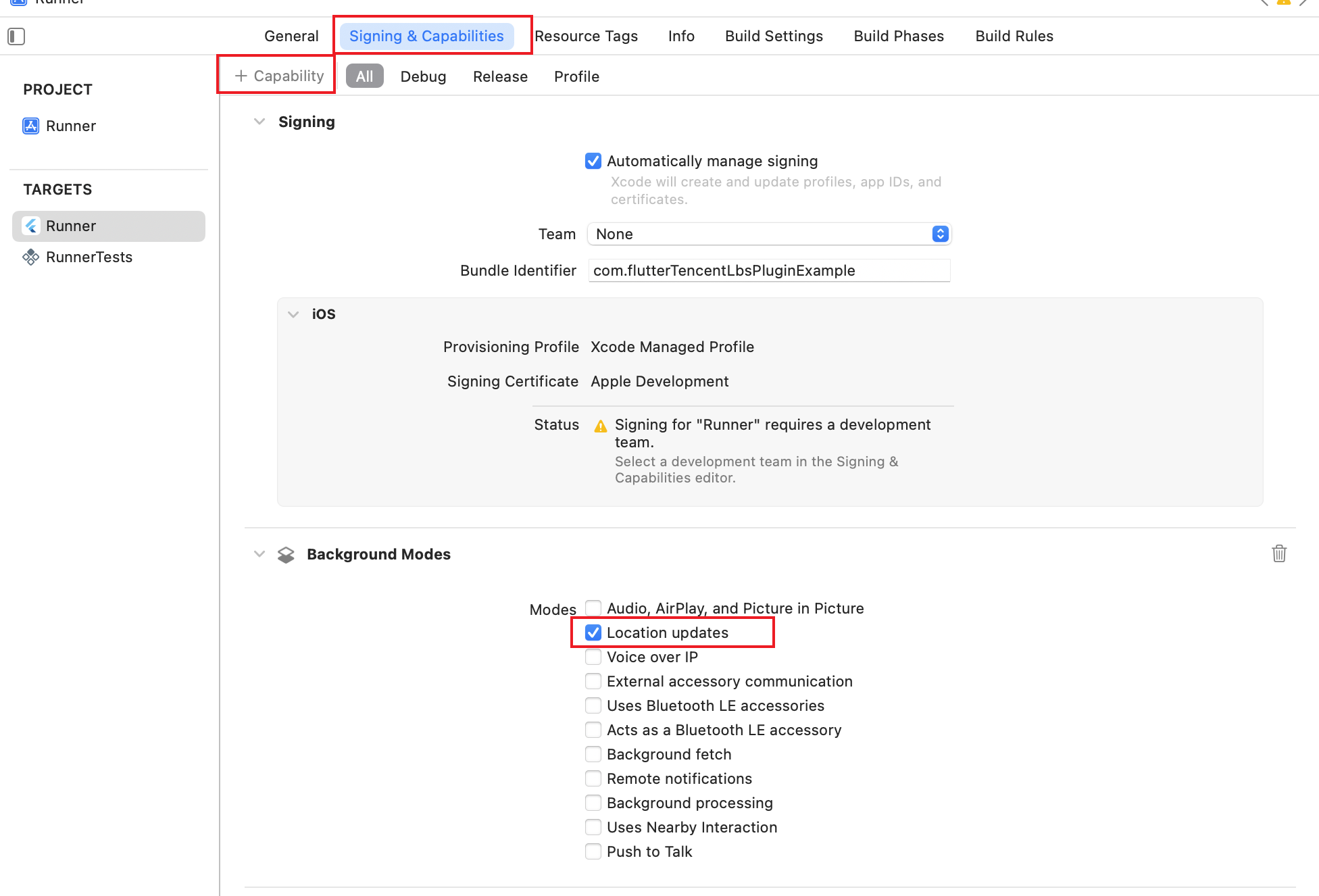
使用 Xcode 打开 ios/Runner.xcworkspace
`Signing & Capabilities` -> `+ Capability` -> 搜索 “Background Modes” -> 并勾选 `Location updates`
## 避坑
### 无法获取地址描述
Android:需要使用 WGS84 坐标才能获取地址描述
iOS:需要使用 GCJ02 坐标才能获取地址描述
> 这似乎是 SDK 的默认行为
## 参考
[tencent_location](https://github.com/maxleexyz/tencent_location)
[flutter_tencent_location](https://pub.dev/packages/flutter_tencent_location)