# ckeditor4-vue
**Repository Path**: liter_007/ckeditor4-vue
## Basic Information
- **Project Name**: ckeditor4-vue
- **Description**: No description available
- **Primary Language**: Unknown
- **License**: Not specified
- **Default Branch**: master
- **Homepage**: None
- **GVP Project**: No
## Statistics
- **Stars**: 0
- **Forks**: 1
- **Created**: 2021-11-09
- **Last Updated**: 2024-12-01
## Categories & Tags
**Categories**: Uncategorized
**Tags**: None
## README
# CKEditor 4 WYSIWYG editor component for Vue.js [](https://twitter.com/intent/tweet?text=Check%20out%20CKEditor%204%20Vue%20integration&url=https%3A%2F%2Fwww.npmjs.com%2Fpackage%2Fckeditor4-vue)
[](https://www.npmjs.com/package/ckeditor4-vue)
[](https://github.com/ckeditor/ckeditor4-vue)
[](https://travis-ci.org/ckeditor/ckeditor4-vue)
[](https://david-dm.org/ckeditor/ckeditor4-vue)
[](https://david-dm.org/ckeditor/ckeditor4-vue?type=dev)
[](http://eepurl.com/c3zRPr)
[](https://twitter.com/ckeditor)
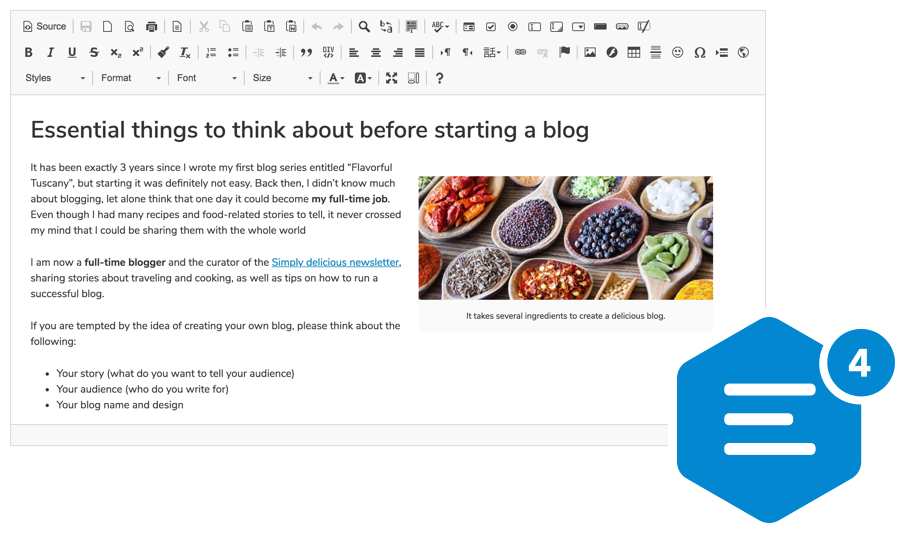
The official [CKEditor 4](https://ckeditor.com/ckeditor-4/) WYSIWYG editor component for Vue.js.
We are looking forward to your feedback! You can report any issues, ideas or feature requests on the [integration issues page](https://github.com/ckeditor/ckeditor4-vue/issues/new).
## Installation and usage
To install the CKEditor 4 component for Vue.js from npm, simply run:
```
npm install ckeditor4-vue
```
Then use it by calling the `Vue.use()` method:
```js
import Vue from 'vue';
import CKEditor from 'ckeditor4-vue';
Vue.use( CKEditor );
new Vue( {
// ... options
} )
```
And use the `` component in your template:
```html
```
Instead of using ES6 imports, the component can also be added via a direct script include:
```html
```
and used in the same way as with ES6 imports:
```js
Vue.use( CKEditor );
```
Refer to the official [CKEditor 4 Vue component documentation](http://ckeditor.com/docs/ckeditor4/latest/guide/dev_vue.html#basic-usage) for more information about the installation process.
## Documentation and examples
See the [CKEditor 4 WYSIWYG Editor Vue Integration](https://ckeditor.com/docs/ckeditor4/latest/guide/dev_vue.html) article in the [CKEditor 4 documentation](https://ckeditor.com/docs/ckeditor4/latest).
You can also check out the [CKEditor 4 WYSIWYG Editor Vue Integration samples](https://ckeditor.com/docs/ckeditor4/latest/examples/vue.html) in [CKEditor 4 Examples](https://ckeditor.com/docs/ckeditor4/latest/examples/).
## Browser support
The CKEditor 4 Vue component works with all the [supported browsers](https://ckeditor.com/docs/ckeditor4/latest/guide/dev_browsers.html#officially-supported-browsers) except for Internet Explorer.
To enable Internet Explorer 11 support, instead of the standard import you need to import a specific `dist/legacy.js` file containing all required polyfills:
```js
import CKEditor from 'ckeditor4-vue/dist/legacy.js'
```
**Note**: Even though CKEditor 4 supports older Internet Explorer versions including IE8, IE9 and IE10, the Vue integration is only supported in the latest Internet Explorer 11.
## Contributing
After cloning this repository, install necessary dependencies:
```
npm install
```
### Executing tests
Run:
```
npm run test
```
If you are going to change the source files (ones located in the `src/` directory), remember about rebuilding the package. You can use `npm run develop` in order to do it automatically.
### Building the package
Build a minified version of the package that is ready to be published:
```
npm run build
```
## License
Copyright (c) 2003-2021, CKSource - Frederico Knabben. All rights reserved.
Licensed under the terms of any of the following licenses at your
choice:
* [GNU General Public License Version 2 or later](http://www.gnu.org/licenses/gpl.html),
* [GNU Lesser General Public License Version 2.1 or later](http://www.gnu.org/licenses/lgpl.html),
* [Mozilla Public License Version 1.1 or later (the "MPL")](http://www.mozilla.org/MPL/MPL-1.1.html).
For full details about the license, please check the `LICENSE.md` file.