# capture
**Repository Path**: little77/capture
## Basic Information
- **Project Name**: capture
- **Description**: mirror of capture
- **Primary Language**: Unknown
- **License**: AGPL-3.0
- **Default Branch**: develop
- **Homepage**: None
- **GVP Project**: No
## Statistics
- **Stars**: 0
- **Forks**: 0
- **Created**: 2025-11-19
- **Last Updated**: 2025-11-19
## Categories & Tags
**Categories**: Uncategorized
**Tags**: None
## README







[](https://pkg.go.dev/github.com/bluewave-labs/capture)
[](https://github.com/bluewave-labs/capture/actions/workflows/check.yml)
[](https://github.com/bluewave-labs/capture/actions/workflows/go.yml)
[](https://deepwiki.com/bluewave-labs/capture)
An open source hardware monitoring agent
Capture is a hardware monitoring agent that collects hardware information from the host machine and exposes it through a RESTful API. The agent is designed to be lightweight and easy to use.
- [Features](#features)
- [Quick Start (Docker)](#quick-start-docker)
- [Quick Start (Docker Compose)](#quick-start-docker-compose)
- [Configuration](#configuration)
- [Endpoints](#endpoints)
- [API Documentation](#api-documentation)
- [Installation Options](#installation-options)
- [Docker (Recommended)](#docker-recommended)
- [System Installation](#system-installation)
- [Reverse Proxy and SSL](#reverse-proxy-and-ssl)
- [Caddy](#caddy)
- [Contributing](#contributing)
- [Star History](#star-history)
- [License](#license)
## Features
- CPU Monitoring
- Temperature
- Load
- Frequency
- Usage
- Memory Monitoring
- Disk Monitoring
- Usage
- Inode Usage
- Read/Write Bytes
- S.M.A.R.T. Monitoring (Self-Monitoring, Analysis and Reporting Technology)
- Network Monitoring
- Docker Container Monitoring
- GPU Monitoring (coming soon)
## Quick Start (Docker)
```shell
docker run -d \
-v /etc/os-release:/etc/os-release:ro \
-p 59232:59232 \
-e API_SECRET=your-secret-key \
ghcr.io/bluewave-labs/capture:latest
```
## Quick Start (Docker Compose)
```yaml
services:
# Capture service
capture:
image: ghcr.io/bluewave-labs/capture:latest
container_name: capture
restart: unless-stopped
ports:
- "59232:59232"
environment:
- API_SECRET=REPLACE_WITH_YOUR_SECRET # Required authentication key. Do not forget to replace this with your actual secret key.
- GIN_MODE=release
volumes:
- /etc/os-release:/etc/os-release:ro
```
## Configuration
| Variable | Description | Default | Required |
| ------------ | ------------------------------------------------------------------------------------------------------------------------------------------------------------------- | ------- | -------- |
| `API_SECRET` | Authentication key ([Must match the secret you enter on Checkmate](https://docs.checkmate.so/users-guide/infrastructure-monitor#step-2-configure-general-settings)) | - | Yes |
| `PORT` | Server port number | 59232 | No |
| `GIN_MODE` | Gin(web framework) mode. Debug is for development | release | No |
Example configurations:
```shell
# Minimal
API_SECRET=your-secret-key ./capture
# Complete
API_SECRET=your-secret-key PORT=59232 GIN_MODE=release ./capture
```
## Endpoints
- **Base URL**: `http://:` (default port `59232`)
- **Authentication**: Every `/api/v1/**` route requires `Authorization: Bearer $API_SECRET`. `/health` stays public so you can use it for liveness checks.
| Method | Path | Auth | Description | Notes |
| ------ | ------------------------ | ---- | --------------------------------------------------------------------------------------------------- | ---------------------------------------------- |
| `GET` | `/health` | ❌ | Liveness probe that returns `"OK"`. | Useful for container orchestrators. |
| `GET` | `/api/v1/metrics` | ✅ | Returns the complete capture payload with CPU, memory, disk, host, SMART, network, and Docker data. | Aggregates every collector. |
| `GET` | `/api/v1/metrics/cpu` | ✅ | CPU temps, load, and utilization. | |
| `GET` | `/api/v1/metrics/memory` | ✅ | Memory totals and usage metrics. | |
| `GET` | `/api/v1/metrics/disk` | ✅ | Disk capacity, inode usage, and IO stats. | |
| `GET` | `/api/v1/metrics/host` | ✅ | Host metadata (OS, uptime, kernel, etc.). | |
| `GET` | `/api/v1/metrics/smart` | ✅ | S.M.A.R.T. drive health information. | |
| `GET` | `/api/v1/metrics/net` | ✅ | Interface-level network throughput. | |
| `GET` | `/api/v1/metrics/docker` | ✅ | Docker container metrics. | Use `?all=true` to include stopped containers. |
All responses share the same envelope:
```jsonc
{
"data": {
// collector-specific payload
},
"capture": {
"version": "1.0.0",
"mode": "release"
},
"errors": [
// optional array of error messages if any collectors failed, can be null
],
}
```
Collectors can partially fail; when that happens the API responds with HTTP `207 Multi-Status` and fills `errors` with detailed reasons so you can alert without dropping other metric data.
## API Documentation
Our API is documented in accordance with the OpenAPI spec.
You can find the OpenAPI specifications [in openapi.yml](https://github.com/bluewave-labs/capture/blob/develop/openapi.yml)
## Installation Options
### Docker (Recommended)
Pull and run the official image:
```shell
docker run -d \
-v /etc/os-release:/etc/os-release:ro \
-p 59232:59232 \
-e API_SECRET=your-secret-key \
ghcr.io/bluewave-labs/capture:latest
```
Or build locally:
```shell
docker buildx build -t capture .
docker run -d -v /etc/os-release:/etc/os-release:ro -p 59232:59232 -e API_SECRET=your-secret-key capture
```
Docker options explained:
- `-v /etc/os-release:/etc/os-release:ro`: Platform detection
- `-p 59232:59232`: Port mapping
- `-e API_SECRET`: Required authentication key
- `-d`: Detached mode
## System Installation
Choose one of these methods:
1. **Pre-built Binaries**: Download from [GitHub Releases](https://github.com/bluewave-labs/capture/releases)
2. **Go Package**:
```shell
go install github.com/bluewave-labs/capture/cmd/capture@latest
```
3. **Build from Source**:
```shell
git clone git@github.com:bluewave-labs/capture
cd capture
just build # or: go build -o dist/capture ./cmd/capture/
```
## Reverse Proxy and SSL
You can use a reverse proxy in front of the Capture service to handle HTTPS requests and SSL termination.
### Caddy
```lua
├deployment/reverse-proxy-compose/
├── caddy/
│ └── Caddyfile
└── caddy.compose.yml
```
1. Go to the `deployment/reverse-proxy-compose` directory
```shell
cd deployment/reverse-proxy-compose
```
2. Replace `replacewithyourdomain.com` with your actual domain in [deployment/reverse-proxy-compose/caddy/Caddyfile](./deployment/reverse-proxy-compose/caddy/Caddyfile)
3. Set `API_SECRET` environment variable for the Capture service in [deployment/reverse-proxy-compose/caddy.compose.yml](./deployment/reverse-proxy-compose/caddy.compose.yml).
4. Ensure your domain’s DNS A/AAAA records point to this server’s IP.
5. Open inbound TCP ports 80 and 443 on your firewall/security group.
Start the Caddy reverse proxy
```shell
docker compose -f caddy.compose.yml up -d
```
## Contributing
We welcome contributions! If you would like to contribute, please read the [CONTRIBUTING.md](./CONTRIBUTING.md) file for more information.
 ## Star History
[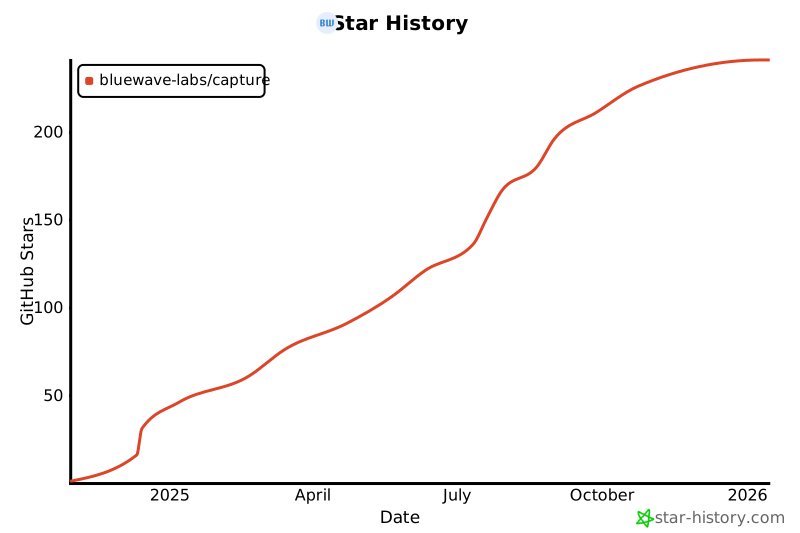](https://www.star-history.com/#bluewave-labs/capture&Date)
## License
Capture is licensed under AGPLv3. You can find the license [here](./LICENSE)
## Star History
[](https://www.star-history.com/#bluewave-labs/capture&Date)
## License
Capture is licensed under AGPLv3. You can find the license [here](./LICENSE)